Week 2 - 2R Robotic Arm Challenge
Aim:- TO simulate the forward kinematics of a 2R Robotic Arm.
Objective:-
- To write a program for a 2R robotic arm.
- To plot the animation of the end-effector position according to forward kinematic.
Theory:-
- Kinematics is the relationship between the position, velocities, and acceleration of the links of a manipulator. In kinematics only Velocity and Acceleration Analysis of various parts is to be done. Forces are neglected.
- Forward Kinematics refers to the process of obtaining the position and velocity of the end effector, given the know joint angles and angular velocities. The kinematics equations of the robot are used in robotics, computer games, and animations.
- Robotic arm is a type of mechanical arm, machines that are programmed to execute a specific task are job quickly, efficiently, and accurately
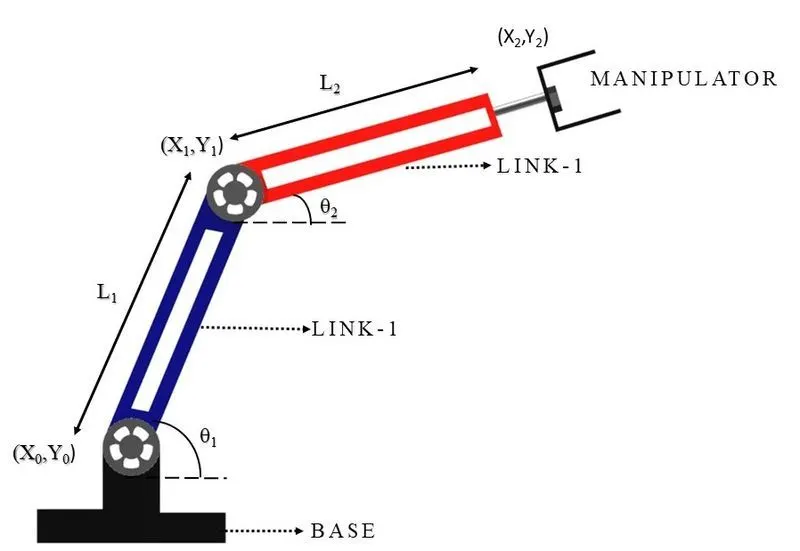
Fig.1 2R Rbotic Arm
Equation:-
The equation to determine the position of end effectors as follows,
X1 = L1.cosθ1 , Y1 = L1.sinθ2
X2 = X1+L2.cosθ2 , Y2 = Y1+L2.sinθ2
X0 = Y0 = 0
Where;
(X0,Y0) = coordinates of origine base
(X1,Y1) = end coordinates of link 1
(X2,Y2) = end coordinates of link 2
L1,L2 = length of link 1 & 2 (m)
θ1,θ2 = angle of link 1 & 2 (degree)
Solution:
Programming Language - MATLAB
Procedure/Steps
- Before writing the code, it's important to start with clear all, close all, clc.
clear all - removes data from the workspace,
close all - deletes the current figure or plot,
clc - clears all input and output from the command window.
- Define all the inputs values
- The values of l1 & l2 are assumed to be 1m & 0.5m respectively,
- The angle made by the 2 links called theta1 & theta2 is assumed 0 & 90 degree respectively by using the linspace command. The function of linspace generates linearly space vectors. So the case of theta 1 and theta2 linspace(0,90,10) means that will generate a row vector 0 to 90 degree of 10 linearly spaced in between.
- Create a for loop to the generation of frames and declare a variable named Counter(ct) to start with. A counter is a variable that counts an event in a loop.
- The first loop will b ranging from 1 to maximum value of θ1, whereas the second loop will b ranging from 1 to the maximum value of θ2.
- THETA 1 & THETA 2 are added to the code, for THETA 1 the variable (i), & for THETA 2 the variable (j) respective angles. The formula for calculating x1,y1,x2 & y2 are shown in the above equation.
- Plot the graph for all the x & y coordinates with the axis.
- A pause command was used for pausing the command for a certain time, Time assumed as 0.03s was used.
- The M command was used to capture the current frame every time the loop runs.
- The final step of the loop is to add a ct+1 to the ct variable, this will increment the frame every time the loop run.
- To create a movie of the animation of the 2R Robotic arm, so that movie commands are used. writevideo command was used to write the video with a plot frame. Finally, the close command is used to close the videofile.
MATLAB Coding
% Foward kinematics of a 2R robotic arm manipulator

clear all
close
clc

%inputs
l1 = 1;
l2 = 0.5;

theta1 = linspace(0,90,4);
theta2 = linspace(0,90,4);
ct =1

for i = 1:length(theta1);
    THETA1 = theta1(i);
for j = 1:length(theta2);
        THETA2 = theta2(j);
%coordinats
x0 = 0;
y0 = 0;

x1 = l1*cosd(THETA1);
y1 = l1*sind(THETA1);

x2 = x1+l2*cosd(THETA2);
y2 = y1+l2*sind(THETA2);

%polting
plot([x0 x1],[y0 y1],[x1 x2],[y1 y2],'linewidth',3);
axis([-0.1 1.5 0 1.5])
pause(0.3)
M(ct)= getframe(gcf);
ct = ct+1;
end
end
movie(M)
videofile = VideoWriter('forward_kinematics.avi','Uncompressed AVI');
open(videofile)
writeVideo(videofile,M)
close(videofile)
Output: The simulation of the 2R Robotic arm is coded successfully as shown below,
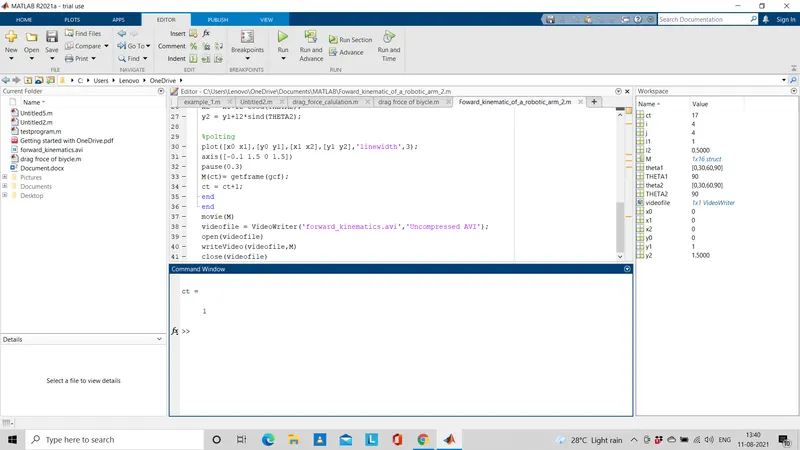
Fig.2 screenshot of MATLAB coded successfully
Animation Video link:
Errors faced while programming:
Error#1 : Unrecognized function or variable 'gef'.
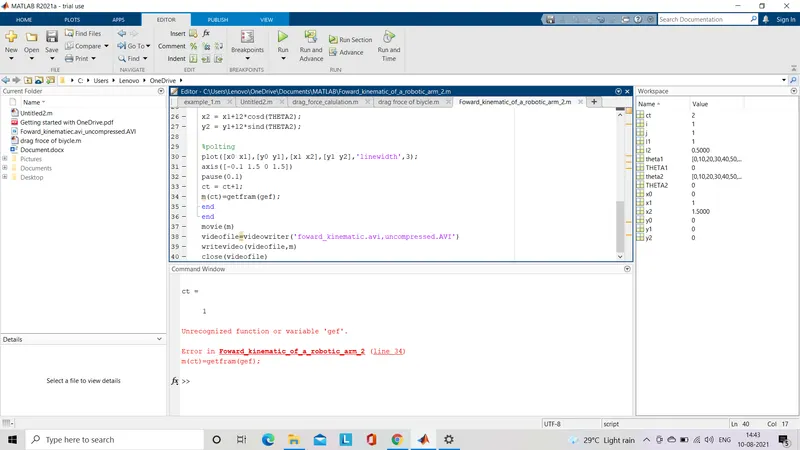
Fig.3 Command window showing error message
Solution #1: counter increment ct=1+ct this function was inculded below m(ct)=getfram(gef); here in the function m must hv a uppercase.
Error #2 : Cannot find the exact match of 'videowriter'.
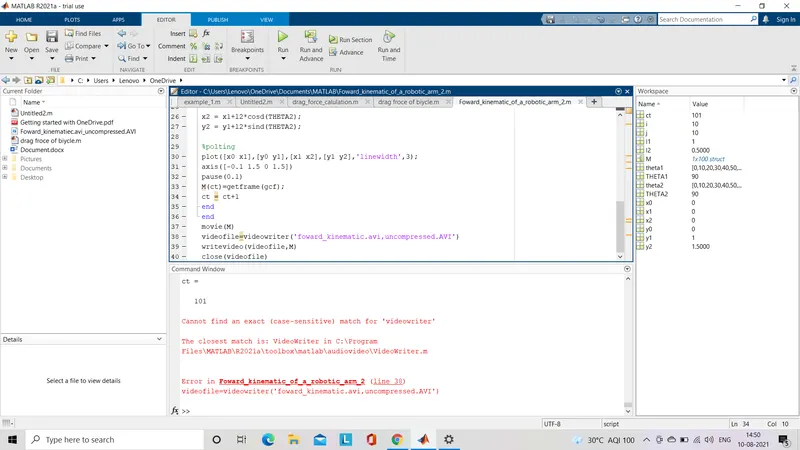
Fig.4 command window showing the error message
Solution #2: Accidentally typed small case instead of an uppercase since MATLAB is a case sensitive program language, commands must b written with the same case shown in above Fig.4 shows the command window message.
Conclusion: Tus, the program for a 'FORWARD KINEMATICS OF 2R ROBOTIC ARM' was coded and the position of the end effector was simulated in MATLAB plot as a video.
References: