Week 2- 2R Robotic Arm Challenge
Aim to - simulate the forward kinematics of a 2R Robotic Arm using Matlab.
in this, we are going to write a program to solve the forward kinematic of a 2arm robotic arm manipulator.
solution-
- calculate the position of link 1
- calculate the position of link 2
the robot consists of 2 links 2 axis ponts and manipulator connected at the end of the second link
the first axis connected to the base and the 1st link
and the second axis is connected to the 1st link and the 2nd link
inputs
let us consider 1st link length as
l1=1
and 2nd link as
l2=0.5
1st axis as
theta1
2nd axis as
theta2
here forward kinematic is used to calculate the position of the end-effector of the specific value of the joint parameters
in this, we have to find the value of the x1,y1,x2,y2
x1=l1*costheta
y1=l1*sintheta
x2=y1+l2*costheta
y2=y1+l2*sintheta
writing of program
%calculate the forward kinematic of 2r robotic arm
clear all
close all
clc

% inputs
l1 = 1;
l2 = 0.5;
theta1 = linspace(0,90,10);
theta2 = linspace(0,90,10);

ct = 1;

for i = 1:length(theta1)
    THETA1 = theta1(i);
    for j = 1:length(theta2)
        THETA2 = theta2(j);

        x0 = 0;
        y0 = 0;

        x1 = l1*cosd(THETA1);
        y1 = l1*sind(THETA1);

        x2 = x1+l2*cosd(THETA2);
        y2 = y1+l2*sind(THETA2);

        %plotting
        plot([x0 x1],[y0 y1],[x1 x2],[y1 y2],'linewidth',3)
        axis([-0.5 1.5 0.1 1.5])
        pause(0.03)
        M(ct) = getframe(gcf);
        ct= ct+1;
    end
end

%making of movie

movie(M)
vediofile = VideoWriter('forward_kinematics.avi','Uncompressed AVI');
open(vediofile)
writeVideo(vediofile,M)
close(vediofile)
the output of the program
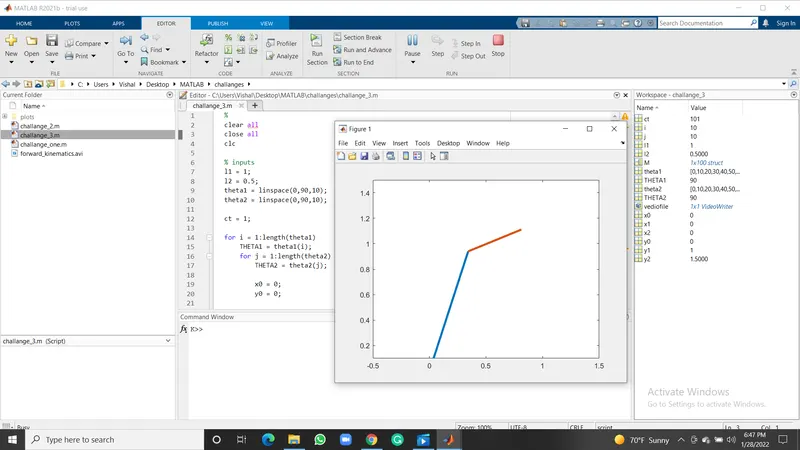
coding
- to get started we have to open a new file
- whenever we start a new program it is good practice to include some commands
- input variables are taken
- linspace command is used to get the variables between 0:90 without typing manually
- and forloop command is used b using this command no need of changing theta value manually
- the formula has been inserted
- plot command is used to plot the variable angels of the robotic arm
- and it is converted to the animation video
errors faced while writing the program
- confused between the theta and THETA
- while writing the forloop command I and j was miss placed