Week 2- 2R Robotic Arm Challenge
clear all
close all
clc

%animation of forward kinematics of a 2R robotic arm
l1=2
l2=1.5
theta1=linspace(0,90,20)
theta2=linspace(0,90,50)

ct=1

for i=1:length(theta1)
    THETA1=theta1(i)
    for j=1:length(theta2)
        THETA2=theta2(j)
        x0=0
        y0=0

        x1=l1*cosd(THETA1)
        y1=l1*sind(THETA1)

        x2=x1+(l2*cosd(THETA2))
        y2=y1+(l2*sind(THETA2))

        plot([x0 x1],[y0 y1],[x1 x2],[y1 y2],'linewidth',3)
        axis([-1 3.6 0 3.6])
        pause(0.05)
        M(ct)=getframe(gcf)
        ct=ct+1
    end
end
movie(M)
videofile=VideoWriter('animation_of_forward_kinematics_of_a_robotic_arm.AVI','Uncompressed AVI');
open(videofile)
writeVideo(videofile,M)
close(videofile)
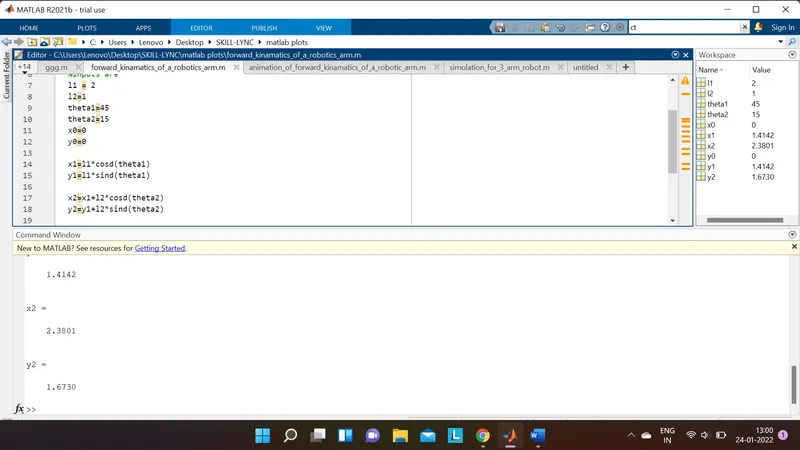
So in this coding I am going to animate the forward kinematics of a 2R robotic arm. So here inputs are (i) `l1`(length of lower arm), (ii) `l2`(length of upper arm), (iii)`theta1` (theta1 represents angle between lower arm and base), (iv) `theta2`(theta2 represents angle between upper arm and base). If we see the position of lower arm then two coordinates will be there. one is (`x0,y0`) that is fixed with the base and value will be `x0=0,y0=0` & another is (`x1,y1`) that is linked with upper arm and its value will be `x1=l1costheta1` & `y1=l1sintheta1`. For upper arm also two coordinates are there, one is (`x1,y1`) and the value is also given previously, another is (`x2,y2`) and value will be `x2=x1+l2costheta2` & `y2=y1+l2sintheta2`. In this position if we put the value of `l1`,`l2`,`theta1`&`theta2` then the values of `x1,x2,y1,y2`will be shown in command window and work space as below.
For plotting the coordinates in a figure plot command is executed two times for two arm. as given below.
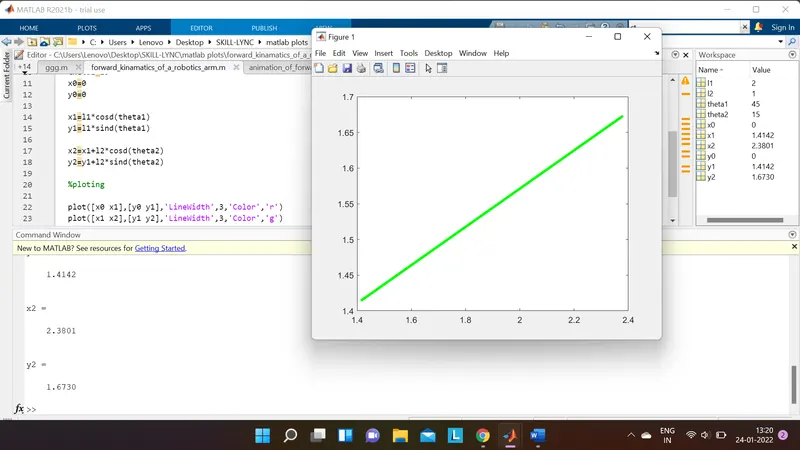
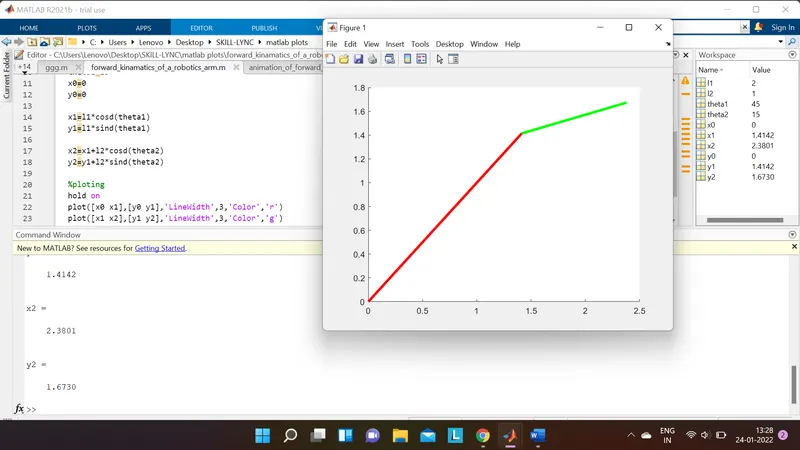
As we can see that only last line of 'plot' command executed. So we have to add one more command that is 'hold on'. By using this command program will take a pause before execution the 'plot' command and will plot both arm. so reasult will be as below.
Now if we want to create an animation then we have to take multiple value of theta1 and theta2 by using ‘linespace’ command followed by (starting value, ending value, length of value). And we have to use ‘for’ loop to showcase the position of lower arm for each value of theta1. Another ‘for’ loop will be there inside the ‘for’ loop used for theta1, to showcase the each position of upper arm for each value of theta2. Result given below.
clear all
close all
clc

%animation of forward kinematics of a 2R robotic arm
l1=2
l2=1.5
theta1=linspace(0,90,4)
theta2=linspace(0,90,4)


for i=1:length(theta1)
    THETA1=theta1(i)
    for j=1:length(theta2)
        THETA2=theta2(j)
        x0=0
        y0=0

        x1=l1*cosd(THETA1)
        y1=l1*sind(THETA1)

        x2=x1+(l2*cosd(THETA2))
        y2=y1+(l2*sind(THETA2))

        hold on

        plot([x0 x1],[y0 y1],'LineWidth',3,'Color','r')
        plot([x1 x2],[y1 y2],'LineWidth',3,'Color','g')

    end
end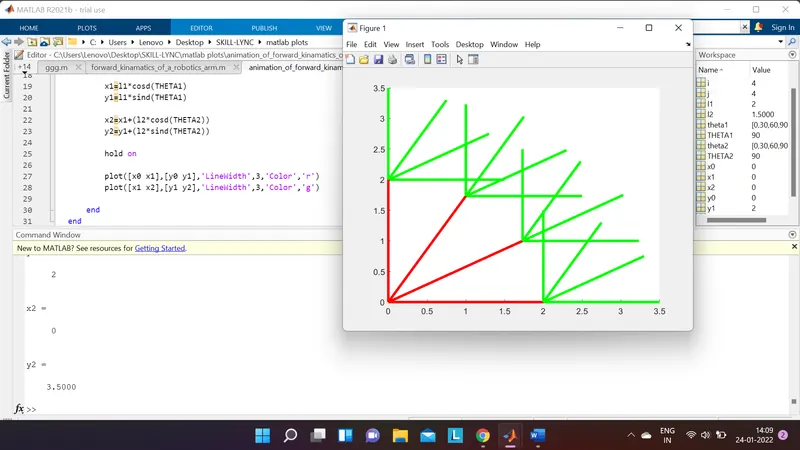
To make each position of lower arm and upper arm in a single figure have to start the 'for' loop with ct=1 and inside the 'for' loop ct=ct+1 as each valu of `theta1`there is multiple value of `theta2`. so code will be
clear all
close all
clc

%animation of forward kinematics of a 2R robotic arm
l1=2
l2=1.5
theta1=linspace(0,90,4)
theta2=linspace(0,90,4)
ct=1

for i=1:length(theta1)
    THETA1=theta1(i)
    for j=1:length(theta2)
        THETA2=theta2(j)
        x0=0
        y0=0

        x1=l1*cosd(THETA1)
        y1=l1*sind(THETA1)

        x2=x1+(l2*cosd(THETA2))
        y2=y1+(l2*sind(THETA2))
figure(ct)
        hold on

       plot([x0 x1],[y0 y1],'LineWidth',3,'Color','r')
       plot([x1 x2],[y1 y2],'LineWidth',3,'Color','g')
       ct=ct+1
    end
end
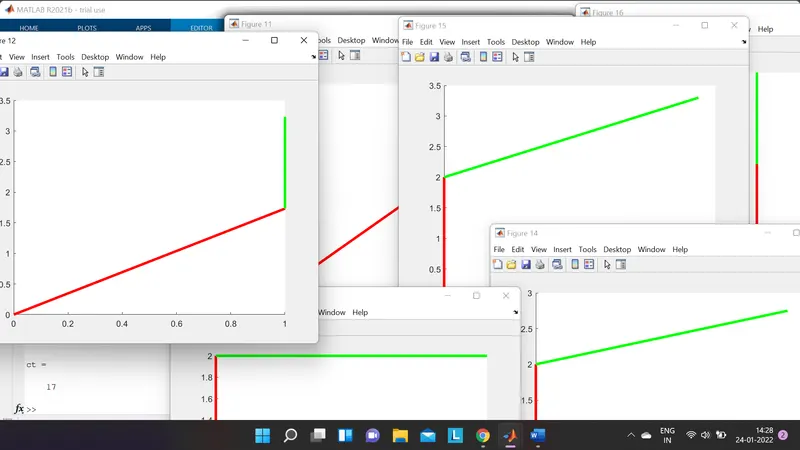
so 16 figure will creat. so here we will make the plot command once for two arm and will use 'pause' command to creat an animation. pause command will make a pause inbeyween each figure and will creat an animation.