Week 2- 2R Robotic Arm Challenge
Code and comments explaining the code:
clear all
close all
clc

%inputs
l1= 1.3
l2=1.2

%Array of values for theta1 & theta2. suppressed to prevent printing of
%values in the command window
theta1=0:6.5:91;
theta2=0:6.5:91;

%counter set to 1 to initiate for loop
i=1;

%for loop sets the value of p between 1 to number of values of theta1(15 here)
for p=1:length(theta1)
%Theta1 is a different variable than theta1 and gives assumes a singular
%value, unlike theta1 which is an array. Theta1 takes the value between
%0 and 91 deg depending on the value of 'p'.
Theta1 = theta1(p);

%for every value of Theta1 i.e. movement of arm 1, arm 2 will travel
%between 0 & 91 deg hence a second for loop is created to the same effect.
%Theta2 takes singular values between 0 deg and 91 deg as per the value of 'q' for each value of 'p'.
for q=1:length(theta2)
Theta2= theta2(q);

%initial co-ordinates of arm 1 fixed to (0,0)
x0=0;
y0=0;

%Second point of arm 1
x1=l1*cosd(Theta1);
y1=l1*sind(Theta1);

%second point of arm2. first point of arm 2 = second point of arm 1
x2= x1+l2*cosd(Theta2);
y2= y1+l2*sind(Theta2);

%plotting of 2 lines between (x0, y0):(x1,y1) & (x1,y1):(x2,y2)
% with a width of 3 for better visibility
plot ([x0 x1], [y0 y1], [x1 x2], [y1 y2],'LineWidth',3)

%title of the curve fixed as 'Robotic arm kinematics' with added
%features pf color and width
title ('Robotic arm kinematics', 'BackgroundColor',[0.35 0.22 0.76],'Color', 'y', 'LineWidth', 12)

%Values of abscissa and ordinate fixed to create seamless
%animation. without this command, the values of abscissa and ordinate keep changing continuously
axis([-0.5 3 0 3]);

%Creates the effect of animation by temporarily pausing a frame
%for a given amount of time
pause (0.1);

%asssigns all frames from the plot to varaible F
F(i)= getframe(gcf);

%resets the value of counter 'i' to reset the loop
i=i+1;
%end of for loop 2
end
%end of for loop 1
end

%to play recorded movie frames. assigns memory to variable F
movie (F)

%Assigned variable 'file' as a movie to be saved with the name
%'robotic_arm_kinematics' and the file type is set as .avi
file = VideoWriter('robotic_arm_kinematics','Uncompressed AVI');

%opens 'file' movie folder
open (file);

%writes movie from 'F' to 'file' variable to create a .avi (refer command in line 71) from file to be
%viewed generic videofile players
writeVideo(file,F);

%closes 'file' after writing it
close(file);- Errors faced
- As indicated in the attached image
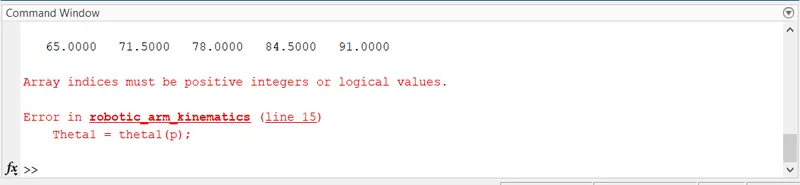
This error was being faced when the value of p was considered in the range 0 and length of theta1
p = 0:length(theta1)
Error resolution: Since the error states array indices must be positive, only the array of p was identified to have a non positive value. the range was changed as below,
p = 1:length(theta1)
And thus, the error was easily resolved.
2. Kindly refer to the video file '2R_robotic_arm-error2' in the link below to find the error in the animation
https://drive.google.com/drive/folders/1rhw9CydGLS48pf8Zwv8Hw98JFuSn0r05?usp=sharing
It can be observed in the animation that the range of values in abscissa and ordinate are continuously changing.
The reasoning observed was that the axes limiting command was kept after the 'pause' command. hence, the 'axis' command was not being assimilated in the animation.
Error resolution: The 'pause' command was shifted to be placed after the 'axis' command so that it gets assimilated in the plot before the plot is paused and taken effect.
3. Kindly refer to the video file '2R_robotic_arm-error3' in the link provided above to find the error in the animation
It can be observed that arm 2 is not changing the angle and the animation only covers the movement of arm 1.
The reason observed was that the counter update operation was done after the end of the second loop and before the end of the first loop.
Error resolution: The counter update operation was moved inside the second loop so that the counter is updated in the second loop itself and the loop can be repeated.
- Output:
The output to the code can be accessed by the link,
https://drive.google.com/drive/folders/1rhw9CydGLS48pf8Zwv8Hw98JFuSn0r05?usp=sharing
The video file 'robotic_arm_kinematics' gives the output of the code.
As intended in the code, arm 2 rotates between 0 and 91 degrees for each value of theta for arm 1.
The video is in '.avi' format as it was written into a .avi file in the code.
X & Y coordinates are not labeled as they only cover numerical values of coordinates and we only intend to create an animation of the movement of robotic arms.
The animation includes the title 'Robotic-arm kinematics' as we intend to create the same.