Week 2- 2R Robotic Arm Challenge
AIM :
- A Program in matlab to simulate the forward kinematics of 2R robotic arm .
Definition : kinematics
- kinematics is a branch of physics and a subdivision of classical mechanics concerned with geometrically possible motion of body or system of bodies without consideration of forces involed .
forward kinematics is refers to use of kinematics equation of robot to compute the position of end effector from specified values for the joint parameters.
fig 1 : aniamtion of robotic arm

- Industrial robotic arms are helping companies reach new level of productivity through enchanced speed , efficiency and precision across a variety of application .
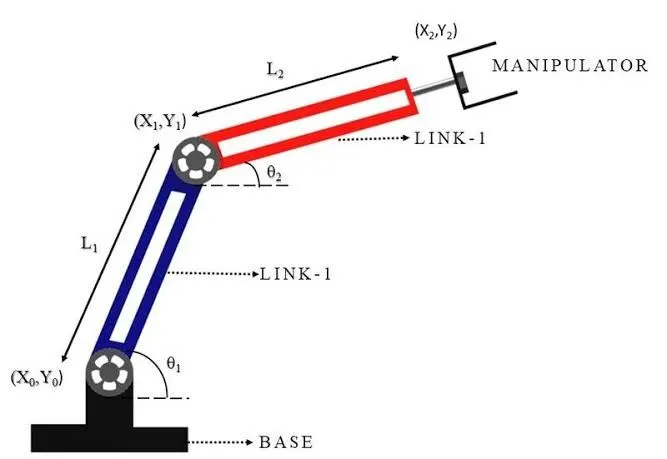
fig 2 : ROBOTIC ARMS WITH COORDINATES .
PROCEDURE :
- It consists of base , two kinematic links and two rotational joints . these links have motion in them when they are been programmed. i.e ( in softwares like matlab, etc . )
- Let us consider link 1 as theta1 and l1.
- and link 2 as theta2 and l2.
- coordinates of these two kinematic links are :
- (x0 ,y0 ) ( x1,y1) is for link 1, and (x1,y1) (x2,y2) for link 2.
- x0 = 0;
- y0 = 0;
- x1 = l1*cos(theta1);
- y1 = l1*sin(theta2);
- x2 = x1 + l1*cos(theta1);
- y2 = y2 +l2*sin(theta2);
PROGRAM :
% forward kinematics of 2r robotic arm
clear all
close all
clc

% Inputs
% length of the first arm
 l1 = 1;
% length of the second arm
 l2 = 0.5;
% angle of the first  arm
 theta1 = linspace(0,90,10);
% angle of the second arm
 theta2 = linspace(0,90,10);
% initate counter value
 ct = 1;
 for i = 1:length(theta1)
     THETA1 = theta1(i);
     for j = 1:length(theta2)
         THETA2 = theta2(j);
         x0 = 0;
         y0 = 0;

         x1 = l1*cosd(THETA1);
         y1 = l1*sind(THETA2);

         x2 = x1 + l1*cosd(THETA1);
         y2 = y1 + l2*sind(THETA2);

         % Plotting

         plot([x0 x1],[y0 y1],[x1 x2],[y1 y2],'linewidth',3)
         axis([-0.1 1.5 0 1.5])
         pause(0.1)
         M(ct) = getframe(gcf);
         ct = ct+1;
     end
 end
movie(M)
videofile = VideoWriter('forward_kinematics.avi','Uncompressed AVI')
open(videofile)
writeVideo(videofile,M)
close(videofile)
CODE EXPLANTION :
- clear all : This command is used to clear all the varaibles from the workspace.
- close all : This coomand is used to close all figure whose handles are visible .
- clc : clc command is used to clear the txt from the command window .
- countervalue : it is varaible that is used to simply the increments (or decrements) by the specific step value of iterationof a loop.
- getframe : this command captures the axes as it appear on the screen as a movie frame .
- movie(M) : plays the movie n number of times .
- videofile is used to create the video in avi format
- close videofile is used to close the video .
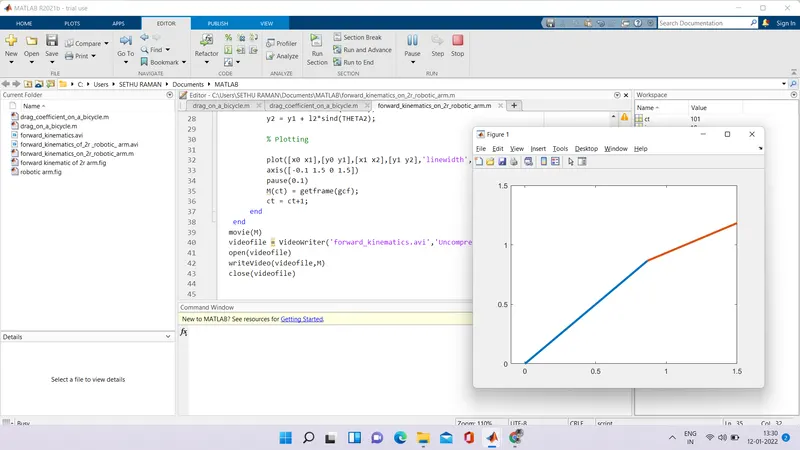
OUTPUT :
ERRORS made while programming :
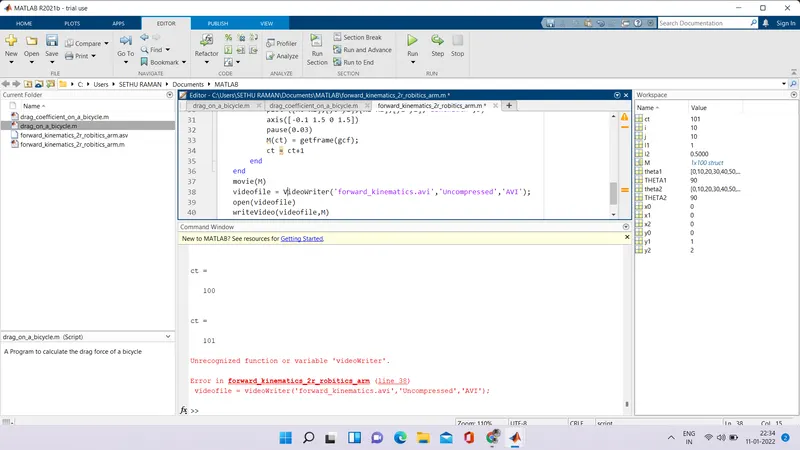
yesterday while programming made many errors one of those error are wrote (inserted the comma option in-between the uncompressed and AVI).
ANIMATION VIDEO: