2R Robotic Arm Challenge
Aim
To write a program in MATLAB to simulate the forward kinematics of a 2D Robotic arm
Theory
FORWARD KINEMATICS
Forward kinematics deals with the equations for a robot to find out the position of the end effector for different values of the joint coordinates.
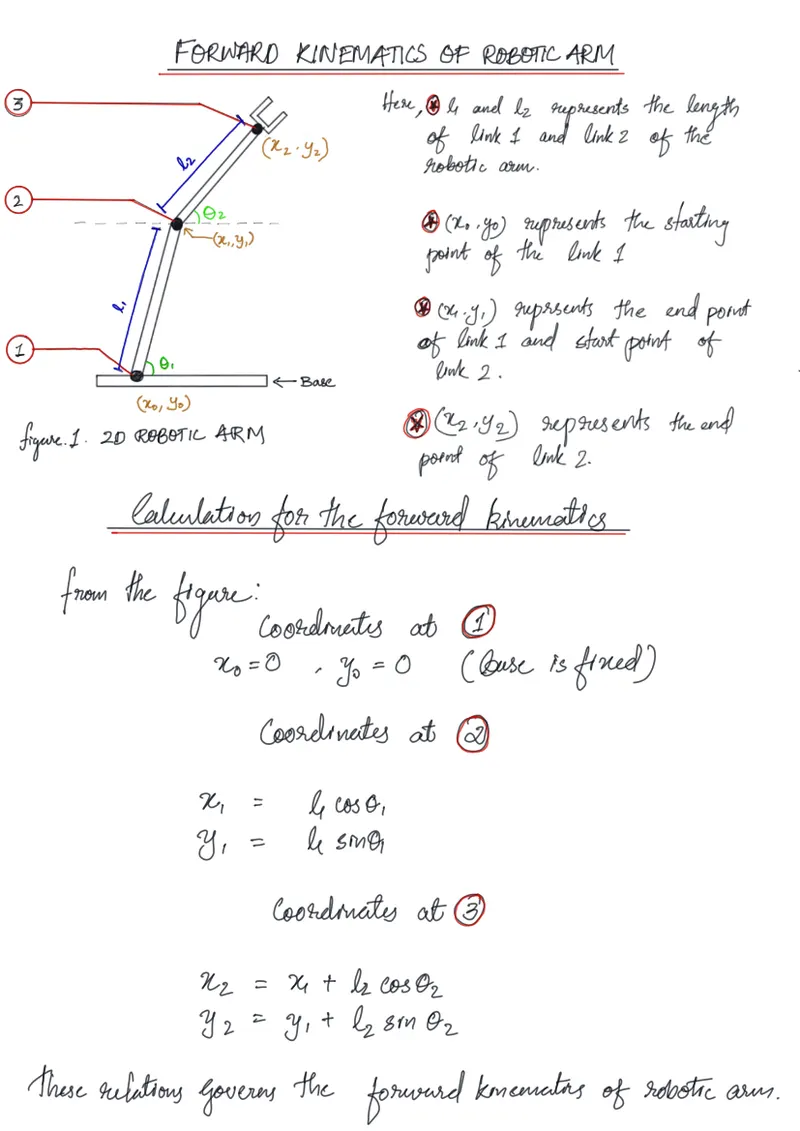
Now , converting the obtained mathematical expressions into MATLAB code.
CODE
clear all
close all
clc

%INPUTS

%Length of  link 1 and link 2
 l1 = 1;
 l2 = 0.5;

 %Value of the angle
 theta1 = linspace(0,90,24);
 theta2 = linspace(0,90,24);

 %Vriable for adding the frames for caputing the movie. here its value
 %defined as 1
 ct = 1;

 %Using for loop for changing the values of theta1&2 and storing the
 %instant values to THETA1&2
for i = 1: length(theta1)
    THETA1 = theta1(i);
    for j = 1: length(theta2)
    THETA2 = theta2(j);

    %Calculations for the coordinate values of link 1 and link 2

    x0 = 0;
    y0 = 0;

x1 = l1*cosd(THETA1);
y1 = l1*sind(THETA1);

x2 = x1 + l2*cosd(THETA2);
y2 = y1 + l2*sind(THETA2);
%Plotting the calculated values for link 1 and link 2
plot([x0 x1],[y0,y1],[x1 x2],[y1 y2], 'linewidth',3)
%Title of the plot
title('2D ROBOTIC ARM SIMULATION')

%Defining the axis  for the plot
axis([-0.1 1.5 0 1.5])

%Pausing the code for 0.03 sec after every code excecution and starting
%again so that the output looks animated rather that a single plot.
pause(0.03)


%Getting the frames generated from the loop by the ct variable
M(ct)= getframe(gcf);

%Iterating ctvariable in the for loop
ct = ct+1;

    end
end

%Making a movie as output

 movie(M)

%Defining the videoout's filename and format using videoWriter funtion
 videofile = VideoWriter('robotic_arm.avi','uncompressed AVI');

 %opening the video file
 open(videofile)

 %writing the captured frames in M into the video file
 writeVideo(videofile,M)

 %Closing the video file
 close(videofile)
Code Explanation.
clear all
close all
clc
These line of codes will close and clear all the plots , command windows or any stored variables from previous codes in MATLAB
l1 = 1;
l2 = 0.5;
The value of l1 and l2 is defined
theta1 = linspace(0,90,24);
theta2 = linspace(0,90,24);
The value of the angles theta1 and theta 2 is defined a an array of values from 0 to 90 with 24 values between them with linspace command.
ct=1
Defining the variable ct as 1 for capturing the frames.
for i = 1: length(theta1)
THETA1 = theta1(i);
for j = 1: length(theta2)
THETA2 = theta2(j);
In these lines of codes by using for loops the value of i is changed between the lenght of theta1 ,which gives the value in the theta1 array by theta1(i) and stores it in the THETA1 variable.
Second for loop does the same for the variable j and THETA2.
x0 = 0;
y0 = 0;
x1 = l1*cosd(THETA1);
y1 = l1*sind(THETA1);
x2 = x1 + l2*cosd(THETA2);
y2 = y1 + l2*sind(THETA2);
Here , using the values stored in THETA1 and THETA2 , the forward kinematic calculation is carried out.
plot([x0 x1],[y0,y1],[x1 x2],[y1 y2], 'linewidth',3)
title('2D ROBOTIC ARM SIMULATION')
axis([-0.1 1.5 0 1.5])
A plot is created using different values obtained by the for loop, with a linewidth of 3 and with a title and a defined axis for base.
pause(0.03)
The code is paused for 0.03 sec for better animation.
M(ct)= getframe(gcf);
Getting the frames as per the number found in the variable ct
ct = ct+1;
incrementing the variable ct so that enough frames can be obtained throughout the for loop
end
end
Both the for loops are ended
movie(M)
Making a movie as output
videofile = VideoWriter('robotic_arm.avi','uncompressed AVI');
Defining the video file by the VideoWriter function by the file name robotic_arm.avi finename and uncompressed AVI video file format
open(videofile)
writeVideo(videofile,M)
close(videofile)
opening the video file then writing the captured video frames on to it the closing the video file.
Output Video
Errors Faced during coding
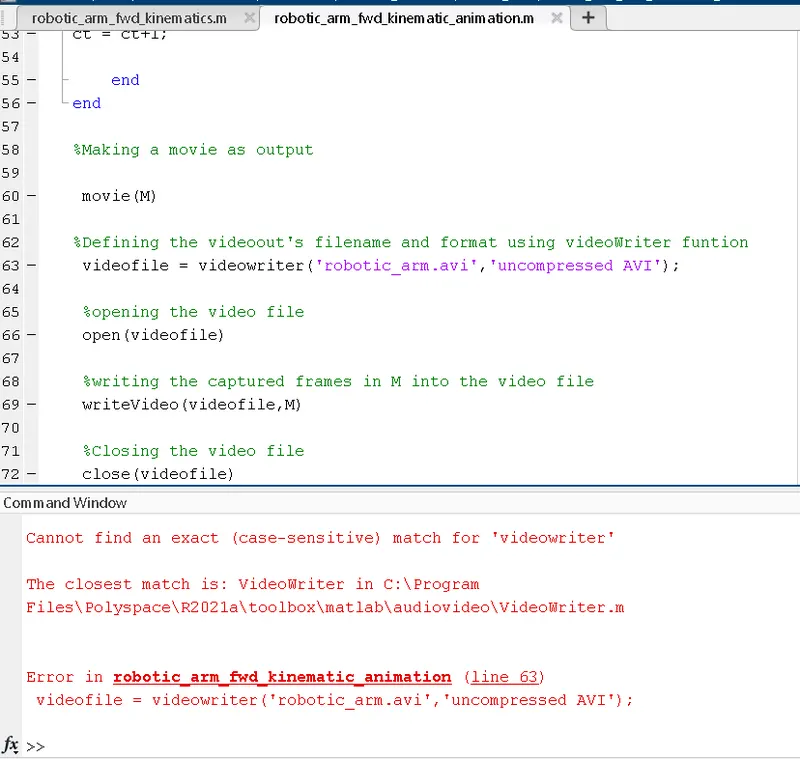
case sensitive error faced : provided videowriter instead of VideoWriter.
Solution : Replaced videowriter with VideoWriter
RESULT
A program to simulate the forward kinematics of a 2D Robotic arm in MATLAB is successfully executed.
The end result is successfully executed in a .avi video file .