Week 2- 2R Robotic Arm Challenge
AIM- To simulate the forward kinematics of robotic arm through programming with animation movie creating.
PROGRAM
% Forward kinematics of 2R robotic arms manipulator
clear all
close all
clc
% Inputs
l1 = 1;
l2 = 0.5;
theta1 = 45;
theta2 = 30;
% Coordinates
x0 = 0;
y0 = 0;
x1 = l1*cosd(theta1);
y1 = l1*sind(theta1);
x2 = x1 + l2*cosd(theta2);
y2 = y1 + l2*sind(theta2);
% Plotting
line([x0 x1],[y0 y1],'linewidth',3,'color','b')
line([x1 x2],[y1 y2],'linewidth',3,'color','r')
EXPLAINATION-
Clear all, close all and clc is written first before starting the program because if any numerical values, variables etc, are present then the final result may get error or it may get manipulated. It will close it out.
- % Inputs
l1 = 1;
l2 = 0.5;
theta1 = 45;
theta2 = 30;
where as
l1 = Length of 1st link(i.e 1st arm)
l2 = Length of 2nd link( i.e 2st arm)
theta1 = angle of 1st link
theta2 = angle of 2nd link
- % Coordinates
x0 = 0;
y0 = 0;
x1 = l1*cosd(theta1);
y1 = l1*sind(theta1);
x2 = x1 + l2*cosd(theta2);
y2 = y1 + l2*sind(theta2);
- x0 = 0;
y0 = 0;
where as
x0 = Variable of the fixed point i.e base for x-direction
y0 = Variable of the fixed point i.e base for y-direction
It is the fixed base of the forward kinematic of robotic arm manipulator, that why x0 is zero and y0 is zero.
- x1 = l1*cosd(theta1);
- x1 = Variable of 1st link (i.e starting point is connecting to base and the ending point is connecting to link 2).
- l1 = Length of 1st link (1m).
- cosd = adjacent side by hypotenuse side and d is degree.
- theta1 = angle of 1st link(i.e 45 degree).
- y1 = l1*sind(theta1);
- y1 = Variable of 1st link (i.e starting point is connecting to base and the ending point is connecting to link 2).
- l1 = Length of 1st link (1m).
- sind = opposite side by adjacent side and d is degree.
- theta1 = angle of 1st link(i.e 45 degree).
- x2 = x1 + l2*cosd(theta2);
- x1 is added
- x2 = Variable of the 2nd link(i.e ending point of the link 1 is the starting point of the link 2 and the ending point is the starting point of the manipulator).
- l2 = Length of 2nd link (0.5m).
- cosd = adjacent side by hypotenuse side and d is degree.
- theta1 = angle of 2st link(i.e 30 degree).
- y2 = y1 + l2*sind(theta2);
- x1 is added
- x2 = Variable of the 2nd link(i.e ending point of the link 1 is the starting point of the link 2 and the ending point is the starting point of the manipulator).
- l2 = Length of 2nd link (0.5m).
- sind = opposite side by adjacent side and d is degree.
- theta1 = angle of 2st link(i.e 30 degree).
% Plotting
line([x0 x1],[y0 y1],'linewidth',3,'color','b')
line([x1 x2],[y1 y2],'linewidth',3,'color','r')
- line([x0 x1],[y0 y1],'linewidth',3,'color','b')
- [x0 x1],[y0 y1]- In matlab will consider the first coordinate ‘x’ and then ‘y’ coordinate for plotting of the 1st link or 1st arm of forward kinematics of robotics.
- ‘linewidth’ means create line thickness in the graphical representation.
- ‘3’ means the value in numerical.
- ‘b’ is the color and b represent ‘blue’
- line([x1 x2],[y1 y2],'linewidth',3,'color','r')
- [x1 x2],[y1 y2]- In matlab will consider the first coordinate ‘x’ and then ‘y’ coordinate for plotting of the 2nd link or 2nd arm of forward kinematics of robotics.
- ‘linewidth’ means create line thickness in the graphical representation.
- ‘3’ means the value in numerical.
- ‘r’ is the color and ‘r’ represent ‘red’
Graphical Representation of Forward Kinematics of Robotic Arm
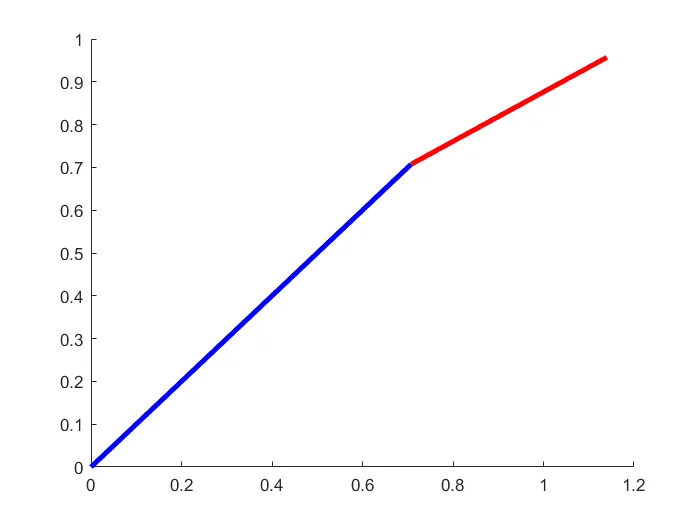
Open new script to show the animation of the forward kinematics of robotic arm through ‘for loop’
PROGRAM-
clear all
close all
clc
% inputs
l1 = 1;
l2 = 0.5;
theta1 = linspace(0,90,10)
theta2 = linspace(0,90,10)
ct = 1
for i = 1:length(theta1)
THETA1 = theta1(i);
for j = 1:length(theta2)
THETA2 = theta2(j);
x0 = 0;
y0 = 0;
x1 = l1*cosd(THETA1);
y1 = l1*sind(THETA1);
x2 = x1 + l2*cosd(THETA2);
y2 = y1 + l2*sind(THETA2);
% plotting
figure(1)
plot([x0 x1],[y0 y1],[x1 x2],[y1 y2],'linewidth',3)
axis ([-0.1 2 0 2])
pause(0.03)
M(ct) = getframe(gcf);
ct =ct+1;
end
end
% Animation of forward kinematics of robotic arm
movie(M)
videofile = VideoWriter('forward_kinematics.avi','Uncompressed AVI');
open(videofile)
writeVideo(videofile,M)
close(videofile)
EXPLAINATION-
- % inputs
l1 = 1;
l2 = 0.5;
theta1 = linspace(0,90,10)
theta2 = linspace(0,90,10)
theta1= It will give the value from 0 to 90 at a given interval of 10
(i.e 0 10 20 30 40 50 60 70 80 90) individually.
theta2= It will give the value from 0 to 90 at a given interval of 10
(i.e 0 10 20 30 40 50 60 70 80 90) individually.
- % for loop
ct = 1
for i = 1:length(theta1)
THETA1 = theta1(i);
for j = 1:length(theta2)
THETA2 = theta2(j);
- ct = 1
ct is counter loop which is added before the ‘for loop’ code program starts.
- for i = 1:length(theta1)
THETA1 = theta1(i);
- ‘i’ variable is assigned to the values of theta1,which counter loop to the particular value.
- ‘THETA1’ is the variable(i.e contains 1 value) and ‘theta1’ is an array(i.e contains 10 values).
- for j = 1:length(theta2)
THETA2 = theta2(j);
- ‘j’ variable is assigned to the values of theta2,which counter loop to the particular value.
- ‘THETA2’ is the variable(i.e contains 1 value) and ‘theta2’ is an array(i.e contains 10 values).
- x0 = 0;
y0 = 0;
where as
x0 = Variable of the fixed point i.e base for x-direction
y0 = Variable of the fixed point i.e base for y-direction
- x1 = l1*cosd(THETA1);
- x1 = Variable of 1st link (i.e starting point is connecting to base and the ending point is connecting to link 2).
- l1 = Length of 1st link (1m).
- cosd = adjacent side by hypotenuse side and d is degree.
- ‘THETA1’ is the value of theta(i) within the x-axis.
- y1 = l1*sind(THETA1);
- y1 = Variable of 1st link (i.e starting point is connecting to base and the ending point is connecting to link 2)
- l1 = Length of 1st link (1m).
- sind = opposite side by adjacent side and d is degree.
- ‘THETA1’ is the value of theta(i) within the y-axis.
- x2 = x1 + l2*cosd(THETA2);
- x1 is added
- x2 = Variable of the 2nd link(i.e ending point of the link 1 is the starting point of the link 2 and the ending point is the starting point of the manipulator).
- l2 = Length of 2nd link (0.5m).
- cosd = adjacent side by hypotenuse side and d is degree.
- ‘THETA2’ is the value of theta(j) within the x-axis.
- y2 = y1 + l2*sind(THETA2);
- y1 is added
- y2 = Variable of the 2nd link(i.e ending point of the link 1 is the starting point of the link 2 and the ending point is the starting point of the manipulator).
- l2 = Length of 2nd link (0.5m).
- cosd = adjacent side by hypotenuse side and d is degree.
- ‘THETA2’ is the value of theta(j) within the y-axis.
% plotting
figure(1)
plot([x0 x1],[y0 y1],[x1 x2],[y1 y2],'linewidth',3)
axis ([-0.1 2 0 2])
pause(0.03)
M(ct) = getframe(gcf);
ct =ct+1;
end
end
- plot([x0 x1],[y0 y1],[x1 x2],[y1 y2],'linewidth',3)
- plot([x0 x1],[y0 y1],[x1 x2],[y1 y2])- In matlab it will consider as array first it will recognize x variable and the it recognized y variable.
- ‘linewidth’ means create line thickness in the graphical representation.
- ‘3’ means the value in numerical.
- axis ([-0.1 2 0 2])
It gives the x-axis coordinates and y-axis coordinates in graphical representation.
- pause(0.03)- Pause command is used to stop the command for the certain time.
- M(ct) = getframe(gcf);
‘M’ is the command for capturing the current frame every time for the loop run.
‘getframe’ capture the axis at the same size that appears on the screen.
- ct =ct+1;
add + 1 to the final step to ct variable, this will increment the frame every time for loop to run.
% Animation of forward kinematics of robotic arm
movie(M)
videofile = VideoWriter('forward_kinematics.avi','Uncompressed AVI');
open(videofile)
writeVideo(videofile,M)
close(videofile)
- movie(M)- To create a movie this input is given at the beginning of the program.
- videofile = VideoWriter('forward_kinematics.avi','Uncompressed AVI');
- videoWrite command is to give the format of the video with videofile name .avi
- open(videofile)- This command is used to open the file in the media player.
- writeVideo(videofile,M)- This command is to write video frames.
- close(videofile)- This command is used to close the video in the media player.
Link for animation of Forward kinematic of robotic arm-