Week 2- 2R Robotic Arm Challenge
AIM: To simulate the forward kinematics of a 2R robotic arm using MATLAB.
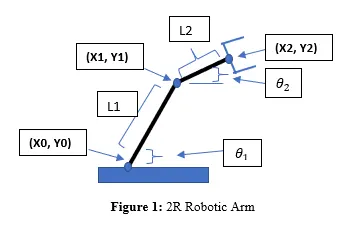
Governing Equation: The equation to determine the position of the end-effector is as follows:
X₁= L₁*cosθ₁, Y₁=L₁.sinθ₁
X₂= X₁+L₂.cosθ₂, Y₂= Y₁+L₂.sinθ₂
Xo=0, Yo=0
where;
(Xo, Yo) = coordinates of origin i.e. base (X₁, Y₁)= end coordinates of Link 1
(X₂, Y₂) = end coordinates of Link 2 i.e. end-effector
L₁, L₂=length of Link 1 and 2 (m)
θ₁,θ₂=angle of Link 1 and 2 (degree)
OBJECTIVE:
- To write a program for a 2R robotic arm.
- To plot the animation of the end-effector position according to the Forward Kinematics.
Theory
Forward kinematics refers to the process of obtaining the position and velocity of the end effector, given the known joint angles and angular velocities.
Forward kinematics is a transformation matrix to calculate the relationship between position and orientation (pose) of task (end-effector) frame and joint variables. This part is very important to calculate the position and/or orientation error to calculate the controller's qualify.
Programming Language: MATLAB
Procedure:
- Assign suitable variables to store length and angle for the links.
- Create a "for loop" for the generation of frames and declare a variable named counter (ct) to start with.
- The first loop (1) will be ranging from 1 to the maximum value of θ, (theta1) whereas the second one will be ranging from 1 to the maximum value of θ2 (theta2).
- For one count of the loop i, loop j would finish complete rotation and compute the values as shown in the code.
- The images are plotted with the help of the plot function.
- Finally, the counter will increment by 1 (ct+1) until loop i is finished and steps #4 and #5 are repeated.
- getframe ( ) captures the individual frame and stores it in an array M.
- To create an animation of all the frames generated,
- assign the frame movie in array "M"
- assign appropriate file name and extension in videofile()
- "Writevideo" writes data from an array to the video file
- "close" terminates the operation
Code for the Simulation:
%Forward kinematics of a 2R Robotic Arm
clear all
close all
clc

%inputs
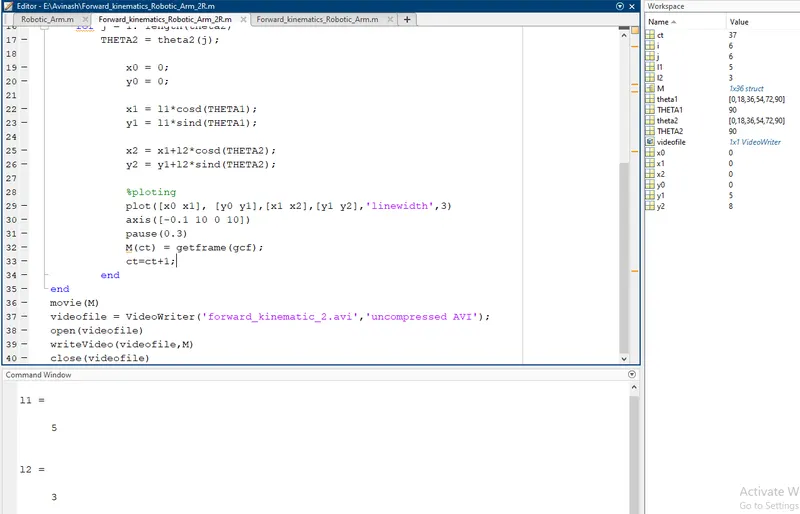
l1 = 5
l2 = 3

theta1 = linspace(0,90,6);
theta2 = linspace(0,90,6);

ct=1;
for i = 1: length(theta1)
    THETA1 = theta1(i);
    for j = 1: length(theta2)
        THETA2 = theta2(j);

            x0 = 0;
            y0 = 0;

            x1 = l1*cosd(THETA1);
            y1 = l1*sind(THETA1);

            x2 = x1+l2*cosd(THETA2);
            y2 = y1+l2*sind(THETA2);

            %ploting
            plot([x0 x1], [y0 y1],[x1 x2],[y1 y2],'linewidth',3)
            axis([-0.1 10 0 10])
            pause(0.3)
            M(ct) = getframe(gcf);
            ct=ct+1;
        end
end
movie(M)
videofile = VideoWriter('forward_kinematic_2.avi','uncompressed AVI');
open(videofile)
writeVideo(videofile,M)
close(videofile)
Output
Output Plot
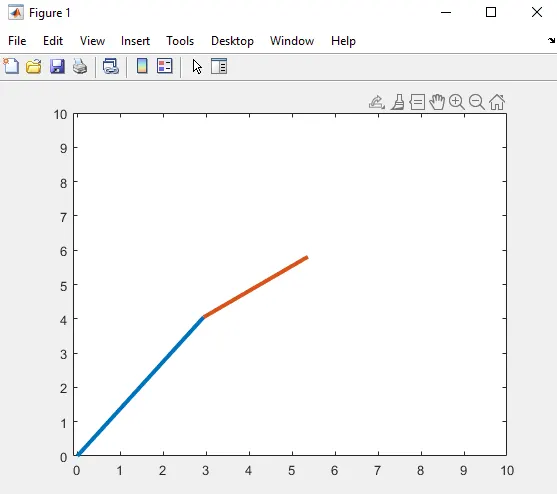
Animation Video Output
https://drive.google.com/file/d/1e6KVskyM5qDvIBg6e9Tiq4yY1CXhCTY9/view?usp=sharing