Week -2
Aim:- Make a Simulink model of Doorbell using solenoid block with the following details:-
In the above arrangement, when the switch is closed the electromagnet receives electrical power from the battery and pulls the metal arm to hit the bell producing sound.
Create a situation where the switch is closed for 2 seconds and then released. Observe the physical movement of the plunger.
Assume remaining parameters.
Description:-
To make a model of a doorbell using solenoid block, where the switch is closed for 2 seconds and then released, we should use simulink main blocks are:-
- Solenoid block
- Battery source
- spdt switch
- Pulse generator
- Mechanical Reference
- Electrical Reference
- Solver
- Ps-simulink converter
- simulink-Ps converter
- scope
Schematic Diagram:-
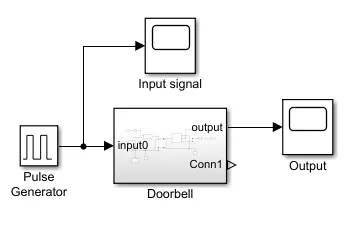
Main System
Sub System
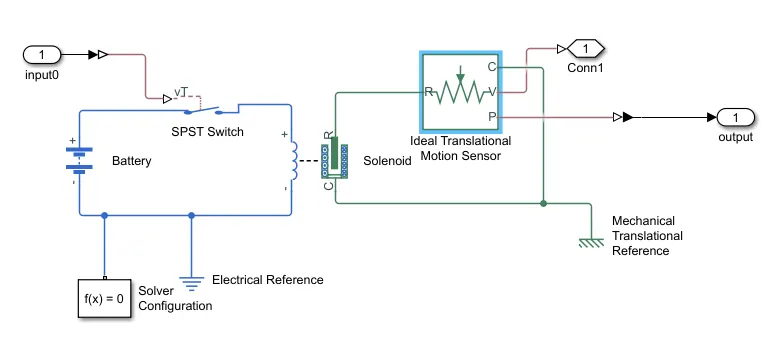
Above are Two diagrams one is main diagram and second is sub system we are do this to repeat previously learning how to make sub system and shorten our schematic.
Now, in model we use solenoid switch to produce sound and it is operated by a battery source through a switch and this switch is operated by a pulsating input which operates the switch to close connection for two second and release. The input pulse generate by pulse generator block.
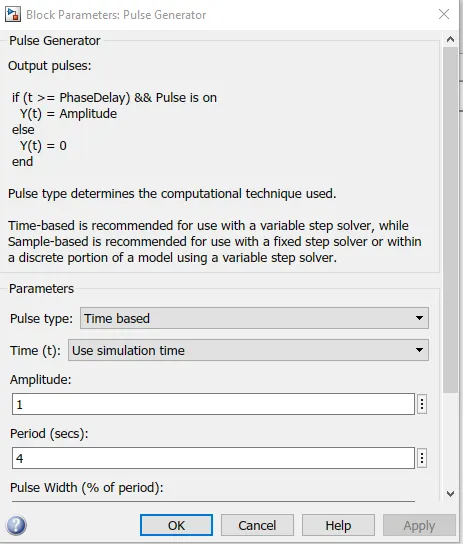
Setting for pulse generator which produce signal to operate switch for 2s, the simulation time is 20s
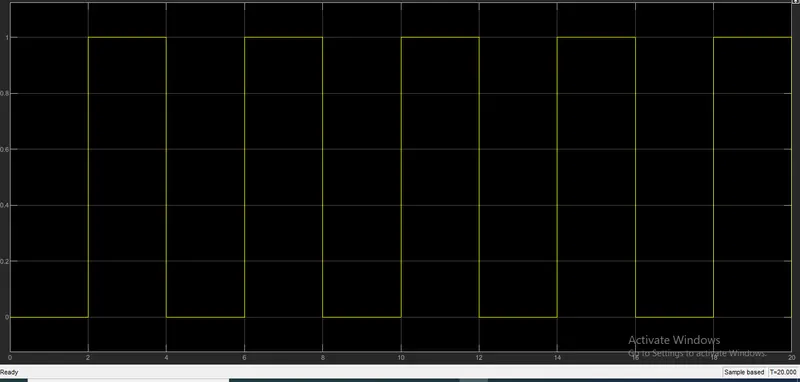
Input signal Display:-
In this model we use ideal translation motion sensor to see output results becuase the solenoid convert electrical input to mechanical output, which is the movement of plunger inside.
In above schematic we use 2nos. scope, one is for monitor input signal ans 2nd is for monitor output.
The out of our model are:-
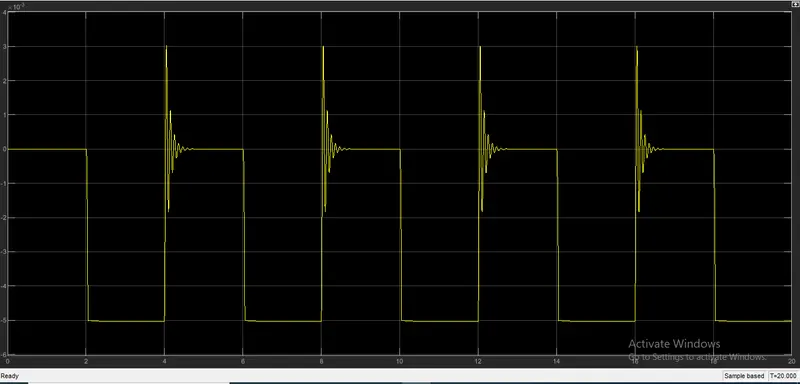
The above picture shows result of our doorbell model, here we see some distortion output because it is a mechenaical form and have vibration in working.
Result:-
When we give input value 1 then switch become closed and make supply excite solenoid and plunger moves R point to C point about 5mm same as shown in both input and output scope.
switch will on only when we give input value 1 because threshold value is 0.5 and we require greater value to on the switch.
2.
Aim:- Use a thermistor to sense the temperature of a heater & turn on or turn off the fan as per the below conditions:
Temperature source: 20 °C from 0 to 10 seconds, 27 °C from 10 to 30 seconds, 23 °C from 30 to 50 seconds
Fan conditions: ON if the temperature above 25 °C, OFF otherwise.
Description:-
To develop this model we have to develop three conditions are:-
- Generate signal according to temperature condition and make a circuit for it.
- Generate voltage signal to operate the switch which controls the fan on/off, so make circuit for this.
- Fan operation through motor.
Then, connect all three situation to each other to make the Temperature dependent fan on/off model.
Blocks are used for the model:-
- Signal builder
- controlled temperature source
- Battery source
- Thermistor
- Resistor
- Voltage sensor
- DC motor
- Switch
- Ideal velocity source
- Electrical reference
- Mechanical reference
- Scopes
- PS converter
- simulink converter
Model:-
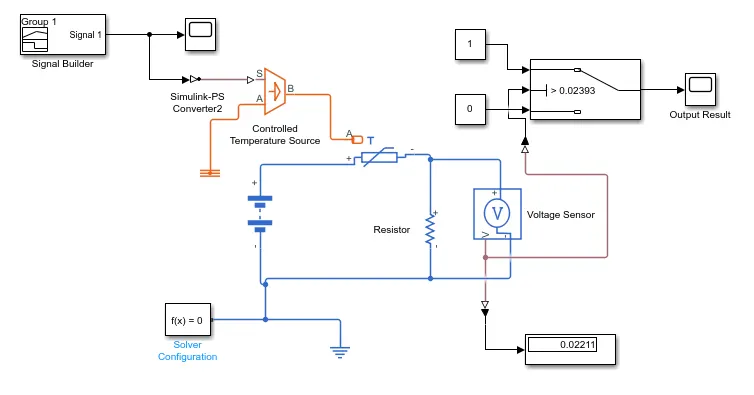
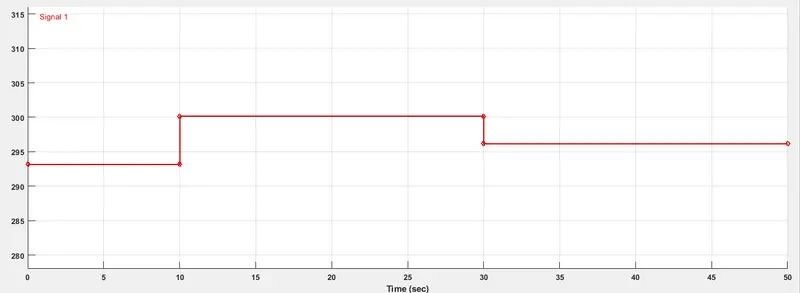
In above model first we create signals in signal builder to operation of fan switch as given temperature condition.
Input Signal:-
Results of Input signal:-
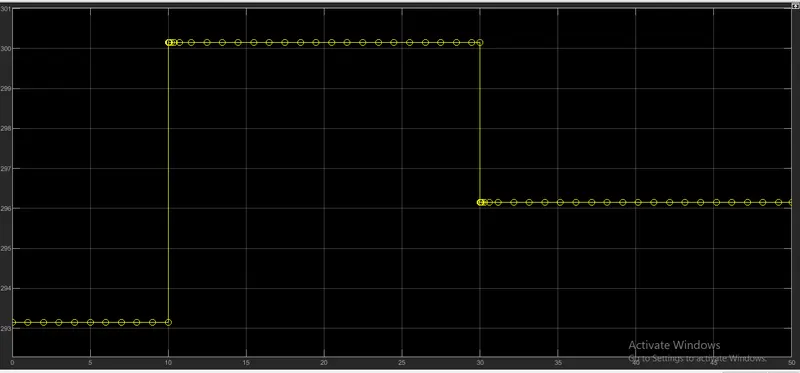
After building input signal we make a temperature sensor circuit to give controlled signal for switch operation.
Here we use blocks are controlled temperature source, Thermistor, Battery (24v),Resistor, Voltage sensor, Electrical reference, Sover and Display block.
In this circuit the thermistor is coneected with battery and a load resistor, and voltage sensor measures the value. we give first constant value as 298.15 (25 deg.C) input to measure a threshold value for switch according to this value the switch will become on an and off when we give pusled signal.
Here the output ot the switch are:-
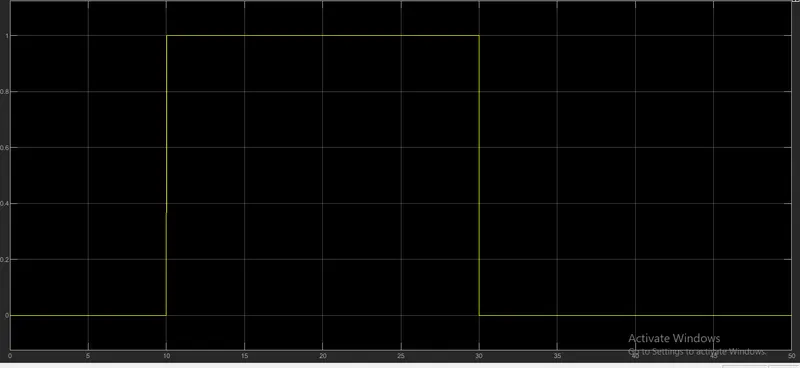
Above results shows 0 to 10 value where is switch is off position 10 to 30 it shows 1 where switch is on position and again 30 to 50 it is off.
Hence this output shows when we give input value >= to threshold value the will become on.
Note:- We not make fan in this model because no need of fan we require on switch on/off position.