Week -2
- Make a Simulink model of Doorbell using solenoid block with the following details:
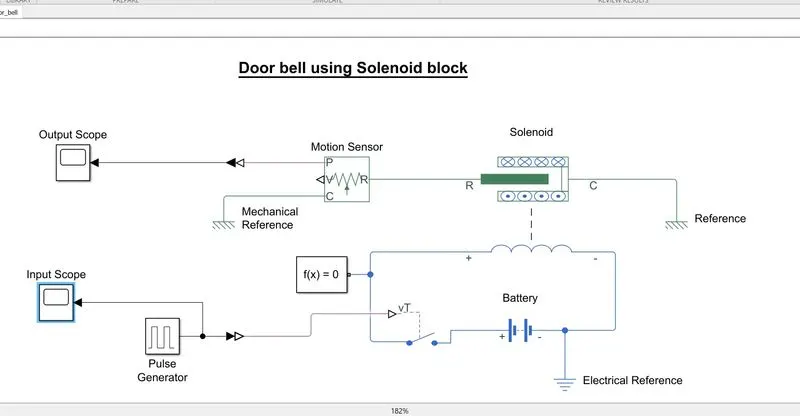
In above fig. Simulinkmodel is shown for Doorbell using solenoid block
Let first understand simple working of doorbell and the components required for it
- It is prepared using solenoid, switch, plunger, bell and some source of electricity.
- Solenoid is a simple iron rod on which copper wire is wounded and electricity is made to pass through this wire.
- When switch is ON the circuit gets energize with the help of source and electricity is passed through the wire which makes the iron rod behave as an electromagnet.
- This electromagnetic property of iron rod attracts the plunger towards it and the bell is rang.
- Once the switch is OFF the circuit gets de-energize, the solenoid loses it electromagnetic property and plunger comes to its original rest position.
Let's understand now simulink model of MATLAB using various blocks such as Pulse generator, SPST switch, Solenoid block, Motion sensor, Electrical reference, Mechanical reference, Scope, Solver configuration, Simulink-PS converter and PS-Simulink converter.
Will see purpose of main blocks used in this model.
- SPST switch: It is a one way switch operates when the control circuit is provided at its input. Switch has many internal parameters in which important one is threshold, control signal having value below the specified value of threshold will not let the switch to operate and thus circuit will not get complete.
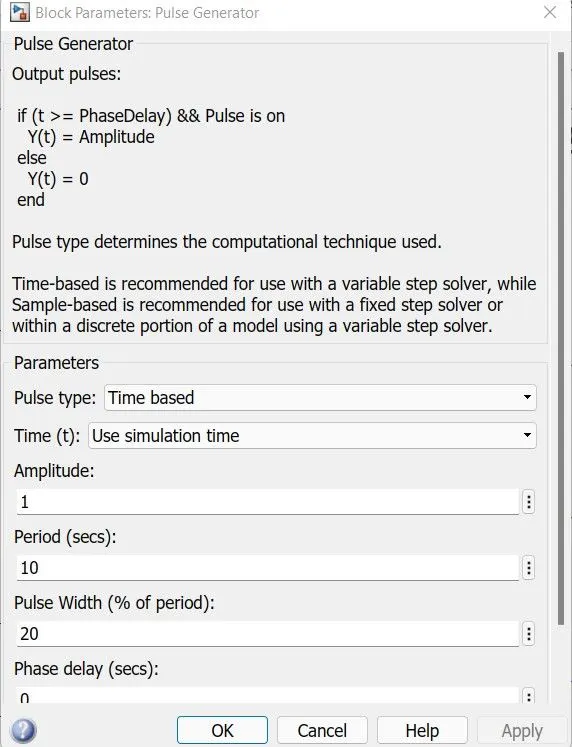
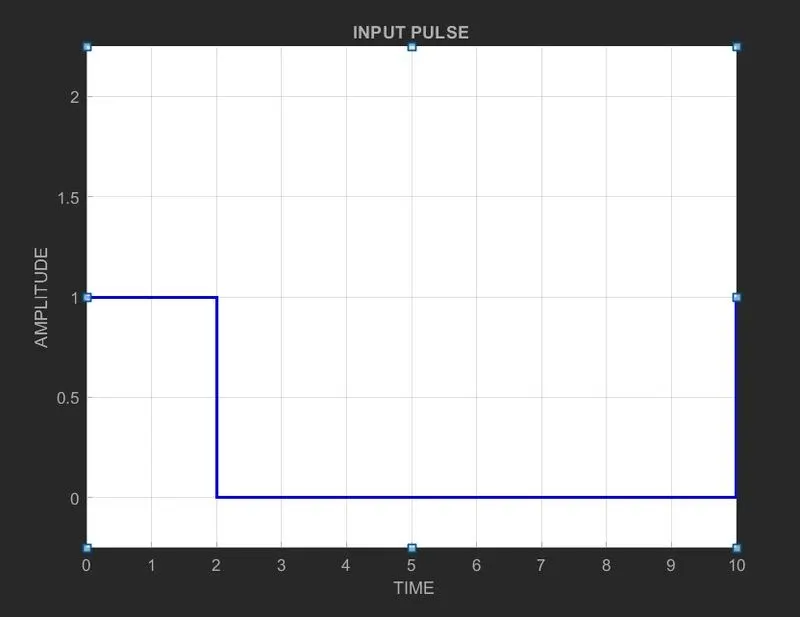
- Pulse generator: This block is used to give input signal to switch which is set up as shown in fig. below its parameters and also the input pulse result from scope.
- Battery: It is the source of electricity which makes the solenoid as electromagnet to attract the plunger.
- Solenoid block: Here two conserving points R and C are shown in which C is connected with mechanical reference so that any displacement occurs in plunger is subjected to one fixed reference. and port R is connected with motion sensor. Other two terminals of block is connected in series with battery and switch.
- Motion sensor: This sensor is used for sensing any change in motion whether position or velocity. As the motion is wrt to position here, port P is used to display the result.
OUTPUT RESULT:
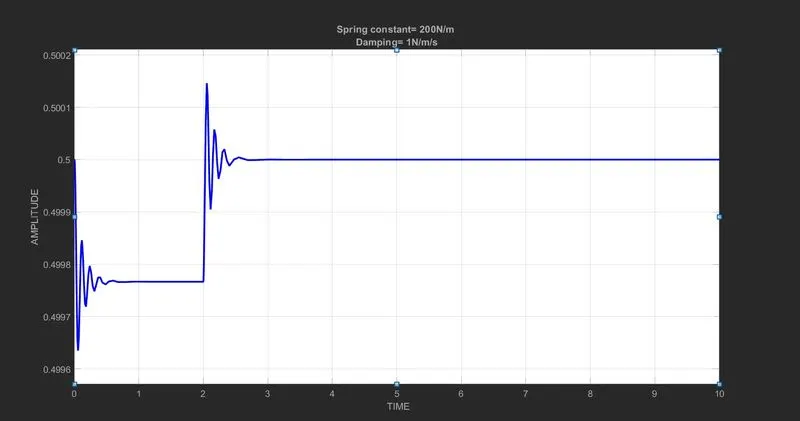
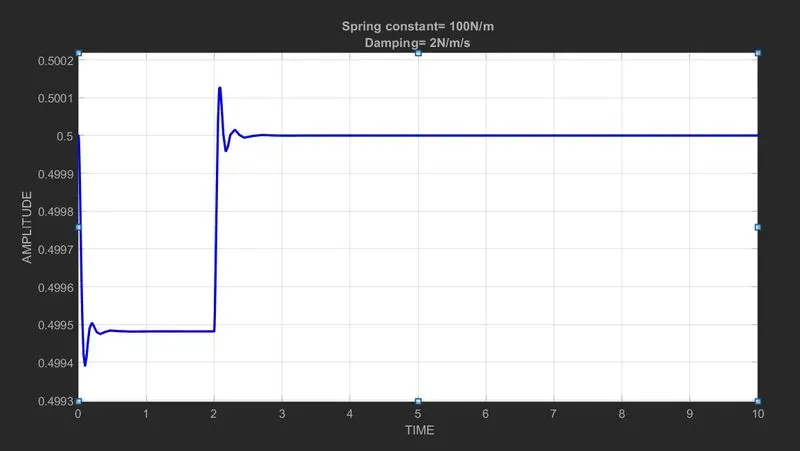
JUSTIFICATION:
The output result is shown by selecting two different values of spring constant and damping in solenoid block from mexhannical parameters which are:
- Spring constant= 200N/m and Damping= 1N/m/s
- Spring constant= 100N/m and Damping= 2N/m/s
When we compare the results the later one is showing less oscillation or vibrations in the position of plunger.
2. Use a thermistor to sense the temperature of a heater & turn on or turn off the fan as per the below conditions:
Temperature source: 20 °C from 0 to 10 seconds, 27 °C from 10 to 30 seconds, 23 °C from 30 to 50 seconds. Fan conditions: ON if the temperature above 25 °C, OFF otherwise
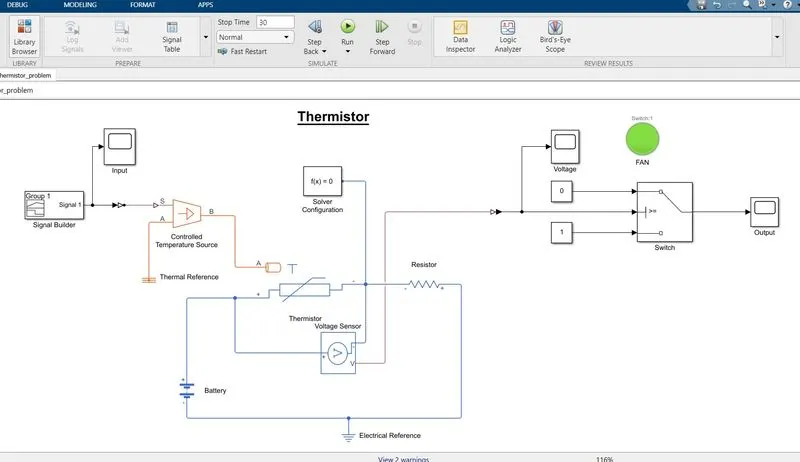
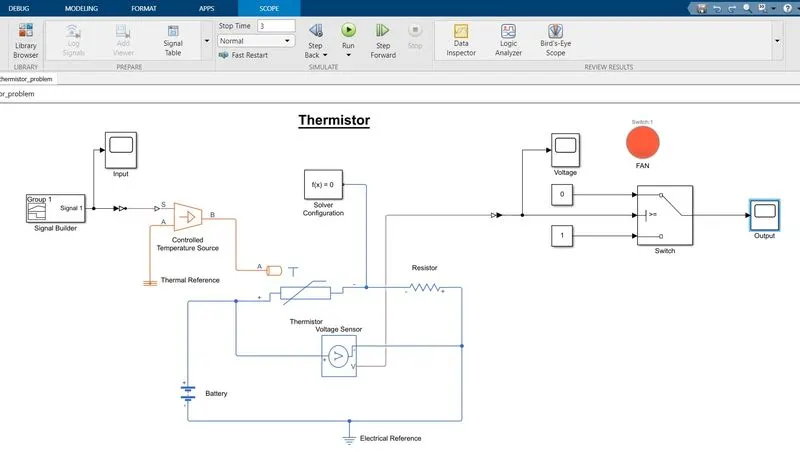
In above fig. simulink is shown using Thermistor block as per the condition, where run time is set to 30secs and the Fan is in ON condition.
- Thermistor: It is kind of resistor which depends on temperature thus it names as thermistor which possesses property of both. Dependence of temperature is wrt whether the thermistor is NTC ( Negative temperature coefficient ) or PTC ( Positive temperaturecoefficient ). PTC has linear type of relationship with temperature where as NTC has nonlinear relationship.
Let us understand the simulink block and its components.
Components are: Thermistor block, Voltage sensor, Controlled temperature sensor, resistor, battery, signal builder, switch, constant, thermal reference, electrical reference, Solver configuration, Simulink-PS converter, PS-Simulink converter, Lamp and Scope.
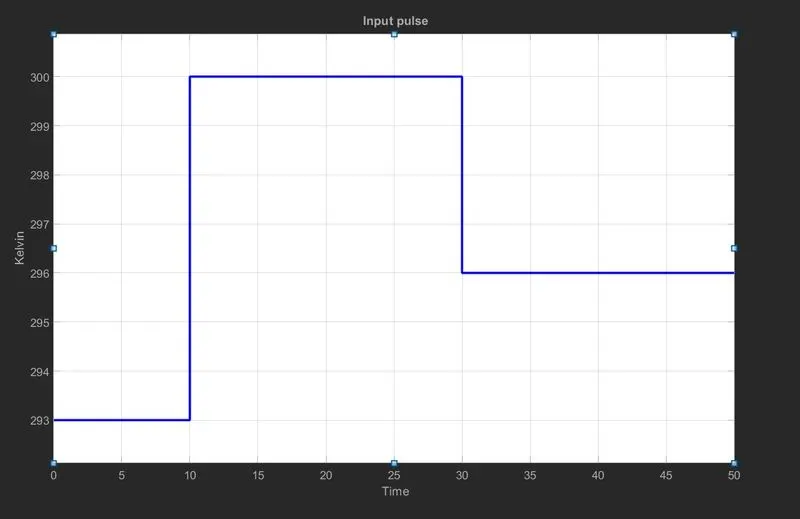
- Signal builder: This block provides the input pulse to the temperature sensor. As per the requirement for first 10 seconds temperature is set at 293K and then for next 20 seconds it is set to 300K and remaining 20 seconds it is set to 296K. Here unit is selected as Kelvin such that in Thermistor block no parameters needs to be change. Scope result of the signal is shown below.
- Temperature source: This block maintains the temperature difference when input signal is sent to control port S. To maintain positive difference temperature at B should be more than at A point. Thus point A is set at thermal reference and B is connected to port A of thermistor.
- Thermistor block: It is NTC type thermistor block which is inversely proportional to temperature. A battery and resistor value 1 ohm is connected in series with the other two terminals as per proper sign convention.
- Voltage sensor: It is connected in parallel with thermistor to measure voltage between it. Port V converts this measured value of voltage into a physical signal. This sensor helps to decide the threshold value of voltage to be set in switch.
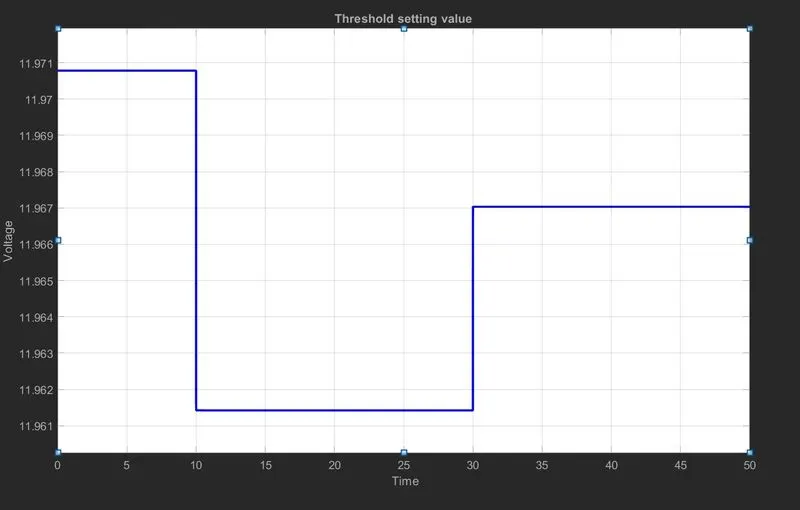
- Switch: Three input switch consists first and third as data inputs and second port is control port receiving signal from voltage sensor. Threshold value is selected from the output of voltage sensor scope where voltage for 25 °C is selected. Below fig. is showing graph for it.
- Fan: This block is used to show the result of simulation it is connected with the output of switch. It indicates green when the Fan is ON condition else it will indicates Red.
OUTPUT RESULT:
JUSTIFICATION:
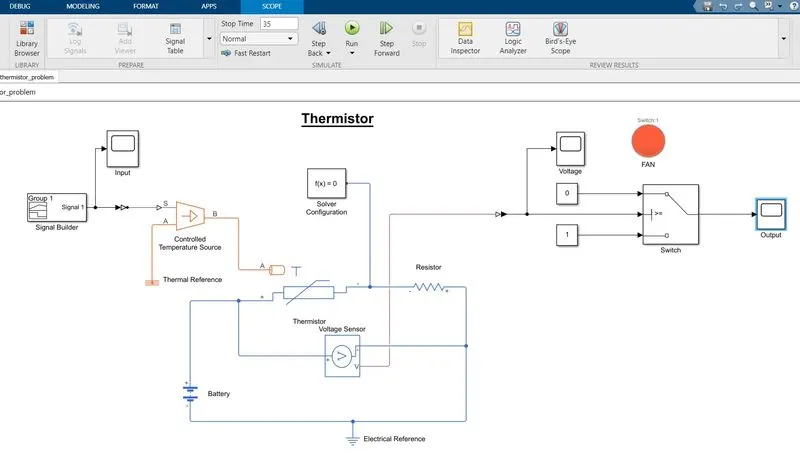
From output result two models are compared which are:
- Simulation run time= less than 10 seconds and the Fan is showing red indication that means in OFF condition
- Simulation run time= greater than 30 seconds and the result is same as above.
Simulation run time between 10-30 seconds is already shown initially in which fan indication was green.
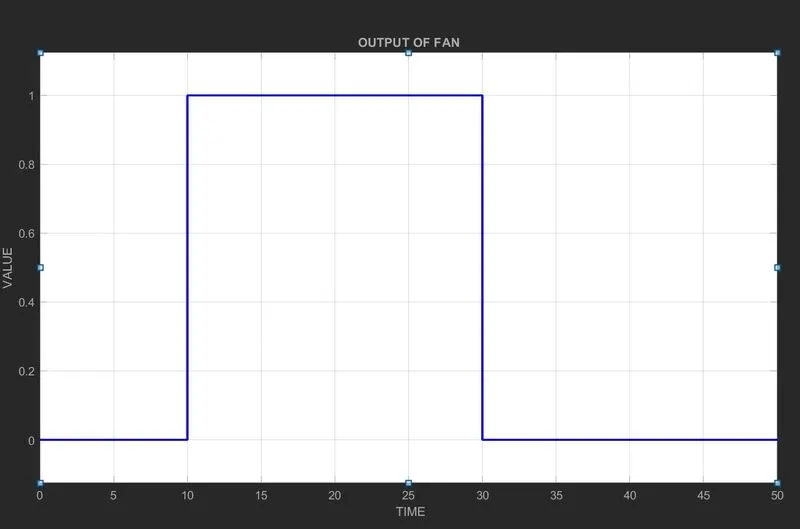
Lets check the scope result for 50 seconds which will satisfy all three conditions.