Week 12 - Validation studies of Symmetry BC vs Wedge BC in OpenFOAM vs Analytical H.P equation
Validation studies of Symmetry BC vs Wedge BC in OpenFOAM vs Analytical H.P equation
Aim: To simulate the pipe flow by applying Symmetry Boundary Condition.
Objectives:
1.To simulate the pipe flow for the below-mentioned angles using both symmetry and wedge boundary conditions and validate them with HP equations .
Angles to test:`10^0,25^0,45^0`
2.To validate Hydro-dynamic length with the numerical result.
3.To validate the fully developed flow velocity profile with its analytical profile.
4.To validate maximum velocity and pressure drop for fully developed flow.
5.To post-process Shear stress and validate wall shear stress for fully developed flow.
6.To highlight the differences in both boundary conditions in terms of their usage and application.
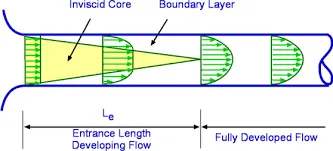
Procedure: using WSL (OpenFOAM for Windows 10 ) for wedge angle `10^o`wedge boundary condition:
1. Open the terminal by just running the Ubuntu app.
2. Type $FOAM_TUTORIALS or TUT in the terminal window.
3. We have to solve incompressible flow simulation for this problem so select incompressible directory by typing ‘cd incompressible’ and then again type 'ls' to explore folders in incompressible folders.
4. For this particular case we need a solver for laminar-viscous flow. So here we have to choose ‘icoFoam’.Therefore, we will select icoFoam folder by typing ‘cd icoFoam’ and by typing ‘ls’ we explore this folder in the terminal.
5.Here, we have, again two options, cavity and elbow. They both are part of the icoFoam solver and cavity section is used to create required domain and black mesh so select the ‘cavity’ folder.By typing ‘cd cavity’ and then again typing 'ls' to explore folders in cavity folder.(0,constant,system)
6. We are not going to make any changes here in the tutorial section. So, we are going to copy this cavity folder using the ‘cp -r cavity’ command and paste it into OpenFOAM run folder by typing ‘cp -r cavity $FOAM_RUN/pipeflow10’.
7. Then open the run folder by typing ‘cd $FOAM_RUN’. where we can see the pipeflow10 file.
8.Type 'ls' to explore folders in pipeflow file.(0,constant,system).
9.We have to open the system folder by typing 'cd system'.There are 4 script files in the system folder(blockMeshDict controlDict fvSchemes fvSolution )and by opening blockMeshDict we can create domain and provide the required specification for block mesh.
10.Type notepad.exe blockMeshDict to open the blockMeshDict .We have to replace the file with the file created by using MatLab and save it.
blockMeshDict file is used for creating geometry, generating mesh, and defining boundary conditions. The following procedures need to be followed in creating geometry in blockMesh.
clear all
close all
clc

%program to create blockMeshDict file for pipe flow

%inputs
Re=2100 %Reynolds number;
L=2.7 % length(m);
D=0.02 %dia(m);
mu=8.90e-4 % dynamic viscosity(pa-s);
theta=10 %wedge angle(degree);
R=D/2 % radious(m);
Le=0.06*Re*D %entrance length;

%determining the vertices of wedge
v0=[0,0,0];
v1=[0,(R*cosd(theta/2)),(R*sind(theta/2))];
v2=[0,(R*cosd(theta/2)),(-R*sind(theta/2))];
v3=[L,0,0];
v4=[L,(R*cosd(theta/2)),(R*sind(theta/2))];
v5=[L,(R*cosd(theta/2)),(-R*sind(theta/2))];


f1=fopen('blockMeshDict10.txt','w')
fprintf(f1,'/*--------------------------------*- MATLAB -*----------------------------------*');
fprintf(f1,'\n=========                  ');
fprintf(f1,'\n  \\       /  F ield         | OpenFOAM: The Open Source CFD Toolbox');
fprintf(f1,'\n   \\     /   O peration     | Website:  https://openfoam.org');
fprintf(f1,'\n    \\   /    A nd           | Version:  10');
fprintf(f1,'\n     \\ /     M anipulation  |');
fprintf(f1,'\n*---------------------------------------------------------------------------*/');
fprintf(f1,'\nFoamFile');
fprintf(f1,'\n{');
fprintf(f1,'\nformat      ascii;');
fprintf(f1,'\nclass       dictionary;');
fprintf(f1,'\nobject      blockMeshDict;');
fprintf(f1,'\n}');
fprintf(f1,'\n// * * * * * * * * * * * * * * * * * * * * * * * * * * * * * * * * * * * * * //');

fprintf(f1,'\n\nconvertToMeters 1;');
%vertices
fprintf(f1,'\n\nvertices');
fprintf(f1,'\n(');
fprintf(f1,'\n(%f %f %f)//point0',v0(1),v0(2),v0(3));
fprintf(f1,'\n(%f %f %f)//point1',v1(1),v1(2),v1(3));
fprintf(f1,'\n(%f %f %f)//point2',v2(1),v2(2),v2(3));
fprintf(f1,'\n(%f %f %f)//point3',v3(1),v3(2),v3(3));
fprintf(f1,'\n(%f %f %f)//point4',v4(1),v4(2),v4(3));
fprintf(f1,'\n(%f %f %f)//point5',v5(1),v5(2),v5(3));
fprintf(f1,'\n);');
fprintf(f1,'\nblocks');
fprintf(f1,'\n(');
fprintf(f1,'\n  hex (0 3 5 2 0 3 4 1) (200 20 1) simpleGrading (1 1 1)');
fprintf(f1,'\n);');
%edges
fprintf(f1,'\n %s \n','edges');
fprintf(f1,'%s \n','(');
fprintf(f1,'\n arc 1 2 (%f %f %f)',0,R,0);
fprintf(f1,'\n arc 4 5 (%f %f %f)',L,R,0);
fprintf(f1,'\n);');

%boundary

fprintf(f1,'\nboundary');
fprintf(f1,'\n(');
fprintf(f1,'\n    inlet');
fprintf(f1,'\n    {');
fprintf(f1,'\n	type patch;');
fprintf(f1,'\n	faces');
fprintf(f1,'\n	(');
fprintf(f1,'\n	(0 1 2 0)');
fprintf(f1,'\n);');
fprintf(f1,'\n    }');
fprintf(f1,'\n    outlet');
fprintf(f1,'\n    {');
fprintf(f1,'\n	type patch;');
fprintf(f1,'\n	faces');
fprintf(f1,'\n	(');
fprintf(f1,'\n	(3 5 4 3)');
fprintf(f1,'\n);');
fprintf(f1,'\n    }');
%wall
fprintf(f1,'\n %s \n','wall')
fprintf(f1,'%s \n','{')
fprintf(f1,'\n	type wall;');
fprintf(f1,'\n	faces');
fprintf(f1,'\n	(');
fprintf(f1,'\n	(1 4 5 2)');
fprintf(f1,'\n);');
fprintf(f1,'\n    }');
%frontand back
fprintf(f1,'\n %s \n','front')
fprintf(f1,'%s \n','{')
fprintf(f1,'\n	type wedge;');
fprintf(f1,'\n	faces');
fprintf(f1,'\n	(');
fprintf(f1,'\n	(0 3 4 1)');
fprintf(f1,'\n);');
fprintf(f1,'\n    }');
fprintf(f1,'\n %s \n','back')
fprintf(f1,'%s \n','{')
fprintf(f1,'\n	type wedge;');
fprintf(f1,'\n	faces');
fprintf(f1,'\n	(');
fprintf(f1,'\n	(0 2 5 3)');
fprintf(f1,'\n);');
fprintf(f1,'\n    }');
fprintf(f1,'\n %s \n','axis')
fprintf(f1,'%s \n','{')
fprintf(f1,'\n	type empty;');
fprintf(f1,'\n	faces');
fprintf(f1,'\n	(');
fprintf(f1,'\n	(0 3 3 0)');
fprintf(f1,'\n);');
fprintf(f1,'\n    }');
fprintf(f1,'\n);');

fprintf(f1,'\n %s \n','mergePatchPairs')
fprintf(f1,'\n(');
fprintf(f1,'\n);');
fprintf(f1,'\n // ************************************************************************* //');
blockMeshDict :
/*--------------------------------*- MATLAB -*----------------------------------*
=========
  \       /  F ield         | OpenFOAM: The Open Source CFD Toolbox
   \     /   O peration     | Website:  https://openfoam.org
    \   /    A nd           | Version:  10
     \ /     M anipulation  |
*---------------------------------------------------------------------------*/
FoamFile
{
format      ascii;
class       dictionary;
object      blockMeshDict;
}
// * * * * * * * * * * * * * * * * * * * * * * * * * * * * * * * * * * * * * //

convertToMeters 1;

vertices
(
(0.000000 0.000000 0.000000)//point0
(0.000000 0.009962 0.000872)//point1
(0.000000 0.009962 -0.000872)//point2
(2.700000 0.000000 0.000000)//point3
(2.700000 0.009962 0.000872)//point4
(2.700000 0.009962 -0.000872)//point5
);
blocks
(
  hex (0 3 5 2 0 3 4 1) (200 20 1) simpleGrading (1 1 1)
);
 edges
(

 arc 1 2 (0.000000 0.010000 0.000000)
 arc 4 5 (2.700000 0.010000 0.000000)
);
boundary
(
    inlet
    {
	type patch;
	faces
	(
	(0 1 2 0)
         );
    }
    outlet
    {
	type patch;
	faces
	(
	(3 5 4 3)
         );
     }
 wall
      {

	type wall;
	faces
	(
	(1 4 5 2)
        );
        }

 front
   {

	type wedge;
	faces
	(
	(0 3 4 1)

         );
    }
back
   {

	type wedge;
	faces
	(

	(0 2 5 3)
         );
    }
 axis
  {

	type empty;
	faces
	(
	(0 3 3 0)
        );
    }
);
 mergePatchPairs
(
);

 // ************************************************************************* //
11. The next step is to navigate to the controlDict folder and specify the simulation time.
controlDict:
/*--------------------------------*- C++ -*----------------------------------*\
  =========                 |
  \\      /  F ield         | OpenFOAM: The Open Source CFD Toolbox
   \\    /   O peration     | Website:  https://openfoam.org
    \\  /    A nd           | Version:  10
     \\/     M anipulation  |
\*---------------------------------------------------------------------------*/
FoamFile
{
    format      ascii;
    class       dictionary;
    location    "system";
    object      controlDict;
}
// * * * * * * * * * * * * * * * * * * * * * * * * * * * * * * * * * * * * * //

application     icoFoam;

startFrom       startTime;

startTime       0;

stopAt          endTime;

endTime         50;

deltaT          0.01;

writeControl    timeStep;

writeInterval   20;

purgeWrite      0;

writeFormat     ascii;

writePrecision  6;

writeCompression off;

timeFormat      general;

timePrecision   6;

runTimeModifiable true;


// ************************************************************************* //
12.Making changes in boundary condition and p and U textfile in 0 folder.
p:
/*--------------------------------*- C++ -*----------------------------------*\
  =========                 |
  \\      /  F ield         | OpenFOAM: The Open Source CFD Toolbox
   \\    /   O peration     | Website:  https://openfoam.org
    \\  /    A nd           | Version:  10
     \\/     M anipulation  |
\*---------------------------------------------------------------------------*/
FoamFile
{
    format      ascii;
    class       volScalarField;
    object      p;
}
// * * * * * * * * * * * * * * * * * * * * * * * * * * * * * * * * * * * * * //

dimensions      [0 2 -2 0 0 0 0];

internalField   uniform 0;
boundaryField
{
    inlet
    {
        type            zeroGradient;
    }

    outlet
    {
        type            fixedValue;
        value           uniform 0.018;
    }

   wall
    {
         type           zeroGradient;
    }

    front
    {
        type            wedge;
    }

    back
    {
        type            wedge;
    }

     axis
    {
        type            empty;
    }


}

// ************************************************************************* //
U:
/*--------------------------------*- C++ -*----------------------------------*\
  =========                 |
  \\      /  F ield         | OpenFOAM: The Open Source CFD Toolbox
   \\    /   O peration     | Website:  https://openfoam.org
    \\  /    A nd           | Version:  10
     \\/     M anipulation  |
\*---------------------------------------------------------------------------*/
FoamFile
{
    format      ascii;
    class       volVectorField;
    object      U;
}
// * * * * * * * * * * * * * * * * * * * * * * * * * * * * * * * * * * * * * //

dimensions      [0 1 -1 0 0 0 0];

internalField   uniform (0.0937 0 0);

boundaryField
{
    inlet
    {
        type             fixedValue;
        value            uniform (0.0937 0 0);
    }

    outlet
    {
        type           zeroGradient;

    }

    wall
    {
         type           noSlip;
    }

    front
    {
        type            wedge;
    }

    back
    {
        type            wedge;
    }

     axis
    {
        type            empty;
    }

}

// ************************************************************************* //
13. Make changes in constant folder the value of nu and save it.
/*--------------------------------*- C++ -*----------------------------------*\
  =========                 |
  \\      /  F ield         | OpenFOAM: The Open Source CFD Toolbox
   \\    /   O peration     | Website:  https://openfoam.org
    \\  /    A nd           | Version:  10
     \\/     M anipulation  |
\*---------------------------------------------------------------------------*/
FoamFile
{
    format      ascii;
    class       dictionary;
    location    "constant";
    object      physicalProperties;
}
// * * * * * * * * * * * * * * * * * * * * * * * * * * * * * * * * * * * * * //

nu              [0 2 -1 0 0 0 0] 8.93e-7;


// ************************************************************************* //
14.Type 'checkMesh' to check the blockMesh.
15. Type 'icoFoam' to run the solver.
16. Now, view the results in ParaView by using the ‘paraFoam’ command.
using WSL (OpenFOAM for Windows 10 ) for wedge angle `10^o`symmetry boundary condition:
1. We are going to copy this cavity folder using the ‘cp -r cavity’ command and paste it into OpenFOAM run folder by typing ‘cp -r cavity $FOAM_RUN/pipeflow10s.
2. Then open the run folder by typing ‘cd $FOAM_RUN’. where we can see the pipeflow10s file.
3.Type 'ls' to explore folders in pipeflow file.(0,constant,system).
4.We have to open the system folder by typing 'cd system'.There are 4 script files in the system folder(blockMeshDict controlDict fvSchemes fvSolution )and by opening blockMeshDict we can create domain and provide the required specification for block mesh.
5.Type notepad.exe blockMeshDict to open the blockMeshDict .We have to replace the file with the file created by using MatLab and save it.
blockMeshDict file is used for creating geometry, generating mesh, and defining boundary conditions. The following procedures need to be followed in creating geometry in blockMesh.
clear all
close all
clc

%program to create blockMeshDict file for pipe flow

%inputs
Re=2100 %Reynolds number;
L=2.7 % length(m);
D=0.02 %dia(m);
mu=8.90e-4 % dynamic viscosity(pa-s);
theta=10 %wedge angle(degree);
R=D/2 % radious(m);
Le=0.06*Re*D %entrance length;

%determining the vertices of wedge
v0=[0,0,0];
v1=[0,(R*cosd(theta/2)),(R*sind(theta/2))];
v2=[0,(R*cosd(theta/2)),(-R*sind(theta/2))];
v3=[L,0,0];
v4=[L,(R*cosd(theta/2)),(R*sind(theta/2))];
v5=[L,(R*cosd(theta/2)),(-R*sind(theta/2))];


f1=fopen('blockMeshDict10sym.txt','w')
fprintf(f1,'/*--------------------------------*- MATLAB -*----------------------------------*');
fprintf(f1,'\n=========                  ');
fprintf(f1,'\n  \\       /  F ield         | OpenFOAM: The Open Source CFD Toolbox');
fprintf(f1,'\n   \\     /   O peration     | Website:  https://openfoam.org');
fprintf(f1,'\n    \\   /    A nd           | Version:  10');
fprintf(f1,'\n     \\ /     M anipulation  |');
fprintf(f1,'\n*---------------------------------------------------------------------------*/');
fprintf(f1,'\nFoamFile');
fprintf(f1,'\n{');
fprintf(f1,'\nformat      ascii;');
fprintf(f1,'\nclass       dictionary;');
fprintf(f1,'\nobject      blockMeshDict;');
fprintf(f1,'\n}');
fprintf(f1,'\n// * * * * * * * * * * * * * * * * * * * * * * * * * * * * * * * * * * * * * //');

fprintf(f1,'\n\nconvertToMeters 1;');
%vertices
fprintf(f1,'\n\nvertices');
fprintf(f1,'\n(');
fprintf(f1,'\n(%f %f %f)//point0',v0(1),v0(2),v0(3));
fprintf(f1,'\n(%f %f %f)//point1',v1(1),v1(2),v1(3));
fprintf(f1,'\n(%f %f %f)//point2',v2(1),v2(2),v2(3));
fprintf(f1,'\n(%f %f %f)//point3',v3(1),v3(2),v3(3));
fprintf(f1,'\n(%f %f %f)//point4',v4(1),v4(2),v4(3));
fprintf(f1,'\n(%f %f %f)//point5',v5(1),v5(2),v5(3));
fprintf(f1,'\n);');
fprintf(f1,'\nblocks');
fprintf(f1,'\n(');
fprintf(f1,'\n  hex (0 3 5 2 0 3 4 1) (200 20 1) simpleGrading (1 1 1)');
fprintf(f1,'\n);');
%edges
fprintf(f1,'\n %s \n','edges');
fprintf(f1,'%s \n','(');
fprintf(f1,'\n arc 1 2 (%f %f %f)',0,R,0);
fprintf(f1,'\n arc 4 5 (%f %f %f)',L,R,0);
fprintf(f1,'\n);');

%boundary

fprintf(f1,'\nboundary');
fprintf(f1,'\n(');
fprintf(f1,'\n    inlet');
fprintf(f1,'\n    {');
fprintf(f1,'\n	type patch;');
fprintf(f1,'\n	faces');
fprintf(f1,'\n	(');
fprintf(f1,'\n	(0 1 2 0)');
fprintf(f1,'\n);');
fprintf(f1,'\n    }');
fprintf(f1,'\n    outlet');
fprintf(f1,'\n    {');
fprintf(f1,'\n	type patch;');
fprintf(f1,'\n	faces');
fprintf(f1,'\n	(');
fprintf(f1,'\n	(3 5 4 3)');
fprintf(f1,'\n);');
fprintf(f1,'\n    }');
%wall
fprintf(f1,'\n %s \n','wall')
fprintf(f1,'%s \n','{')
fprintf(f1,'\n	type wall;');
fprintf(f1,'\n	faces');
fprintf(f1,'\n	(');
fprintf(f1,'\n	(1 4 5 2)');
fprintf(f1,'\n);');
fprintf(f1,'\n    }');
%frontand back
fprintf(f1,'\n %s \n','front')
fprintf(f1,'%s \n','{')
fprintf(f1,'\n	type symmetry;');
fprintf(f1,'\n	faces');
fprintf(f1,'\n	(');
fprintf(f1,'\n	(0 3 4 1)');
fprintf(f1,'\n);');
fprintf(f1,'\n    }');
fprintf(f1,'\n %s \n','back')
fprintf(f1,'%s \n','{')
fprintf(f1,'\n	type symmetry;');
fprintf(f1,'\n	faces');
fprintf(f1,'\n	(');
fprintf(f1,'\n	(0 2 5 3)');
fprintf(f1,'\n);');
fprintf(f1,'\n    }');
fprintf(f1,'\n %s \n','axis')
fprintf(f1,'%s \n','{')
fprintf(f1,'\n	type empty;');
fprintf(f1,'\n	faces');
fprintf(f1,'\n	(');
fprintf(f1,'\n	(0 3 3 0)');
fprintf(f1,'\n);');
fprintf(f1,'\n    }');
fprintf(f1,'\n);');

fprintf(f1,'\n %s \n','mergePatchPairs')
fprintf(f1,'\n(');
fprintf(f1,'\n);');
fprintf(f1,'\n // ************************************************************************* //');
blockMeshDict:
/*--------------------------------*- MATLAB -*----------------------------------*
=========
  \       /  F ield         | OpenFOAM: The Open Source CFD Toolbox
   \     /   O peration     | Website:  https://openfoam.org
    \   /    A nd           | Version:  10
     \ /     M anipulation  |
*---------------------------------------------------------------------------*/
FoamFile
{
format      ascii;
class       dictionary;
object      blockMeshDict;
}
// * * * * * * * * * * * * * * * * * * * * * * * * * * * * * * * * * * * * * //

convertToMeters 1;

vertices
(
(0.000000 0.000000 0.000000)//point0
(0.000000 0.009962 0.000872)//point1
(0.000000 0.009962 -0.000872)//point2
(2.700000 0.000000 0.000000)//point3
(2.700000 0.009962 0.000872)//point4
(2.700000 0.009962 -0.000872)//point5
);
blocks
(
  hex (0 3 5 2 0 3 4 1) (200 20 1) simpleGrading (1 1 1)
);
 edges
(

 arc 1 2 (0.000000 0.010000 0.000000)
 arc 4 5 (2.700000 0.010000 0.000000)
);
boundary
(
    inlet
    {
	type patch;
	faces
	(
	(0 1 2 0)
         );
    }
    outlet
    {
	type patch;
	faces
	(
	(3 5 4 3)
         );
     }
 wall
      {

	type wall;
	faces
	(
	(1 4 5 2)
        );
        }

 front
   {

	type symmetry;
	faces
	(
	(0 3 4 1)

         );
    }
back
   {

	type symmetry;
	faces
	(

	(0 2 5 3)
         );
    }
 axis
  {

	type empty;
	faces
	(
	(0 3 3 0)
        );
    }
);
 mergePatchPairs
(
);

 // ************************************************************************* //
6. The next step is to navigate to the controlDict folder and specify the simulation time.
controlDict:
/*--------------------------------*- C++ -*----------------------------------*\
  =========                 |
  \\      /  F ield         | OpenFOAM: The Open Source CFD Toolbox
   \\    /   O peration     | Website:  https://openfoam.org
    \\  /    A nd           | Version:  10
     \\/     M anipulation  |
\*---------------------------------------------------------------------------*/
FoamFile
{
    format      ascii;
    class       dictionary;
    location    "system";
    object      controlDict;
}
// * * * * * * * * * * * * * * * * * * * * * * * * * * * * * * * * * * * * * //

application     icoFoam;

startFrom       startTime;

startTime       0;

stopAt          endTime;

endTime        50;

deltaT         0.01;;

writeControl    timeStep;

writeInterval  20;

purgeWrite      0;

writeFormat     ascii;

writePrecision  6;

writeCompression off;

timeFormat      general;

timePrecision   6;

runTimeModifiable true;


// ************************************************************************* //
7.Making changes in boundary condition and p and U textfile in 0 folder.
p:
/*--------------------------------*- C++ -*----------------------------------*\
  =========                 |
  \\      /  F ield         | OpenFOAM: The Open Source CFD Toolbox
   \\    /   O peration     | Website:  https://openfoam.org
    \\  /    A nd           | Version:  10
     \\/     M anipulation  |
\*---------------------------------------------------------------------------*/
FoamFile
{
    format      ascii;
    class       volScalarField;
    object      p;
}
// * * * * * * * * * * * * * * * * * * * * * * * * * * * * * * * * * * * * * //

dimensions      [0 2 -2 0 0 0 0];

internalField   uniform 0;
boundaryField
{
    inlet
    {
        type            zeroGradient;
    }

    outlet
    {
        type            fixedValue;
        value           uniform 0.018;
    }

   wall
    {
         type           zeroGradient;
    }

    front
    {
        type            symmetry;
    }

    back
    {
        type            symmetry;
    }

     axis
    {
        type            empty;
    }


}

// ************************************************************************* //
U:
/*--------------------------------*- C++ -*----------------------------------*\
  =========                 |
  \\      /  F ield         | OpenFOAM: The Open Source CFD Toolbox
   \\    /   O peration     | Website:  https://openfoam.org
    \\  /    A nd           | Version:  10
     \\/     M anipulation  |
\*---------------------------------------------------------------------------*/
FoamFile
{
    format      ascii;
    class       volVectorField;
    object      U;
}
// * * * * * * * * * * * * * * * * * * * * * * * * * * * * * * * * * * * * * //

dimensions      [0 1 -1 0 0 0 0];

internalField   uniform (0.0937 0 0);

boundaryField
{
    inlet
    {
        type             fixedValue;
        value            uniform (0.0937 0 0);
    }

    outlet
    {
        type           zeroGradient;

    }

    wall
    {
         type           noSlip;
    }

    front
    {
        type            symmetry;
    }

    back
    {
        type            symmetry;
    }

     axis
    {
        type            empty;
    }

}

// ************************************************************************* //
8.Making changes in constant folder the value of nu and save it.
/*--------------------------------*- C++ -*----------------------------------*\
  =========                 |
  \\      /  F ield         | OpenFOAM: The Open Source CFD Toolbox
   \\    /   O peration     | Website:  https://openfoam.org
    \\  /    A nd           | Version:  10
     \\/     M anipulation  |
\*---------------------------------------------------------------------------*/
FoamFile
{
    format      ascii;
    class       dictionary;
    location    "constant";
    object      physicalProperties;
}
// * * * * * * * * * * * * * * * * * * * * * * * * * * * * * * * * * * * * * //

nu              [0 2 -1 0 0 0 0] 8.93e-7;


// ************************************************************************* //
9.Type 'checkMesh' to check the blockMesh.
10. Type 'icoFoam' to run the solver.
11. Now, view the results in ParaView by using the ‘paraFoam’ command.
using WSL (OpenFOAM for Windows 10 ) for wedge angle `25^o`wedge boundary condition.
All the procedures are the same as wedge angle `10^o`wedge boundary condition except the blockMesh file
using MatLab:
clear all
close all
clc

%program to create blockMeshDict file for pipe flow

%inputs
Re=2100 %Reynolds number;
L=2.7 % length(m);
D=0.02 %dia(m);
mu=8.90e-4 % dynamic viscosity(pa-s);
theta=25 %wedge angle(degree);
R=D/2 % radious(m);
Le=0.06*Re*D %entrance length;

%determining the vertices of wedge
v0=[0,0,0];
v1=[0,(R*cosd(theta/2)),(R*sind(theta/2))];
v2=[0,(R*cosd(theta/2)),(-R*sind(theta/2))];
v3=[L,0,0];
v4=[L,(R*cosd(theta/2)),(R*sind(theta/2))];
v5=[L,(R*cosd(theta/2)),(-R*sind(theta/2))];


f1=fopen('blockMeshDict25.txt','w')
fprintf(f1,'/*--------------------------------*- MATLAB -*----------------------------------*');
fprintf(f1,'\n=========                  ');
fprintf(f1,'\n  \\       /  F ield         | OpenFOAM: The Open Source CFD Toolbox');
fprintf(f1,'\n   \\     /   O peration     | Website:  https://openfoam.org');
fprintf(f1,'\n    \\   /    A nd           | Version:  10');
fprintf(f1,'\n     \\ /     M anipulation  |');
fprintf(f1,'\n*---------------------------------------------------------------------------*/');
fprintf(f1,'\nFoamFile');
fprintf(f1,'\n{');
fprintf(f1,'\nformat      ascii;');
fprintf(f1,'\nclass       dictionary;');
fprintf(f1,'\nobject      blockMeshDict;');
fprintf(f1,'\n}');
fprintf(f1,'\n// * * * * * * * * * * * * * * * * * * * * * * * * * * * * * * * * * * * * * //');

fprintf(f1,'\n\nconvertToMeters 1;');
%vertices
fprintf(f1,'\n\nvertices');
fprintf(f1,'\n(');
fprintf(f1,'\n(%f %f %f)//point0',v0(1),v0(2),v0(3));
fprintf(f1,'\n(%f %f %f)//point1',v1(1),v1(2),v1(3));
fprintf(f1,'\n(%f %f %f)//point2',v2(1),v2(2),v2(3));
fprintf(f1,'\n(%f %f %f)//point3',v3(1),v3(2),v3(3));
fprintf(f1,'\n(%f %f %f)//point4',v4(1),v4(2),v4(3));
fprintf(f1,'\n(%f %f %f)//point5',v5(1),v5(2),v5(3));
fprintf(f1,'\n);');
fprintf(f1,'\nblocks');
fprintf(f1,'\n(');
fprintf(f1,'\n  hex (0 3 5 2 0 3 4 1) (200 20 1) simpleGrading (1 1 1)');
fprintf(f1,'\n);');
%edges
fprintf(f1,'\n %s \n','edges');
fprintf(f1,'%s \n','(');
fprintf(f1,'\n arc 1 2 (%f %f %f)',0,R,0);
fprintf(f1,'\n arc 4 5 (%f %f %f)',L,R,0);
fprintf(f1,'\n);');

%boundary

fprintf(f1,'\nboundary');
fprintf(f1,'\n(');
fprintf(f1,'\n    inlet');
fprintf(f1,'\n    {');
fprintf(f1,'\n	type patch;');
fprintf(f1,'\n	faces');
fprintf(f1,'\n	(');
fprintf(f1,'\n	(0 1 2 0)');
fprintf(f1,'\n);');
fprintf(f1,'\n    }');
fprintf(f1,'\n    outlet');
fprintf(f1,'\n    {');
fprintf(f1,'\n	type patch;');
fprintf(f1,'\n	faces');
fprintf(f1,'\n	(');
fprintf(f1,'\n	(3 5 4 3)');
fprintf(f1,'\n);');
fprintf(f1,'\n    }');
%wall
fprintf(f1,'\n %s \n','wall')
fprintf(f1,'%s \n','{')
fprintf(f1,'\n	type wall;');
fprintf(f1,'\n	faces');
fprintf(f1,'\n	(');
fprintf(f1,'\n	(1 4 5 2)');
fprintf(f1,'\n);');
fprintf(f1,'\n    }');
%frontand back
fprintf(f1,'\n %s \n','front')
fprintf(f1,'%s \n','{')
fprintf(f1,'\n	type wedge;');
fprintf(f1,'\n	faces');
fprintf(f1,'\n	(');
fprintf(f1,'\n	(0 3 4 1)');
fprintf(f1,'\n);');
fprintf(f1,'\n    }');
fprintf(f1,'\n %s \n','back')
fprintf(f1,'%s \n','{')
fprintf(f1,'\n	type wedge;');
fprintf(f1,'\n	faces');
fprintf(f1,'\n	(');
fprintf(f1,'\n	(0 2 5 3)');
fprintf(f1,'\n);');
fprintf(f1,'\n    }');
fprintf(f1,'\n %s \n','axis')
fprintf(f1,'%s \n','{')
fprintf(f1,'\n	type empty;');
fprintf(f1,'\n	faces');
fprintf(f1,'\n	(');
fprintf(f1,'\n	(0 3 3 0)');
fprintf(f1,'\n);');
fprintf(f1,'\n    }');
fprintf(f1,'\n);');

fprintf(f1,'\n %s \n','mergePatchPairs')
fprintf(f1,'\n(');
fprintf(f1,'\n);');
fprintf(f1,'\n // ************************************************************************* //');
blockMeshDict:
/*--------------------------------*- MATLAB -*----------------------------------*
=========
  \       /  F ield         | OpenFOAM: The Open Source CFD Toolbox
   \     /   O peration     | Website:  https://openfoam.org
    \   /    A nd           | Version:  10
     \ /     M anipulation  |
*---------------------------------------------------------------------------*/
FoamFile
{
format      ascii;
class       dictionary;
object      blockMeshDict;
}
// * * * * * * * * * * * * * * * * * * * * * * * * * * * * * * * * * * * * * //

convertToMeters 1;

vertices
(
(0.000000 0.000000 0.000000)//point0
(0.000000 0.009763 0.002164)//point1
(0.000000 0.009763 -0.002164)//point2
(2.700000 0.000000 0.000000)//point3
(2.700000 0.009763 0.002164)//point4
(2.700000 0.009763 -0.002164)//point5
);
blocks
(
  hex (0 3 5 2 0 3 4 1) (200 20 1) simpleGrading (1 1 1)
);
 edges
(

 arc 1 2 (0.000000 0.010000 0.000000)
 arc 4 5 (2.700000 0.010000 0.000000)
);
boundary
(
    inlet
    {
	type patch;
	faces
	(
	(0 1 2 0)
         );
    }
    outlet
    {
	type patch;
	faces
	(
	(3 5 4 3)
         );
     }
 wall
      {

	type wall;
	faces
	(
	(1 4 5 2)
        );
        }

 front
   {

	type wedge;
	faces
	(
	(0 3 4 1)

         );
    }
back
   {

	type wedge;
	faces
	(

	(0 2 5 3)
         );
    }
 axis
  {

	type empty;
	faces
	(
	(0 3 3 0)
        );
    }
);
 mergePatchPairs
(
);

 // ************************************************************************* //
using WSL (OpenFOAM for Windows 10 ) for wedge angle `25^o`symmetry boundary condition
All the procedures are the same as wedge angle `10^0`symmetry boundary conditions except the blockMeshDict file.
using MatLab:
clear all
close all
clc

%program to create blockMeshDict file for pipe flow

%inputs
Re=2100 %Reynolds number;
L=2.7 % length(m);
D=0.02 %dia(m);
mu=8.90e-4 % dynamic viscosity(pa-s);
theta=25 %wedge angle(degree);
R=D/2 % radious(m);
Le=0.06*Re*D %entrance length;

%determining the vertices of wedge
v0=[0,0,0];
v1=[0,(R*cosd(theta/2)),(R*sind(theta/2))];
v2=[0,(R*cosd(theta/2)),(-R*sind(theta/2))];
v3=[L,0,0];
v4=[L,(R*cosd(theta/2)),(R*sind(theta/2))];
v5=[L,(R*cosd(theta/2)),(-R*sind(theta/2))];


f1=fopen('blockMeshDict25sym.txt','w')
fprintf(f1,'/*--------------------------------*- MATLAB -*----------------------------------*');
fprintf(f1,'\n=========                  ');
fprintf(f1,'\n  \\       /  F ield         | OpenFOAM: The Open Source CFD Toolbox');
fprintf(f1,'\n   \\     /   O peration     | Website:  https://openfoam.org');
fprintf(f1,'\n    \\   /    A nd           | Version:  10');
fprintf(f1,'\n     \\ /     M anipulation  |');
fprintf(f1,'\n*---------------------------------------------------------------------------*/');
fprintf(f1,'\nFoamFile');
fprintf(f1,'\n{');
fprintf(f1,'\nformat      ascii;');
fprintf(f1,'\nclass       dictionary;');
fprintf(f1,'\nobject      blockMeshDict;');
fprintf(f1,'\n}');
fprintf(f1,'\n// * * * * * * * * * * * * * * * * * * * * * * * * * * * * * * * * * * * * * //');

fprintf(f1,'\n\nconvertToMeters 1;');
%vertices
fprintf(f1,'\n\nvertices');
fprintf(f1,'\n(');
fprintf(f1,'\n(%f %f %f)//point0',v0(1),v0(2),v0(3));
fprintf(f1,'\n(%f %f %f)//point1',v1(1),v1(2),v1(3));
fprintf(f1,'\n(%f %f %f)//point2',v2(1),v2(2),v2(3));
fprintf(f1,'\n(%f %f %f)//point3',v3(1),v3(2),v3(3));
fprintf(f1,'\n(%f %f %f)//point4',v4(1),v4(2),v4(3));
fprintf(f1,'\n(%f %f %f)//point5',v5(1),v5(2),v5(3));
fprintf(f1,'\n);');
fprintf(f1,'\nblocks');
fprintf(f1,'\n(');
fprintf(f1,'\n  hex (0 3 5 2 0 3 4 1) (200 20 1) simpleGrading (1 1 1)');
fprintf(f1,'\n);');
%edges
fprintf(f1,'\n %s \n','edges');
fprintf(f1,'%s \n','(');
fprintf(f1,'\n arc 1 2 (%f %f %f)',0,R,0);
fprintf(f1,'\n arc 4 5 (%f %f %f)',L,R,0);
fprintf(f1,'\n);');

%boundary

fprintf(f1,'\nboundary');
fprintf(f1,'\n(');
fprintf(f1,'\n    inlet');
fprintf(f1,'\n    {');
fprintf(f1,'\n	type patch;');
fprintf(f1,'\n	faces');
fprintf(f1,'\n	(');
fprintf(f1,'\n	(0 1 2 0)');
fprintf(f1,'\n);');
fprintf(f1,'\n    }');
fprintf(f1,'\n    outlet');
fprintf(f1,'\n    {');
fprintf(f1,'\n	type patch;');
fprintf(f1,'\n	faces');
fprintf(f1,'\n	(');
fprintf(f1,'\n	(3 5 4 3)');
fprintf(f1,'\n);');
fprintf(f1,'\n    }');
%wall
fprintf(f1,'\n %s \n','wall')
fprintf(f1,'%s \n','{')
fprintf(f1,'\n	type wall;');
fprintf(f1,'\n	faces');
fprintf(f1,'\n	(');
fprintf(f1,'\n	(1 4 5 2)');
fprintf(f1,'\n);');
fprintf(f1,'\n    }');
%frontand back
fprintf(f1,'\n %s \n','front')
fprintf(f1,'%s \n','{')
fprintf(f1,'\n	type symmetry;');
fprintf(f1,'\n	faces');
fprintf(f1,'\n	(');
fprintf(f1,'\n	(0 3 4 1)');
fprintf(f1,'\n);');
fprintf(f1,'\n    }');
fprintf(f1,'\n %s \n','back')
fprintf(f1,'%s \n','{')
fprintf(f1,'\n	type symmetry;');
fprintf(f1,'\n	faces');
fprintf(f1,'\n	(');
fprintf(f1,'\n	(0 2 5 3)');
fprintf(f1,'\n);');
fprintf(f1,'\n    }');
fprintf(f1,'\n %s \n','axis')
fprintf(f1,'%s \n','{')
fprintf(f1,'\n	type empty;');
fprintf(f1,'\n	faces');
fprintf(f1,'\n	(');
fprintf(f1,'\n	(0 3 3 0)');
fprintf(f1,'\n);');
fprintf(f1,'\n    }');
fprintf(f1,'\n);');

fprintf(f1,'\n %s \n','mergePatchPairs')
fprintf(f1,'\n(');
fprintf(f1,'\n);');
fprintf(f1,'\n // ************************************************************************* //');
/*--------------------------------*- MATLAB -*----------------------------------*
=========
  \       /  F ield         | OpenFOAM: The Open Source CFD Toolbox
   \     /   O peration     | Website:  https://openfoam.org
    \   /    A nd           | Version:  10
     \ /     M anipulation  |
*---------------------------------------------------------------------------*/
FoamFile
{
format      ascii;
class       dictionary;
object      blockMeshDict;
}
// * * * * * * * * * * * * * * * * * * * * * * * * * * * * * * * * * * * * * //

convertToMeters 1;

vertices
(
(0.000000 0.000000 0.000000)//point0
(0.000000 0.009763 0.002164)//point1
(0.000000 0.009763 -0.002164)//point2
(2.700000 0.000000 0.000000)//point3
(2.700000 0.009763 0.002164)//point4
(2.700000 0.009763 -0.002164)//point5
);
blocks
(
  hex (0 3 5 2 0 3 4 1) (200 20 1) simpleGrading (1 1 1)
);
 edges
(

 arc 1 2 (0.000000 0.010000 0.000000)
 arc 4 5 (2.700000 0.010000 0.000000)
);
boundary
(
    inlet
    {
	type patch;
	faces
	(
	(0 1 2 0)
         );
    }
    outlet
    {
	type patch;
	faces
	(
	(3 5 4 3)
         );
     }
 wall
      {

	type wall;
	faces
	(
	(1 4 5 2)
        );
        }

 front
   {

	type symmetry;
	faces
	(
	(0 3 4 1)

         );
    }
back
   {

	type symmetry;
	faces
	(

	(0 2 5 3)
         );
    }
 axis
  {

	type empty;
	faces
	(
	(0 3 3 0)
        );
    }
);
 mergePatchPairs
(
);

 // ************************************************************************* //
using WSL (OpenFOAM for Windows 10 ) for wedge angle `45^o`wedge boundary condition
All the procedures are the same as wedge angle `10^o`wedge boundary condition except the blockMesh file
using MatLab:
clear all
close all
clc

%program to create blockMeshDict file for pipe flow

%inputs
Re=2100 %Reynolds number;
L=2.7 % length(m);
D=0.02 %dia(m);
mu=8.90e-4 % dynamic viscosity(pa-s);
theta=25 %wedge angle(degree);
R=D/2 % radious(m);
Le=0.06*Re*D %entrance length;

%determining the vertices of wedge
v0=[0,0,0];
v1=[0,(R*cosd(theta/2)),(R*sind(theta/2))];
v2=[0,(R*cosd(theta/2)),(-R*sind(theta/2))];
v3=[L,0,0];
v4=[L,(R*cosd(theta/2)),(R*sind(theta/2))];
v5=[L,(R*cosd(theta/2)),(-R*sind(theta/2))];


f1=fopen('blockMeshDict45.txt','w')
fprintf(f1,'/*--------------------------------*- MATLAB -*----------------------------------*');
fprintf(f1,'\n=========                  ');
fprintf(f1,'\n  \\       /  F ield         | OpenFOAM: The Open Source CFD Toolbox');
fprintf(f1,'\n   \\     /   O peration     | Website:  https://openfoam.org');
fprintf(f1,'\n    \\   /    A nd           | Version:  10');
fprintf(f1,'\n     \\ /     M anipulation  |');
fprintf(f1,'\n*---------------------------------------------------------------------------*/');
fprintf(f1,'\nFoamFile');
fprintf(f1,'\n{');
fprintf(f1,'\nformat      ascii;');
fprintf(f1,'\nclass       dictionary;');
fprintf(f1,'\nobject      blockMeshDict;');
fprintf(f1,'\n}');
fprintf(f1,'\n// * * * * * * * * * * * * * * * * * * * * * * * * * * * * * * * * * * * * * //');

fprintf(f1,'\n\nconvertToMeters 1;');
%vertices
fprintf(f1,'\n\nvertices');
fprintf(f1,'\n(');
fprintf(f1,'\n(%f %f %f)//point0',v0(1),v0(2),v0(3));
fprintf(f1,'\n(%f %f %f)//point1',v1(1),v1(2),v1(3));
fprintf(f1,'\n(%f %f %f)//point2',v2(1),v2(2),v2(3));
fprintf(f1,'\n(%f %f %f)//point3',v3(1),v3(2),v3(3));
fprintf(f1,'\n(%f %f %f)//point4',v4(1),v4(2),v4(3));
fprintf(f1,'\n(%f %f %f)//point5',v5(1),v5(2),v5(3));
fprintf(f1,'\n);');
fprintf(f1,'\nblocks');
fprintf(f1,'\n(');
fprintf(f1,'\n  hex (0 3 5 2 0 3 4 1) (200 20 1) simpleGrading (1 1 1)');
fprintf(f1,'\n);');
%edges
fprintf(f1,'\n %s \n','edges');
fprintf(f1,'%s \n','(');
fprintf(f1,'\n arc 1 2 (%f %f %f)',0,R,0);
fprintf(f1,'\n arc 4 5 (%f %f %f)',L,R,0);
fprintf(f1,'\n);');

%boundary

fprintf(f1,'\nboundary');
fprintf(f1,'\n(');
fprintf(f1,'\n    inlet');
fprintf(f1,'\n    {');
fprintf(f1,'\n	type patch;');
fprintf(f1,'\n	faces');
fprintf(f1,'\n	(');
fprintf(f1,'\n	(0 1 2 0)');
fprintf(f1,'\n);');
fprintf(f1,'\n    }');
fprintf(f1,'\n    outlet');
fprintf(f1,'\n    {');
fprintf(f1,'\n	type patch;');
fprintf(f1,'\n	faces');
fprintf(f1,'\n	(');
fprintf(f1,'\n	(3 5 4 3)');
fprintf(f1,'\n);');
fprintf(f1,'\n    }');
%wall
fprintf(f1,'\n %s \n','wall')
fprintf(f1,'%s \n','{')
fprintf(f1,'\n	type wall;');
fprintf(f1,'\n	faces');
fprintf(f1,'\n	(');
fprintf(f1,'\n	(1 4 5 2)');
fprintf(f1,'\n);');
fprintf(f1,'\n    }');
%frontand back
fprintf(f1,'\n %s \n','front')
fprintf(f1,'%s \n','{')
fprintf(f1,'\n	type wedge;');
fprintf(f1,'\n	faces');
fprintf(f1,'\n	(');
fprintf(f1,'\n	(0 3 4 1)');
fprintf(f1,'\n);');
fprintf(f1,'\n    }');
fprintf(f1,'\n %s \n','back')
fprintf(f1,'%s \n','{')
fprintf(f1,'\n	type wedge;');
fprintf(f1,'\n	faces');
fprintf(f1,'\n	(');
fprintf(f1,'\n	(0 2 5 3)');
fprintf(f1,'\n);');
fprintf(f1,'\n    }');
fprintf(f1,'\n %s \n','axis')
fprintf(f1,'%s \n','{')
fprintf(f1,'\n	type empty;');
fprintf(f1,'\n	faces');
fprintf(f1,'\n	(');
fprintf(f1,'\n	(0 3 3 0)');
fprintf(f1,'\n);');
fprintf(f1,'\n    }');
fprintf(f1,'\n);');

fprintf(f1,'\n %s \n','mergePatchPairs')
fprintf(f1,'\n(');
fprintf(f1,'\n);');
fprintf(f1,'\n // ************************************************************************* //');
blockMeshDict:
/*--------------------------------*- MATLAB -*----------------------------------*
=========
  \       /  F ield         | OpenFOAM: The Open Source CFD Toolbox
   \     /   O peration     | Website:  https://openfoam.org
    \   /    A nd           | Version:  10
     \ /     M anipulation  |
*---------------------------------------------------------------------------*/
FoamFile
{
format      ascii;
class       dictionary;
object      blockMeshDict;
}
// * * * * * * * * * * * * * * * * * * * * * * * * * * * * * * * * * * * * * //

convertToMeters 1;

vertices
(
(0.000000 0.000000 0.000000)//point0
(0.000000 0.009239 0.003827)//point1
(0.000000 0.009239 -0.003827)//point2
(2.700000 0.000000 0.000000)//point3
(2.700000 0.009239 0.003827)//point4
(2.700000 0.009239 -0.003827)//point5
);
blocks
(
  hex (0 3 5 2 0 3 4 1) (200 20 1) simpleGrading (1 1 1)
);
 edges
(

 arc 1 2 (0.000000 0.010000 0.000000)
 arc 4 5 (2.700000 0.010000 0.000000)
);
boundary
(
    inlet
    {
	type patch;
	faces
	(
	(0 1 2 0)
         );
    }
    outlet
    {
	type patch;
	faces
	(
	(3 5 4 3)
         );
     }
 wall
      {

	type wall;
	faces
	(
	(1 4 5 2)
        );
        }

 front
   {

	type wedge;
	faces
	(
	(0 3 4 1)

         );
    }
back
   {

	type wedge;
	faces
	(

	(0 2 5 3)
         );
    }
 axis
  {

	type empty;
	faces
	(
	(0 3 3 0)
        );
    }
);
 mergePatchPairs
(
);

 // ************************************************************************* //
using WSL (OpenFOAM for Windows 10 ) for wedge angle `45^o`symmetry boundary condition
All the procedures are the same as wedge angle `10^o`symmetry boundary condition except the blockMesh file
using MatLab:
clear all
close all
clc

%program to create blockMeshDict file for pipe flow

%inputs
Re=2100 %Reynolds number;
L=2.7 % length(m);
D=0.02 %dia(m);
mu=8.90e-4 % dynamic viscosity(pa-s);
theta=45 %wedge angle(degree);
R=D/2 % radious(m);
Le=0.06*Re*D %entrance length;

%determining the vertices of wedge
v0=[0,0,0];
v1=[0,(R*cosd(theta/2)),(R*sind(theta/2))];
v2=[0,(R*cosd(theta/2)),(-R*sind(theta/2))];
v3=[L,0,0];
v4=[L,(R*cosd(theta/2)),(R*sind(theta/2))];
v5=[L,(R*cosd(theta/2)),(-R*sind(theta/2))];


f1=fopen('blockMeshDict45sym.txt','w')
fprintf(f1,'/*--------------------------------*- MATLAB -*----------------------------------*');
fprintf(f1,'\n=========                  ');
fprintf(f1,'\n  \\       /  F ield         | OpenFOAM: The Open Source CFD Toolbox');
fprintf(f1,'\n   \\     /   O peration     | Website:  https://openfoam.org');
fprintf(f1,'\n    \\   /    A nd           | Version:  10');
fprintf(f1,'\n     \\ /     M anipulation  |');
fprintf(f1,'\n*---------------------------------------------------------------------------*/');
fprintf(f1,'\nFoamFile');
fprintf(f1,'\n{');
fprintf(f1,'\nformat      ascii;');
fprintf(f1,'\nclass       dictionary;');
fprintf(f1,'\nobject      blockMeshDict;');
fprintf(f1,'\n}');
fprintf(f1,'\n// * * * * * * * * * * * * * * * * * * * * * * * * * * * * * * * * * * * * * //');

fprintf(f1,'\n\nconvertToMeters 1;');
%vertices
fprintf(f1,'\n\nvertices');
fprintf(f1,'\n(');
fprintf(f1,'\n(%f %f %f)//point0',v0(1),v0(2),v0(3));
fprintf(f1,'\n(%f %f %f)//point1',v1(1),v1(2),v1(3));
fprintf(f1,'\n(%f %f %f)//point2',v2(1),v2(2),v2(3));
fprintf(f1,'\n(%f %f %f)//point3',v3(1),v3(2),v3(3));
fprintf(f1,'\n(%f %f %f)//point4',v4(1),v4(2),v4(3));
fprintf(f1,'\n(%f %f %f)//point5',v5(1),v5(2),v5(3));
fprintf(f1,'\n);');
fprintf(f1,'\nblocks');
fprintf(f1,'\n(');
fprintf(f1,'\n  hex (0 3 5 2 0 3 4 1) (200 20 1) simpleGrading (1 1 1)');
fprintf(f1,'\n);');
%edges
fprintf(f1,'\n %s \n','edges');
fprintf(f1,'%s \n','(');
fprintf(f1,'\n arc 1 2 (%f %f %f)',0,R,0);
fprintf(f1,'\n arc 4 5 (%f %f %f)',L,R,0);
fprintf(f1,'\n);');

%boundary

fprintf(f1,'\nboundary');
fprintf(f1,'\n(');
fprintf(f1,'\n    inlet');
fprintf(f1,'\n    {');
fprintf(f1,'\n	type patch;');
fprintf(f1,'\n	faces');
fprintf(f1,'\n	(');
fprintf(f1,'\n	(0 1 2 0)');
fprintf(f1,'\n);');
fprintf(f1,'\n    }');
fprintf(f1,'\n    outlet');
fprintf(f1,'\n    {');
fprintf(f1,'\n	type patch;');
fprintf(f1,'\n	faces');
fprintf(f1,'\n	(');
fprintf(f1,'\n	(3 5 4 3)');
fprintf(f1,'\n);');
fprintf(f1,'\n    }');
%wall
fprintf(f1,'\n %s \n','wall')
fprintf(f1,'%s \n','{')
fprintf(f1,'\n	type wall;');
fprintf(f1,'\n	faces');
fprintf(f1,'\n	(');
fprintf(f1,'\n	(1 4 5 2)');
fprintf(f1,'\n);');
fprintf(f1,'\n    }');
%frontand back
fprintf(f1,'\n %s \n','front')
fprintf(f1,'%s \n','{')
fprintf(f1,'\n	type symmetry;');
fprintf(f1,'\n	faces');
fprintf(f1,'\n	(');
fprintf(f1,'\n	(0 3 4 1)');
fprintf(f1,'\n);');
fprintf(f1,'\n    }');
fprintf(f1,'\n %s \n','back')
fprintf(f1,'%s \n','{')
fprintf(f1,'\n	type symmetry;');
fprintf(f1,'\n	faces');
fprintf(f1,'\n	(');
fprintf(f1,'\n	(0 2 5 3)');
fprintf(f1,'\n);');
fprintf(f1,'\n    }');
fprintf(f1,'\n %s \n','axis')
fprintf(f1,'%s \n','{')
fprintf(f1,'\n	type empty;');
fprintf(f1,'\n	faces');
fprintf(f1,'\n	(');
fprintf(f1,'\n	(0 3 3 0)');
fprintf(f1,'\n);');
fprintf(f1,'\n    }');
fprintf(f1,'\n);');

fprintf(f1,'\n %s \n','mergePatchPairs')
fprintf(f1,'\n(');
fprintf(f1,'\n);');
fprintf(f1,'\n // ************************************************************************* //');
blockMeshDict:
/*--------------------------------*- MATLAB -*----------------------------------*
=========
  \       /  F ield         | OpenFOAM: The Open Source CFD Toolbox
   \     /   O peration     | Website:  https://openfoam.org
    \   /    A nd           | Version:  10
     \ /     M anipulation  |
*---------------------------------------------------------------------------*/
FoamFile
{
format      ascii;
class       dictionary;
object      blockMeshDict;
}
// * * * * * * * * * * * * * * * * * * * * * * * * * * * * * * * * * * * * * //

convertToMeters 1;

vertices
(
(0.000000 0.000000 0.000000)//point0
(0.000000 0.009239 0.003827)//point1
(0.000000 0.009239 -0.003827)//point2
(2.700000 0.000000 0.000000)//point3
(2.700000 0.009239 0.003827)//point4
(2.700000 0.009239 -0.003827)//point5
);
blocks
(
  hex (0 3 5 2 0 3 4 1) (200 20 1) simpleGrading (1 1 1)
);
 edges
(

 arc 1 2 (0.000000 0.010000 0.000000)
 arc 4 5 (2.700000 0.010000 0.000000)
);
boundary
(
    inlet
    {
	type patch;
	faces
	(
	(0 1 2 0)
         );
    }
    outlet
    {
	type patch;
	faces
	(
	(3 5 4 3)
         );
     }
 wall
      {

	type wall;
	faces
	(
	(1 4 5 2)
        );
        }

 front
   {

	type symmetry;
	faces
	(
	(0 3 4 1)

         );
    }
back
   {

	type symmetry;
	faces
	(

	(0 2 5 3)
         );
    }
 axis
  {

	type empty;
	faces
	(
	(0 3 3 0)
        );
    }
);
 mergePatchPairs
(
);

 // ************************************************************************* //
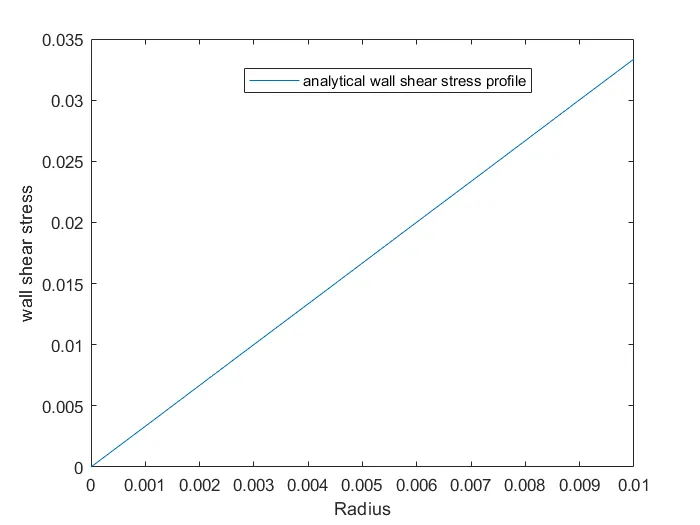
Analytical solution using MatLab:
clear all
close all
clc
%inputs
D = 0.02
r = D/2
Re = 2100
mu = 8.9e-4
rho = 997
%V_avg
V_avg = (Re*mu)/(rho*D)
V_max = 2*V_avg
L_e=0.06*Re*D
L=L_e+0.18
DeltaP=(32*mu*V_avg*L)/(D^2)
%radius
R = linspace(0,0.01,20);
for i = 1:length(R)
    %local velocity
    V_local(i) = 2*V_avg*(1-(4*R(i)^2/D^2));
    %wall shear stress
    tau(i)=(2*mu*V_max.*R(i)./(r^2));

end

figure(1)
plot(R,V_local)
xlabel('Radius')
ylabel('local velocity')
legend('analytical velocity profile')
figure(2)
plot(R,tau)
xlabel('Radius')
ylabel('wall shear stress')
legend('analytical wall shear stress profile')
D =
0.0200 m
R =
0.0100 m
Re =
2100
mu =
8.9000e-04 `pa-s`
rho =
997 `(kg)/(m^3)`
V_avg =
0.0937 m/s
V_max =
0.1875 m/s
L_e =
2.5200 m
L =
2.7000 m
DeltaP =
18.0189 pa
kinematicpressredrop =
0.0181`m^2/s^2`
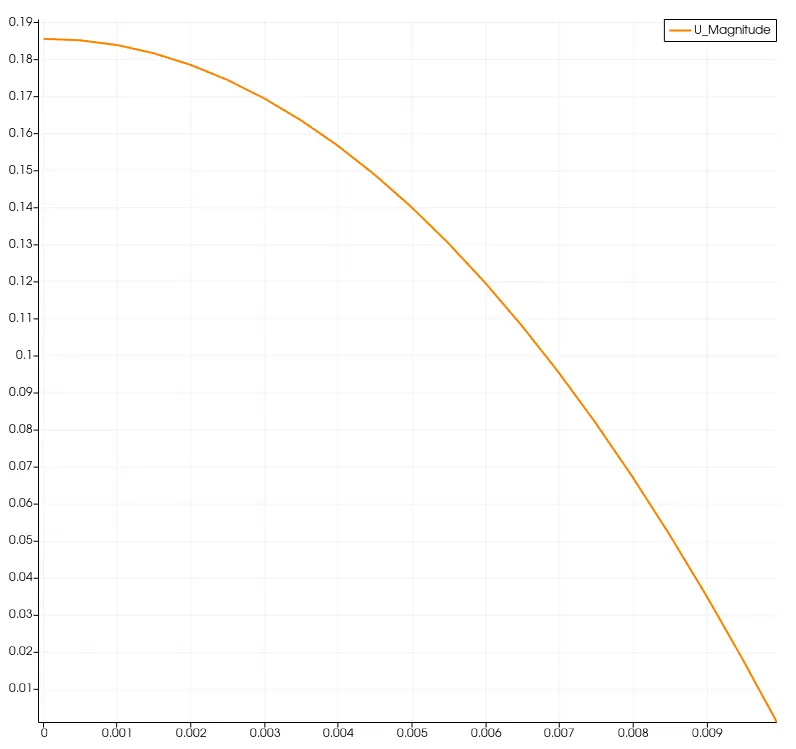
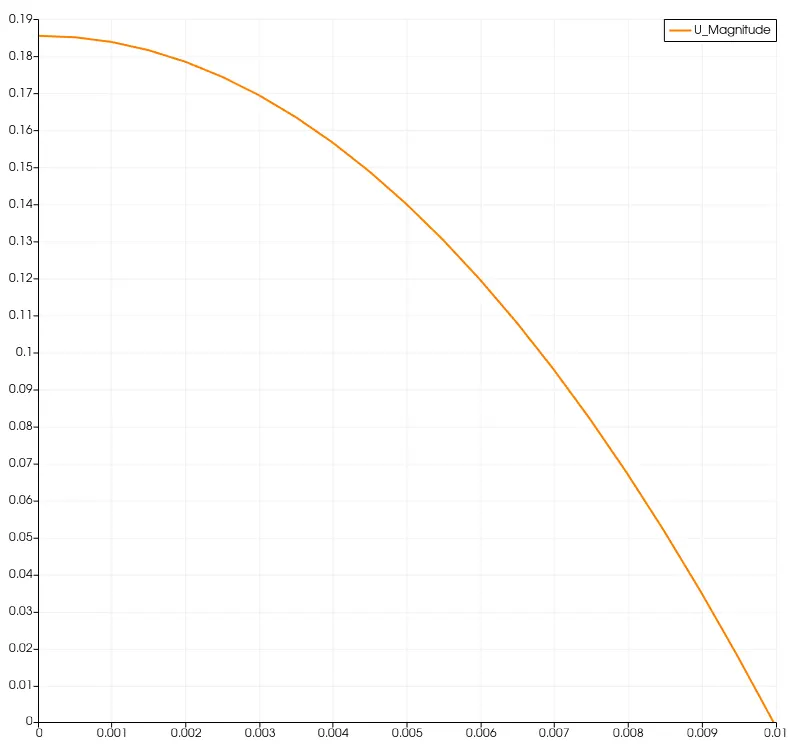
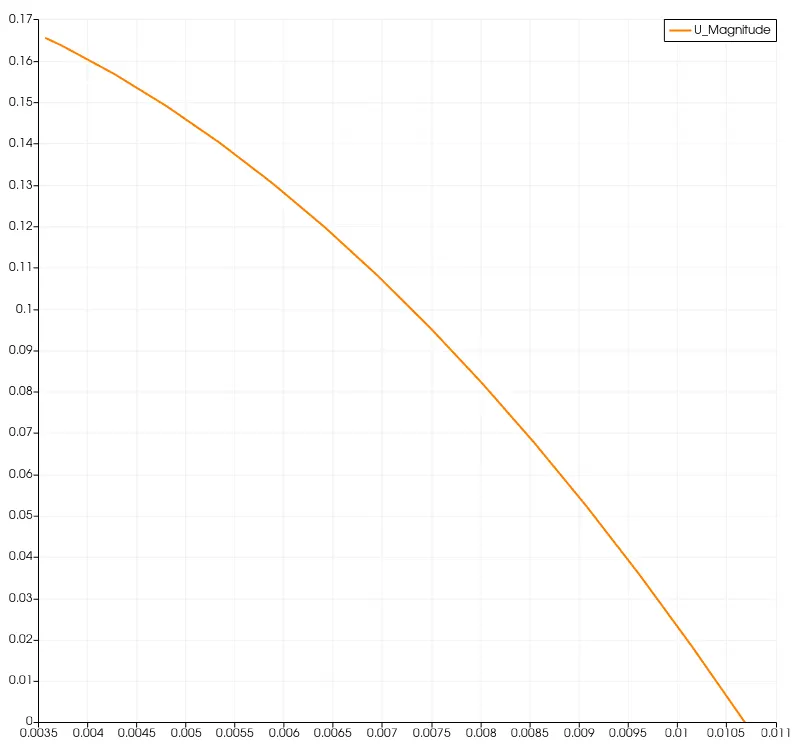
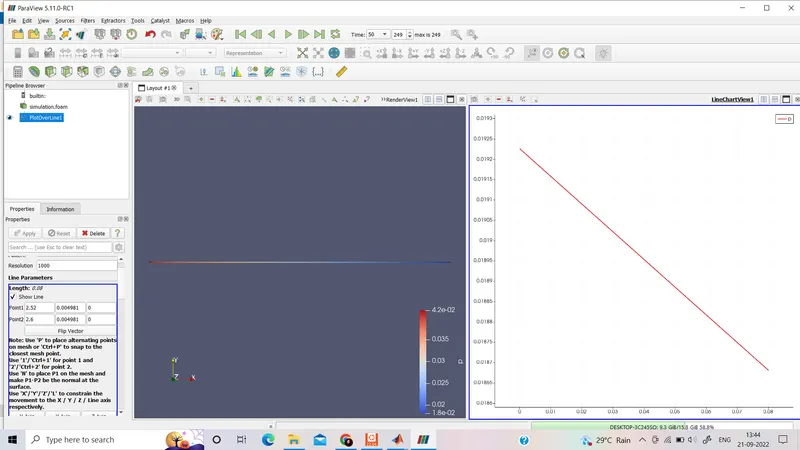
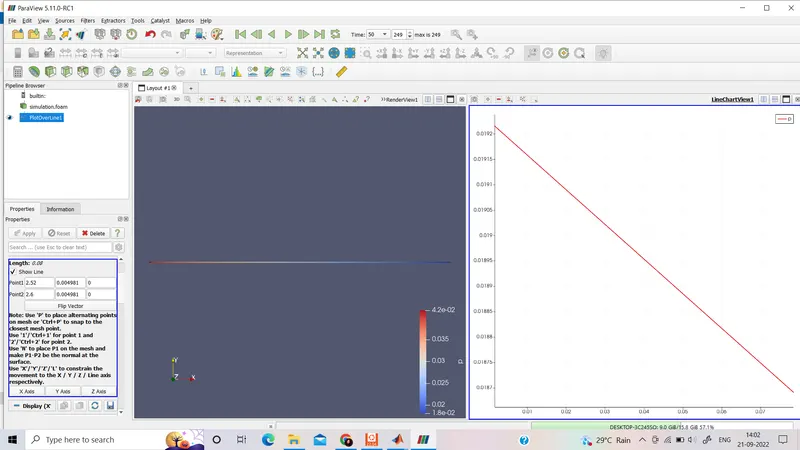
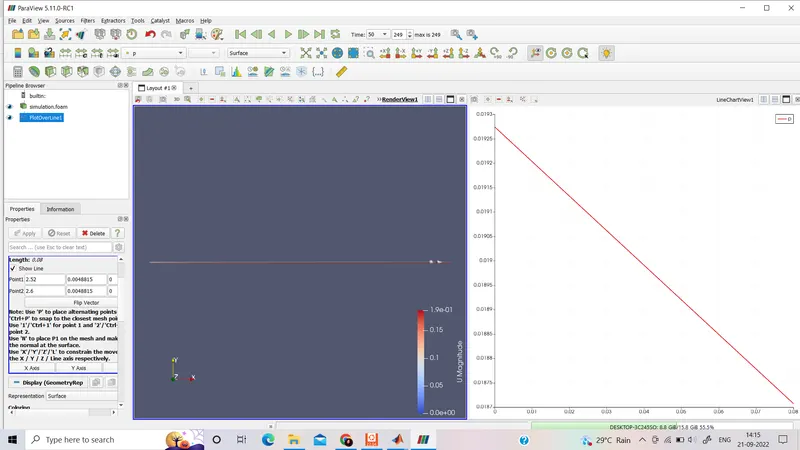
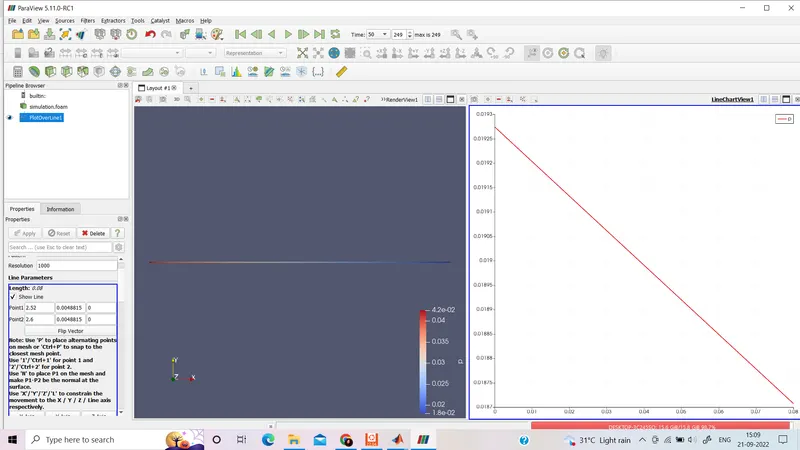
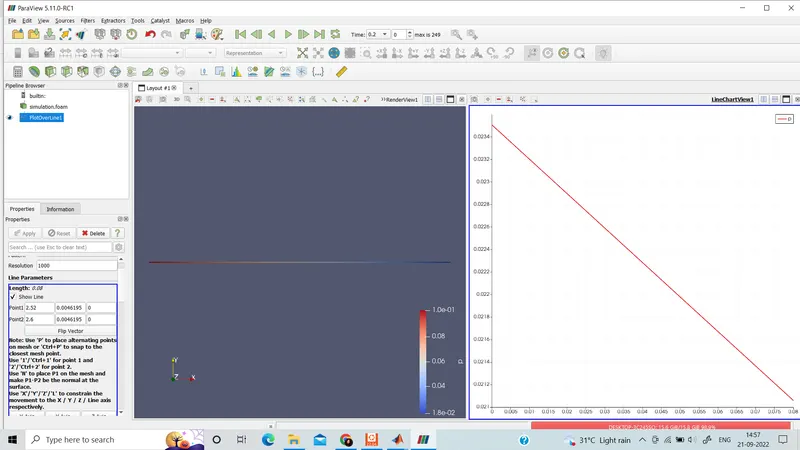
Validation of hydro-dynamic length with the numerical result: after passing Le i.e. x=2.52 m the flow will fully develop
wedge angle `10^o`wedge boundary condition:
At x=2.6 m
wedge angle `10^o`symmetry boundary condition:
at x=2.6 m
wedge angle `25^o`wedge boundary condition:
At x=2.6 m
wedge angle `25^o`symmetry boundary condition:
At x=2.6 m
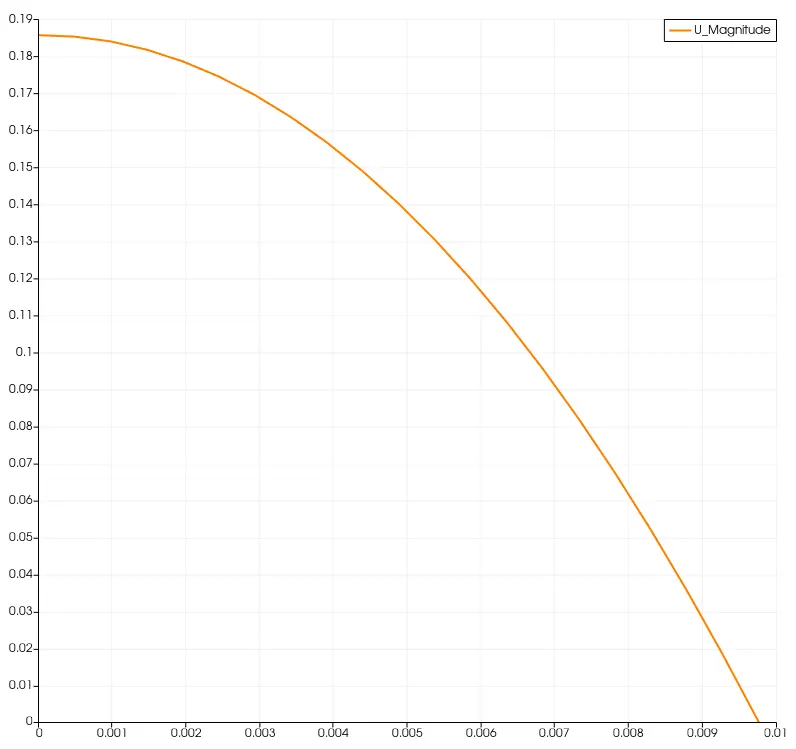
wedge angle `45^o`wedge boundary condition:
At x=2.6m
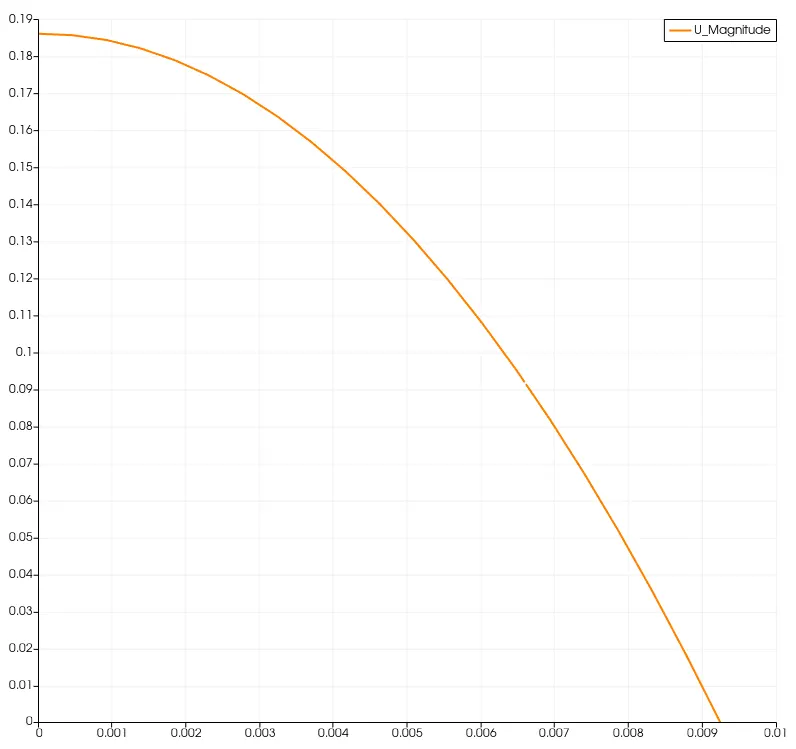
wedge angle `45^o`symmetry boundary condition:
At x=2.6 m
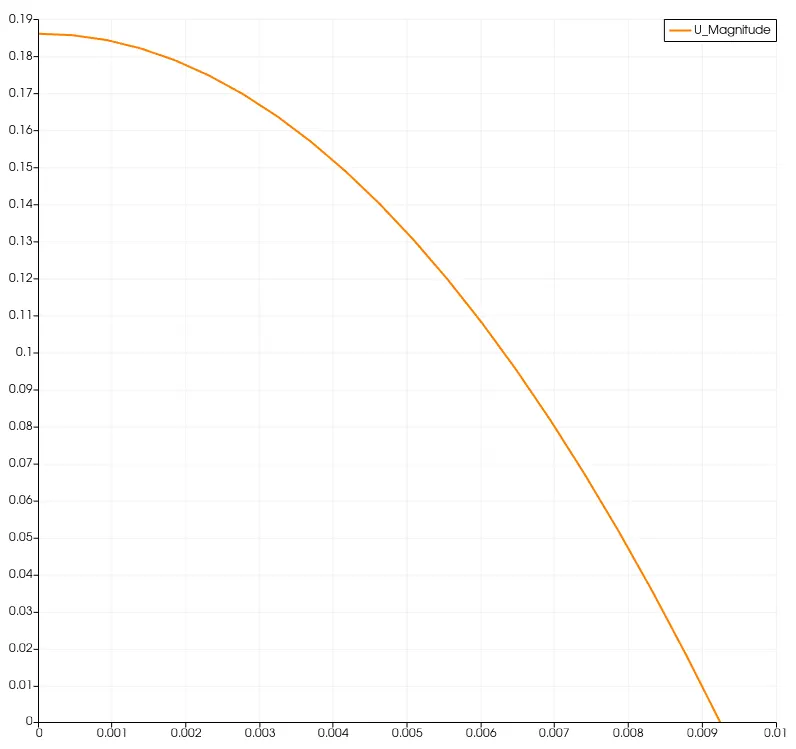
Validation of the fully developed flow velocity profile with its analytical profile:
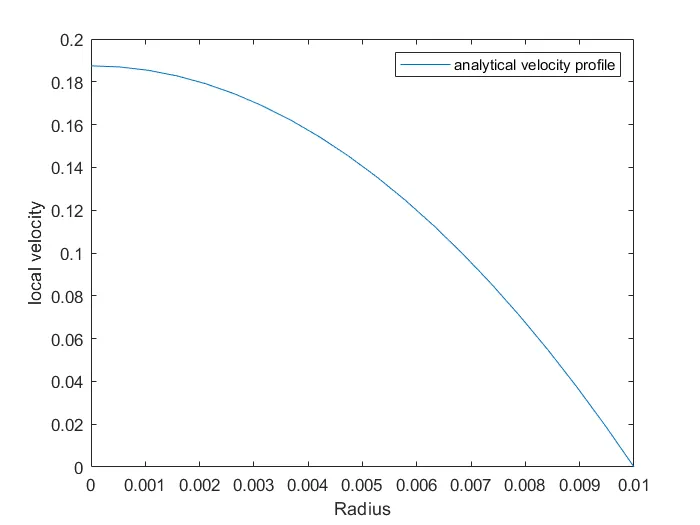
The analytical profile generated using MatLab: (matches the velocity profile generated using OpenFOAM.)
Analytical Velocity profile:
Validation of maximum velocity and pressure drop for fully developed flow:
`V_(avg)=(Re*mu)/(rho.D)`
`V_(max)=2*V_(avg)`=0.1875`m^2`
Pressure drop,
to validate the kinematic pressure drop we are taking L=(2.6-2.52) m=0.08m
`DeltaP/(rho)=(32*mu*V_(avg)*L)/(D^2*rho)`=5.35e-4 `m^2/s^2`
wedge angle `10^o`wedge boundary condition:
wedge angle `10^o`symmetry boundary condition:
wedge angle `25^o`wedge boundary condition:
wedge angle `25^o`symmetry boundary condition:
wedge angle `45^o`wedge boundary condition:
Wedge angle `45^o`symmetry boundary condition
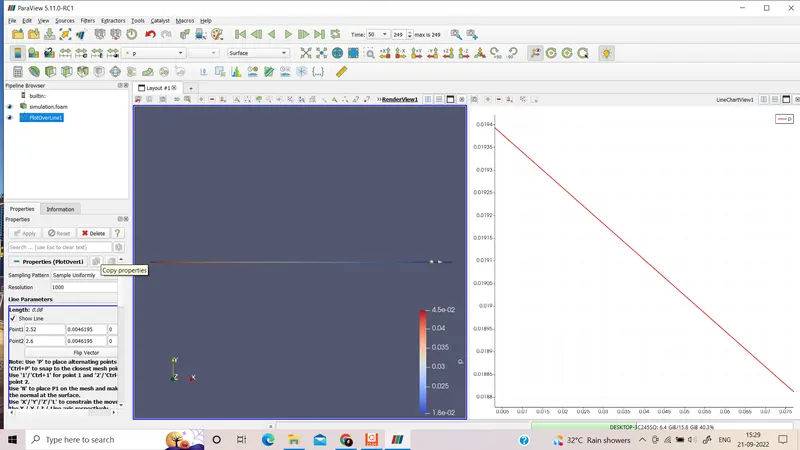
By observing the graphs obtained in ParaView, we can say that when R=0 i.e. at the center there will be zero shear stress and maximum velocity. On the other hand, at R=0.01m i.e. at the circumference shear stress will be maximum and velocity will be zero. Pressure is decreasing.
Post-processing of Shear stress and validation of wall shear stress for fully developed flow:
using OpenFOAM:
wedge angle `10^o`wedge boundary condition:
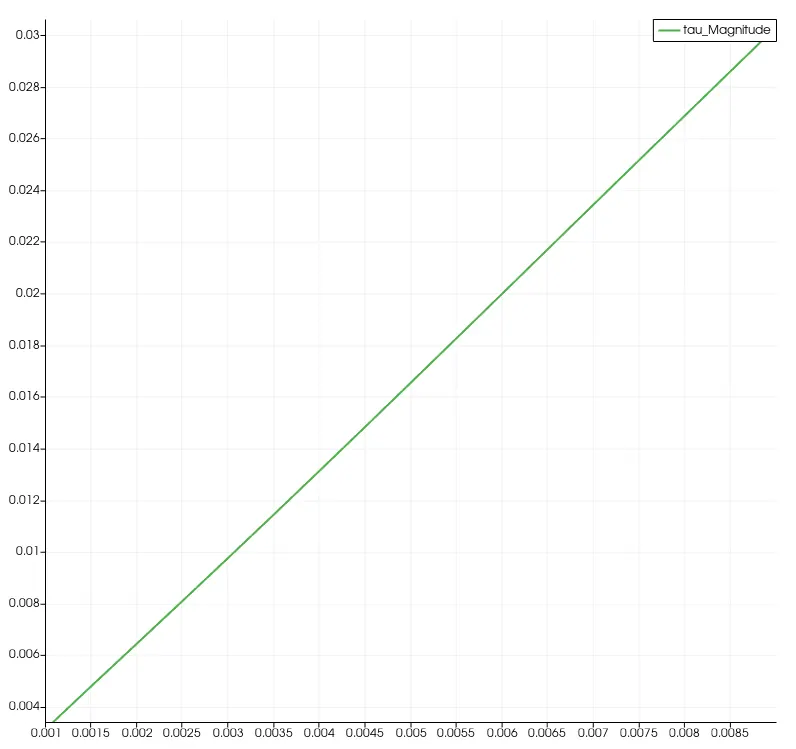
wedge angle `10^o`symmetry boundary condition:
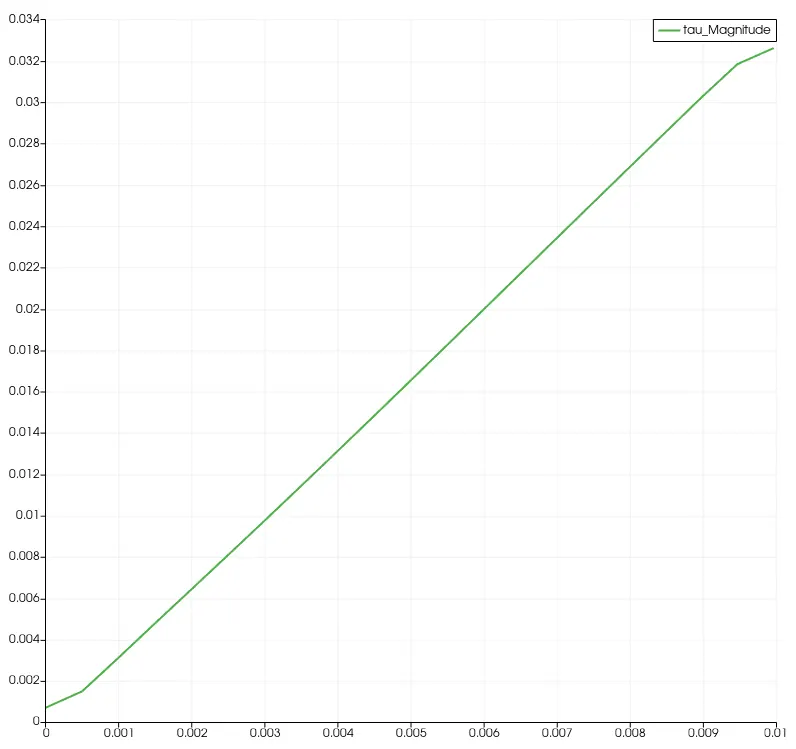
wedge angle `25^o`wedge boundary condition:
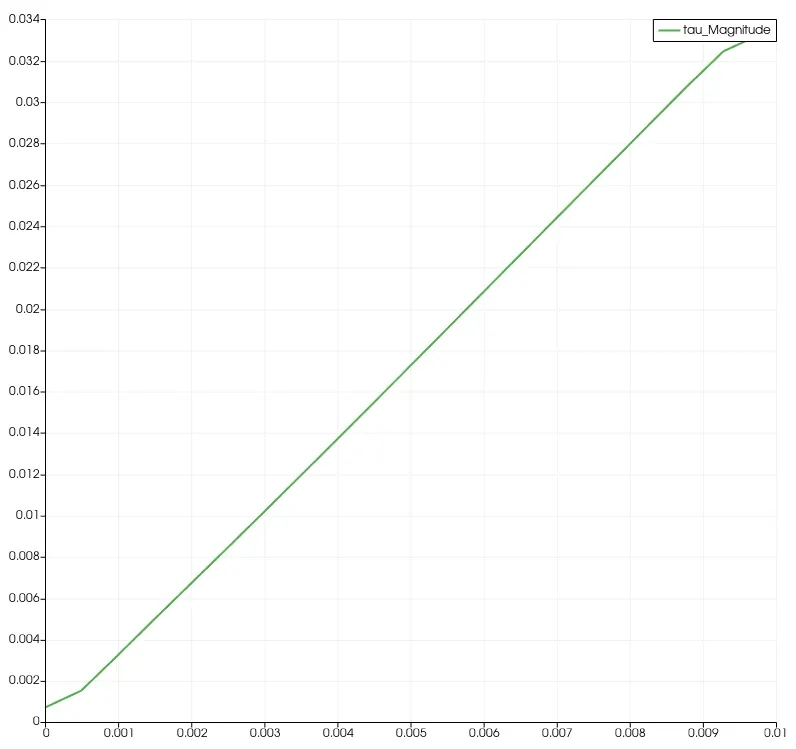
wedge angle `25^o`symmetry boundary condition:
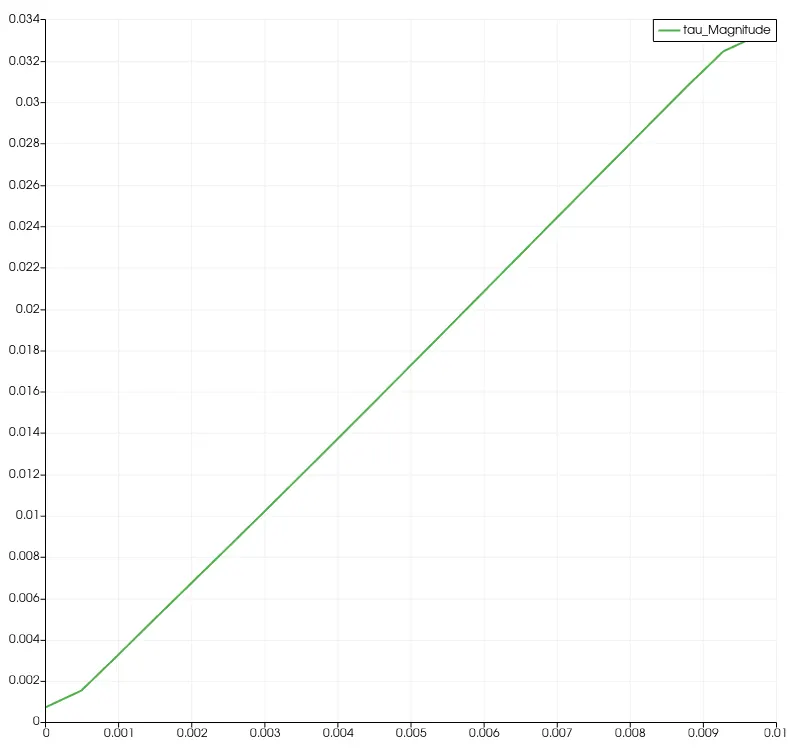
wedge angle `45^o`wedge boundary condition:
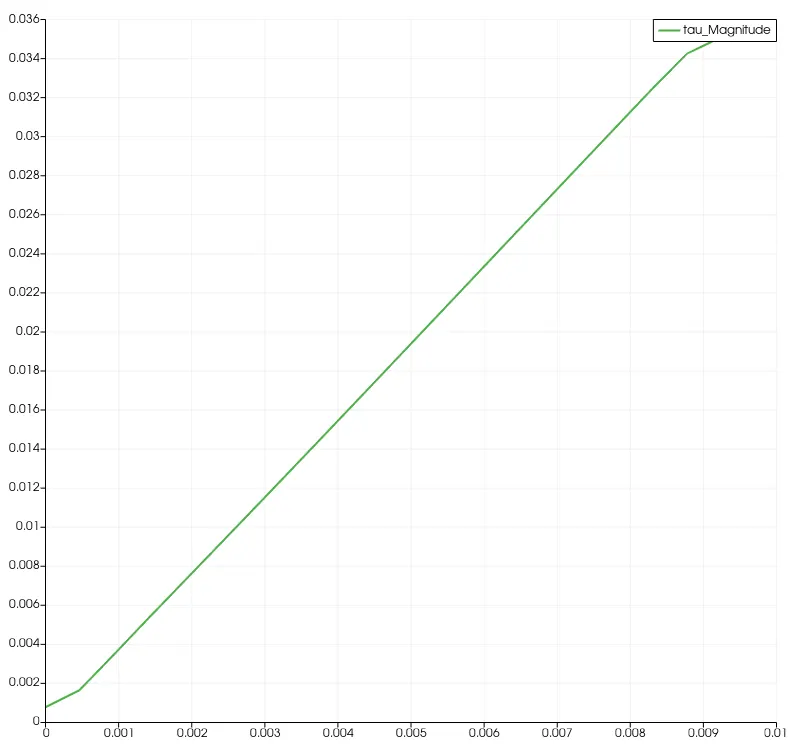
wedge angle `45^o`symmetry boundary condition:
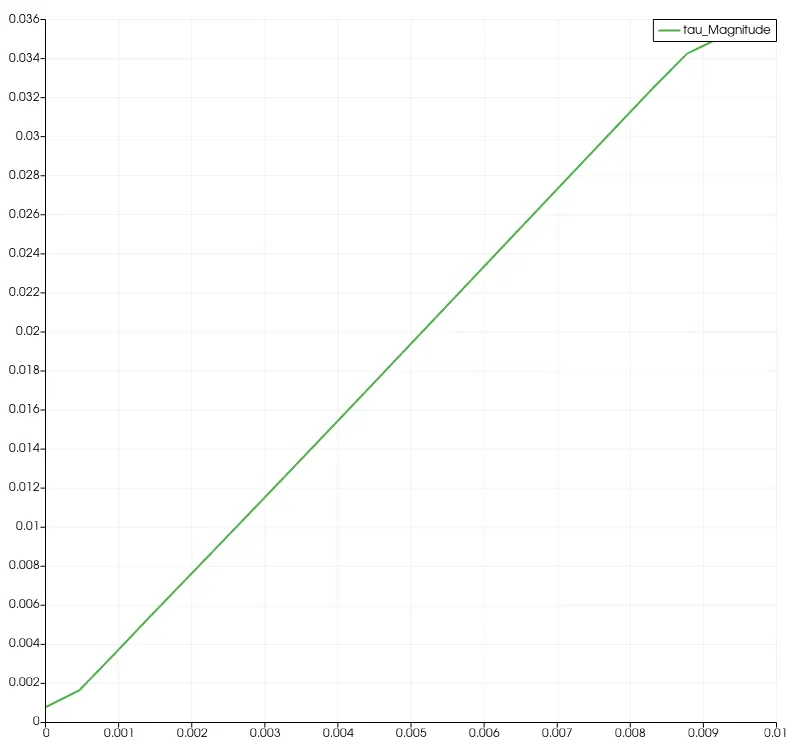
Analytical shear stress profile:
The differences in both boundary conditions in terms of their usage and application:
Wedge boundary condition: For 2-dimensional axisymmetric cases e.g. a cylinder, the geometry is specified as a wedge of small angle (e.g. less than `5^o`) and 1 cell thick running along the plane of symmetry, straddling one of the coordinate planes. The axisymmetric wedge planes must be specified as separate patches of wedge type.
Symmetry boundary condition:
The symmetry boundary condition defines a mirror face/surface. The symmetry condition is used if the physical object or geometry and the expected flow field pattern of the developed solution are mirrored along that surface.
Conclusions:
Simulation results are very near to analytical results .