Week 12:Project 2-Meshing of Rear Wheel Holder challenge
Aim:
Meshing the component given and assigning the thickness to that component by giving the target Element Length as 5
Units by using of the quality criteria as mentioned below.
Target Element Length = 5 Units
| S.N | Quality Criteria | Value |
| 1 | Aspect Ratio | 5 |
| 2 | Skewness | 45 |
| 3 | Warping | 15 |
| 4 | Taper | 0.5 |
| 5 | Min. Length | 2 Units |
| 6 | Max. Length | 8 Units |
| 7 | Min angle Quad | 45 |
| 8 | Max angle Quad | 135 |
| 9 | Min angle Tria | 20 |
| 10 | Max angle Tria | 120 |
| 10 | Tria % | 10 |
Steps:
1.Firstly import the model.
2.Select the import option on the toolbar menu and click on the imported geometry.
3.Click on the file sign,then it will be shown the model and then select it.
4.Click on the import button,then it will be shown on the graphic area.
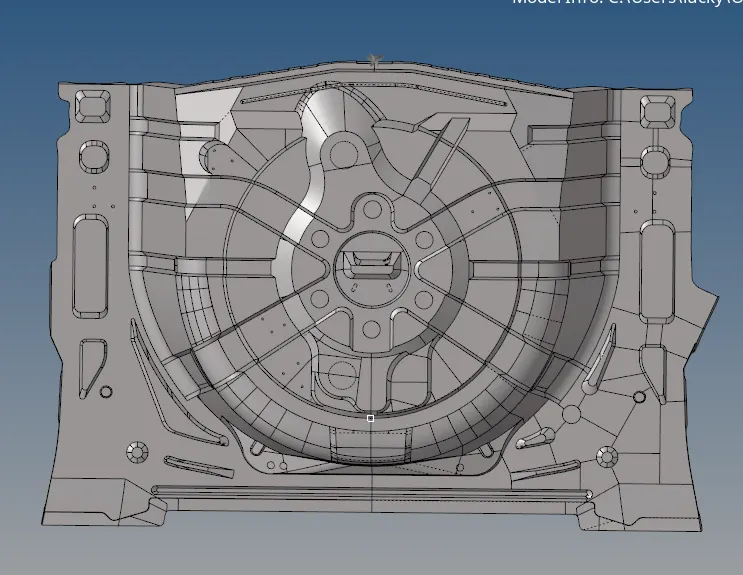
5.After importing the model,perform the mid surface operation as we discussed earlier.
6.To perform mid surface operation,go to the geomentry tools option and click on the mid surface option.
7.After clicking on the mid surface,goto extraction option and select the offest+planes+sweeps which gives the perfect mid
surface forthe component.
8.After selecting it,go to the auto extraction and click on the surfaces which we have to perform the mid surface operation
and click on the extract button to perform the operation.
9.After creation of the mid surface,check the mid surface wheather the surface has any errors or not.If the errors are found
try to minimize that errors before performing the meshing for the component.
10.Before starting up the mesh,adjust the elemental quality criteria as mentioned above in the procedure.
11.The quality criteria can be adjusted from the preferances option from the main menu bar.
12.After that split the component into the desired number of parts which we can perform the mesh properly.
13.After spiliting into the parts, perform the automesh operation from the 2D in the menu bar.
14.Now while performing the meshing,ignore all the rotational quadrant that are which cannot be formed during the mesh.
15.Repeat the same procedure for the rest of the geomentry model.
16.The below figures will shows the component of the model after meshing.
17.After meshing the component the entire model be shown as in below fig.
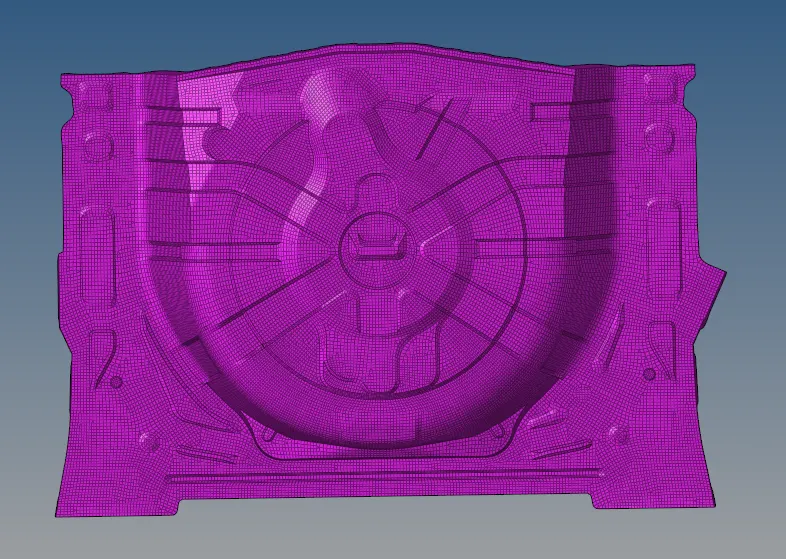
OUTPUT
18.Thus I performed quality criteria for meshing the given component with the given element thickness as 5 units.