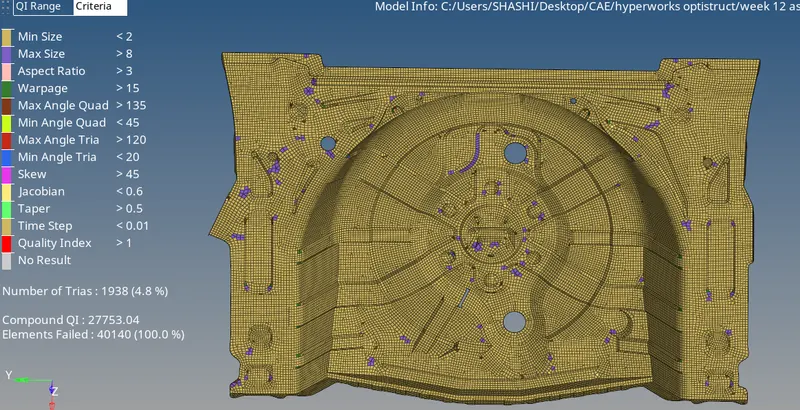
Week 12:Project 2-Meshing of Rear Wheel Holder challenge
OBJECTIVE:- (1) Create a mid-surface for the Rear wheel holder from the given model.
(2) Mesh the mid surface as per the given quality criteria.
(3) assign thickness to the element based on the model's thickness at different regions.
PROCEDURE:- (1) first I imported the model which was provided as an igs file.
(2) then I extracted the mid-surface from the model using auto mid-surface and repair the mid-surface using quick edit, edge edit, and surface edit.



(3) then I set mesh quality by going to preference < criteria file setting < set mesh quality as mentioned.
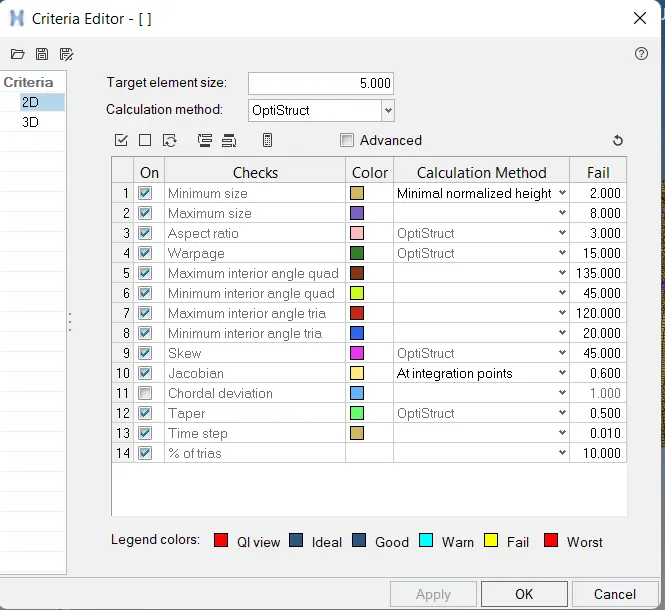
(4) then I mesh the mid surface by going to 2D < auto mesh < with mixed elements.

(5) AT the end I created a property by right-clicking on the tab area and assigning it the value of thickness 0.75 than assigning it to mesh.
(6) After that I re-mesh the various region of the mid-surface to improve mesh flow and to reduce the number of tri elements.