Structural analysis of a buidling using Robot Structural Analysis
QUESTION 1 ANSWER
HVAC stands for Heating,Ventilation and air conditioning systems.They are not visible to us externally but certainly makes us feel comfortable.
It is a system which is used to regulate temperature,air flow,ventilation, and air conditioning of an entire building.
HVAC buildings are necessary in buildings because
- They regulate the temperature inside the building
- They improve the quality of air ,remove unpleasant smell and controls the humidity
- They are a worthy investment and used in energy savings
- They are automated and we do not need to control them.
QUESTION 2 ANSWER
AIM : To design HVAC system for each floor created in week 7 and include all the related components like collectors ,ducts ,blowers .
PROCEDURE :
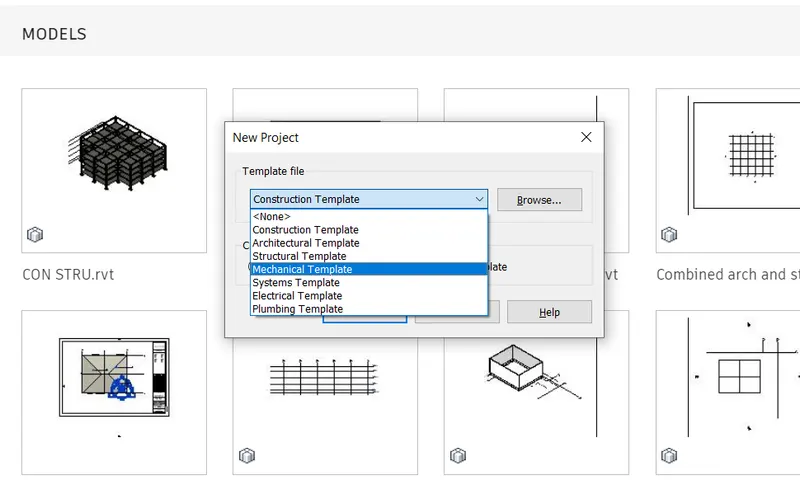
- Open a new mechanical template in revit
- Save it using appropriate name
- Set the collaborate settings and coordinates of our model
- Add grids to your model and link your architecture model to mechanical model using manage links option
- If they do not coincide use relocate the project option to to coincide as we did in our previous challenge
- Now select system tab and add air terminals and suppliers in each room

- Select all the elements in the room and click on duct
- To generate the layout of HVAC system click on generate layout option
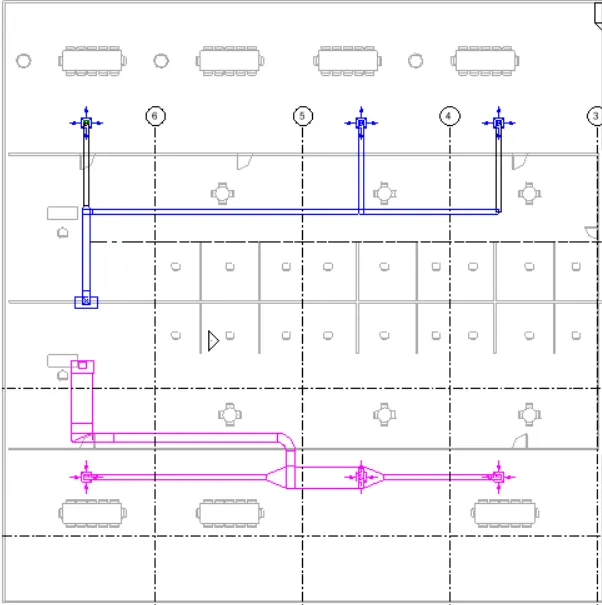
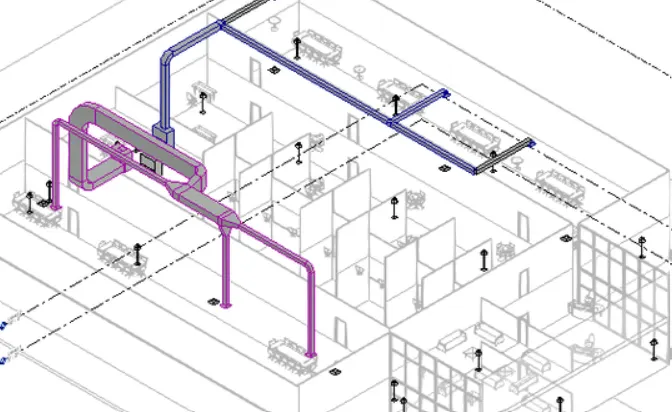
RESULT: We designed HVAC system for our model
QUESTION 3 ANSWER
Steps to add ROBO STRUCTURAL ANALYSIS TOOL to Revit software
- First check whether robo structure analysis add in available in your software or not(It should be present under analyze tab)
- If it is not available you can download it from auto desk official site
- Or click on the store option present at the top of the bar in revit software and search for robo structure analysis tool according to your revit version
- Download it and install it (close Revit while installing )
- Now Reopen Revit app and Go to analyze tab to check whether it is installed or not
QUESTION 4 ANSWER
Structural analysis is a process of caluculating the forces moments and deflections to which members in a structure are to be subjected .It is particularly important for structural engineers to ensure that they completely understand the load paths and the impacts they have on their engineering design. To perform structural analysis a strucural engineer must determine information such as structural loads ,geometry ,support conditions ,and material properties .The result of analysis includes support reactions ,displacements , stresses .
The structure should resist all the loads and should be sevicible. Structural analysis can either be performed during design ,testing or post construction,and will generally account for the materiak used. the geometry of structure and applied loads .It usually looks at structural elements and the force they undergo . The structural will look at structural analysis of beams slabs cables and walls .All of these elements have forces applied to them such as wind load ,live load ,dead load .So it is important to review how much of these elements behave under these loads .The structural design does effect the modelling ,it will help to design better models and cover the issues with an existing models and allows to incorporate the alternatives.
QUESTION 5 ANSWER
AIM : To export the complete analytical model of our week 6 or 7 session to robot structural analysis.
a)Boundary conditions are conditions which are to be satiesfied at all parts of boundary regions where differential conditions have to be solved separately.For a structural analysis problem to be solvable every location of our boundary should be must have a known force or displacement
b) we can apply different load like dead load,live load ,wind load etc ..
PROCEDURE :
- First open the structural analysis file we created in week 6 and week 7
- Go to analytical 3 d view from properties browser.
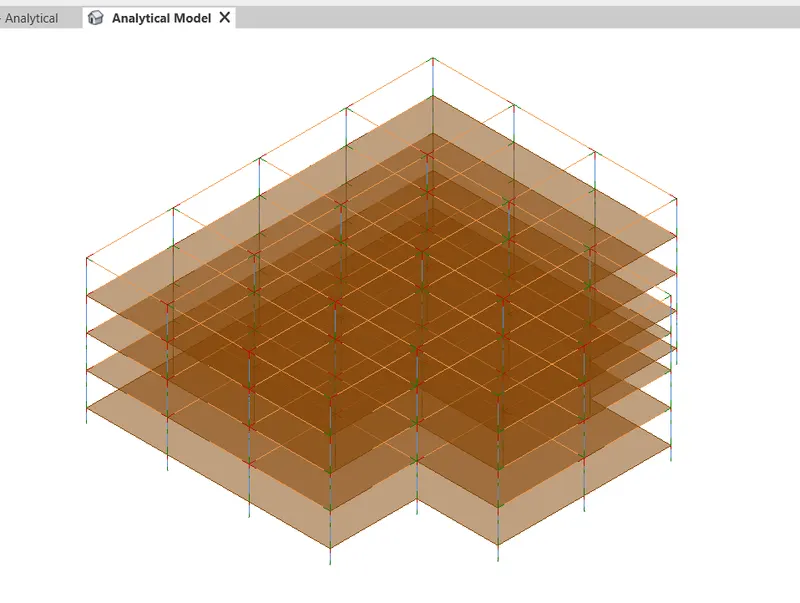
- Now go to structural setting option under manage tab
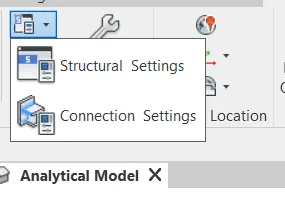
- Select the load combination tool add different load combinations
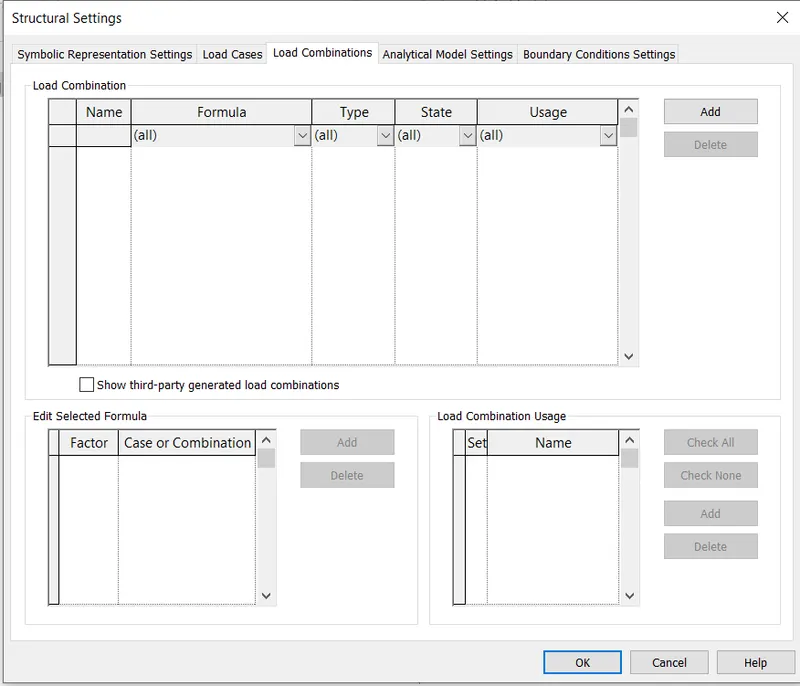
- Now go to analysis tab ,select the boundary conditions and set them
- Now click on robo structural analysis in analyze tab
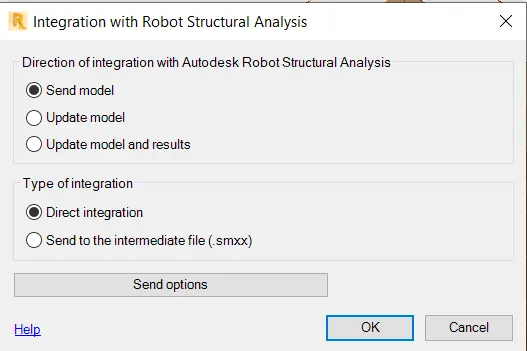
- Click send the model and ok
- This is how you export your model to robo structural analysis
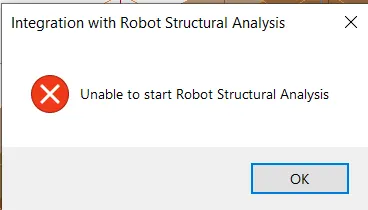
- There is problem with my software to show the results
QUESTION 6 ANSWER
ENERGY ANALYSIS: It is caluculating the amount of energy
It helps us in assessing the way energy is used in an operation involving the physical and chemical processing of materials and transfer and conversion of energy
It is usually performed on the building design through all stages from the earliest conceptual phase through detailed design to ensure that you are constantly working towards the most energy efficient building possible.
Energy analysis involves 4 steps
- Calculation of heat loss and gain to the building spaces and the heating and cooling loads imposed upon building systems
- Caluculation of energy addition and extration of to meet the possibly varying temperature set points and humidity criteria
- Determination of fuel requirement of primary equipment in the attempt to supply the energy demand of HVAC system
- It evaluates the cost of equipment ,fuels, electricity,labour and retrofit components against the alternative of investing money in another way
Energy simulation can help in analyzing the moment of energy in and out and through the rooms and volumes in building models. This information can help designers make better informed cost effective desicions that improve the performance and reduces the environmental impact of building
Sustainable design deals with the philosophy of having built and designed objects buildings environments and services that confirms with the many principles of ecological sustainability .This includes maintaining change in a homeostatic environment where the use of resources ,inclination of investments,and the direction of development are balanced and meet the current and future needs of humanity. Simply put sustainable design represents development that not only meet the needs of present but does so without compromising the ability of future generations to meet their own needs.