Solving Second Order ODE's and Simulation of Simple pendulum motion in MATLAB
AIM: To write a MATLAB program which solves the equation of motion of a simple pendulum with damping.
OBJECTIVE:
- To learn how to solve an Ordinary Differential Equation (ODE) using MATLAB
- To solve ODE of a simple pendulum that represents its equation of motion
- To simulate the pendulum motion
- Understand the importance behind motion study of a simple pendulum
Theory:
An ordinary differential equation (ODE) is a differential equation containing one or more functions of one independent variable and the derivatives of those functions.
The ordinary differential equation under question here represents the equation of motion of a simple pendulum.
In fact, a simple pendulum consists of a mass m hanging from a string of length L and fixed at a pivot point P. So, in case it is tilted to an initial angle and released, the pendulum will swing back and forth with a periodic motion.
It lies on Newton’s second law and its study enables us to describe the simple harmonic motion or the theory of all oscillations.
Scientifically, pendulum finds its application in time-keeping even if nowadays it is getting substituted by atomic vibrations for the most accurate clocks. It is also used in the measurement of the acceleration due to gravity and also can be used the spinning of then earth.
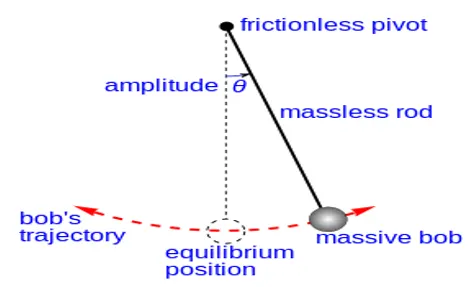
EQUATION USED:
- `(d^2 θ)/dt^2 + b/m ( dθ)/dt + g/L sinθ = 0` where
g is the gravity in m/s^2
L is the length of the pendulum in m
m is the mass of the ball in kg
b is the damping coefficient
In order to write the MATLAB program, the above equation is solved as following:
- Firstly, we substitute `θ= θ_1`
`(dθ)/dt= (dθ_1)/dt`
- `(dθ_1)/dt= θ_2` (1st ODE)
- `(d^2 θ)/dt^2 = (d^2 θ_1)/dt^2 = d/dt ((dθ_1)/dt)= d/dt(θ_2)`
- By rewriting the main equation we get
`(dθ_2)/dt+ b/m θ_2+ g/L sinθ_1 =0` `⇒` `(dθ_2)/dt= - b/m θ_2- g/L sinθ_1` (2nd ODE)
By putting the above two ODEs in the matrix form we get:
`d/dt [θ_1@θ_2 ]= [θ_2@-(b/m) θ_2-(g/L )sinθ_1 ]`
DETAILS:
Programming language used: MATLAB
Concepts used: Ordinary Differential Equation, Simple pendulum, damping coefficient, Newton second Law.
Brief overview: This program in order to run and give the expected results, takes a help of a built-in function that is an anonymous function of which the purpose is to solve the ordinary differential equation.
Loop used: For Loop
PROGRAAM AND STEPWISE EXPLANATION:
MAIN PROGRAM:
%This program aims to solve the ODE which represents the equation of motion
%of a simple pendulum
clear all
close all
clc

%Inputs

b = 0.05;  % Damping coefficient
g = 9.81;  %The acceleration due to gravity in m/s^2
l = 1;     %The length of the pendulum in m
m = 1;     %The mass of the ball in kg
% initial condition
theta_0 = [0;3];  %The first value represents the displacement and the second value represents the angular velocity

%time points
t_span = linspace(0,20,500);  %This is the time span which takes 500 values between 0 and 20

%solve ODE
[t, results] = ode45(@(t,theta) ode_func(t,theta,b,g,l,m), t_span, theta_0); %As you can see an anonymous function that is ode45 is used to solve our ODE
%And its initial conditions can be seen above. It also contains a function
%that is ode_func which we have defined to break up and solve the second
%order ODE.


%The following commands hold the plots of angular displacement and velocity
plot(t,results(:,1)); % command to plot the angular velocity
hold on
plot(t,results(:,2)); %command to plot the angular velocity
xlabel('time'); % X axis represents time
ylabel('theta'); %y axis represents displacement theta
legend('angular displacement','angular velocity'); %This is for legend display
hold off

%The following commands are within a for loop which enable us to create a
%simple pendulum and its animation

ct = 1; %initialisation of the counter
for i = 1:length(t);
    x_0 = 0;
    y_0 = 0;
    %The following commands calculate the x and y coordinates that give the position of the ball coresponding to each value of angle theta
    x_1 = l*sin(results(i,1))
    y_1 = -l*cos(results(i,1));

    figure(2)
    plot([x_0 x_1],[y_0 y_1],'linewidth',3,'color','r');
    hold on
    plot([1 -1],[0 0],'color','g');
    plot(x_1,y_1,'.','Markersize',75);% This command help us create a sphere in MATLAB
    axis([-1 1 -1.3 1]);
    hold off

    M(ct) = getframe(gcf);
    ct = ct + 1;% Impementation f the counter
end

% All the following commands let us create the video file of the animation
movie(M);
Videofile = VideoWriter('Pendulum_ODE.avi','uncompressed AVI');
open(Videofile);
writeVideo(Videofile,M);
close(Videofile);
PROGRAM FUNCTION:
%This function help us break up the sedond order ODE into first order ODEs in order to %solve them with much more facility

function [dtheta_dt] = ode_func(t,theta,b,g,l,m)
       theta1 = theta(1)
       theta2 = theta(2)
       dtheta1_dt = theta2;
       dtheta2_dt = -(b/m)*theta2 - (g/l)*sin(theta1);
       dtheta_dt = [dtheta1_dt; dtheta2_dt];
endOUTPUT:
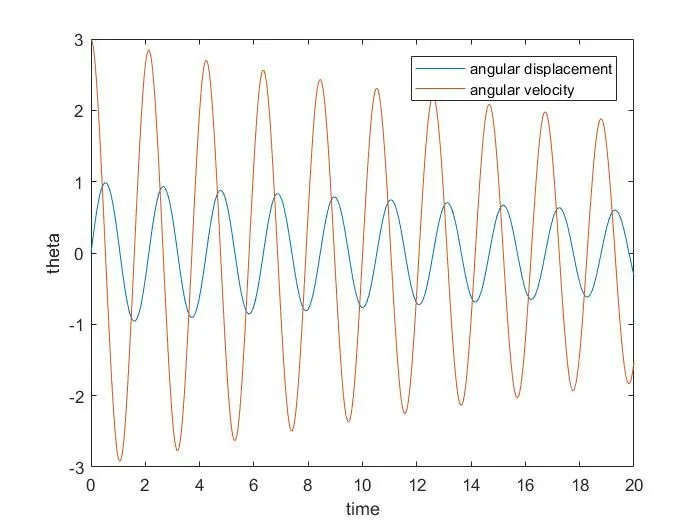
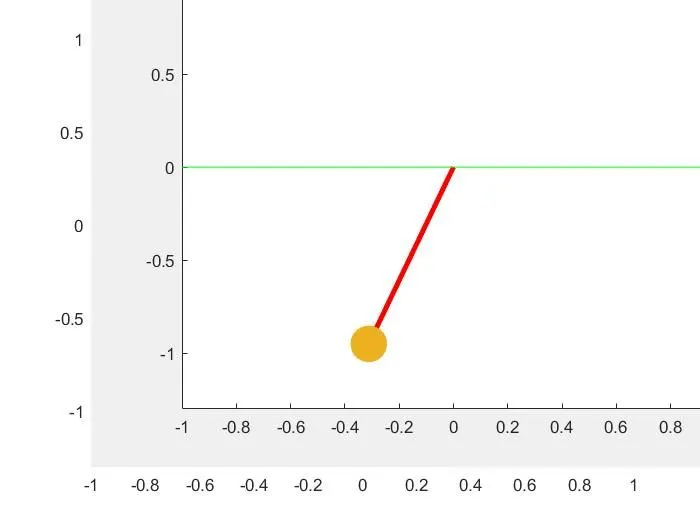
The simulation of simple pendulum motion can be consulted through the link belokw:
https://drive.google.com/file/d/1x64A8artgugVVAAs_9RftO5k42eTZjmz/view?usp=sharing
ERRORS OR PROBLEMS FACED:
- Case sentive error

As a solution, we have to bear in our mind while using MATLAB that it is a case sentive programming language. and this must be especially when using built-in funtions.
2. Loop closing error

Here to avoid such errors while using a loop through a program, we have to remember to close each loop to mark its end in that program
CONCLUSION:
All in all, we have understood how to solve a second ODEs using MATLAB . We have also achieve the study of the simple pendulum motion and its simulation.