Simulation of 2R Robotic arm using MATLAB
Aim: To simulate the Forward kinematic of a 2R robotic arm using MATLAB.
Objective:
- Write a program to simulate the forward kinematics of a 2R robotic arm.
- Animating and creating a movie for arm workspace.
Introduction:
Forward kinematics refers to users of the kinematic equation of a robot to compute the position of the end effector from specified values for the joint parameter.
2R robotic arm:
A 2R robotic arm is a type of mechanical arm, use to do function similar to a human arm, the arm may be sum total of the mechanism or may be part of the more complex robot. The links of such manipulator are connected by joint allowing either rotational motion or translational (linear) displacement.
Application:
There are various application of the 2Rrobotic arm, such as follows
- Welding
- Pick and Place
- Painting
- Package industry
- Food and sanitation
- Assembly operation
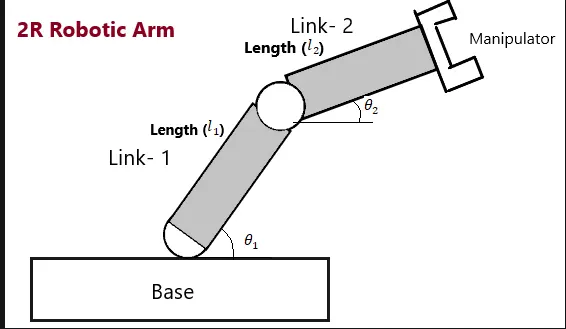
Schematic diagram:
Input:
l1 = length of link 1
l2 = length of link 2
theta1 = angle made link 1 with a horizontal surface
Theta2 = angle made by link 2 with a horizontal surface
Code:
%forword kinematics of 2R robotic arm
clear all
close all
clc
 % input

 % length of link1 and link2
 l1 = 1;
 l2 = 0.5;

 % angle of link1 and link2
 theta1 = linspace(0,90,10);
 theta2 = linspace(0,90,10);

 % code and counter
 ct= 1;
 for i= 1:length(theta1)
     THETA1 = theta1(i);
     for j = 1:length(theta2)
         THETA2 = theta2(j);

         %coordinates of starting point of link1
         x0 = 0;
         y0 = 0;

         %coordinates of end point of link1
         x1 = l1*cosd(THETA1);
         y1 = l1*sind(THETA1);

         %coordinates of end point of link2
         x2 = x1+l2*cosd(THETA2);
         y2 = y1+l2*sind(THETA2);

         %plotting

         plot([x0 x1],[y0 y1],[x1 x2],[y1 y2],"linewidth",4)
         axis([-0.1 1.5 0 1.5])
         pause(0.02)
         M(ct)= getframe(gcf)
         ct = ct+1;
     end

 end

 movie(M)
 videofile = VideoWriter('forword_kinematics.avi','Uncompressed AVI');
 open(videofile)
 writeVideo(videofile,M)
 close(videofile)
Explanation:
Give some inputs to MATLAB regarding arm length for link1 and link2. theta1 and theta2 is an array set of 10 values of THETA. We use the variable ‘ct’ for frame counting with the initial value 1.
Then use ‘for loop’ for theta1 and theta2 separately. The values of theta1 and theta2 are store into variables called THETA1 and THETA2 respectively.
- For loop:
For loop is a set of instructions or commands that repeat itself a specified number of times.
Any loop contains an ‘end’ value statement to symbolized the end of our set of instructions so the program again checks the condition to repeat the process.
- To calculate the end position of each link there are some equations given below.
- Link 1
Start point, x0 = 0 , y0 = 0
End point, x1 = l1cosd(theta1)
y1 = l1sind(theta1)
- Link2
Start point = end point of link 1
End point ,x2 = x1+l2cosd(theta2)
y2 = y1+l2sind(theta2)
Commands:
- plot: to plot a graph.
- getframe(gcf): it used inside the second loop to gety the current frame and store it is an image into the array M.
- videowriter:its create an empty video file by name forword kinematic in .avi formate.
- writevideo:it insert the frame stored in the array ‘M’ into video file.
Result:
Conclusion:
In this way, we simulate the 2R robotic arm.