Section Modulus calculation and optimization
Aim:
To calculate the section modulus of the hood and to modify the design for improving its strength.
Theory:
Section modulus:
Section modulus is a geometric property for a given cross-section used in the design of beams or flexural members. Other geometric properties used in the design include an area for tension and shear, the radius of gyration for compression, and the moment of inertia and polar moment of inertia for stiffness. Any relationship between these properties is highly dependent on the shape in question.
There are two types of section moduli, the elastic section modulus and the plastic section modulus. For general design, the elastic section modulus is used, applying up to the yield point for most metals and other common materials.
Section Modulus can be calculated by using the Formula:
S = I / y
Where,
S = Section Modulus
I = Moment of inertia
Y = Distance from the neutral axis to the most extreme end of the object
Procedure:
To calculate the section modulus, we first need to take a section of our hood and then find the moment of inertia (I) and the distance from the neutral axis to the most extreme end (Y).
To get the section of our hood in CATIA, Go to the intersection option and select the first element as YZ plane (Since it is cutting the hood from the centre) and then select the body (outer & inner panel of the hood) as the second element.
Case 1:
In this case, we will be finding the moment of inertia without modifying or changing the distance between the inner & outer panel.
First, extract only the outer boundaries of the section (extract inner and outer panel boundaries separately) and hide the section view.
After extracting the outer boundaries, close the gap between the inner panel and outer panel boundary with a line. This will give us a close body and a surface can be created here using the 'fill' option in CATIA.
Note: A surface is created here in order to find the moment of inertia.
To find the moment of inertia, Go to the "Measure Inertia" tool in CATIA V5 and select the surface (fill surface). This will give us the minimum & maximum moment of inertias (M1 & M2 respectively).
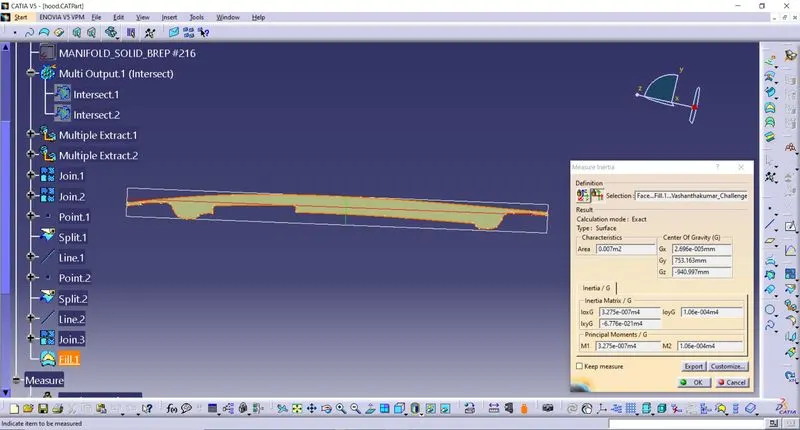
While calculating the section modulus, we will be using the minimum value (M1) of the moment of inertia (I) in both cases.
Now to find the "distance from the neutral axis to the most extreme end of the object (Y)", Go to the 'Measure' tool in CATIA and select the outer edges of the section or we can also find the distance by drawing vertical lines at both the ends in a sketch as shown below.
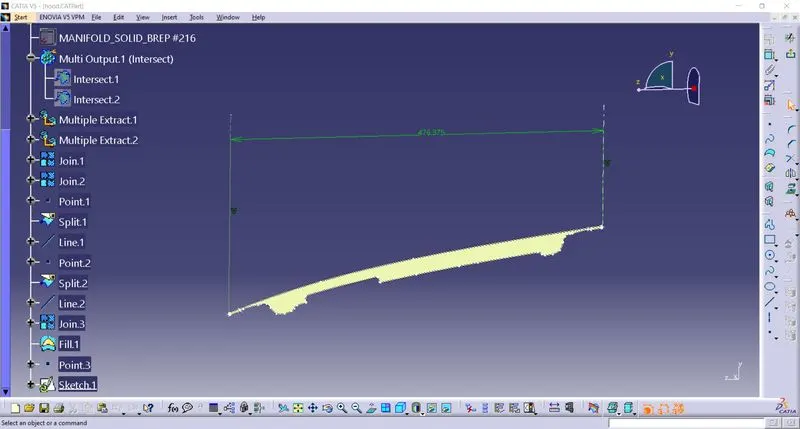
Divide this value by '2' to get the 'Y' since the neutral axis will be at the centre and we have measured the distance from the corner edge to the other corner edge of the hood.
Once we get the moment of inertia and the distance from the neutral axis to the most extreme end of the object (Y), we can now find the "Section modulus" for case 1.
Section Modulus can be calculated by using the Formula:
S=I/Y
where,
I = 3.275 x 10-007m4
y = 238.1875 mm
S = 3.275 x 10-007m4 / 238.1875 mm
= 1374.96 mm3
Case 2:
In this case, we will be finding the moment of inertia by modifying or changing the distance between the inner & outer panel.
Here we will be offsetting the inner panel boundary (outer boundary) to 0.5mm and this will cause a change in the moment of inertia for case 2.
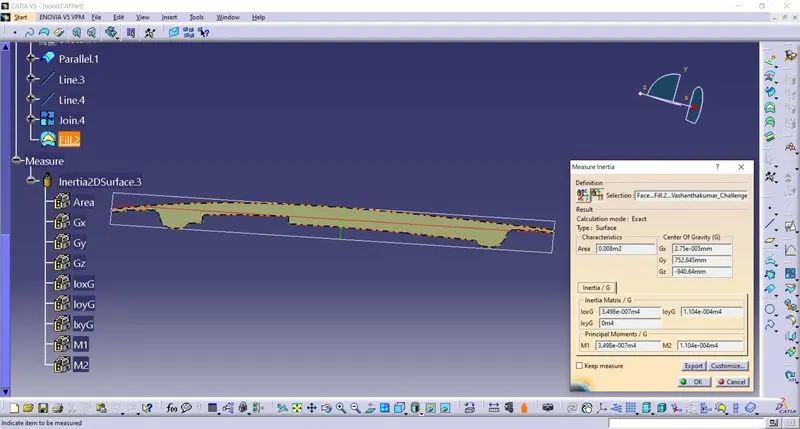
Section Modulus can be calculated by using the Formula:
S = I / y
where,
I = 3.498 x 10-007m4
y = 238.1875 mm
S = 3.498 x 10-007m4 / 238.1875 mm
= 1468.59 mm3
Result & Conclussion:
Section Modulus,
Case 1: 1374.96 mm3
Case 2: 1468.59 mm3
Increasing the distance between the inner and outer panel of the hood increases the moment of inertia which intern increases the strength of the component. Thus by comparing the results of Case 1 & Case 2, we can say that the increase in moment of inertia helps in increasing the strength of the component.