Project - Design a Hospital Management system
The hospital management system is a computer system that helps manage the information related to health care and aids in the job completion of health care providers effectively. They manage the data related to all departments of healthcare such as clinical, Financial, Laboratory, Inpatient, Outpatient, Operation theater Materials, Nursing, Pharmaceutical, Radiology, Pathology, etc.
HOSPITAL MANAGEMENT SYSTEM
web-based technology offers many online services in almost every field. a web-based platform eliminates the need for paper prescriptions in the Hospitals that propose E-Medical Management which will increase the efficiency of patient management, schedule management of the doctors, and give universal access to the patient data anywhere in the hospital. The storage of all these details would be done by setting up a database server. If a patient is admitted to the hospital, all the vital details would be updated for the doctors to check online. They can even give online prescriptions directly to the pharmacy specific to a particular patient with their patient id. Every person who visits the website can register themselves as a patient and get a unique Patient ID that is referred to in all future transactions. Patients can take appointments online and know the availability of the doctor. Notifications regarding regular health check-ups and medicine reorder. Tips on regular better lifestyle and good Healthcare provided.
There are two modules that are identified, Patient and Doctor modules. In the patient module, a web interface is designed which allows a user to register to the hospital website, schedule appointments, make payments and view reports online. The appointment with doctors is automated using the ID3 algorithm (i.e. when a patient requests a doctor the available doctor is directly allotted by the system). There is a disease prediction section in the patient module that predicts the disease by analyzing the symptoms they enter. The doctor module is another web interface where a doctor can view the patients assigned to him, view their history and he can add his comments about the patient's visit. There are two other sub-modules for the pharmacy and lab staff where they can view payments made by patients and share the reports and bills. Also, there is an admin module who can view all patient details, view all doctor's details, add new staff details, and update existing staff details.
The patient module is used to book appointments, make payments, view reports and see their medical as well as payment history. The patient module also contains a disease prediction section where the patients Whereas the doctor module has the User Interface(UI) for the employees to access the database. There are four types of users in the Doctor module. They are Admins, doctors, Lab staff, and Pharmacy staff. They all have a hierarchical access to the database. Admin is responsible for adding the users to the database and giving access based on their designation. Users with Doctor access can view their patient's details, give medicines and view the tests assigned to them. The lab staff is in charge of the payment section and reports. Pharmacy staff can add or remove the medicine details and dispatch the medicines based on the payment details.
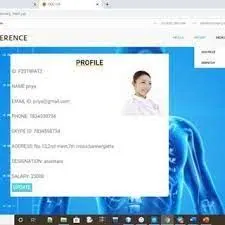
pharmacy staff dashboard
The main page has the profile of the staff member. Patient tab – add price page allows the user to confirm the price and share the bill with the patient and the dispatch page allows the user to confirm the dispatch of medicine. Medicine tab- allows the user to update prices and stock details of existing medicines and add new medicines
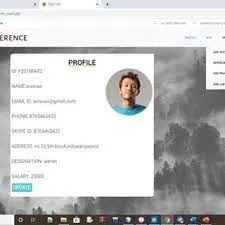
admin dashboard
The main page displays the profile of the admin. Add tab– allows admin to add new doctors and other staff and also allows him to approve users. View tab– allows admin to view the patients, doctors, and staff details and also alter them.
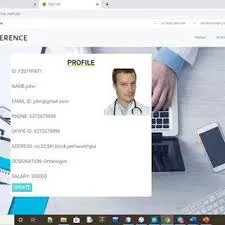
doctor dashboard
The main page displays the profile of the doctor. Patients page – allows the doctor to confirm the appointment, share reports with the patient, and also view the history of the patient.
patient dashboard
The main page shows the patient profile orders tab- which shows all the medical or lab orders related to the patient. Patient tab – allows patients to view other profiles and also book appointments. Payment page – allows the user to make additional payments for other orders and also add money to an online wallet.
technologies used in basic Healthcare management system (HMS):
- The medical practice management system: forms an integral part of the healthcare system. It takes care of different administrative and clinical aspects of your practice. It is geared towards a facility’s clerical work, such as managing various documents, scheduling appointments, and more. It automates and streamlines multiple activities, which makes it easy to run the facility smoothly.
- Electronic health records are another type of hospital management information system that is basically concerned about the patient’s medical information. doctors can simply fill out all the information on the EHR system. The best part is that it can be accessed instantly using a mobile or computer. It also enables doctors to easily share data across different departments, allowing them to provide quick and accurate treatment. It deals with data management, which generally contains information on patients'
- E-prescribing software is a beneficial technology as it enables doctors to generate prescriptions electronically. It allows them to directly send prescriptions to the pharmacy in just a few clicks, and when the patient gets there, the store is already ready with their supplements. The system eliminates the need to create handwritten notes, which are generally hard to decipher, and instead generates an understandable prescription. medical history, allergies, laboratory charges, and more.
- New technologies like AR are considered by healthcare companies to make the process more visually clear. AR has firmly created an area for itself as an outstanding market within the operational world, and it is already transforming the work methodology forever. It allows the professionals to strengthen the tactic they work on an everyday basis, with a bunch of the newest choices being supplemental to the workplace.
- The Master patient index is a crucial part of the hospital management system as it aims at connecting patient records from more than one database. MPI creates an index of all medical records for a specific patient, which is easily accessible by all departments. The main purpose of MPI is to reduce duplication of patient records and also to avoid inaccuracy of information that can result in wrong treatment.
- Another essential type of hospital management system is the patient portal. it provides a platform where patients can access their health-related data using any device. It includes all the information stored in an EHR, such as the patient's medical history, treatments, and other medications previously taken.
- Urgent care application is a type of health management information system that keeps track of patients that might require immediate attention. It enables patients to skip the waiting room and get care instantly. Besides, it provides patients with knowledge about health-related queries, and informative health articles, and even lets them track their medical care status.
- Billing software makes it easy by automatically generating medical bills and handling the entire workflow. Besides patient billing, the software also takes care of insurance claims and verification, payment tracking, and processing. It sends out alerts for late payments or if there is any pending bill from the hospital’s end.
Snippets help programmers reduce the time it takes to type in repetitive information while coding. Code Snippets are a feature on most text editors, code editors, and IDEs.
Step1: Check if your editor lets you create custom snippets
You can check the docs on your code editor to find out if the feature is available and how to access it. To access this setting, you can either click on the settings icon on the sidebar and then click on user snippets or open up the command palette using Cntr + shift + p on Windows or CMD + shift + p on Mac, typing in "snippet" and clicking on Preferences: Configure User Snippets. This will give you a drop-down with different language selections to choose from.
Step2: Decide your Snippet Scope
So from the drop-down, you can see New Global Snippet File and then a bunch of languages in alphabetical order. Scroll to the language you want to write your snippet for and click on it (or select New Global Snippet File if you want to use your snippets in multiple languages). If you selected a particular language, HTML for example, the file will automatically open. But if you chose Global snippet, you'll be prompted to type in the name of the snippet file before it opens.
Step3: Understand the Syntax
The Syntax for code snippets is quite easy actually. It is written in JSON format and each file can contain an unlimited number of snippets.
Snippet name: The Snippet Name is the name of the snippet. It is also what will be displayed via IntelliSense if no description is provided.
Scope: This determines what languages are allowed to use the snippet. Enter the name of the language(s) separated by a comma. If you leave it empty or omit it, the snippet can be accessed by any language.
Prefix: This describes one or more trigger words that will prompt IntelliSense to display the snippet.
Body: This can be a string if it is one-line code or an array of strings if it is multi-line code.
Step4: Add Tab Stops
Tabstops allows you to move the editor cursor inside a snippet. $1, $2, ..., $n specify cursor locations it should move into sequentially when you hit the tab key. $0 represents the final position the cursor should stop.
Step5: Use Placeholders
These are Tab Stops with values. They help the user easily identify or understand what they are supposed to type at that particular tab stop. The placeholder will be automatically highlighted so you can immediately type in what you want to replace it with.
Step6: Create Choices
Placeholders can have choices as values. This means that instead of typing in your value, you can choose from a dropdown selection. To create one, you write the values which are separated by a comma between two pipe characters, for example, ${1|one, two, three|}.
There are various features included in the HMS. Some of the system functions include Registration, Patient checks out, Report generation, and more.
Functional Requirements:
There are a lot of software requirements specifications included in the functional requirements of the Hospital Management System, which contains various processes, namely Registration, Check out, Report Generation, and Database.
Registration Process of SRS (Software Requirements Specification)
● Adding Patients: Hospital Management enables the staff at the front desk to include new patients in the system.
● Assigning an ID to the patients: The HMS enables the staff at the front desk to provide a unique ID for each patient and then add them to the record sheet of the patient. The patients can utilize the ID throughout their hospital stay.
Check Out of SRS:
● Deleting Patient ID: The staff in the administration section of the ward can delete the patient ID from the system when the patient checkout from the hospital.
● Adding to the bed's available list: The Staff in the administration section of the ward can put the bed empty in the list of beds available.
Report Generation of SRS:
● Information of the Patient: The Hospital Management System generates a report on every patient regarding various information like the patient's name, Phone number, bed number, the doctor's name whom its assigns, ward name, and more.
● Availability of the Bed: The Hospital Management system also helps in generating reports on the availability of the bed regarding information like bed numbers unoccupied or occupied, ward name, and more.
Database of SRS:
● Mandatory Patient Information: Every patient has some necessary data like phone number, first and last name, personal health number, postal code, country, address, city, 'patient's ID number, etc.
● Updating information of the Patient: The hospital management system enables users to update the information of the patient as described in the mandatory information included.