Project 8
OBJECTIVE: To perform sparse optical flow with Lucas Kanade optical flow model for the pixels of interest which are derived from Shi Tomashi corner detection algorithm.
SOLUTION PROCEDURE:
- Program starts with importing the required libraries which are numpy and open cv
- Program is driven by the main script which drives the two user defined functions to perform the feature detection & optical flow model.
- The main script starts by reading the video file into an instance with the help of the Videocapture function in the open CV.
- A numpy array for random colours is created to use it to highlight the corners detected by the shi Tomashi detector in the output video.
- First frame for the video is read with the help of the read function over the instance of the video.
- The first frame is converted to the gray scale image with the help of the cvt color function in the Open CV.
- Features from the first gray image are extracted with the help of the user defined function find_features()
- This function uses the shi Tomashi detector for extracting the features (corners)
- goodFeaturesToTrack() is the open CV function which implements the Shi Tomashi detector over the gray image shared to it as input.
- Parameters for the function are
- Max corner: Max number of corners allowed to be detected in a image
- Quality Level: the quality level will help in removing the weak corners. The corners with the quality score less than quality level * max quality score in the image are eliminated.
- minDistance: Minimum possible distance between two returned corners
- blockSize: block size for computing the covariance matrix over each pixel neighborhood
- Function returns the points which are considered as corner in the input image
- An image is created by the same size as the first frame of the video with zeros as input
- We create the output video instance with the help of the VideoWriter function in the OpenCV which takes the output file name, file format, frames per second, frame dimensions which is taken same as the input video.
- A while loop is created to read the next frames of the video file
- Every next frame of the video is read for every iteration of the while loop
- If the frame is extracted successfully, Frame is converted to grayscale with the help of cvtColor function.
- Position of the points in the current image based on the feature extracted in the previous image by the Shi Tomashi detector by the user defined function LK_model()
- This function uses the Lucas Kanade sparse optical flow model to detect the points in the current image
- This function takes the inputs as previous gray image, current gray image, points detected as corners in the previous image
- The Lucas Kanade Optical flow model is performed by the Open CV function calcOpticalFlowPyrLK()
- Parameters for the function are
- Gray images of the previous image & current image
- Corner points detected in the previous image
- Window size for the search at each pyramid level
- Max level: number of higher levels of pyramids to be used
- Function returns the feature points in the current image along with the respective status & errors
- We create a line in the mask image between the feature points of the previous image & current image with the help of the line function in Open CV
- We draw filled circles in the original(color) version of the current image which highlight the feature points of the current & previous image.
- We add the mask image over the original version image which got filled with circles in the previous step with the help of the add function in the Open CV.
- After the above step we add this image in the output video with the help of the write function over the instance of the video.
- Finally, we replace the previous feature points & image with the current feature points & image since the next frame is going to read in the next iteration.
CODE: Jupyter notebook attached
OUTPUT:
- Processed video along with feature highlighted
https://drive.google.com/file/d/1K2KRxk7anK29urTj8Ivg0e7Md89EsLnC/view?usp=sharing
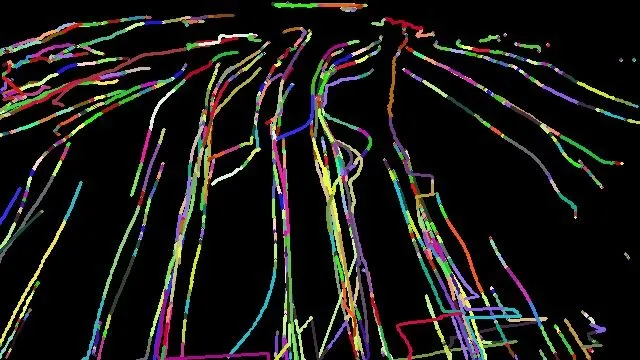
- Final image highlighting the features path alone
COMPARISON OF HARRIS CORNER & SHI TOMASHI CORNER DETECTION WITH THE OPTICAL FLOW MODEL:
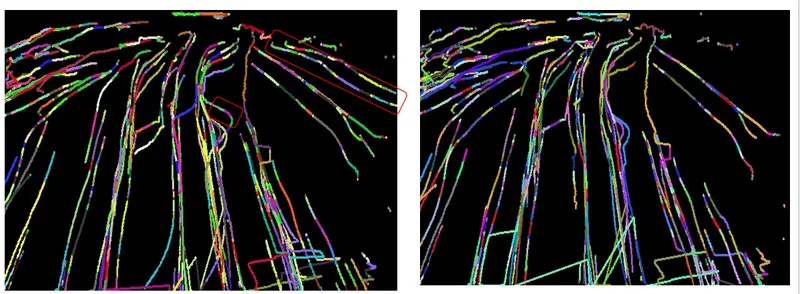
The study is performed to compare the output video & the mask image created by the Harris corner and Shi Tomashi detector. Based on the below mask image, we have found the Shi Tomashi is able to isolate the key peak corners in the video which is missed by the Harris corner. The Missed corners by the Harris corner detected mask image (Right image) are highlighted in the Shi Tomashi detected mask image (Left image).
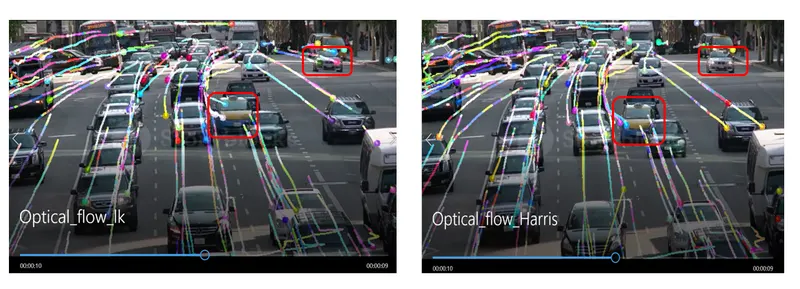
We have added the snip from the video corresponding to the above mask image. The right-side red box indicates the car which was missed to be identified by the Harris corner detector. The red box in the middle of the image indicates that the Harris corner was able to detect only two corners of the taxi while the Shi Tomashi was able to detect the three corners of the taxi which will assist in knowing the size of the car.
CONCLUSION:
Based on the above program, we are able to understand the application of sparse optical flow model for the pixels of interest detected by the Shi Tomashi corner detection algorithm
References:
https://medium.com/pixel-wise/detect-those-corners-aba0f034078b
https://theailearner.com/2021/09/27/shi-tomasi-corner-detector/
https://www.geeksforgeeks.org/python-opencv-optical-flow-with-lucas-kanade-method/