Project
AIM- To study and analyze the All-Terrain Vehicle model using Simulink.
OBJECTIVES- Write a technical report on ATV model properties and comments on the results.
MODEL- This is BAJA ATV Model without Dashboard.
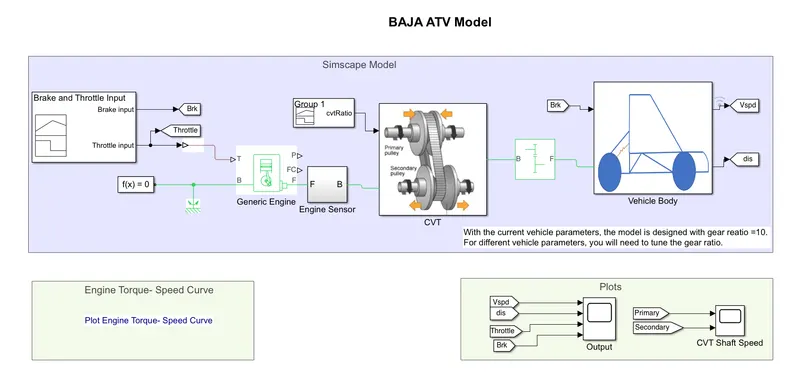
INSIDE SUBSYSTEM AND BLOCKS USED-
1) Signal Builder- It is used to give input for Throttle, Brake, and CVT ratio as per requirement. Signal Wave is created inside it for each input. As we can see one block is used for Throttle and Brake input, another block is used for CVT ratio.
2) Generic Engine- It is an internal combustion engine block used for spark ignition and diesel. The "T=Throttle Input" and "B=Base Port" are inputs of the engine block and "P=Instantaneous Engine Power in W", "FC= Fuel Combustion rate in kg/s", "F= Follower Port" are outputs of the block.
3) Engine Sensor- It is a subsystem created by the "Ideal Rotational Motion Sensor" with "Ports", "Terminator" and "Scope" blocks.
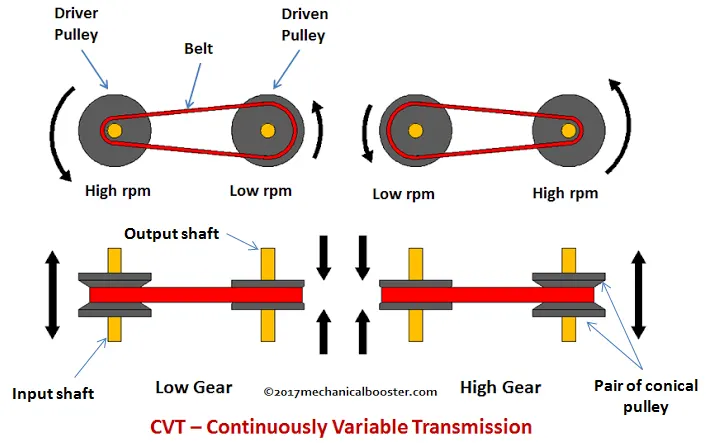
4) CVT- Mainly it is Continuous Variable Transmission that works on the Primary pulley, Secondary pulley, Variator, and Belt. It is a subsystem created by the "Variable ratio Transmission", "Inertia", "Ideal Rotational Motion Sensor" with some essential blocks.
5) SIMPLE GEAR- It is a simple gear that works on the gear ratio provided. It transmits power from the base axle to the follower axel.
6) VEHICLE BODY- It is a subsystem of various blocks:-
i) Tire(Magic Formula)- A normal force is given as an input at N and S is slip as output, A=Axle, and H=Hub where the tire is connected with mechanical rotation.
ii) Double shoe brake- It is a brake provided with a double side on the wheel rim. Actuating force is applied at F as input and S= drum shaft rotational is taken as output.
iii) Vehicle body- It is a two-axle vehicle body. It has the same or a different number of wheels on each axle. It has W=Headwind speed, beta=Road Incline angle as an input and NF=Front axle normal force, NR=Rear axle normal force, V= Longitudinal velocity as output, and H=Horizontal motion.
WORKING-
i) Throttle signal is generated through the signal builder and given as input to the Generic Engine. Torque and Speed Vector are taken from Base Workspace.
ii) The engine will generate the output RPM which will be sensed by Ideal Rotational Motion Sensor. This RPM is also given to Simple Gear Mechanism to reduce the speed by applying Gear Ratio.
iii) After this reduced speed will be given to the CVT subsystem as an input value and the CVT Ratio is provided through the signal builder.
iv) The speed generated through is given to Vehicle Axle and Brake Input generated by Signal Builder is also given to Vehicle Axle.
v) Vehicle accelerates w.r.t to these parameters and velocity is taken as output for further analysis.
INPUT SIGNAL- For brake and throttle
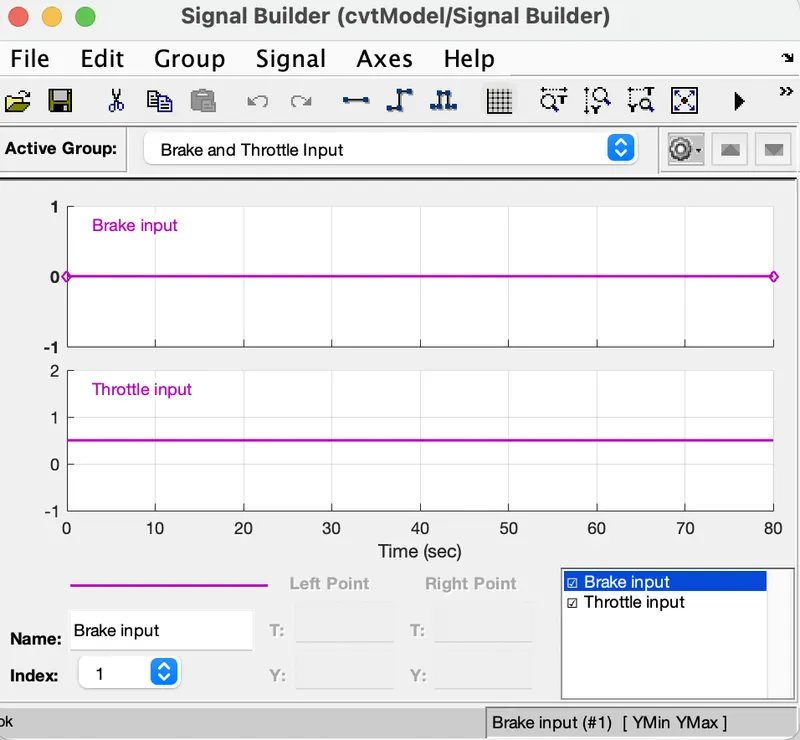
For CVT Gear Ratio
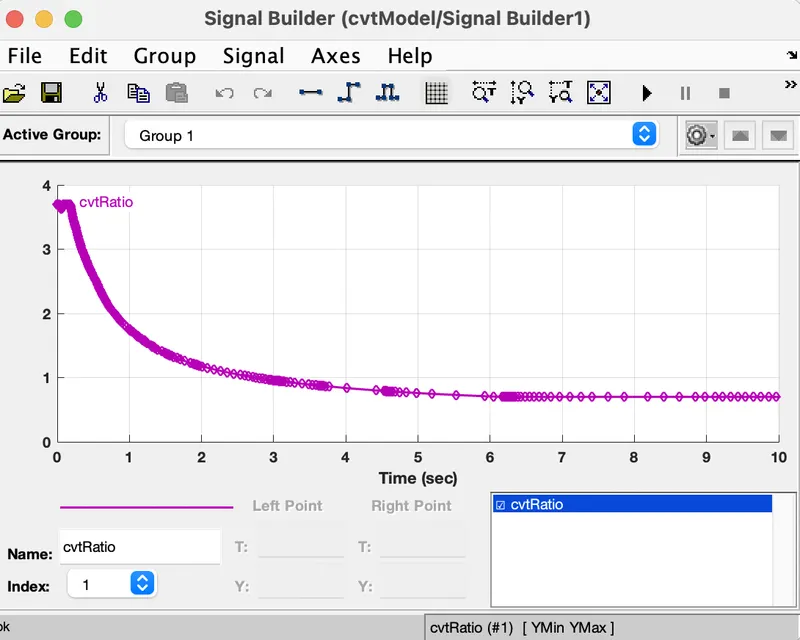
For Speed and Torque vector input is given through workspace.
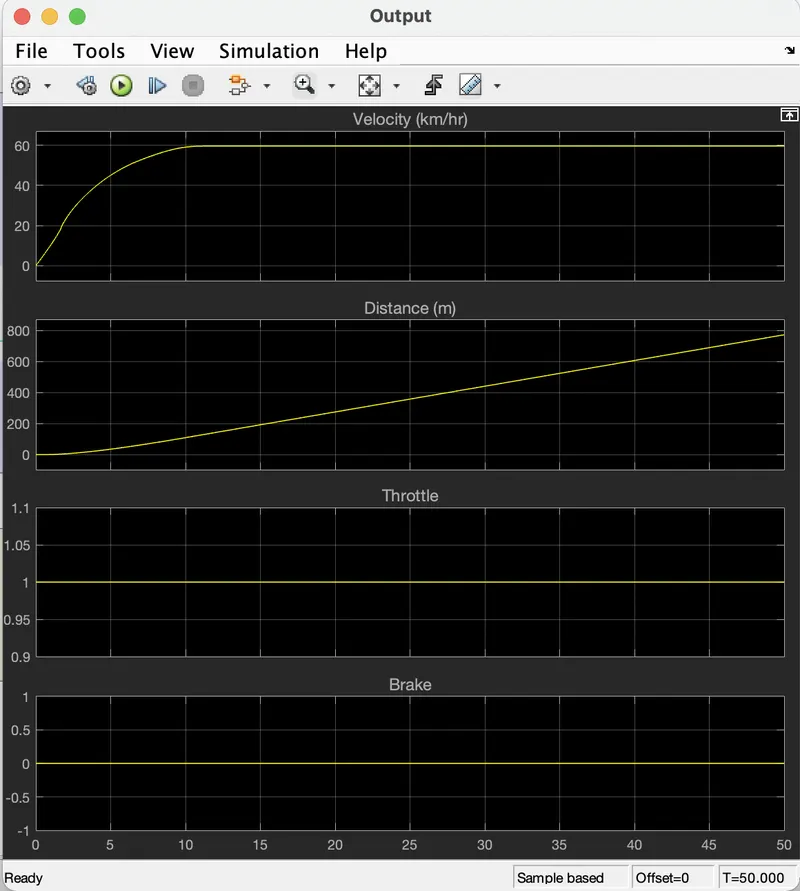
OUTPUT- For Velocity, Distance with Throttle, and Brake Input.
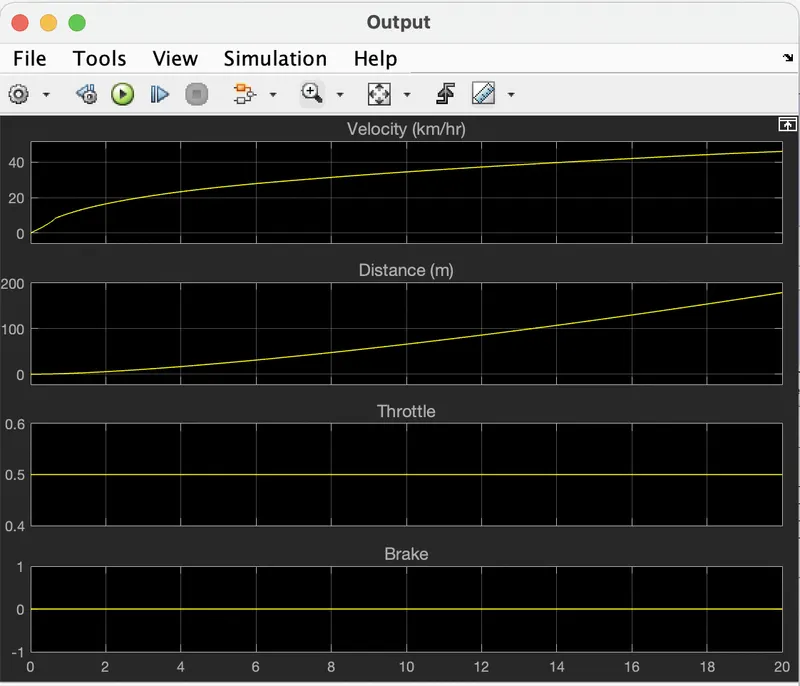
For CVT shaft RPM
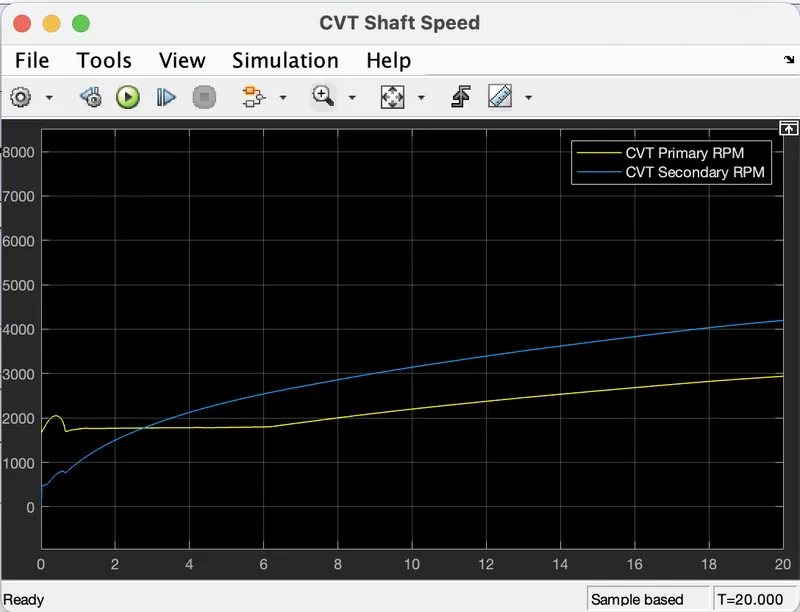
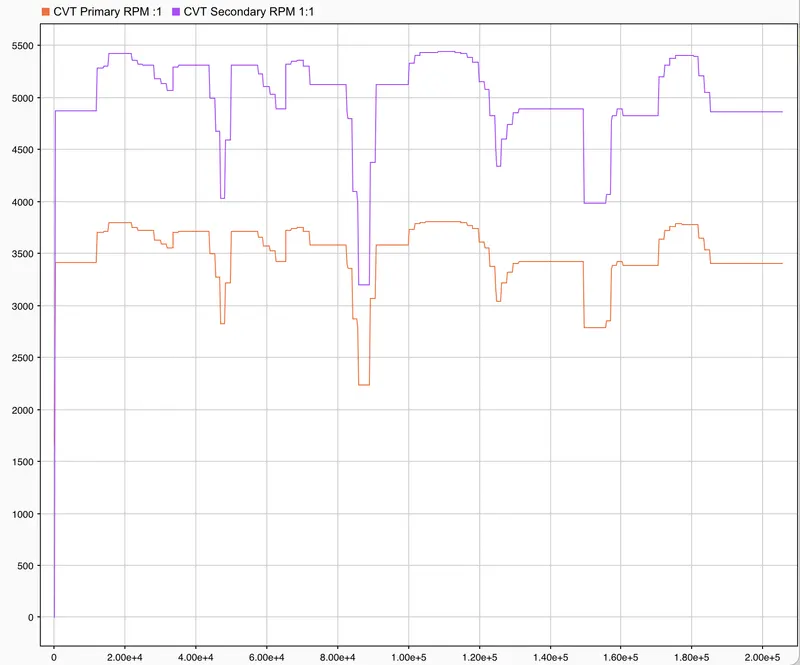
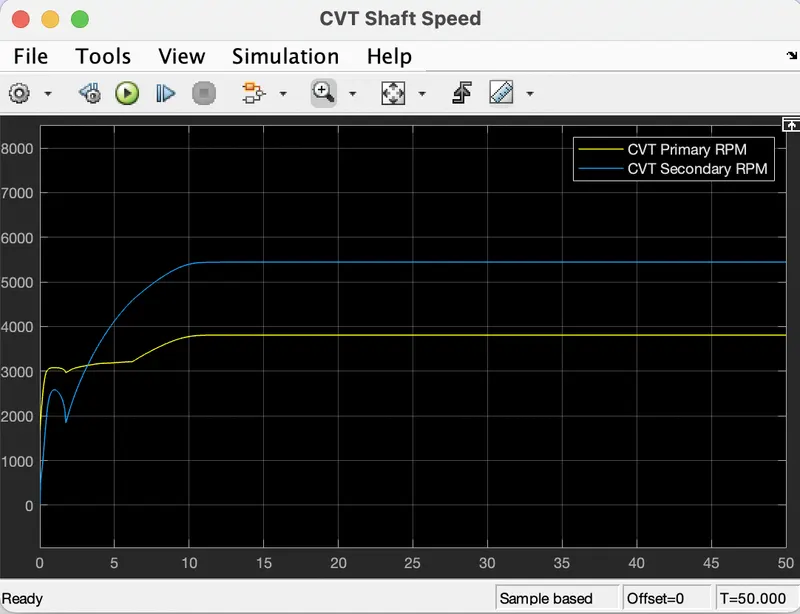
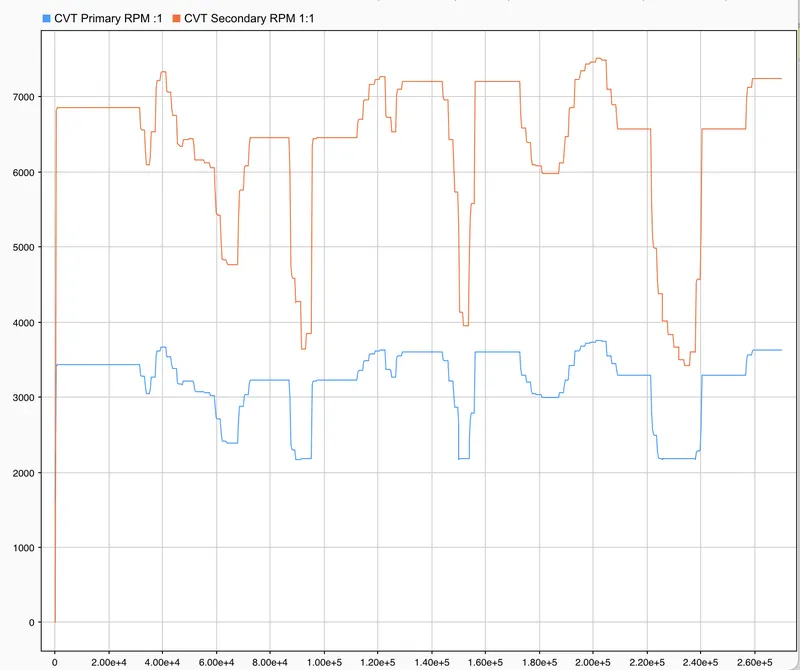
These graphs show the variation in angular velocities of the input and output shaft of the variable gear transmission system. These values differ with respect to the gear ratio.
MODEL- This is a BAJA ATV Model-Data Extraction.
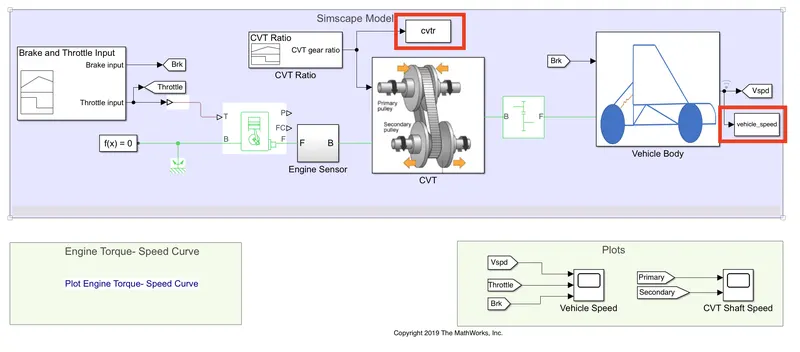
BLOCKS USED- All blocks are the same but a small addition of the "To Workspace" block is used to extract output.
WORKING- All the inputs and processes are the same as above.
RESULTS- An additional output other than the above model outputs is the CVT ratio and Vehicle velocity to the workspace.
MODEL- This is a BAJA ATV Model with Dashboard.
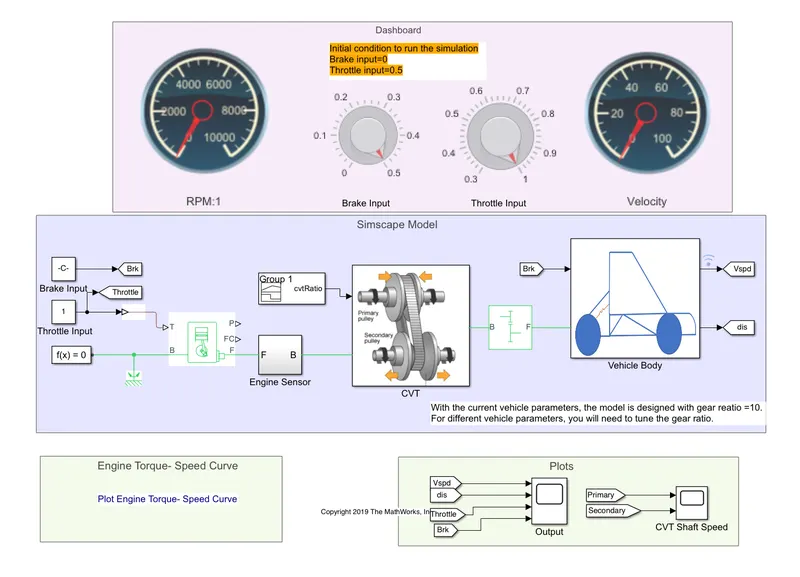
BLOCKS USED- In previous models throttle input and brake input were given by Singal Builder but in this model, both were controlled by the user with the help of a given knob.
WORKING- Set the simulation time as "inf". Now start the simulation, Brake Input and Throttle Input was given by changing knob and after that, all process was same as above models.
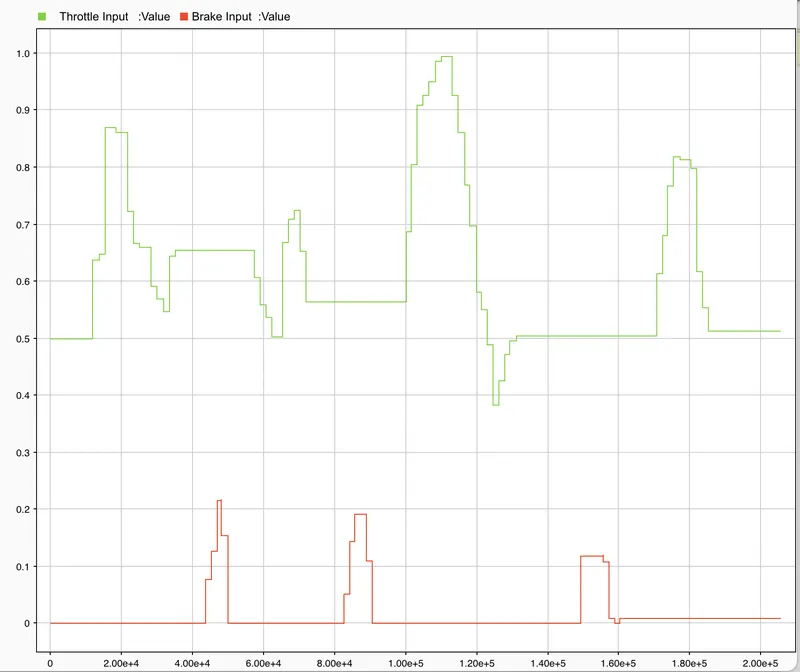
OUTPUTS- For Throttle and Brake input
For Primary and Secondary CVT RPM
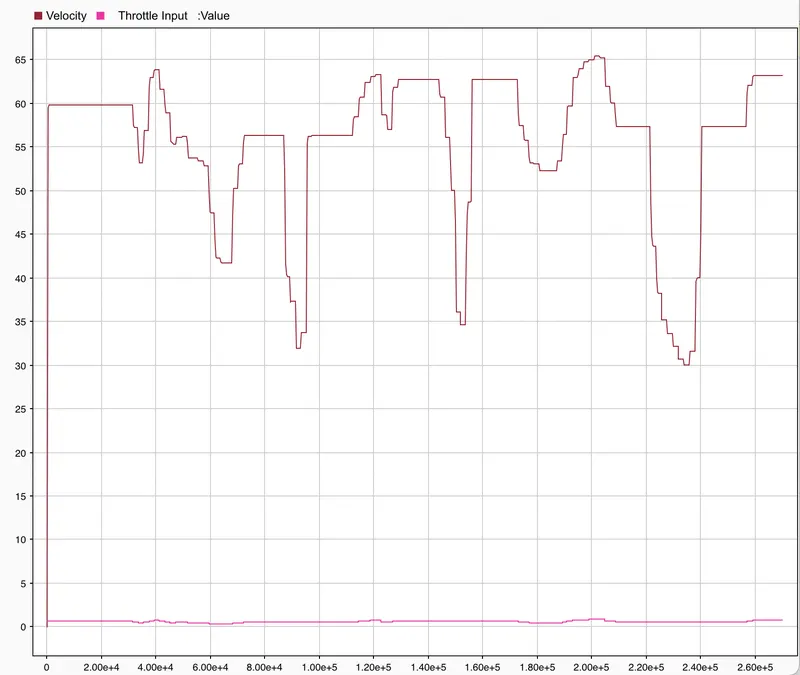
For Velocity of vehicle w.r.t Throttle Input
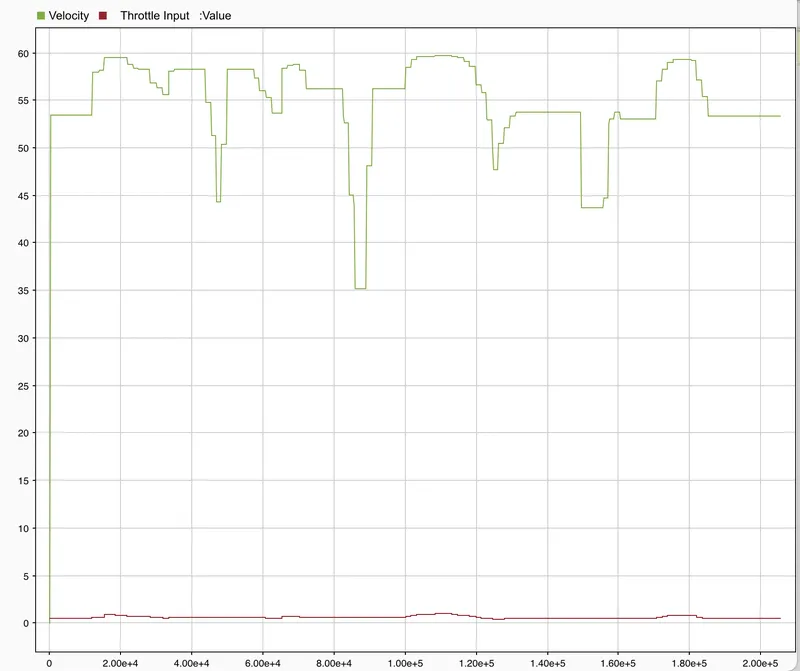
RESULTS- As we change the Throttle and Brake input through the knob, the Vehicle Velocity changes w.r.t that. ( Gear Ratio remains Constant)
MODEL- This is BAJA ATV Model with 1-D Look Up Table.
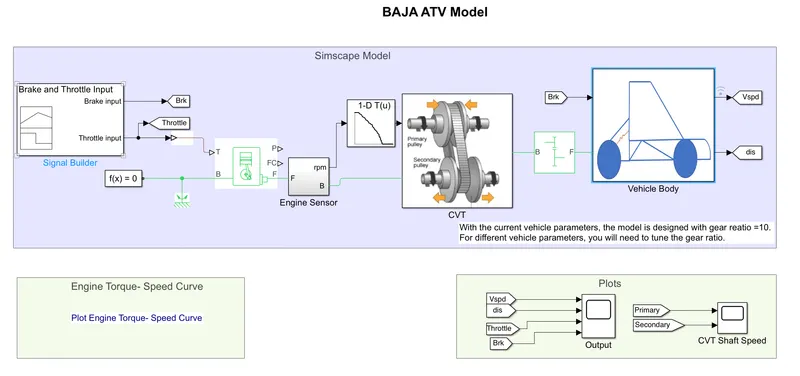
BLOCKS USED- Same as the basic model but replace Brake input for CVT to 1-D Look Up Table.
WORKING- It runs the same as above all steps, just brake input was taken from 1-D Look Up table for CVT subsystem.
OUTPUTS- For CVT Primary and Secondary RPM
For Velocity, Distance with Throttle and Brake Input
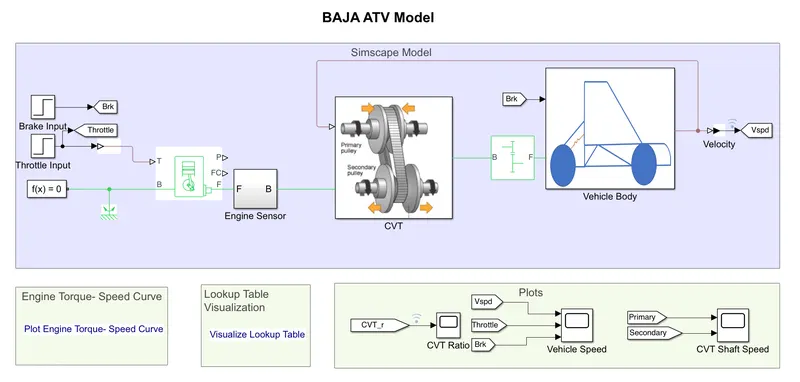
MODEL- This is a BAJA ATV Model MAPPED LOOKUP- WITHOUT DASHBOARD
Inside of CVT Subsystem:-
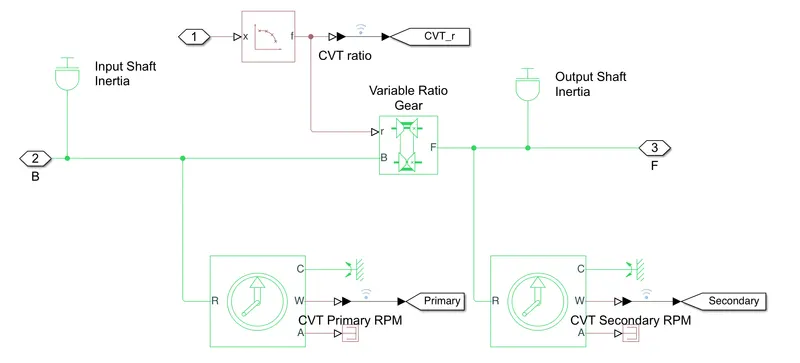
BLOCKS USED- All the blocks are the same except using Signal Builder for Brake and Throttle Input, we used Step Block.
CONNECTIONS- Connect Step Block to Throttle and Brake Input. Final Velocity Signal was given to Input of CVT. Lookup Table was connected to Variable Ratio Gear as shown Above.
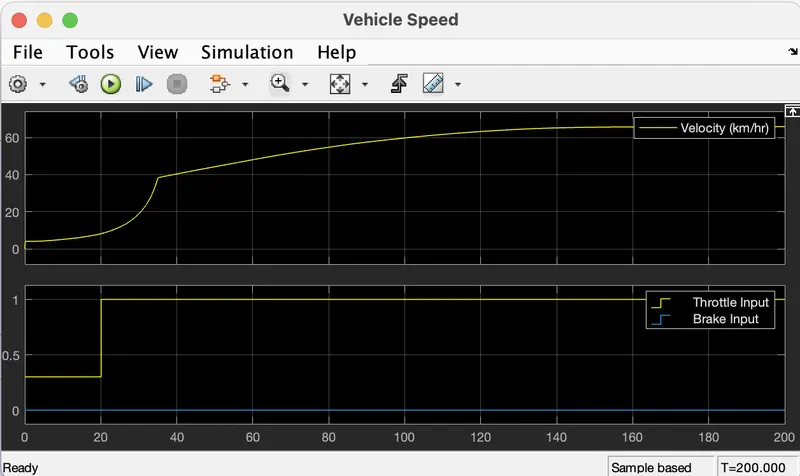
WORKING- In Step Input at 35-sec Brake Input will take a step to value 0, hence remains the same as before and at 20-sec Throttle Input will take a step to 1 from 0.3.
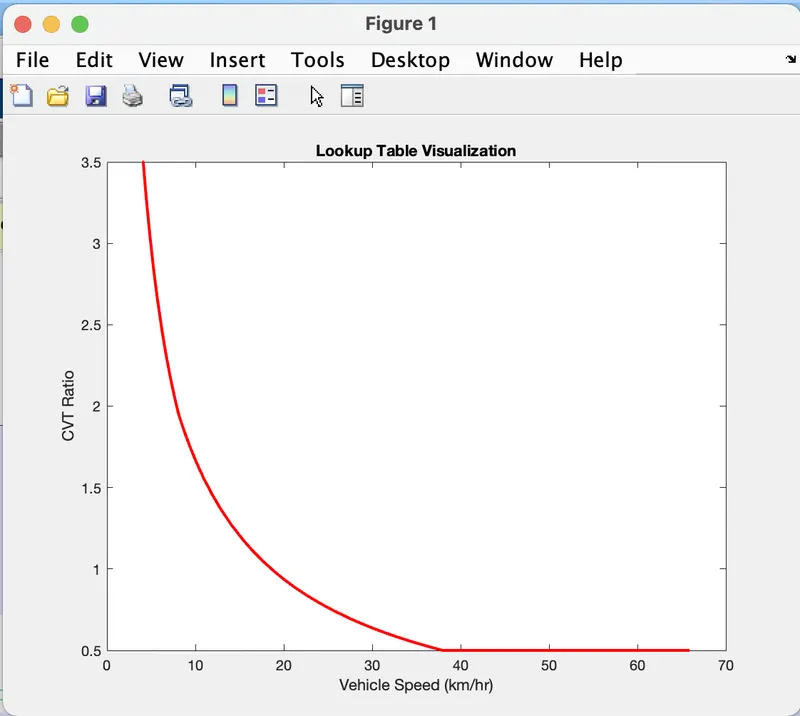
A lookup table uses an array of data to map input values to output values. If the lookup table does not define the input values, the block estimates the output values based on nearby table values.
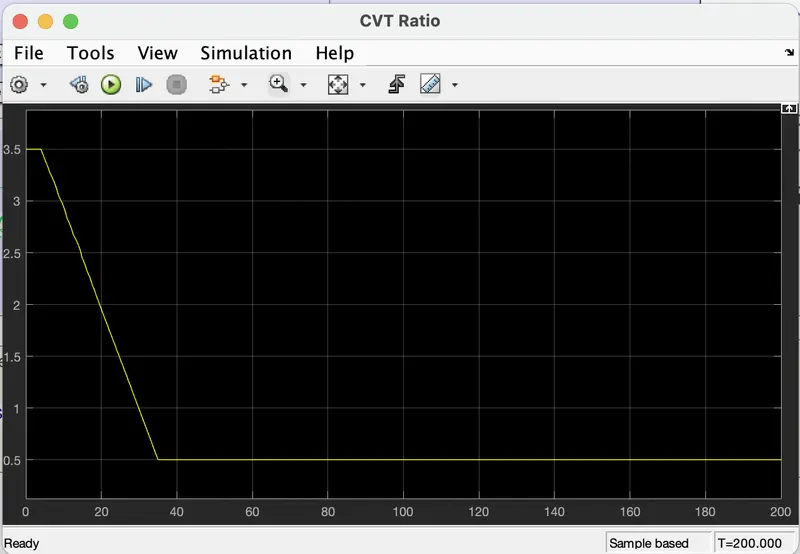
However, vehicle velocity output was given back to the 2-D lookup Table so that we can verify that the velocity of the vehicle is changing w.r.t CVT Ratio changes.
OUTPUTS- For Velocity in comparison with Throttle and Brake Input
 .
.
For CVT Ratio
 .
.
For LookUp Table
MODEL- This is a BAJA ATV Model MAPPED LOOKUP- WITH DASHBOARD
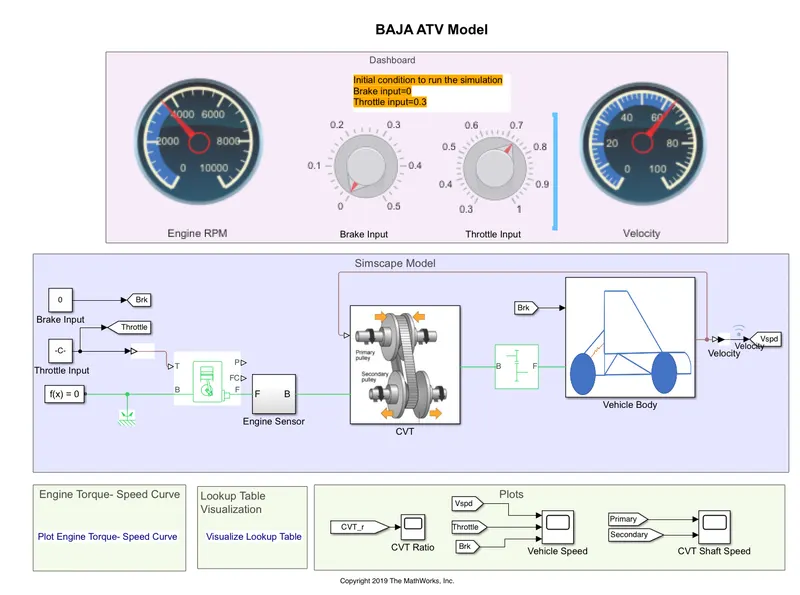
BLOCKS USED- Here KNOB-to control input and CIRCULAR GAUGE-to display Values is used else all the blocks are the same.
CONNECTIONS- Constant blocks were used to connect with KNOB. One circular gauge was connected to engine RPM and the second was connected with Velocity.
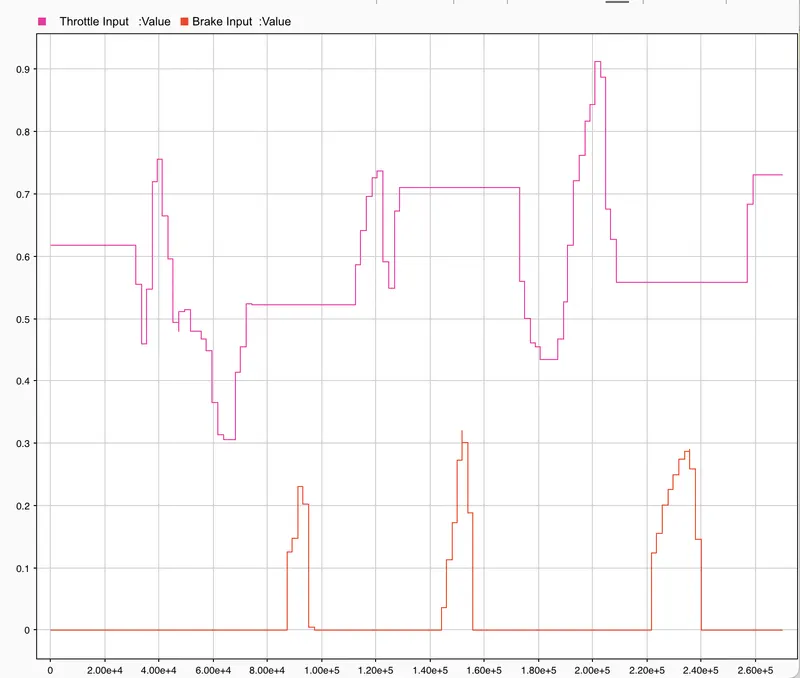
WORKING- Input of Throttle and Brake was controlled by the user, by changing value through KNOB. Here also vehicle speed is given as feedback to the CVT Ratio lookup table.
OUTPUTS- For the Throttle and Brake Input
For the Primary and Secondary RPM
For the Vehicle Velocity Output and Throttle Input