Project 2 - Measuring distance of an object using ultrasonic sensor (HC-SR04)
Answers
C program for Distance mesurment using HC-SR04 Ultrasonic Sensore.
/*
 * Project 2.c
 *
 * Created: 19-10-2022 22:49:14
 * Author : Axit Rupareliya
 */

#define F_CPU 16000000UL
#include <avr/io.h>
#include <avr/interrupt.h>
#include <util/delay.h>
#include <string.h>
#include <stdlib.h>

#define LCD_Data_Dir DDRB		                      /* Define LCD data port direction */
#define LCD_Command_Dir DDRC                                  /* Define LCD command port direction register */
#define LCD_Data_Port PORTB		                      /* Define LCD data port */
#define LCD_Command_Port PORTC                                /* Define LCD data port */
#define RS PC0				                      /* Define Register Select (data/command reg.)pin */
#define RW PC1				                      /* Define Read/Write signal pin */
#define EN PC2				                      /* Define Enable signal pin */

#define  Trigger_pin	PA0	                              /* Trigger pin */

int TimerOverflow = 0;


void LCD_Command(unsigned char cmnd)
{
	LCD_Data_Port= cmnd;
	LCD_Command_Port &= ~(1<<RS);	                      /* RS=0 command reg. */
	LCD_Command_Port &= ~(1<<RW);	                      /* RW=0 Write operation */
	LCD_Command_Port |= (1<<EN);	                      /* Enable pulse */
	_delay_us(1);
	LCD_Command_Port &= ~(1<<EN);
	_delay_ms(3);
}

void LCD_Char (unsigned char char_data)	                       /* LCD data write function */
{
	LCD_Data_Port= char_data;
	LCD_Command_Port |= (1<<RS);	                       /* RS=1 Data reg. */
	LCD_Command_Port &= ~(1<<RW);	                       /* RW=0 write operation */
	LCD_Command_Port |= (1<<EN);	                       /* Enable Pulse */
	_delay_us(1);
	LCD_Command_Port &= ~(1<<EN);
	_delay_ms(1);
}

void LCD_Init (void)			                        /* LCD Initialize function */
{
	LCD_Command_Dir = 0xFF;		                        /* Make LCD command port direction as o/p */
	LCD_Data_Dir = 0xFF;		                        /* Make LCD data port direction as o/p */
	_delay_ms(20);			                        /* LCD Power ON delay always >15ms */

	LCD_Command (0x38);		                        /* Initialization of 16X2 LCD in 8bit mode */
	LCD_Command (0x0C);		                        /* Display ON Cursor OFF */
	LCD_Command (0x06);		                        /* Auto Increment cursor */
	LCD_Command (0x01);		                        /* Clear display */
	LCD_Command (0x80);		                        /* Cursor at home position */
}

void LCD_String (char *str)		                        /* Send string to LCD function */
{
	int i;
	for(i=0;str[i]!=0;i++)		                        /* Send each char of string till the NULL */
	{
		LCD_Char (str[i]);
	}
}

void LCD_String_xy (int row, int pos, char *str)                /* Send string to LCD with xy position */
{
	if (row == 0 && pos<16)
	LCD_Command((pos & 0x0F)|0x80);	                        /* Command of first row and required position<16 */
	else if (row == 1 && pos<16)
	LCD_Command((pos & 0x0F)|0xC0);	                        /* Command of first row and required position<16 */
	LCD_String(str);		                        /* Call LCD string function */
}

void LCD_Clear()
{
	LCD_Command (0x01);		                        /* clear display */
	LCD_Command (0x80);		                        /* cursor at home position */
}

ISR(TIMER1_OVF_vect)
{
	TimerOverflow++;	                                /* Increment Timer Overflow count */
}

int main(void)
{
	char string[10];
	long count;
	double distance;

	DDRA = 0x01;		                                /* Make trigger pin as output */
	PORTD = 0xFF;		                                /* Turn on Pull-up */

	LCD_Init();
	LCD_String_xy(0, 0, "Distance Meter");


	sei();			                                /* Enable global interrupt */
	TIMSK = (1 << TOIE1);	                                /* Enable Timer1 overflow interrupts */
	TCCR1A = 0;		                                /* Set all bit to zero Normal operation */

	while(1)
	{
		PORTA |= (1 << Trigger_pin);                    /* Give 10us trigger pulse on trig. pin to HC-SR04 */
		_delay_us(10);
		PORTA &= (~(1 << Trigger_pin));

		TCNT1 = 0;	                                /* Clear Timer counter */
		TCCR1B = 0x41;	                                /* Capture on rising edge, No prescaler*/
		TIFR = 1<<ICF1;	                                /* Clear ICP flag (Input Capture flag) */
		TIFR = 1<<TOV1;	                                /* Clear Timer Overflow flag */

		                                                /*Calculate width of Echo by Input Capture (ICP) */

		while ((TIFR & (1 << ICF1)) == 0);              /* Wait for rising edge */
		TCNT1 = 0;	                                    /* Clear Timer counter */
		TCCR1B = 0x01;	                                /* Capture on falling edge, No prescaler */
		TIFR = 1<<ICF1;	                                /* Clear ICP flag (Input Capture flag) */
		TIFR = 1<<TOV1;	                                /* Clear Timer Overflow flag */
		TimerOverflow = 0;                              /* Clear Timer overflow count */

		while ((TIFR & (1 << ICF1)) == 0);              /* Wait for falling edge */
		count = ICR1 + (65535 * TimerOverflow);	        /* Take count */
		                                                /* 8MHz Timer freq, sound speed =343 m/s */
		distance = (double)count / 466.47;

		dtostrf(distance, 2, 2, string);                /* distance to string */
		strcat(string, " cm   ");	                    /* Concat unit i.e.cm */
		LCD_String_xy(1,0,"Dist = ");
		LCD_String_xy(1, 7, string);	                /* Print distance */
		_delay_ms(200);
	}
}
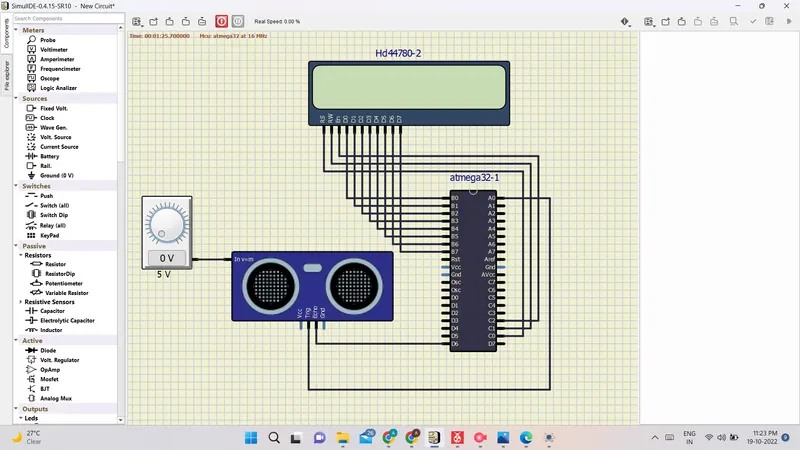
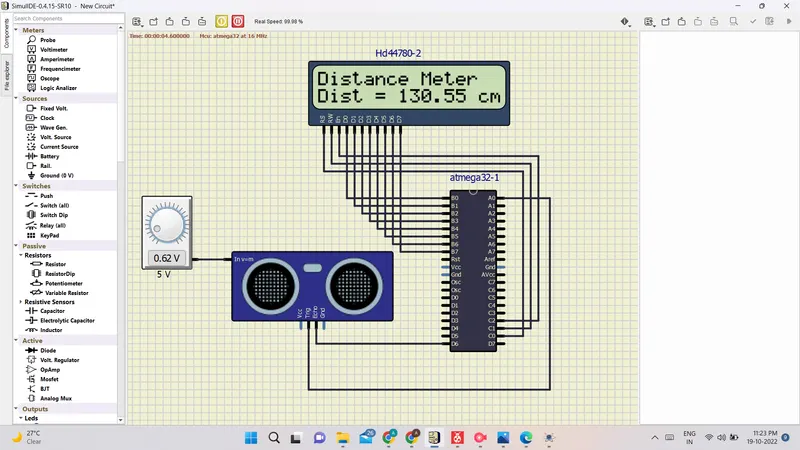
Screenshot of Simulation
Simulation Video is given in attachment section.