Project 2- Creating a custom IOObject in Visual Studio Code
Creating a custom IOObject in Visual Studio Code
In this challenge, we will create a custom IOobject in visual studio code to compute the total pressure flowfield for an incompressible case, by copying pitzDaily from ~incompressible/simpleFoam and pasting it in the run directory.
The total pressure ptotal is the contribution of the static pressure and the dynamic pressure . To calculate this, we decide to write a coded function object called p_total via creating a field p_total and placing this in controlDict inside a function object
The equation `P_{To}=P+ \frac{\rhoU^2}{2}` is famously known as the bernoulli's equation. This equation is valid only for an incompressible flow. There are two components to stagnation pressure-the first component is static pressure, which is the pressure at a given altitude and the second component is the dynamic pressure, which is relatively small compared to static pressure.
ControlDict file
A function object is written in the name of p_total which will have an IOobject created in the name of StagnationPressure. This will create the output file named StagnationPressure in the folders 100,200,etc.
(Ref:CFD-online)
/*--------------------------------*- C++ -*----------------------------------*\
| =========                 |                                                 |
| \\      /  F ield         | OpenFOAM: The Open Source CFD Toolbox           |
|  \\    /   O peration     | Version:  v2206                                 |
|   \\  /    A nd           | Website:  www.openfoam.com                      |
|    \\/     M anipulation  |                                                 |
\*---------------------------------------------------------------------------*/
FoamFile
{
    version     2.0;
    format      ascii;
    class       dictionary;
    object      controlDict;
}
// * * * * * * * * * * * * * * * * * * * * * * * * * * * * * * * * * * * * * //

application     simpleFoam;

startFrom       startTime;

startTime       0;

stopAt          endTime;

endTime         2000;

deltaT          1;

writeControl    timeStep;

writeInterval   100;

purgeWrite      0;

writeFormat     ascii;

writePrecision  6;

writeCompression off;

timeFormat      general;

timePrecision   6;

runTimeModifiable true;

functions
{
    //#includeFunc streamlines
    p_total
    {
        type            coded;
        libs            (utilityFunctionObjects);
        //executeControl timeStep;
        //executeInterval 100;
        writeControl    timeStep;
        writeInterval   100;
        name            StagnationPressure;

        codeWrite
        #{
            const volScalarField& p = mesh().lookupObject("p");
            const volVectorField& U = mesh().lookupObject("U");
            volScalarField StagnationPressure
            (
                IOobject
                (
                    "StagnationPressure",
                    mesh().time().timeName(),
                    mesh(),
                    IOobject::NO_READ,
                    IOobject::AUTO_WRITE
                ),
                p
            );
            StagnationPressure = p + 0.5*mag(U)*mag(U);
            StagnationPressure.write();
        #};


    }

}


// ************************************************************************* //
Once done, we run blockMesh and simpleFoam. The picture below is a sample file that has been created after running the solver.
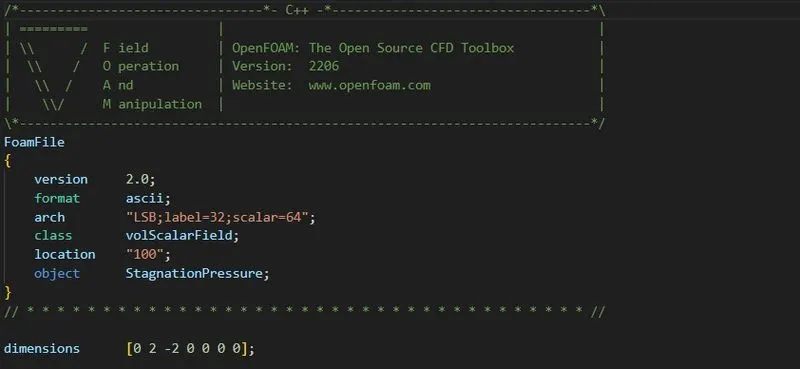
Sample StagnationPressure file created
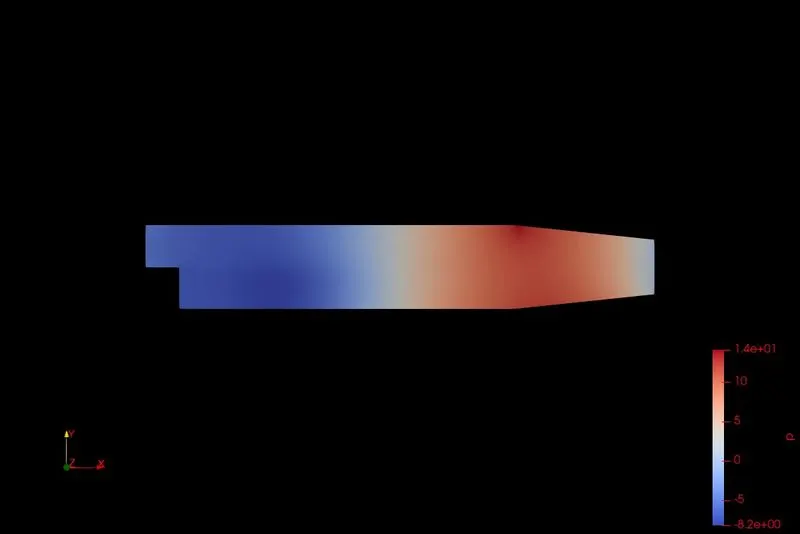
Pressure plot
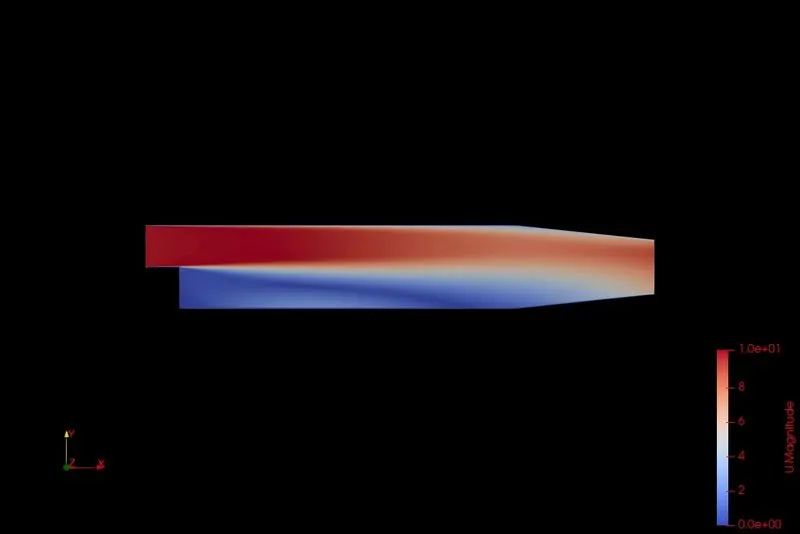
Velocity plot
LATEX code
\documentclass[12pt]{report}
\usepackage{graphicx} % Required for inserting images
\usepackage{amsfonts,amsmath,amssymb}
\usepackage[margin=1in]{geometry}
\usepackage[inline]{enumitem}

\begin{document}


\begin{center}
\section*{Creating a custom IOObject in Visual Studio
Code}
\end{center}

In this challenge, we will create a custom IOobject in visual studio code to compute the total pressure flowfield for an incompressible case, by copying pitzDaily from ~incompressible/simpleFoam and pasting it in the run directory.

The total pressure ptotal is the contribution of the static pressure and the dynamic pressure. To calculate this, we decide to write a coded function object called ptotal via creating a field ptotal and placing this in controlDict inside a function object.

The equation $\displaystyle \mathrm{P_o=P +\frac{\rho U^2}{2}}$ is famously known as the bernoulli's equation. This equation is valid only for an incompressible flow. There are two components to stagnation pressure-the first component is static pressure, which is the pressure at a given altitude and the second component is the dynamic pressure, which is relatively small compared to static pressure.\\

\textbf{controlDict file}\\

A function object is written in the name of ptotal which will have an IOobject created in the name of StagnationPressure. This will create the output file named StagnationPressure in the folders 100,200,etc.
\begin{verbatim}
    /*--------------------------------*- C++ -*----------------------------------*\
| =========                 |                                                 |
| \\      /  F ield         | OpenFOAM: The Open Source CFD Toolbox           |
|  \\    /   O peration     | Version:  v2206                                 |
|   \\  /    A nd           | Website:  www.openfoam.com                      |
|    \\/     M anipulation  |                                                 |
\*---------------------------------------------------------------------------*/
FoamFile
{
    version     2.0;
    format      ascii;
    class       dictionary;
    object      controlDict;
}
// * * * * * * * * * * * * * * * * * * * * * * * * * * * * * * * * * * * * * //

application     simpleFoam;

startFrom       startTime;

startTime       0;

stopAt          endTime;

endTime         2000;

deltaT          1;

writeControl    timeStep;

writeInterval   100;

purgeWrite      0;

writeFormat     ascii;

writePrecision  6;

writeCompression off;

timeFormat      general;

timePrecision   6;

runTimeModifiable true;

functions
{
    //#includeFunc streamlines
    p_total
    {
        type            coded;
        libs            (utilityFunctionObjects);
        //executeControl timeStep;
        //executeInterval 100;
        writeControl    timeStep;
        writeInterval   100;
        name            StagnationPressure;

        codeWrite
        #{
            const volScalarField& p = mesh().lookupObject("p");
            const volVectorField& U = mesh().lookupObject("U");
            volScalarField StagnationPressure
            (
                IOobject
                (
                    "StagnationPressure",
                    mesh().time().timeName(),
                    mesh(),
                    IOobject::NO_READ,
                    IOobject::AUTO_WRITE
                ),
                p
            );
            StagnationPressure = p + 0.5*mag(U)*mag(U);
            StagnationPressure.write();
        #};


    }

}


// ************************************************************************* //

\end{verbatim}
Once done, we run blockMesh and simpleFoam. We see files getting created under the name StagnationPressure which contains the values.


\end{document}