Project 2 Adaptive Cruise Control
"Project 2 Adaptive Cruise Control"
Aim:
To Develop an Adaptive Cruise Control feature as per the Requirement Document by using MATLAB Simulink.
Objective of Main Project:
- Developing Adaptive Cruise Control feature as per the Requirement Document using MATLAB Simulink.
- Follow all the MBD related processes: Requirement Tagging & Traceability, SLDD creation, Configuration Parameter changes, Model Advisor check & Code Generation.
- In Configuration Parameters: enable “Support Floating Numbers” under Code Generation settings.
- Use Embedded Coder to generate the code.
- If choosing code generation, Storage class for Input signals: ImportedExtern; Storage class for Output signal: Export to File; Storage class for local signals: localizable; Storage class for calibration signals: Const.
- Choose sample time for all signals as 0.01s
General Overview:
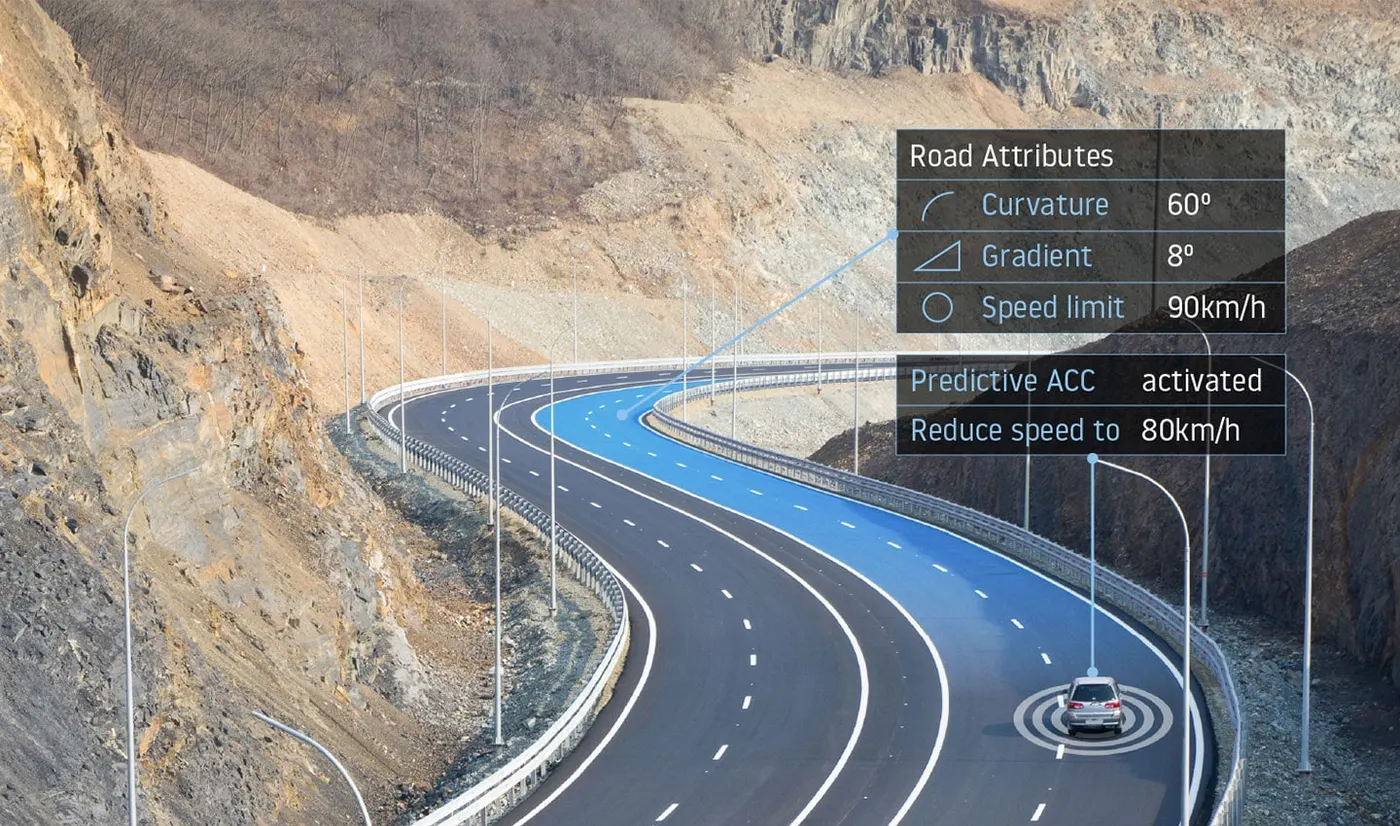
Adaptive Cruise Control Feature for passenger cars allows the host vehicle to adapt to the speed in line with the flow of traffic. Driving in heavy traffic or keeping a safe distance from the preceding vehicle calls for a high level of concentration. The Adaptive Cruise Control feature can reduce the stress on the driver by automatically controlling the vehicle speed & maintaining a predefined minimum distance to the preceding vehicle. As a consequence, the driver enjoys more comfort & can concentrate on the road little better.
A radar sensor is usually at the core of the Adaptive Cruise Control. Installed at the front of the vehicle, the system permanently monitors the road ahead. As long as the road ahead is clear, cruise control feature maintains the speed set by the driver. If the system spots a slower vehicle within its detection range, it gently reduces speed by releasing the accelerator or actively engaging the brake control system. If the vehicle ahead speeds up or changes lanes, the cruise control automatically accelerates to the driver’s desired speed.
Standard Adaptive Cruise Control can be activated from speeds of around 30 km/h (20 mph) upwards and supports the driver, primarily on cross-country journeys or on freeways. The cruise control stop & go variant is also active at speeds below 30 km/h (20 mph). It can maintain the set distance to the preceding vehicle even at very low speeds and can decelerate to a complete standstill. When the vehicle remains stopped longer, the driver needs only to reactivate the system, for example by briefly stepping on the gas pedal to return to cruise control mode. In this way, cruise control stop & go supports the driver even in heavy traffic and traffic jams.
Since Adaptive Cruise Control is a comfort and convenience system, brake interventions and vehicle acceleration only take place within defined limits. Even with Adaptive Cruise Control switched on, it remains the driver’s responsibility to monitor the speed and distance from the vehicle in front.
How adaptive cruise control works:

What use cases are supported by modern adaptive cruise control?
Stop & Go cruise control:
Traffic congestion is a real problem across the world. Major cities worldwide are faced with the challenge of optimizing their traffic networks. Even driving bumper to bumper at low speeds can result not only in discomfort for drivers, but also accidents. This is where Stop & Go cruise control can play a role. Operating similarly to adaptive cruise control on motorways, the difference is in slow-moving traffic, when it automatically stops or starts vehicle movement under driver supervision. The car will brake and accelerate on its own, while maintaining a safe distance from the vehicle in front.Speed limit-aware cruise control:
One of the situations requiring ACC adjustment by the driver is when passing a speed limit sign. However, intelligent cruise control can automatically adjust the set speed to the newly detected speed limit, thanks to input from the traffic sign recognition system. This is done by fusing camera observation and map data to provide reliable speed restriction information.Eco cruise control for fuel and EV capacity savings:
When in eco mode, cruise control adjusts the set speed so that the minimum amount of energy – whether electricity or fuel – is consumed during the journey. In a situation where a vehicle would go uphill, the system could drop the speed of the vehicle with 15-20%, in appreciation of the expected downhill speed gain shortly after.To be able to make such judgment, ACC relies on ADAS map data, specifically gradient information. Being able to rely on slope data means that the TomTom ADAS Map has been proven to provide between 5-10% fuel savings.Cruise control in curves:
Especially on country roads and junctions, but also on motorways, the driver usually needs to correct the speed set by adaptive cruise control when facing bends and turns.Using curvature data from the ADAS Map, intelligent cruise control can eliminate human intervention by calculating the safe and comfortable speed for a given road segment. It does so by also considering specific vehicle dynamics.There is also ample opportunity for customization. When in sport mode, the system can cater to drivers with a sporty driving style and shows them the dynamic driving capabilities of the vehicle.Turn-by-turn cruise control:
One of the most recent advancements in intelligent cruise control technology is the capability to automate acceleration and braking at highway exits, entrances, junctions, and roundabouts. Even when a driver corrects the vehicle speed by braking, as soon as the pedal is released, the system resumes its activity and sets the speed according to the upcoming road feature it detects. For example, this can be a drivable profile through a roundabout.Map data is critical to this operation, as the system relies on insights based on traffic signs – stop, yield, traffic lights – and curvature at junction information.Predictive adaptive cruise control to anticipate road hazards ahead:
When there is a road accident, a broken vehicle on the road or severe weather conditions such as icy roads, special caution when driving is required. Intelligent cruise control systems rely on the vehicle’s connectivity to obtain early warnings and adjust speed accordingly. The result is a safer and more comfortable journey for the driver and passengers.Parking speed control:
The first and the last stage of a car journey with adaptive cruise control is always the same: controlling the speed when maneuvering in a parking or a driveway. To assist the driver in such a scenario, it is imperative to use additional sensing and very low speed.Currently, many ACC systems under development target not only self-parking, but also maneuvering through large parking lots.Dynamic priority cruise control: an emerging technology:
The next step for modern adaptive cruise control systems is the ability to perceive and automatically handle changing traffic lights and other vehicles at junctions. Intelligent driving strategies that support this use case include priority negotiation and sensing a rapidly changing situation with high confidence. Of course, the driver can still observe the vehicle’s choices and intervene at any given moment.
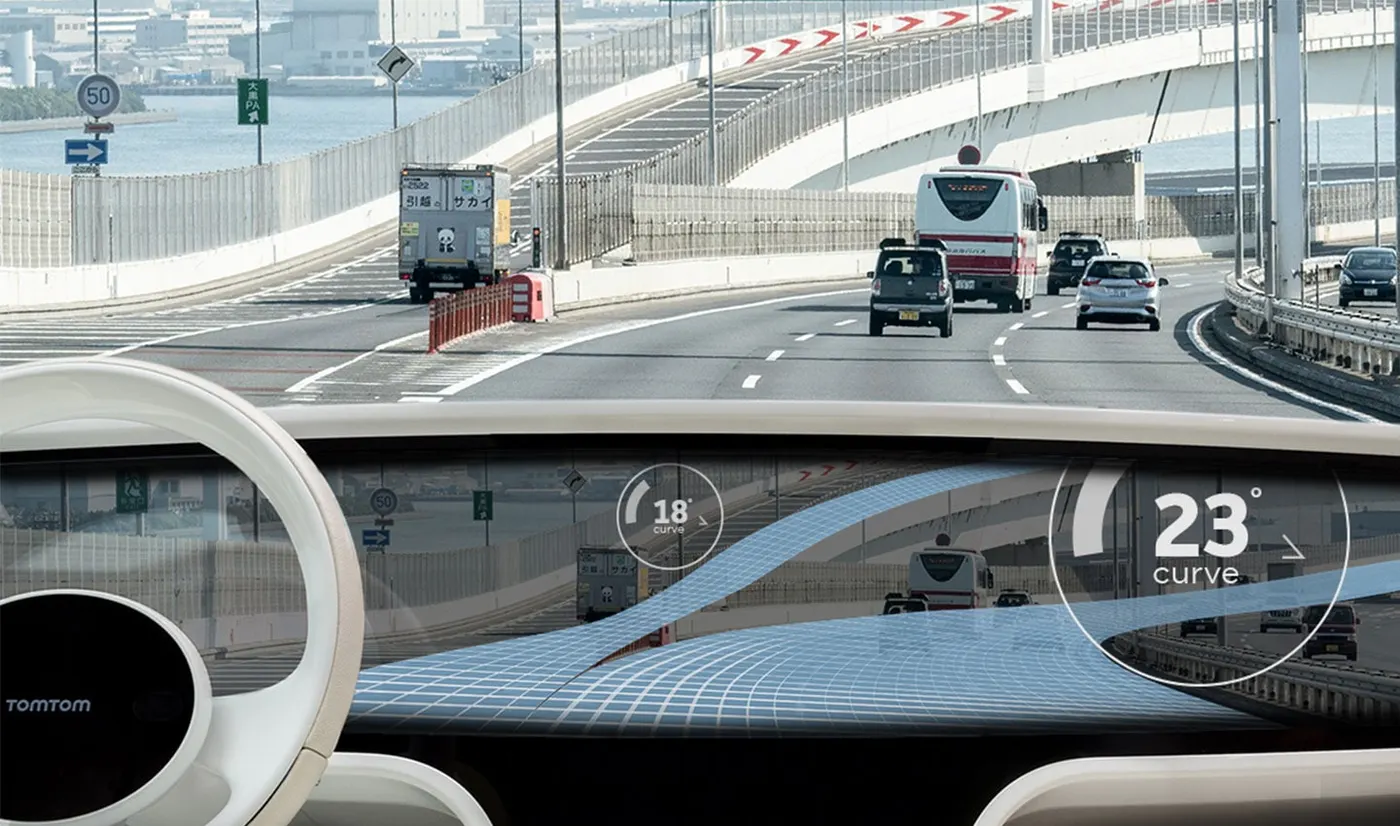
Fig: Adaptive cruise control helps drivers adjust the speed of their vehicle.
Basic Procedure:
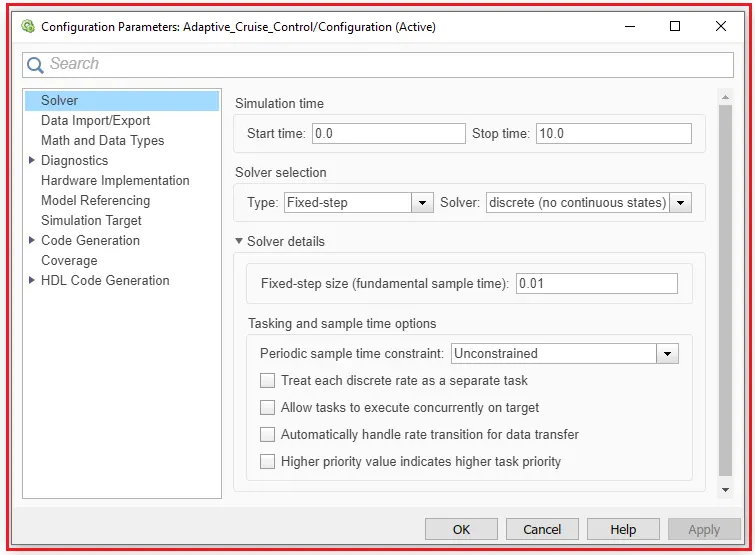
1). First step we have to go to the model setting option and then select the solver option in that solver selection select the fixed type and solver as discrete and in solver details fixed-step size is set as 0.01.
Then select Apply --> save it.
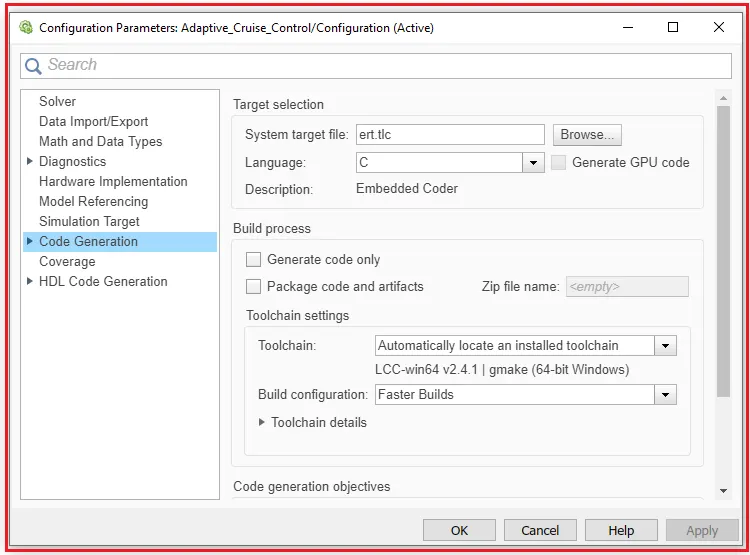
2). Next in the same configuration parameters for the Embedded code generation we have selected the system target file to browse ert.tlc.
Then select Apply --> OK.
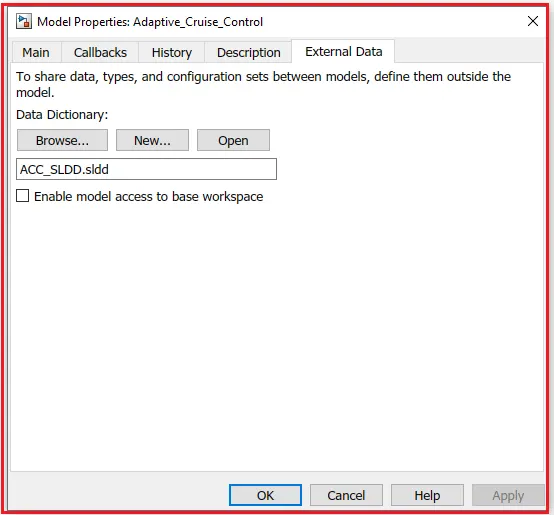
3). A Simulink Data Dictionary (SLDD) file is created that contains input, output signals, and calibration parameters used in the model. SLDD file is created by clicking on Modelling --> Model Properties --> External Data and then specifying a file name for the Data Dictionary.
4). Next, we have to go to the Model Explorer and click ACC_SLDD under that there is an option called Design data. Now we can enter the data into the SLDD file according to our requirements.
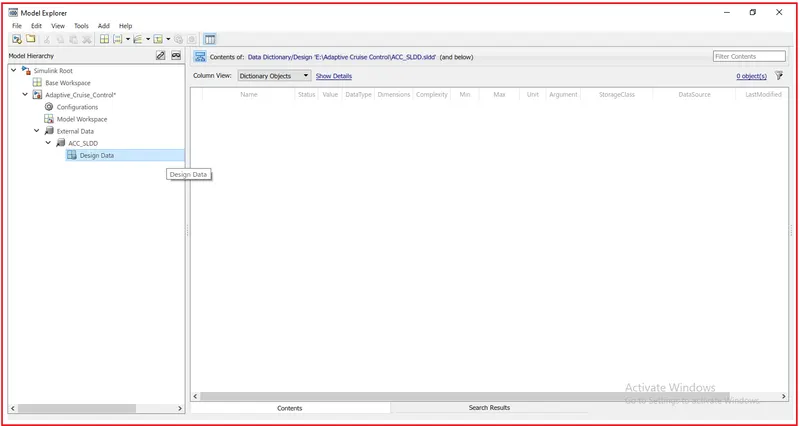
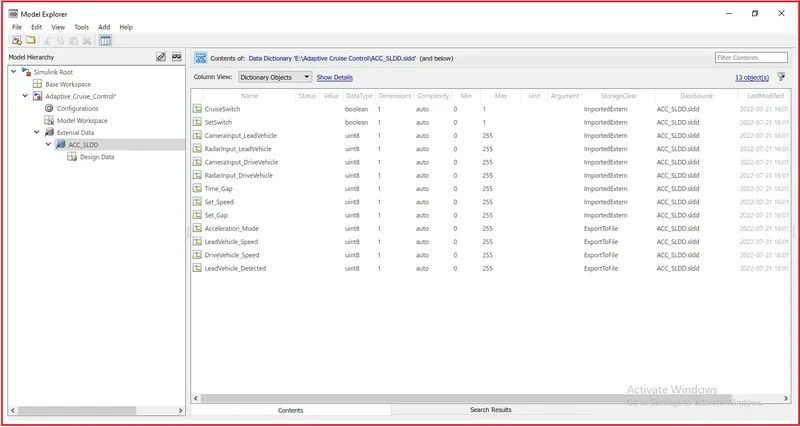
5). There are a total of 9 input signals, 3 local signals, and 1 output signal. There is a total of 13 signals.
For Input signals, we have given the storage class as Imported Extern, for local signals we have given the storage class as Localizable, and for output signals we have chosen the storage class as Export to File.
Signals & Calibration Data List:
Signal / Calibration Name | Signal Type | Data Type | Dimension | Min | Max | Initial Value | Units |
CameraInput_LeadVehicle | Input | Uint8 | 1 | 0 | 255 | - | - |
RadarInput_LeadVehicle | Input | Uint8 | 1 | 0 | 255 | - | - |
CameraInput_DriveVehicle | Input | Uint8 | 1 | 0 | 255 | - | - |
RadarInput_DriveVehicle | Input | Uint8 | 1 | 0 | 255 | - | - |
Time_Gap | Input | Uint8 | 1 | 0 | 255 | - | - |
Set_Speed | Input | Uint8 | 1 | 0 | 255 | - | - |
Set_Gap | Input | Uint8 | 1 | 0 | 255 | - | - |
CruiseSwitch | Input | Boolean | 1 | 0 | 1 | - | - |
SetSwitch | Input | Boolean | 1 | 0 | 1 | - | - |
Acceleration_Mode | Output | Uint8 | 1 | 0 | 255 | - | - |
LeadVehicle_Speed | Output | Uint8 | 1 | 0 | 255 | - | - |
DriveVehicle_Speed | Output | Uint8 | 1 | 0 | 255 | - | - |
LeadVehicle_Detected | Output | Uint8 | 1 | 0 | 255 | - | - |
6). Now, We can add the Simulink signals by selecting the Simulink Signal option.
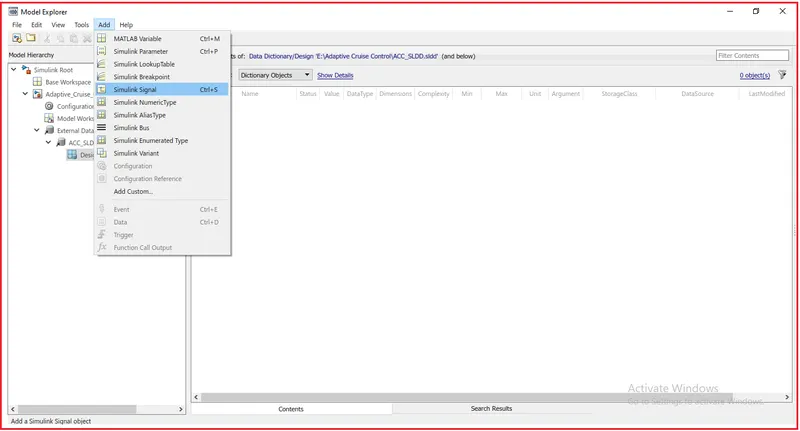
7). Here, we are using three types of signals in the model.
- Input Signal
- Output Signal
- Local Signal
For Input Signal we have set the storage class as an Imported Extern. For Output Signal, we have set the storage class as Export to File, and for local signals, we have given the storage class as Localizable. Local signals are signals that are neither inputs nor output signals.
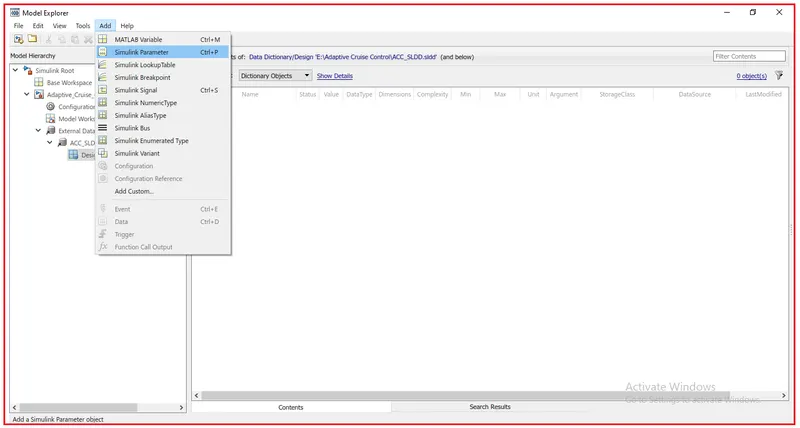
Calibration Signals are from the constant blocks. For this, we have to select the Simulink Parameter option.
By adding the new signal to the design data, the input parameters look like this,
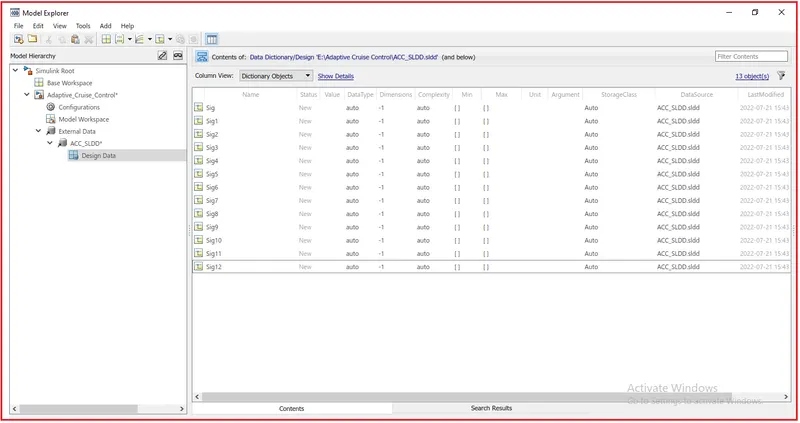
8). The Data Type, Dimension, Complexity, Value, Minimum and Maximum values, Unit, and Storage Cas are defined in the SLDD File. The use of the SLDD file is that when we define the signals in our model the characteristics and properties are assigned to these signals.
After creating the SLDD file the Data Dictionary looks like this,
9). Requirements:
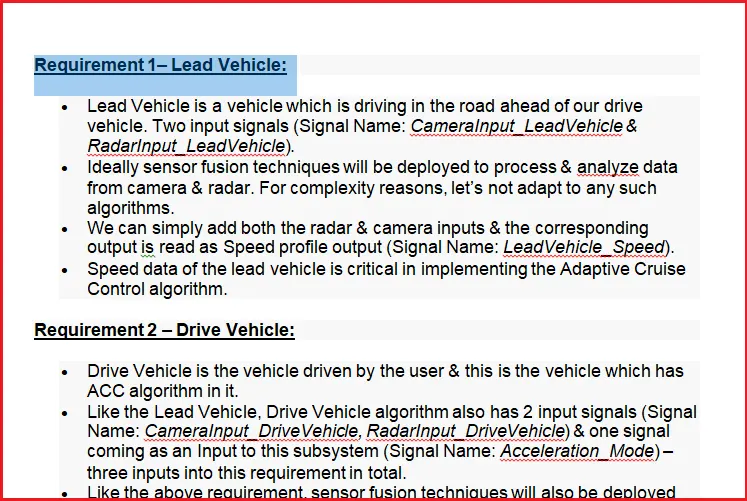
Requirement 1– Lead Vehicle:
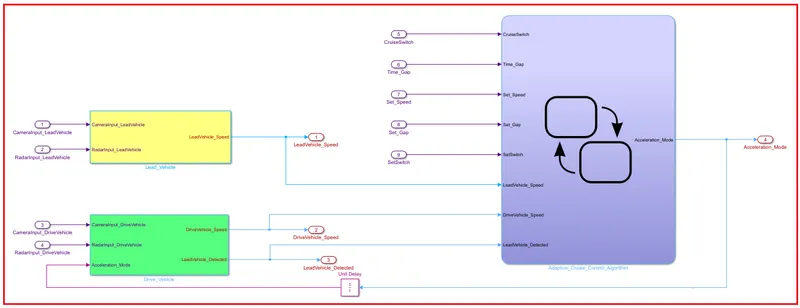
- Lead Vehicle is a vehicle which is driving in the road ahead of our drive vehicle. Two input signals (Signal Name: CameraInput_LeadVehicle & RadarInput_LeadVehicle).
- Ideally, sensor fusion techniques will be deployed to process & analyze data from camera & radar. For complexity reasons, let’s not adapt to any such algorithms.
- We can simply add both the radar & camera inputs & the corresponding output is read as Speed profile output (Signal Name: LeadVehicle_Speed).
- Speed data of the lead vehicle is critical in implementing the Adaptive Cruise Control algorithm.
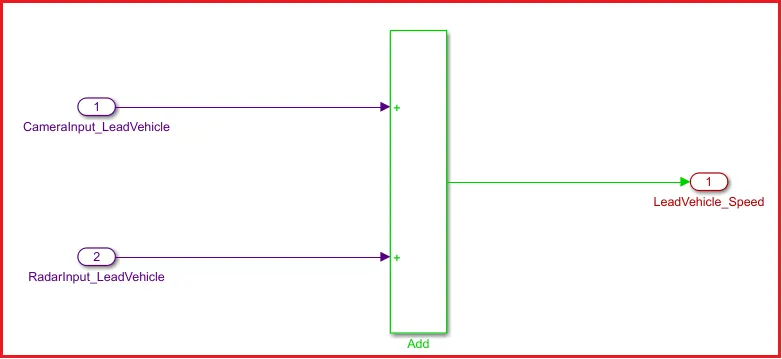
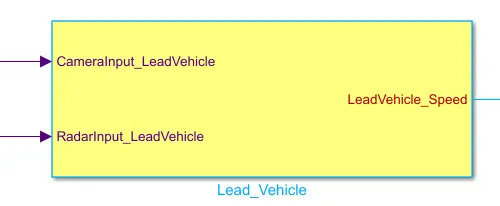
Camera input of the head vehicle and Radar Input of the Lead Vehicle is added to give the Speed of the Lead Vehicle.
Requirement 2 – Drive Vehicle:
- Drive Vehicle is the vehicle driven by the user & this is the vehicle which has ACC algorithm in it.
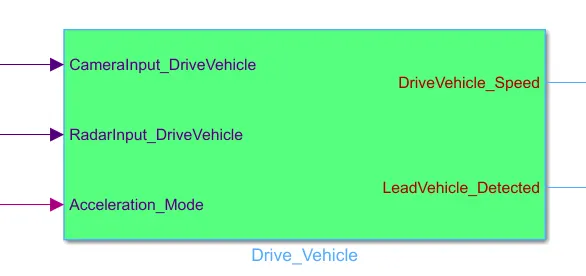
- Like the Lead Vehicle, Drive Vehicle algorithm also has 2 input signals (Signal Name: CameraInput_DriveVehicle, RadarInput_DriveVehicle) & one signal coming as an Input to this subsystem (Signal Name: Acceleration_Mode) – three inputs into this requirement in total.
- Like the above requirement, sensor fusion techniques will also be deployed here, for complexity reasons we are ignoring them.
- Two output signals come from this subsystem (Signal Name: DriveVehicle_Speed & LeadVehicle_Detected).
- Signal DriveVehicle_Speed is summation of three input signals mentioned above & LeadVehicle_Detected is renamed from Input Signal RadarInput_DriveVehicle by mere use of Signal Conversion block.
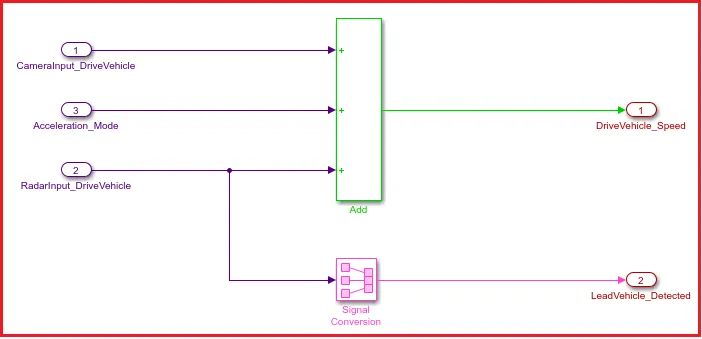
Camera Input of Drive Vehicle, Radar Input of Drive Vehicle, and Acceleration Mode are added to give the speed of Drive Vehicle.
Radar Input of Drive Vehicle is then converted to Lead Vehicle detected signal by using the signal conversion block.
Requirement 3 – Adaptive Cruise Control Algorithm:
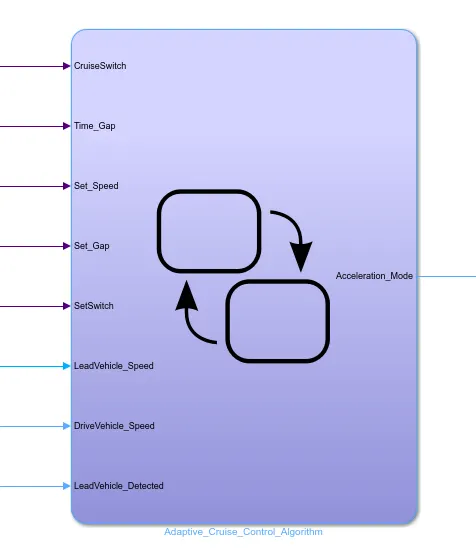
- Adaptive Cruise Control feature has 3 major modes of operation: OFF Mode, STANDBY Mode & ON Mode. This particular requirement has to be implemented as state machine logic in Simulink.
- The input signals to this state machine system are (Signal Name: Time_Gap, Set_Speed, Set_Gap, CruiseSwitch, SetSwitch).
- Also, the output signals (Signal Name: DriveVehicle_Speed & LeadVehicle_Detected) from requirement-2 is fed back as an input signal into this state machine block.
- Additionally, output signal (Signal Name: LeadVehicle_Speed) from requirement-1 is given as an input signal to this state machine block as well.
- Output from this subsystem is a signal (Signal Name: Acceleration_Mode) which governs the vehicular speed of the drive vehicle which automatically adjusts its speed & velocity to match the lead vehicle.
Requirement 3a – ACC OFF MODE state logic:
- This is the default state inside state machine logic. Output signal Acceleration_Mode is at value 0 in this state.
- This state is governed by input signal CruiseSwitch.
- If CruiseSwitch is equal to 1, state ACC STANDBY mode will get activated. If CruiseSwitch is equal to 0, state ACC OFF mode will get activated, from either ACC ON mode or ACC STANDBY mode
Requirement 3b – ACC STANDBY MODE state logic:
- This is the second activated state inside state machine logic. Output signal Acceleration_Mode is at value 1 in this state.
- This state is governed by both input signals CruiseSwitch & SetSwitch.
- If CruiseSwitch is equal to 1, state ACC STANDBY mode will get activated. If CruiseSwitch is equal to 0, state ACC OFF mode will get activated, from either ACC ON mode or ACC STANDBY mode
- If SetSwitch is equal to 1, state ACC ON mode will get activated. If SetSwitch is equal to 0, state ACC STANDBY mode will get activated.
Requirement 3c – ACC ON MODE state logic:
This state will be activated when input signal SetSwitch is equal to 1. There are 6 sub states to this state logic: They are:
- LeadVehicle_Detected_Follow (Default)
- LeadVehicle_Not_Detected
- LeadVehicle_Detected_Resume
- LeadVehicle_Not_Detected_Resume
- LeadVehicle_Speed_lessthan_Set_Speed
- LeadVehicle_Speed_equal_Set_Speed
Requirement 3c (i) – LeadVehicle_Detected_Follow (ACC ON MODE):
- This is the default sub state inside ACC ON MODE state. Output signal Acceleration_Mode is equal to 2.
- Condition to transit from LeadVehicle_Detected_Follow to LeadVehicle_Not_Detected; Input signal condition LeadVehicle_Detected == 0.
- Condition to transit from LeadVehicle_Detected_Follow to LeadVehicle_Speed_lessthan_Set_Speed; Input Signals condition (LeadVehicle_Detected == 1) && (LeadVehicle_Speed < Set_Speed) || (Time_Gap < Set_Gap).
Requirement 3c (ii) – LeadVehicle_Not_Detected (ACC ON MODE):
- Output signal Acceleration_Mode is equal to 1.
- Condition to transit from LeadVehicle_Not_Detected to LeadVehicle_Detected_Follow; Input signals condition [(LeadVehicle_Detected==1) && (DriveVehicle_Speed == Set_Speed) && (LeadVehicle_Speed >= Set_Speed) && (Time_Gap >= Set_Gap)]
- Condition to transit from LeadVehicle_Not_Detected to LeadVehicle_Speed_lessthan_Set_Speed; Input signals condition [(LeadVehicle_Detected == 1) && (LeadVehicle_Speed < Set_Speed) || (Time_Gap < Set_Gap)]
Requirement 3c (iii) – LeadVehicle_Detected_Resume (ACC ON MODE):
- Output signal Acceleration_Mode is equal to 3.
- Condition to transit from LeadVehicle_Detected_Resume to LeadVehicle_Detected_Follow; Input signals condition [(DriveVehicle_Speed == Set_Speed) && (LeadVehicle_Speed >= Set_Speed) && (Time_Gap >= Set_Gap)]
- Condition to transit from LeadVehicle_Detected_Resume to LeadVehicle_Not_Detected_Resume; Input signal condition LeadVehicle_Detected==0.
- Condition to transit from LeadVehicle_Detected_Resume to LeadVehicle_Speed_equal_Set_Speed; Input Signal condition [(DriveVehicle_Speed < Set_Speed) && (LeadVehicle_Speed > DriveVehicle_Speed) && (Time_Gap >= Set_Gap)]
Requirement 3c (iv) - LeadVehicle_Not_Detected_Resume (ACC ON MODE):
- Output signal Acceleration_Mode is equal to 1.
Requirement 3c (v) - LeadVehicle_Speed_lessthan_Set_Speed (ACC ON MODE):
- Output signal Acceleration_Mode is equal to 4.
- Condition to transit from LeadVehicle_Speed_lessthan_Set_Speed to LeadVehicle_Not_Detected; Input signal condition [(LeadVehicle_Detected == 0) && (DriveVehicle_Speed == Set_Speed)]
- Condition to transit from LeadVehicle_Speed_lessthan_Set_Speed to LeadVehicle_Speed_equal_Set_Speed; Input signals condition [((LeadVehicle_Speed*1.25>=DriveVehicle_Speed) && (LeadVehicle_Speed * 0.75<=DriveVehicle_Speed)) && (DriveVehicle_Speed < Set_Speed) && ((Time_Gap<=1.25*Set_Gap) && (Time_Gap >=0.75*Set_Gap))]
Requirement 3c (vi) - LeadVehicle_Speed_equal_Set_Speed (ACC ON MODE):
- Output signal Acceleration_Mode is equal to 5.
- Condition to transit from LeadVehicle_Speed_equal_Set_Speed to LeadVehicle_Not_Detected_Resume; Input signal conditions is [(LeadVehicle_Detected == 0) || (DriveVehicle_Speed <= Set_Speed)]
- Condition to transit from LeadVehicle_Speed_equal_Set_Speed to LeadVehicle_Detected_Resume; Input signal conditions [(DriveVehicle_Speed < Set_Speed) && (LeadVehicle_Speed > DriveVehicle_Speed) || (Time_Gap >= Set_Gap)]
- Condition to transit from LeadVehicle_Speed_equal_Set_Speed to LeadVehicle_Speed_lessthan_Set_Speed; Input signals conditions [(LeadVehicle_Speed < Set_Speed) && (LeadVehicle_Speed < DriveVehicle_Speed) || (Time_Gap == 0.75*Set_Gap)]
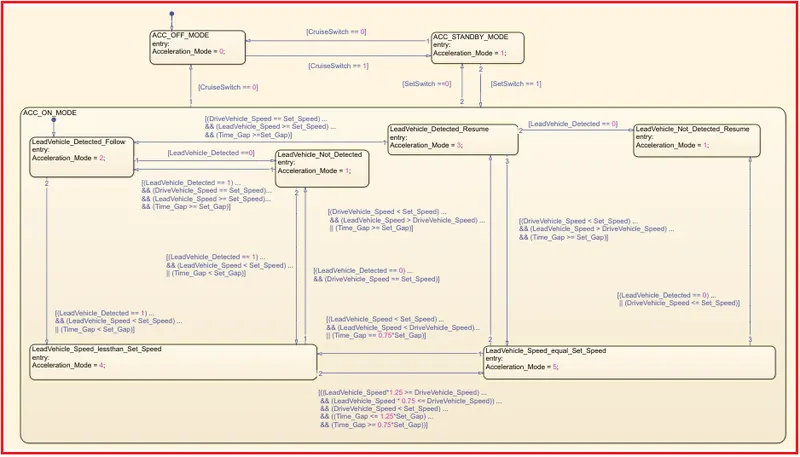
The following figure shows the created Adaptive Cruise Control Algorithm as per the requirement.
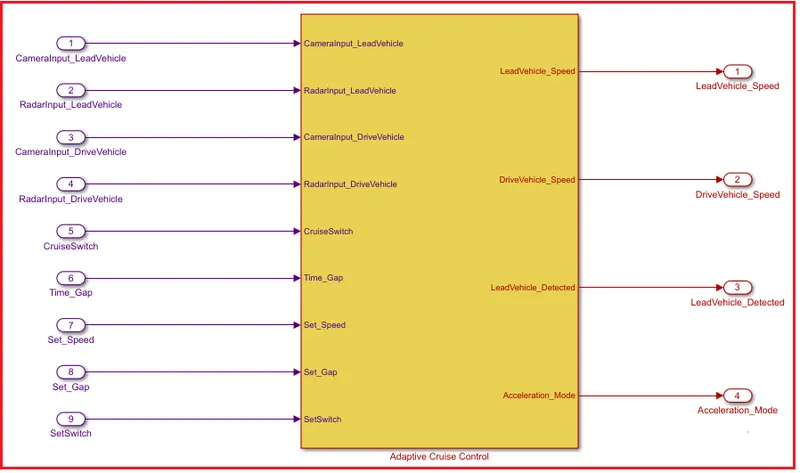
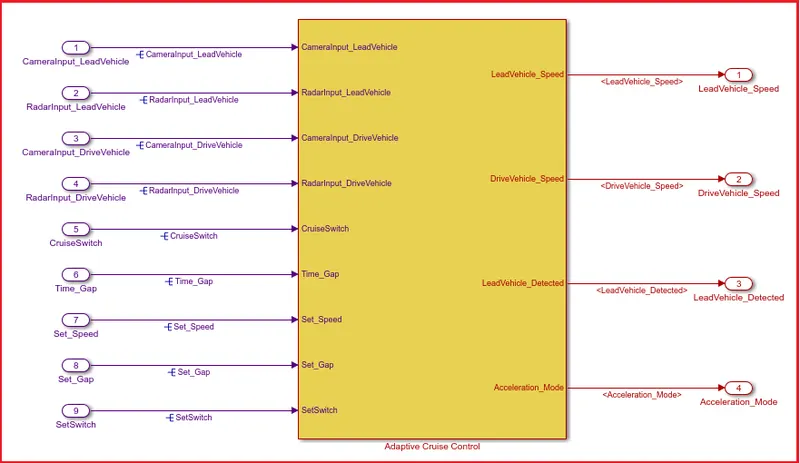
The following figure shows the whole model created for the Adaptive Cruise Control with all input and output ports by using Simulink.
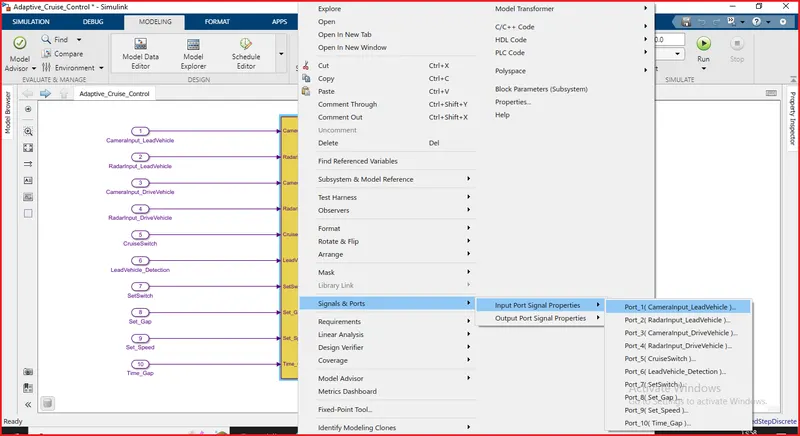
10). Signal Resolving:
For Signal Resolving right click on subsystem and select the properties and enter the signal name, then select signal name must resolve to Simulink signal object.
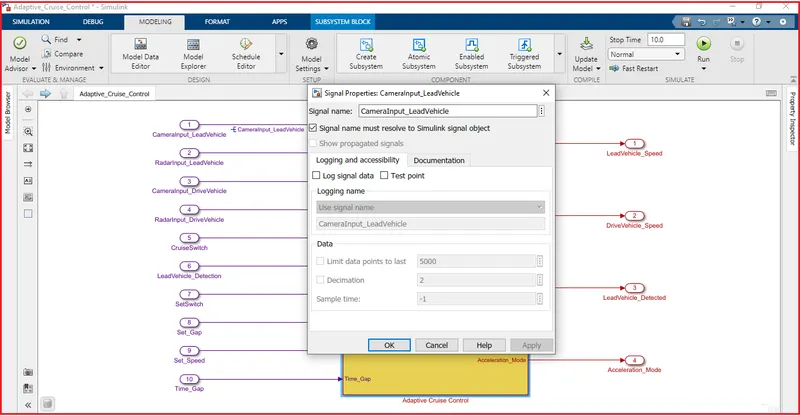
After doing the Signal Resolving the final Model we get,
11). Requirement Tagging:
To perform Tagging first we have to create a word file with all details regarding the model. Tagging enables us to view the procedure which is used to build the model or to know more details about the designed model. To tag the given requirements the following procedure has been followed:
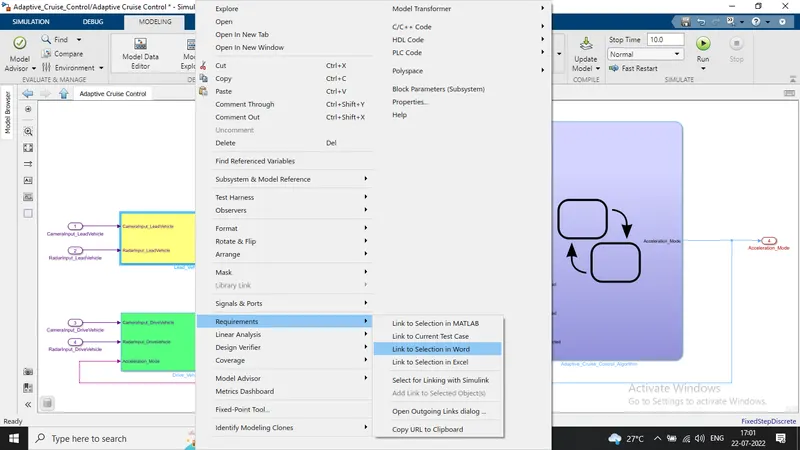
- First, we have highlighted the requirements stated in the Word document.
- Then Right-click on the subsystem in the model that has to be tagged.
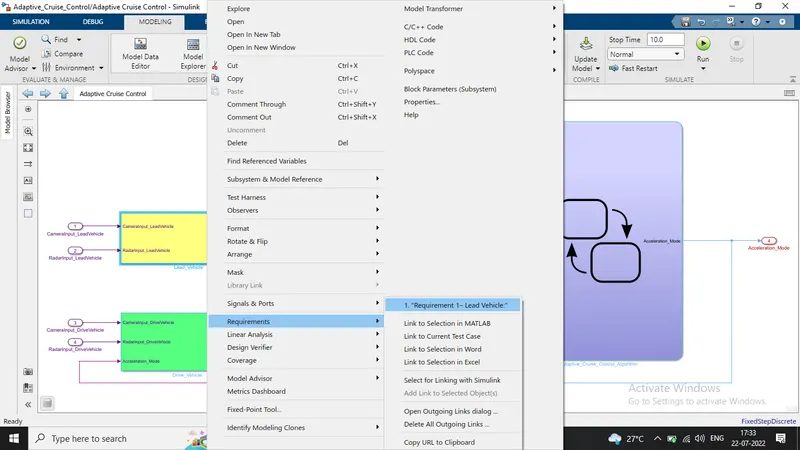
- Next, we have selected 'Requirements' and then 'Link to Selection in Word'.
Now we can see that requirement tagging is done.
12). MAB Guidelines Check-in Model Advisor:
The MAB (MathWorks Advisory Board) is a set of modeling guidelines developed by an independent industry working group for the usage of MATLAB, Simulink, Stateflow, and Embedded Coder. The guidelines are the culmination of years of engineering expertise and best practices for developing, maintaining, and documenting control algorithm modes used in the development of production software.
The following procedure is followed to check MAB Guidelines:
- To perform the MAB guidelines test on our Simulink Model, go to the modeling section and select Model Advisor which is at the top left corner of the window.
- We can use the Model Advisor to verify compliance of our model with the Mathworks Advisory Board (MAB) guidelines.
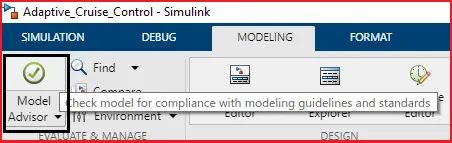
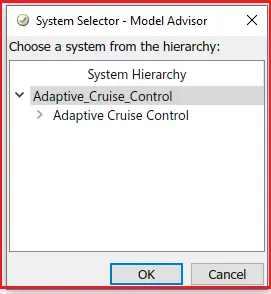
By clicking on the Mode Advisor, a window will ask us for confirmation if we click on OK then it will open a window which is shown in the following figure.
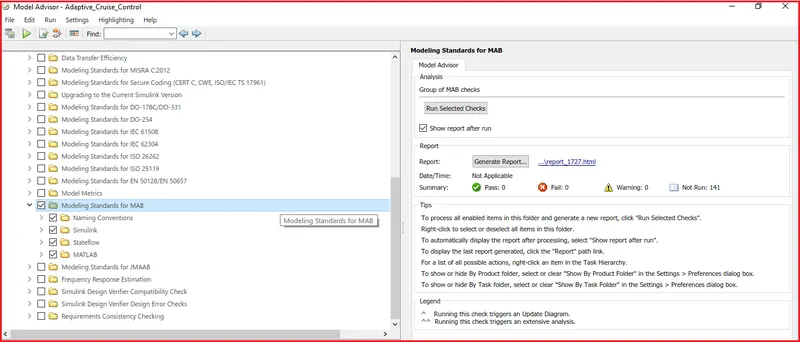
In the Model Advisor, there are many guidelines, among them, we will select only Modeling Standards for MAB.
- If we expand the section will be able to see which are tested under the MAB guidelines. If we again expand there will be many sub-sections in each section.
After selecting MAB guidelines, click on Run selected checks.
- Then it asks again for confirmation, click on continue. Then the testing will begin. It takes time to perform the guidelines test.
Model Advisor Report:
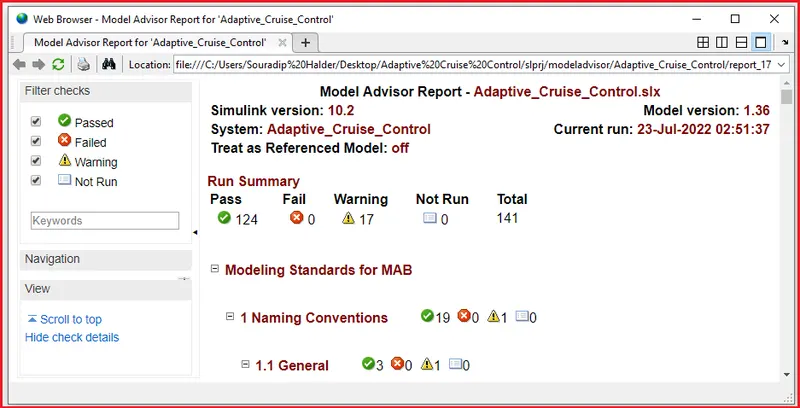
After running the selected checks of the Model Advisor, we generated the report. The generated report is shown below:
13). Code Generation:
As per the requirement, we have created the data dictionary and now we have also generated the code for the Simulink Model.
To generate the code, select Apps --> Embedded Coder
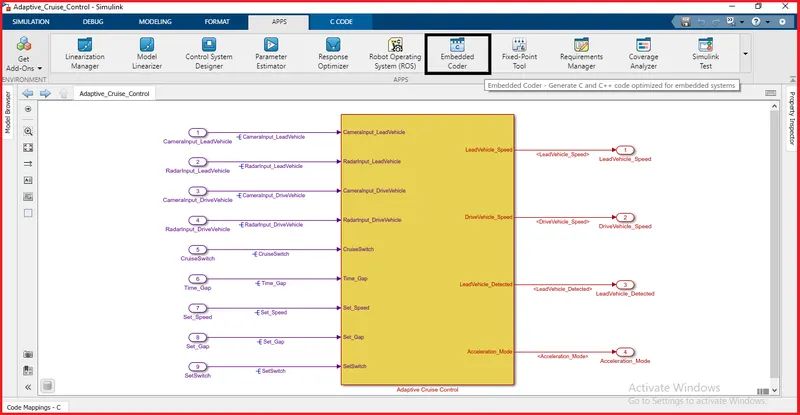
After selecting the embedded coder, the C Code window will open. Then in C Code, we have chosen the Build option.
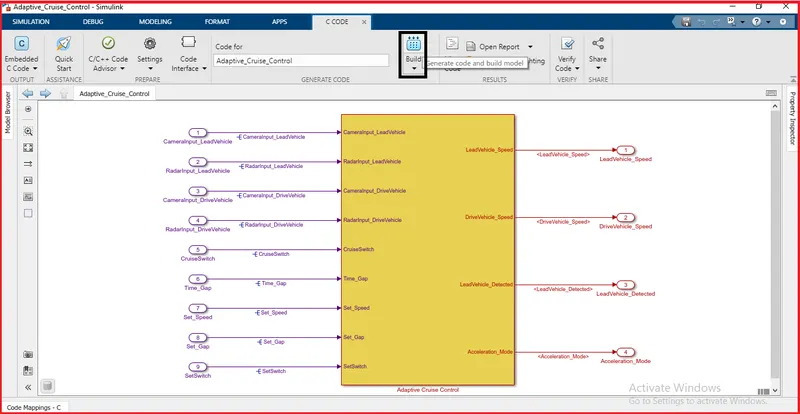
Next, the code will be generated and it is shown below:
Generated C-Code:
/*
 * File: Adaptive_Cruise_Control.c
 *
 * Code generated for Simulink model 'Adaptive_Cruise_Control'.
 *
 * Model version                  : 1.37
 * Simulink Coder version         : 9.4 (R2020b) 29-Jul-2020
 * C/C++ source code generated on : Sat Jul 23 02:58:10 2022
 *
 * Target selection: ert.tlc
 * Embedded hardware selection: Intel->x86-64 (Windows64)
 * Code generation objectives: Unspecified
 * Validation result: Not run
 */

#include "Adaptive_Cruise_Control.h"
#include "Adaptive_Cruise_Control_private.h"

/* Named constants for Chart: '/Adaptive_Cruise_Control_Algorithm' */
#define Ada_IN_LeadVehicle_Not_Detected ((uint8_T)3U)
#define Adaptive_Cr_IN_ACC_STANDBY_MODE ((uint8_T)3U)
#define Adaptive_Cru_IN_NO_ACTIVE_CHILD ((uint8_T)0U)
#define Adaptive_Cruise_IN_ACC_OFF_MODE ((uint8_T)1U)
#define Adaptive_Cruise__IN_ACC_ON_MODE ((uint8_T)2U)
#define IN_LeadVehicle_Detected_Follow ((uint8_T)1U)
#define IN_LeadVehicle_Detected_Resume ((uint8_T)2U)
#define IN_LeadVehicle_Not_Detected_Res ((uint8_T)4U)
#define IN_LeadVehicle_Speed_equal_Set_ ((uint8_T)5U)
#define IN_LeadVehicle_Speed_lessthan_S ((uint8_T)6U)

/* Exported data definition */

/* Definition for custom storage class: ExportToFile */
real_T Acceleration_Mode;              /* '/Unit Delay' */
real_T DriveVehicle_Speed;             /* '/Add' */
real_T LeadVehicle_Detected;           /* '/Signal Conversion' */
real_T LeadVehicle_Speed;              /* '/Add' */

/* Block states (default storage) */
DW_Adaptive_Cruise_Control_T Adaptive_Cruise_Control_DW;

/* External outputs (root outports fed by signals with default storage) */
ExtY_Adaptive_Cruise_Control_T Adaptive_Cruise_Control_Y;

/* Real-time model */
static RT_MODEL_Adaptive_Cruise_Cont_T Adaptive_Cruise_Control_M_;
RT_MODEL_Adaptive_Cruise_Cont_T *const Adaptive_Cruise_Control_M =
  &Adaptive_Cruise_Control_M_;

/* Model step function */
void Adaptive_Cruise_Control_step(void)
{
  /* Sum: '/Add' incorporates:
   *  Inport: '/CameraInput_LeadVehicle'
   *  Inport: '/RadarInput_LeadVehicle'
   */
  LeadVehicle_Speed = CameraInput_LeadVehicle + RadarInput_LeadVehicle;

  /* UnitDelay: '/Unit Delay' */
  Acceleration_Mode = Adaptive_Cruise_Control_Y.Acceleration_Mode_j;

  /* Sum: '/Add' incorporates:
   *  Inport: '/CameraInput_DriveVehicle'
   *  Inport: '/RadarInput_DriveVehicle'
   */
  DriveVehicle_Speed = (CameraInput_DriveVehicle + Acceleration_Mode) +
    RadarInput_DriveVehicle;

  /* SignalConversion: '/Signal Conversion' incorporates:
   *  Inport: '/RadarInput_DriveVehicle'
   */
  LeadVehicle_Detected = RadarInput_DriveVehicle;

  /* Chart: '/Adaptive_Cruise_Control_Algorithm' incorporates:
   *  Inport: '/CruiseSwitch'
   *  Inport: '/SetSwitch'
   *  Inport: '/Set_Gap'
   *  Inport: '/Set_Speed'
   *  Inport: '/Time_Gap'
   *  UnitDelay: '/Unit Delay'
   */
  if (Adaptive_Cruise_Control_DW.is_active_c3_Adaptive_Cruise_Co == 0U) {
    Adaptive_Cruise_Control_DW.is_active_c3_Adaptive_Cruise_Co = 1U;
    Adaptive_Cruise_Control_DW.is_c3_Adaptive_Cruise_Control =
      Adaptive_Cruise_IN_ACC_OFF_MODE;
    Adaptive_Cruise_Control_Y.Acceleration_Mode_j = 0.0;
  } else {
    switch (Adaptive_Cruise_Control_DW.is_c3_Adaptive_Cruise_Control) {
     case Adaptive_Cruise_IN_ACC_OFF_MODE:
      Adaptive_Cruise_Control_Y.Acceleration_Mode_j = 0.0;
      if (CruiseSwitch == 1.0) {
        Adaptive_Cruise_Control_DW.is_c3_Adaptive_Cruise_Control =
          Adaptive_Cr_IN_ACC_STANDBY_MODE;
        Adaptive_Cruise_Control_Y.Acceleration_Mode_j = 1.0;
      }
      break;

     case Adaptive_Cruise__IN_ACC_ON_MODE:
      if (CruiseSwitch == 0.0) {
        Adaptive_Cruise_Control_DW.is_ACC_ON_MODE =
          Adaptive_Cru_IN_NO_ACTIVE_CHILD;
        Adaptive_Cruise_Control_DW.is_c3_Adaptive_Cruise_Control =
          Adaptive_Cruise_IN_ACC_OFF_MODE;
        Adaptive_Cruise_Control_Y.Acceleration_Mode_j = 0.0;
      } else if (SetSwitch == 0.0) {
        Adaptive_Cruise_Control_DW.is_ACC_ON_MODE =
          Adaptive_Cru_IN_NO_ACTIVE_CHILD;
        Adaptive_Cruise_Control_DW.is_c3_Adaptive_Cruise_Control =
          Adaptive_Cr_IN_ACC_STANDBY_MODE;
        Adaptive_Cruise_Control_Y.Acceleration_Mode_j = 1.0;
      } else {
        switch (Adaptive_Cruise_Control_DW.is_ACC_ON_MODE) {
         case IN_LeadVehicle_Detected_Follow:
          Adaptive_Cruise_Control_Y.Acceleration_Mode_j = 2.0;
          if (LeadVehicle_Detected == 0.0) {
            Adaptive_Cruise_Control_DW.is_ACC_ON_MODE =
              Ada_IN_LeadVehicle_Not_Detected;
            Adaptive_Cruise_Control_Y.Acceleration_Mode_j = 1.0;
          } else {
            if (((LeadVehicle_Detected == 1.0) && (LeadVehicle_Speed < Set_Speed))
                || (Time_Gap < Set_Gap)) {
              Adaptive_Cruise_Control_DW.is_ACC_ON_MODE =
                IN_LeadVehicle_Speed_lessthan_S;
              Adaptive_Cruise_Control_Y.Acceleration_Mode_j = 4.0;
            }
          }
          break;

         case IN_LeadVehicle_Detected_Resume:
          Adaptive_Cruise_Control_Y.Acceleration_Mode_j = 3.0;
          if ((DriveVehicle_Speed == Set_Speed) && (LeadVehicle_Speed >=
               Set_Speed) && (Time_Gap >= Set_Gap)) {
            Adaptive_Cruise_Control_DW.is_ACC_ON_MODE =
              IN_LeadVehicle_Detected_Follow;
            Adaptive_Cruise_Control_Y.Acceleration_Mode_j = 2.0;
          } else if (LeadVehicle_Detected == 0.0) {
            Adaptive_Cruise_Control_DW.is_ACC_ON_MODE =
              IN_LeadVehicle_Not_Detected_Res;
            Adaptive_Cruise_Control_Y.Acceleration_Mode_j = 1.0;
          } else {
            if ((DriveVehicle_Speed < Set_Speed) && (LeadVehicle_Speed >
                 DriveVehicle_Speed) && (Time_Gap >= Set_Gap)) {
              Adaptive_Cruise_Control_DW.is_ACC_ON_MODE =
                IN_LeadVehicle_Speed_equal_Set_;
              Adaptive_Cruise_Control_Y.Acceleration_Mode_j = 5.0;
            }
          }
          break;

         case Ada_IN_LeadVehicle_Not_Detected:
          Adaptive_Cruise_Control_Y.Acceleration_Mode_j = 1.0;
          if ((LeadVehicle_Detected == 1.0) && (DriveVehicle_Speed == Set_Speed)
              && (LeadVehicle_Speed >= Set_Speed) && (Time_Gap >= Set_Gap)) {
            Adaptive_Cruise_Control_DW.is_ACC_ON_MODE =
              IN_LeadVehicle_Detected_Follow;
            Adaptive_Cruise_Control_Y.Acceleration_Mode_j = 2.0;
          } else {
            if (((LeadVehicle_Detected == 1.0) && (LeadVehicle_Speed < Set_Speed))
                || (Time_Gap < Set_Gap)) {
              Adaptive_Cruise_Control_DW.is_ACC_ON_MODE =
                IN_LeadVehicle_Speed_lessthan_S;
              Adaptive_Cruise_Control_Y.Acceleration_Mode_j = 4.0;
            }
          }
          break;

         case IN_LeadVehicle_Not_Detected_Res:
          Adaptive_Cruise_Control_Y.Acceleration_Mode_j = 1.0;
          break;

         case IN_LeadVehicle_Speed_equal_Set_:
          Adaptive_Cruise_Control_Y.Acceleration_Mode_j = 5.0;
          if (((LeadVehicle_Speed < Set_Speed) && (LeadVehicle_Speed <
                DriveVehicle_Speed)) || (0.75 * Set_Gap == Time_Gap)) {
            Adaptive_Cruise_Control_DW.is_ACC_ON_MODE =
              IN_LeadVehicle_Speed_lessthan_S;
            Adaptive_Cruise_Control_Y.Acceleration_Mode_j = 4.0;
          } else if (((DriveVehicle_Speed < Set_Speed) && (LeadVehicle_Speed >
                       DriveVehicle_Speed)) || (Time_Gap >= Set_Gap)) {
            Adaptive_Cruise_Control_DW.is_ACC_ON_MODE =
              IN_LeadVehicle_Detected_Resume;
            Adaptive_Cruise_Control_Y.Acceleration_Mode_j = 3.0;
          } else {
            if ((LeadVehicle_Detected == 0.0) || (DriveVehicle_Speed <=
                 Set_Speed)) {
              Adaptive_Cruise_Control_DW.is_ACC_ON_MODE =
                IN_LeadVehicle_Not_Detected_Res;
              Adaptive_Cruise_Control_Y.Acceleration_Mode_j = 1.0;
            }
          }
          break;

         default:
          /* case IN_LeadVehicle_Speed_lessthan_Set_Speed: */
          Adaptive_Cruise_Control_Y.Acceleration_Mode_j = 4.0;
          if ((LeadVehicle_Detected == 0.0) && (DriveVehicle_Speed == Set_Speed))
          {
            Adaptive_Cruise_Control_DW.is_ACC_ON_MODE =
              Ada_IN_LeadVehicle_Not_Detected;
            Adaptive_Cruise_Control_Y.Acceleration_Mode_j = 1.0;
          } else {
            if ((LeadVehicle_Speed * 1.25 >= DriveVehicle_Speed) &&
                (LeadVehicle_Speed * 0.75 <= DriveVehicle_Speed) &&
                (DriveVehicle_Speed < Set_Speed) && ((Time_Gap <= 1.25 * Set_Gap)
                 && (Time_Gap >= 0.75 * Set_Gap))) {
              Adaptive_Cruise_Control_DW.is_ACC_ON_MODE =
                IN_LeadVehicle_Speed_equal_Set_;
              Adaptive_Cruise_Control_Y.Acceleration_Mode_j = 5.0;
            }
          }
          break;
        }
      }
      break;

     default:
      /* case IN_ACC_STANDBY_MODE: */
      Adaptive_Cruise_Control_Y.Acceleration_Mode_j = 1.0;
      if (CruiseSwitch == 0.0) {
        Adaptive_Cruise_Control_DW.is_c3_Adaptive_Cruise_Control =
          Adaptive_Cruise_IN_ACC_OFF_MODE;
        Adaptive_Cruise_Control_Y.Acceleration_Mode_j = 0.0;
      } else {
        if (SetSwitch == 1.0) {
          Adaptive_Cruise_Control_DW.is_c3_Adaptive_Cruise_Control =
            Adaptive_Cruise__IN_ACC_ON_MODE;
          Adaptive_Cruise_Control_DW.is_ACC_ON_MODE =
            IN_LeadVehicle_Detected_Follow;
          Adaptive_Cruise_Control_Y.Acceleration_Mode_j = 2.0;
        }
      }
      break;
    }
  }

  /* End of Chart: '/Adaptive_Cruise_Control_Algorithm' */
}

/* Model initialize function */
void Adaptive_Cruise_Control_initialize(void)
{
  /* (no initialization code required) */
}

/* Model terminate function */
void Adaptive_Cruise_Control_terminate(void)
{
  /* (no terminate code required) */
}

/*
 * File trailer for generated code.
 *
 * [EOF]
 */
Conclusion:
- The Adaptive Cruise Control is modeled as per the given requirements.
- All the signals and calibrated values are defined in the Simulink Data Dictionary (SLDD).
- All input and output signals are resolved and propagated.
- The respective subsystems are Tagged according to their requirement.
- Model Advisory check is done with MAB guidelines and there are 0 fail conditions.
- Since there are no errors in Model Advisory Report the C code has been generated by using Embedded Coder.