Project 1- Traffic Jam Assistant Feature
MBD- Traffic Jam Assistant Feature
Objective:-
To develop one specific requirement of Traffic Jam Assistant algorithm which would predominantly feature in the IPC algorithm
Project Description:-
Requirements Provided:-
Requirement 1:
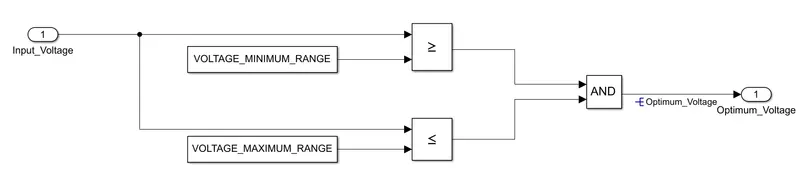
- Input Signal “Input_Voltage” is compared against voltage values “VOLTAGE_MINIMUM_RANGE” & “VOLTAGE_MAXIMUM_RANGE”.
- Incoming input signal “Input_Voltage” must be greater than – equal to “VOLTAGE_MINIMUM_RANGE” and less than – equal to “VOLTAGE_MAXIMUM_RANGE”.
- Output signal from here is “Optimum_Voltage” which will be one of the inputs to the subsystem “DisplayUnit”.
Simulink Model for Requirement 1:-
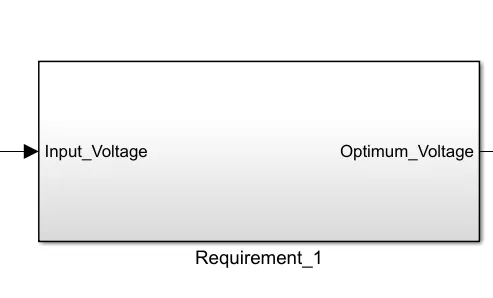
Requirement 2 (DisplayUnit Subsystem):
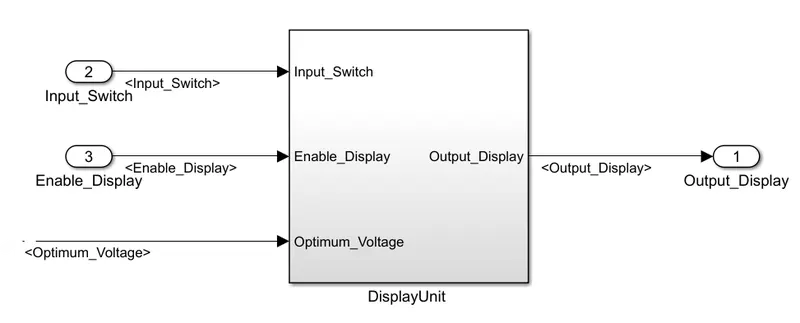
- Input Signals are “Optimum_Voltage”, “Input_Switch”,“Enable_Display”. Signal “Enable_Display” must be saturated between the range 0 – 7. Output signal from the subsystem is “Output_Display”.
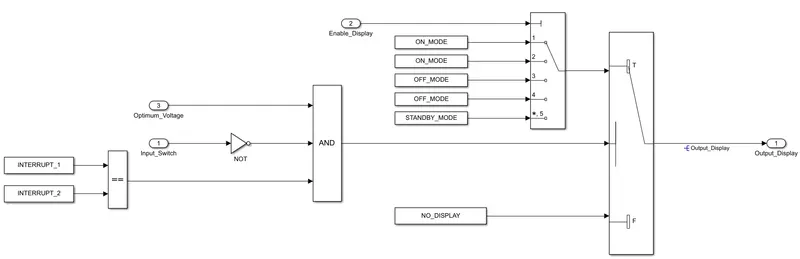
- Input Signal “Enable_Display” is compared against pre – defined set of values in a multiport switch. Total data ports in the multiport switch is 5.
- Multiport switch inputs 1 & 2 is connected to calibration signal “ON_MODE”, Multiport switch inputs 3 & 4 is connected to calibration signal “OFF_MODE” while Multiport switch input 5 is connected to calibration signal “STANDBY_MODE”.
- The output from Multiport switch is connected to the first input port of the Switch block. The third input port of the Switch block is connected to the calibration signal “NO_DISPLAY”.
- Meanwhile NOT value of input signal “Input_Switch” is compared in an AND gate against input signal “Optimum_Voltage” and the output from comparing if calibration signals “INTERRUPT_1” & “INTERRUPT_2” are equal. The output of the AND gate is the second input of the switch block.
- The output from the switch block is “Output_Display”
Simulink Model for Requirement 2:-
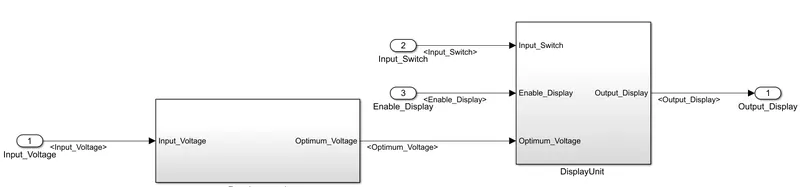
Final simulink model:-
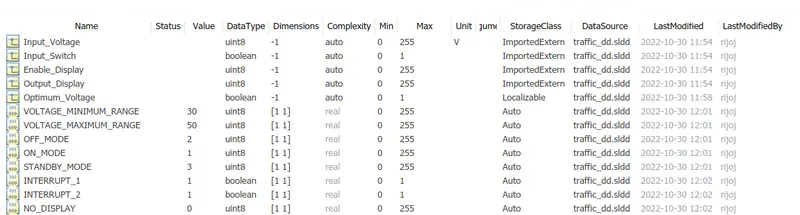
SLDD:-
Requirement tagging:-
The given requirements are then tagged in the specific model which will be useful for the developer as well as for the entire team, who is working in the project. It will also be very helpfull in the future usage if we have a very tedious models. It can be done by Right Click ---> Requirements ---> Link to selection in Word. For doing this the requirements which should be tagged should be selected in prior, and the word file should be in active (ie., open).
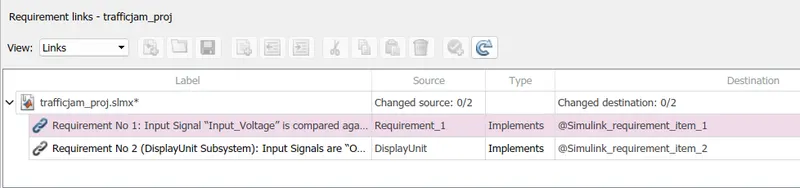
This can bee seen through Apps ---> Requirements Manager command. And hence by clicking the requirements, we will be directed to the tagged component easily. And by this way, the requirement tagging is done to the given model.
Model Advisor Check:-
The next step is to do the model advisory check. To start the Model check, first update the diagram by using ctrl+D . Then go to Apps ---> Model advisor
Then the Model advisor diaglog box will appear and then choose the entire model name for model check.
And then in the dialog box select the tasks which you want to go for the check. Since it is a mini project, I have chosen only MAAB guidelines for the advisory check. But depending upon our project we can go for our required checks and after selecting the guideline click on ' Run the selected checks '. And hence the checks will be done and our results will be displayed as follows:-
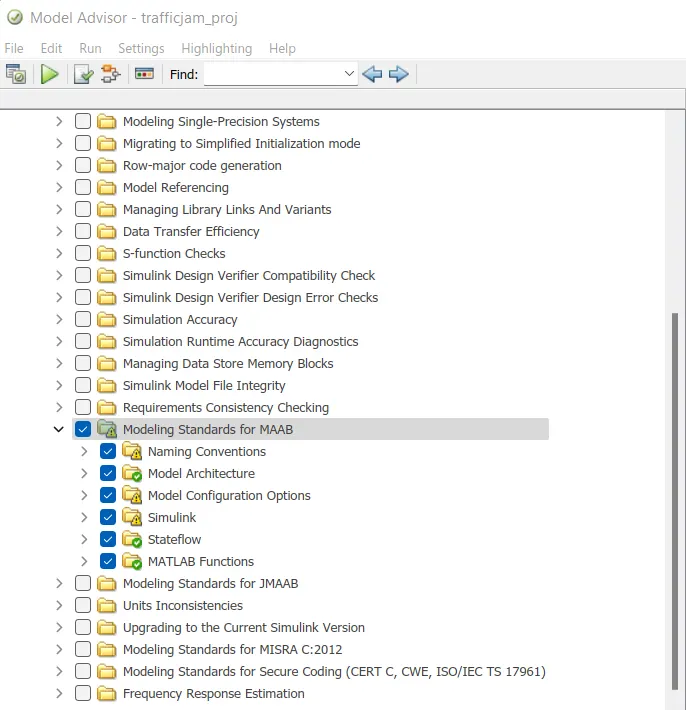
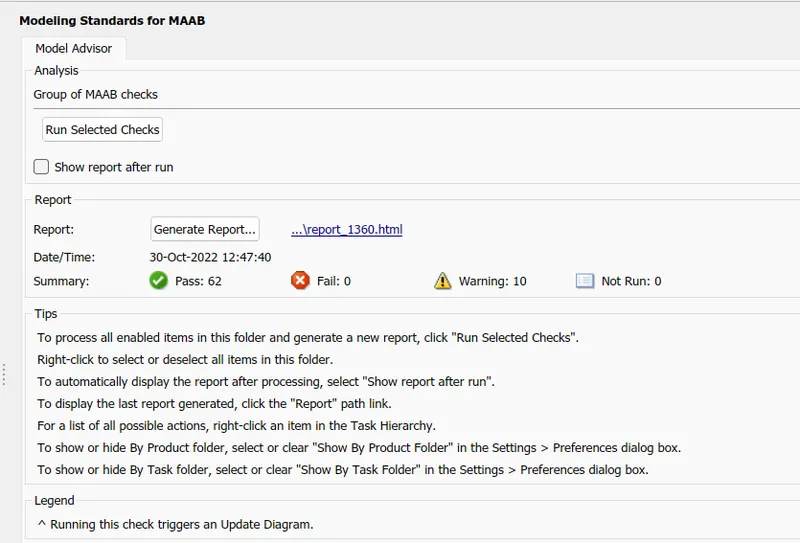
And then, when you give ' Generate report ' command, the model advisory report will get generated for us and it can be saved as a pdf file.
Note:- The warnings are mostly for the file names , which we have stored in that particular folder so it is neglected in this report.
CODE GENERATION:-
Go to Model settings---> Code generation and set the system target file as ert.tlc
The final step for the Model based development, is the Code generation. This is done by giving the command, Apps ---> Embbedded coder ---> Build ---> Generate code and build model. And hence the C code is generated and stored for the model sucessfully.
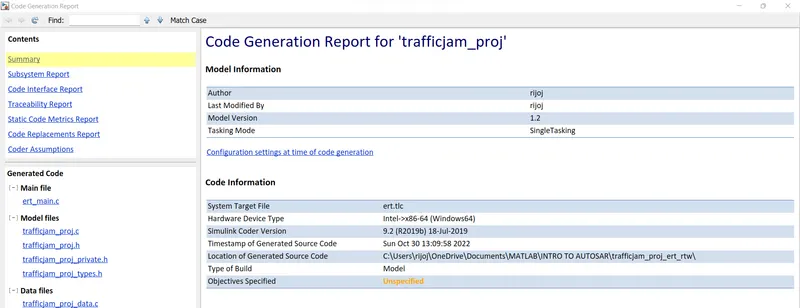
Generated Code:-
File: trafficjam_proj.c

1	/*
2	 * File: trafficjam_proj.c
3	 *
4	 * Code generated for Simulink model 'trafficjam_proj'.
5	 *
6	 * Model version                  : 1.2
7	 * Simulink Coder version         : 9.2 (R2019b) 18-Jul-2019
8	 * C/C++ source code generated on : Sun Oct 30 13:09:58 2022
9	 *
10	 * Target selection: ert.tlc
11	 * Embedded hardware selection: Intel->x86-64 (Windows64)
12	 * Code generation objectives: Unspecified
13	 * Validation result: Not run
14	 */
15
16	#include "trafficjam_proj.h"
17	#include "trafficjam_proj_private.h"
18
19	/* Real-time model */
20	RT_MODEL_trafficjam_proj_T trafficjam_proj_M_;
21	RT_MODEL_trafficjam_proj_T *const trafficjam_proj_M = &trafficjam_proj_M_;
22
23	/* Model step function */
24	void trafficjam_proj_step(void)
25	{
26	  /* local block i/o variables */
27	  boolean_T Optimum_Voltage;
28
29	  /* Logic: '/AND' incorporates:
30	   *  Constant: '/Constant'
31	   *  Constant: '/Constant1'
32	   *  Inport: '/Input_Voltage'
33	   *  RelationalOperator: '/GreaterThanOrEqual'
34	   *  RelationalOperator: '/GreaterThanOrEqual1'
35	   */
36	  Optimum_Voltage = ((Input_Voltage >= 30) && (Input_Voltage <= 50));
37
38	  /* Switch: '/Switch' incorporates:
39	   *  Constant: '/Constant5'
40	   *  Inport: '/Input_Switch'
41	   *  Logic: '/AND'
42	   *  Logic: '/NOT'
43	   */
44	  if (Optimum_Voltage && (!Input_Switch) && trafficjam_proj_ConstB.Equal) {
45	    /* MultiPortSwitch: '/Multiport Switch' incorporates:
46	     *  Constant: '/Constant'
47	     *  Constant: '/Constant1'
48	     *  Constant: '/Constant2'
49	     *  Constant: '/Constant3'
50	     *  Constant: '/Constant4'
51	     *  Inport: '/Enable_Display'
52	     */
53	    switch (Enable_Display) {
54	     case 1:
55	      Output_Display = 1U;
56	      break;
57
58	     case 2:
59	      Output_Display = 1U;
60	      break;
61
62	     case 3:
63	      Output_Display = 2U;
64	      break;
65
66	     case 4:
67	      Output_Display = 2U;
68	      break;
69
70	     default:
71	      Output_Display = 3U;
72	      break;
73	    }
74
75	    /* End of MultiPortSwitch: '/Multiport Switch' */
76	  } else {
77	    Output_Display = 0U;
78	  }
79
80	  /* End of Switch: '/Switch' */
81	}
82
83	/* Model initialize function */
84	void trafficjam_proj_initialize(void)
85	{
86	  /* (no initialization code required) */
87	}
88
89	/* Model terminate function */
90	void trafficjam_proj_terminate(void)
91	{
92	  /* (no terminate code required) */
93	}
94
95	/*
96	 * File trailer for generated code.
97	 *
98	 * [EOF]
99	 */
100