Project 1 - Parsing NASA thermodynamic data
Aim-Write a code in Matlab to parse the NASA thermodynamic data file and then calculate the thermodynamic properties of various gas species
File Parsing-
Parsing, syntax analysis, or syntactic analysis is the process of analyzing a string of symbols, either in natural language, computer languages or data structures, conforming to the rules of formal grammar. The term parsing comes from Latin pars meaning part of speech. Within computational linguistics the term is used to refer to the formal analysis by a computer of a sentence or other string of words into its constituents, resulting in a parse tree showing their syntactic relation to each other, which may also contain semantic and other information. Some parsing algorithms may generate a parse forest or list of parse trees for a syntactically ambiguous input. Parsing a file means reading in a data stream of some sort and building an in-memory model of the semantic content of that data. This aims at facilitating performing some kind of transformation on the data.
NASA thermodynamics file-
NASA thermodynamics file which is THERMO.dat file in which there is temperature range and 53 species are given in these data and each species contains 14 coefficients and temperature ranges and we have to parse these 14 coefficients to find Specific heat
Entropy and Enthalpy using formula as-

where-
- R=universal gas constant
- T=Temperature
- Cp=Specific heat (KJ)
- S=Entropy(KJ/mol-K)
- H = Enthalpy(KJ/mol)
- a(I)= coefficients where,i=1:14
Function code for specific heat
%function code to find the specific heat

function cp=specific_heat(a1,a2,a3,a4,a5,a8,a9,a10,a11,a12,T,R,mid_globel_temp)

T>mid_globel_temp

cp = R*(a1+(a2*T)+(a3*(T).^2)+(a4*(T).^3)+(a5*(T).^4))

cp = R*(a8+(a9*T)+(a10*(T).^2)+(a11*(T).^3)+(a12*(T).^4))

end
specific heat-
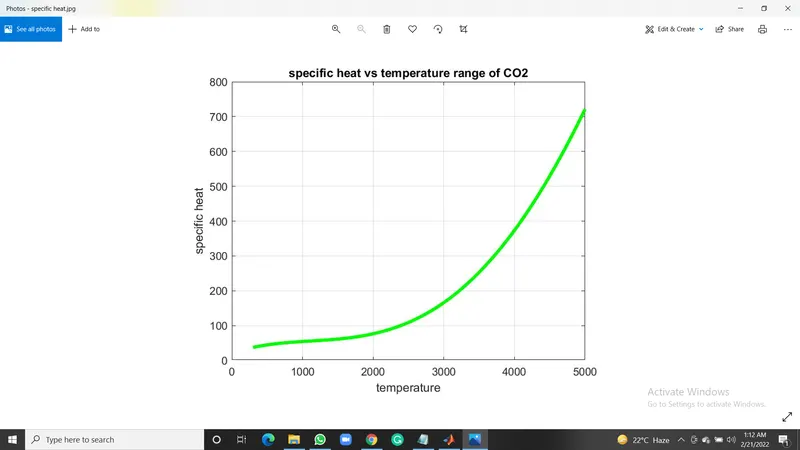
The specific heat is the amount of heat per unit mass required to raise the temperature by one degree Celsius. The relationship between heat and temperature change is usually expressed in the form shown below where c is the specific heat
coding explanation
- at first, we have to use the word Function to start the function command
- Now we will find the Specific heat by creating a Specific heat function and assigning its related formula coefficient from 14 coefficients, Gas constant, Temperature and mid-temperature.
- and then we want to create a templet and this is a code templet and name for the templet
- we are going to name the code templet specific_heat
- we are going to use this formula to solve the equation.
- so whenever we want to substitute different values we just call this function and then pass in the right values
- then we have to save the function while saving the name of the function and the name of the file should exactly be the same
- the calling the function means using the function and using the templates with the appropriate values
- we have to ensure the no of inputs we provide match the orders of inputs also match
- end word is used to end the function command.
Function code for Entropy-
%function code to find the entropy

function s=entropy(a1,a2,a3,a4,a5,a7,a8,a9,a10,a11,a12,a14,T,R,mid_globel_temp)

(T<=mid_globel_temp)

s = R*(a1.*log(T)+(a2*T)+((a3*(T).^2)/2)+((a4*(T).^3)/3)+((a5*(T).^4)/4)+a7)

s = R*(a8.*log(T)+(a9*T)+((a10*(T).^2)/2)+((a11*(T).^3)/3)+((a12*(T).^4)/4)+a14)

end
Entropy-
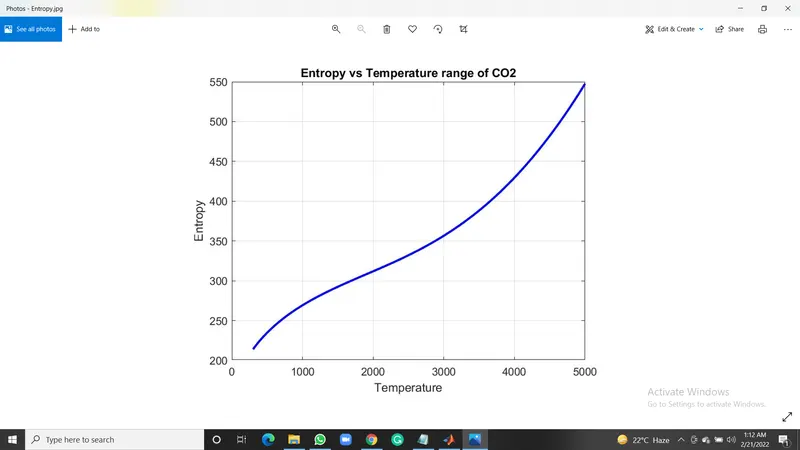
the measure of a system's thermal energy per unit temperature that is unavailable for doing useful work. Because work is obtained from ordered molecular motion the amount of entropy is also a measure of the molecular disorder, or randomness, of a system.
coding explanation-
- at first, we have to use the word Function to start the function command
- Now we will find the Entropy by creating a Specific heat function and assigning its related formula coefficient from 14 coefficients, Gas constant, Temperature and mid-temperature.
- and then we want to create a templet and this is a code templet and name for the templet
- we are going to name the code templet Entropy
- we are going to use this formula to solve the equation.
- so whenever we want to substitute different values we just call this function and then pass in the right values
- then we have to save the function while saving the name of the function and the name of the file should exactly be the same
- the calling the function means using the function and using the templates with the appropriate values
- we have to ensure the no of inputs we provide match the orders of inputs also match
- end word is used to end the function command.
Function code for enthalpy-
%function code to find the Enthalpy

function H= enthalpy(a1,a2,a3,a4,a5,a6,a8,a9,a10,a11,a12,a13,T,R,mid_globel_temp)

(T<=mid_globel_temp)

H = R*T.*(a1+((a2.*T)/2)+((a3*(T).^2)/3)+((a4*(T).^3)/4)+((a5*(T).^4)/5)+((a6./T)))

H = R*T.*(a8+((a9*T)/2)+((a10*(T).^2)/3)+((a11*(T).^3)/4)+((a12*(T).^4)/5)+((a13./T)))

end
enthalpy-
Enthalpy, a property of a thermodynamic system, is equal to the system's internal energy plus the product of its pressure and volume. In a system contained so as to prevent the mass transfer, for processes at constant pressure, the heat absorbed or released equals the change in enthalpy.
coding explanation-
- at first, we have to use the word Function to start the function command
- Now we will find the enthalpy by creating a Specific heat function and assigning its related formula coefficient from 14 coefficients, Gas constant, Temperature and mid-temperature.
- and then we want to create a templet and this is a code templet and name for the templet
- we are going to name the code templet enthalpy
- we are going to use this formula to solve the equation.
- so whenever we want to substitute different values we just call this function and then pass in the right values
- then we have to save the function while saving the name of the function and the name of the file should exactly be the same
- the calling the function means using the function and using the templates with the appropriate values
- we have to ensure the no of inputs we provide match the orders of inputs also match
- end word is used to end the function command.
Function code to find molecule weight-
%function code to find the molecular weight
function W = Molecular_weight(species)

    % Defining Atomic name of the species
    atomic_name = ['H','C','O','N','Ar']

    % Defining Atomic masses of main species
    atomic_weight = [1.008 12.011 15.999 14.007 39.948]

    W=0

    % Molecular weight starting range

    % Loop runs to the length of the species
    for i=1:length(species)
        % Loop runs to the length of the atomic names
        for j=1:length(atomic_name)
            %function to compare 2 strings
            if strcmp(species(i), atomic_name(j))
                W = W + atomic_weight(j)
                position = j
            end
        end

        % Now we will find if there is more element in the species then incrementing atomic weight of the species
        n = str2num(species)
        if n>1
            W = W + atomic_weight(position)*(n-1)
        end
    end
    fprintf('Molecular Weight of %s :- ',species)
    fprintf('%f',W)
    disp(' ')
end- at first, we have to use the word Function to start the function command
- and then we want to create a templet and this is a code templet and name for the templet
- we are going to name the code templet moleculer_weight
- Firstly we create a Molecular weight function and assign species input to that.
- Then define the main element of all 53 species in an array atomic_name that are 'H', 'C', 'O',' N', 'Ar'
- Then by taking the above main elements we will create their atomic_wieght array from any source like the internet that is 1.008 12.011 15.999 14.007 39.948.
- Then we will assign molecular starting range W To zero and then create a for loop condition which runs to the length of the species and another nested for loop is created which runs to the length of the string atomic_name.
- Then we will create a condition using the if condition and use strcmp command to compare the species and atomic_name strings to calculate molecular masses if, by comparison, both strings are found the same then we will assign their molecular weight.
- Now, we will string to the number using the str2num command assigned to n. Then we run a condition of if loop to find whether the species contains more than one element if there are more than 1 elements that are n>1 then we will increment the atomic weight by the multiplication of position and n-1 to the atomic_weight array.
- Then we will print the Molecular weight using the print command and display it using disp command.
Main code-
%parsing NASA tharmodynamic data
close all
clear all
clc

%input
R = 8.314

%opening the filing and reading the file data
f1 = fopen('THERMO.dat','r');
header_line = fgetl(f1);

%getting the globel temprture of the file
globel_temp = fgetl(f1);

%splitting the line
split_temp = strsplit(globel_temp);

%converting the string sells to the number
low_globel_temp = str2num(split_temp{2});
mid_globel_temp = str2num(split_temp{3});
high_globel_temp = str2num(split_temp{4});

%getting varisous temprature range between low and high temperature
temp = linspace(low_globel_temp,high_globel_temp,1000);
T = temp

%skipping the header comment
fgetl(f1);
fgetl(f1);
fgetl(f1);

%reading the 53 species
for j=1:53
    tline=fgetl(f1);

%splitting
A=strsplit(tline,' ');

%to read the name of the species
species=(A{1});

%converting the strings to the number

low_temp=str2num(A{6});
mid_temp=str2num(A{8});
high_temp=str2num(A{7});

tline1=fgetl(f1);

%finding the E string in the line
a=strfind(tline1,'E');

% finding high temperature coefficients
a1 = tline1(1:a(1)+3);
a1 =  str2num(a1);

a2 = tline1(a(1)+4:a(2)+3);
a2 =  str2num(a2);

a3 = tline1(a(2)+4:a(3)+3);
a3 =  str2num(a3);

a4 = tline1(a(3)+4:a(4)+3);
a4 =  str2num(a4);

a5 = tline1(a(4)+4:a(5)+3);
a5 =  str2num(a5);

tline2 = fgetl(f1);
b = strfind(tline2,'E');

a6 = tline2(1:b(1)+3);
a6 = str2num(a6);

a7 = tline2(b(1)+4:b(2)+3);
a7 = str2num(a7);

%find lower temperature coefficients

a8 = tline2(b(2)+4:b(3)+3);
a8 = str2num(a8);

a9 = tline2(b(3)+4:b(4)+3);
a9 = str2num(a9);

a10 = tline2(b(4)+4:b(5)+3);
a10= str2num(a10);

tline3 = fgetl(f1);

c = strfind(tline3,'E');

a11 = tline3(1:c(1)+3);
a11 = str2num(a11);

a12 = tline3(c(1)+4:b(2)+3);
a12 = str2num(a12);

a13 = tline3(c(2)+4:b(3)+3);
a13 = str2num(a13);

a14 = tline3(c(3)+4:b(4)+3);
a14 = str2num(a14);

%calculating specific heat
cp=specific_heat(a1,a2,a3,a4,a5,a8,a9,a10,a11,a12,T,R,mid_globel_temp);

%calcullating Entropy
s=entropy(a1,a2,a3,a4,a5,a7,a8,a9,a10,a11,a12,a14,T,R,mid_globel_temp);

%calcullating Enthalpy
H=enthalpy(a1,a2,a3,a4,a5,a6,a8,a9,a10,a11,a12,a13,T,R,mid_globel_temp);

%calculating the molecular weight of the species
W = Molecular_weight(species);

%writing of molecular weight file
Molecular_weight_file = fopen('Molecular weight.txt','w');
fprintf(Molecular_weight_file,'Moleculer weight of %s is %d',species,W);

%closing of the file
fclose(Molecular_weight_file);

%plotting cp,H,s with temperature

%saving folder
cd('c:/users/vishal/desktop/MATLAB/challanges/project1/species/')

%creating directory
mkdir(species);
cd(species);

%ploting 1cp vs T

figure(1)
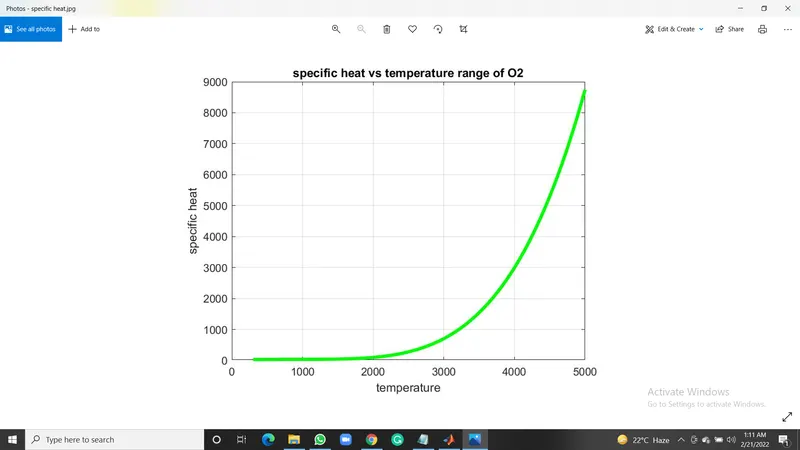
plot(T,cp,'LineWidth',3,'Color','g');
xlabel('temperature');
ylabel('specific heat');
title(sprintf('specific heat vs temperature range of %s',species));
grid on;
saveas(figure(1),'specific heat.jpg');

% Plot 2 S vs T

    figure(2)
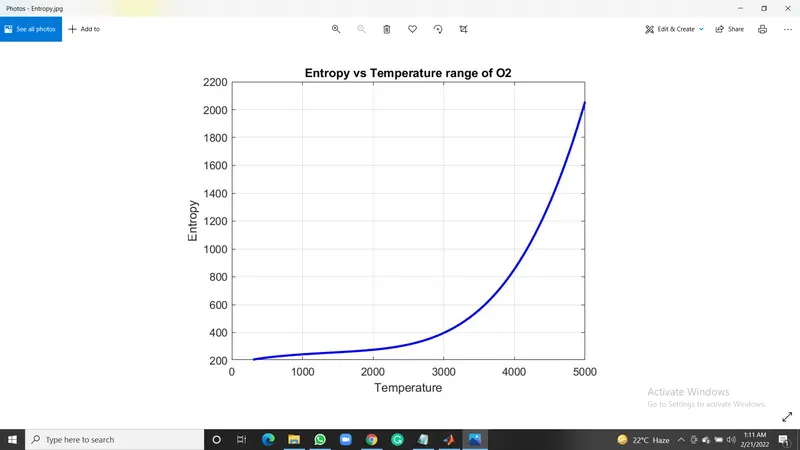
    plot(T,s,'linewidth',2,'color','b');
    xlabel('Temperature');
    ylabel('Entropy');
    title(sprintf('Entropy vs Temperature range of %s',species));
    grid on
    saveas(figure(2),'Entropy.jpg');


    % Plot 3 Cp vs T

    figure(3)
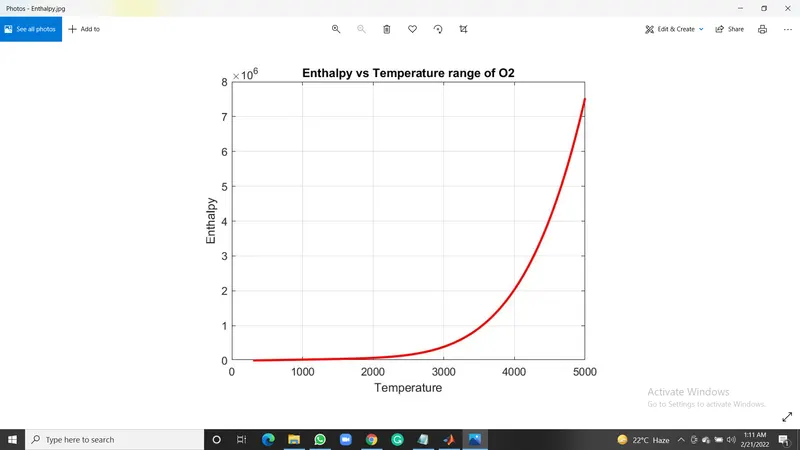
    plot(T,H,'linewidth',2,'color','r');
    xlabel('Temperature');
    ylabel('Enthalpy');
    title(sprintf('Enthalpy vs Temperature range of %s',species));
    grid on
    saveas(figure(3),'Enthalpy.jpg');

    %Changing directory to Original matlab path

    cd('c:/users/vishal/desktop/MATLAB/challanges/project1/') ;
    % Molecular weight

    W = Molecular_weight(species)
end
explanation of code-
- Firstly, we will Input the parameter R and we will open a file THERMO.dat file and read this file using fopen command.
- Then, we will read the first THERMO using the fgetl command and then we read the temperature file and we will split the temperatures using the strsplit command to convert it into cell array and then we will convert this string to number using the str2num command to find low, high and mid temperatures.
- Then we will assign a temperature range using the linspace command. Then we run a loop to skip command lines of the data file using the fgetl command inside the loop.
- Now, we will run the loop to find 53 elements in the data file by assigning the fgetl command and then splitting them into the cell array to find the species line and then find the species name and then find the number of the temperatures in the species line.
- Then we read the new line. In order to read the coefficient in the data file, we will first find the 'E' string using the strfind command to find before and after numbers of the coefficients then we will find the remaining 14 coefficients and convert them to numbers from strings.
- Out of which we will find the first 7 Coefficients which are for Higher temperature and then the Second 7 Coefficients which are for Lower temperature.
- Now we will specify Specific heat Cp, Entropy S, Enthalpy H functions to find these parameters using these 14 coefficients for Lower and higher then we will specify molecular weight W function to find the Molecular weight of the different species.
- Now we will write the Molecular weight.txt file and fprintf all the molecular weights of the species. and then close the text file using the fclose command.
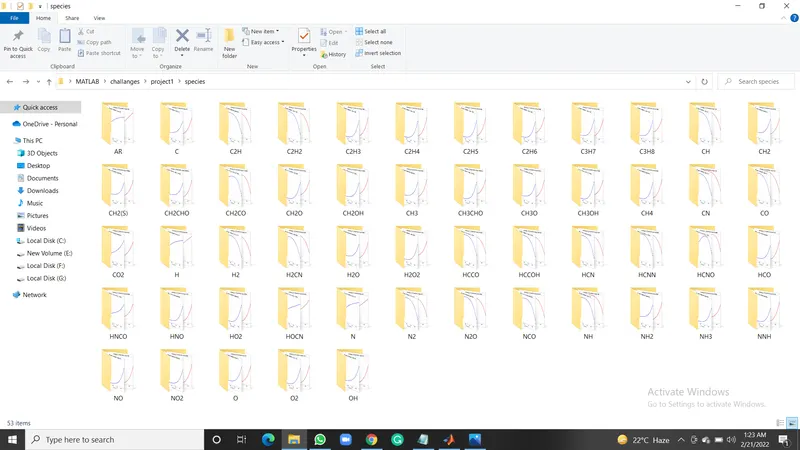
- Now we change the directory using the cd command and then create a directory folder where we have to save our files using the mkdir command and then we will change the directory to this created folder.
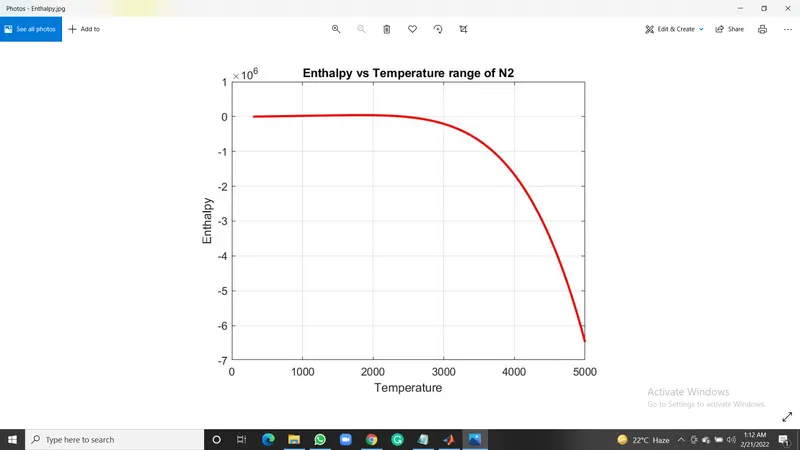
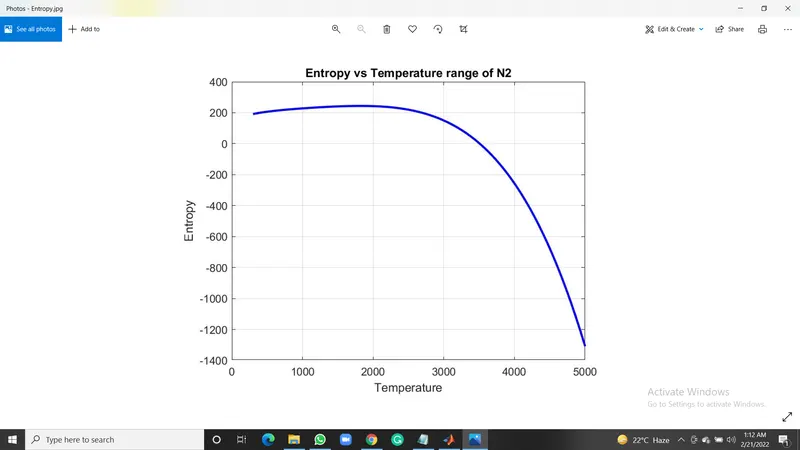
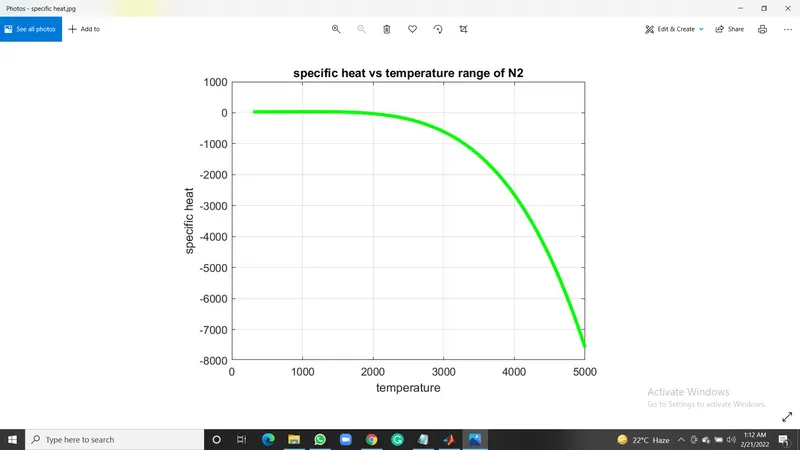
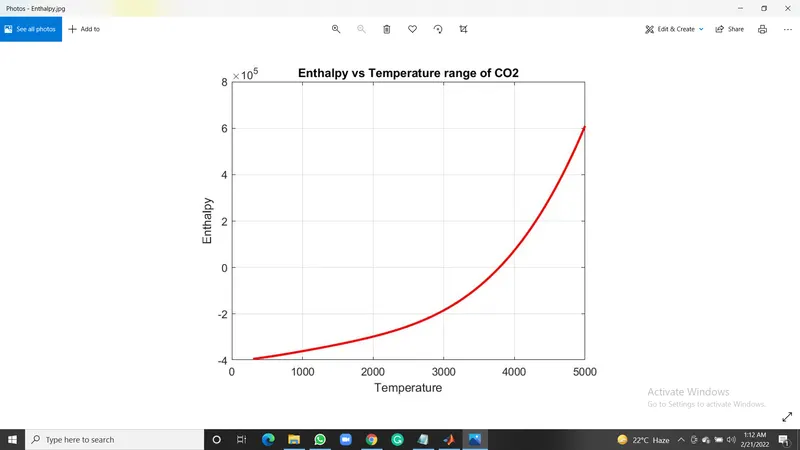
- Now, we will plot Specific heat, Entropy and Enthalpy with the Temperature for different species. We will use the scanf command in the title command to create different species titles.
- Then we will use the saveas command to save the plots of different species in the directory folder. Now we will change the directory to which our main code file runs in MATLAB.
Output-
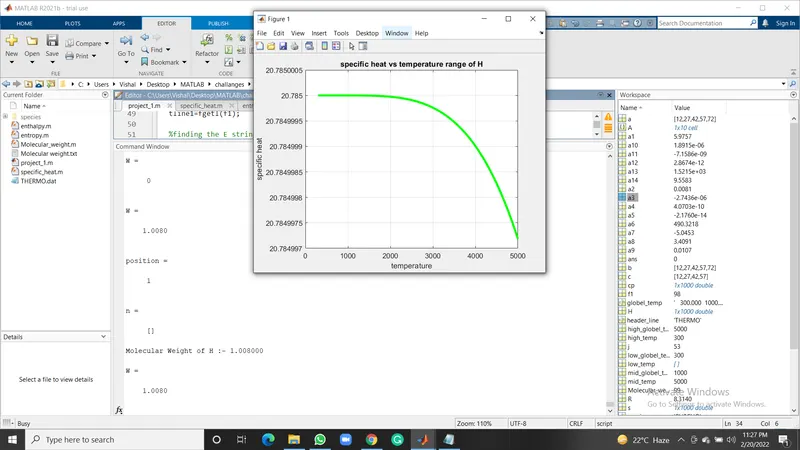
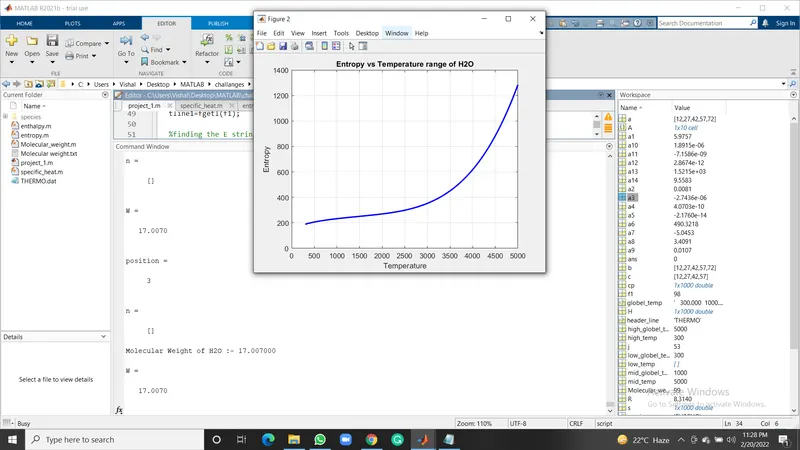
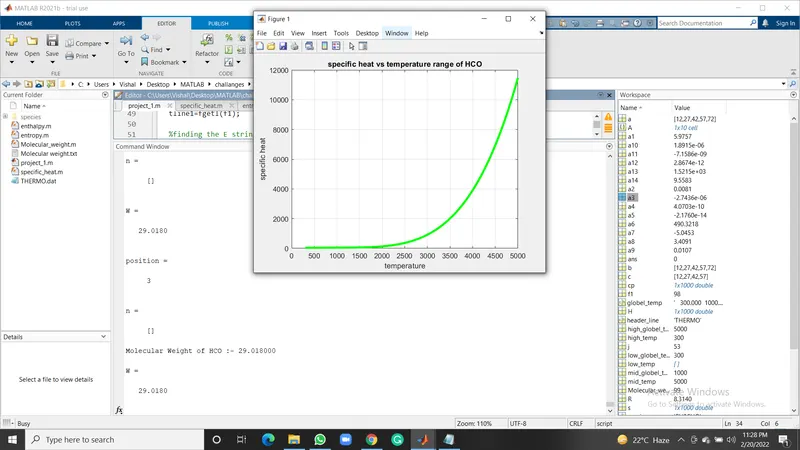
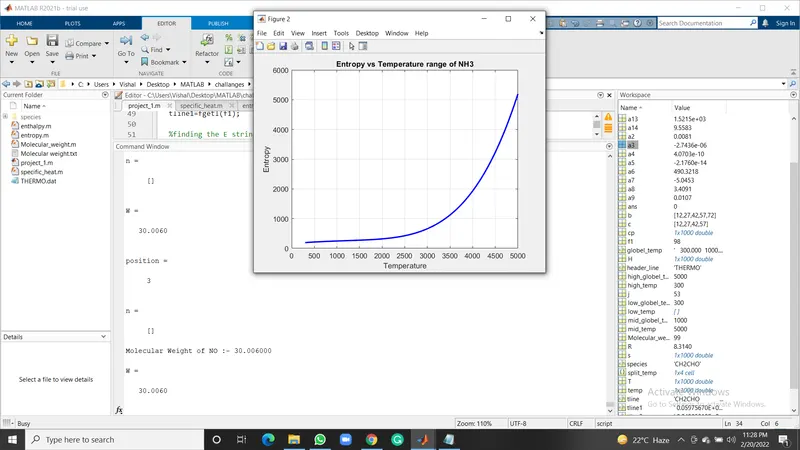
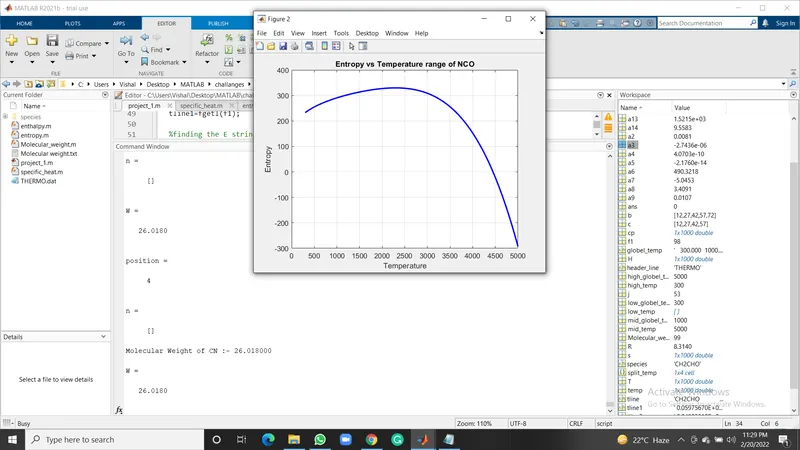
Plots-
O2 species plot-
N2 species plot-
CO2 species plot-
Screenshot of the saved species-
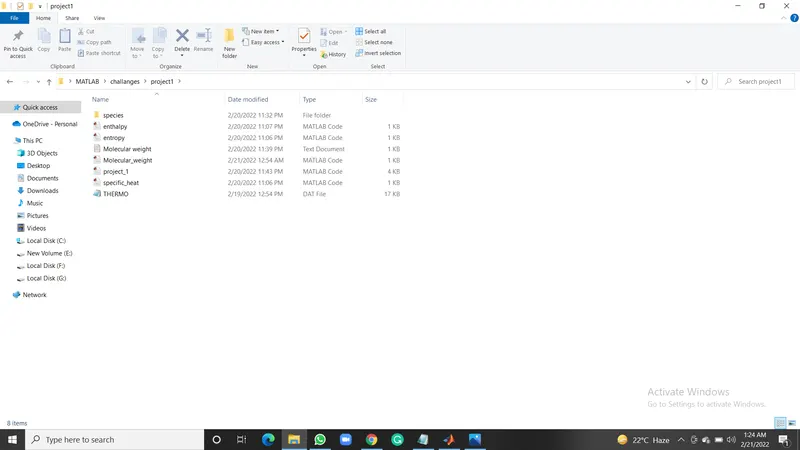
molecular weight in command window-