Project 1 - Parsing NASA thermodynamic data
PARSING NASA THERMODYNAMIC DATA
Objectives:
1. Write a function that extracts the 14 co-efficients and calculates the enthalpy, entropy and specific heats for all the species in the NASA thermodynamic data file.
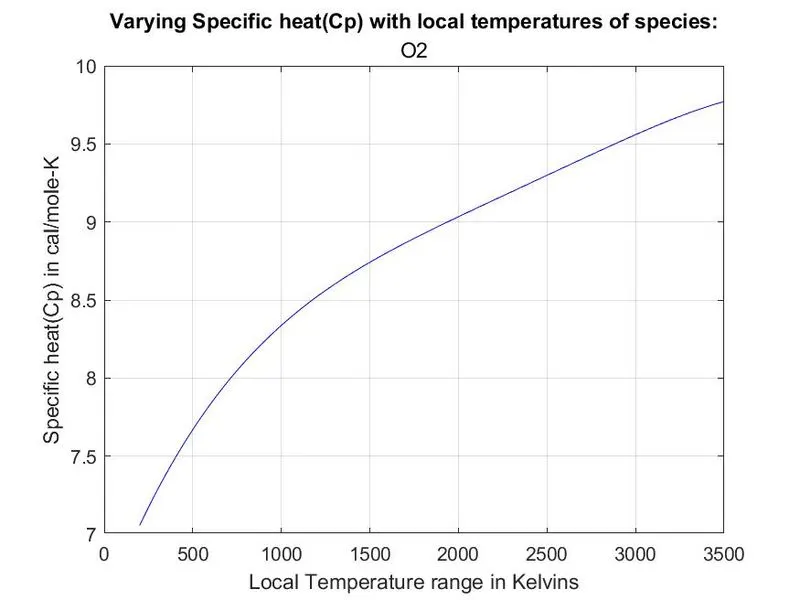
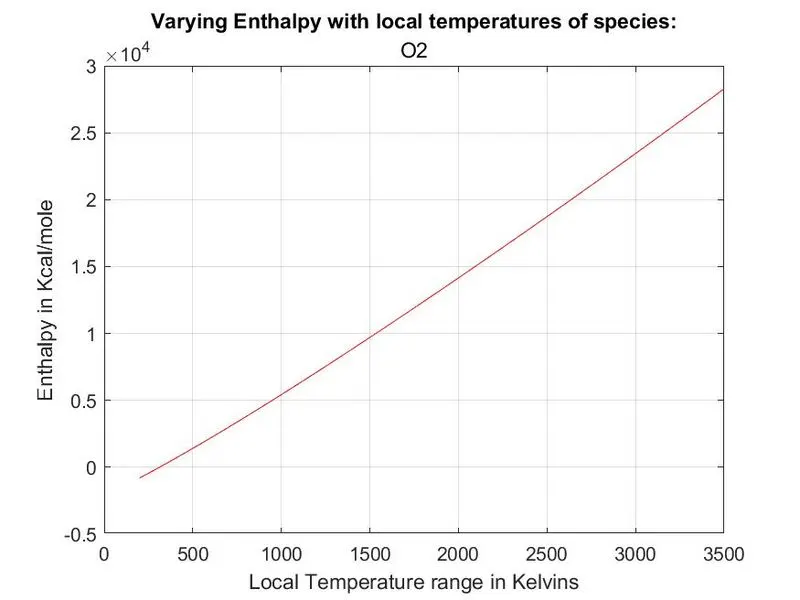
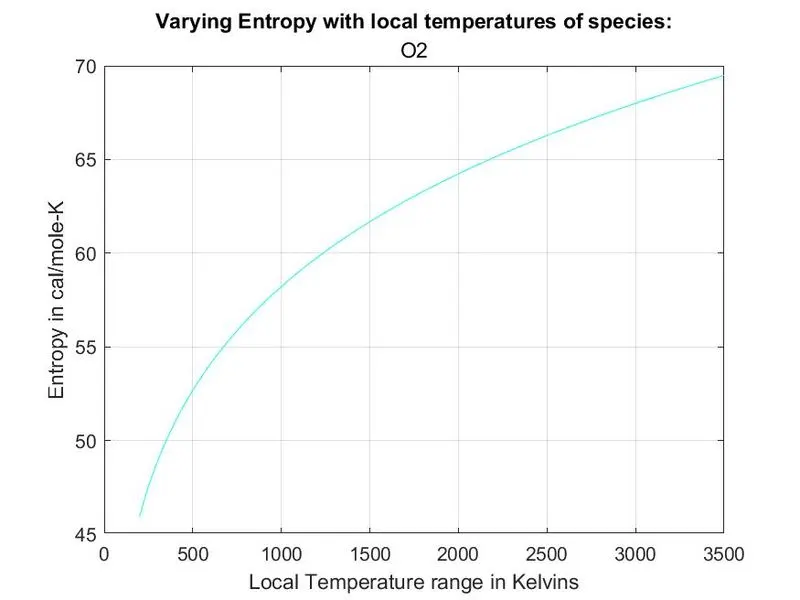
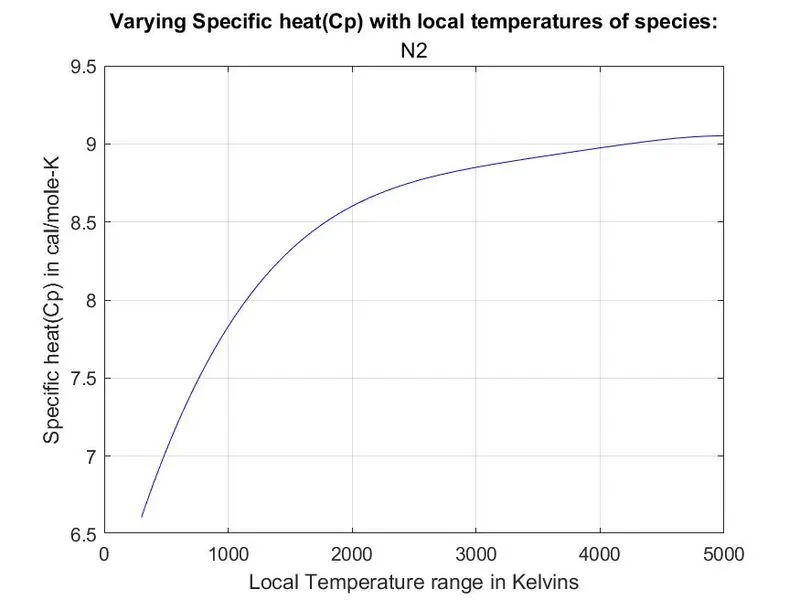
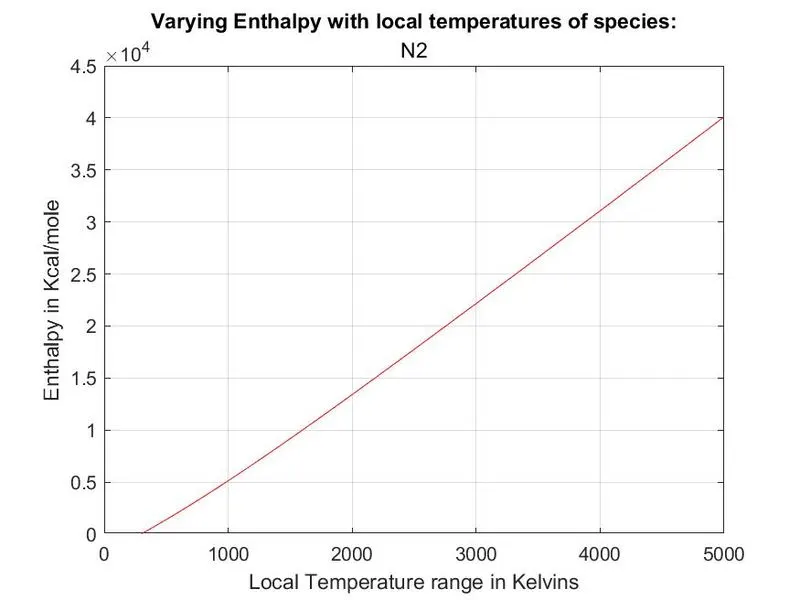
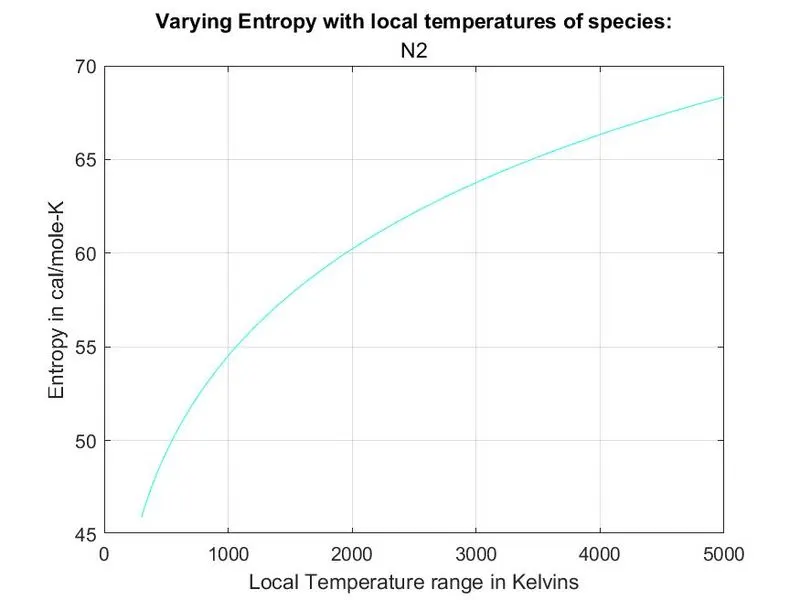
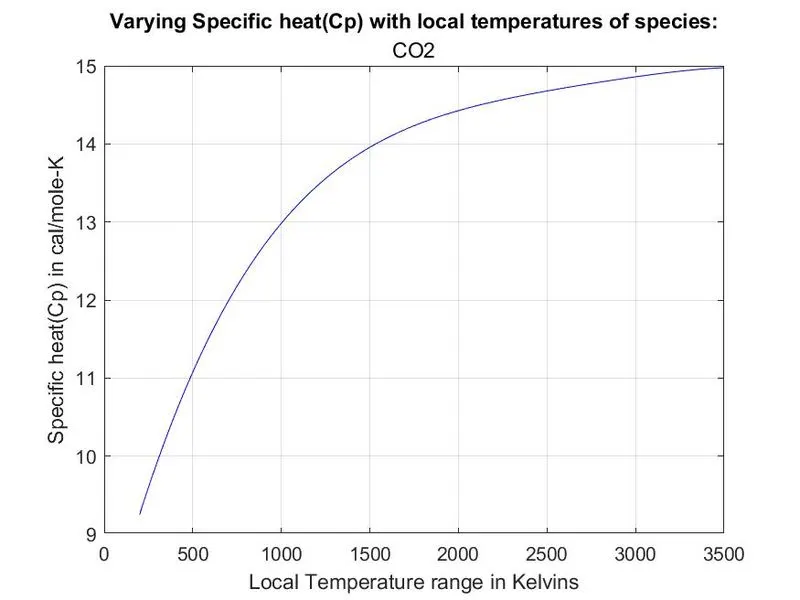
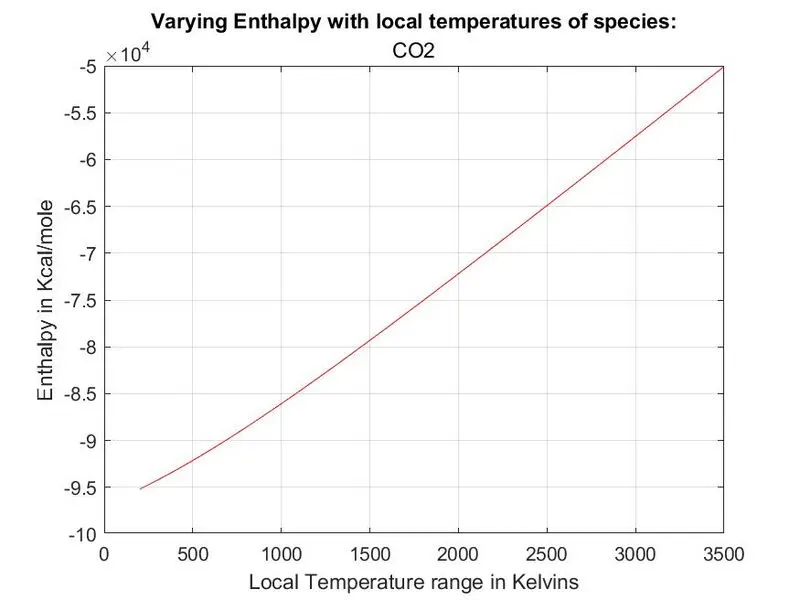
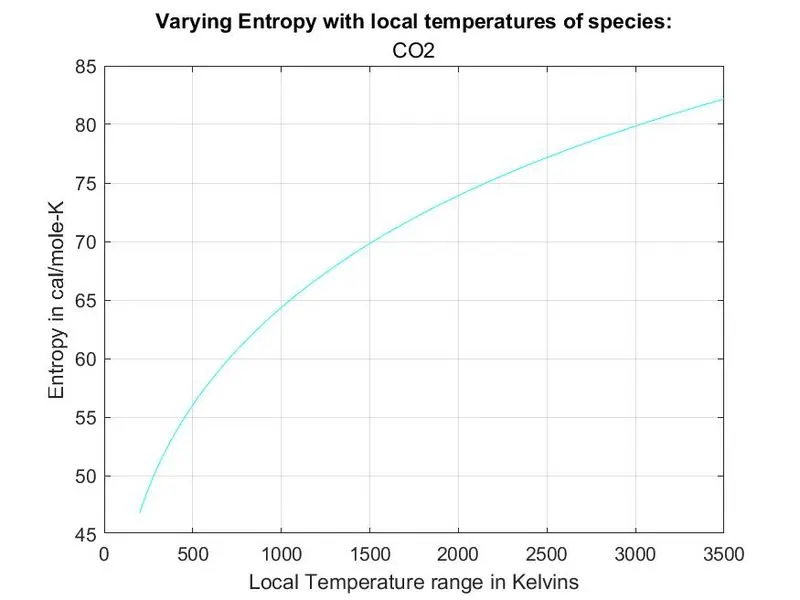
2. Plot the Cp, Enthalpy and Entropy for the local temperature range (low temperature : high temperature) specific for each species.
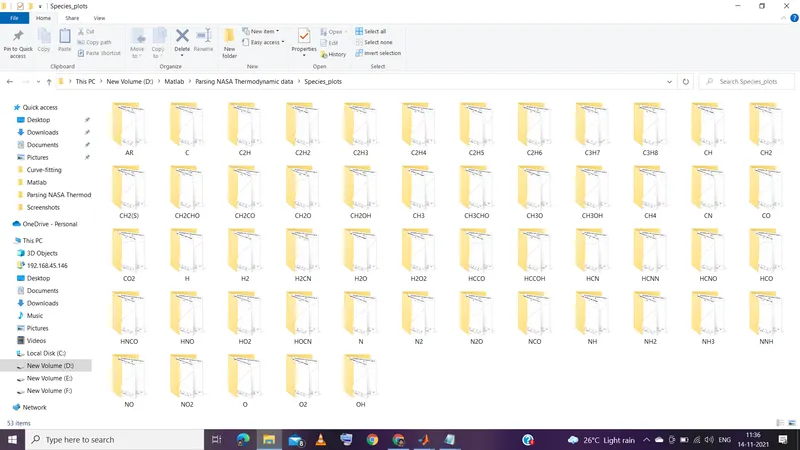
3. Save the plots as images with appropriate names and dump them in separate folders for each species with suitable name. All these should be generated automatically.
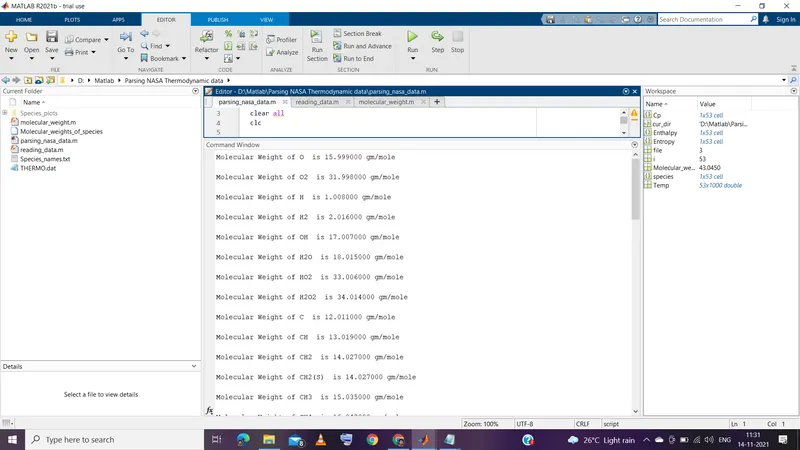
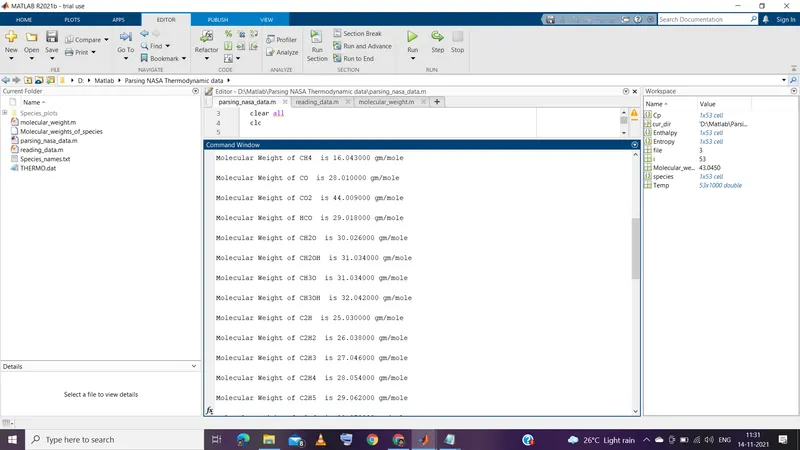
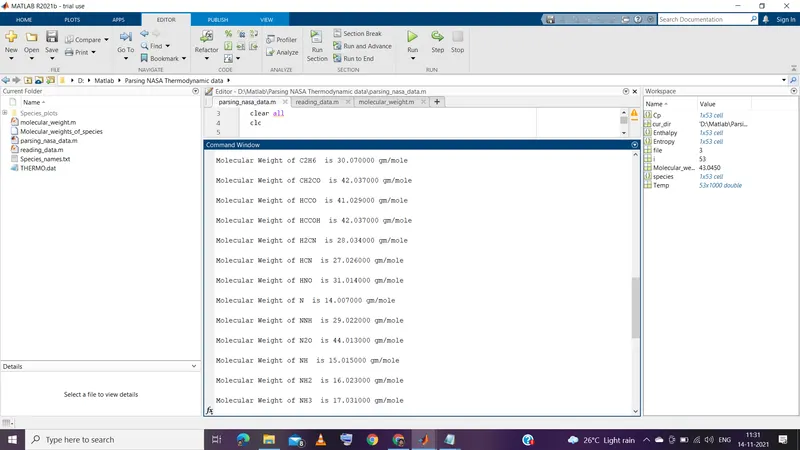
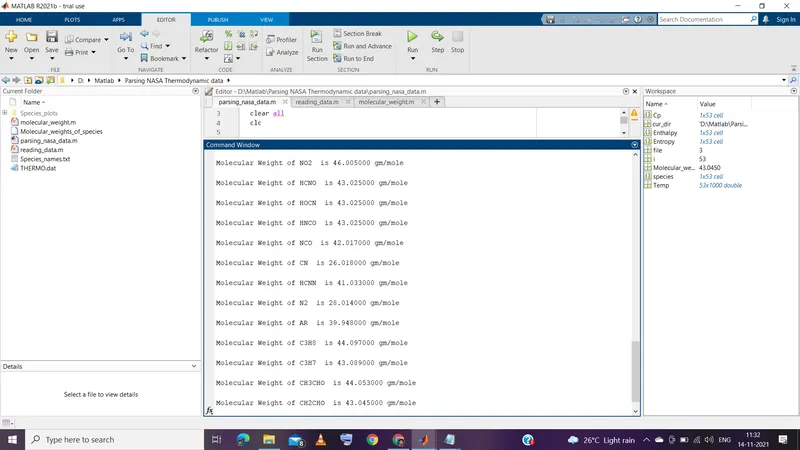
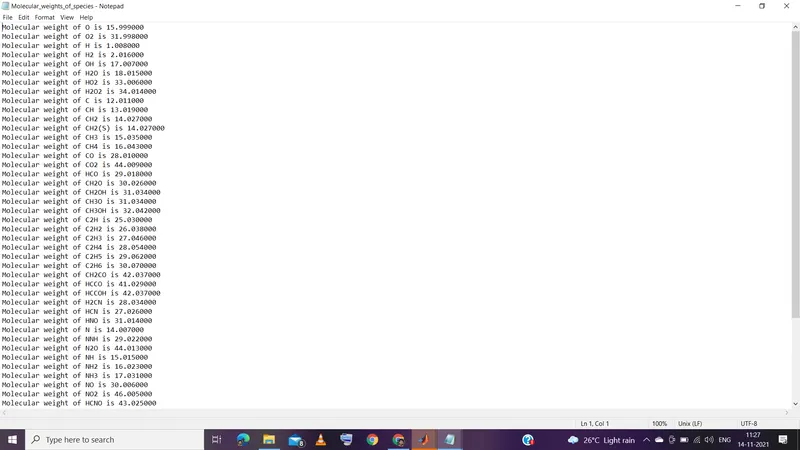
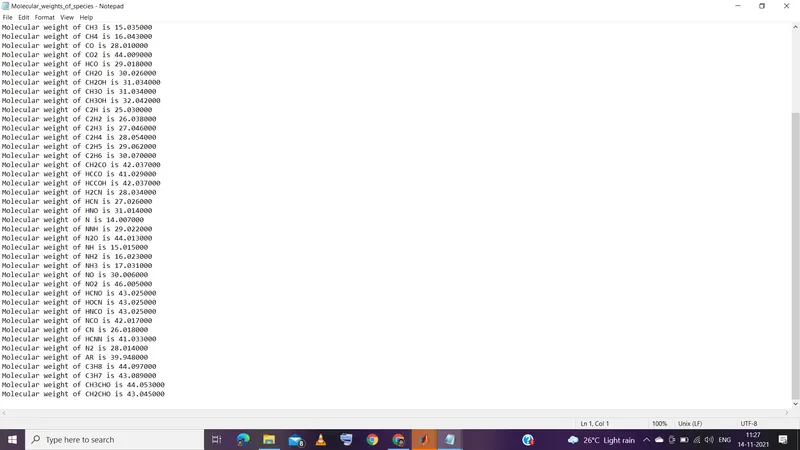
4. Calculate the molecular weight of each species and display it in the command window.
[Note: The first 7 coefficients are HIGH-temperature coefficients and the second 7 coefficients are LOW-temperature coefficients in NASA Thermodynamic data file.]
Formula used:
where, Cp is the Specific heat in cal/mole-K,
H is the Enthalpy in Kcal/mole,
S is the Entropy in cal/mole-K,
R is the universal gas constant in cal/mole-K,
T is the temeprature in Kelvins.
Main code:
close all
clear all
clc

file=fopen('THERMO.dat','r');   % Open file to read


% Calling function to get the values of Cp,Enthalpy,Entropy values and species names
[species,Cp,Enthalpy,Entropy,Temp]=reading_data(file);

% Calling function to get values of molecular weights of species and print
% them in command window.

Molecular_weight = molecular_weight(species);

mkdir('Species_plots');    % Creating a new folder in the current directory

for i=1:length(species)

           cur_dir=pwd;          % Storing current directory path
           cd('Species_plots');  % Changing path to new folder in current directory
           mkdir(species{i});    % Create a new folder with species name as folder name
           cd(species{i});       % Changing path to new folder

 % Plotting Local temperatures in Klevins vs Specific heat(Cp) in cal/mole-K
 figure(1)
 plot(Temp(i,:),Cp{i},'color','b')
 grid on
 xlabel('Local Temperature range in Kelvins')
 ylabel('Specific heat(Cp) in cal/mole-K')
 title('Varying Specific heat(Cp) with local temperatures of species:',species(i))
 saveas(figure(1),'Temp VS Cp.jpg');    % Saving figure(1) in species named folder

 % Plotting Local temperatures in Klevins vs Enthalpy in Kcal/mole
 figure(2)
 plot(Temp(i,:),Enthalpy{i},'color','r')
 grid on
 xlabel('Local Temperature range in Kelvins')
 ylabel('Enthalpy in Kcal/mole')
 title('Varying Enthalpy with local temperatures of species:',species(i))
 saveas(figure(2),'Temp VS Enthalpy.jpg');

 % Plotting Local temperatures in Klevins vs Entropy in cal/mole-K
 figure(3)
 plot(Temp(i,:),Entropy{i},'color','c')
 grid on
 xlabel('Local Temperature range in Kelvins')
 ylabel('Entropy in cal/mole-K')
 title('Varying Entropy with local temperatures of species:',species(i))
 saveas(figure(3),'Temp VS Entropy.jpg');

 cd(cur_dir);           % Changing path to directory in which main code is placed
end
Main code explaination:
- Line-2: close all ----> closes all the Plots.
- Line-3: clear all ----> clears all the variables in the workspace.
- Line-4: clc ----> clears the command window.
- Line-6: ----> Opening THERMO.dat file to read the data in it.
- Line-10: ----> Calling function 'reading_data' by taking input file which reads the file and to get the values of Cp,Enthalpy,Entropy values and species names as output variables
- Line-15: ----> Calling function 'molecular_weight' to get values of molecular weights of species and print them in command window and store the molecular weights of species in a text file labelled as Molecular_weights_of_species.txt
- Line-17: ----> Creating a new folder in the current directory labelled as Species_plots
- Line-19 to 54: ----> In a for loop which iterates from 1 to length(species)=(53) , for the first itertion storing current directory path in variable cur_dir next changing path to new folder 'Species_plots' in current directory in it creating a new folder with folder name as of the species name and change the path to the folder created with species name in it plots for Local temperatures in Kelvins vs Specific heat(Cp) in cal/mole-K with proper x and y labels and titles are created using plot command by using Temp matrix and Cp cell which are returned from function reading_data. By using the saveas command the plot of figure is saved in the directory with proper label with .jpg extension. The same process is repeated to save plots of Local temperatures Vs Enthalpy and Entropy are created and saved with proper labels to the plots as .jpg files . After saving the plots in the folder of species the path of the directory is changed back to the path where the main code is saved. This process is repeated untill the for loop runs 53 times and closed.
Function code : reading_data()
function [species,Cp,Enthalpy,Entropy,Temp]=reading_data(file)

% Universal gas constant.
R=1.9872;   % cal/(mol-K)

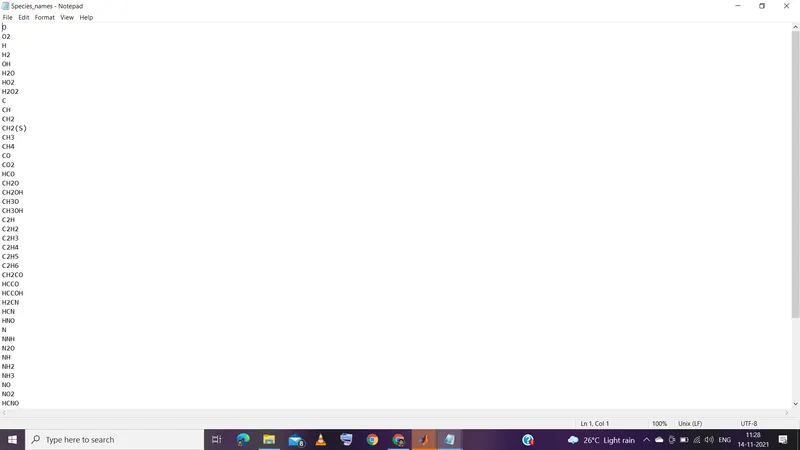
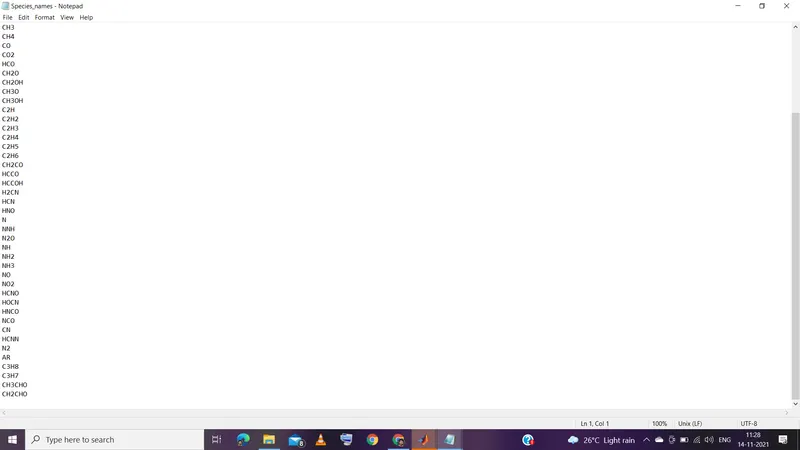
x=fopen('Species_names.txt','w');   % Creating a text file to write

% Skipping line number 1 to 5 in thermodynamic data file
for j=1:5
    fgetl(file);
end

Temp=[];    % Creating a null matrix for storing temperature values.

for i=1:53
% Line 6
line_6=fgetl(file);        % storing line of data file
B=strsplit(line_6,' ');    % splitting line of data file
species(i)={B{1}};         % storing species name from line of data file

fprintf(x,'%s \n',species{i});  % storing the name of species in text file created

% Storing local temperature ranges of species
local_low_temp=str2double(B{end-3});
local_high_temp=str2double(B{end-2});
local_mid_temp=str2double(B{end-1});


% From line 7 to 9 reading
C=fscanf(file,'%f',[17 1]);      % splitting the values of coefficients in 3 lines of file into 17 by 1 matrix

% Storing the values of coefficients indvidually into variables
a1=C(1);
a2=C(2);
a3=C(3);
a4=C(4);
a5=C(5);
a6=C(7);
a7=C(8);
a8=C(9);
a9=C(10);
a10=C(11);
a11=C(13);
a12=C(14);
a13=C(15);
a14=C(16);

T=linspace(local_low_temp,local_high_temp,1000); % splitting local temperature range into 1000 equal parts
Temp =[Temp;T];        % storing temperatures in matrix

% Calculating Cp
if (T<local_mid_temp)   % For low temperature ranges
    Cp(i)={(a8 + (a9*T) + (a10*(T).^2) + (a11*(T).^3) + (a12*(T).^4))*R};

else                    % For high temperature ranges
    Cp(i)={(a1 + (a2*T) + (a3*(T).^2) + (a4*(T).^3) +(a5*(T).^4))*R};
end

% Calculating Enthalpy
if (T<local_mid_temp)    % For low temperature ranges
    Enthalpy(i) = {R*T.*(a8+((a9*T)/2)+((a10*(T).^2)/3)+((a11*(T).^3)/4)+((a12*(T).^4)/5)+(a13./T))};

else               % For high temperature ranges
    Enthalpy(i)= {R*T.*(a1+((a2*(T))/2)+((a3*(T).^2)/3)+((a4*(T).^3)/4)+((a5*(T).^4)/5)+(a6./T))};
end

% Calculating Entropy
if (T<local_mid_temp)     % For low temperature ranges
    Entropy(i)={ R* ( (a8.*log(T)) + (a9*T) + ((a10*(T).^2)/2) + ((a11*(T).^3)/3) + ((a12*(T).^4)/4) + (a14) )};

else              % For high temperature ranges
    Entropy(i)={R* ( (a1.*log(T)) + (a2*T) + ((a3*(T).^2)/2) + ((a4*(T).^3)/3) + ((a5*(T).^4)/4) + (a7) )};
end
fgetl(file);      % skip to next line of file
end
fclose(x);        % Closing the text file created before
end
Function code explaination:
- Line-1: ----> Creating a function of name reading_data with reading data file as input and species,Cp,Enthalpy,Entropy,Temp as outputs in the form of cells.
- Line-4: ----> Storing the value of universal constant in variable R.
- Line-6: ----> Creating a text file to write labelled as Species_names.txt to write the species names in the text file.
- Line-9 to 11: ----> Skipping line number 1 to 5 in THERMO.txt file
- Line-13: ----> Creating a null matrix for storing temperature values.
- Line-15 to 76: ----> In a for loop which iterates 53 times, in the first iteration, line 6 of data file is stored in a variable and then is splitted by using strsplit command with dividing element as space(' '). Then the first part of the splitted string is stored in variable species in the first row then the string is stored in a text file Species_names.txt using fprintf command then the values of local temperatures in the string are stored in individual variables by converting them into numerical values from strings. Then the next 3 lines of the data file is coverted into 17 by 1 matrix(C) which seperates the values in lines 7 to 9 by using fscanf command and the coefficients of species are stored in variables a1,a2,a3,a4,a5,a6,a7,a8,a9,a10,a11,a12,a13,a14 skipping the 6,12 rows in 17 by 1 matrix(C). Next the range of temperatures is splittes into 1000 equal parts ranging from local low temperature to local high temperature of species and the values of temperatures are stored in matrix Temp .Next using the formula for calculating Cp (Specific heat) in a if condition since the coefficients change for certain range of temperature. If the temperature values falls bellow local mid temperature the coefficients a8,a9,a10,a11,a12,a13,a14 are used for calculation and the values are stored in first element of Cp cell. The same is repeated for calculating Enthalpy and Entropy and values are stored in the first element of respective cells. Next skipping the line in data file using fgetl command and close the text file Species_names.txt . This process is repeated 53 times and each time of iteration values are calculated and stored in respective cells.
- Line-77: ----> End of function reading_data() .
Function code : molecular_weight()
function [Mol_weight] = molecular_weight(species)

file_species=fopen('Species_names.txt','r');    % opening 'Species_names' text file for reading species names

file_wt=fopen('Molecular_weights_of_species','w'); % Creating a text file to write the molecular weights of species

for p=1:53
      x=fgetl(file_species);    % Storing first line of text file 'Species_names' in variable x

  % Atomic names Hydrogen, Carbon, Oxygen, Nitrogen, Argon
  atomic_name = ['H','C','O','N','A'];

  % Atomic weights of Hydrogen, Carbon, Oxygen, Nitrogen, Argon respectively
  atomic_weight = [1.008 12.011 15.999 14.007 39.948];  %in gm/mole

  % initialisation
  Mol_weight = 0;

  %  Calculating molecular weights of species by checking each string element of species names
  for i = 1:length(x)
      for j = 1:length(atomic_name)
           if strcmpi(x(i),atomic_name(j))    % Comparing string elements with atomic names
              Mol_weight = Mol_weight + atomic_weight(j);
              position = j;             % Storing the position of element in string
           end
      end
      n = str2double(x(i));     % converting string to number
         if n>1
             Mol_weight = Mol_weight + atomic_weight(position)*(n-1);
         end
  end

  % Printing molecular weights of species in command window
  fprintf('Molecular Weight of %s is ',x);
  fprintf('%f gm/mole \n\n',Mol_weight);

  % Printing molecular weights of species in text file created above
  fprintf(file_wt,'Molecular weight of %s is %f \n',species{p},Mol_weight);

end

fclose(file_wt);  % Closing the text file created above

end
Function code explaination:
- Line-1: ----> Creating a function of name molecular_weight with species as input and Mol_weight as output.
- Line-3: ----> Opening 'Species_names' text file for reading species names.
- Line-4: ----> Creating a text file to write the molecular weights of species labelled as Molecular_weights_of_species.txt
- Line-7: ----> For loop which iterates 53 times.
- Line-8: ----> Storing first line of text file 'Species_names' in variable x
- Line-11: ----> Storing atomic names of elements Hydrogen, Carbon, Oxygen, Nitrogen, Argon as strings 'H','C','O','N','A' in a matrix named atomic_name.
- Line-14: ----> Storing the atomic weights of elements Hydrogen, Carbon, Oxygen, Nitrogen, Argon in matrix named atomic_weight
- Line-17: ----> Initially the value of molecular weight is taken as 0.
- Line-20 to 31: ----> In a for loop running from 1 to length of species string a for loop is created which runs from 1 to length of atomic names matrix, intially the first element of the species string is compared with the atomic names in the matrix if they match the value of atomic weight respective to the element is added to the Mol_weight and stored in Mol_weight and the position of the element is stored in a variable called position. after the for loop execution the element in the string is converted into numerical value if the outcome is numerical value then the value is multiplied with the atomic weight of respective element and is added to Mol_weight and stored in Mol_weight. If the string is not a numerical value ,the code is continued to iterate for the next loop of iteration and Mol_weight is thus calculated for each molecule of species.
- Line-34,35: ----> Printing the molecular weights of species in command window using fprintf command.
- Line-38: ----> Printing the molecular weights of species in Molecular_weights_of_species.txt text file using fprintf command.
- Line-42: ----> Closing the text file Molecular_weights_of_species.txt.
- Line-44: ----> End of function.
Command window output:
Screenshot of window where plots are saved:
Plots of O2:
1. Temperature Vs Specific heat(Cp)
2. Temprature Vs Enthalpy
3. Temperature Vs Entropy
Plots of N2:
1. Temperature Vs Specific heat(Cp)
2. Temprature Vs Enthalpy
3. Temperature Vs Entropy
Plots of CO2:
1. Temperature Vs Specific heat(Cp)
2. Temprature Vs Enthalpy
3. Temperature Vs Entropy
Text Files created from code:
1.Species_names.txt
2.Molecular_weights_of_species.txt
Errors faced:
1. Mistakes in usuage of variables, parentheses.
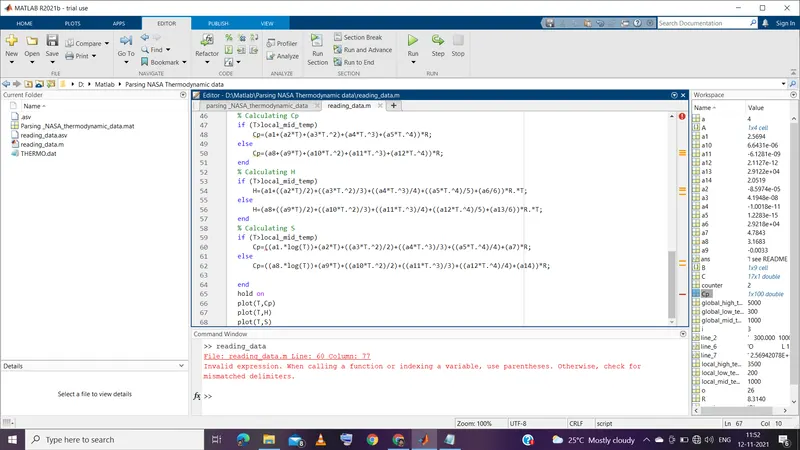
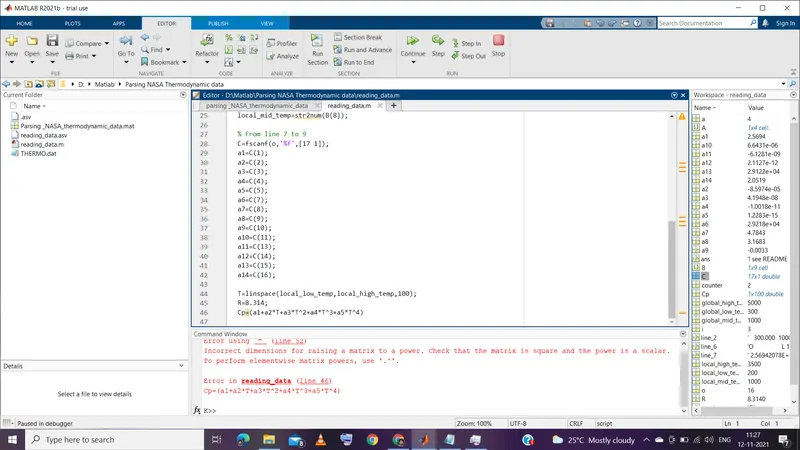
2. Mistake in using element wise operator for mathematical calculations of matrices.
References:
- http://combustion.berkeley.edu/gri-mech/data/thermo_table.html
- Google wikipedia.
- Skill-lync support team.
- Matlab help desk.