MATLAB CODE TO SOLVE OTTO CYCLE AND MAKE PLOTS FOR IT
CODE TO SOLVE OTTO CYCLE AND MAKE PLOTS FOR IT
Problem taken: In an I C Engine working with the Otto cycle, the cylinder diameter is 250 mm and a stroke is 375 mm. If the clearance volume is 0.00263 𝑚^3, and the initial pressure and temperature are 1 bar and 50℃, calculate the thermal efficiency of engine and plot the PV graph. The maximum cycle pressure is limited to 25 bar and the length of connecting rod is 450mm. (Take gamma=1.4)
Reference: From GTU Winter 2014 Engineering Thermodynamics question paper.
CODE:
% PROBLEM:
% In an I C Engine working with the Otto cycle, the cylinder diameter is 250 mm and a stroke is 375 mm.
% If the clearance volume is 0.00263 𝑚^3, and the initial pressure and temperature are 1 bar and 50℃,
% calculate the thermal efficiency of engine and plot the PV graph.
% The maximum cycle pressure is limited to 25 bar and the length of
% connecting rod is 450mm. (Take gamma=1.4)


% Code to solve otto cycle, create plots and to calculate the thermal efficiency of the engine
close all
clear all
clc

% Given Data:
bore= 0.25; % in meters.
stroke= 0.375; % in meters.
v_clearance= 0.0026; % in cubic meters.
p1=100; % K*N/m^2.
t1=50+273; % Kelvin.
p3=2500; % K*N/m^2.
con_rod=0.45; % in meters.
gamma=1.4;
% Calculating Swept volume.
disp('Swept volume in cubic meters')
v_swept=(pi/4)*bore^2*stroke % in cubic meters

% Calculating Compression Ratio.
disp('Compression Ratio')
c_r=(v_swept+v_clearance)/v_clearance

% State variables at point-1
disp('State variables at point-1')
p1=100   % K*N/m^2.
v1=v_swept+v_clearance    % in cubic meters.
t1=50+273   % Kelvin.

% process 1-2 is Isentropic Compression
constant_c1= p1*v1^gamma;
v_compression=engine_kinematics(stroke,con_rod,c_r,v_clearance,180,0);
p_compression = constant_c1./v_compression.^gamma;

%State variables at point-2
disp('State variables at point-2')
v2=v_clearance;     % in cubic meters.

% since PV^gamma=Constant.
p2=p1*((v1/v2)^gamma)   % in K*N/m^2.
v2
% Ideal Gas law---> PV/T = Constant
t2=(p2*v2*t1)/(p1*v1)   % Kelvin.

%State variables at point-3
disp('State variables at point-3')
p3   % in K*N/m^2. (In Given Data)
v3=v2;   % in cubic meters. ( Since process 2-3 is constant volume heat addition)
% Ideal Gas law---> PV/T = Constant
t3=(p3*v3*t2)/(p2*v2)  % Kelvin.

% process 3-4 is Isentropic Expansion
constant_c2= p3*v3^gamma;
v_expansion=engine_kinematics(stroke,con_rod,c_r,v_clearance,0,180);
p_expansion = constant_c2./v_expansion.^gamma;

%State variables at point-4
disp('State variables at point-4')
v4=v1;   % in cubic meters. ( Since process 4-1 is constant volume heat subtraction)

% since PV^gamma=Constant.
p4=p3*((v3/v4)^gamma)   % in K*N/m^2.
v4
% t/v^(gamma-1) is constant.
t4=((v3/v4)^(gamma-1))*t3  % Kelvin.


% Plotting P-V graph
hold on
xlabel('VOLUME');
ylabel('PRESSURE');
plot(v1,p1,'*','color','k')                      % point-1
plot(v_compression,p_compression,'Color','b')    % curve joining points 1 and 2
plot(v2,p2,'*','color','k')                      % point-2
plot(v3,p3,'*','color','k')                      % point-3
plot([v2,v3],[p2,p3],'color','r')                % line joining points 2 and 3
plot(v4,p4,'*','color','k')                      % point-4
plot(v_expansion,p_expansion,'Color','g')        % curve joining points 1 and 2
plot([v4,v1],[p4,p1],'color','r')                % line joining points 4 and 1

% Calculating Thermal Efficiency of engine.
Thermal_Efficiency=(1-(c_r^(1-gamma)))*100; % in percentage.
fprintf('Thermal_Efficiency of the engine is %d percentage.n',Thermal_Efficiency)
FUNCTION: (File name=engine_kinematics.m) (The function file and the main code file should be in the same directory)
function V=engine_kinematics(stroke,con_rod,c_r,v_clearance,start_crank,end_crank)

R=con_rod/(stroke/2);
theta=linspace(start_crank,end_crank,100);

term1=0.5*(c_r-1);
term2=R+1-cosd(theta);
term3=(R^2-sind(theta).^2).^0.5;

V=(1+term1*(term2-term3)).*v_clearance;
end
CODE EXPLAINATION:
- Line-1 to 6: ---> The problem which is solved under comment section.
- Line-10: close all ----> closes all the Plots.
- Line-11: clear all ----> clears all the variables in the workspace.
- Line-12: clc ----> clears the command window.
- Line-14 to 22: ---> The date given in problem.
- Line-23 to 25: ---> Calulation of swept volume using formula : v_swept=(pi/4)*bore^2*stroke in cubic meters.
- Line-27 to 29: ---> Calculating Compression Ratio using formula : Compression Ratio=(v_swept+v_clearance)/v_clearance.
- Line-31 to 35: ---> State variables at point-1 are calculated. Since the value of v1=Swept volume+Clearance volume in cubic meters.
- Line-37 to 40: ---> Calculation of compression volume and compression pressure using P*V^Gamma=CONSTANT . In line-39, use of function is made.
FUNCTION CODE:
- Line-1: ---> A function of name engine_kinematics is made using function command with output variable V and input variables (stroke,con_rod,c_r,v_clearance,start_crank,end_crank).
- Line-2: ---> Calculation of R using formula R=con_rod/(stroke/2).
- Line-4: ---> Values of crank angle is stored in an array with name theta using linspace command.
- Line-6 to 8: ---> Splitting the formula V=(1+0.5*(c_r-1)*(R+1-cosd(theta)-(R^2-sind(theta).^2).^0.5)).*v_clearance into three terms. The usuage of Element wise operator is made in the formula because the values of theta is an array.
- Line-10: ---> The value of V is calculated using the formula and the value is returned to the output variable V in the function command.
- Line-42 to 50: ---> State variables at point-2 are calculated using relations P*V^Gamma=CONSTANT and Ideal Gas law PV/T = Constant, since the value of v2=Clearance volume process1-2 is Iscentropic compression process.
- Line-52 to 57: ---> State variables at point-3 are calculated using relations P*V^Gamma=CONSTANT and Ideal Gas law PV/T = Constant, since the value of v3=v2 because the process 2-3 is Constant volume heat addition.
- Line-59 to 62: ---> Calculation of expansion volume and expansion pressure using P*V^Gamma=CONSTANT .
- Line-64 to 71: ---> State variables at point-4 are calculated using relations P*V^Gamma=CONSTANT and t/v^(gamma-1)= constant.
- Line-76: ---> hold on command is used to add a second line plot without deleting the existing line plot.
- Line-77: ---> Labels X-axis of plot naming as VOLUME.
- Line-78: ---> Labels Y-axis of plot naming as PRESSURE.
- Line-79,81,82,84: ---> Plots points (v1,p1), (v2,p2), (v3,p3), (v4,p4) with marker * of colour black.
- Line-80: ---> Creates a curve of colour blue joining points 1 and 2 using compression volume and compression pressure values of colour blue.
- Line-83: ---> Creates a line of colour red joining points 2 and 3 using points (v2,p2), (v3,p3).
- Line-85: ---> Creates a curve of colour green joining points 3 and 4 using expansion volume and expansion pressure values.
- Line-85: ---> Creates a line of colour red joining points 4 and 1 using points (v3,p3), (v4,p4).
- Line-89: ---> Formula for calculation of Thermal efficiency of engine. Thermal_Efficiency=(1-(c_r^(1-gamma)))*100 %. and storing the thermal efficiency value in the variable Thermal_Efficiency.
- Line-90: ---> fprintf is used to show the string 'Thermal_Efficiency of the engine is %d percentage.' along with the value of thermal efficiency in the output.
OUTPUT IN COMMAND WINDOW:
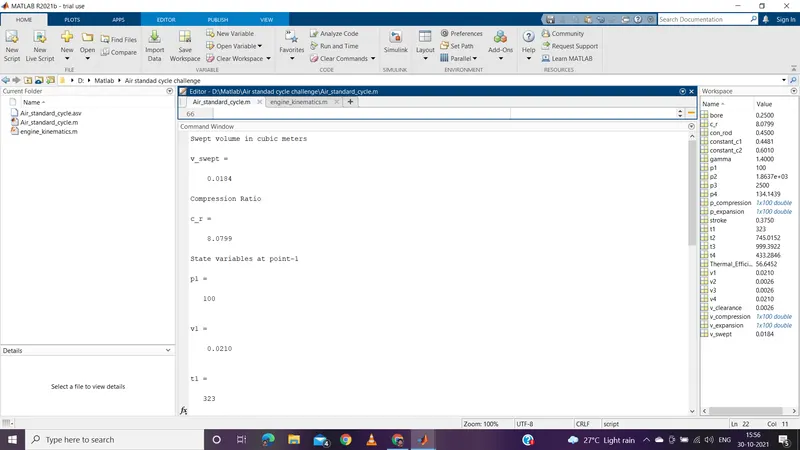
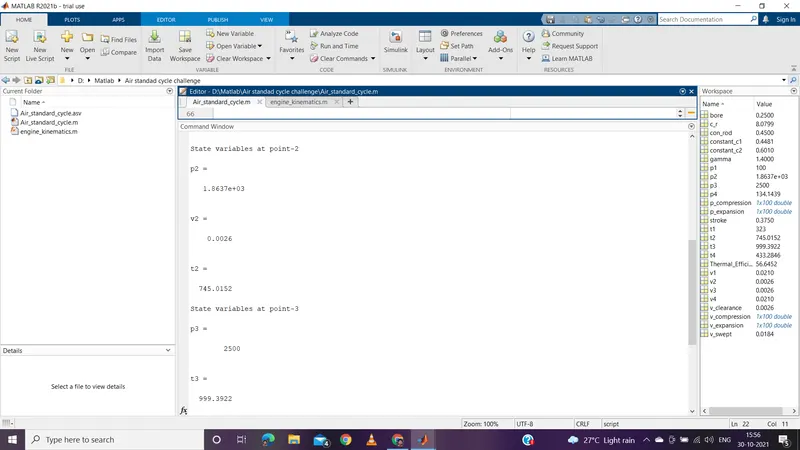
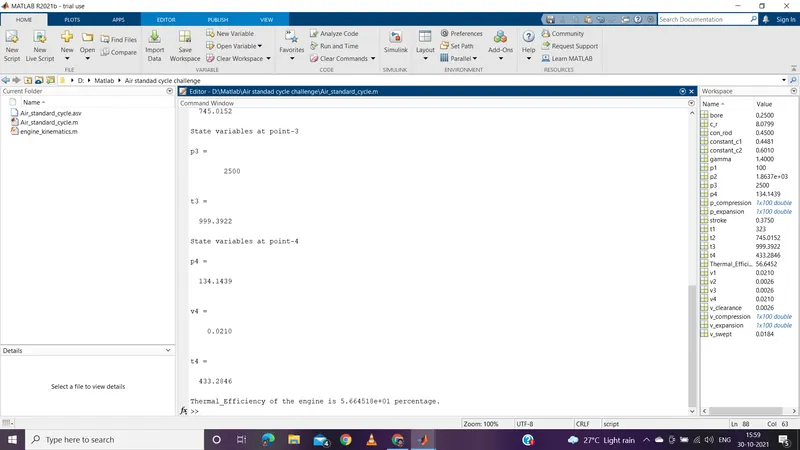
OUTPUT PLOT:
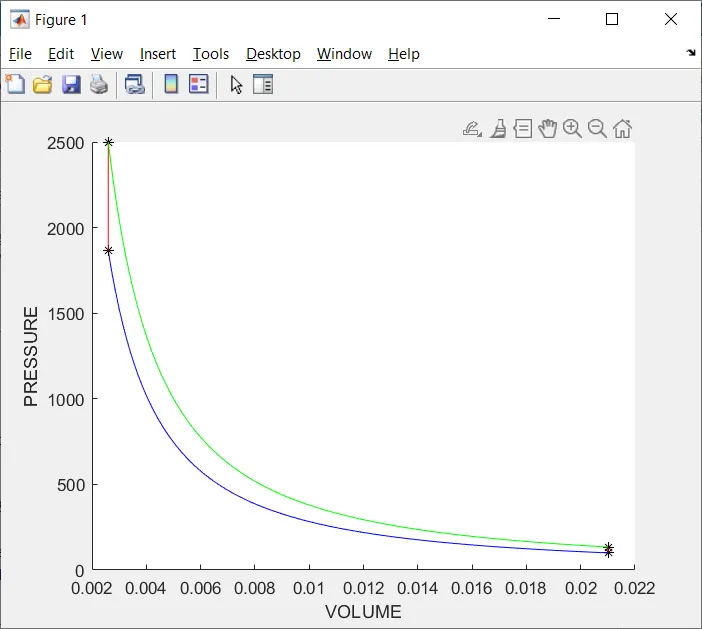
ERRORS FACED WHILE PRGRAMMING:
1.
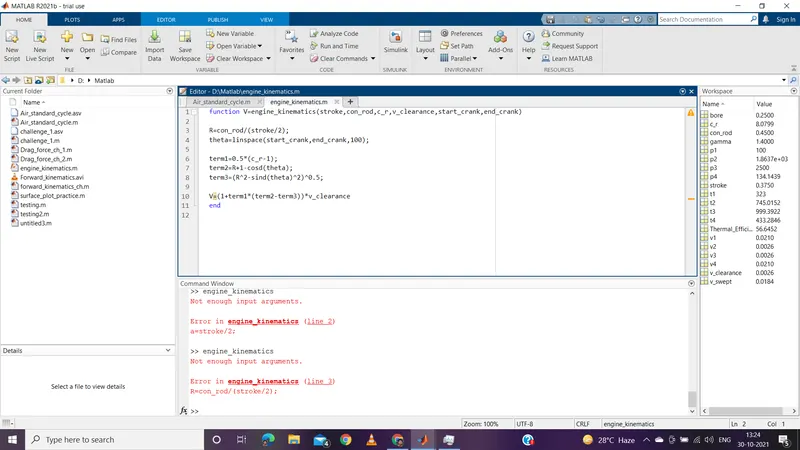
Should have defined the input variables in function in command window.
2.
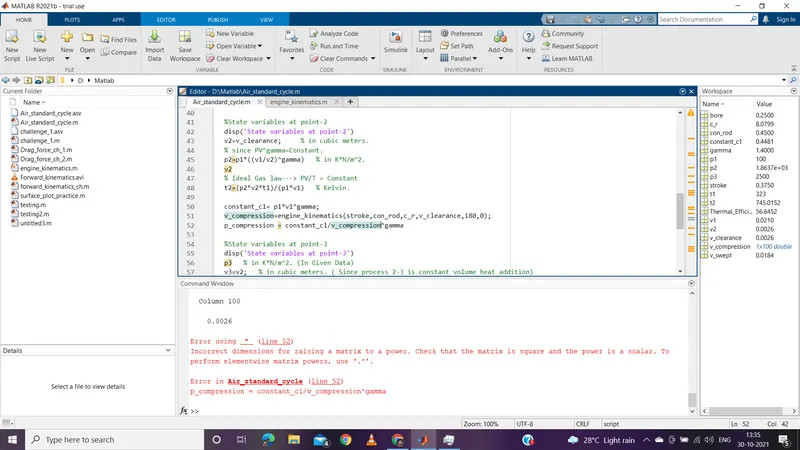
Shouls use element wise operator for mathematical calculations of Arrays.
3.
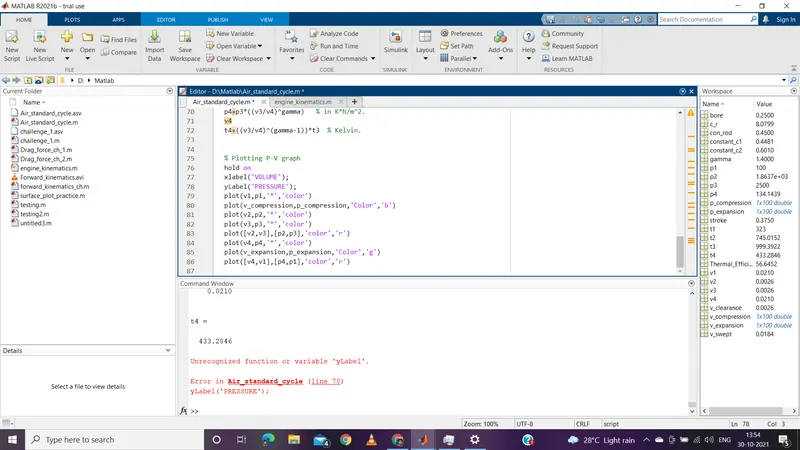
Took care while entering keywords without any case-sensitive errors while programming.
4.
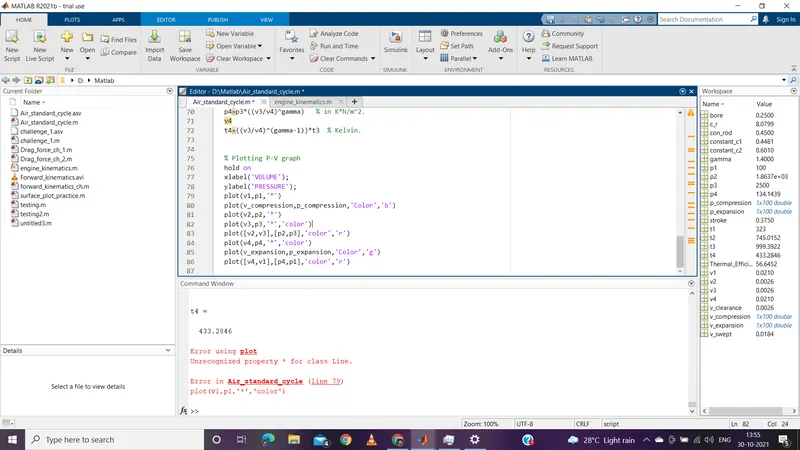
Forgot to enter the colour symbol in plot command while programming and took care while entering commands.