Project 1 - Parsing NASA thermodynamic data
Problem Statement:
- Write a function that extracts the 14 co-efficients and calculates the enthalpy, entropy, and specific heats for all the species in the data file. You will be reading this file NASA thermodynamic data(Tip: use fopen and fgetl). The formulae are shown below. Here R is the universal gas constant, T is the temperature.
- Cp/R = a1 + a2 T + a3 T^2 + a4 T^3 + a5 T^4
- H/RT = a1 + a2 T /2 + a3 T^2 /3 + a4 T^3 /4 + a5 T^4 /5 + a6/T
- S/R = a1 lnT + a2 T + a3 T^2 /2 + a4 T^3 /3 + a5 T^4 /4 + a7
-
The FIRST 7 coefficients are HIGH-temperature coefficients and the SECOND 7 coefficients are LOW-temperature coefficients. Also use the LOCAL TEMPERATURE RANGES which is unique for each individual species, not the GLOBAL TEMPERATURE RANGE.
-
Calculate the molecular weight of each species and display it in the command window.
-
Plot the Cp, Enthalpy and Entropy for the local temperature range (low temperature : high temperature) specific for each species.
-
Save the plots as images with appropriate names and dump them in separate folders for each species with a suitable name. All these should be generated automatically.
-
The main program that you will submit will just take the "THERMO.dat" file as an input and generate Cp, H and S plots.
-
Write a detailed report to describe your logic.
Solution:
Theory:
File parsing is a process of taking input data and breaking it down to appropriate components and using this data for data interpretation and data analysis. In Matlab, various file related and string related commands can be used for file parsing. Here, NASA polynomials are provided which are essentially used for curve fitting of Cp, S and H of various species. The data file contains the Global Temperature range, Local Temperature range and coefficients for low and high temperature ranges are provided. All this data needs to be accessed from the data file and broken down to useful bits of information and for that purpose, stored in variables. Then these values need to be supplied to given formulae and plots need to be generated.
Various Matlab commands used for file parsing:
- Fileid=fopen(Filename,mode): fopen command is used to open the specific file mentioned in the parenthesis, in the read or write mode in which data is fetched or data is written to the file respectively. Unique integer is generated and stored in fileid.
- fgetl(fileid): This command is used to read the next line from the file. It is in the form of character vector excluding the newline character.
- feof(fileid): It indicates the position of the end-of-file marker. It returns value 1 if the pointer is at the end and 0 if the pointer is not yet at the end.
- fclose(fileid): It closes the file.
- fprintf(formatspec,a1,a2,...): It formats the data and presents on the screen.
- strsplit(string, delimiter): It breaks the string input into many parts based on the delimiter. Delimiter specify the pattern where the string needs to be separated. The broken bits are stored in the cell array. Cell array is a special kind of array in which data of various type can be stored. It takes whitespace as the default delimiter and eliminates all the white space between the other characters.
- contains(string,pat): Here, pat is the pattern that the user is looking for in the string. Pat can be a number, alphabet or string. If string contains the pat, this command returns 1 (true) or else 0 (false).
- string(A): It is used to convert the input data type to string type.
- findstr(string1,string2): It finds the occurrence of the shorter array in the longer array of the input arguments. If there are numerous occurrences, the starting index number is returned in the form of row matrix or empty set is returned.
- str2double(string): Here, the input is a string of digits and this command is used to convert the string into double data type.
- mkdir parentfolder foldername: It creates a directory. A new folder is created by the name provided within the parent folder.
- saveas(gcf,fullfile(folder1,folder2,...filename.png)): This command is used to save the plot in the figure window. fullfile command is used to store the file of png format in the directory of the user choice. Folder names are provided in the fullfile() to enter into it and store new file.
Procedure to extract the various species:
- Create a function to extract species without any inputs and store it in string array species.
- Create a pattern with '|' logical-or for all the chemical elements present in the data file.
- Open the THERMO file in read mode.
- Skip the first line 'THERMO' as it contains the pattern elements and store the next line.
- Create element counter 'i' for indexing of the species names in string array and initialize with value 1.
- Create a loop to run over all the lines of the file with end-of-file condition. Use while loop as the number of iterations is unknown.
- Use strsplit to dismantle the string line into the components of cell array. This is done, since species name are written at the beginning of the string line.
- Use if-condition to check whether the first element of cell array contains the pattern. If true, then first element of cell array should be converted into string and stored in species array, and index number 'i' should be augmented by 1 in order to store the next species.
- Move to the next line using fgetl()
- Close the file out of the loop.
Code:
%Function to find the species name stored in the data file.
function species=extract_species()
%Create the pattern of various chemical elements present in the data file
pat=("O"|"H"|"C"|"N"|"S"|"AR");

f4=fopen('THERMO.dat','r');
fgetl(f4);
strg=fgetl(f4);
i=1; %variable to store species index number in string array

%Running the loop till end-of-file marker is reached
while ~feof(f4)
       raww=strsplit(strg);
    if (contains(raww{1},pat)&&strg~="END")
        species(i)=string(raww{1});
        i=i+1;
    end
    strg=fgetl(f4); %moving on to the next line
end
fclose(f4);

end
Procedure for obtaining the coefficients of a species:
- Create a function with coeffs as output vector and species-name as input argument.
- Open the 'THERMO' file in read mode.
- Skip the first line and store the next line in the str variable using fgetl().
- Use while loop to jump to the lines of data file sequentially until end-of-file is encountered.
- Split the array line into different blocks of cell array using strsplit function.
- Use if condition with contains() to find if the compound name is same as that of first cell array element. If it is true, then the species block is reached and break the loop. If it is false, then move to the next line.
- The second, third and fourth line of the species block store the values of the coefficients. Hence create for loop for 3 iterations. The iterating element 'j' also serves for the indexing of coefficient variable 'a'. So the initial value of j is 0.
- Move to the next line of the block using fgetl() and store the string.
- Find location of all exponential terms 'E' in the line using findstr. Since every coefficient value contains it, so it indicates the number of coefficients present in the line.
- Set start to 1 which is used to move on to the next value in the line.
- Create another for loop whose iterations correspond to the number of coefficients in the line.
- Store the value in two parts: st and dec. From index 'start' to index before 'E' is the number and 3 indices after 'E' are the power of 10 values.
- st and dec are converted to double data type and stored in vector 'a'.
- Close the file.
Code:
%Function to extract the coefficients of a species in the data file
function coeffs=co_efficient(compound)
    f2=fopen('THERMO.dat','r');
    fgetl(f2);
    str=fgetl(f2);
    %loop to run over the lines and find the location of species block
    while ~feof(f2)
        arr=strsplit(str);
    if contains(arr{1},compound) %to check if the line contains the species name
        break %to exit the loop, once the species block is found
    end
    str=fgetl(f2);
    end

    %Loop to go through all the three cofficients lines in a species block
    for j=0:2
        str=fgetl(f2);
        loc=findstr('E',str);
        start=1;
        %Loop extract the coeffiients and store them in 'a'
        for i=1:length(loc)
            st=str(start:loc(i)-1); %to store digits before exponent
            st1=str2double(st);
            dec=str(loc(i)+1:loc(i)+3);%to store digits after exponent
            dec1=str2double(dec);
            a(i+(5*j))=st1*10^dec1;
            start=loc(i)+4; % to start reading the next coefficient
        end
    end


fclose(f2);
coeffs=a;

end
Procedure for extracting the local temperature range:
- Create a function with vector variable as output and species name as input.
- Open the 'THERMO' data file using fopen()
- Skip the first line and store the next line in string.
- Use the while loop to run till the end of file and break the loop once the species file is encountered.
- At the end of the loop, species line of data file is stored in the string variable. Split the string into cell array using strsplit().
- High temperature limit is last second element of cell array, hence end-1 index is used.
- Mid temperature is the last third element, index=end-2.
- High temperature limit is last fourth element, index=end-3.
- Store these elements in the output variable.
Code:
%Function to extract the local temperature range
function lt=local_temperature(compound)
f3=fopen('THERMO.dat','r');
fgetl(f3);
strrr=fgetl(f3);
%Loop to find the species block
while ~feof(f3)
    arr=strsplit(strrr);
      if contains(arr{1},compound)
        break
      end
    strrr=fgetl(f3);

end
%Extract the local temperature from the string line
raw=strsplit(strrr);
local_low_temp=str2double(raw{end-3});
local_high_temp=str2double(raw{end-2});
local_mid_temp=str2double(raw{end-1});
%storing the local temperatures in row vector
lt=[local_low_temp,local_mid_temp,local_high_temp];

fclose(f3);
end
Procedure for calculating Cp, S, H:
- Create a function with species name, coefficient value and local temperature limits as input arguments and no output.
- Initialize the temperature variable using linspace() with low temperature limit as initial value and high temperature limit as final value and 100 total divisions.
- Create a for loop with 'i' as variable used for indexing from 1 to 100
- Use if-condition to check if the temperature lies in lower or higher range
- For lower range(local_low_temp to local_mid_temp), set skip to 7. This will skip the first 7 values of coefficient variable and move to last 7 variables.
- for higher range(local_mid_temp to local_high_temp), set skip to 0. This will not skip the coefficient values and the first 7 values are used.
- Use NASA polynomials to generate the Cp, S and H values.
- Use mkdir command to create subfolder in the name of particular species in the parentfolder
- Create the 3 plots against the temperature values and store the figures using saveas()
Code:
%Function to calculate the Specific heat, Enthalpy and Entropy
function thermal_data(a,temp,chem_bond)
R=1.987; %Universal gas constant in cal/mol-K
t=linspace(temp(1),temp(3),100);%Local temperature from low to high limit

%Loop to calculate gas properties for all values of temperature
for i=1:length(t)
    %Condition to determine low or high temperature coefficient
    if t(i)<=temp(2)
        skip=7;
    else
        skip=0;
    end
      %NASA polynomials:
    Cp(i)=(a(skip+1)+a(skip+2)*t(i)+a(skip+3)*t(i)^2+a(skip+4)*t(i)^3+a(skip+5)*t(i)^4)*R;
    H(i)=(a(skip+1)+a(skip+2)*t(i)/2+a(skip+3)*t(i)^2/3+a(skip+4)*t(i)^3/4+a(skip+5)*t(i)^4/5+a(skip+6)/t(i))*R*t(i);
    S(i)=(a(skip+1)*log(t(i))+a(skip+2)*t(i)+a(skip+3)*t(i)^2/2+a(skip+4)*t(i)^3/3+a(skip+5)*t(i)^4/4+a(skip+7))*R;
end

%To create sub folder in the specifies parentfolder
mkdir('NASA_thermodynamics_plots',chem_bond)

%Plotting the curves and saving the figure in the subfolder
figure(1)
plot(t,Cp)
ylabel('Specific heat (cal/mol-K)')
xlabel('Temperature (K)')
title(chem_bond)
saveas(gcf,fullfile('NASA_thermodynamics_plots',chem_bond,'Specific_heat_curve.png'));

figure(2)
plot(t,H)
ylabel('Enthalpy (Kcal/mol)')
xlabel('Temperature (K)')
title(chem_bond)
saveas(gcf,fullfile('NASA_thermodynamics_plots',chem_bond,'Enthalpy_curve.png'));

figure(3)
plot(t,S)
ylabel('Entropy (cal/mol-K)')
xlabel('Temperature (K)')
title(chem_bond)
saveas(gcf,fullfile('NASA_thermodynamics_plots',chem_bond,'Entropy_curve.png'));


end
Procedure for main function:
- Create a function that accepts species name as input and that gives molecular weight as output.
- Create an outer loop with 'i' as index of the species variable
- Initialize variables to store molecular weight 'mw' with 0
- Create an inner loop with 'j' as index for the species name string with values up to the length of the name.
- Use extract() to access the character of the species name at the jth position
- Compare this character with 5 predetermined elements using if- condition. If the match is found store the value of element in mw.
- Check if the character is a number using contains() and digitsPattern as match. If true, then store the number in multiplier variable and then access the previous element again using j-1 indexing. Again try to find the match of the element using if condition. On finding the match, multiply the corresponding element weight with multiplier and add to the previous value of mw.
Code:
%Function to calculate the molecular weight of the species
function mw=molecular_weight(species)
%Initialize the chemical elements with the corresponding molecular weight
O=16;
H=1;
C=12;
N=14;
AR=39.9;

%Loop to access all the species and calculate the molecular weight
for i=1:length(species)
    mw(i)=0;%variable to store the value
    %Inner Loop to access all the chemical elements in a species
    for j=1:strlength(species(i))
        ch=extract(species(i),j);
        %If condition to match the element with predermined element
        if ch=="O"
            mw(i)=mw(i)+O;
        end
        if ch=="N"
            mw(i)=mw(i)+N;
        end
        if ch=="H"
            mw(i)=mw(i)+H;
        end
         if ch=="C"
            mw(i)=mw(i)+C;
         end
         if ch=="A"
             mw(i)=mw(i)+AR;
         end
         %Condition to check numbers in species and factor in the extra...
               %elements
         if contains(ch,digitsPattern)
             multiplier=str2num(ch)-1;
             ch=extract(species(i),j-1);
             %Condition to check the previous element and add the
             %respective molecular weight
             if ch=="O"
                mw(i)=mw(i)+O*multiplier;
             end
             if ch=="N"
                mw(i)=mw(i)+N*multiplier;
             end
             if ch=="H"
                mw(i)=mw(i)+H*multiplier;
             end
             if ch=="C"
                mw(i)=mw(i)+C*multiplier;
             end
             if ch=="A"
                mw(i)=mw(i)+AR*multiplier;
             end
         end
    end
end
end
Procedure for Main function:
- Call the extract_species() and store the names in 'species' variable.
- Create a parent folder using mkdir command
- Create a for loop to access all species names and call the functions to obtain coefficients and local temperatures first and then supply these variables to thermal_data() to obtain the plots
- Call molecular_weight() and store all the weights in row vector.
- Use fprintf() to format the data and print the values on screen.
Code:
clear all
close all
clc

%Calling the function to obtain all the species names in a variable
species=extract_species();

%Creating a parentfolder
mkdir NASA_thermodynamics_plots

%Loop to access all the compounds in the species variable and calling...
%various functions
for k=1:length(species)

    coef=co_efficient(species(k));
    local_t=local_temperature(species(k));
    thermal_data(coef,local_t,species(k));
end

%calling molecular weight function
molwe=molecular_weight(species);

%Printing the species and respective molecular weights in command window
fprintf("%16s|%16s\n","Species","Molecular Weight")
for f=1:length(species)
fprintf('%16s-%16.2f\n', species(f),molwe(f))
end
Errors:
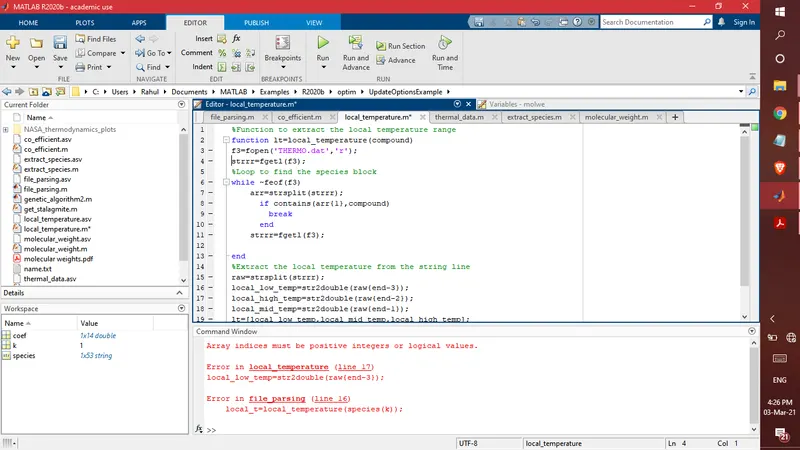
- Here, the first line of the data file, "Thermo" is stored in the string variable which matches the species 'O' and 'H'. Hence the program tries to find the local temperature values in the first line of the data file and indexing fails. It is resolved by skipping the first line using fgetl().
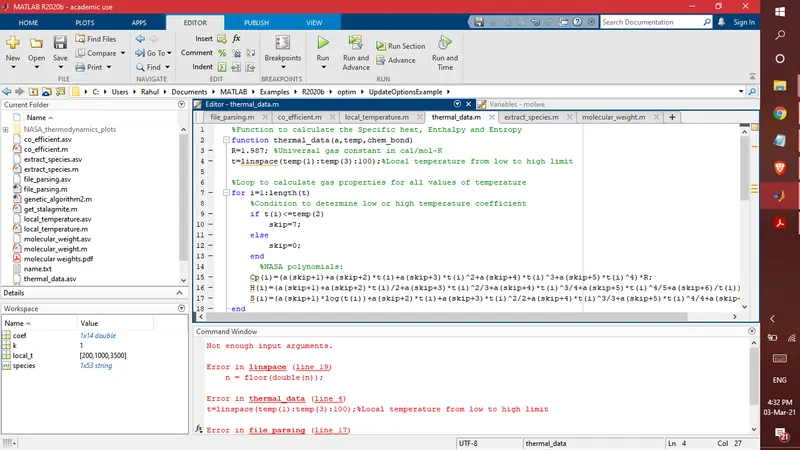
- Error in linspace syntax. It is resolved by eliminating the range operator.
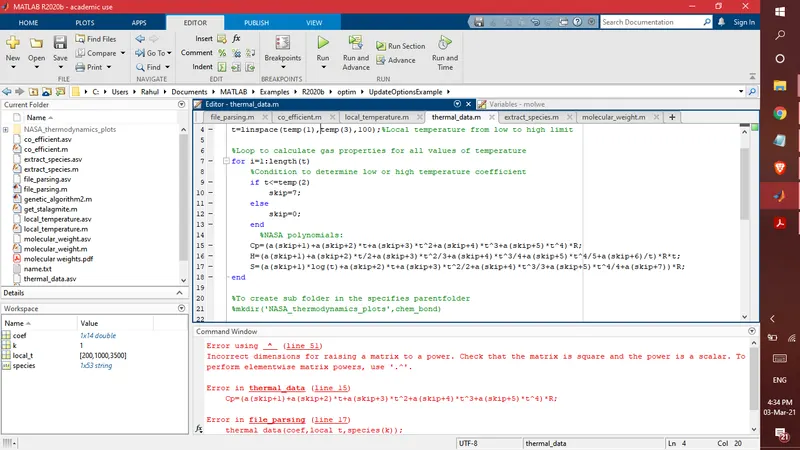
- The compiler is asking to use the dot operator, since 't' is a row matrix. Error is resolved by using indexing for t and other variables.
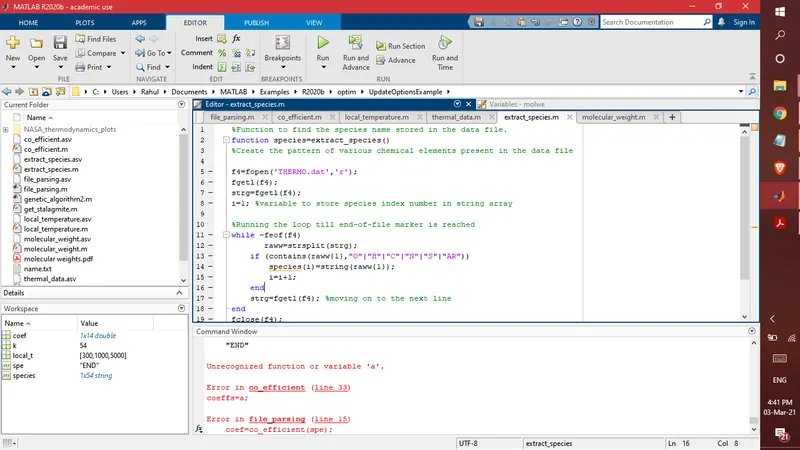
- Species is storing the "END" as the 54th compound from the data file since it matches the pattern as it contains "N" in it. To avoid the extraction of "END", line 13 if the condition is modified.
- pat variable is created to store the matches using logical OR (|) and logical AND is used in the if condition so that string is NOT EQUAL (~=) to "END".
Output:
Molecular weights are displayed in the command window as follows:
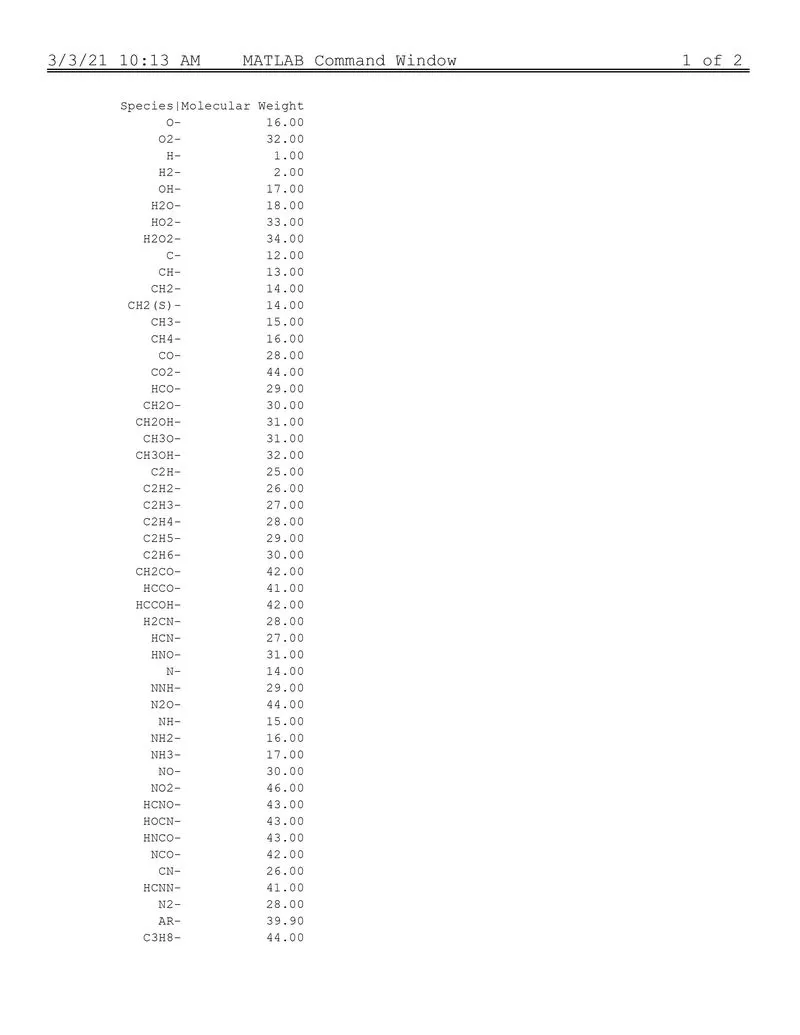
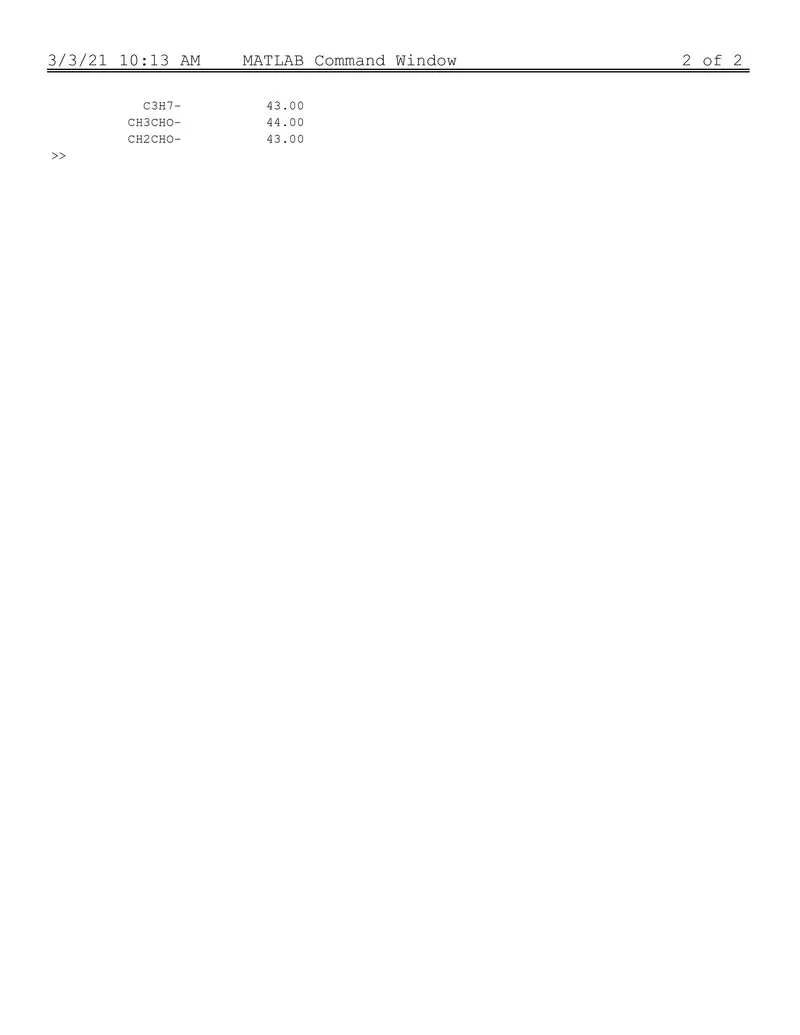
The rest of the results are attached.
Reference: