Parsing NASA thermodynamic data
Objective: To write a matlab code for data parsing of a NASA file with thermodynamic constants
Here in this program we are writing a code to extract the thermodynamic constants of different species of substances provided in the data file (THERMO.dat) and calculate for the Cp (Specific Heat Capacity), H (Enthalpy) and S (Entropy) for each of the species. Also, we are calculating for the molecular weight for each of the substance given in the data file.
Theory:
The thermodynamioc parameters of a substance help us understand the state of the sytem and with some constants in the energy equations we can predict the behaviour of the system when subjected to temperature/ pressure/ volume change. Few of these properties are Enthalpy, Entropy and the example for constans is Specific heat capacity.
Specific Heat Capacity (`C_p`):
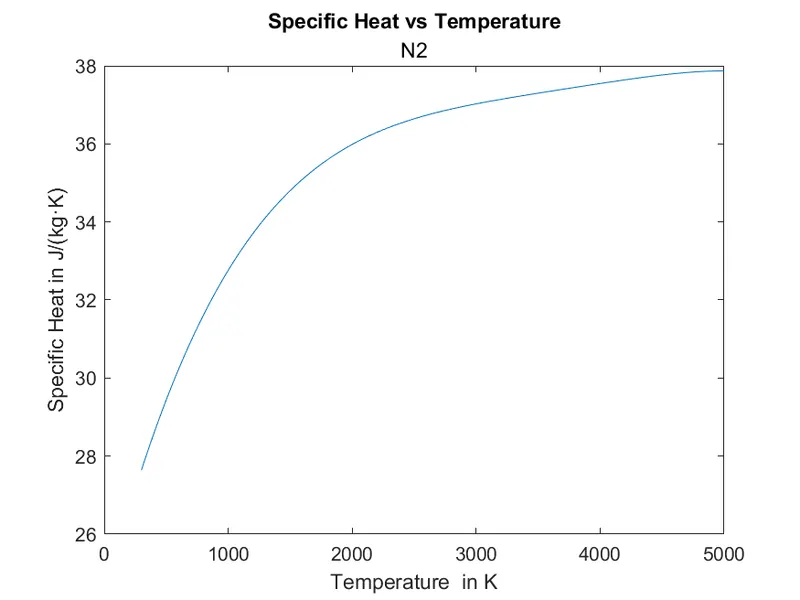
Specific heat capacity is defined as the ammount of energy required to raise unit temperature value for a unit mass of a given substance. This means materials with high Cp need higher energy to cause the change in temp. and can store greater amount of energy as compared to materials with low Cp.(Unit: J·kg−1·K−1)
Enthalpy (H):
Enthalpy is defined as the sum of the internal energy of a thermo. system. The total enthalpy cannot be measured as components of energy in a system are unkown, in practice we use a change in enthalpy(`DeltaH`) for thermal analysis.
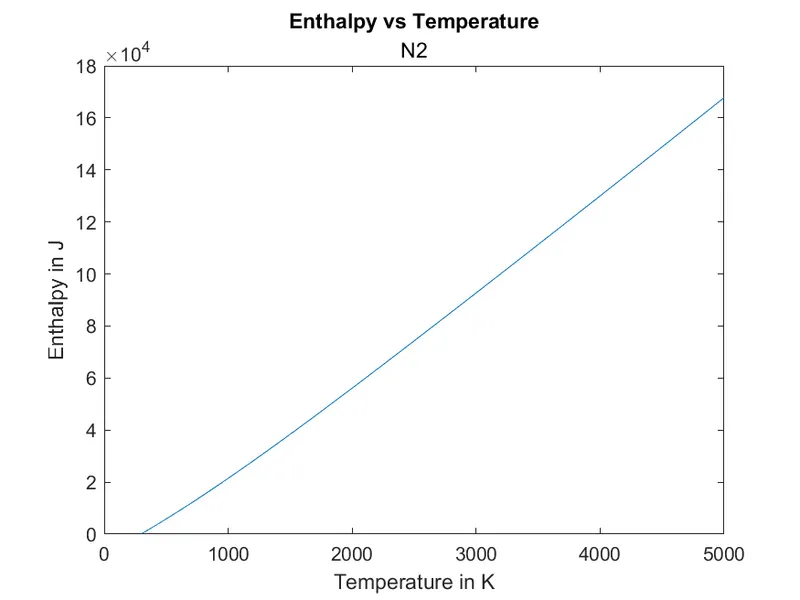
The enthalpy of an ideal gas is predominantly a function of temperature and not pressure. In practice most of the gasses and air follow this behaviour closly. Here, in this program, we are tracing the variation of enthalpy w.r.t. Temp. variation for all the material species given in the data file. (Unit: Joules (J))
Entropy (S):
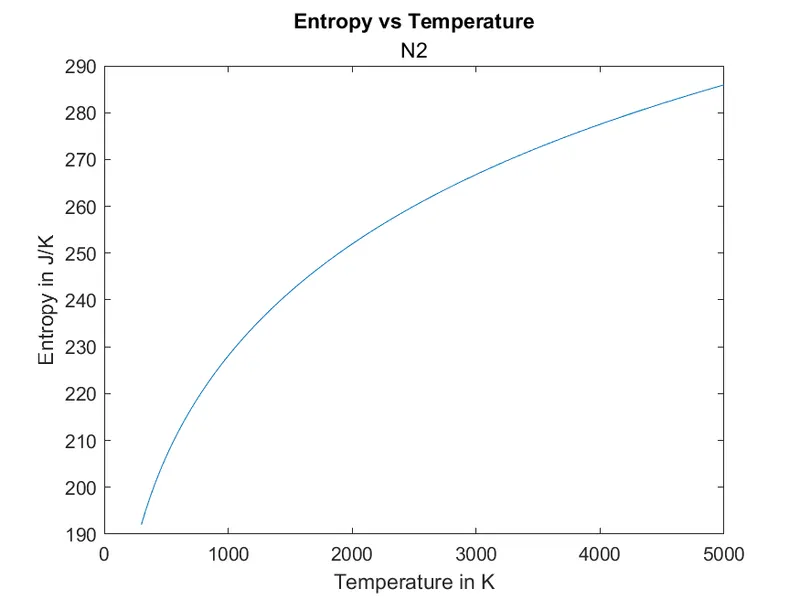
Entropy is the measure of disturbance, disorder or randomness in a system. Entropy predicts if the prociss is reversible or not whiles abiding the law of conservation of energy. It is central to the second law of thermodynamics, that say the entropy of a isolated systems cannot decrease with time, as they always arrive at an equilubrium state where the entropy is the highest. Here, in this program, we are tracing the variation in entropy w.r.t. temperature change. (Unit: J/K)
The Data File:
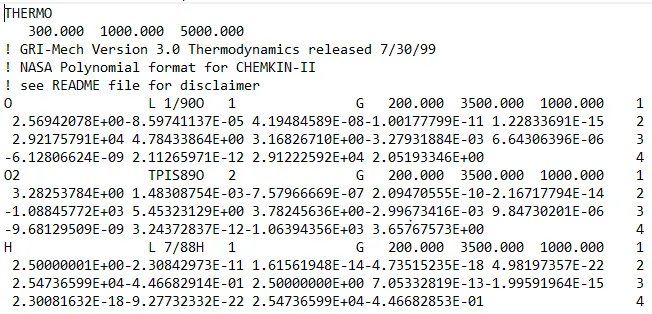
Above picture shows a snap of the given data file(THERMO.dat). In this file lines starting with '!' are comments. In the 2nd line the global temperature limits are given followed by 3 lines of comments. Next line gives the species name and the local temp. limits for the species, followed by 3 lines of constants for the species. Here, the first seven numbers are high temp. constants and next seven are the low temp. constants. This is then repeated till the last line which is "END"
Formulae to calculate the Cp, H & S and Molecular Weight:
`Cp = R*(a_1+ a_2*T+ a_3*T^2 + a_4*T^3 + a_5*T^4)`
`H = R*T*(a_1 + a_2*T/2 + a_3*T^2/3 + a_4*T^3/4 + a_5*T^4/5 + a_6*T^5/6)`
`S = R*(a_1*log(T)+ a_2*T + a_3*T^2/2 + a_4*T^3/3 + a_5*T^4/4 +a_7)`
R is a universal gas constant = 8.314 J/mol·K
Molecular Weight is calculated by adding the atomic weight of all the atoms in a given species molecule.
For example:
Molecular weight of `H_2O = H+H+O = 1 +1+16 = 18 g/(mol)`
Here, atomic weight of H = 1, O = 16.
Code:
% Data parsing of nasa file
clear all
close all
clc
N1 = fopen('THERMO.dat', 'r')                 % Opening the data file in matlab and assigning a handle 'N1'
fgetl(N1);                                    %reads first line
X = fgetl(N1);                                % to get global temp. limits
A = strsplit(X, '  ');                        % saperating data in string with space
GLT = str2num(A{2});                          % converting string data to a number
GLM = str2num(A{3});
GLH = str2num(A{4});
fgetl(N1);                                    % To neglect comment lines
fgetl(N1);
fgetl(N1);
R = 8.314;                                    % Universal gas constant

for i = 1:inf
    material_line = fgetl(N1);
    L_T= strsplit(material_line, '  ');
    if L_T(1) == "END"                        % To end the loop at last line
        break;
    else
        LLT = str2num(L_T{end -3});                                  % Assigning values to the local temperature limits
        LHT = str2num(L_T{end -2});
        LMT = str2num(L_T{end-1});
        T = linspace(LLT, LHT, 1000);                                % defining temperature range
        first_line = fgetl(N1);                                      % First line with constants
        x = findstr(first_line, 'E');                                % Recording for the locations of E in the 1st line string and storing in x
        second_line = fgetl(N1);                                     % Second line with constants
        y = findstr(second_line, 'E');                               % Recording for the locations of E in the 2nd line string and storing in y
        third_line = fgetl(N1);                                      % Third line with constants
        z = findstr(third_line, 'E');                                % Recording for the locations of E in the 3rd line string and storing in z
        ha1 = str2num(first_line(1:x(1)+3));                         % The first high temp. constant
        ha2 = str2num(first_line(x(1)+4: x(2)+3));                   % "first_line(x(1)+4: x(2)+3)" is a string
        ha3 = str2num(first_line(x(2)+4: x(3)+3));                   % str2num() converts the string into number
        ha4 = str2num(first_line(x(3)+4: x(4)+3));
        ha5 = str2num(first_line(x(4)+4: x(5)+3));
        ha6 = str2num(second_line(1:y(1)+3));
        ha7 = str2num(second_line(y(1)+4: y(2)+3));
        la1 = str2num(second_line(y(2)+4: y(3)+3));                 % The first low temp constant
        la2 = str2num(second_line(y(3)+4: y(4)+3));
        la3 = str2num(second_line(y(4)+4: y(5)+3));
        la4 = str2num(third_line(1:z(1)+3));
        la5 = str2num(third_line(z(1)+4: z(2)+3));
        la6 = str2num(third_line(z(2)+4: z(3)+3));
        la7 = str2num(third_line(z(3)+4: z(4)+3));
        % Calculating Cp, H, S:
        % Using if condition to calculate for 2 different input values of constants for low and high temp.
        if T < LMT
            Cp = R*(la1+ la2*T+ la3*T.^2 + la4*T.^3 + la5*T.^4);
            H = R*T.*(la1 + la2*T/2 + la3*T^.2/3 + la4*T.^3/4 + la5*T.^4/5 + la6./T);
            S = R*(la1*log(T)+ la2*T + la3*T.^2/2 + la4*T^.3/3 + la5*T^.4/4 +la7);
        else
            Cp = R*(ha1+ ha2*T+ ha3*T.^2 + ha4*T.^3 + ha5*T.^4);
            H = R*T.*(ha1 + ha2*T/2 + ha3*T.^2/3 + ha4*T.^3/4 + ha5*T.^4/5 + ha6./T);
            S = R*(ha1*log(T)+ ha2*T + ha3*T.^2/2 + ha4*T.^3/3 + ha5*T.^4/4 +ha7);
        end
        % recording data in matrix for the species names:
      str = cell2mat(L_T(1));                                       % Recorging for the species name in matrix form
        s = ["H" "O" "C" "N" "A"];                                  % Array with atom name
        atomic_weight = [1, 16, 12, 14, 40];                        % Array with respective atomic weight
        mol_weight = 0;
        for j = 1:length(str)
            for k = 1: length(atomic_weight)
                if strcmp(str(j), s(k))                             % Comparing for str(j) with s(k) and if similar the atomic_weight(k) is added to mol_weight
                    mol_weight = mol_weight + atomic_weight(k);
                    position = k;                                   % regestering for the location of the atom
                end
            end
            % Calculating molecular weight of each material
            number = str2double(str(j));                            % reaging for numeric values in str(j)
            if number > 1
                mol_weight = mol_weight +atomic_weight(position)*(number-1);        % If a number is found the value of atom at position=k is added. (number-1 coz the atom is added once already)
            end
        end
        M = mol_weight;
        fprintf("The molecular weight of %s is %d g/molnr", str, M);
    %     pathe for saving data
     targetdirectory = sprintf('C:/Users/Skill_Lync/Desktop/trial/%s', str);
    % going to the specific folder to save the plots
    mkdir(targetdirectory)                                                                                  % Makes a new directory with name from str
    cd(targetdirectory)                                                                                       % Changes the working directory to the new directory with new string name
        % Plotting
        figure(1)
        plot(T, Cp)                                                                                                % Plotting 'Cp' w.r.t. 'T'
        title('Specific Heat vs Temperature', str)
        xlabel('Temperature  in K')
        ylabel('Specific Heat in J/(kg·K)')
        saveas(gcf, 'Cp.png');                                                                              % Saves the plot in .png format

        figure(2)
        plot(T, H)                                                                                                  % Plotting 'H' w.r.t. 'T'
        title('Enthalpy vs Temperature', str)
        xlabel('Temperature in K')
        ylabel('Enthalpy in J')
        saveas(gcf, 'H.png');

        figure(3)
        plot(T, S)                                                                                                   % Plotting 'S' w.r.t. 'T'
        title('Entropy vs Temperature', str)
        xlabel('Temperature in K')
        ylabel('Entropy in J/K')
        saveas(gcf, 'S.png');
        cd ..
    end

end
Code Comments:
- Command line 'N1 = fopen('THERMO.dat', 'r')' opens the THERMO.dat file in matlab with read permission and a handle name 'N1 is assigned to the file.
- 'fgetl(N1)' reads the first line in the file.
- as the global temp. are in 2nd line, 'X = fgetl(N1);' records 'X' with 2nd line. 'A = strsplit(X, ' ')' saperates the data in string 'X' at ' ' and records this split data in 'A'
- Now the global low, medium and high temp. values are recored in mumber format using command 'str2num(A{2}) here, {} is used as the data in 'A' is a string.
- Next 3 lines in the file are comments and are neglected by calling the command 'fgetl(N1)' thrice.
- Universal gas constant 'R' is defined
- Next 4 lines of data in the file is about a specific species of substance such as O, O2, H2O... Here the 1st line gives the species name and local temperature limits, and bext three lines contain the constants values for the calculation.
- A for loop is used with 1: Inf as we do not know the number of lines in data file and an if condition is used with 'L_T(1) == "END" ' this matches the recorded value with 'END' and terminates the program when the match happens.
- 'material_line = fgetl(N1);' records for the 1st line material.
- 'L_T= strsplit(material_line, ' ');' command line splits the data and recodes in L_T in a set of strings.
- 'LLT = str2num(L_T{end -3});' here the string value of 'L_T' at location {end-3} is recorded as a number in 'LLT'. Similarly, the local medium and high temperatures are defined.
- The command 'T = linspace(LLT, LHT, 1000);' creates an array for Temperature with LLT as loswer limit and LHT as higher limit.
- Following sequence is used to record for the next 3 lines of data as strings in first_line, second_line & third_line. In each line here, 'E' is the data point saperator, the location of this saperator is recorded in x, y, & z for above 3 lins respectively.
first_line = fgetl(N1); % First line with constants
x = findstr(first_line, 'E'); % Recording for the locations of E in the 1st line string and storing in x
second_line = fgetl(N1); % Second line with constants
y = findstr(second_line, 'E'); % Recording for the locations of E in the 2nd line string and storing in y
third_line = fgetl(N1); % Third line with constants
z = findstr(third_line, 'E');
- Now to record the values of the constants in number format str2num(first_line(start : end)) commands are used. Here, start point and end point are defined with the help of recorde location values of 'E' in x, y, & z. Such as:
ha1 = str2num(first_line(1:x(1)+3)); % The first high temp. constant
ha2 = str2num(first_line(x(1)+4: x(2)+3)); % "first_line(x(1)+4: x(2)+3)" is a string
ha3 = str2num(first_line(x(2)+4: x(3)+3)); % str2num() converts the string into number
- The above sequence shows the code for assigning values for the high temp. constants. similarly low temp. constants are recored from the second_line and third_line.
- Now an 'if' condition is used as we have two different set of constant values for high temp range and low temp range. if < LMT( Local medium Temp) is the saperator here. The formula for Cp, H and S are executed in if condition for both low temp and high temp conditions.
- Next code is to calculate Molecular Weight and to plot for the calculated values of Cp, H, & S w.r.t. T and store the plots in saperate directory.
- Now the name of the species is recorded by 'str = cell2mat(L_T(1))', here str stores the name.
- 2 new arrays are defined to record atom names and atomic weights respectively in 's' and 'atomic_weight'
- Following sequence of code is used to calculate for the molecular weight:
mol_weight = 0;
for j = 1:length(str)
for k = 1: length(atomic_weight)
if strcmp(str(j), s(k)) % Comparing for str(j) with s(k) and if similar the atomic_weight(k) is added to mol_weight
mol_weight = mol_weight + atomic_weight(k);
position = k; % regestering for the location of the atom
end
end
% Calculating molecular weight of each material
number = str2double(str(j)); % reaging for numeric values in str(j)
if number > 1
mol_weight = mol_weight +atomic_weight(position)*(number-1); % If a number is found the value of atom at position=k is added. (number-1 coz the atom is added once already)
end
end
M = mol_weight;
fprintf("The molecular weight of %s is %d g/molnr", str, M);
- Here, the 1st 'for loop' looks for the length of the species name and second for loop looks for the length of atoms array.
- An if condition with 'strcmp(str(j), s(k))' is used to compare the name string and atoms array. If the atom matches, the weight of that specific atom is added to the mol_weight, position of the atom is recorded in 'position' and if condition is ended also 2nd for loop is ended.
- Now, 'number = str2double(str(j));' records if there is a number in name (in name H2O this will record for '2') and next if condition adds the atomic weight of the previous atom (number - 1) times to the mol_weight (as the atom_weight is already added once to the mol_weight).
- 'M = mol_weight;' recordes mol_weight value in 'M' and the command 'fprintf("The molecular weight of %s is %d g/molnr", str, M);' prints the value of M on the command window, (nr is used here to go to next line in command window for each execution)
- Folowing sequence of code creates a new directory with species name and changes the directory once the for loop is ended.
targetdirectory = sprintf('C:/Users/Skill_Lync/Desktop/trial/%s', str); % going to the specific folder to save the plots
mkdir(targetdirectory) % Makes a new directory with name from str
cd(targetdirectory) % Changes the working directory to the new directory with new string name
- 1. targetdirectory is the handler for folder path and %s', str is to set new folder name to str value
- 2. mkdir(targetdirectory) makes the new folder at the set path in targetdirectory with name from str
- 3. cd(targetdirectory) changes the working directory to the new folder.
- Three figures are generated with plot command to plot for the Cp, H, & S w.r.t. T and at the end of each plotting command, saveas(gcf, 'Cp.png'); is used to save the plot with respective names in '.png' format.
- cd .. is used to change back the directory to original one.
- The first if and for loops are ended
Referances:
- https://en.wikipedia.org/wiki/Specific_heat_capacity
- https://en.wikipedia.org/wiki/Enthalpy
- https://en.wikipedia.org/wiki/Entropy
- Matlab help doc
Errors:
Did not define R value.
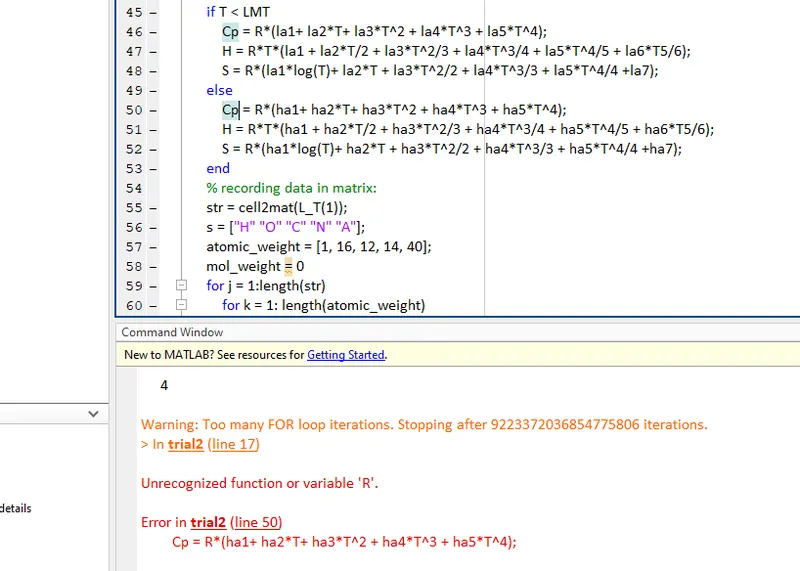
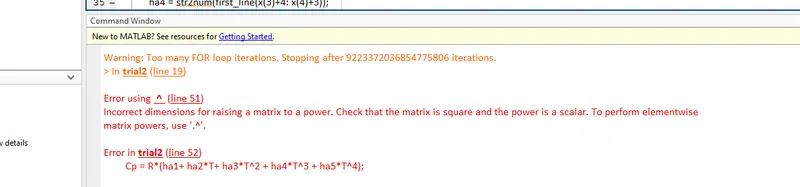
Missing element vise operator in formula.
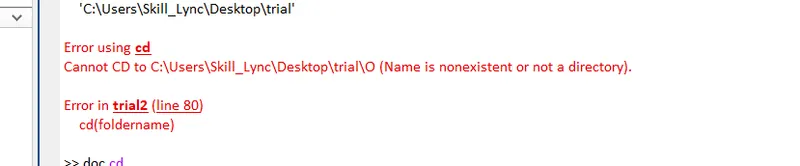
Impropper use of cd(): had not defined the directory path and path handles properly.
Improper termination of the first for loop: had not difined where to end the for loop making it run from 1:Inf, Fixed by implementing a 'if condition that checks for the last line.
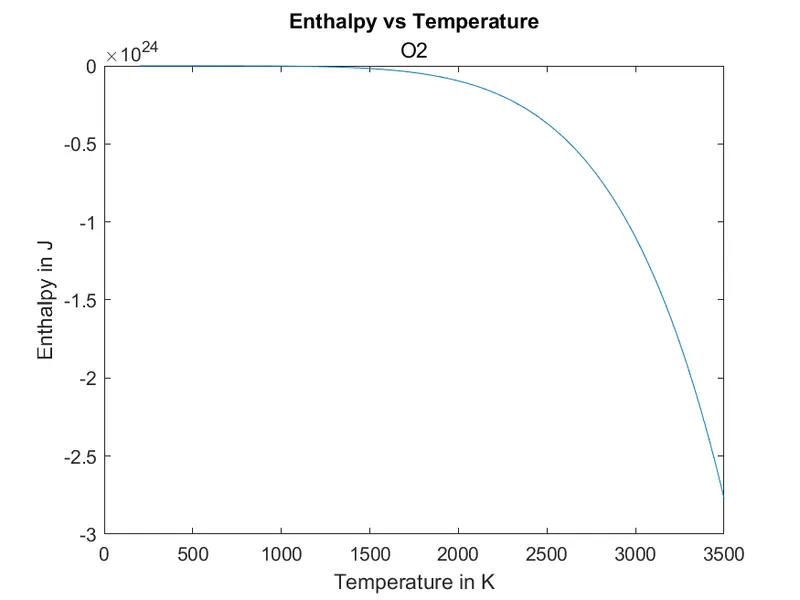
Wrong code for Cp formula resulting in negative value for Cp
Results:
The Command Window after code execution:
N1 =

     9

Warning: Too many FOR loop iterations. Stopping after 9223372036854775806 iterations.
> In trial2 (line 17)

The molecular weight of O is 16 g/mol

The molecular weight of O2 is 32 g/mol

The molecular weight of H is 1 g/mol

The molecular weight of H2 is 2 g/mol

The molecular weight of OH is 17 g/mol

The molecular weight of H2O is 18 g/mol

The molecular weight of HO2 is 33 g/mol

The molecular weight of H2O2 is 34 g/mol

The molecular weight of C is 12 g/mol

The molecular weight of CH is 13 g/mol

The molecular weight of CH2 is 14 g/mol

The molecular weight of CH2(S) is 14 g/mol

The molecular weight of CH3 is 15 g/mol

The molecular weight of CH4 is 16 g/mol

The molecular weight of CO is 28 g/mol

The molecular weight of CO2 is 44 g/mol

The molecular weight of HCO is 29 g/mol

The molecular weight of CH2O is 30 g/mol

The molecular weight of CH2OH is 31 g/mol

The molecular weight of CH3O is 31 g/mol

The molecular weight of CH3OH is 32 g/mol

The molecular weight of C2H is 25 g/mol

The molecular weight of C2H2 is 26 g/mol

The molecular weight of C2H3 is 27 g/mol

The molecular weight of C2H4 is 28 g/mol

The molecular weight of C2H5 is 29 g/mol

The molecular weight of C2H6 is 30 g/mol

The molecular weight of CH2CO is 42 g/mol

The molecular weight of HCCO is 41 g/mol

The molecular weight of HCCOH is 42 g/mol

The molecular weight of H2CN is 28 g/mol

The molecular weight of HCN is 27 g/mol

The molecular weight of HNO is 31 g/mol

The molecular weight of N is 14 g/mol

The molecular weight of NNH is 29 g/mol

The molecular weight of N2O is 44 g/mol

The molecular weight of NH is 15 g/mol

The molecular weight of NH2 is 16 g/mol

The molecular weight of NH3 is 17 g/mol

The molecular weight of NO is 30 g/mol

The molecular weight of NO2 is 46 g/mol

The molecular weight of HCNO is 43 g/mol

The molecular weight of HOCN is 43 g/mol

The molecular weight of HNCO is 43 g/mol

The molecular weight of NCO is 42 g/mol

The molecular weight of CN is 26 g/mol

The molecular weight of HCNN is 41 g/mol

The molecular weight of N2 is 28 g/mol

The molecular weight of AR is 40 g/mol

The molecular weight of C3H8 is 44 g/mol

The molecular weight of C3H7 is 43 g/mol

The molecular weight of CH3CHO is 44 g/mol

The molecular weight of CH2CHO is 43 g/mol

>>
Screenshot of window with saved folders:

Plots for O2:
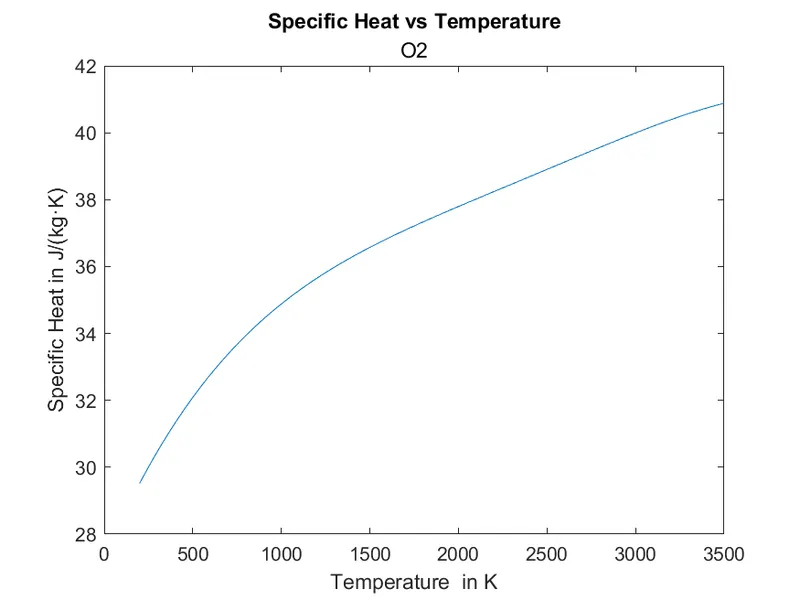
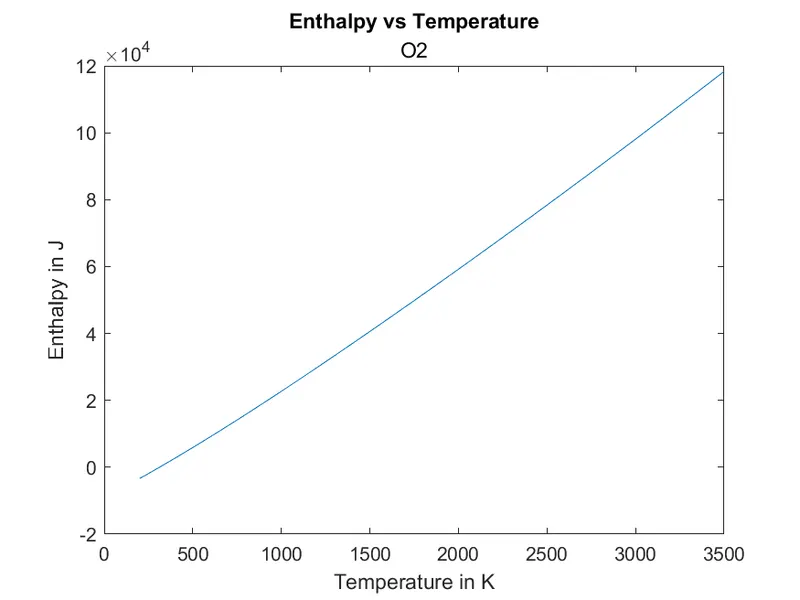
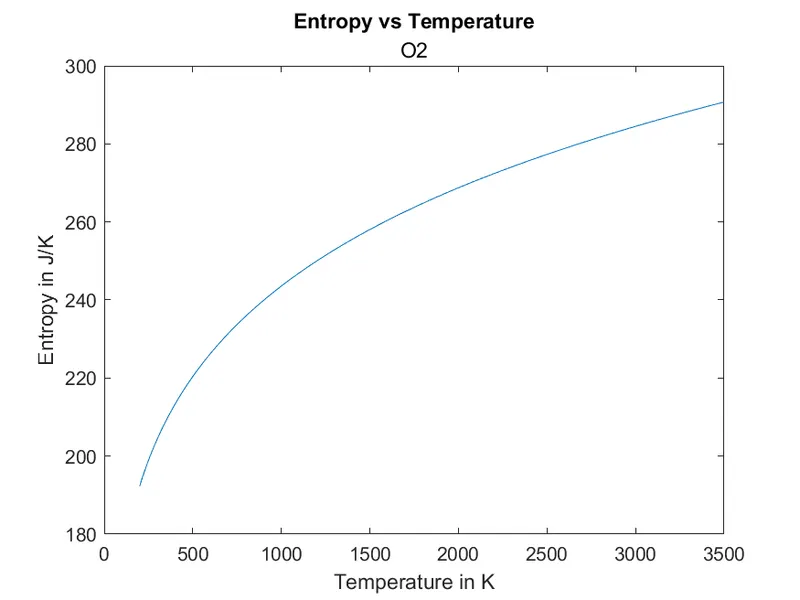
Plots for N2:
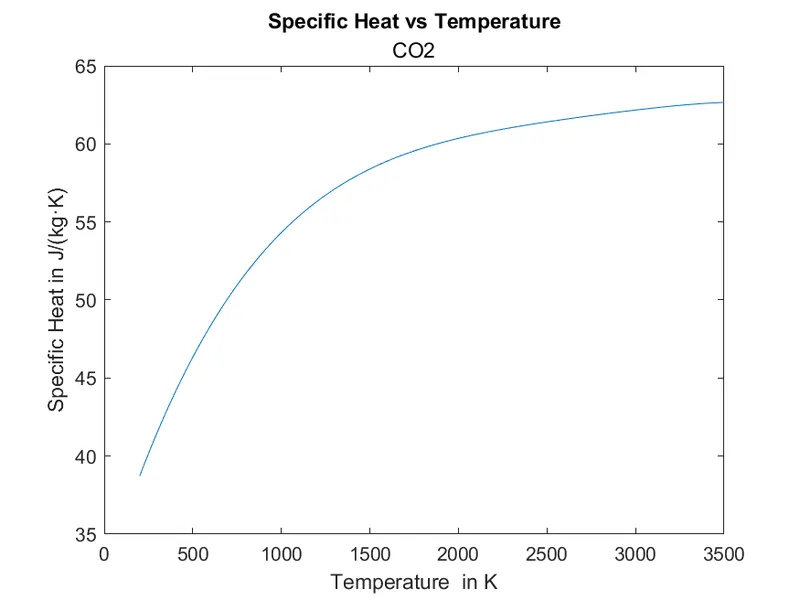
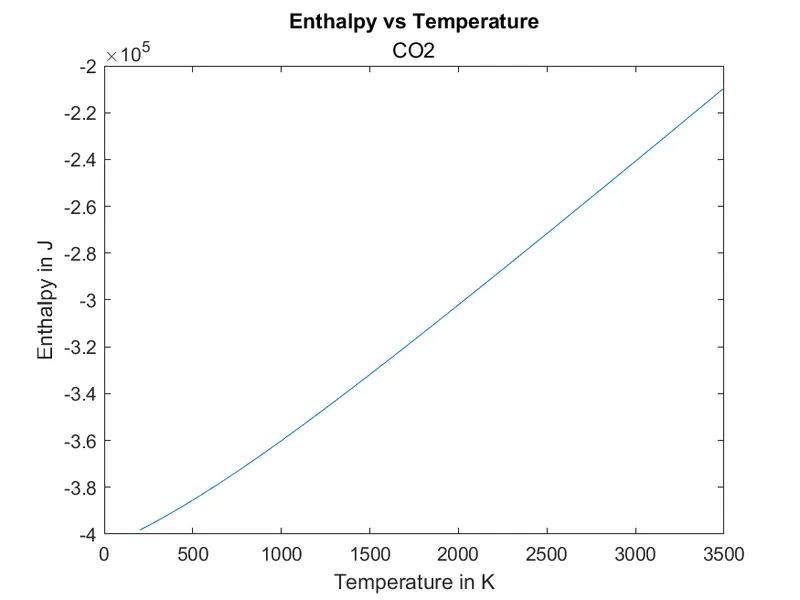
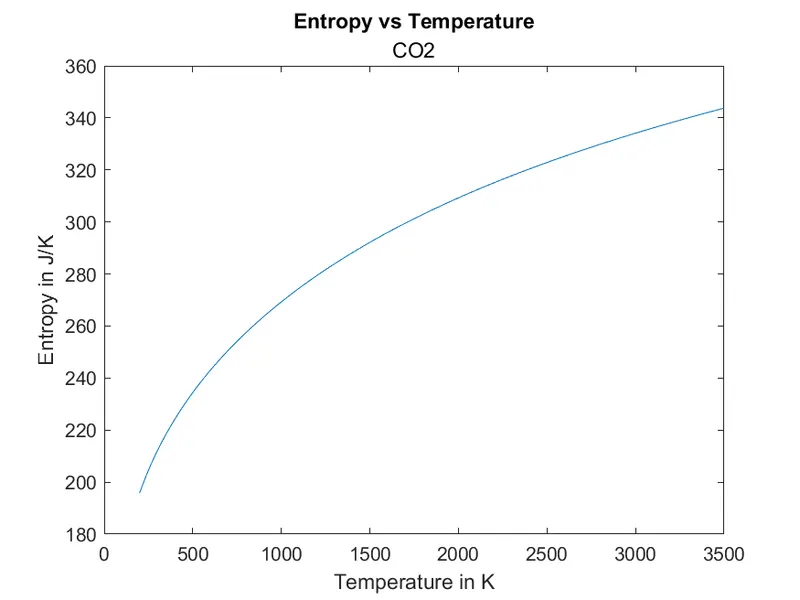
Plots of CO2: