Project 1 - Parsing NASA thermodynamic data
AIM:
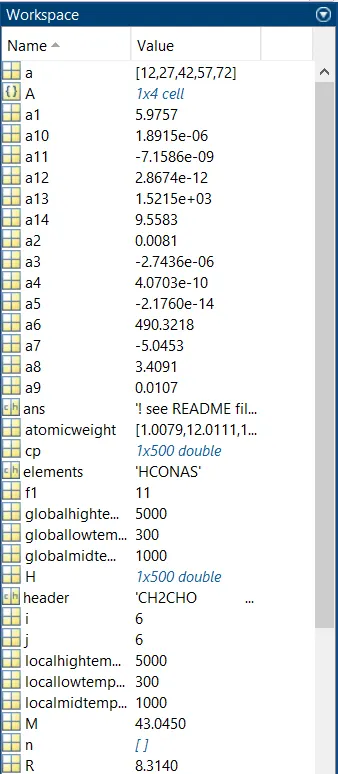
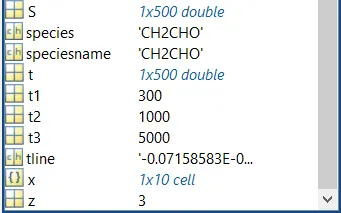
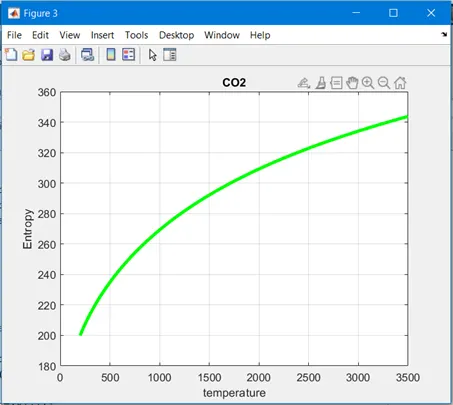
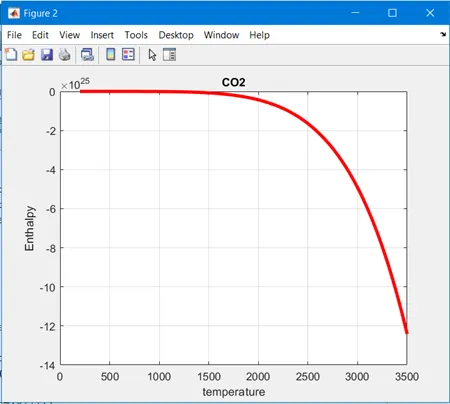
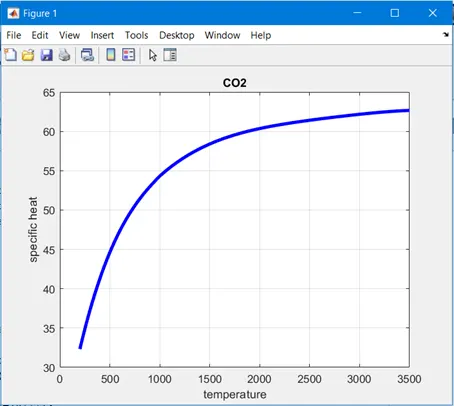
To parse a thermodynamic data file of NASA, and to extract the coefficients and other parameters of each species and to calculate the specific heat (cp), Entropy (S) and Enthalpy (H) . Then using the local temperature plot the values of cp , H and S. Save the plot as images in separate folders and display the molecular weight of each species in matlab .
THEORY
FILE WRITING
It is the process of writing data to a particular file
f1=open (‘filename.txt’,’w’)
Where w = writing mode and f1 refers to the file where we can write the data and it is stored
In the above command, f1 gives us some value, but it should not be negative.
Fclose(f1) is used to close the file
- File print f command is used to write inside a file
- For adding float value point numbers syntax used is
fprintf(f1,’%f’,1.5) or fprintf(f1,’%f %f’,1.5,2.0)
- Adding a new line
fprintf(f1,’\n’)
- Adding a header to the file is given by
fprintf(f1,%16s %16s,time,pressure)
Where ‘16’ -16 character spaces before time and % s is string format specifier .
- For adding places of digit and decimal no. places the syntax used is:
fprintf(f1,%16f %16f\n’, var1, var2)
FILE READING
File reading is the process of reading data from a particular file.
Syntax f1=fopen(‘filename.txt’, ‘r’) where r is reading mode and f1 is pointer to a file with help of which we can read data to the file. f1 should not be negative.
Fclose(f1) is used to close the file
- Fgetl() command is used to get the content of each and every line
- In some cases we need to split the line to extract data so we use the strsplit()command .
For eg: = ‘300 1000 5000’
A= strsplit(line, ‘ ’)
where ‘ ’ is delimiter and A {} will contain string in cell array {300},{1000},{5000}
- To convert string to number we use str2num()command ( for cell array use {})
Eg: a = str2num(A{1});
FILE PARSING
Parsing a file means breaking down the data into component parts so that the syntax can be analysed, categorized and understood. File parsing is splitting a file or input data which can be easily stored and manipulated. So in file parsing, we split a string into parts then recognize the parts and convert it into something simpler than a string.
In the given NASA file for each species like molecules O2 (oxygen), N2 (nitrogen), CO2 (carbon – dioxide) etc. each have fourteen coefficients. The first 7 coefficients are high temperature coefficient and the second 7 coefficient are low temperature coefficients. So we will determine these thermodynamic properties at low temperature as well as high temperature coefficients .File parsing is used to read the data given in ‘NASA’S thermodynamic data file’ to extract the coefficients and perform calculation of specific heat (Cp), enthalpy (H) and entropy(s) in matlab . A code is also generated for making directory
MATHEMATICAL EQUATION
The Formula used for calculation of specific heat (Cp) , enthalpy (H) and entropy(s) are as follows :
Cp/R = a1 +a2 T + a3 T^2 + a4 T^3 + a5 T^4
H/RT = a1 +a2 T /2 + a3 T^2 /3 +a4 T^3 /4 + a5 T^4 /5 + a6/T
S/R = a1 lnT + a2 T + a3 T^2 /2 + a4 T^3 /3 + a5 T^4 + a7
Here,
a1, a2, a3, a4, a5, a6, a7, are the coefficients
T is the temperature in kelvin
R is the universal gas constant
Cp is specified for specific heat
H is specified for enthalpy
S is specified for entropy
- SPECIFIC HEAT CAPACITY
Specific heat capacity is the heat capcity of the sample divided by the mass of the sample.
It is the amount of energy supplied to one unit of mass of a system in the form of heat in order to increase its temperature by one unit. The SI unit of specific heat is joule per kilogram kelvin .
Cp/R = a1 +a2 T + a3 T^2 + a4 T^3 + a5 T^4
- ENTHALPY
Enthalpy is defined as sum of internal energy of the system plus the product of pressure and volume .Si unit of enthalpy is joule per kilogram .
H/RT = a1 +a2 T /2 + a3 T^2 /3 +a4 T^3 /4 + a5 T^4 /5 + a6/T
- ENTROPY
Entropy is the measure of a system’s thermal energy per unit of temperature that is unavailable for doing useful work . Si unit of entropy joules per kelvin .
S/R = a1 lnT + a2 T + a3 T^2 /2 + a4 T^3 /3 + a5 T^4 + a7
CODE FOR PARSING DATA FROM NASA THERMO.dat FILE:
clear all
close all
clc

%getting the data file
f1=fopen('thermo.dat','r');
fgetl(f1)

%reading the header information
A=fgetl(f1);
A=strsplit(A,' ');
globallowtemperature=str2num(A{2});
globalmidtemperature=str2num(A{3});
globalhightemperature=str2num(A{4});

%skipping next three lines
for i=1:3
    fgetl(f1);
end
for i=1:53;
% reading the species

    header=fgetl(f1);
    x=strsplit(header,' ');

    speciesname=(x{1});
    z=length(x);

    locallowtemperature=str2num(x{z-3});
    localhightemperature=str2num(x{z-2});
    localmidtemperature=str2num(x{z-1});

    t1=locallowtemperature;
    t2=localmidtemperature;
    t3=localhightemperature;


%reading 1st line of temperature values
tline=fgetl(f1);
a= findstr(tline,'E');

%converting the string of values to number
a1=tline(1:a(1)+3);
a1=str2num(a1);
a2= tline(a(1)+4:a(2)+3);
a2=str2num(a2);
a3= tline(a(2)+4:a(3)+3);
a3=str2num(a3);
a4= tline(a(3)+4:a(4)+3);
a4=str2num(a4);
a5= tline(a(4)+4:a(5)+3);
a5=str2num(a5);

%reading 2nd line of temperature values
tline=fgetl(f1);
a= findstr(tline,'E');

%converting the string of values to number
a6=tline(1:a(1)+3);
a6=str2num(a6);
a7= tline(a(1)+4:a(2)+3);
a7=str2num(a7);
a8= tline(a(2)+4:a(3)+3);
a8=str2num(a8);
a9= tline(a(3)+4:a(4)+3);
a9=str2num(a9);
a10= tline(a(4)+4:a(5)+3);
a10=str2num(a10);

%reading 3rd line of temperature values
tline=fgetl(f1);


%converting the string of values to number
a11=tline(1:a(1)+3);
a11=str2num(a11);
a12= tline(a(1)+4:a(2)+3);
a12=str2num(a12);
a13= tline(a(2)+4:a(3)+3);
a13=str2num(a13);
a14= tline(a(3)+4:a(4)+3);
a14=str2num(a14);

% making directory
mkdir(['C:\speciesname\',speciesname]);

R=8.314; %universal gas constant
t= linspace(locallowtemperature,localhightemperature,500);
for i=1:length(t)
    if t(i)>localmidtemperature
        cp(i)=R*(a1+a2*t(i)+a3*t(i)^2+a4*t(i)^3+a5*t(i)^4);
        H(i)=R*t(i)*(a1+a2*(t(i)/2)+a3*(t(i)^2/3)+a4*(t(i)^3/4)+a5*(t(i)^4/5)+a6*(t(i)^5/6));
        S(i)=R*(a1*log(t(i))+a2*t(i)+(a3/2)*t(i)^2+(a4/3)*t(i)^3+(a5/4)*t(i)^4+a7);
    else
        cp(i)=R*(a8+a9*t(i)+a10*t(i)^2+a11*t(i)^3+a12*t(i)^4);
        H(i)=R*t(i)*(a8+a9*(t(i)/2)+a10*(t(i)^2/3)+a11*(t(i)^3/4)+a12*(t(i)^4/5)+a13*(t(i)^5/6));
        S(i)=R*(a8*log(t(i))+a9*t(i)+(a10/2)*t(i)^2+(a11/3)*t(i)^3+(a12/4)*t(i)^4+a14);
    end

end

figure (1)
plot(t,cp,'linewidth',3,'color','b');
grid on
xlabel('temperature');
ylabel('specific heat');
title(speciesname);

figure(2)
plot(t,H,'linewidth',3,'color','r');
grid on
xlabel('temperature');
ylabel('Enthalpy');
title(speciesname);

figure(3)
plot(t,S,'linewidth',3,'color','g');
grid on
xlabel('temperature');
ylabel('Entropy');
title(speciesname);

%changing the directory and saving the file
cd(['C:\speciesname\',speciesname]);
saveas(1,'Specific Heat.jpg');
saveas(2,'Enthalpy.jpg');
saveas(3,'Entropy.jpg');

% molecular weight calculation

elements=['H','C','O','N','A','S'];
atomicweight=[1.00794 12.01107 15.999 14.0067 39.948 32.065];
M=0;
z=0;
species=(speciesname);

for i=1:length(species);
    for j=1:length(atomicweight);
    if strcmp(species(i),elements(j));
        M=M+atomicweight(j);
        z=j;
    end
    end

n=str2num(species(i));
if n>1;
    M=M+atomicweight(z)*(n-1);
end

end
fprintf('Molecular Weight of %s:%f\n',species,M)
end
EXPLANATION OF THE CODE
- The program starts with clear all , close all and clc
‘clear all’ command is used to clear the data stored in workspace
close all command is used to close all plots and figures
clc command is used to clear the command window
- The given THERMO.dat file is opened using the fopen command, reading permission is provided and the information is extracted from the file using the fgetl command.
- fgetl command is used to read the data in the file, the global temperature and the first line is read
- Strsplit command is used to split the string at a specified delimiter which is spacing between the numbers.
- Str2num command is used to convert the string of values of temperature into actual numbers and the global temperature values are read.
- For loop is used and the fgetl command is used to skip the next 3 lines in the file.
- For reading the data for all the 53 species given in the data file and to calculate the thermodynamic properties of each species a ‘for loop’ is used.
- First line of the for loop is read using fgetl command and the string is converted into array using strsplit command
- The species are stored in a folder named species name and the local temperature are extracted using str2num command.
- Fgetl command is used to find the common term in the string where E is given as input
- The common term (E) is found in order to separate the values in the string and str2num is used to extract the values
- In this way all the 14 coefficients are extracted from the given data file
- The local temperature range for calculation is defined for 500 values between lower value and higher value using linspace command .
- Universal gas constant is defined
- To calculate the specific heat, enthalpy, and entropy and molecular weight separate functions are written.
- In all three functions for specific heat enthalpy and entropy if else loop is used in which the first 7 coefficients are high temperature and the second 7 coefficients are low temperature coefficients.
- For calculating the specific heat, enthalpy and entropy if else loop is used in such a way that if the value of temperature is more local mid temperature of the respective species, then the function will take high temperature coefficients and if the value of temperature is less than the local mid temperature the function will take low temperature coefficients to perform calculations.
- To calculate for the molecular weight, the atoms along with their atomic weight is defined and the value of m is taken as zero.
- Then two for loops are used one is for data stored in species name and another for the atoms that are defined . If loop command is used , where the species name and the atoms are compared using the strcmp command and if the comparison is true , then the atomic weight of that particular atom is added to the variable ‘m’ at every place where the atom is present in the species .
- Another If loop is used to multiply the value to the atomic weight.
- The mkdir command makes a new folder for each species and cd will again change the folder to that particular species name to save the output.
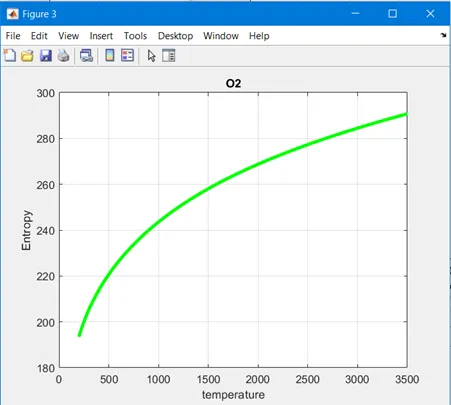
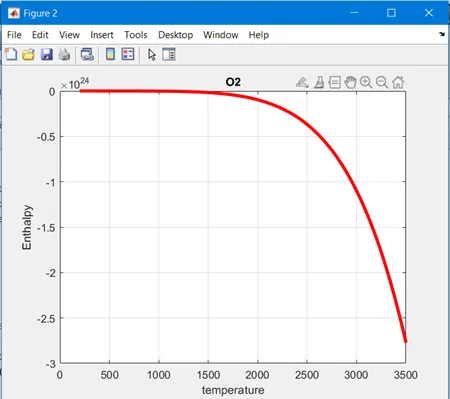
- The graphs of specific heat, enthalpy and entropy against temperature are plotted for each species using the cd command .
- save as command is used to save three graphs for all the species as an image file with jpg extension.
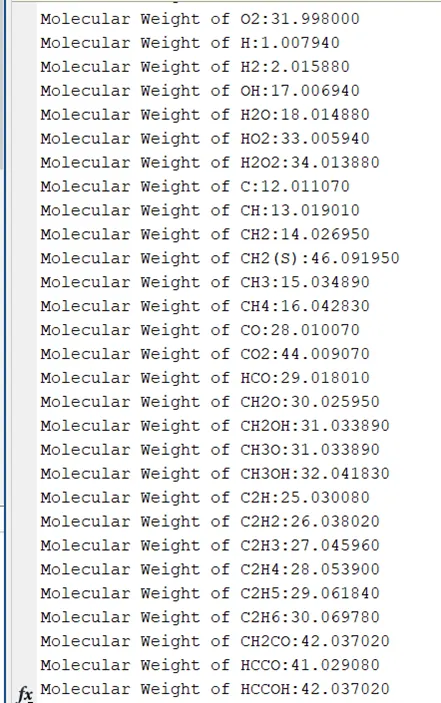
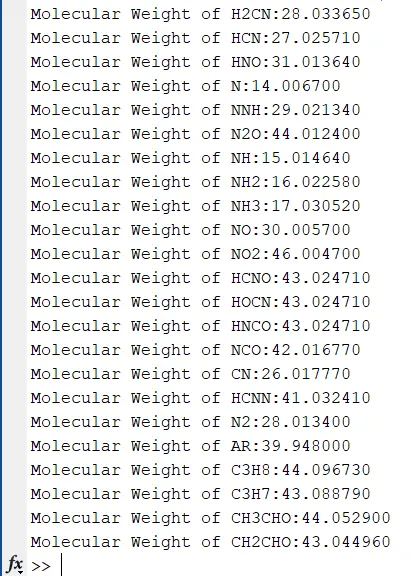
- For the molecular weight to be displayed in the command window , fprintf command is used which will display( 'Molecular Weight of %s:%f\n',species,M ) .The code for the molecular weight is written to a text file using the fprintf command , the fopen and fclose command is used to open and close the file .
MOLECULAR WEIGHT OF SPECIES DISPLAYED IN THE COMMAND WINDOW
SCREENSHOT CONTAINING THE PLOTS FOR ALL THE SPECIES

- ERRORS
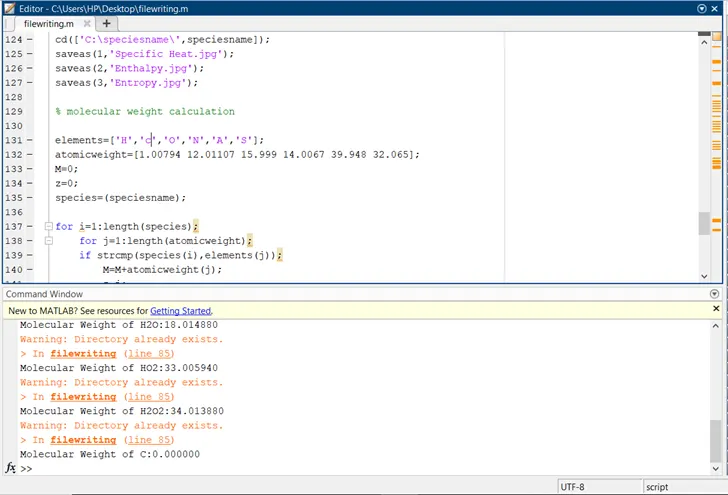
- I got this following error because I had written small c so I could not get the required molecular weight of carbon. So to rectify this error I put it as capital ‘C’, since the species in the data are case sensitive.
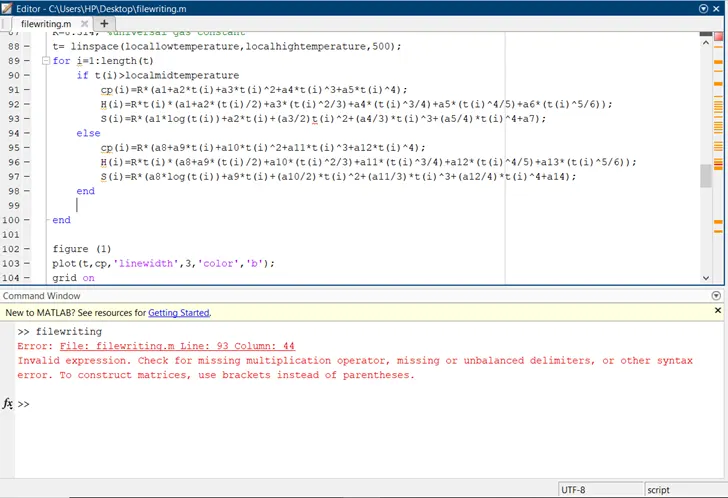
- B) I got this as the following error when the formula was wrong. To rectify this mistake I typed the correct formula to get the desired entropy of the species.
RESULTS:
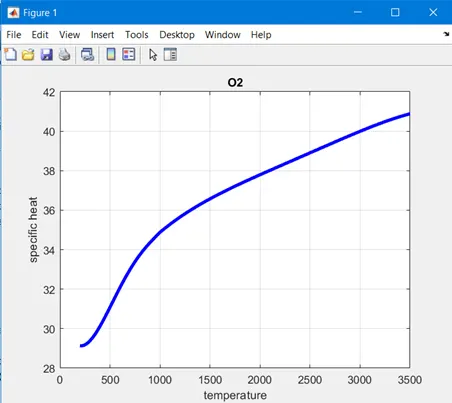
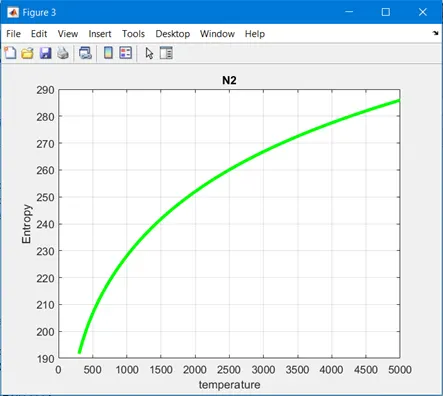
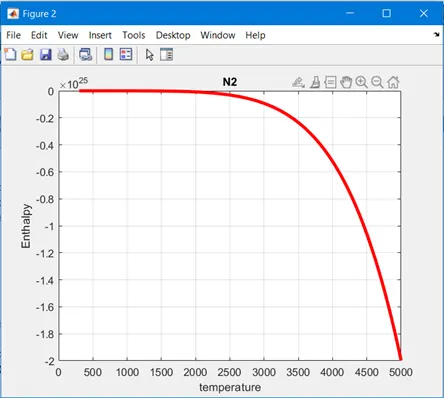
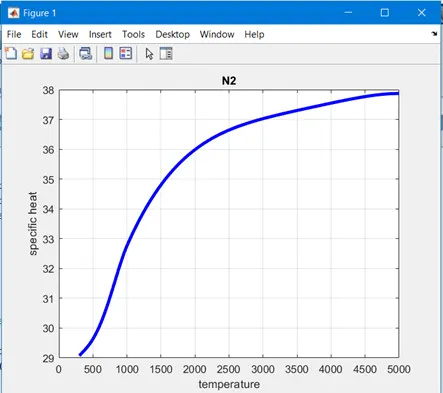
- PLOTS FOR 02,N2 AND CO2 SPECIES
- PLOTS FOR O2
- PLOTS FOR N2
- PLOTS FOR CO2
-
CONCLUSIONclear all close all clc %getting the data file f1=fopen('thermo.dat','r'); fgetl(f1) %reading the header information A=fgetl(f1); A=strsplit(A,' '); globallowtemperature=str2num(A{2}); globalmidtemperature=str2num(A{3}); globalhightemperature=str2num(A{4}); %skipping next three lines for i=1:3 fgetl(f1); end for i=1:53; % reading the species header=fgetl(f1); x=strsplit(header,' '); speciesname=(x{1}); z=length(x); locallowtemperature=str2num(x{z-3}); localhightemperature=str2num(x{z-2}); localmidtemperature=str2num(x{z-1}); t1=locallowtemperature; t2=localmidtemperature; t3=localhightemperature; %reading 1st line of temperature values tline=fgetl(f1); a= findstr(tline,'E'); %converting the string of values to number a1=tline(1:a(1)+3); a1=str2num(a1); a2= tline(a(1)+4:a(2)+3); a2=str2num(a2); a3= tline(a(2)+4:a(3)+3); a3=str2num(a3); a4= tline(a(3)+4:a(4)+3); a4=str2num(a4); a5= tline(a(4)+4:a(5)+3); a5=str2num(a5); %reading 2nd line of temperature values tline=fgetl(f1); a= findstr(tline,'E'); %converting the string of values to number a6=tline(1:a(1)+3); a6=str2num(a6); a7= tline(a(1)+4:a(2)+3); a7=str2num(a7); a8= tline(a(2)+4:a(3)+3); a8=str2num(a8); a9= tline(a(3)+4:a(4)+3); a9=str2num(a9); a10= tline(a(4)+4:a(5)+3); a10=str2num(a10); %reading 3rd line of temperature values tline=fgetl(f1); %converting the string of values to number a11=tline(1:a(1)+3); a11=str2num(a11); a12= tline(a(1)+4:a(2)+3); a12=str2num(a12); a13= tline(a(2)+4:a(3)+3); a13=str2num(a13); a14= tline(a(3)+4:a(4)+3); a14=str2num(a14); % making directory mkdir(['C:\speciesname\',speciesname]); R=8.314; %universal gas constant t= linspace(locallowtemperature,localhightemperature,500); for i=1:length(t) if t(i)>localmidtemperature cp(i)=R*(a1+a2*t(i)+a3*t(i)^2+a4*t(i)^3+a5*t(i)^4); H(i)=R*t(i)*(a1+a2*(t(i)/2)+a3*(t(i)^2/3)+a4*(t(i)^3/4)+a5*(t(i)^4/5)+a6*(t(i)^5/6)); S(i)=R*(a1*log(t(i))+a2*t(i)+(a3/2)*t(i)^2+(a4/3)*t(i)^3+(a5/4)*t(i)^4+a7); else cp(i)=R*(a8+a9*t(i)+a10*t(i)^2+a11*t(i)^3+a12*t(i)^4); H(i)=R*t(i)*(a8+a9*(t(i)/2)+a10*(t(i)^2/3)+a11*(t(i)^3/4)+a12*(t(i)^4/5)+a13*(t(i)^5/6)); S(i)=R*(a8*log(t(i))+a9*t(i)+(a10/2)*t(i)^2+(a11/3)*t(i)^3+(a12/4)*t(i)^4+a14); end end figure (1) plot(t,cp,'linewidth',3,'color','b'); grid on xlabel('temperature'); ylabel('specific heat'); title(speciesname); figure(2) plot(t,H,'linewidth',3,'color','r'); grid on xlabel('temperature'); ylabel('Enthalpy'); title(speciesname); figure(3) plot(t,S,'linewidth',3,'color','g'); grid on xlabel('temperature'); ylabel('Entropy'); title(speciesname); %changing the directory and saving the file cd(['C:\speciesname\',speciesname]); saveas(1,'Specific Heat.jpg'); saveas(2,'Enthalpy.jpg'); saveas(3,'Entropy.jpg'); % molecular weight calculation elements=['H','C','O','N','A','S']; atomicweight=[1.00794 12.01107 15.999 14.0067 39.948 32.065]; M=0; z=0; species=(speciesname); for i=1:length(species); for j=1:length(atomicweight); if strcmp(species(i),elements(j)); M=M+atomicweight(j); z=j; end end n=str2num(species(i)); if n>1; M=M+atomicweight(z)*(n-1); end end fprintf('Molecular Weight of %s:%f\n',species,M) end
It can be said that with the help of file parsing we can extract data from the file in a read mode and can be further used for calculation of properties and values etc. The extracted data can be converted into plots or graphs, saving automatically at the correct locations, which will help us analyse information in a detailed and organised way.
REFERNCES
https://en.wikipedia.org/wiki/Specific_heat_capacity
https://en.wikipedia.org/wiki/Enthalpy
https://en.wikipedia.org/wiki/Entropy