Project 1 - Parsing NASA thermodynamic data
Aim: To parse Nasa Thermodynamics data file to calculate enthalpy entropy and specific heat molecular weight of each spaces using Matlab
Objective:
1. To write a function to read the data given in the file and extract the Coefficient for each for Species to calculate Enthalpy entropy and specific heat for all the Species In the data file.
2. To calculate the molecular weight of each species And display it the come on window of Matlab.
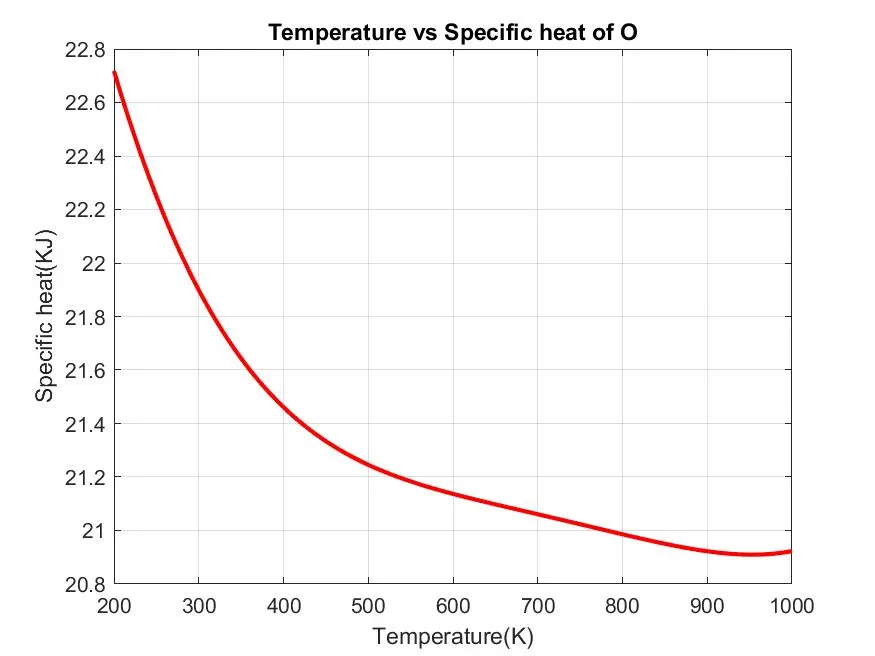
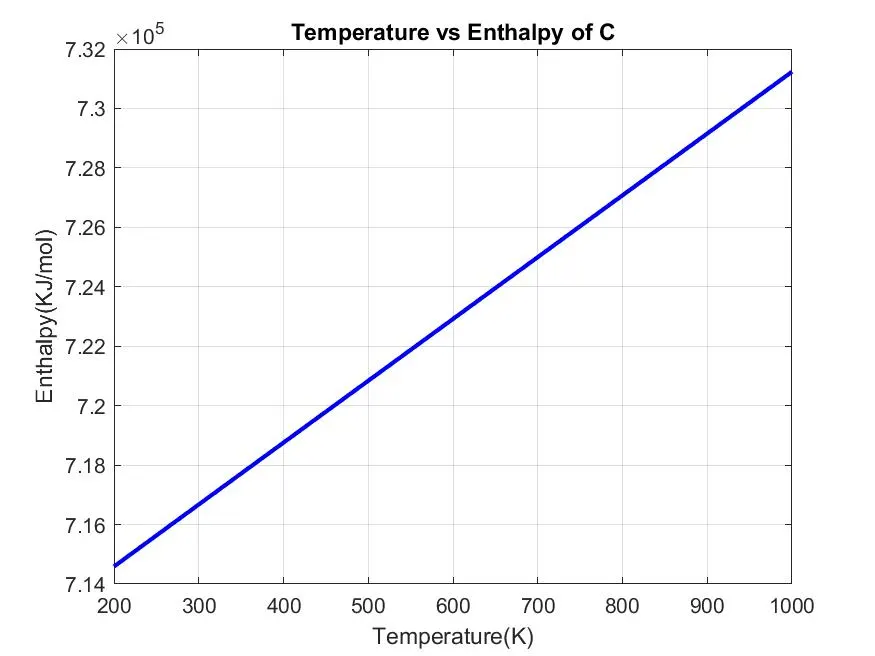
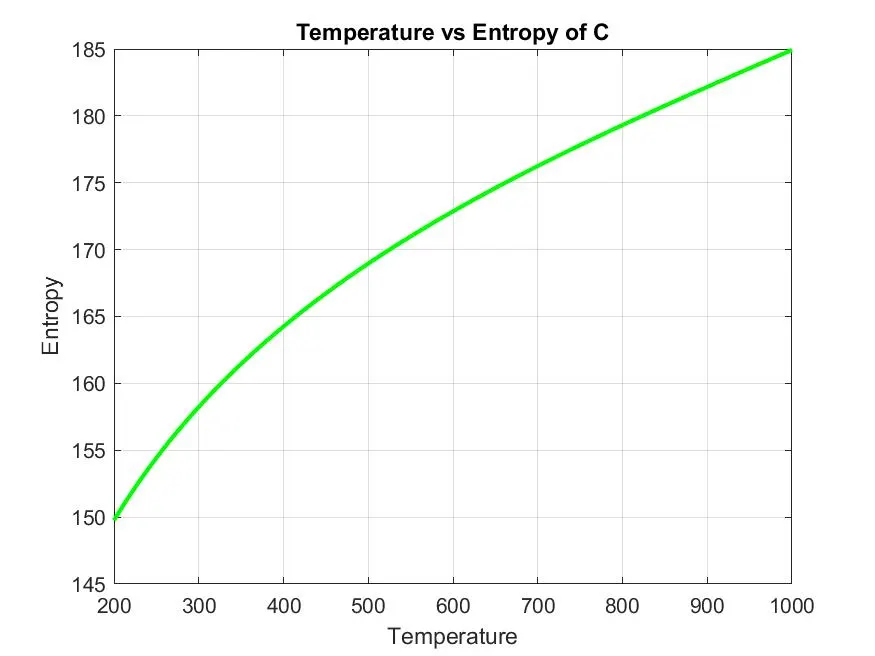
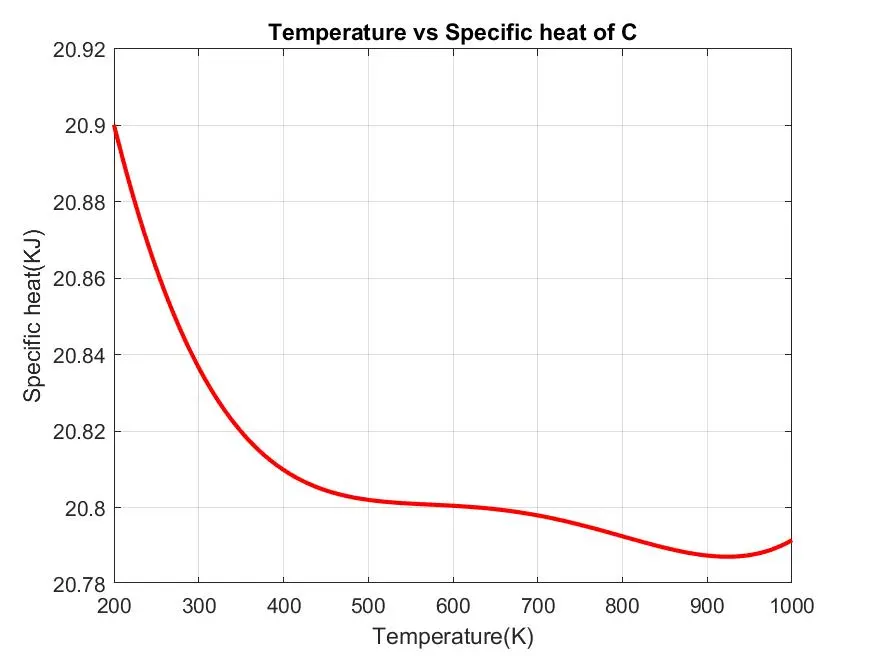
3. To plot the specific heat enthalpy and entropy for the local temperature range specific for each species.
4. To write the code to save the plots and images with appropriate names and dump them in separate folder for each species with suitable name.
File parsing:
Parsing, syntax analysis, or syntactic analysis is the process of analyzing a string of symbols, either in natural language, computer languages or data structures, conforming to the rules of a formal grammar. The term parsing comes from Latin pars (orationis), meaning part (of speech).The term has slightly different meanings in different branches of linguistics and computer science. Traditional sentence parsing is often performed as a method of understanding the exact meaning of a sentence or word, sometimes with the aid of devices such as sentence diagrams. It usually emphasizes the importance of grammatical divisions such as subject and predicate.Within computational linguistics the term is used to refer to the formal analysis by a computer of a sentence or other string of words into its constituents, resulting in a parse tree showing their syntactic relation to each other, which may also contain semantic and other information (p-values). Some parsing algorithms may generate a parse forest or list of parse trees for a syntactically ambiguous input.The term is also used in psycholinguistics when describing language comprehension. In this context, parsing refers to the way that human beings analyze a sentence or phrase (in spoken language or text) "in terms of grammatical constituents, identifying the parts of speech, syntactic relations, etc."[1] This term is especially common when discussing what linguistic cues help speakers to interpret garden-path sentences.Within computer science, the term is used in the analysis of computer languages, referring to the syntactic analysis of the input code into its component parts in order to facilitate the writing of compilers and interpreters. The term may also be used to describe a split or separation.
The formula to calculate specific heat(Cp), Enthalpy and Entropy
`(Cp)/R =a1 + a2(T) + a3(T^2)+a4(T^3)+a5(T^4)`
`(H)/(RT) =a1+ (a2T)/2 +(a3T^2)/3 + (a4T^3)/4 + (a5T^4)/5 + (a6)/T`
`(S)/(R) =a1.ln(T)+ a2T +(a3T^2)/2 + (a4T^3)/3 + (a5T^4)/4 + a6`
- Main code:
1. The code starts with 'Clear all' 'close all' and 'clc'. Where
a. 'Clear all' command is used to clear the data stored in the workspace
b. 'Close all' command is used to close all plots and figures
c. 'clc' command is used to clear the command window.
2. Then to open The "THEROMO.data" Data file "fopen" command is used and reading permission is provided
* fopen Open file, or obtain information about open files
3. Then to read the data in the file "fgetl"
* Read line from file, removing newline characters.
4. That "strsplit" Command is used To separate the string at a specified Delimeter Which in the case is the spacing between the number.
* Split string or character vector at specified delimiter.
5. The "str2num" Command is used convert the string of values of temperature into actual numbers and the global temperature values are read.
* Convert character array or string to numeric array
6. To skip comments in the file the "for loop" is used and the values of universal gas constant is defined.
7. To read the data for all the 53 species mentioned In the data file and to calculate the thermodynamics properties of each species "for loop" is used.
8. In the "for loop" the first line of each species Is read using "fgetl" Command the string is converted into array with"strsplit" command
9. The name of the species Is stored in the "species_name" variable And the local temperature values or extracted using "str2num" command.
10. To read the values of coefficient from the proceeding three lines "fgetl" command Is used along with "findstr" Command to find a common term in the string here 'E' Is given as input to find common in the string.
11. The common term is found in order to separate the values in the string str2num and is used to extract to those values.
12. In this way all the 14 coefficients are extracted and stored in a variable an where ‘n=1,2,3,4,..........,13,14’
13. The local temperature range for calculation is defined for 1000 Will use between lower values and higher values using linspace command
* Generate linearly spaced vector
14. To calculate specific heat, enthalpy, entropy and molecular weight separate functions is written.
MAIN CODE:
clear all
close all
clc

f1=fopen('THERMO.dat','r');
Ist_line = fgetl(f1)


%universal gas constant
    R=8.314;

%golobal temperature
Temp=fgetl(f1);

T=strsplit(Temp,' ');

golobal_low_temp=str2double(T{2});
golobal_mid_temp=str2double(T{3});
golobal_high_temp=str2double(T{4});

%neglecting the 3 line
for i=1:3
    fgetl(f1);
end

%reading species block

%line 1
for j=1:53
    tline=fgetl(f1);
    A=strsplit(tline,'  ');
    species_name=A{1};


    %READING GOLOBAL TEMPERATURE FOR EACH

     local_low_temp=str2double(A{end-3});
    local_mid_temp=str2double(A{end-2});
    local_high_temp=str2double(A{end-1});

   %reading the 1st line of temperaturevalues
    tline=fgetl(f1);
    a=findstr(tline,'E');


   %converting the string of values to number
   %1st line coefficient

    a1=tline(1:a(1)+3);
    a1=str2num(a1);
    %2nd coefficient
    a2=tline(a(1)+4:a(2)+3);
    a2=str2num(a2);
    %3rd coefficient
    a3=tline(a(2)+4:a(3)+3);
    a2=str2num(a3);
    %4th coefficient
    a4=tline(a(3)+4:a(4)+3);
    a4=str2num(a4);
    %5th coefficient
    a5=tline(a(4)+4:a(5)+3);
    a5=str2num(a5);

    %reading 2nd line of temperature values
    tline = fgetl(f1);
    a= findstr(tline,'E');

    %converting the string of values to number

    %6th coefficient
    a6=tline(1:a(1)+3);
    a6=str2num(a6);
    %7th coefficient
    a7=tline(a(1)+4:a(2)+3);
    a7=str2num(a7);
    %8th coefficient
    a8=tline(a(2)+4:a(3)+3);
    a8=str2num(a8);
    %9th coefficient
    a9=tline(a(3)+4:a(4)+3);
    a9=str2num(a9);
    %10th coefficient
    a10=tline(a(4)+4:a(5)+3);
    a10=str2num(a10);

    %reading 3nd line of temperature values
    tline = fgetl(f1);
    a= findstr(tline,'E');

   %converting the string of values to number

    %11th coefficient
    a11=tline(1:a(1)+3);
    a11=str2num(a11);
    %12th coefficient
    a12=tline(a(1)+4:a(2)+3);
    a12=str2num(a12);
    %7th coefficient
    a13=tline(a(2)+4:a(3)+3);
    a13=str2num(a13);
    %14th coefficient
    a14=tline(a(3)+4:a(4)+3);
    a14=str2num(a14);

    %defining temperaure range for calculation

    T=linspace(local_low_temp,local_high_temp,1000);

    %calculate specific heat by creating function
    Cp=specific_heat(a1,a2,a3,a4,a5,a8,a9,a10,a11,a12,R,T,local_mid_temp);

    %ENTHALPY by creating function
    H = Enthalpy(a1,a2,a3,a4,a5,a6,a8,a9,a10,a11,a12,a13,R,T,local_mid_temp);

    %ENTROPY CREATING FUNCTION
    S = Entropent(a1,a2,a3,a4,a5,a7,a8,a9,a10,a11,a12,a14,R,T,local_mid_temp);

    %Molecular weight
    M = molecular_weight(species_name);


    %creating a seperate directory to store graphs and values of each
    %spchies


    mkdir(species_name);
    cd(species_name);

    %writing molecular weight to text file
    M_file = fopen('Molecular Weight.txt','W');
    fprintf(M_file,'Molecular weight of %s is %d',species_name,M);
    fclose(M_file);


    %plotting for Temperature vs Specific heat

    figure(1)
    plot(T,Cp,'linewidth',2,'color','r');
    xlabel('Temperature(K)');
    ylabel('Specific heat(KJ)');
    title(sprintf('Temperature vs Specific heat of %s',species_name))
    grid on
    saveas(figure(1),'Specific heat.jpg');


    %plotting for Temperature vs Enthalpy
    figure(2)
    plot(T,H,'linewidth',2,'color','b')
    xlabel('Temperature(K)')
    ylabel('Enthalpy(KJ/mol)')
    title(sprintf('Temperature vs Enthalpy of %s',species_name))
    grid on
    saveas(figure(2),'Enthalpy.jpg');


    %plotting for Temperaturevs Entropy
    figure(3)
    plot(T,S,'linewidth',2,'color','g')
    xlabel('Temperature')
    ylabel('Entropy')
    title(sprintf('Temperature vs Entropy of %s',species_name))
    grid on
    saveas(figure(3),'Entropy.jpg');

    %changeing  driectory to orginal directory
    cd ..
end
Function to calculate the specific heat:
this function the high_temperature coefficient low temp coefficient universal gas constant and golobal temperature values as input parameter.
`Cp = R(a1 + a2T +a3T^2 + a4T^3 +a5T^4`
Then we use 'if else' conditional statement to check if the temp values are less then or equal to global mid temp with high and low temp coefficients is used to calculate the sepecfix heat values denoted by Cp and return that values
function Cp=specific_heat(a1,a2,a3,a4,a5,a8,a9,a10,a11,a12,R,T,local_mid_temp)
if T>=local_mid_temp
    Cp=R*(a1+(a2.*T)+(a3.*(T.^2))+(a4.*(T.^3))+(a5.*(T.^4)));
else
    Cp=R*(a8+(a9.*T)+(a10.*(T.^2))+(a11.*(T.^3))+(a12.*(T.^4)));
end
end
Function to calculate the enthalpy:
This function uses the high temp coefficient low temp coefficient universal gas constant in global minimum temp values as the input perameter
`(H) =(a1+ (a2T)/2 +(a3T^2)/3 + (a4T^3)/4 + (a5T^4)/5 + (a6)/T)*R*T`
Then using 'if else' conditions statement the temp value is compared with the global mid temp values and the enthalpy is calculated
function H= Enthalpy(a1,a2,a3,a4,a5,a6,a8,a9,a10,a11,a12,a13,R,T,local_mid_temp)
if (T>= local_mid_temp)
    H=(a1+((a2.*T)/2)+((a3.*(T.^2))/3)+((a4.*(T.^3))/4)+((a5.*(T.^4))/5)+(a6./t)).*T*R;
else
    H=(a8+((a9.*T)/2)+((a10.*(T.^2))/3)+((a11.*(T.^3))/4)+((a12.*(T.^4))/5)+(a13./T)).*T*R;
end
end
Function to calculate the Entropy:
`(S) =(a1.ln(T)+ a2T +(a3T^2)/2 + (a4T^3)/3 + (a5T^4)/4 + a6)*R`
function S = Entropent(a1,a2,a3,a4,a5,a7,a8,a9,a10,a11,a12,a14,R,T,local_mid_temp)
if T >= local_mid_temp
    S=R*((a1.*log(T))+(a2.*T)+((a3.*(T.^2))/2)+(a4.*(T^.3))/3)+(a5.*(T.^4))+a7;
else
    S=((a8.*log(T))+(a9.*T)+((a10.*(T.^2))/2)+((a11.*(T.^3))/3)+(a12.*(T.^4))+a14)*R;
end
end
Function to calculate the Entropy:
This function for molecular weight calculation requires elements names as inpit argument andit is saved in the variable 'elements' function
- A string array is created which contains the names of the atoms.
- A variable atomic_weight is created which contains the atomic weight of respective atoms in string array.
- Then used 'strcmp' command to compare the nameof the elements with the string array.
- if there is repetation pf tan elements 'str2double' is used to find that and (n-1)is multiplied to atomic_weight of the element to calculate
% function for molecular_weight
function M= molecular_weight(species_name)
 %definig  atoms and their respective atomic weight
Atoms=['O','H','C','N','A'];
Atomic_weight = [16,1,12,14,40]
M = 0;

 for i= 1:length(species_name)
    for j= 1:length(Atoms)
        if strcmp(species_name(i),Atoms(j))
            M= M + Atomic_weight(j);
            place = j;

        end
    end

   n=str2double(species_name(i));
    if (n>1)
    M = M + Atomic_weight(place)*(n-1);
    end
end
fprintf('Molecular weight of %s : ',species_name);
fprintf('%f',M);
disp(' ')
end
Command window shows molecular weight:
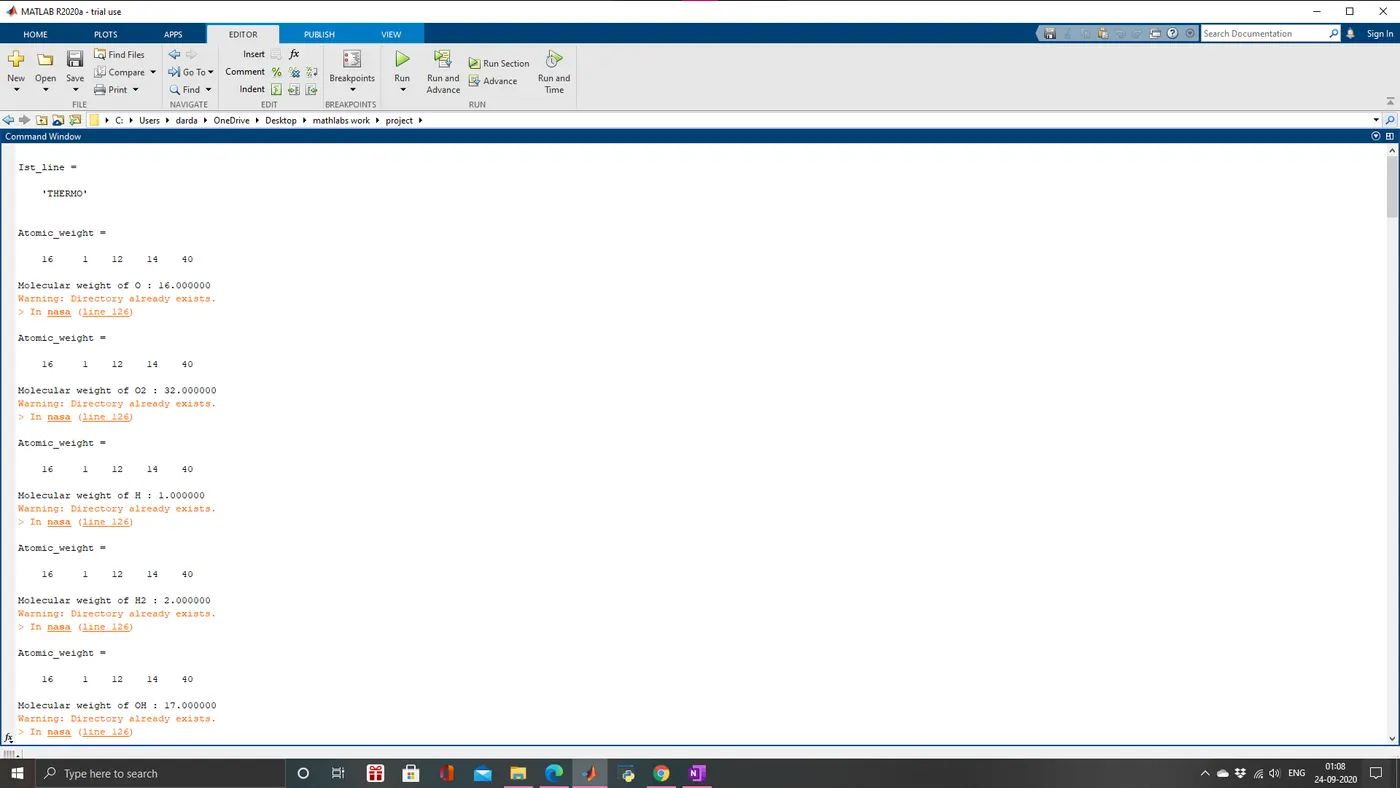
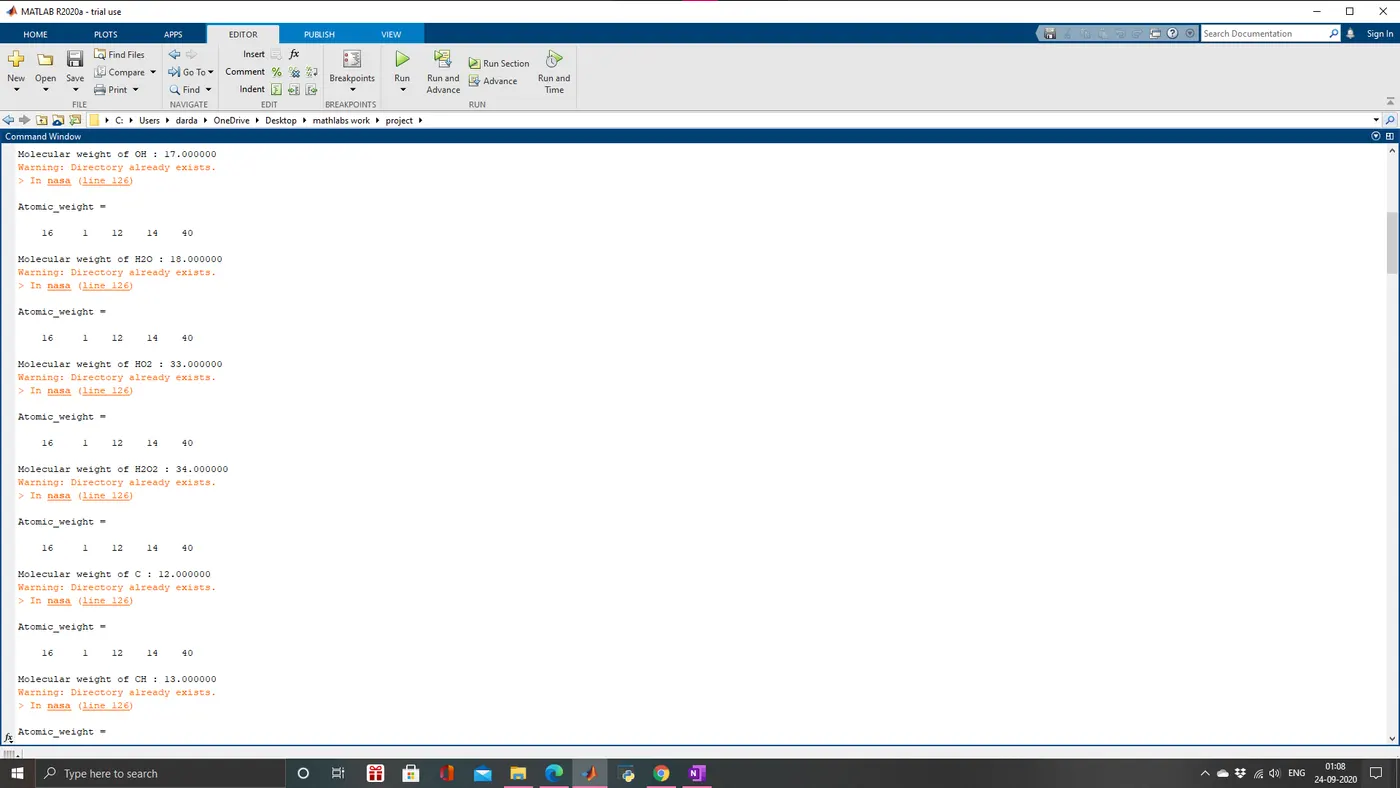
The molecular weight is given in this file
https://drive.google.com/file/d/1o_P8lCmBHnGRCu0PfSYvDaM8FQEGEmno/view?usp=sharing
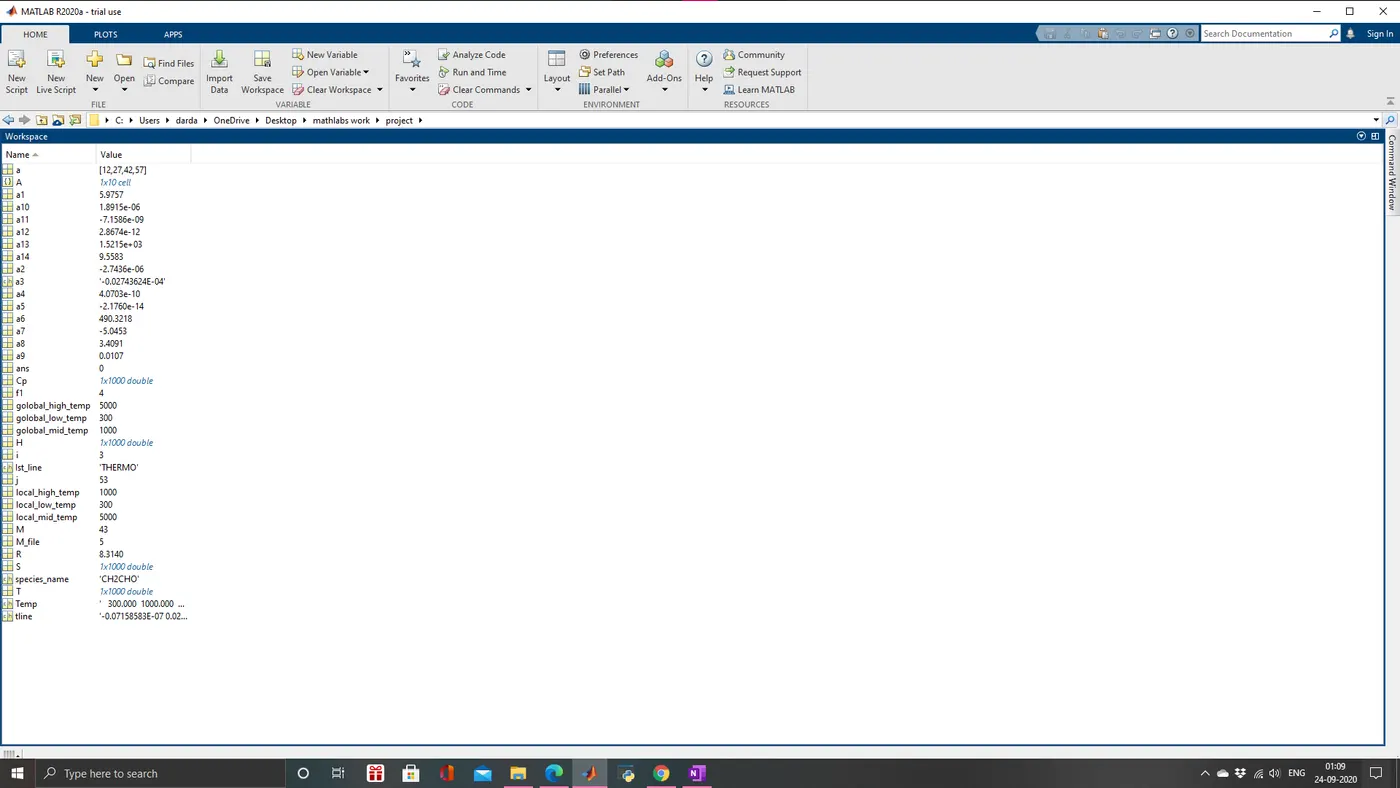
The workspace
Output of the O2:
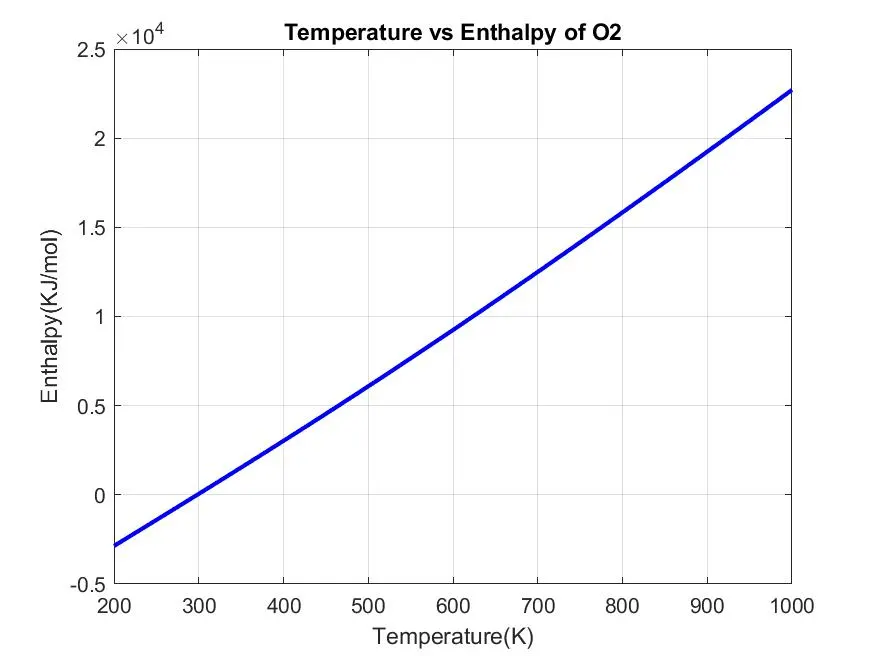
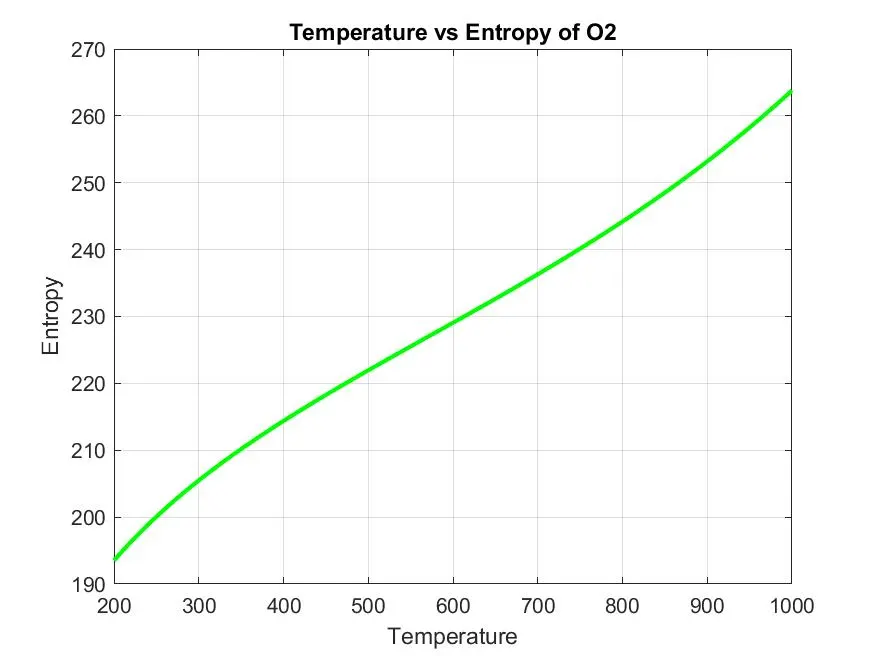
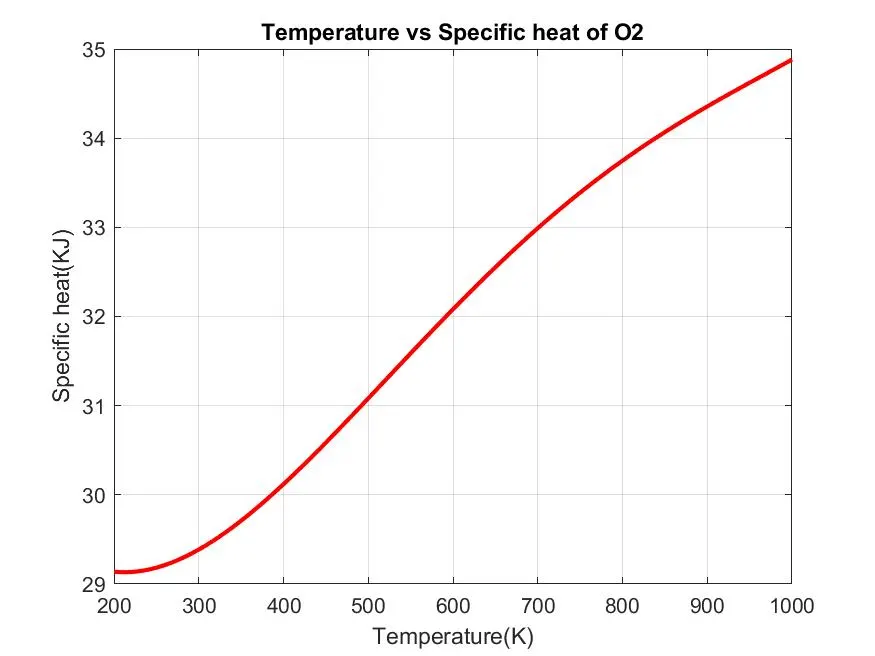
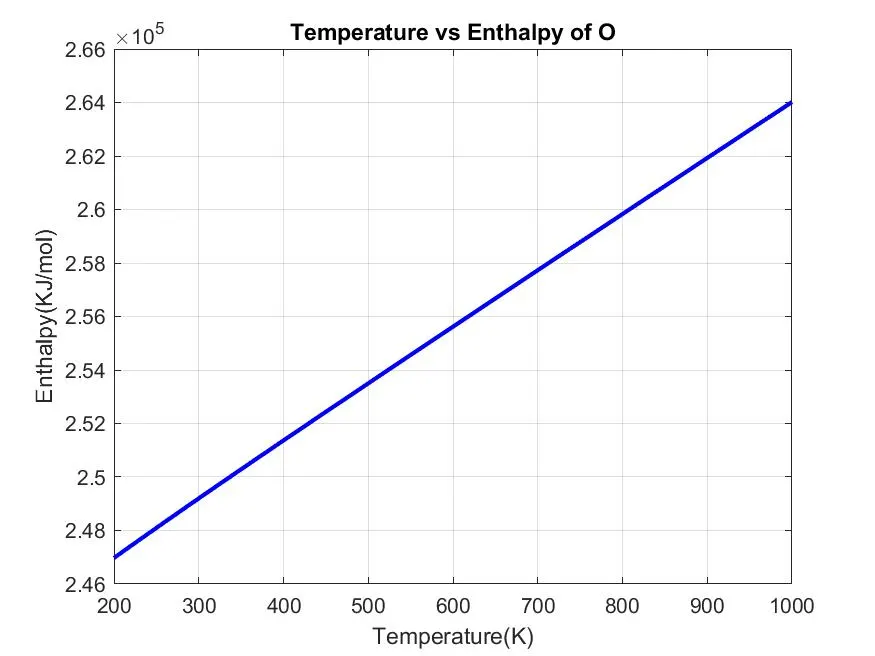
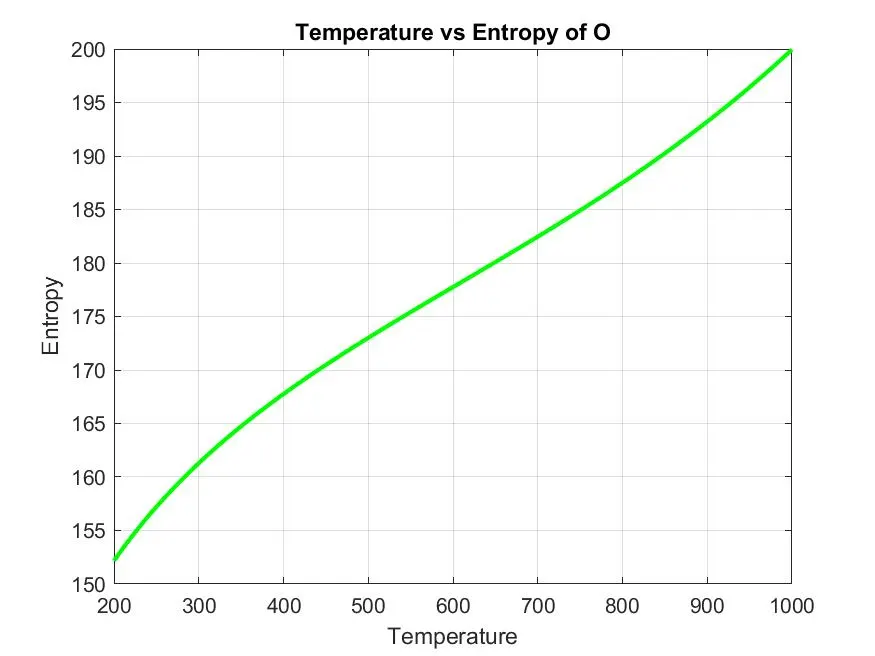
Output of the O:
Output of the C:
The folder of the program:
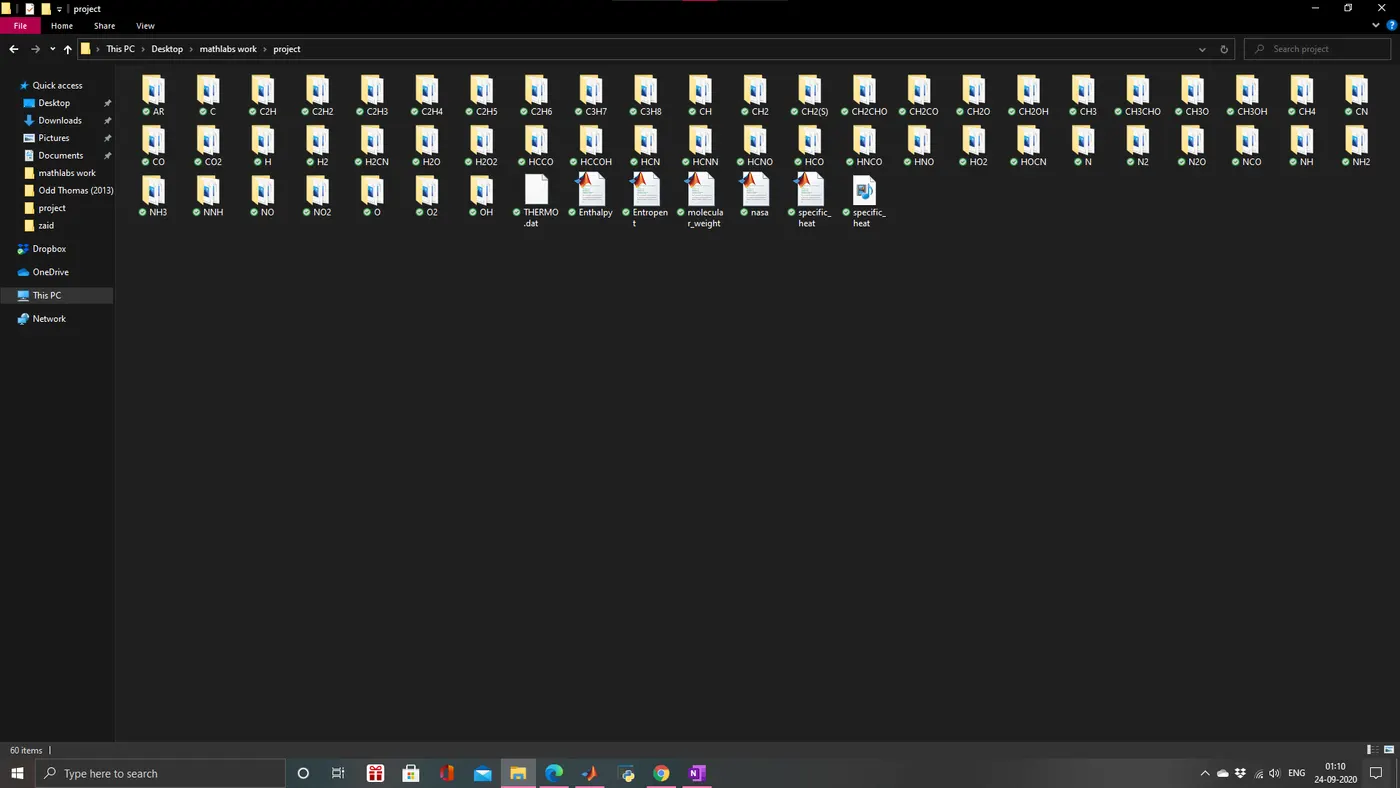
The all data is too large i have saved this into google drive i am giving link of all the data:
https://drive.google.com/drive/folders/1PQ1h9FsQTyMeIUXChjGCLASx-9aEtkKD?usp=sharing
REFERENCE:
- https://en.wikipedia.org/wiki/Parsing
- and the skill lync support team