Forward Kinematics Of a 2R Robotic Arm
AIM: To Simulate The Forward Kinematics Of A 2R-Robotic Arm Using MATLAB
ROBOTIC ARM:
A robotic arm is a type of mechanical arm, usually programmable, with similar functions to a human arm, the arm may be the sum total of the mechanism or may be part of a more complex robot. The links of such a manipulator are connected by joints allowing either rotational motion such as in an articulated robot or translational linear displacement.The links of the manipulator can be considered to form a kinematic chain. The terminus of the kinematic chain of the manipulator is called the end effector and it is analogous to the human hand.
Forward Kinematics:
* Kinematics is the relationships between the positions, velocities and accelerations of the links of a manipulator.
* The problem we are eventually trying to solve is we know where we want our robot
is what position are the motors in? This in Inverse Kinematics, and is important
because we can use the same technique to solve: we know what position we want to be
in, what position would the motors be in? Once we know that, we can compare where
the motors are now to where the motors should be, and make them so
* To understand that, we first need to understand the problem of: We know what position the motors are in, where is the arm? This is know as the forward kinematics problem.
– We will focus on the positions.
– The velocities and accelerations are based on the first and second derivatives of
the positions.
* Serial link manipulator is a series of links which connects the hand of the robot to the base.
– Each link is connected to the next by an actuated joint (i.e. one that the robot can move).
– The relationship between neighboring links can be described with (yet another)
homogeneous transformation matrix, denoted A.
– We use a series of A matrices to describe the transform from the base of the robot
to the hand of the manipulator- This is called the forward kinematic transform.
* In order to calculate the hand position, we must:
– Set up coordinate frames for each link in the hand,
– Generate A matrices for each transformation between the frames,
– Multiply the A matrices to generate the right hand side of the above equation,
– Solve the equation for the various pieces we need: the position of the hand frame,
as well as its orientation.
* In this project we consider 2R robotic arm 2R robotic arm with two rotation i.e it has two limks which rotates or work over 2-dimensional plane with each of links having a single degree of freedom also, both links are restricted to 90° rotation with respect to the axes.
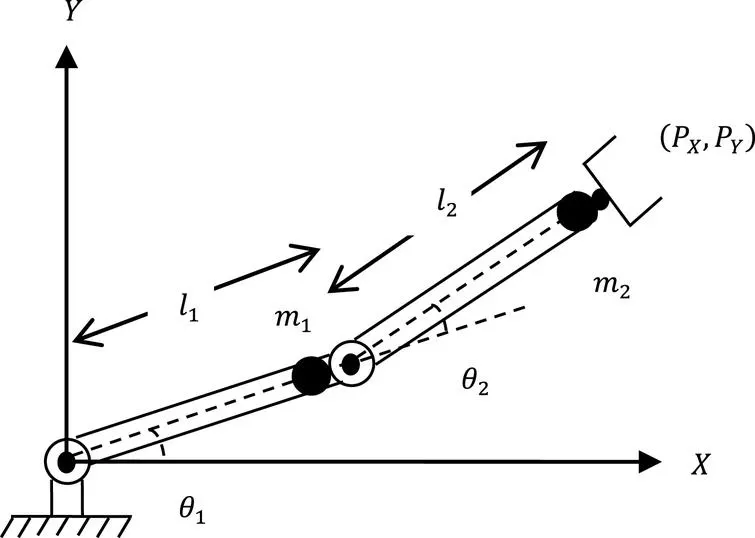
* In this program we consider the robotic arm as shown in the fig;
- The link begins from link-1 and link-2 , L1 & L2 begins the length of two links respesctively.
- Consider the link-1 to be fixed to the horizintal plane and making and angle θ1 with the horizontal.
- The link 2 is conected to link 1 and th e second joint making an angle θ2.
- Consider the start and end co-ordinate of link 1 to be (X0,Y0) & (X1,Y1) respectively.
- Similarly the start and end co-ordinate of link 2 to be (X1,Y1) & (X2,Y2) respectively.
where,
X0 = 0; Y0 =0;
X1 = L1.Cos(θ1); Y1 = L1.Sin(θ1);
X2 = X1 + L12.Cos(θ2); Y2 = Y1 + L2.Sin(θ2);
Explanation To The Code:
* Intially the required input variable such as length of links and co-ordinates are declared along with a counter variable 'ct'
* Once the variable is declared variables are being assigned to the variables.
* The angles are assigned values with help of the linspace command as we consider 10 position of the link between 0° and 90°.
* To run the same matlabs program desired number of times "Nested For Loop" is used.
* Now under the For Loop we define co-ordinates (X1,Y1) &(X2,Y2) using the equation:
X1 = L1.Cos(θ1); Y1 = L1.Sin(θ1);
X2 = X1 + L12.Cos(θ2); Y2 = Y1 + L2.Sin(θ2);
* The "plot" command is used to plot graph.
* The "pause" command is used to get the better animation speed.
* The "getframe" command is used to capture the motion of lines stored in variable 'M'.
To Make The Movie The syntax Are:
* movie(M) %Plays the movie in the M once.
* videofile = VideoWriter('videoname.avi',filetype) % Assigns file name and file formate.
* open(videofile) % Open the videofile.
* writevideo(videofile,M) %Writes the video with plot frame in the array M.
* close(videofile) % Close the videofile.
clear all
close all
clc

% inputs
l1 = 1;
l2 = 0.5;
theta1 = linspace(0,90,10);
theta2 = linspace(0,90,10);

ct=1;
for i = 1:length(theta1)
    THETA1 = theta1(i);
    for j = 1:length(theta2)
    THETA2 = theta2(j);
    x0 = 0;
    y0 = 0;

x1 = l1*cosd(THETA1);
y1 = l1*sind(THETA1);


x2 = x1 + l2*cosd(THETA2);
y2 = y1 + l2*sind(THETA2);

% plotting
plot([x0 x1],[y0 y1],[x1 x2],[y1 y2],'linewidth',3)
axis([-0.1 1.5 0 1.5])
pause(0.03)
M(ct) = getframe(gcf);
ct=ct+1;
    end
end
movie(M)
videofile = VideoWriter('forward_kienamatics.avi','Uncompressed AVI');
open(videofile)
writeVideo(videofile,M)
close(videofile)
error i got durring program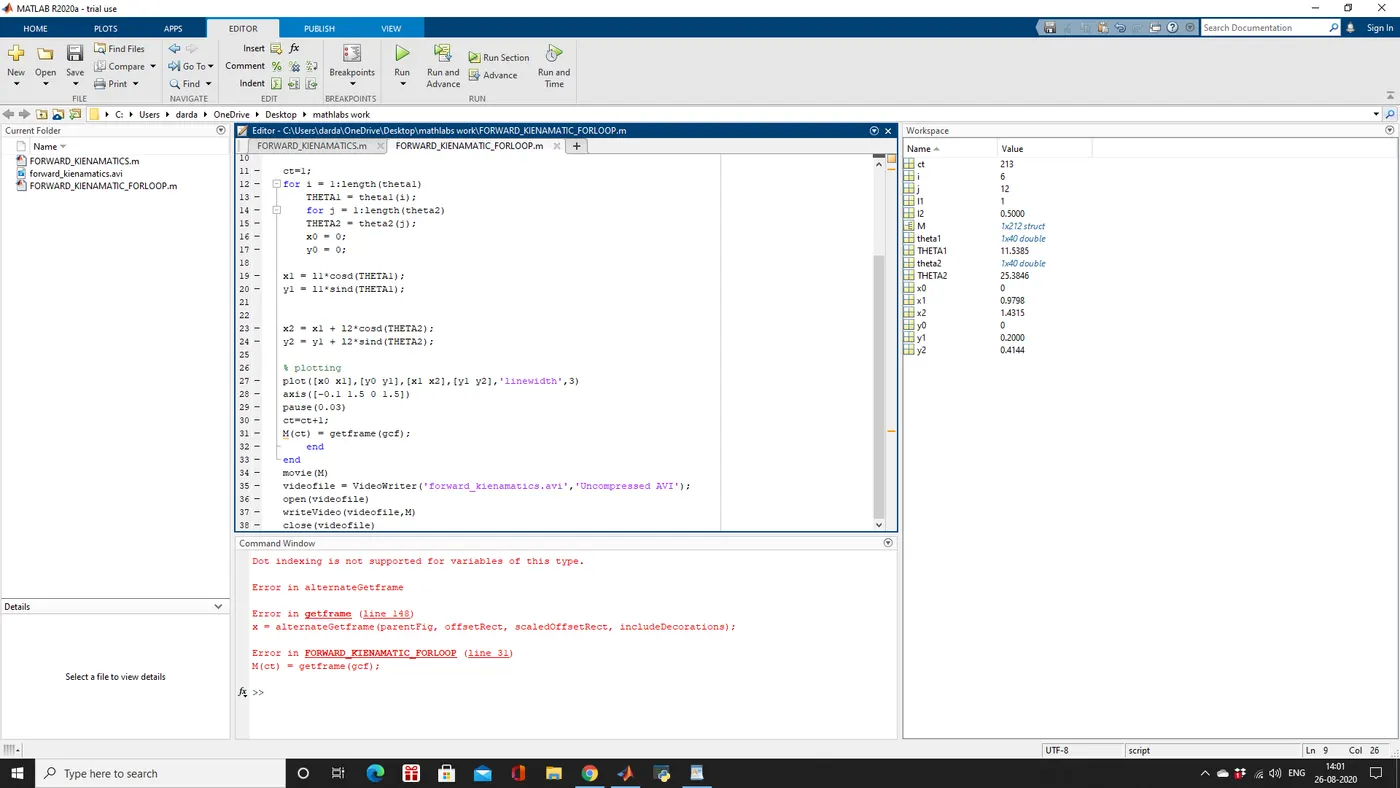
RESULT FULL ANIMATION VIDEO