Project 1 - Parsing NASA thermodynamic data
AIM: Write a code in matlab to parse the thermodynamics data file.
OBJECTIVE :
1.Write a function that extracts the 14 co-efficients and calculates the enthalpy, entropy and specific heats for all the species in the data file. You will be reading this file NASA thermodynamic data. The formulae are shown below.
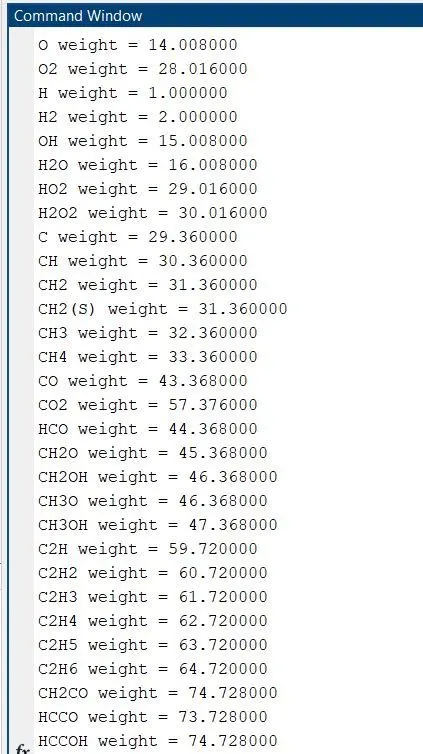
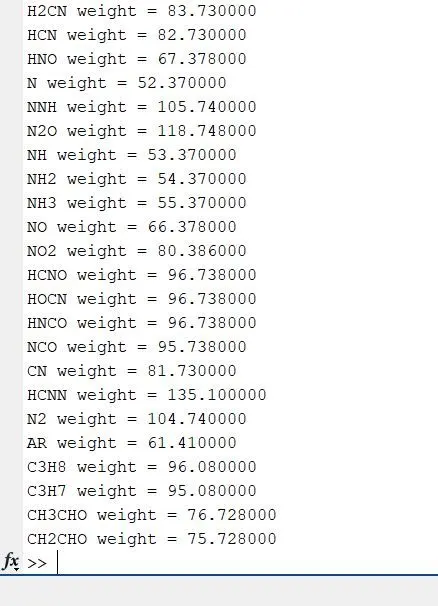
2. Calculate the molecular weight of each species and display it in the command window.
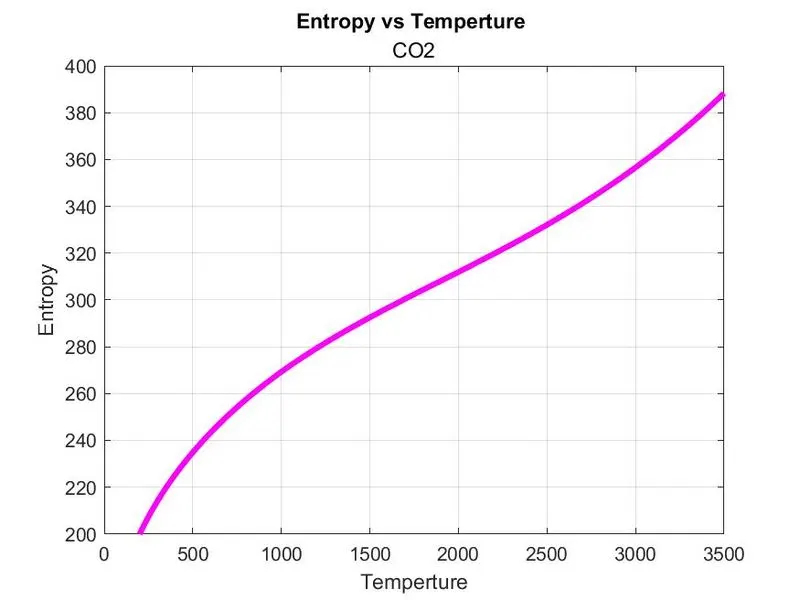
3. Plot the Cp, Enthalpy and Entropy for the local temperature range (low temperature : high temperature) specific for each species.
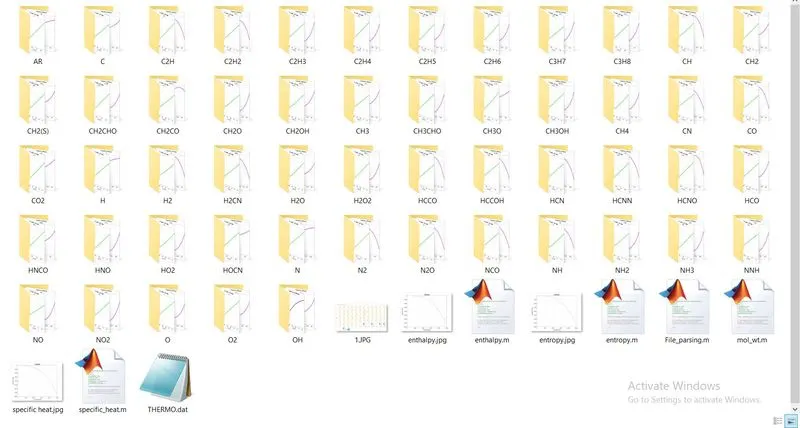
4. Save the plots as images with appropriate names and dump them in separate folders for each species with suitable name. All these should be generated automatically.
5. The main program that you will submit will just take the "THERMO.dat" file as an input and generate Cp, H and S plots.
6. Please write a detailed report to describe your logic.
FILE PARSING
Parsing is the process of converting formatted text into a data structure. A data structure type can be any suitable representation of the information engraved in the source text.
FORMULA USED:
Specific heat :
Specific heat capacity (Cp), often referred to as specific heat, is a fundamental thermophysical property of a substance. It indicates the substance's ability to store thermal energy and equals the amount of heat that must be added to one gram of the substance in order to raise its temperature by one Kelvin.
Enthalpy:
Enthalpy is the sum of the internal energy. and pressure times volume. We cannot measure the enthalpy of a system, but we can look at changes in enthalpy. H = E + P V. to make life easier we will make certain that Pressure is held constant..
Entropy:
entropy, the measure of a system's thermal energy per unit temperature that is unavailable for doing useful work. Because work is obtained from ordered molecular motion, the amount of entropy is also a measure of the molecular disorder, or randomness, of a system.
PROBLEM APPROACH:-
File Read
Extraction of load temperature
Extraction of coefficient values
Calculation of Cp,H,S
Plotting & saving figure
Calculation of molecular weight
MAIN FUNCTION:
clear all
close all
clc
% Opening the file
f1 = fopen('THERMO.dat','r');
% using for loop to read first 5 lines
for i = 1:5
%fgetl reads each 5 line from a file
a = fgetl(f1);
end
for i = 1:53
% Getting first header line which is a character with different data's
header_line = fgetl(f1);
% Splitting the string based on delimiter
% Our delimiter is space
a = strsplit(header_line,' ');
% We use curly brackets because it is character
% 1st cell represents the species_name
species_name = a{1};
% Local lower, medium, higher temperatures, we are converting string to number
llt = str2double(a{end-3});
lmt = str2double(a{end-1});
lht = str2double(a{end-2});
T = linspace(llt,lht,500);
% Getting species with exponential coeifficent
line1 = fgetl(f1);
% Finding the location of exponent(E) for line 1
e1 = strfind(line1,'E');
% We are converting string to number
a1 = str2double(line1(1:e1(1)+3));
a2 = str2double(line1(e1(1)+4:e1(2)+3));
a3 = str2double(line1(e1(2)+4:e1(3)+3));
a4 = str2double(line1(e1(3)+4:e1(4)+3));
a5 = str2double(line1(e1(4)+4:e1(5)+3));
% Getting species with exponential coeifficent
line2 = fgetl(f1);
% Finding the location of exponent(E) for line 2
e2 = strfind(line2,'E');
% We are converting string to number
a6 = str2double(line2(1:e2(1)+3));
a7 = str2double(line2(e2(1)+4:e2(2)+3));
a8 = str2double(line2(e2(2)+4:e2(3)+3));
a9 = str2double(line2(e2(3)+4:e2(4)+3));
a10 = str2double(line2(e2(4)+4:e2(5)+3));
% Getting species with exponential coeifficent
line3 = fgetl(f1);
% Finding the location of exponent(E) for line 3
e3 = strfind(line3,'E');
% We are converting string to number
a11 = str2double(line3(1:e3(1)+3));
a12 = str2double(line3(e3(1)+4:e3(2)+3));
a13 = str2double(line3(e3(2)+4:e3(3)+3));
a14 = str2double(line3(e3(3)+4:e3(4)+3));
% Defining Universal Gas Constant 'r'
r = 8.314;
% Calling functions in main body: specific_heat,enthalpy,entropy
[cp] = specific_heat(a1,a2,a3,a4,a5,a8,a9,a10,a11,a12,T,lmt,r);
[H] = enthalpy(a1,a2,a3,a4,a5,a6,a8,a9,a10,a11,a12,a13,T,lmt,r);
[S] = entropy(a1,a2,a3,a4,a5,a7,a8,a9,a10,a11,a12,a14,T,lmt,r);
% Creating new folder for species
mkdir(['C:\Users\Ashish\Desktop\SKILL-LYNC\project 1\',species_name])
% Entering current folder
cd(['C:\Users\Ashish\Desktop\SKILL-LYNC\project 1\',species_name])
% Plot 1
figure(1)
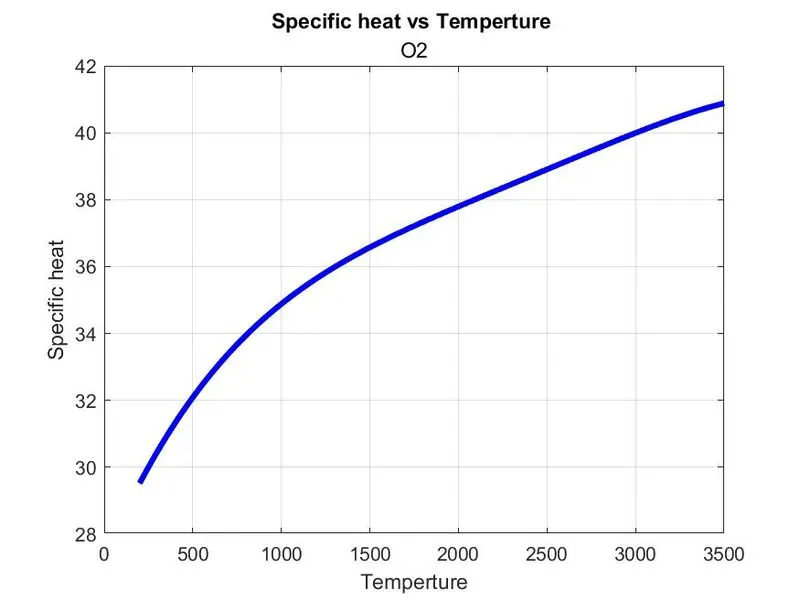
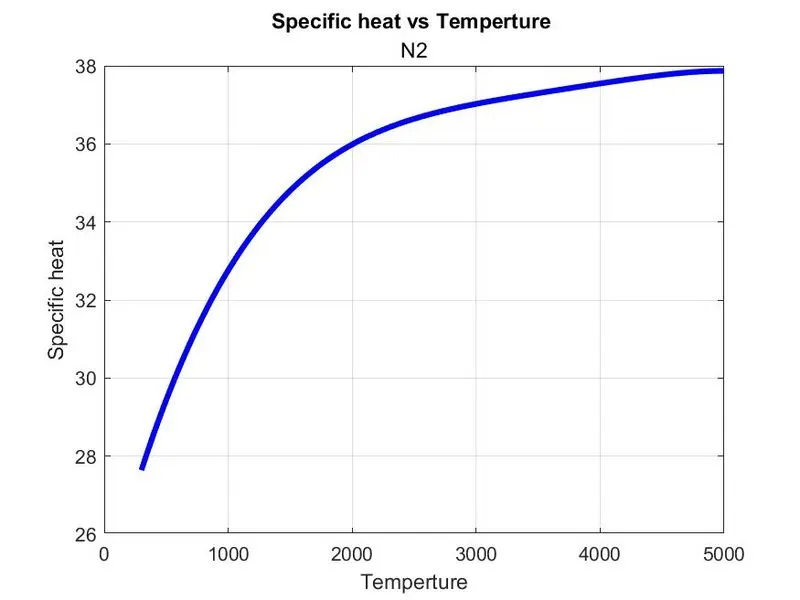
plot(T,cp,'LineWidth',3,'Color','b')
xlabel('Temperture')
ylabel('Specific heat')
title('Specific heat vs Temperture of',sprintf('%s',species_name))
grid on
% Saveas saves figure to a specific format
saveas(figure(1),'cp vs T.jpg')
% Plot 1
figure(2)
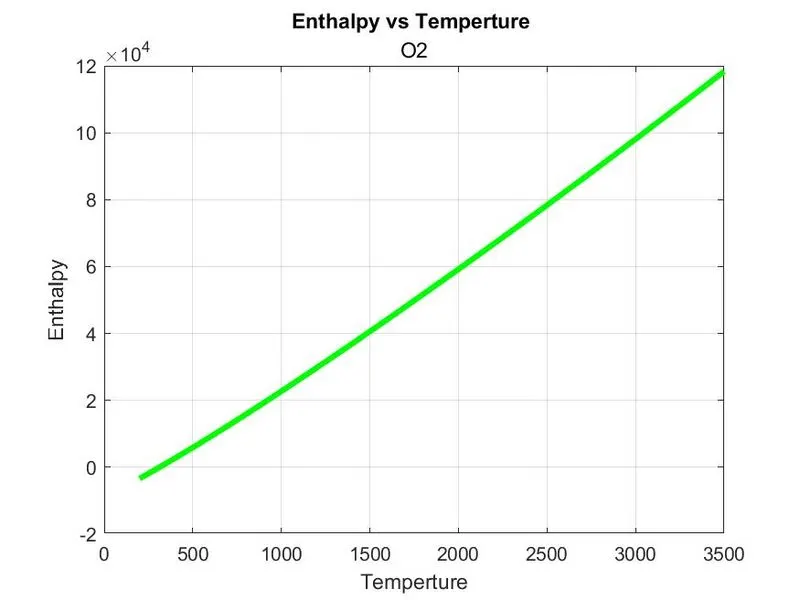
plot(T,H,'LineWidth',3,'Color','g')
xlabel('Temperture')
ylabel('Enthalpy')
title('Enthalpy vs Temperture of',sprintf('%s',species_name))
grid on
% Saveas saves figure to a specific format
saveas(figure(2),'H vs T.jpg')
% Plot 1
figure(3)
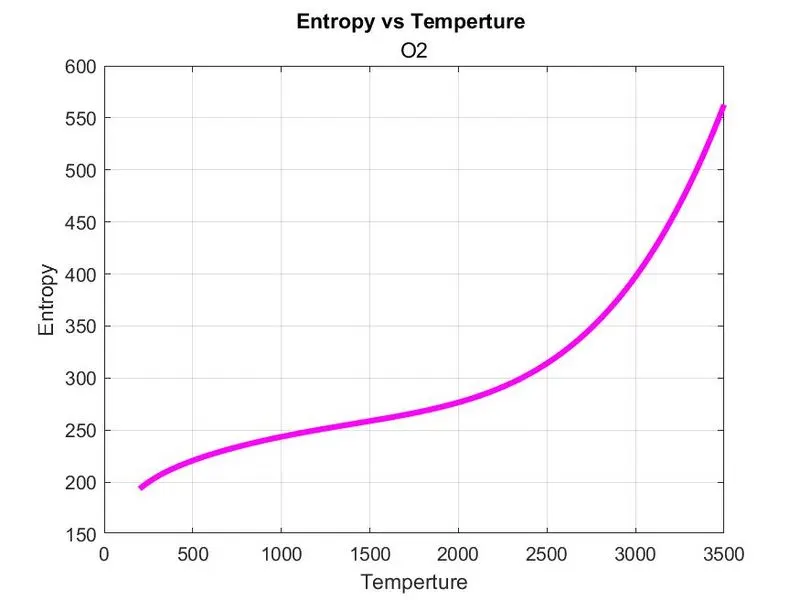
plot(T,S,'LineWidth',3,'Color','m')
xlabel('Temperture')
ylabel('Entropy')
title('Entropy vs Temperture of',sprintf('%s',species_name))
grid on
% Saveas saves figure to a specific format
saveas(figure(3),'S vs T.jpg')
%Returning back to initial directory
cd ..
[M] = mol_wt(species_name);
K = sprintf('%s weight = %f',species_name,M);
disp(K)
end
fclose(f1);
ENTHALPY FUNCTION:
% Code
function [H] = enthalpy(x1,x2,x3,x4,x5,x6,x8,x9,x10,x11,x12,x13,temp,lmt,const_R)
if temp<=lmt
H = (x8+(x9*(temp/2))+(x10*(temp.^2/3))+(x11*(temp.^3/4))+(x12*(temp.^4/5))+(x13./temp)).*temp*const_R;
else
H = (x1+(x2*(temp/2))+(x3*(temp.^2/3))+(x4*(temp.^3/4))+(x5*(temp.^4/5))+(x6./temp)).*temp*const_R;
end
end
ENTROPY FUNCTION:
% Code
function [S] = entropy(x1,x2,x3,x4,x5,x7,x8,x9,x10,x11,x12,x14,temp,lmt,const_R)
if temp>=lmt
S = (x1*log(temp)+x2*temp+x3*(temp.^2/2)+x4*(temp.^3/3)+x5*(temp.^4/4)+x7)*const_R;
else
S = (x8*log(temp)+x9*temp+(x10*(temp.^2)/2)+(x11*(temp.^3)/3)+(x12*(temp.^4)/4)+x14)*const_R;
end
end
SPECIFIC HEAT:
% Code
function [cp] = specific_heat(x1,x2,x3,x4,x5,x8,x9,x10,x11,x12,temp,lmt,const_R)
if temp<=lmt
cp = (x8+(x9*temp)+(x10*temp.^2)+(x11*temp.^3)+(x12*temp.^4))*const_R;
else
cp = (x1+(x2*temp)+(x3*temp.^2)+(x4*temp.^3)+(x5*temp.^4))*const_R;
end
end
MOLECULAR WEIGHT:
% Code
function Mole_wt = mol_wt(species_name)
weight = 0;
elements = ['H','C','N','O','Ar'];
mass = [1.0,29.36,52.37,14.008,15.78,45.63];
for i = 1:length(species_name)
for j = 1:length(elements)
if strcmpi(species_name(i),elements(j))
weight = weight+mass(j);
y = j;
end
end
number = str2double(species_name(i));
if(number>1)
weight = weight+(mass(y)*(number-1));
end
Mole_wt = weight;
end
EXPLANATION with LOGIC :-
Parsing a file means reading the data from the file and applying some transformation to it and easily stored and manipulated the data.
The THERMO.dat contain coefficient required to solve specific heat,enthalpy,entropy.
- Initially to read the data we fopen command and fgetl command to extracted the data.
- Extracting the global temperature ranges using str2num so that string character array is converted into number array.
- find 53 element we create for loop to solve.
- extracting of coefficient for this we use findstr command to find string character E-position from this we can access the local temperature easily from this we have to find coefficient of linel using fgetl command and also change the string character to numbers.
- for extracting low ,mid,high temperature we use str2double command for string to double precesion number.
- plot between specific heat and temperature using linspace we have to take lowtemp and hightemp in interval of 100.
- we have to take function of specific heat and plot between cp,temperature.
- after finding plot we have to find molecular weight we have to write function for the element. N,H,C,O,A using strcmp command we compare the others element to get the molecular weight.
- 'mkdir' command is used for creating folder for all the 53 element 'cd' is used for change in directory using 'save as' command to save the plots.
- then last calculate 'molecular weight.
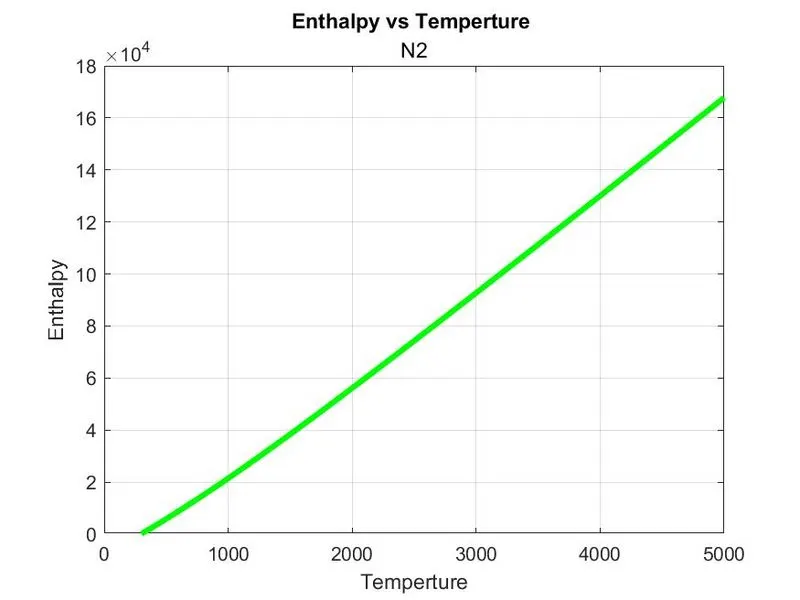
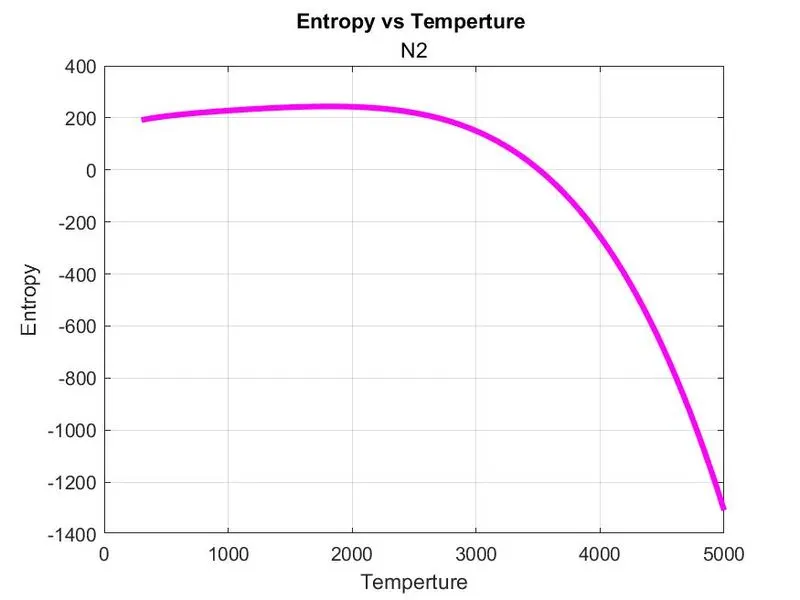
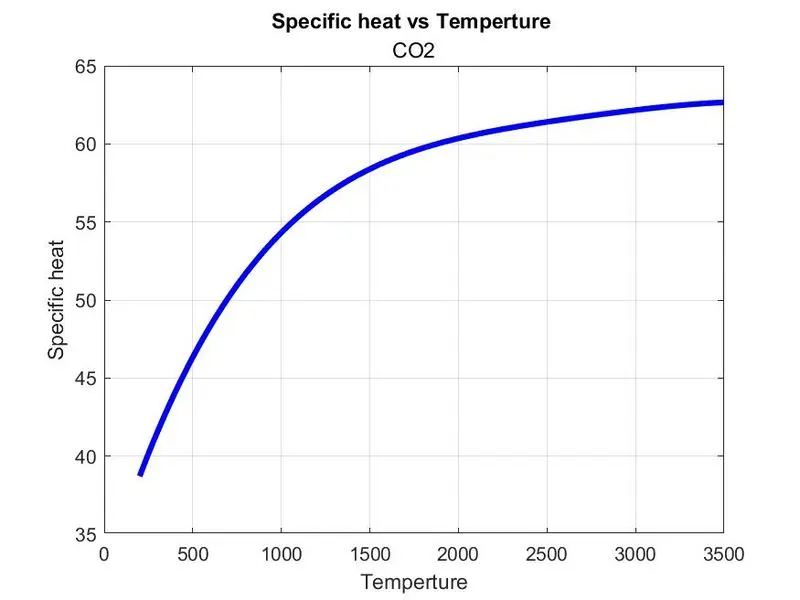
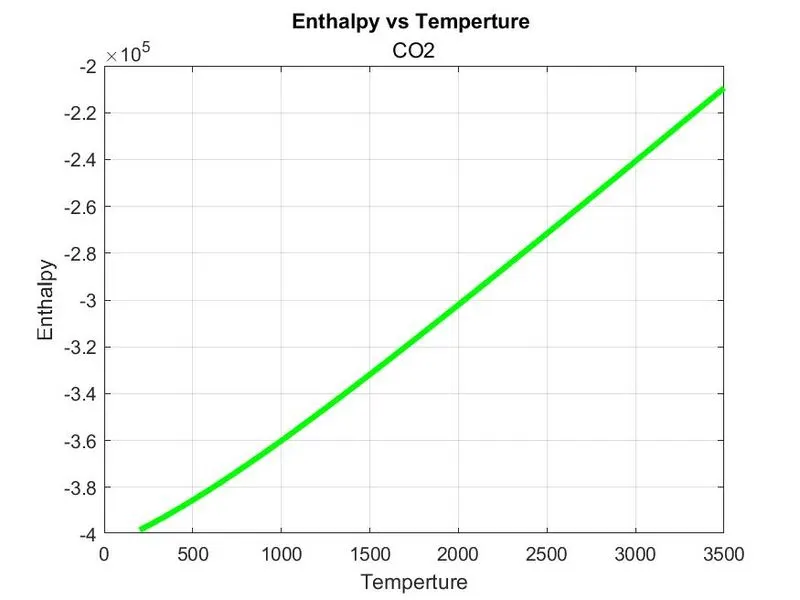
OUTPUT & Plots for O2, N2 and Co2 species
O2
N2:
Co2:
ALL 53 SPECIES
MOLECULAR WEIGHT
I correct them all s error.
RESULT:
Hence ,file parsing is done.
Molecular weight of all the element are found
File are created