Project 1 - Interfacing a 16*2 LCD with Arduino using I2C protocol
PROJECT-1
I2C communication
Aim-
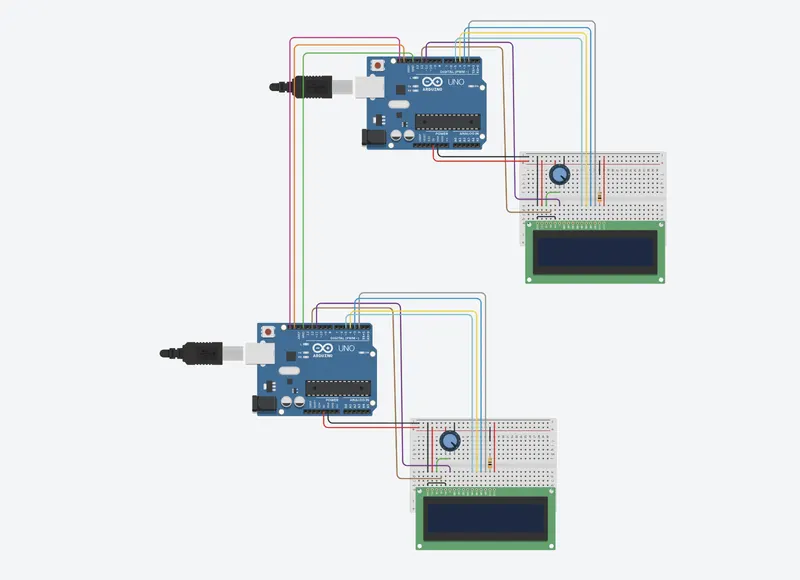
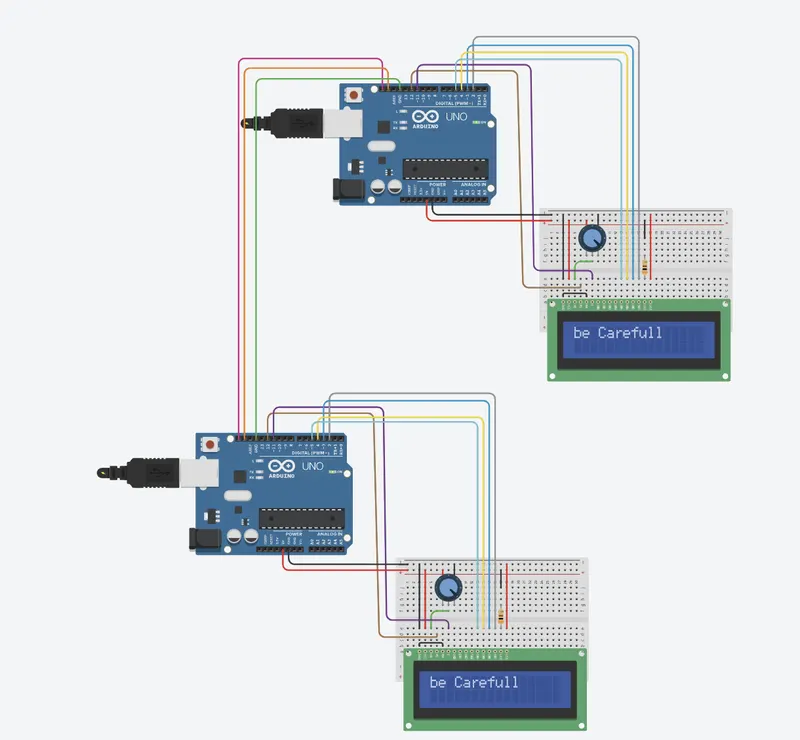
Use I2C communication to send data from master to slave and print it on the LCD.
Circuit diagram-
Master code-
//Master
#include<Wire.h>
#include<LiquidCrystal.h>
LiquidCrystal lcd(12,11,5,4,3,2);
char c[11];
void setup()
{
Wire.begin();
lcd.begin(16,2);
}//setup
void loop()
{
for(int i=0;i<=12;i++)
{
char a[]="be Carefull"; //message
c[i]=a[i];
}
lcd.print(c);
Wire.beginTransmission(8); //start transmission to adress 8
Wire.write(c); //transmitt c
Wire.endTransmission(); //end transmission
delay(8000);
lcd.clear(); //clear screen
}
Slave code-
//Slave
#include<Wire.h>
#include<LiquidCrystal.h>
LiquidCrystal lcd(12,11,5,4,3,2);
char w[24];
int i=0;
void setup()
{
Wire.begin(8);
Wire.onReceive(doit); //call the function 'doit' when data is received
lcd.begin(16,2);
}//setup
void loop()
{
delay(20);
}
void doit(int howMany) //called function
{
lcd.clear();
for(i=0;i<11;i++)
{
char a=Wire.read(); //Reading the transmitted data
w[i]=a;
}//reading all the data and stored in array
lcd.print(w); //printing on screen
delay(9000);
delay(10);
}
Output-
link-
(it may expire)