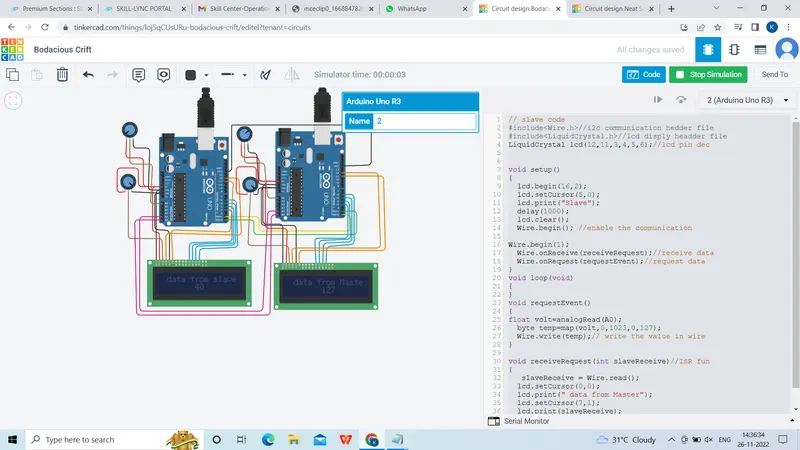
Project 1 - Interfacing a 16*2 LCD with Arduino using I2C protocol
Interfacing a 16*2 LCD with Arduino using I2C protocol
Master code
// master code
#include//i2c communication hedder file
#include//lcd disply headder file
LiquidCrystal lcd(12,11,3,4,5,6);//lcd pin dec

void setup()
{
  lcd.begin(16,2);
  lcd.setCursor(5,0);
  lcd.print("Master");
  delay(1000);
  lcd.clear();// clear the lcd disply
  Wire.begin(); //enable the communication
}

void loop()
{
    Wire.requestFrom(1,1);//address of slave and qty of bytes
  byte MasterReceive = Wire.read();//receive the req from slave
  Wire.beginTransmission(1);
  float volt=analogRead(A0);
  byte temp=map(volt,0,1023,0,127);
  Wire.write(temp);
  Wire.endTransmission();//end of transmission

  lcd.setCursor(0,0);
  lcd.print(" data from slave");
  lcd.setCursor(7,1);
  lcd.print(MasterReceive);
  delay(500);

}
Slave code
// slave code
#include//i2c communication hedder file
#include//lcd disply headder file
LiquidCrystal lcd(12,11,3,4,5,6);//lcd pin dec


void setup()
{
  lcd.begin(16,2);
  lcd.setCursor(5,0);
  lcd.print("Slave");
  delay(1000);
  lcd.clear();
  Wire.begin(); //enable the communication

Wire.begin(1);
  Wire.onReceive(receiveRequest);//receive data
  Wire.onRequest(requestEvent);//request data
}
void loop(void)
{
}
void requestEvent()
{
float volt=analogRead(A0);
  byte temp=map(volt,0,1023,0,127);
  Wire.write(temp);// write the value in wire
}

void receiveRequest(int slaveReceive)//ISR fun
{
   slaveReceive = Wire.read();
  lcd.setCursor(0,0);
  lcd.print(" data from Master");
  lcd.setCursor(7,1);
  lcd.print(slaveReceive);
  delay(500);
}
OUTPUT: