Project 1 - English Dictionary App & Library Book Management System
Project 1 - English Dictionary App & Library Book Management System
1] English Dictionary App
Aim: The aim of this project is to create an English Dictionary app that returns definitions of English words. When the application is started, it displays a menuas follows:
Main Menu
Add a new word
Find the meaning
Update a word
Exit
import json           #We use json to open the file that contains the data.json stands for JavaScript object notation.

print("Welcome to the directory \nPlease select your choice \n1.Add a Word \n2.Find the meaning \n3.Update the word\n4.Exit")

f = open('word.txt','w')
our_dict = {}              #The our_dict is the dictionary of the words user will provide by choosing option 1.
json.dump(our_dict,f)      #Then this word is store into the word text file by using fuction dump.
f.close()

while True:                                   #While loop is used to execute a block of code repeatedly until given boolean condition
    n = int(input('Enter the choise:'))       #We ask for word from user
    if n==1:
        import json
        f=open('word.txt','w')                #if user choose 1st option the file word text is open,
        word = input("Enter the word:")       #Then we ask for word to put in our file
        meaning = input("Enter the Meaning:") #Then we asl for meaning of the word to put in our file
        our_dict[word] = meaning              #Then we add thos words and meaning in our dictionary
        json.dump(our_dict,f)                 #The we dump this dictionary into our sord file
        f.close()
    elif n == 2:
        import json
        f=open('word.txt','r+')
        dic = json.load(f)                    #Here we load the dictionary from our word text file to find user word
        find= input("Enter the Word to find:")#Find is used to find the word in our word file
        if find in our_dict:
            print("The meaning is",our_dict.get(find)) #Then we get that word from our file to put its meaning
        else:
            print("Sorry the word is not found")
        json.dump(our_dict,f)
        f.close()
    elif n==3:
        import json
        f=open('word.txt','w')
        word1 = input("Enter the word:")
        update_meaning = input("Enter the Meaning:") #Here we upade the meaning of that word and then store in our word file
        our_dict[word1] = update_meaning
        json.dump(our_dict,f)
        f.close()
    elif n==4:
        print('Thank You! Have a Peacefull Life....') #After user select the 4th option this message is display
        print('*_*'*39)
        break
    else:
        print("Welcome to the directory \nPlease select your choice \n1.Add a Word \n2.Find the meaning \n3.Update the word\n4.Exit")
Output:-
Welcome to the directory
Please select your choice
1.Add a Word
2.Find the meaning
3.Update the word
4.Exit
Enter the choise:1
Enter the word:cosmos
Enter the Meaning:The peace
Enter the choise:2
Enter the Word to find:cosmos
The meaning is The peace
Enter the choise:3
Enter the word:cosmos
Enter the Meaning:The sky full of stars
Enter the choise:4
Thank You! Have a Peacefull Life....
*_**_**_**_**_**_**_**_**_**_**_**_**_**_**_**_**_**_**_**_**_**_**_**_**_**_**_**_**_**_**_**_**_**_**_**_**_**_**_*
2] Library Book Management System
Aim: Library Book Management System will be implemented with the front end GUI developed using Tkinter and the backend database implemented in SQLite.
The Program is written as follow:
#-------------------------------------------Library------------------------------------------------------------------
import sqlite3
from tkinter import*
import tkinter.ttk as ttk
import tkinter.messagebox as tkMessageBox

#---------------------------------------------Background Photo------------------------------------------------------
root=Tk()
root.title("Libary Book Management")

bg = PhotoImage(file = "cos.png")

label = Label(root,image = bg)
label.place(x=0,y=0)

#------------------------------------------Fuctions-----------------------------------------------------------
def Database():
    global conn,cursor
    conn = sqlite3.connect('lab.db')
    cursor = conn.cursor()
    cursor.execute("CREATE TABLE IF NOT EXISTS lab(booktitle TEXT,author TEXT,year TEXT,isbn TEXT)")

def Add():
        Database()
        if BOOKTITLE.get()=="" or AUTHOR.get()=="" or YEAR.get()==""or ISBN.get()=="":
            txt_result.config(text="Please enter all values",fg="red")
        else:
            cursor.execute("INSERT INTO lab(booktitle,author,year,isbn) values(?,?,?,?)",[str(BOOKTITLE.get()),str(AUTHOR.get()),str(YEAR.get()),str(ISBN.get())])
            conn.commit()
            BOOKTITLE.set("")
            AUTHOR.set("")
            YEAR.set("")
            ISBN.set("")
            cursor.close()
            conn.close()
            txt_result.config(text="Record Inserted",fg="green")

def Display():
    Database()
    cursor.execute("SELECT * FROM lab ORDER BY booktitle ASC")
    fetch = cursor.fetchall()
    for data in fetch:
        tree.insert('','end',values=(data[0],data[1],data[2],data[3]))
    cursor.close()
    txt_result.config(text="Successful fetch data",fg="black")

def Search():
    Database()
    cursor.execute("SELECT * FROM lab WHERE booktitle = ? or author = ? or year = ? or isbn=? ",[str(BOOKTITLE.get()),str(AUTHOR.get()),str(YEAR.get()),str(ISBN.get())])
    rows=cursor.fetchall()
    for data in rows:
        tree.insert('','end',values=(data[0],data[1],data[2],data[3]))
    cursor.close()

def Issue():
    Database()
    txt_result.config(text="Book is Issue.Thank you",fg = "green")

def Delete():
    Database()
    cursor.execute("DELETE FROM lab WHERE booktitle = ? or author = ? or year = ? or isbn=? ",[str(BOOKTITLE.get()),str(AUTHOR.get()),str(YEAR.get()),str(ISBN.get())])
    cursor.close()
    txt_result.config(text="Successfully Deleted!!!",fg="red")

def Exit():
    result = tkMessageBox.askquestion('Do you want to exit? (y/n)',icon='warning')
    if result == "yes":
        root.destroy()
        exit()
#-----------------------------------------------Variable Decleartion-------------------------------------------------

BOOKTITLE = StringVar()
AUTHOR = StringVar()
YEAR = StringVar()
ISBN = StringVar()

#--------------------------------------------------Frame-------------------------------------------------------------

Top = Frame(root,width = 900,height = 50,bd=8,relief = 'raise')
Top.pack(side = TOP)

Left = Frame(root,width = 300,height = 500,bd=8,relief = 'raise')
Left.pack(side = LEFT)

Right = Frame(root,width = 600,height = 500,bd=8,relief = 'raise')
Right.pack(side = RIGHT)

Forms = Frame(Left,width = 300,height = 450)
Forms.pack(side = TOP)

Buttons = Frame(Left,width = 300,height = 100,relief = 'raise')
Buttons.pack(side = BOTTOM)
# -------------------------------------------------Label-------------------------------------------------------------
txt_title = Label(Top,width=900,font=('arial',24),text='Libary Book Management')
txt_title.pack()

txt_booktitle = Label(Forms,font=('arial',16),text='Book Title',bd=15)
txt_booktitle.grid(row=0,stick='e')

txt_author = Label(Forms,font=('arial',16),text='Author',bd=15)
txt_author.grid(row=1,stick='e')

txt_year = Label(Forms,font=('arial',16),text='Year',bd=15)
txt_year.grid(row=2,stick='e')

txt_isbm = Label(Forms,font=('arial',16),text='ISBN',bd=15)
txt_isbm.grid(row=3,stick='e')

txt_result = Label(Buttons)
txt_result.pack(side=TOP)
#--------------------------------------------------Entery------------------------------------------------------------
booktitle = Entry(Forms,textvariable = BOOKTITLE,width=30)
booktitle.grid(row=0,column=1)

author = Entry(Forms,textvariable = AUTHOR,width=30)
author.grid(row=1,column=1)

year = Entry(Forms,textvariable = YEAR,width=30)
year.grid(row=2,column=1)

isbm = Entry(Forms,textvariable = ISBN,width=30)
isbm.grid(row=3,column=1)

#---------------------------------------------Buttons----------------------------------------------------------
but_read = Button(Buttons,width = 10,text = 'Display',command=Display)
but_read.pack(side=LEFT)

but_search = Button(Buttons,width = 10,text = 'Search',command=Search)
but_search.pack(side=LEFT)

but_create = Button(Buttons,width = 10,text = 'Add',command=Add)
but_create.pack(side=LEFT)

but_issue = Button(Buttons,width = 10,text = 'Issue',command=Issue)
but_issue.pack(side=LEFT)

but_delete = Button(Buttons,width = 10,text = 'Delete',command=Delete)
but_delete.pack(side=LEFT)

but_exit = Button(Buttons,width = 10,text = 'Exit',command=Exit)
but_exit.pack(side=LEFT)

#----------------------------------------------------List-------------------------------------------------------
scrollbary = Scrollbar(Right,orient=VERTICAL)
scrollbarx = Scrollbar(Right,orient=HORIZONTAL)

tree = ttk.Treeview(Right,columns=("BookTitle","Author","Year","Isbn"))

scrollbary.config(command=tree.yview)
scrollbary.pack(side=RIGHT,fill=Y)

scrollbarx.config(command=tree.xview)
scrollbary.pack(side=BOTTOM,fill=X)

tree.heading('BookTitle',text="Booktitle",anchor=W)
tree.heading('Author',text="Author",anchor=W)
tree.heading('Year',text="Year",anchor=W)
tree.heading('Isbn',text="ISBN",anchor=W)

tree.column("#0",stretch=NO,minwidth=0,width=20)
tree.column("#1",stretch=NO,minwidth=0,width=180)
tree.column("#2",stretch=NO,minwidth=0,width=60)
tree.column("#3",stretch=NO,minwidth=0,width=60)
tree.column("#4",stretch=NO,minwidth=0,width=80)
tree.pack()
#------------------------------------------Ending loop---------------------------------------------------------------
if __name__ == "__main__":
    root.mainloop()
OutPut:-
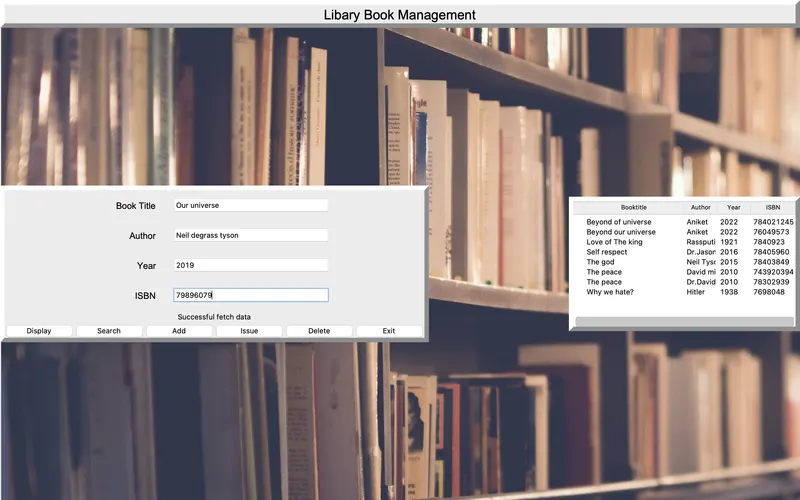
(Note:-If backgroud img gives an error please just restart the anaconda and try again or just remove backround image function.)