Project 1- Creating your own openFOAM solver
`(dels)/(delt) + nabla.(us) = 0`
To start, first the solver icoFoam is copied to the user solver directory. Next, it is renamed to scalarFoam.
This is executed using the following commands, while being present in the user solver directory:
cp -r ~/openfoam/OpenFOAM-v2106/applications/solvers/incompressible/icoFoam .
mv icoFoam scalarFoam
Now, in the createFields.H file, the scalar is added, by simplying copying and pasting pressure as it is a scalar as well. This would look something like this:
volScalarField s
(
    IOobject
    (
        "s",
        runTime.timeName(),
        mesh,
        IOobject::MUST_READ,
        IOobject::AUTO_WRITE
    ),
    mesh
);
Now, the equation is added after the Solution loop for pressure and velocity coupling. Looking at the equation again:
`(dels)/(delt) + nabla.(us) = 0`
This is quite similar to the UEqn and hence can be modified as shown below. Of course the laplacian would be neglected. Hence, the openFoam equation would be written in the icoFoam.C file as
fvScalarMatrix SEqn
(
fvm::ddt(s)
+ fvm::div(phi, s)
);

SEqn.solve();
Next, icoFoam.C can be renamed to scalarFoam.C. Finally, only the files in the Make folder need to be modifed as such:
scalarFoam.C

EXE = $(FOAM_USER_APPBIN)/scalarFoam
Using wmake, the solver is ready.
Next, the cavity case is modified and a s file is added. The dimensions can be anything, and in this case the pressure file is copied and renamed for convinience. The s folder would then become:
/*--------------------------------*- C++ -*----------------------------------*\
| =========                 |                                                 |
| \\      /  F ield         | OpenFOAM: The Open Source CFD Toolbox           |
|  \\    /   O peration     | Version:  v2106                                 |
|   \\  /    A nd           | Website:  www.openfoam.com                      |
|    \\/     M anipulation  |                                                 |
\*---------------------------------------------------------------------------*/
FoamFile
{
    version     2.0;
    format      ascii;
    class       volScalarField;
    object      s;
}
// * * * * * * * * * * * * * * * * * * * * * * * * * * * * * * * * * * * * * //

dimensions      [0 2 -2 0 0 0 0];

internalField   uniform 5;

boundaryField
{
    movingWall
    {
        type            fixedValue;
        value           $internalField;
    }

    fixedWalls
    {
        type            zeroGradient;
    }

    frontAndBack
    {
        type            empty;
    }
}
Now, to account for the scalar equation, some changes are made in fvSchemes and fvSolution. Since the convection for velocity is a similar equation, the schemes and solution can be copied
in fvSchemes, the same divergence shceme can be used for velocity
divSchemes
{
    default         none;
    div(phi,U)      Gauss linear;
    div(phi,s)      Gauss linear;
}
Similarly in fvSolution,
s
{
solver          smoothSolver;
smoother        symGaussSeidel;
tolerance       1e-05;
relTol          0;
}
Now, only the controlDict file needs to be changed, as shown:
/*--------------------------------*- C++ -*----------------------------------*\
| =========                 |                                                 |
| \\      /  F ield         | OpenFOAM: The Open Source CFD Toolbox           |
|  \\    /   O peration     | Version:  v2106                                 |
|   \\  /    A nd           | Website:  www.openfoam.com                      |
|    \\/     M anipulation  |                                                 |
\*---------------------------------------------------------------------------*/
FoamFile
{
    version     2.0;
    format      ascii;
    class       dictionary;
    object      controlDict;
}
// * * * * * * * * * * * * * * * * * * * * * * * * * * * * * * * * * * * * * //

application     scalarFoam;

startFrom       startTime;

startTime       0;

stopAt          endTime;

endTime         2;

deltaT          0.005;

writeControl    timeStep;

writeInterval   20;

purgeWrite      0;

writeFormat     ascii;

writePrecision  6;

writeCompression off;

timeFormat      general;

timePrecision   6;

runTimeModifiable true;


// ************************************************************************* //
Finally, blockMesh and scalarFoam are run in succesion.
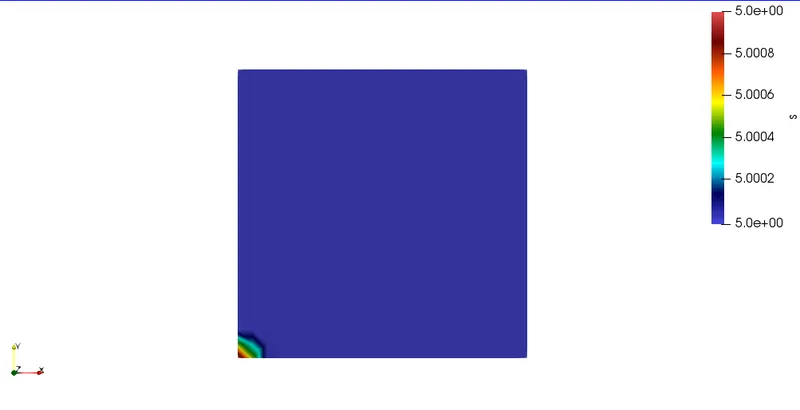
The results at the end time is shown below: