KINEMATICS OF ROBOTIC ARM
FORWARD KINEMATICS OF 2R ROBOTIC ARM:
- AIM:
The main aim of the project is to create the simulation of 2R Robotic Arm using MATLAB coading.
- OBJECTIVE:
Robot kinematics is a study of motion of robots. in kinematic analysis the position, velocity, acceleration are calculated without considering the forces that causes the motion. A robot arm is known as manipulator. It is composed of joints, and joints are where the motion of arm occurs. In basic , a robot arm consisting of the parts: base,joints,links,grapper. The base is the basic part over which arm lies,arm may be fixed or flexible and joints joins the two link and the last part is grapper which is used to hold and move the objects. The main obejective of the project to create the simulation of 2R Robotic arm and visualize the maximum reach of the robot arm by varying the angle of the links with respect to the base.
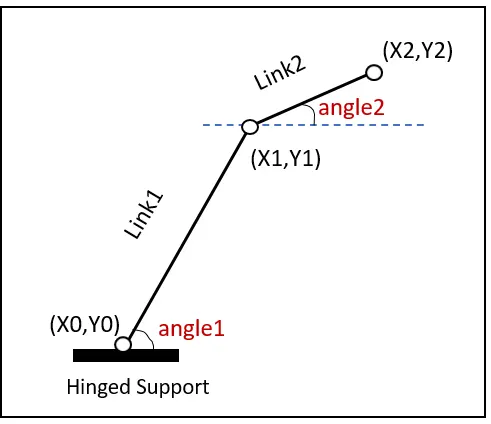
fig: 2R ROBOTIC ARM
- EXPLANATION:
- Bring all the input values like , length of link1,length of link 2.
- Angles of the links are intializes as an array using linspace command.linspace command is used to vary the angles from 0 to 90 degree.For each values of theta the position of links changes.
- Nested if loop is intiated to repeat the set of action and array of angles is stored in variable THETA1 and THETA2.
- Input the coordinates of the links x0,y0,x1,y1,x2,y2.
- The graph is plotted to visualize the maximum reach of arm by varying the angles of links using plot command.
- getframe command is used to store each position of the arm when angle changes from 0 to 90 degrees and it will store it in an array M.
- videofile command creates a empty video and store it as avi format.
- writeVideo command inserts the frames which are stored in an array M.
%forward kinematics of 2R robotic arm

 %inputs
 % length in meters;
 l1= 1;
 l2 =0.5;

 theta1 = linspace(0,90,4);
 theta2 = linspace(0,90,4);

 ct = 1;

 for i = 1:length(theta1)
      THETA1 = theta(i);
   for j = 1:length(theta2)
      THETA2 = theta(j);

 %coordinates

 x0 = 0;
 y0 = 0;

 x1 = l1*cosd(THETA1);
 y1 = l1*sind(THETA2);

 x2 = x1 + l2*cosd(THETA2);
 y2 = y1 + l2*sind(THETA2);

 %plotting

  plot([x0 x1],[y0 y1],[x1 x2],[y1 y2]);
  axis([-0.1 1.5 0 1.5]);
  pause(0.03);
  M(ct) = getframe(gcf);
  ct = ct+1;

end
end

movie(M)
videofile = VideoWriter('forward_kinematics.avi','Uncompressed AVI');
open(videofile);
writevideo(videofile,M);
close(videofile);
- ERRORS:
- I had given a command called 'videowriter' insted of 'VideoWriter' as matlab is case sensitive program language,commands must be given with same case.
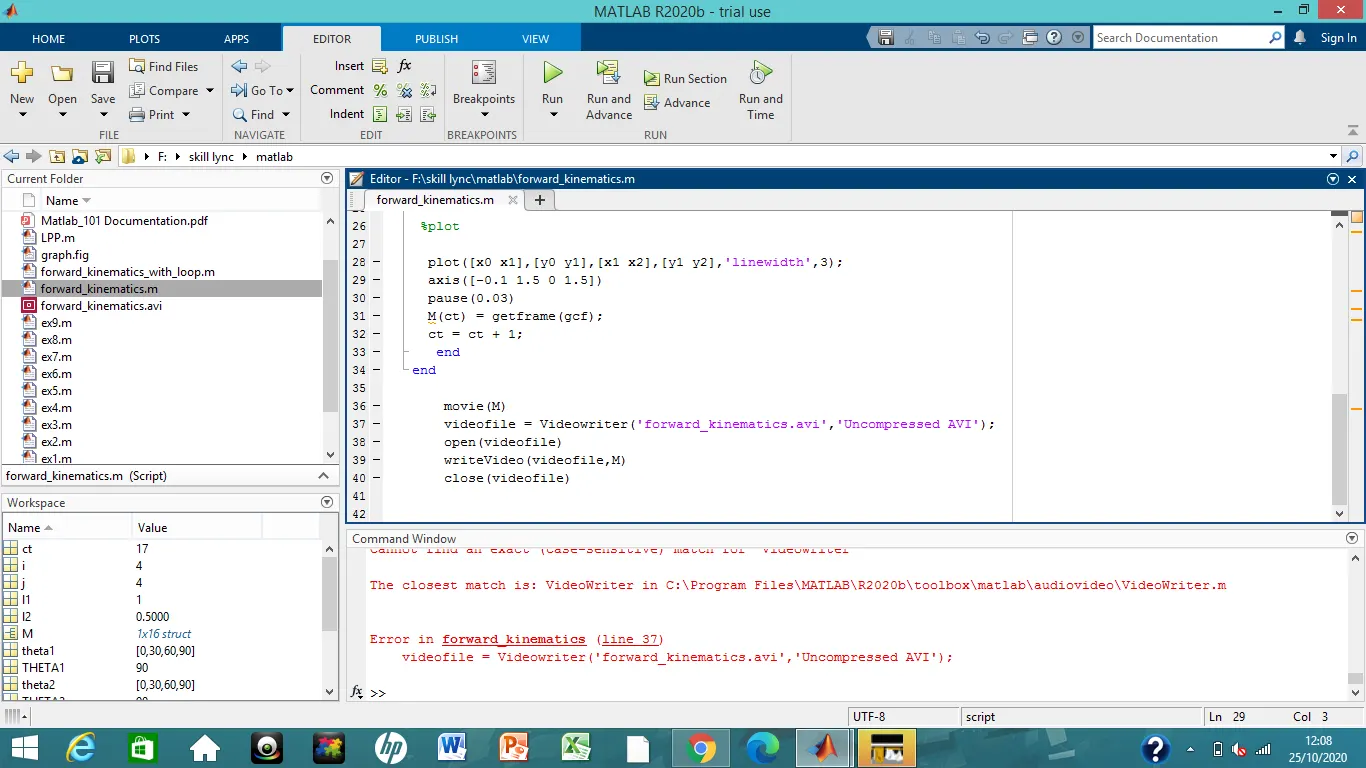
fig: command window error message
- CONCLUSION:
The workspace of the basic 2R robotic arm is obtained by using the program in MATLAB.
- LINK: