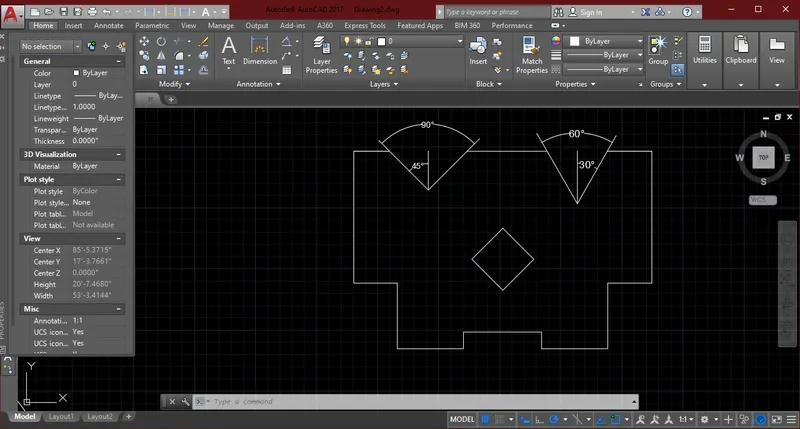
Drafting of various geometries using Chamfer, Fillet tool in AutoCad
Q1.
AIM: Drafting of various geometries using Chamfer, Fillet tool in AutoCad
INTRODUCTION:
- Polyline: Poly means many & lines means joining two or more points.
- Chamfer: Chamfer is angled line that meets the endpoints of two straight 2D objects.
- Fillet: Fillet is creating curve between two lines it can be of rectangle.
PROCEDURE:
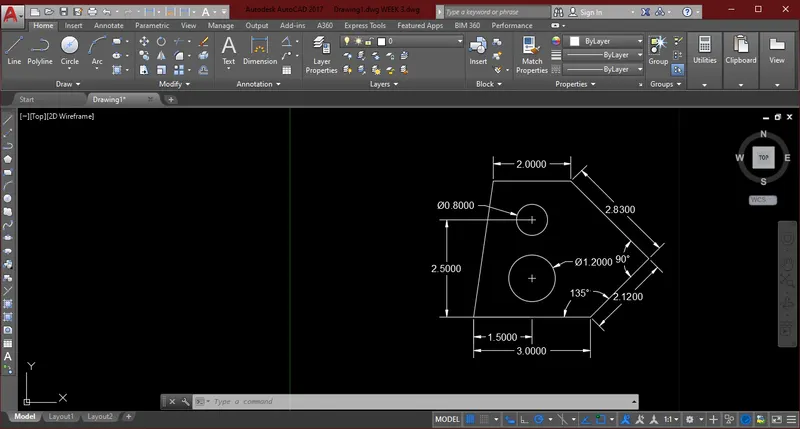
- Select the command line & units in Decimal ,scale in m & polar On
- In the command line type 3.00
- In the command line type 2.12
- In the command line type 2.83
- In the command line type 2.00
- In the command line type c enter
- Select the circle command
- Taking midpoint of line 3.00 & vertical at distance of 1.00 draw circle
- In the command line type circle & diameter of circle 1.20
- Taking midpoint of line 3.00 & vertical at distance of 2.50 draw circle
- In the command line type circle & diameter of circle 0.80
RESULT:
Q2.
AIM: Drafting of various geometries using Chamfer, Fillet tool in AutoCad
INTRODUCTION:
- Polyline: Poly means many & lines means joining two or more points.
- Chamfer: Chamfer is angled line that meets the endpoints of two straight 2D objects.
- Fillet: Fillet is creating curve between two lines it can be of rectangle.
PROCEDURE:
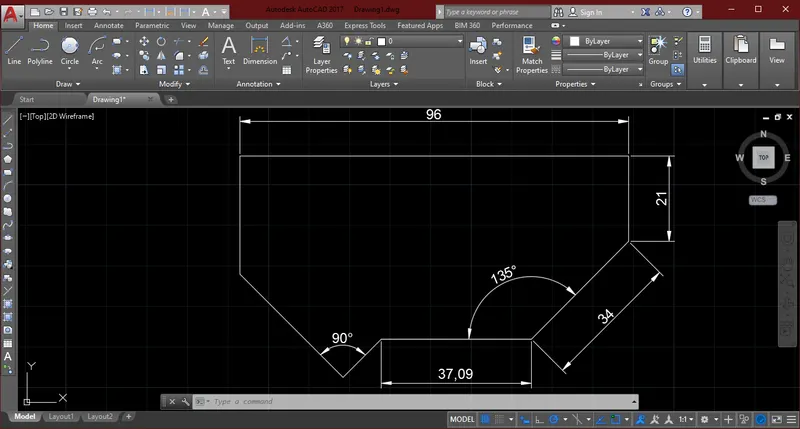
- Select the command line & polar On
- In the command type Units , Engineering , Percision 0'-0", Units in Inches
- In the command line type 8'
- In the command line type 2'-5"
- In the command line type 3'
- In the command line type 2'-6"
- In the command line type 3'-1"
- In the command line type 2'-10"
- In the command line type 1'-9"
RESULT:
Q3.
AIM: Drafting of various geometries using Chamfer, Fillet tool in AutoCad
INTRODUCTION:
- Polyline: Poly means many & lines means joining two or more points.
- Chamfer: Chamfer is angled line that meets the endpoints of two straight 2D objects.
- Fillet: Fillet is creating curve between two lines it can be of rectangle.
PROCEDURE:
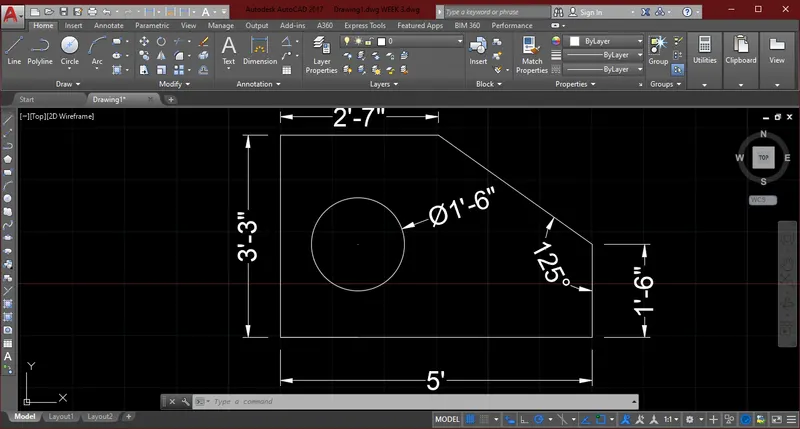
- Select the command line & polar On
- In the command type Units , Engineering , Percision 0'-0", Units in Inches
- In the command type 2'-6.5"
- In the command type 3'-3.0"
- In the command type 5'-0.1"
- In the command type 1'-6.0"
- In the command type c enter
- At the line 5'-0.1" take line 1"-3.0" & in vertical at distance of 1'-6.0".
- Select the command Circle
- Take circle of diameter 1'-6"
RESULT:
Q4.
AIM: Drafting of various geometries using Chamfer, Fillet tool in AutoCad
INTRODUCTION:
- Polyline: Poly means many & lines means joining two or more points.
- Chamfer: Chamfer is angled line that meets the endpoints of two straight 2D objects.
- Fillet: Fillet is creating curve between two lines it can be of rectangle.
PROCEDURE:
- Select the command line & units in Decimal ,scale in m & polar On
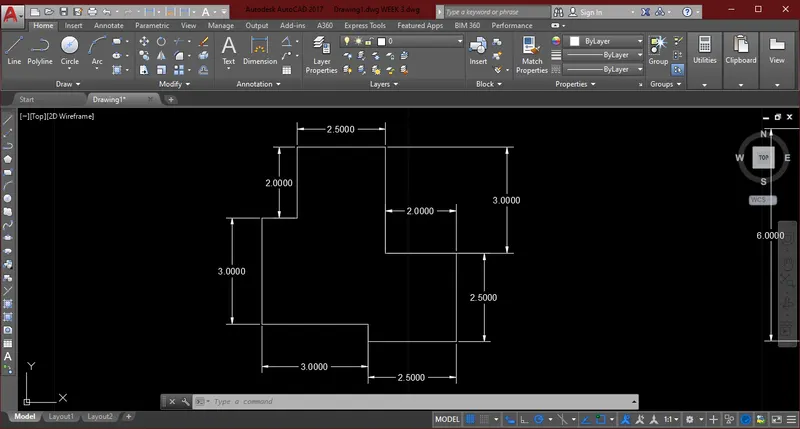
- In the command line type 2.50
- In the command line type 2
- In the command line type 3
- In the command line type 3
- In the command line type 0.5
- In the command line type 2.5
- In the command line type 2.5
- In the command line type 2.0
- In the command line type 3.00
RESULT:
Q5.
AIM: Drafting of various geometries using Chamfer, Fillet tool in AutoCad
INTRODUCTION:
- Polyline: Poly means many & lines means joining two or more points.
- Chamfer: Chamfer is angled line that meets the endpoints of two straight 2D objects.
- Fillet: Fillet is creating curve between two lines it can be of rectangle.
PROCEDURE:
- Select the command line & units in Decimal ,scale in m & polar On
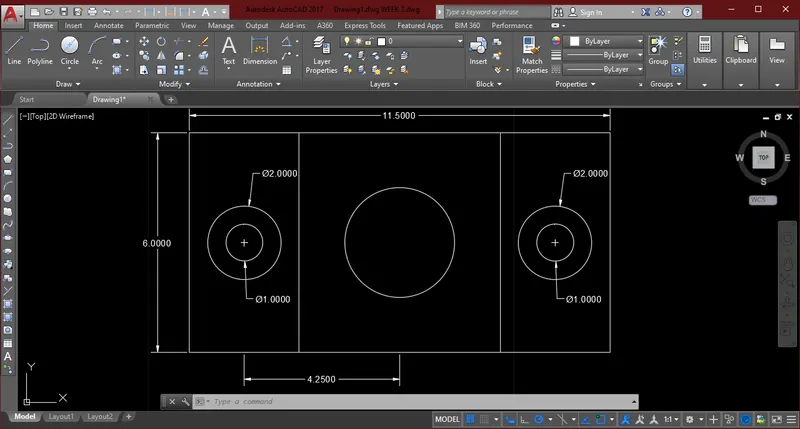
- In the command line type 6
- In the command line type 1.50
- In the command line type 4.25
- In the command line type 4.25
- In the command line type 1.50
- In the command line type 3.0
- In the command line type 3.0
- In the command line type 11.50
- In the command line type Offset at distance of 3.0
- In the command line type Offest at distance of 5.5
- Select the command circle
- At distance of 3.00 draw circle diameter 1.00 & diameter 2.00
- In the command line type copy, by taking Midpoint copy the two circle at distance of 5.5
- In the command line type circle of diameter 3.00
RESULT:
Q6.
AIM: Drafting of various geometries using Chamfer, Fillet tool in AutoCad
INTRODUCTION:
- Polyline: Poly means many & lines means joining two or more points.
- Chamfer: Chamfer is angled line that meets the endpoints of two straight 2D objects.
- Fillet: Fillet is creating curve between two lines it can be of rectangle.
PROCEDURE:
- Select the command line & units in Decimal ,scale in m & polar On
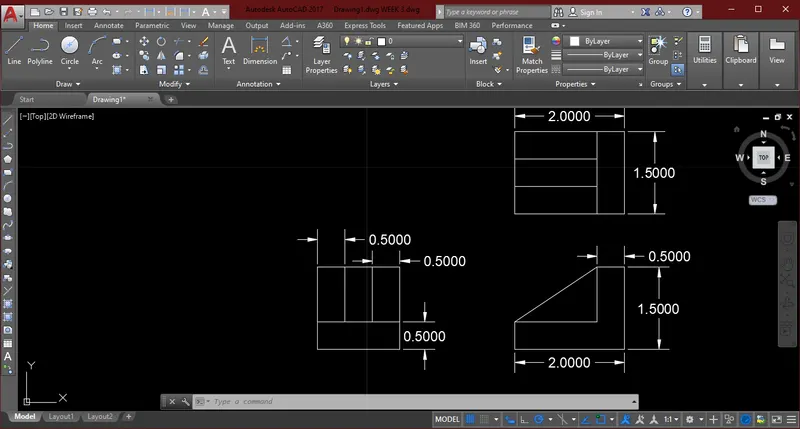
- In the command line type 1.5
- In the command line type 1.5
- In the command line type 1.5
- In the command line type 1.5
- In the command line type Offset at distance 1.00
- In the command line type Offset at distance 0.5
- In the command line type Offset at distance 0.5
- In the command line type 2.0
- In the command line type offset 0.5
- In the command line type 1.5
- In the command line type 1
- In the command line type 0.5
- In the command line type c enter
- In the command line type 1.5
- In the command line type 2.0
- In the command line type Offset at distance of 0.5
- In the command line type Offset at distance of 0.5
- In the command line type Offset at distance of 0.5
- In the command line type Offset at distance of 0.5
- In the command line type trim
RESULT:
Q7.
AIM: Drafting of various geometries using Chamfer, Fillet tool in AutoCad
INTRODUCTION:
- Polyline: Poly means many & lines means joining two or more points.
- Chamfer: Chamfer is angled line that meets the endpoints of two straight 2D objects.
- Fillet: Fillet is creating curve between two lines it can be of rectangle.
PROCEDURE:
- Select the command line & units in Decimal ,scale in m & polar On
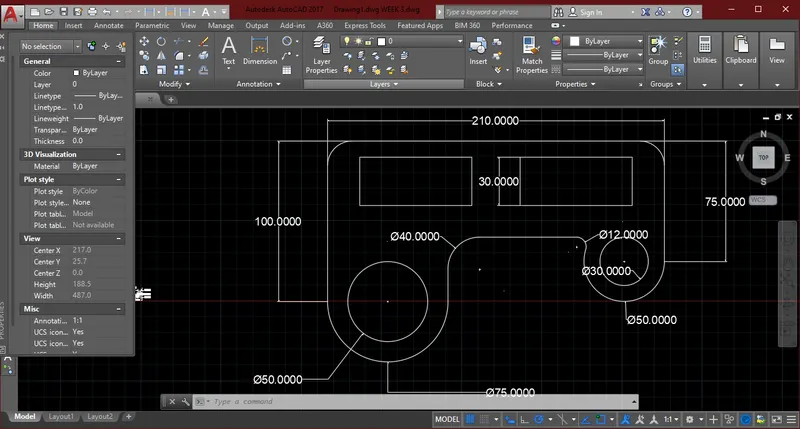
- In the command line type 100
- In the command line type 210
- In the command line type 75
- In the command type circle 2POINTS & draw circle of radius 25 & 15
- In the command type circle 2POINTS & draw circle of radius 35 & 25
- In the command type Fillet radius 15 , 15, 6, 20
- In the command type trim
- Select the line command
- In the command line type 30
- In the command line type 70
- In the command line type 30
- In the command line type 70
- In the command line type copy & copy at distance of 30
RESULT:
Q8.
AIM: Drafting of various geometries using Chamfer, Fillet tool in AutoCad
INTRODUCTION:
- Polyline: Poly means many & lines means joining two or more points.
- Chamfer: Chamfer is angled line that meets the endpoints of two straight 2D objects.
- Fillet: Fillet is creating curve between two lines it can be of rectangle.
PROCEDURE:
- Select the command line & units in Decimal ,scale in m & polar On
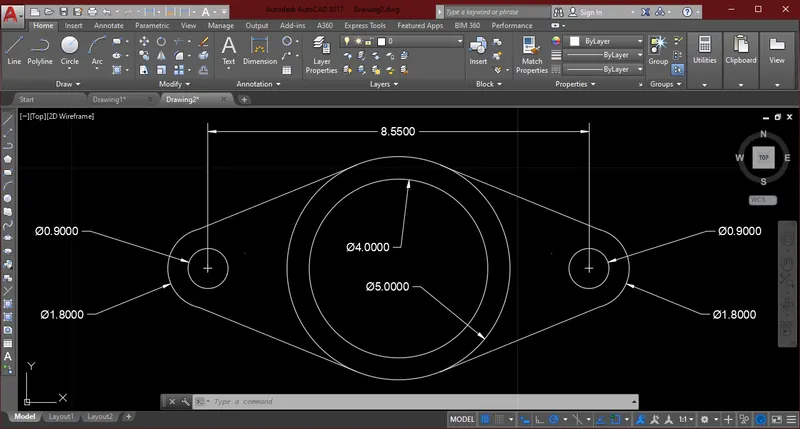
- In the command line type 8.55
- At midpoint of 8.55 draw 2 circles
- Select the command circle
- Circle of diameter 5, 4
- Circle of diameter 0.90 & radius 0.90 & copy at distance of 8.55
- Select the command tangent
- Select the command Trim
RESULT:
Q9.
AIM: Drafting of various geometries using Chamfer, Fillet tool in AutoCad
INTRODUCTION:
- Polyline: Poly means many & lines means joining two or more points.
- Chamfer: Chamfer is angled line that meets the endpoints of two straight 2D objects.
- Fillet: Fillet is creating curve between two lines it can be of rectangle.
PROCEDURE:
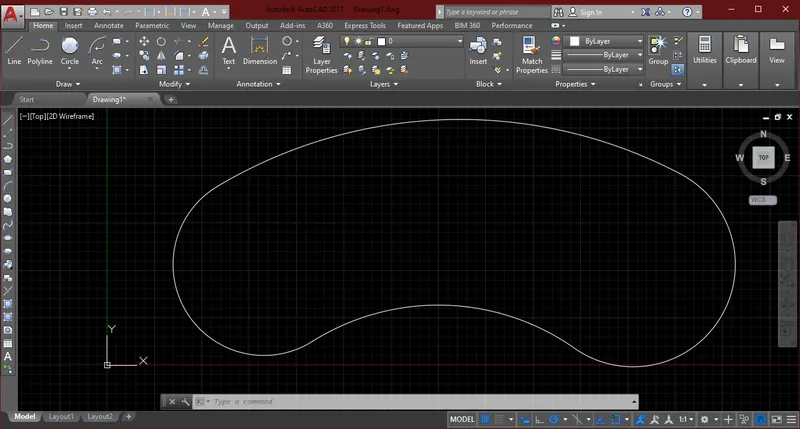
- In the command type Units , Engineering , Percision 0'-0", Units in Inches
- Select the command line of 32'-6"
- Select the command circle, radius
- In the command type radius of circle 8'
- In the command type radius of circle 9'
- Subtract 41'-8'= In the command type radius 33'-8"
- Subtract 41'-9'= In the command type radius 32'-8"
- On intersection from snap cursor
- trim all the extra lines & select tan tan radius
- In the command type radius 20'10"
RESULT:
Q10.
AIM: Drafting of various geometries using Chamfer, Fillet tool in AutoCad
INTRODUCTION:
- Polyline: Poly means many & lines means joining two or more points.
- Chamfer: Chamfer is angled line that meets the endpoints of two straight 2D objects.
- Fillet: Fillet is creating curve between two lines it can be of rectangle.
PROCEDURE:
- Select the command line & units in Decimal ,scale in m & polar On
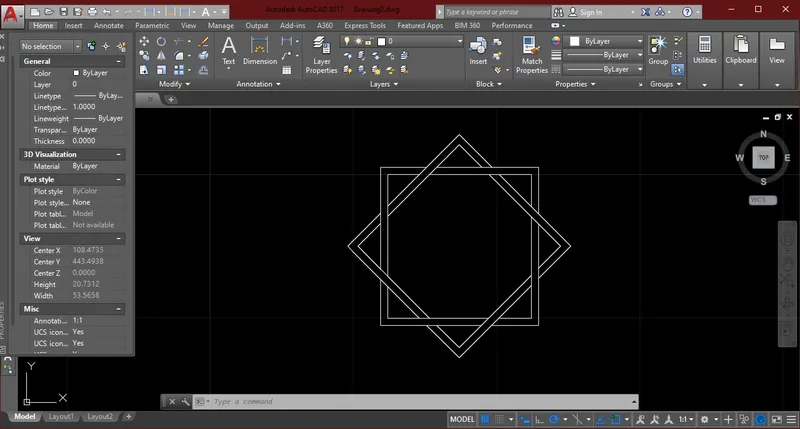
- In the command line type 10
- In the command line type 10
- In the command line type 10
- In the command line type 10
- In the command line type 10.5
- In the command line type 10.5
- In the command line type 10.5
- In the command line type 10.5
- Select the command Copy & select the command Rotate at 45 degree
- Select the command Trim
RESULT:
Q11.
AIM: Drafting of various geometries using Chamfer, Fillet tool in AutoCad
INTRODUCTION:
- Polyline: Poly means many & lines means joining two or more points.
- Chamfer: Chamfer is angled line that meets the endpoints of two straight 2D objects.
- Fillet: Fillet is creating curve between two lines it can be of rectangle.
PROCEDURE:
- Select the command line & polar On
- In the command type Units , Engineering , Percision 0'-0", Units in Inches
- In the command type 20'-4"
- In the command type 6'9"
- In the command type 3'
- In the command type 4'-6"
- In the command type 4'-6"
- In the command type 1'-2"
- In the command type 4'-6"
- In the command type 1'-2"
- In the command type 4'-6"
- In the command type 4'-6"
- In the command type 3'
- In the command type9'
- In the command type 3
- In the command type 3
- In the command type 3
- In the command type 3
- Select the command copy & Rotate at 45 degree
- At distance of 10'-2" take midpoint
- In the command type 2'-8"
- Assume the line 30 degree on both sides
- In the command type 2'-8"
- Assume the line 45 degree on both sides
- Select the command Trim
RESULT: