Drafting of various geometries using Chamfer, Fillet tool in AutoCad
AIM : Drafting of various geometries using Chamfer, Fillet tool in AutoCad
INTRODUCTION : The Tool Palette in AutoCAD allows accessing the different tools.
The tools from the tool palette are inserted into our drawing.
The Tool Palette consists of the tools of Architectural, Civil, Manufacturing, Engineering, etc.
There are groups of tools, separated by functionality on the Tools panel: selection,measuring, retouching , painting and drawing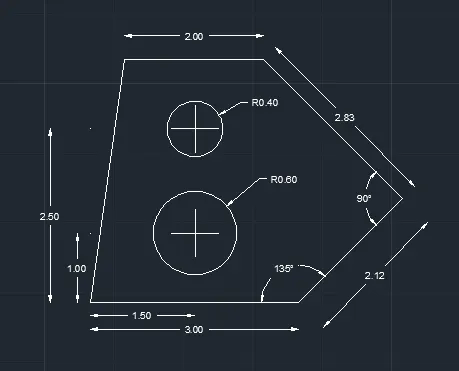
Command: L
LINE
Specify first point:
Specify next point or [Undo]: 3.00
Specify next point or [Undo]: @2.12<45
Specify next point or [Close/Undo]:
>>Enter new value for ORTHOMODE <1>:
Resuming LINE command.
Specify next point or [Close/Undo]: @2.83<135
Specify next point or [Close/Undo]: @-2.00,0
Specify next point or [Close/Undo]: C
Command: C
CIRCLE
Specify center point for circle or [3P/2P/Ttr (tan tan radius)]: *Cancel*
Command c :
Specify center point for circle or [3P/2P/Ttr (tan tan radius)]:
Specify radius of circle or [Diameter] <0.40>: D
Specify diameter of circle <0.80>: 1.20
Command: CIRCLE
Specify center point for circle or [3P/2P/Ttr (tan tan radius)]: *Cancel*
Specify radius of circle or [Diameter] <0.60>: D
Specify diameter of circle <1.20>: 0.80
AIM : Drafting of various geometries using Chamfer, Fillet tool in AutoCad
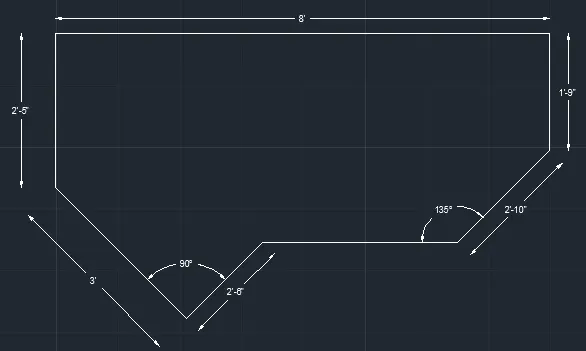
Command: L
LINE
Specify first point:
Specify next point or [Undo]: @3'<135
Specify next point or [Undo]: 2'5"
Specify next point or [Close/Undo]: 8'
Specify next point or [Close/Undo]: 1'9"
Specify next point or [Close/Undo]: @2'10"<225
LINE
Specify first point:
Specify next point or [Undo]: @2'-6"<45
Specify next point or [Undo]:
LINE
Specify first point:
Specify next point or [Undo]:
AIM : Drafting of various geometries using Chamfer, Fillet tool in AutoCad
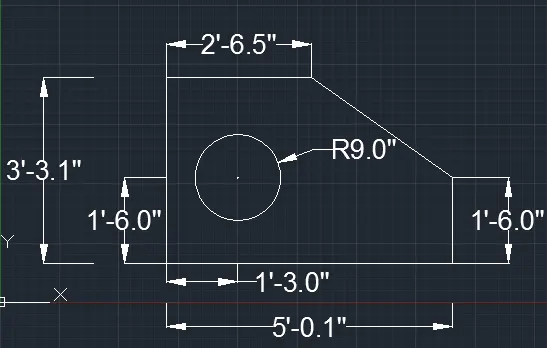
Command: L
LINE
Specify first point:
Specify next point or [Undo]: 5'0.1"
Specify next point or [Undo]: 1'6"
Specify next point or [Close/Undo]:
Command: LINE
Specify first point:
Specify next point or [Undo]: 3'3.0"
Specify next point or [Undo]: 2'6.5"
Specify next point or [Close/Undo]:
Command: L
LINE
Specify first point:
Specify next point or [Undo]: 1'3.0"
Specify next point or [Undo]:
Command: LINE
Specify first point:
Specify next point or [Undo]: 1'6.0"
Specify next point or [Undo]:
Command: C
CIRCLE
Specify center point for circle or [3P/2P/Ttr (tan tan radius)]:
Specify radius of circle or [Diameter] <1'-6.0">: d
Specify diameter of circle <3'-0.0">: 1'6"
AIM : Drafting of various geometries using Chamfer, Fillet tool in AutoCad
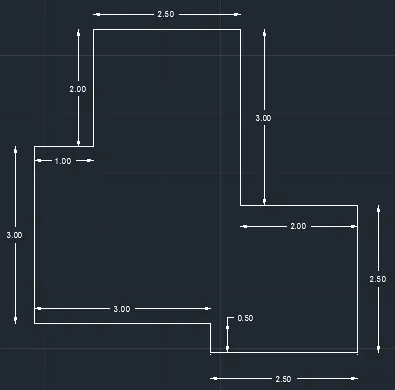
Command: L
LINE
Specify first point:
Specify next point or [Undo]: 5.50
Specify next point or [Undo]: 2.50
Specify next point or [Close/Undo]: 2.00
Specify next point or [Close/Undo]: 3.00
Specify next point or [Close/Undo]: 2.50
Specify next point or [Close/Undo]: 2.00
Specify next point or [Close/Undo]: 1
Specify next point or [Close/Undo]:
Command: L
Specify first point:
Specify next point or [Undo]: 3
Specify next point or [Undo]:
Command: L
LINE
Specify first point:
Specify next point or [Undo]: 3.00
Specify next point or [Undo]: 0.50
Specify next point or [Close/Undo]:
Command: TR
TRIM
AIM : Drafting of various geometries using Chamfer, Fillet tool in AutoCad
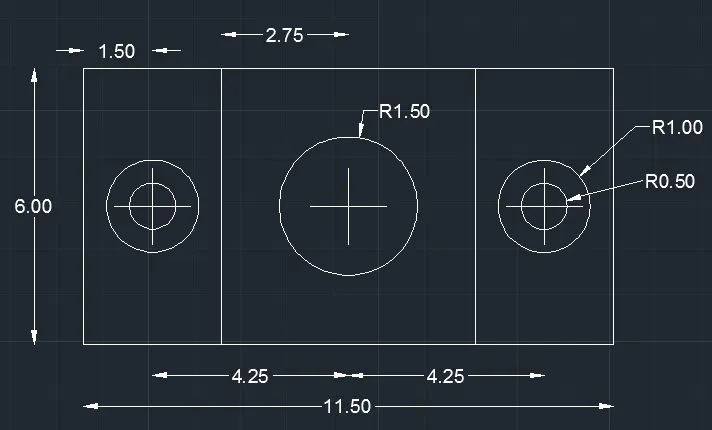
LINE
Specify first point:
Specify next point or [Undo]: 11.50
Specify next point or [Undo]: 6.00
Specify next point or [Close/Undo]: 11.50
Specify next point or [Close/Undo]: c
Command: O
OFFSET
Current settings: Erase source=No Layer=Source OFFSETGAPTYPE=0
Specify offset distance or [Through/Erase/Layer] <1.50>: 1.50
Specify offset distance or [Through/Erase/Layer] <1.50>: 3.00
Select object to offset or [Exit/Undo] :
Command: O
OFFSET
Specify offset distance or [Through/Erase/Layer] <3.00>: 4.25
Select object to offset or [Exit/Undo] :
CIRCLE
Specify center point for circle or [3P/2P/Ttr (tan tan radius)]:
Specify radius of circle or [Diameter] <0.40>: d
Specify diameter of circle <0.80>: 1
Command: C
CIRCLE
Specify center point for circle or [3P/2P/Ttr (tan tan radius)]:
Specify radius of circle or [Diameter] <0.50>: d
Specify diameter of circle <1.00>: 2
CIRCLE
Specify center point for circle or [3P/2P/Ttr (tan tan radius)]:
Specify radius of circle or [Diameter] <1.00>: d
Specify diameter of circle <2.00>: 3.00
AIM : Drafting of various geometries using Chamfer, Fillet tool in AutoCad
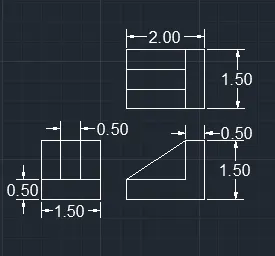
LINE
Specify first point:
Specify next point or [Undo]: 1.5
Specify next point or [Undo]: 1.5
Specify next point or [Close/Undo]: 1.5
Specify next point or [Close/Undo]: c
Command: O : 0.5
LINE
Specify first point:
Specify next point or [Undo]: 2.0
Specify next point or [Close/Undo]:0.5
Specify next point or [Close/Undo]:1.5
Specify next point or [Close/Undo]: 1.0
Specify next point or [Close/Undo]: 0.5
Specify next point or [Close/Undo]:1.5
LINE
Specify first point:
Specify next point or [Undo]: 1.5
Specify next point or [Undo]: 2.0
Specify next point or [Close/Undo]: 1.5
Specify next point or [Close/Undo]: c
COMMAND
O
Offcet command :0.5
COMMAND
TRIM : Select cutting edges
AIM :Drafting of various geometries using Chamfer, Fillet tool in AutoCad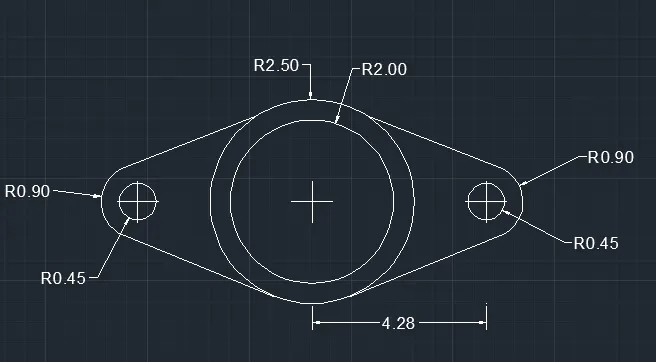
CIRCLE
Specify center point for circle or [3P/2P/Ttr (tan tan radius)]:
Specify radius of circle or [Diameter] <5.00>: d
Specify diameter of circle <10.00>: 5.0
Command: CIRCLE
Specify center point for circle or [3P/2P/Ttr (tan tan radius)]:
Specify radius of circle or [Diameter] <2.50>: d
Specify diameter of circle <5.00>: 4.0
LINE
Specify first point:
Specify next point or [Undo]: 4.25
Specify next point or [Undo]:
Command: C
CIRCLE
Specify center point for circle or [3P/2P/Ttr (tan tan radius)]:
Specify radius of circle or [Diameter] <2.00>: d
Specify diameter of circle <4.00>: 0.9
Command: C
Specify center point for circle or [3P/2P/Ttr (tan tan radius)]:
Specify radius of circle or [Diameter] <0.45>: d
Specify diameter of circle <0.90>: 1.8
Command: DS
DSETTINGS
Command: L
LINE
Specify first point:
Specify next point or [Undo]:
Specify next point or [Undo]:
Command: LINE
Specify first point:
Specify next point or [Undo]:
Specify next point or [Undo]:
Command:
mirror
Specify first point:
Specify next point:
Command: TR
TRIM
Current settings:
Select cutting edges
AIM :Drafting of various geometries using Chamfer, Fillet tool in AutoCad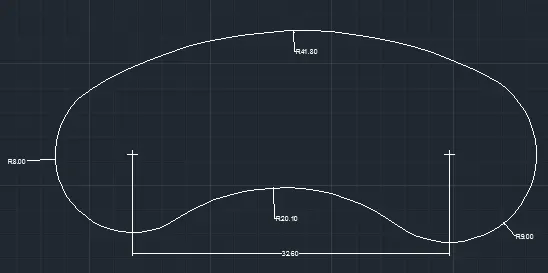
Command: C
CIRCLE
Specify center point for circle or [3P/2P/Ttr (tan tan radius)]:
Specify radius of circle or [Diameter] <41.80>: d
Specify diameter of circle <83.60>: 16
Command: L
LINE
Specify first point:
Specify next point or [Undo]: 32.6
Specify next point or [Undo]:
Command: CO
Current settings: Copy mode
Specify base point or [Displacement/mOde]
Command: _circle
Specify center point for circle or [3P/2P/Ttr (tan tan radius)]:
Specify second point on circle: _tan to
Specify third point on circle: _tan to 41.8
Command: _circle
Specify center point for circle or [3P/2P/Ttr (tan tan radius)]: _ttr
Specify point on object for first tangent of circle:
Specify point on object for second tangent of circle:
Specify radius of circle <25.44>: 20.10
Command: TR
TRIM
Current settings: Projection=UCS, Edge=None
Select cutting edges ...
AIM :Drafting of various geometries using Chamfer, Fillet tool in AutoCad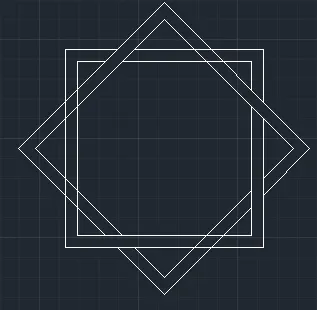
Command: REC
RECTANG
Specify first corner point or [Chamfer/Elevation/Fillet/Thickness/Width]:
Specify other corner point or [Area/Dimensions/Rotation]: d
Specify length for rectangles <5.00>: 5
Specify width for rectangles <5.00>: 5:
Command: O
OFFSET
Specify offset distance or [Through/Erase/Layer] <0.30>: 0.3
Command: POL
POLYGON Enter number of sides <4>: 4
Specify center of polygon or [Edge]:
Command: O
OFFSET
Specify offset distance or [Through/Erase/Layer] <0.30>: 0.3
Command: TR
TRIM
Select cutting edges ...
AIM : Drafting of various geometries using Chamfer, Fillet tool in AutoCad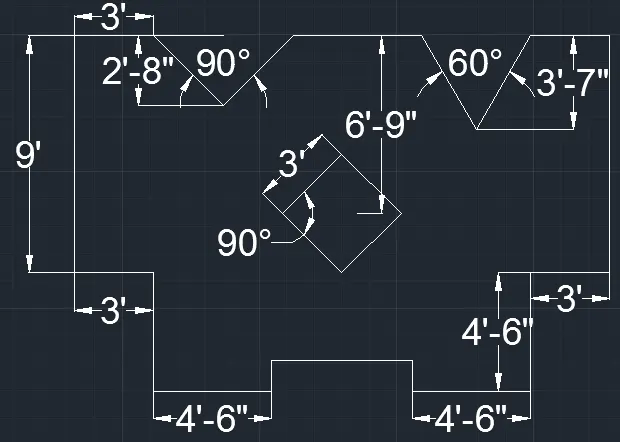
LINE
Specify first point:
Specify next point or [Undo]: <Ortho on> 9'
Command: O
OFFSET
Current settings: Erase source=No Layer=Source OFFSETGAPTYPE=0
Specify offset distance or [Through/Erase/Layer] <10'-2.0">: 20'4"
Command
LINE
Specify first point:
Specify next point or [Undo]: 3'
Specify next point or [Undo]: 4'6"
Specify next point or [Close/Undo]: 4'6"
Specify next point or [Close/Undo]: 1'2"
Specify next point or [Close/Undo]:
Specify next point or [Close/Undo]:
Command: L
LINE
Specify first point:
Specify next point or [Undo]: 3'
Specify next point or [Undo]:
Command: LINE
Specify first point:
Specify next point or [Undo]: 3'
Command: L
LINE
Specify first point:
Specify next point or [Undo]: @3'7"<220
Specify next point or [Undo]:@'37"<60
Command: LINE
Specify first point:
Specify next point or [Undo]:@2'8"<315
Specify next point or [Undo]:@2'8"<90
Command: L
LINE
Specify first point:
Specify next point or [Undo]
Command: pol
pol
Specify no of sides:4
Specify next point or [Undo]:fit
AIM : Drafting of various geometries using Chamfer, Fillet tool in AutoCad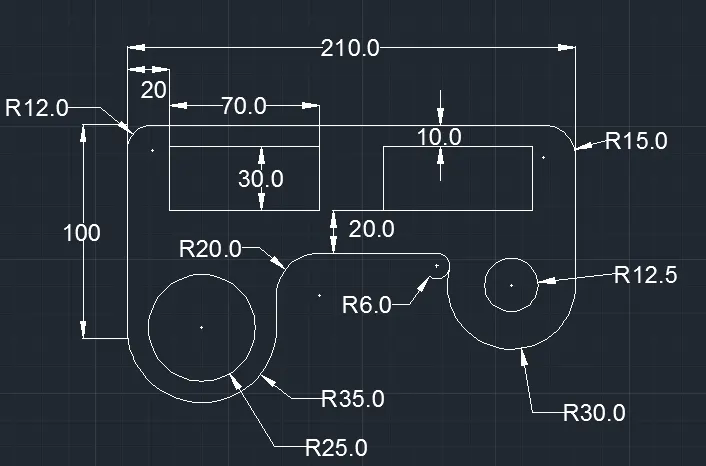
LINE
Specify first point:
Specify next point or [Undo]: 100
Specify next point or [Undo]: 210
Specify next point or [Close/Undo]: 75
LINE
Specify first point:
Specify next point or [Undo]: 20
Specify next point or [Undo]: 10
Command: REC
RECTANG
Specify other corner point or [Area/Dimensions/Rotation]: d
Specify length for rectangles <70.0>: 70
Specify width for rectangles <30.0>: 30
Command: CO
Specify base point or [Displacement/mOde] <Displacement>:
Specify second point or [Array] <use first point as displacement>: 100
Specify second point or [Array/Exit/Undo] <Exit>:
Command: O
OFFSET
Current settings: Erase source=No Layer=Source OFFSETGAPTYPE=0
Specify offset distance : 70
Command: OFFSET
Specify offset distance : 60
Command: C
CIRCLE
Specify center point for circle or [3P/2P/Ttr (tan tan radius)]:
Specify radius of circle or [Diameter] <35.0>: d
Specify diameter of circle <70.0>: 70
Command: C
CIRCLE
Specify center point for circle or [3P/2P/Ttr (tan tan radius)]:
Specify radius of circle or [Diameter] <35.0>: d
Specify diameter of circle <70.0>: 50
Command: C
CIRCLE
Specify center point for circle or [3P/2P/Ttr (tan tan radius)]:
Specify radius of circle or [Diameter] <15.0>: 60
Command: C
CIRCLE
Specify center point for circle or [3P/2P/Ttr (tan tan radius)]:
Specify radius of circle or [Diameter] <50.0>: 30
OFFSET
Specify offset distance or [Through/Erase/Layer] <60.0>:
Select object to offset or [Exit/Undo] <Exit>:
Command: F
FILLET
Current settings: Mode = TRIM, Radius = 20.0
Current settings: Mode = TRIM, Radius = 20.0
Current settings: Mode = TRIM, Radius = 15.0
Current settings: Mode = TRIM, Radius = 6.0