Creation of geometries by Coordinate system methods using AutoCad
AIM : Creating the geometries from P1 to P2 using all the coordinates system methods
INTRODUCTION :
- AutoCAD is globally used by surveyors, designers, engineers, drafters, Globally, AutoCAD has proven as an efficient and user-friendly program.
- Commercial drafting and computer-aided design(CAD) software applications are AutoCAD.
- AutoCAD software is recognized internationally for its remarkable editing capabilities, which make it likely to digitally draw building plans or recreate 3D images. This software was developed in the year 1982 by Autodesk.
- AutoCAD is a global application. It is being used globally by product development teams, manufacturing facilities, medical professionals, in educational institutions, by professionals and engineers.
- 3D modeling and visualization are two main important features of the program
- BY using the line command drawing the specifeid drawings using coordinates system , Absolute coordinates system , Relative coordinates system and direct coordinates system
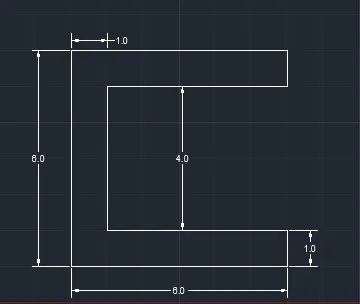
BY Absolute coordinates method
Command: L
LINE
Specify first point: 2,1
Specify next point : 6,0
Specify next point : 0,1
Specify next point : 5,0
Specify next point : 0,4
Specify next point : 5,0
Specify next point : 0,1
Specify next point : 6,0
Specify next point or [Close/Undo]: c
BY Relative rectangle method
Command: L
LINE
Specify first point: 2,1
Specify next point : @6,0
Specify next point : @0,1
Specify next point : @-5,0
Specify next point : @0,4
Specify next point : @5,0
Specify next point : @0,1
Specify next point : @-6,0
Specify next point or [Close/Undo]: c
BY Relative polar coordinate method
Command: L
LINE
Specify first point: 2,1
Specify next point : @6<0
Specify next point : @1<0
Specify next point : @1<90
Specify next point : @5<180
Specify next point : @4<0
Specify next point : @4<90
Specify next point : @5<0
Specify next point : @1<90
Specify next point : @6<180
Specify next point or [Close/Undo]: c
BY Direct coordinate method
Command: L
LINE
Specify first point: 2,1
Specify next point : 6
Specify next point : 1
Specify next point : 5
Specify next point : 4
Specify next point : 5
Specify next point : 1
Specify next point : 6
Specify next point or [Close/Undo]: c
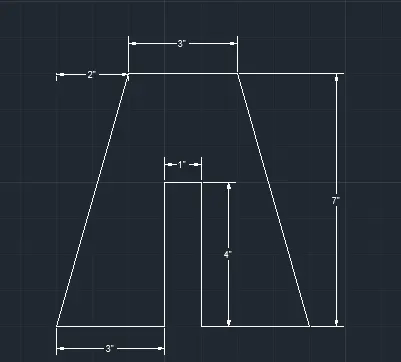
BY Absolute coordinates method
LINE
Specify first point: 2,1
Specify next point: 3,0
Specify next point: 0,4
Specify next point : 1,0
Specify next point : 4,0
Specify next point : 3,0
Specify next point : 2,7
Specify next point : 3,0
Specify next point or [Close/Undo]: c
BY Relative rectangle method
LINE
Specify first point: 2,1
Specify next point: @3,0
Specify next point: @0,4
Specify next point : @1,0
Specify next point : @-4,0
Specify next point : @3,0
Specify next point : @-2,7
Specify next point : @-3,0
Specify next point or [Close/Undo]: c
BY Relative polar coordinate method
Command: L
LINE
Specify first point: 2,1
Specify next point : @3<0
Specify next point : @4<90
Specify next point : @1<0
Specify next point : @4<270
Specify next point : @3<0
Specify next point : @7<108
Specify next point : @3<0
Specify next point : @3<180
Specify next point or [Close/Undo]: c
BY Direct coordinate method
Command: L
LINE
Specify first point: 2,1
Specify next point : 3
Specify next point : 4
Specify next point : 1
Specify next point : 4
Specify next point : 3
Specify next point : Ortho off
Specify next point: 7
Specify next point: Ortho on
Specify next point : 3
Specify next point or [Close/Undo]:c
For P3 Drawing
By Using Relavite Coordinate system
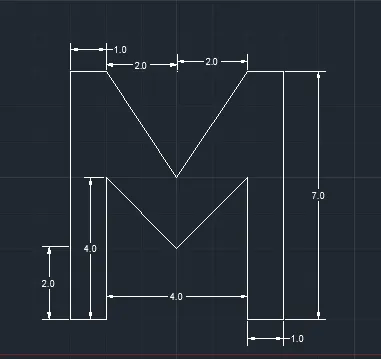
BY USING RELAIVE RECTANGULAR COORDINATES
Command: L
LINE
Specify first point: 2,1
Specify next point : @1,0
Specify next point : @0,4
Specify next point : @2,-2
Specify next point : @2,2
Specify next point : @0,-4
Specify next point : @1,0
Specify next point : @0,7
Specify next point : @-1,0
Specify next point : @-2-3
Specify next point : @-2,3
Specify next point : @-1,0
Specify next point : c
BY USING POLAR COORDINATES
Command: L
LINE
Specify first point: 2,1
Specify next point : @1<0
Specify next point : @4<90
Specify next point : @2<315
Specify next point : @2<45
Specify next point : @4<270
Specify next point : @1<0
Specify next point : @7<90
Specify next point : @3<215
Specify next point : @3<135
Specify next point : @1<180
Specify next point : c
BY USING DIRECT METHOD
Command: L
LINE
Specify first point: 2,1
Specify next point or [Undo]: 1
Specify next point or [Undo]: 4
Specify next point or [Close/Undo]:
Specify next point or [Close/Undo]: 2 with angle 45 Specify next point or [Close/Undo]: 2 with angle 45
Specify next point or [Close/Undo]: Ortho on 4
Specify next point or [Close/Undo]: 1
Specify next point or [Close/Undo]: 7
Specify next point or [Close/Undo]: 1
Specify next point or [Close/Undo]: Ortho off
Specify next point or [Close/Undo]:2 with angle 45 Specify next point or [Close/Undo]: 2 with angle 45
Specify next point or [Close/Undo]:
Specify next point or [Close/Undo]: c
FOR P5 DRAWING
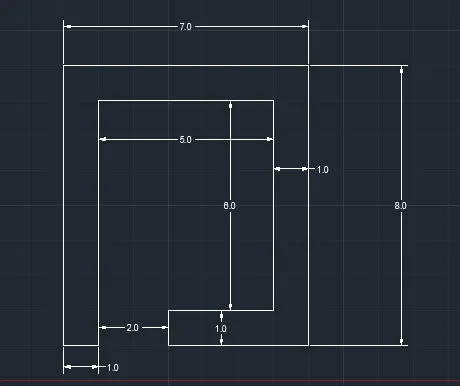
BY USING RELAIVE RECTANGULAR COORDINATES
Command: L
LINE
Specify first point: 2,1
Specify next point : Ortho on @1,0
Specify next point : @0,7
Specify next point : @5,0
Specify next point : @0,-6
Specify next point : @-3,0
Specify next point : @0,-1
Specify next point : @4,0
Specify next point : @0,8
Specify next point : @-7,0 Specify next point or [Close/Undo]: C
BY USING RELAIVE POLAR COORDINATES Command: L
LINE
Specify first point: 2,1
Specify next point : Ortho on @1<0
Specify next point : @7<90
Specify next point : @5<0
Specify next point : @6<270
Specify next point : @3<180
Specify next point : @1<270
Specify next point : @4<0
Specify next point : @8<90
Specify next point : @7<180 Specify next point or [Close/Undo]: C
BY USING DIRECT METHOD
Command: L
LINE
Specify first point: 2,1
Specify next point or [Undo]: 1
Specify next point or [Undo]: 7
Specify next point or [Close/Undo]: 5
Specify next point or [Close/Undo]: 6
Specify next point or [Close/Undo]: 3
Specify next point or [Close/Undo]: 1
Specify next point or [Close/Undo]: 4
Specify next point or [Close/Undo]: 8
Specify next point or [Close/Undo]: 7
Specify next point or [Close/Undo]: C
FOR P7
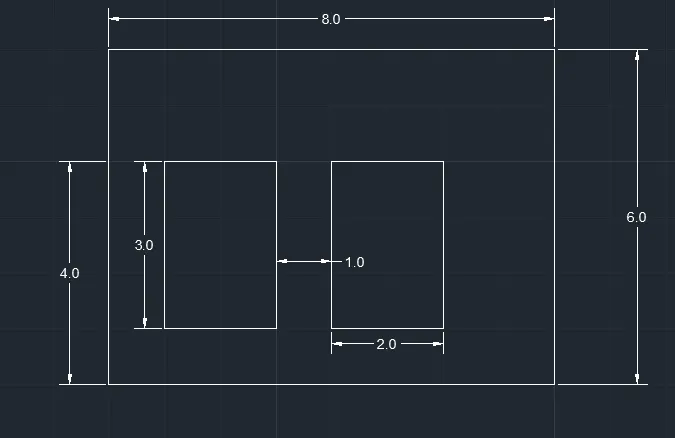
BY USING RECTANGLE METHOD
Command: L
LINE
Specify first point: 2,1
Specify next point or [Undo]: @8,0
Specify next point or [Undo]: @0,6
Specify next point or [Close/Undo]: @-8,0
Specify next point or [Close/Undo]: C
Command: L
LINE
Specify first point: 3,2
Specify next point or [Undo]: @2,0
Specify next point or [Undo]: @0,3
Specify next point or [Close/Undo]: @-2,0
Specify next point or [Close/Undo]: C
Command: L
LINE
Specify first point: 6,2
Specify next point or [Undo]: @2,0
Specify next point or [Undo]: @0,3
Specify next point or [Close/Undo]: @-2,0
Specify next point or [Close/Undo]: C
BY USING POLAR METHOD
LINE
Specify first point: 2,1
Specify next point or [Undo]: @8<0
Specify next point or [Undo]: @6<90
Specify next point or [Close/Undo]: @8<180
Specify next point or [Close/Undo]: C
Command: L
LINE
Specify first point: 3,2
Specify next point or [Undo]: @2<0
Specify next point or [Undo]: @3<90
Specify next point or [Close/Undo]: @2<180
Specify next point or [Close/Undo]: C
Command: L
LINE
Specify first point: 6,2
Specify next point or [Undo]: @2<0
Specify next point or [Undo]: @3<90
Specify next point or [Close/Undo]: @2<180
Specify next point or [Close/Undo]: C
BY USING DIRECT METHOD
Command: L LINE
Specify first point: 2,1
Specify next point or [Undo]: 8
Specify next point or [Undo]: 6
Specify next point or [Close/Undo]: 8
Specify next point or [Close/Undo]: 6
Specify next point or [Close/Undo]:
Command: L
LINE
Specify first point: 3,2
Specify next point or [Undo]: 2
Specify next point or [Undo]: 3
Specify next point or [Close/Undo]: 2
Specify next point or [Close/Undo]: C
Command: L
LINE
Specify first point: 6,2
Specify next point or [Undo]: 2
Specify next point or [Undo]: 3
Specify next point or [Undo]: 2
Specify next point or [Close/Undo]: C
FOR DRAWING P8
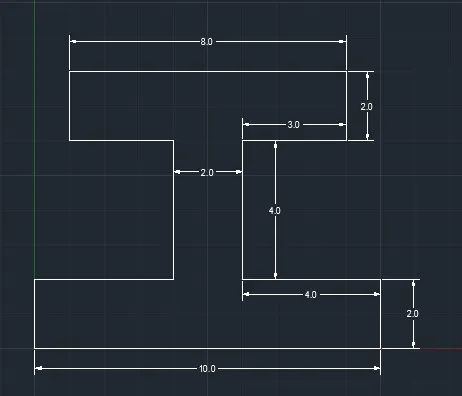
BY USING RECTANGLE METHOD
Command: L
LINE
Specify first point: 0,0
Specify next point or [Undo]: @10,0
Specify next point or [Undo]: @0,2
Specify next point or [Close/Undo]: @-4,0
Specify next point or [Close/Undo]: @0,4
Specify next point or [Close/Undo]: @3,0
Specify next point or [Close/Undo]: @0,2
Specify next point or [Close/Undo]: @-8,0
Specify next point or [Close/Undo]: @0,-2
Specify next point or [Close/Undo]: @3,0
Specify next point or [Close/Undo]: @0,-4
Specify next point or [Close/Undo]: @-4,0
Specify next point or [Close/Undo]: C
FOR DRAWING P9
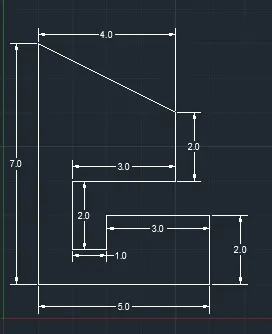
BY USING RECTANGLE METHOD
LINE
Specify first point: 1,1
Specify next point or [Undo]: @5,0
Specify next point or [Undo]: @0,2
Specify next point or [Close/Undo]: @-3,0
Specify next point or [Close/Undo]: @-1,0
Specify next point or [Close/Undo]: U
Specify next point or [Close/Undo]: @0,-1
Specify next point or [Close/Undo]: @-1,0
Specify next point or [Close/Undo]: @0,2
Specify next point or [Close/Undo]: @3,0
Specify next point or [Close/Undo]: @0,2
Specify next point or [Close/Undo]: @-4,2
Specify next point or [Close/Undo]: C
FOR DRAWING 10
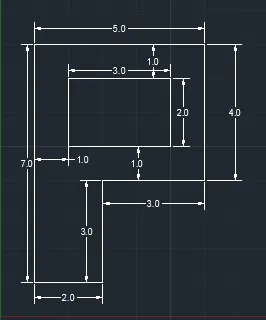
BY USING RECTANGLE METHOD
Command: L
LINE
Specify first point: 1,1
Specify next point or [Undo]: @2,0
Specify next point or [Undo]: @0,3
Specify next point or [Close/Undo]: @3,0
Specify next point or [Close/Undo]: @0,4
Specify next point or [Close/Undo]: @-5,0
Specify next point or [Close/Undo]: C
Command: L
LINE
Specify first point: 2,5
Specify next point or [Undo]: @3,0
Specify next point or [Undo]: @0,2
Specify next point or [Close/Undo]: @-3,0
Specify next point or [Close/Undo]: C
FOR CIVIL DRAWING PROFILE WOOD
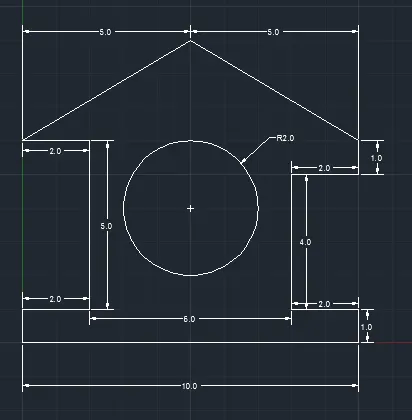
Command: L
LINE
Specify first point: 0,0
Specify next point or [Undo]: @10,0
Specify next point or [Undo]: @0,1
Specify next point or [Close/Undo]: @-2,0
Specify next point or [Close/Undo]: @0,4
Specify next point or [Close/Undo]: @2,0
Specify next point or [Close/Undo]: @1,0
Specify next point or [Close/Undo]: @0,1
Specify next point or [Close/Undo]: @-5,4
Specify next point or [Close/Undo]: @-5,3
Specify next point or [Close/Undo]: @-2,0
Specify next point or [Close/Undo]: @2,0
Specify next point or [Close/Undo]: @0,-5
Specify next point or [Close/Undo]: @-2,0
Specify next point or [Close/Undo]: C
Command: _circle
Specify center point for circle or [3P/2P/Ttr (tan tan radius)]: 5,4
Specify radius of circle or [Diameter] <3>: 2
FOR QUEEN POST TRUSS
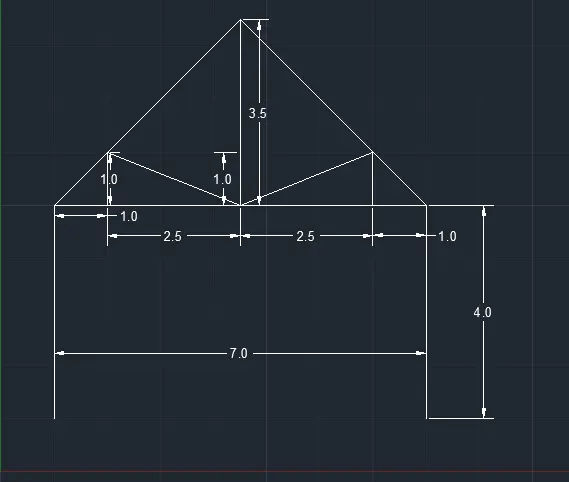
Command: L
LINE
Specify first point: 1,1
Specify next point or [Undo]: @0,4
Specify next point or [Undo]: @1,0
Specify next point or [Close/Undo]: @2.5,0
Specify next point or [Close/Undo]: @2.5,0
Specify next point or [Close/Undo]: @1,0
Specify next point or [Close/Undo]: @0,-4
command: L
LINE
Specify first point: 8,5
Specify next point or [Undo]: @-3.5,3.5
Specify next point or [Undo]: @-3.5,-3.5
Specify next point or [Close/Undo]:
Command: L
LINE
Specify first point: 2,5
Specify next point or [Undo]: @0,1
Specify next point or [Undo]: @2.5,-1
Specify next point or [Close/Undo]: @2.5,1
Specify next point or [Close/Undo]: @0,-1
Specify next point or [Close/Undo]:
Command: L
LINE
Specify first point: 4.5,5
Specify next point or [Undo]: @0,3.5
Specify next point or [Undo]:
FOR MONO PITCH
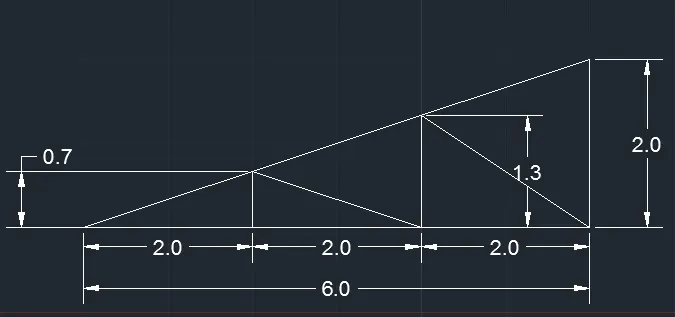
Command: L
LINE
Specify first point: 1,1
Specify next point or [Undo]: Ortho on @2,0
Specify next point or [Undo]: @0,0.667
Specify next point or [Close/Undo]: @2,-0.667
Specify next point or [Close/Undo]: @0,2
Specify next point or [Close/Undo]: @0,1.333
Specify next point or [Close/Undo]: @2,-0.333
Specify next point or [Close/Undo]: @2,-1.333
Specify next point or [Close/Undo]: @0,2
Specify next point or [Close/Undo]: @-6,-2
Specify next point or [Close/Undo]: @-6,-2
Command: L
LINE
Specify first point: 3,1
Specify next point or [Undo]: @4,0
Specify next point or [Undo]: