Drafting of various geometries using Chamfer, Fillet tool in AutoCad
Aim: Drafting of various geometries using Chamfer, Fillet tool in AutoCad
software i used AutoCAD
Tools are i used
FILLET
CHAMFER
LINE
TRIM
CIRCLE
COPY
MOVE
ROTATE
DIMENSIONS
MIRROR
TEXT
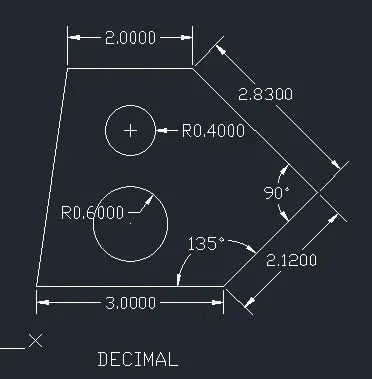
PROCEDURE OF 1ST GEOMETRY
- draw a line with 3 units
- with the help of chamfer command make the line of 2.12units with an angle of 135 degree.
- draw the perpendicular line to the previous line with a distance of 2.83
- again draw a line perpendicular line to the previous line with a distance of 2 units
- join the line to the first line (by through coordination method)-(1,1) or by through fillet (or) chamfer.
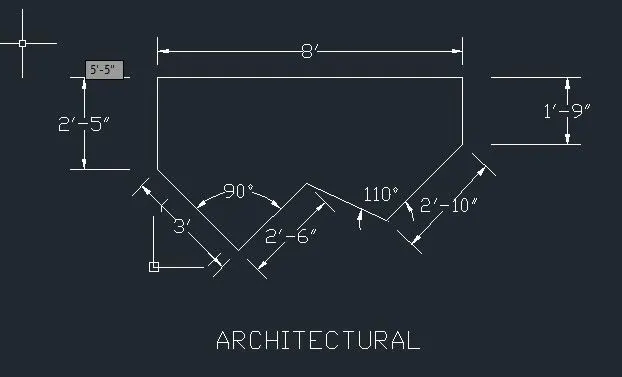
PROCEDURE OF 2nd GEOMETRY
- draw the line with distance of 8'
- draw the vertical lines with reference to the both ends of the first line .
- through chamfer command make the line 3' with the angle of 45
- procedure repeat and make the line 2'16",2'16" with an angle of 45,135.
- form the another line to join the last two lines.
- provide the dimension to the each side.
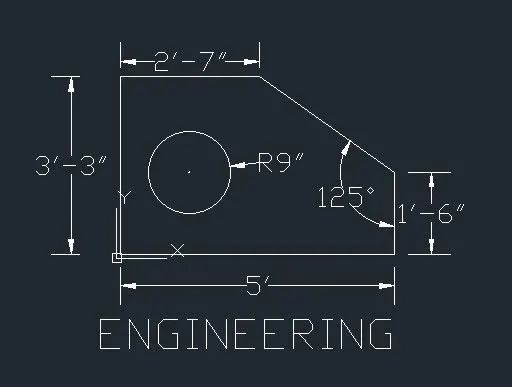
PROCEDURE OF 3rd GEOMETRY
- draw the line with distance of 5'.
- at the initial end draw the vertical end at a distance of 3'3"
- draw the line which is perpendicular to the last line at a distance of 2'7".
- the first line right side end take areference draw the vertical line at adistance of 1'6"
- join the lines whose are not enclosed with the inclined line.
- with reference to the mid point of right vertical and top horizontal line draw the circle with radius 9".
- provide dimension to the geometry.
PROCEDURE OF 4th GEOMETRY
- with the help of tools fillet ,offset , line, trim.
- by taking the line command (or) polyline command is enough to draw this geometry.
- dimensions are provided to the each side.
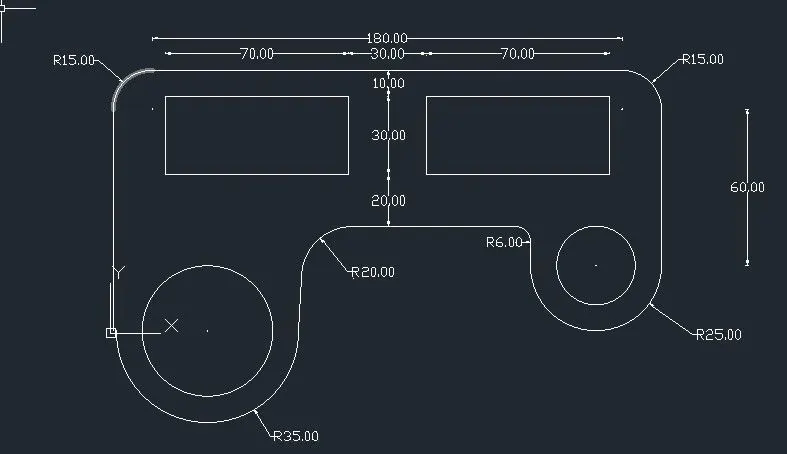
PROCEDURE OF 5th GEOMETRY
- Draw the line with the distance of 210 units
- draw the vertical lines at the both sides with references to previous ends.
- at the both edges have to fillet with the radius of 15.
- draw the rectangles at the both sides with dimensions of 70,30
- take the distance 60 forms the horizontal line with reference to the first line by usoing offset command.
- with the both vertical last ends take as reference draw a circles on both side .
- with help of fillet makes the radius of 35 and 25 on the outside of the circle.
- at the middle line and the internal verticals are fillet with radius of 20,6 units
- provided the dimensions to the geometry.
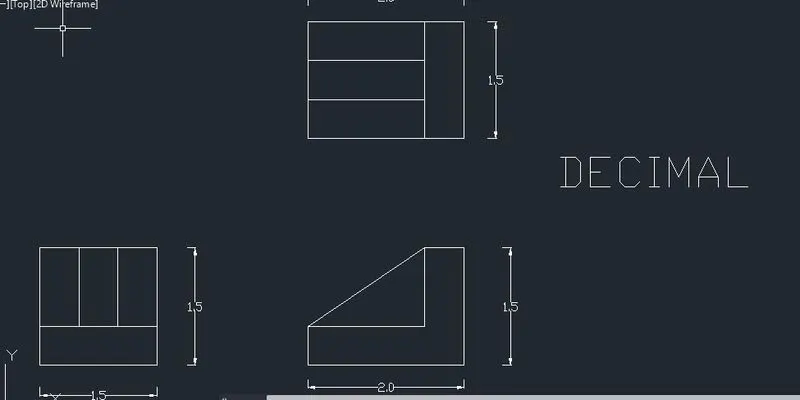
PROCEDURE OF 6th GEOMETRY
- with the help of x line we made the geometry.
- with the help of offset we maintain same the distance in between them
- tools i used by making this geometry are x line, trim, offset,line.
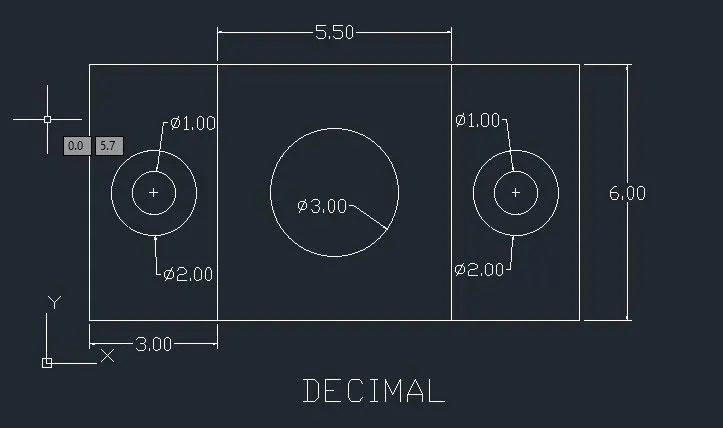
PROCEDURE OF 7th GEOMETRY
- Draw the the lines with a distance 11.50
- at the both ends take a referrence draw the vertical lines at a distance of 6
- by taking offset divide in to two lines are drew in between the vertical lines.
- withe midpoints of the all lines take as the refference draw the circle with respect of centre.
- provided the dimensions to it.
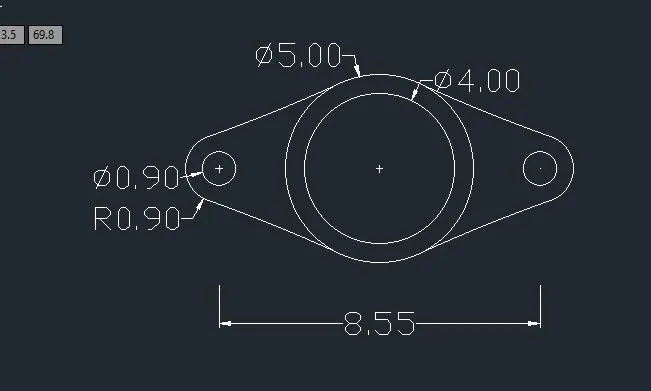
PROCEDURE OF 8th GEOMETRY
- draw the circle with dia of 4
- with respect to the centre draw another circle with dia 5
- draw the line with adistance of 8.55
- with refference to both end points of line draw the circles with dia of 0.9 and radius of 0.9
- with the help of trim remove the unnecessay lines.
- fillet the end circle and the middle exterior circle.
- provided the dimensions to it.
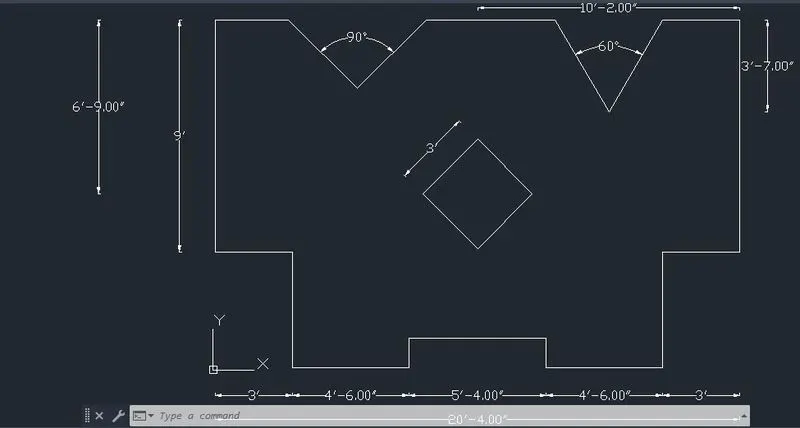
PROCEDURE OF 9th GEOMETRY
- I made this geometry by using tools like chamfer, line, offset,rotate,rectangle.
- to create of right side chamfer line first distances are provide as 2'3" and another distance as 3'7"
- with help of mirror create the another chamfer line and both makes the angle 60 degree.
- same procedure is repeated to the left chamfer but with the different distance.
- inclined square is made by two following steps
- draw the rectangle with dimensions as 3'*3'
- and rotate it 45 with reference of it base point.
- provide the dimensions to it.
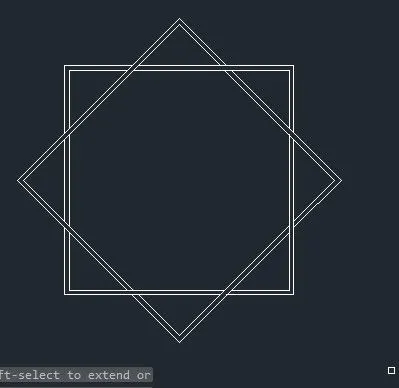
PROCEDURE OF 10th GEOMETRY
- draw the rectangle with dimensions of 5*5
- with the rotate copy reference we can the make th inclined rectangle.
- by using array also make the inclined rectangle
- remove the joint line with the help of trim command.
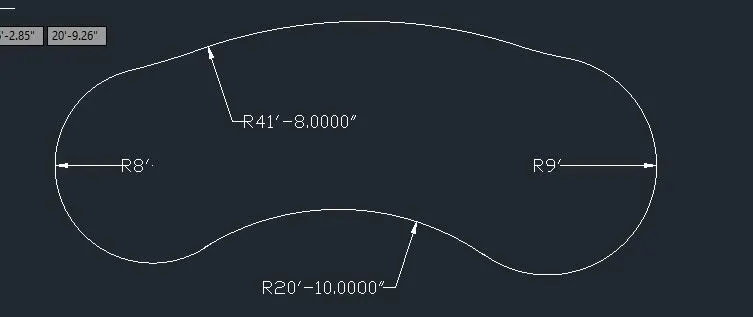
PROCEDURE OF 11th GEOMETRY
- draw the line with a distance.
- take the end points as a reference draw the circles at the both ends with radius of 8' and 9'
- by using fillet joins the bottom of the circles with radius of 20'10"
- in the above draw the arc with radius of 41'8"
- joins the end of the arc to the upper side circle with radius of 41'8"
- by the command blend make it as the single entity.
- provided the dimensions to it.
RESULTS: I Drafted the various geometries using Chamfer, Fillet tool in AutoCad
1.
2.
3.
4.
5.
6.
7.
8.
9.
10.
11.