Drafting of various geometries using Chamfer, Fillet tool in AutoCad
Aim;-To create geometery by using autocad
Introduction:-Constructing various geometeries using fillet and chamfer commands in auto cad
Commands:-Use of line and circle
Procedure:-
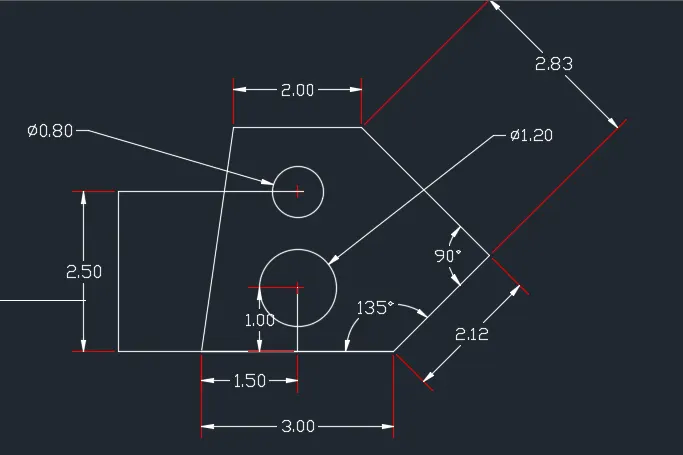
- Create a line using command L and the coordinate are 0,0 and 3,0
- Relative coordinates are 2.12<135 and the other coordinates is @2.83<90
- Next is -2,0 than close
- Create a circle now using command C
- Offset of 1 unit upwards from bottom line centre
- Similarly give the other offsets 2.5 from bottom line 3
- Draw a refernce line left corner to upwards and offsets at a distance 1.5 towards right
- Draw a circle diameter 1.2 an click on center give diameter 0.8 and earse all set line
Results:-
Aim;-To create geometery by using autocad
Introduction:-Constructing various geometeries using fillet and chamfer commands in auto cad
Commands:-Use of line and circle
Procedure:-
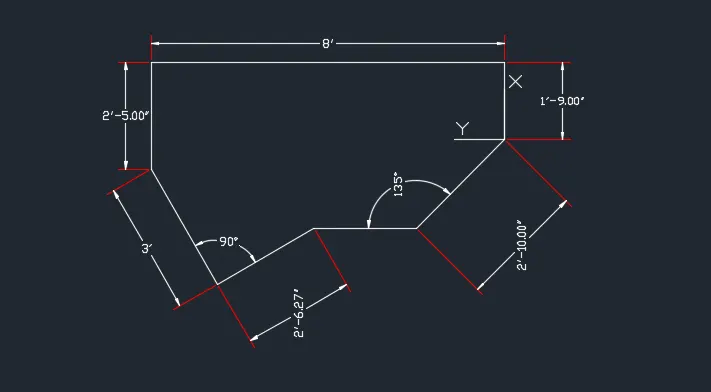
- Create a line using command L and the coordinate are 0,0 and 3,0
- Relative coordinates are 2.12<135 and the other coordinates is @2.83<90
- Next is -2,0 than close
- Create a circle now using command C
- Offset of 1 unit upwards from bottom line centre
- Similarly give the other offsets 2.5 from bottom line 3
- Draw a refernce line left corner to upwards and offsets at a distance 1.5 towards right
- Draw a circle diameter 1.2 an click on center give diameter 0.8 and earse all set line
Results:-
Aim;-To create geometery by using autocad
Introduction:-Constructing various geometeries using fillet and chamfer commands in auto cad
Commands:-Use of line and circle
Procedure:-
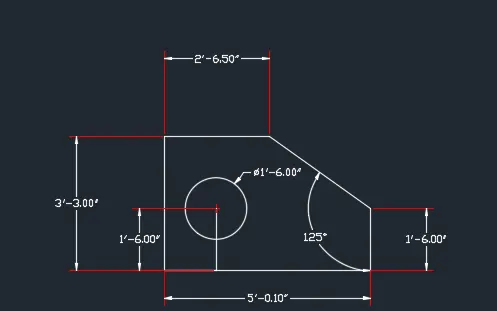
- Create a line using command L and the coordinate are 0,0 and 3,0
- Relative coordinates are 2.12<135 and the other coordinates is @2.83<90
- Next is -2,0 than close
- Create a circle now using command C
- Offset of 1 unit upwards from bottom line centre
- Similarly give the other offsets 2.5 from bottom line 3
- Draw a refernce line left corner to upwards and offsets at a distance 1.5 towards right
- Draw a circle diameter 1.2 an click on center give diameter 0.8 and earse all set line
- reate a circle now using command C
- Offset of 1 unit upwards from bottom line centre
- Similarly give the other offsets 2.5 from bottom line 3
- Draw a refernce line left corner to upwards and offsets at a distance 1.5 towards r
Results:-
Aim;-To create geometery by using autocad
Introduction:-Constructing various geometeries using fillet and chamfer commands in auto cad
Commands:-Use of line and circle
Procedure:-
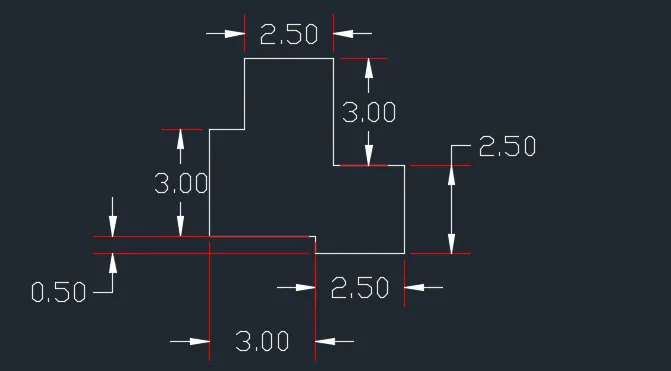
- Create a line using command L and the coordinate are 0,0 and 3,0
- Relative coordinates are 2.12<135 and the other coordinates is @2.83<90
- Next is -2,0 than close
- Create a circle now using command C
- Offset of 1 unit upwards from bottom line centre
- Similarly give the other offsets 2.5 from bottom line 3
- Draw a refernce line left corner to upwards and offsets at a distance 1.5 towards right
- Draw a circle diameter 1.2 an click on center give diameter 0.8 and earse all set line
- Create a line using command L and the coordinate are 0,0 and 3,0
- Relative coordinates are 2.12<135 and the other coordinates is @2.83<90
- Next is -2,0 than close
- Create a circle now using command C
- Offset of 1 unit upwards from bottom line centre
Results:-
Aim;-To create geometery by using autocad
Introduction:-Constructing various geometeries using fillet and chamfer commands in auto cad
Commands:-Use of line and circle
Procedure:-
- Create a line using command L and the coordinate are 0,0 and 3,0
- Relative coordinates are 2.12<135 and the other coordinates is @2.83<90
- Next is -2,0 than close
- Create a circle now using command C
- Offset of 1 unit upwards from bottom line centre
- Similarly give the other offsets 2.5 from bottom line 3
- Draw a refernce line left corner to upwards and offsets at a distance 1.5 towards right
- Draw a circle diameter 1.2 an click on center give diameter 0.8 and earse all set line
- Next is -2,0 than close
- Create a circle now using command C
- Offset of 1 unit upwards from bottom line centre
- Similarly give the other offsets 2.5 from bottom line 3
- Draw a refernce line left corner to upwards and off
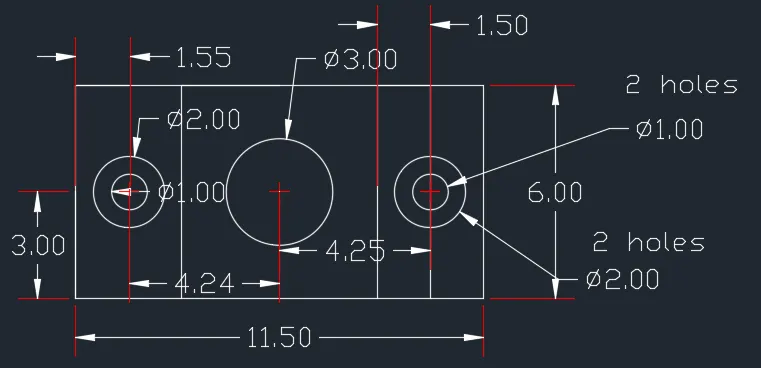
Results:-
Aim;-To create geometery by using autocad
Introduction:-Constructing various geometeries using fillet and chamfer commands in auto cad
Commands:-Use of line and circle
Procedure:-
- Create a line using command L and the coordinate are 0,0 and 3,0
- Relative coordinates are 2.12<135 and the other coordinates is @2.83<90
- Next is -2,0 than close
- Create a circle now using command C
- Offset of 1 unit upwards from bottom line centre
- Similarly give the other offsets 2.5 from bottom line 3
- Draw a refernce line left corner to upwards and offsets at a distance 1.5 towards right
- Draw a circle diameter 1.2 an click on center give diameter 0.8 and earse all set line
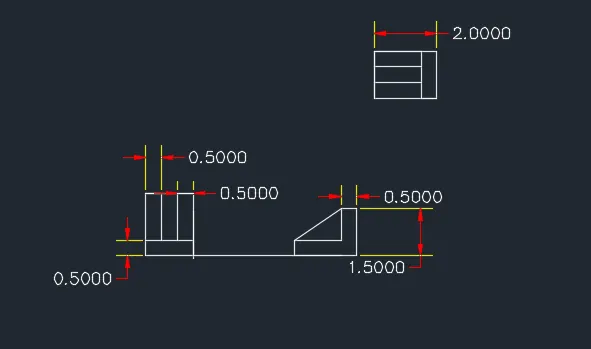
Results:-
Aim;-To create geometery by using autocad
Introduction:-Constructing various geometeries using fillet and chamfer commands in auto cad
Commands:-Use of line and circle
Procedure:-
- Create a line using command L and the coordinate are 0,0 and 3,0
- Relative coordinates are 2.12<135 and the other coordinates is @2.83<90
- Next is -2,0 than close
- Create a circle now using command C
- Offset of 1 unit upwards from bottom line centre
- Similarly give the other offsets 2.5 from bottom line 3
- Draw a refernce line left corner to upwards and offsets at a distance 1.5 towards right
- Draw a circle diameter 1.2 an click on center give diameter 0.8 and earse all set line
- Relative coordinates are 2.12<135 and the other coordinates is @2.83<90
- Next is -2,0 than close
- Create a circle now using command C
- Offset of 1 unit upwards from bottom line centre
- Similarly give the other offsets 2.5 from bottom line 3
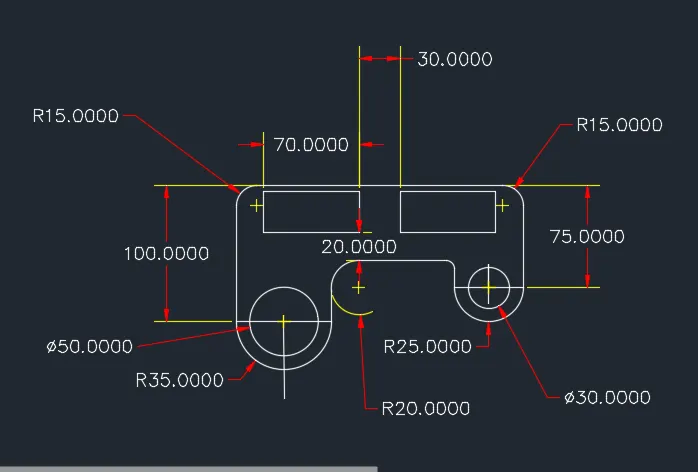
Results:-
Aim;-To create geometery by using autocad
Introduction:-Constructing various geometeries using fillet and chamfer commands in auto cad
Commands:-Use of line and circle
Procedure:-
- Create a line using command L and the coordinate are 0,0 and 3,0
- Relative coordinates are 2.12<135 and the other coordinates is @2.83<90
- Next is -2,0 than close
- Create a circle now using command C
- Offset of 1 unit upwards from bottom line centre
- Similarly give the other offsets 2.5 from bottom line 3
- Draw a refernce line left corner to upwards and offsets at a distance 1.5 towards right
- Draw a circle diameter 1.2 an click on center give diameter 0.8 and earse all set line
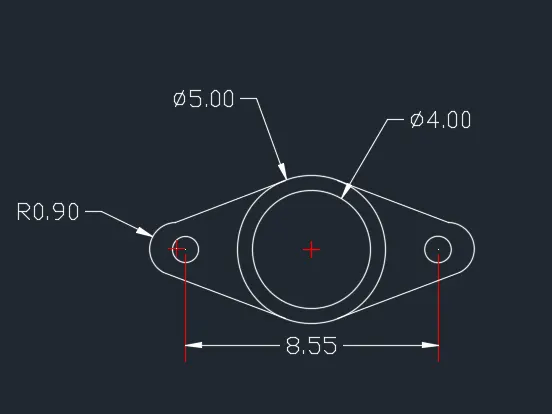
Results:-
Aim;-To create geometery by using autocad
Introduction:-Constructing various geometeries using fillet and chamfer commands in auto cad
Commands:-Use of line and circle
Procedure:-
- Create a line using command L and the coordinate are 0,0 and 3,0
- Relative coordinates are 2.12<135 and the other coordinates is @2.83<90
- Next is -2,0 than close
- Create a circle now using command C
- Offset of 1 unit upwards from bottom line centre
- Similarly give the other offsets 2.5 from bottom line 3
- Draw a refernce line left corner to upwards and offsets at a distance 1.5 towards right
- Draw a circle diameter 1.2 an click on center give diameter 0.8 and earse all set line
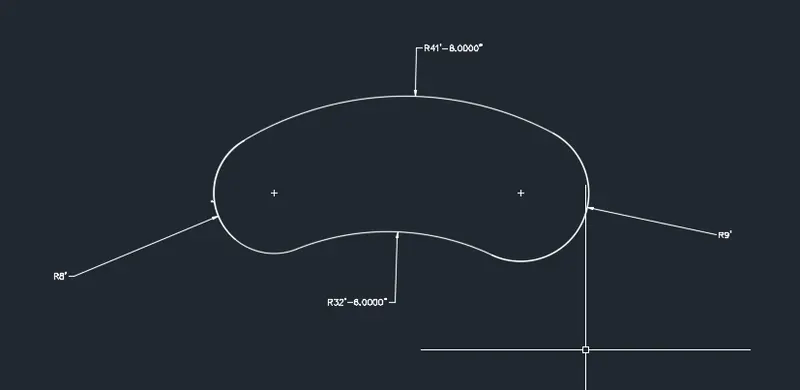
Results:-
Aim;-To create geometery by using autocad
Introduction:-Constructing various geometeries using fillet and chamfer commands in auto cad
Commands:-Use of line and circle
Procedure:-
- Draw a polygon or square of 4 sides with side of 4unit
- Draw another square with same center with side little more than 4 unit or 4.5
- Now rotate it at the angle of 45 degree
- and doesnot erase the souce object
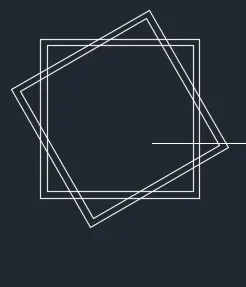
Results:-
Aim;-To create geometery by using autocad
Introduction:-Constructing various geometeries using fillet and chamfer commands in auto cad
Commands:-Use of line and circle
Procedure:-
- Create a line using command L and the coordinate are 0,0 and 3,0
- Relative coordinates are 2.12<135 and the other coordinates is @2.83<90
- Next is -2,0 than close
- Create a circle now using command C
- Offset of 1 unit upwards from bottom line centre
- Similarly give the other offsets 2.5 from bottom line 3
- Draw a refernce line left corner to upwards and offsets at a distance 1.5 towards right
- Draw a circle diameter 1.2 an click on center give diameter 0.8 and earse all set line
- Create a circle now using command C
- Offset of 1 unit upwards from bottom line centre
- Similarly give the other offsets 2.5 from bottom line 3
- Draw a refernce line left corner to upwards and offsets at a distance 1.5 towards right
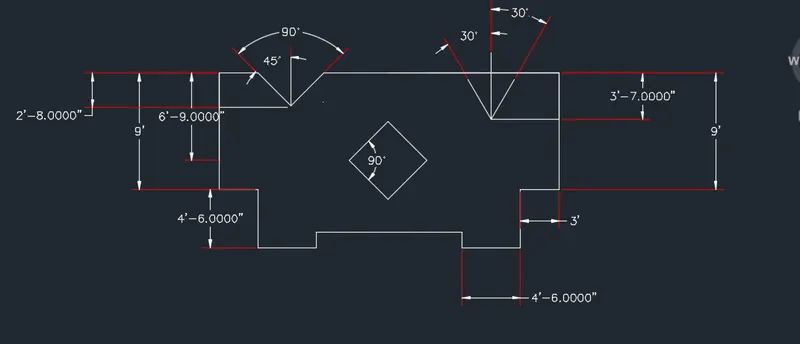
Results:-