Drafting of various geometries using Chamfer, Fillet tool in AutoCad
1. Aim :- To Draw given figure with decimal units.
Procedure:-
Command: UNITS #Specify decimal units with precision of 0.00#
Command: L
LINE
Specify first point: 1,1
Specify next point or [Undo]: @3,0
Specify next point or [eXit/Undo]: 2.12
Specify next point or [Close/eXit/Undo]: >>Tab Index <0>:
Resuming LINE command.
Specify next point or [Close/eXit/Undo]: 2.83
Specify next point or [Close/eXit/Undo]: 2
Specify next point or [Close/eXit/Undo]: c
Command: C
CIRCLE
Specify center point for circle or [3P/2P/Ttr (tan tan radius)]: 1
Specify radius of circle or [Diameter]: 1.20
Command: _u CIRCLE
Command: C
CIRCLE
Specify center point for circle or [3P/2P/Ttr (tan tan radius)]: 1
Specify radius of circle or [Diameter]: d
Specify diameter of circle: 1.20
Command: C
CIRCLE
Specify center point for circle or [3P/2P/Ttr (tan tan radius)]: 2.50
Specify radius of circle or [Diameter] <0.60>: d
Specify diameter of circle <1.20>: .80
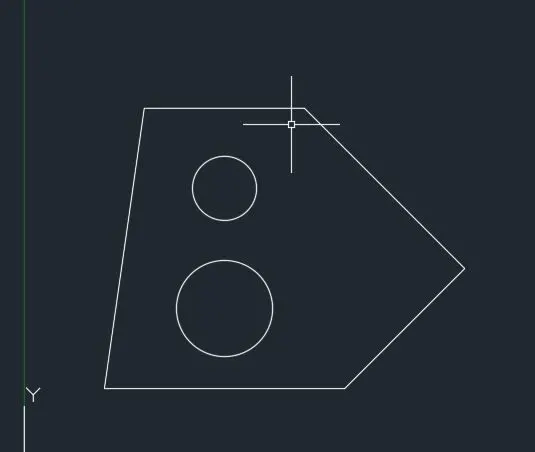
Results:- The given drawing is drawn using decimal units.
2.Aim:-To Draw given figure with Architechtural units.
Procedure:-
Command: L
LINE
Specify first point:
Specify next point or [Undo]: 8'
Specify next point or [eXit/Undo]: 1'-9"
Specify next point or [Close/eXit/Undo]: *Cancel*
Command:
LINE
Specify first point:
Specify next point or [Undo]: 2'-5"
Specify next point or [eXit/Undo]: 3'
Specify next point or [Close/eXit/Undo]: 2'-6"
Specify next point or [Close/eXit/Undo]: *Cancel*
Command:
LINE
Specify first point:
Specify next point or [Undo]: 2'-10"
Specify next point or [eXit/Undo]:
Specify next point or [Close/eXit/Undo]: *Cancel*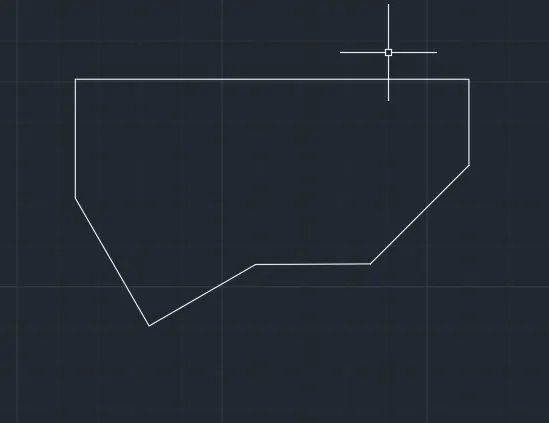
Results:- The given figure is drawn.
3. Aim:-To Draw given figure with Engineering units.
Procedure:-
Command: L
LINE
Specify first point:
Specify next point or [Undo]: 2'-6.5"
Specify next point or [eXit/Undo]: 3'-3.0"
Specify next point or [Close/eXit/Undo]: 5'-.1"
Specify next point or [Close/eXit/Undo]: 1'-6"
Specify next point or [Close/eXit/Undo]:
Specify next point or [Close/eXit/Undo]: *Cancel*
Select object to offset or [Exit/Undo] : *Cancel*
Command:
Command: _offset
Specify offset distance or [Through/Erase/Layer] <1'-6.0">: 1'-3"
Command: C
CIRCLE
Specify center point for circle or [3P/2P/Ttr (tan tan radius)]:
Specify radius of circle or [Diameter]: d
Specify diameter of circle: 1'-6"
Command: Specify opposite corner or [Fence/WPolygon/CPolygon]:
Command: Specify opposite corner or [Fence/WPolygon/CPolygon]:
Command: _.erase 2 found
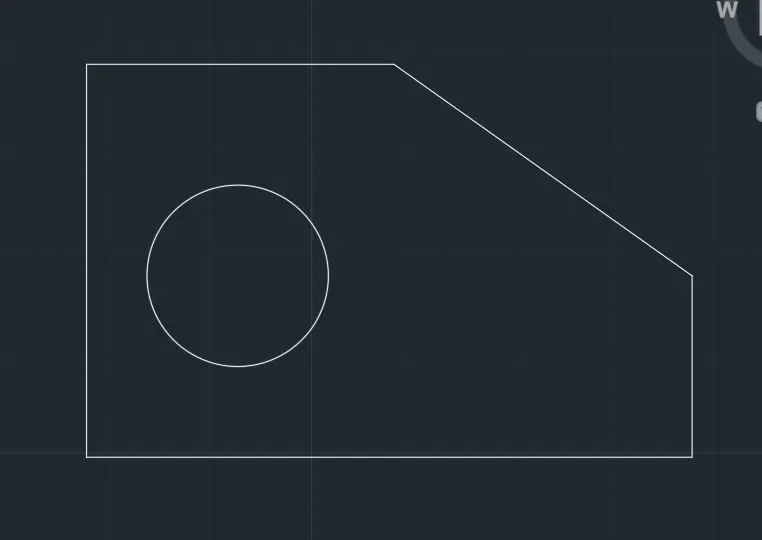
Results:- The given figure is drawn.
4. Aim:-To Draw given figure.
Procedure:-
Command: L
LINE
Specify first point:
Specify next point or [Undo]: 2
Specify next point or [eXit/Undo]: 2.5
Specify next point or [Close/eXit/Undo]: 3
Specify next point or [Close/eXit/Undo]: 2
Specify next point or [Close/eXit/Undo]: 2.5
Specify next point or [Close/eXit/Undo]: 2.5
Specify next point or [Close/eXit/Undo]: .5
Specify next point or [Close/eXit/Undo]: 3
Specify next point or [Close/eXit/Undo]: 3
Specify next point or [Close/eXit/Undo]:
Specify next point or [Close/eXit/Undo]: *Cancel*
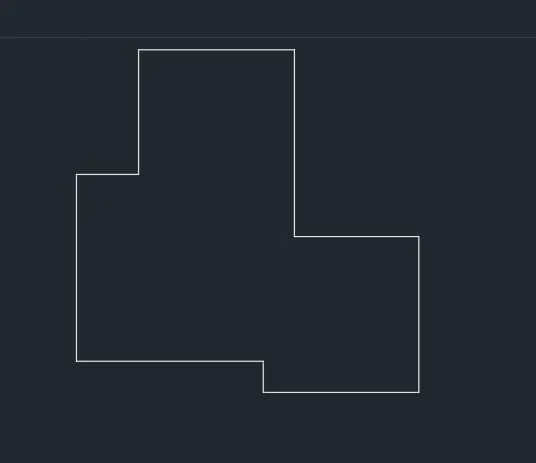
Results:- The given figure is drawn.
5. Aim:-To Draw given figure.
Procedure:-
Command:
Command:
Command: _line
Specify first point:
Specify next point or [Undo]: 6
Specify next point or [eXit/Undo]: 11.5
Specify next point or [Close/eXit/Undo]: 6
Specify next point or [Close/eXit/Undo]: *Cancel*
Command: O
OFFSET
Current settings: Erase source=No Layer=Source OFFSETGAPTYPE=0
Specify offset distance or [Through/Erase/Layer] <15.00>: 3
Select object to offset or [Exit/Undo] :
Specify point on side to offset or [Exit/Multiple/Undo] :
Select object to offset or [Exit/Undo] :
Specify point on side to offset or [Exit/Multiple/Undo] :
Select object to offset or [Exit/Undo] : *Cancel*
Command: L
LINE
Specify first point:
Specify next point or [Undo]:
Specify next point or [eXit/Undo]:
Specify next point or [Close/eXit/Undo]:
Specify next point or [Close/eXit/Undo]: *Cancel*
Command: C
CIRCLE
Specify center point for circle or [3P/2P/Ttr (tan tan radius)]:
Specify radius of circle or [Diameter] <9.00>: d
Specify diameter of circle <18.00>: 3
Command: C
CIRCLE
Specify center point for circle or [3P/2P/Ttr (tan tan radius)]:
Specify radius of circle or [Diameter] <1.50>: d
Specify diameter of circle <3.00>: 1
Command: C
CIRCLE
Specify center point for circle or [3P/2P/Ttr (tan tan radius)]:
Specify radius of circle or [Diameter] <0.50>: d
Specify diameter of circle <1.00>: 1
Command: O
OFFSET
Specify offset distance or [Through/Erase/Layer] <3.00>: 1
Specify offset distance or [Through/Erase/Layer] <1.00>: .5
Select object to offset or [Exit/Undo] :
Specify point on side to offset or [Exit/Multiple/Undo] :
Select object to offset or [Exit/Undo] :
Select object to offset or [Exit/Undo] :
Specify point on side to offset or [Exit/Multiple/Undo] :
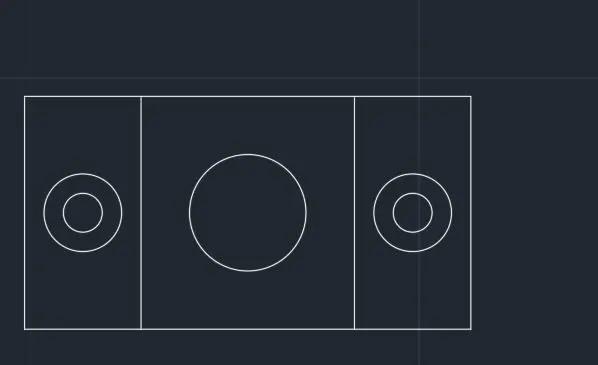
Results:- The given figure is drawn.
6. Aim:-To Draw given figure.
Procedure:-
Command: REC
RECTANG
Specify first corner point or [Chamfer/Elevation/Fillet/Thickness/Width]:
Specify other corner point or [Area/Dimensions/Rotation]: d
Specify length for rectangles <1.0>: 1.5
Specify width for rectangles <1.5>: 1
Specify other corner point or [Area/Dimensions/Rotation]:
Command: Specify opposite corner or [Fence/WPolygon/CPolygon]:
Command:
Command:
Command: _explode 1 found
Command: O
OFFSET
Current settings: Erase source=No Layer=Source OFFSETGAPTYPE=0
Specify offset distance or [Through/Erase/Layer] <0.5>:
Select object to offset or [Exit/Undo] :
Specify point on side to offset or [Exit/Multiple/Undo] :
Select object to offset or [Exit/Undo] :
Specify point on side to offset or [Exit/Multiple/Undo] :
Select object to offset or [Exit/Undo] :
Specify point on side to offset or [Exit/Multiple/Undo] :
Select object to offset or [Exit/Undo] : *Cancel*
Command:
Command:
** STRETCH **
Specify stretch point or [Base point/Copy/Undo/eXit]:
Command: Specify opposite corner or [Fence/WPolygon/CPolygon]:
Command: Specify opposite corner or [Fence/WPolygon/CPolygon]:
Command:
** STRETCH **
Specify stretch point or [Base point/Copy/Undo/eXit]:
Command: *Cancel*
Command: L
LINE
Specify first point:
Specify next point or [Undo]:
Specify next point or [eXit/Undo]: 1.5
Specify next point or [Close/eXit/Undo]: 1
Specify next point or [Close/eXit/Undo]: .5
Specify next point or [Close/eXit/Undo]: 1.5
Specify next point or [Close/eXit/Undo]:
Specify next point or [Close/eXit/Undo]: *Cancel*
Command: L
LINE
Specify first point:
Specify next point or [Undo]:
Specify next point or [eXit/Undo]: *Cancel*
Command: L
LINE
Specify first point: *Cancel*
Command: REC
RECTANG
Specify first corner point or [Chamfer/Elevation/Fillet/Thickness/Width]:
Specify other corner point or [Area/Dimensions/Rotation]: d
Specify length for rectangles <1.5>:
Specify width for rectangles <1.0>:
Specify other corner point or [Area/Dimensions/Rotation]: _u
Point or option keyword required.
Specify other corner point or [Area/Dimensions/Rotation]: *Cancel*
Command: R
REDRAW
Command: REC
RECTANG
Specify first corner point or [Chamfer/Elevation/Fillet/Thickness/Width]:
Specify other corner point or [Area/Dimensions/Rotation]: d
Specify length for rectangles <1.5>:
Specify width for rectangles <1.0>: 1.5
Specify other corner point or [Area/Dimensions/Rotation]:
Command: Specify opposite corner or [Fence/WPolygon/CPolygon]:
Command:
Command:
Command: _explode 1 found
Command: O
OFFSET
Current settings: Erase source=No Layer=Source OFFSETGAPTYPE=0
Specify offset distance or [Through/Erase/Layer] <0.5>:
Select object to offset or [Exit/Undo] :
Specify point on side to offset or [Exit/Multiple/Undo] :
Select object to offset or [Exit/Undo] :
Specify point on side to offset or [Exit/Multiple/Undo] :
Select object to offset or [Exit/Undo] :
Specify point on side to offset or [Exit/Multiple/Undo] :
Select object to offset or [Exit/Undo] : *Cancel*
Command:
Command:
** STRETCH **
Specify stretch point or [Base point/Copy/Undo/eXit]:
Command:
Command:
** STRETCH **
Specify stretch point or [Base point/Copy/Undo/eXit]:
Command: *Cancel*
Command: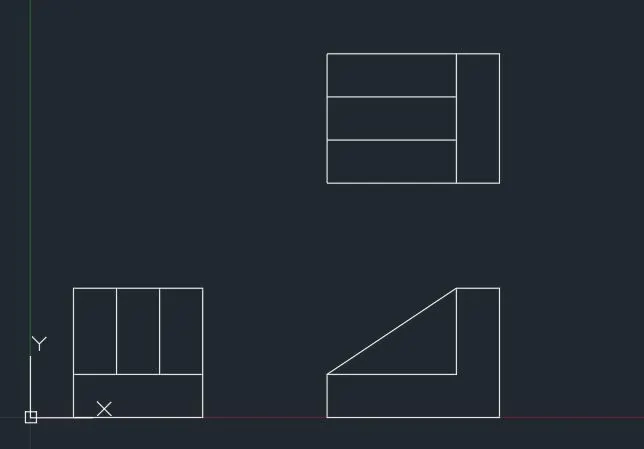
Results:- The given figure is drawn.
7.Aim:-To Draw given figure.
Procedure:-
Command: L
LINE
Specify first point:
Specify next point or [Undo]: 100
Specify next point or [eXit/Undo]: 210
Specify next point or [Close/eXit/Undo]: 75
Specify next point or [Close/eXit/Undo]: *Cancel*
Command:
Command:
Command: _arc
Specify start point of arc or [Center]: *Cancel*
Command:
Command: _arc
Specify start point of arc or [Center]:
Specify second point of arc or [Center/End]: _c
Specify center point of arc: 25
Specify end point of arc (hold Ctrl to switch direction) or [Angle/chord Length]:
Command: L
LINE
Specify first point: *Cancel*
Command: O
OFFSET
Current settings: Erase source=No Layer=Source OFFSETGAPTYPE=0
Specify offset distance or [Through/Erase/Layer] <0.5>: 60
Select object to offset or [Exit/Undo] :
Specify point on side to offset or [Exit/Multiple/Undo] :
Select object to offset or [Exit/Undo] : *Cancel*
Command:
Command:
Command: _arc
Specify start point of arc or [Center]:
Specify second point of arc or [Center/End]: _c
Specify center point of arc: 35
Specify end point of arc (hold Ctrl to switch direction) or [Angle/chord Length]:
Command: L
LINE
Specify first point:
Specify next point or [Undo]:
Specify next point or [eXit/Undo]: *Cancel*
Command: L
LINE
Specify first point:
Specify next point or [Undo]:
Specify next point or [eXit/Undo]: *Cancel*
Command:
Command:
** STRETCH **
Specify stretch point or [Base point/Copy/Undo/eXit]:
Command:
** STRETCH **
Specify stretch point or [Base point/Copy/Undo/eXit]:
Command:
Command:
Command: _MEASUREGEOM
Enter an option [Distance/Radius/Angle/ARea/Volume/Quick/Mode/eXit] : _quick
Move cursor or [Distance/Radius/Angle/ARea/Volume/Quick/Mode/eXit] : *Cancel*
Command:
Command:
Command: _circle
Specify center point for circle or [3P/2P/Ttr (tan tan radius)]:
Specify radius of circle or [Diameter]: d
Specify diameter of circle: 50
Command: C
CIRCLE
Specify center point for circle or [3P/2P/Ttr (tan tan radius)]:
Specify radius of circle or [Diameter] <25.0>: d
Specify diameter of circle <50.0>: 30
Command:
Command:
Command: _fillet
Current settings: Mode = TRIM, Radius = 15.0
Select first object or [Undo/Polyline/Radius/Trim/Multiple]: r
Specify fillet radius <15.0>:
Select first object or [Undo/Polyline/Radius/Trim/Multiple]:
Select second object or shift-select to apply corner or [Radius]:
Command:
Command:
Command: _fillet
Current settings: Mode = TRIM, Radius = 15.0
Select first object or [Undo/Polyline/Radius/Trim/Multiple]:
Select second object or shift-select to apply corner or [Radius]:
Command: F
FILLET
Current settings: Mode = TRIM, Radius = 15.0
Select first object or [Undo/Polyline/Radius/Trim/Multiple]: r
Specify fillet radius <15.0>: 6
Select first object or [Undo/Polyline/Radius/Trim/Multiple]:
Select second object or shift-select to apply corner or [Radius]:
Command: F
FILLET
Current settings: Mode = TRIM, Radius = 6.0
Select first object or [Undo/Polyline/Radius/Trim/Multiple]: r
Specify fillet radius <6.0>: 20
Select first object or [Undo/Polyline/Radius/Trim/Multiple]:
Select second object or shift-select to apply corner or [Radius]:
Command: REC
RECTANG
Current rectangle modes: Elevation=3.0
Specify first corner point or [Chamfer/Elevation/Fillet/Thickness/Width]:
Specify other corner point or [Area/Dimensions/Rotation]: d
Specify length for rectangles <1.5>: 70
Specify width for rectangles <1.5>: 30
Specify other corner point or [Area/Dimensions/Rotation]:
Command: CO
COPY 1 found
Current settings: Copy mode = Multiple
Specify base point or [Displacement/mOde] :
Specify second point or [Array] :
Specify second point or [Array/Exit/Undo] : *Cancel*
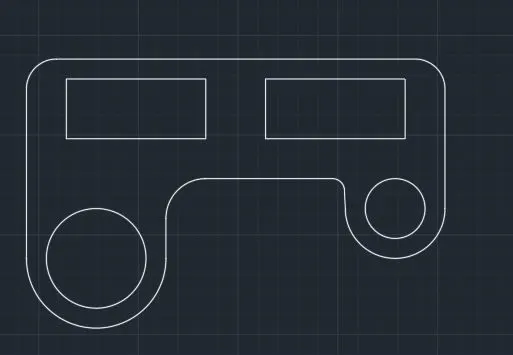
Results:- The given figure is drawn.
8. Aim:-To Draw given figure.
Procedure:-
Command: C
CIRCLE
Specify center point for circle or [3P/2P/Ttr (tan tan radius)]:
Specify radius of circle or [Diameter] <2.0>: d
Specify diameter of circle <4.0>: 5
Command: C
CIRCLE
Specify center point for circle or [3P/2P/Ttr (tan tan radius)]: 4.275
Specify radius of circle or [Diameter] <2.5>: d
Specify diameter of circle <5.0>: .9
Command: L
LINE
Specify first point: _tan to
Specify next point or [Undo]: _tan to
Specify next point or [eXit/Undo]: *Cancel*
Command: L
LINE
Specify first point:
>>Enter new value for ORTHOMODE <0>:
Resuming LINE command.
Specify first point: _tan to
Specify next point or [Undo]: _tan to
Specify next point or [eXit/Undo]: *Cancel*
Command: L
LINE
Specify first point: _tan to
Specify next point or [Undo]: _tan to
Specify next point or [eXit/Undo]: *Cancel*
Command: L
LINE
Specify first point: _tan to
Specify next point or [Undo]: _tan to
Specify next point or [eXit/Undo]: *Cancel*
Command: TRIM #Use trim command to trim out the arc#
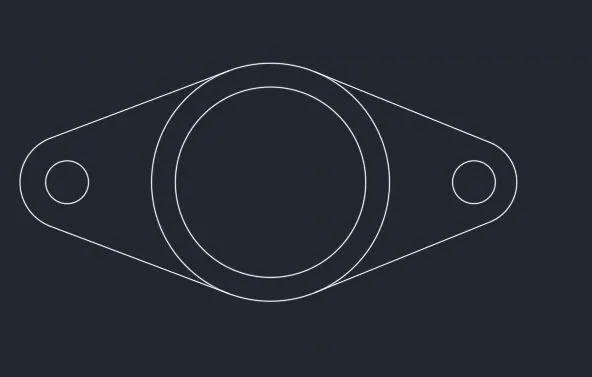
Results:- The given figure is drawn.
9.Aim:- To Draw given figure.
Procedure:-
Command: REC
RECTANG
Current rectangle modes: Elevation=3.0
Specify first corner point or [Chamfer/Elevation/Fillet/Thickness/Width]:
Specify other corner point or [Area/Dimensions/Rotation]: d
Specify length for rectangles <80.0>:
Specify width for rectangles <80.0>:
Specify other corner point or [Area/Dimensions/Rotation]:
Command: O
OFFSET
Current settings: Erase source=No Layer=Source OFFSETGAPTYPE=0
Specify offset distance or [Through/Erase/Layer] <10.0>: 5
Select object to offset or [Exit/Undo] <Exit>:
Specify point on side to offset or [Exit/Multiple/Undo] <Exit>:
Select object to offset or [Exit/Undo] <Exit>: *Cancel*
Command: Specify opposite corner or [Fence/WPolygon/CPolygon]:
Command: MI
MIRROR 2 found
Specify first point of mirror line:
Specify second point of mirror line:
Erase source objects? [Yes/No] <No>: *Cancel*
Command: MI
MIRROR
Select objects: Specify opposite corner: 2 found
Select objects:
Specify first point of mirror line:
Specify second point of mirror line:
Erase source objects? [Yes/No] <No>: N
Automatic save to C:\Users\Mohin Khan G A\AppData\Local\Temp\Drawing1_1_1684_4f001a3f.sv$ ...
Command:
Command: Specify opposite corner or [Fence/WPolygon/CPolygon]:
Command: RO
ROTATE
Current positive angle in UCS: ANGDIR=counterclockwise ANGBASE=0
2 found
Specify base point:
Specify rotation angle or [Copy/Reference] <0>:
Command: Specify opposite corner or [Fence/WPolygon/CPolygon]:
Command: M
MOVE 2 found
Specify base point or [Displacement] <Displacement>:
Specify second point or <use first point as displacement>:
Command:
Command:
Command:
Command:
Command:
** REMOVE VERTEX **
Pick to remove vertex:
Command: _u Grip Edit
Command: Specify opposite corner or [Fence/WPolygon/CPolygon]:
Command: RO
ROTATE
Current positive angle in UCS: ANGDIR=counterclockwise ANGBASE=0
2 found
Specify base point:
Specify rotation angle or [Copy/Reference] <23>:
Command: Specify opposite corner or [Fence/WPolygon/CPolygon]:
Command: M
MOVE 2 found
Specify base point or [Displacement] <Displacement>:
Specify second point or <use first point as displacement>:
Command: *Cancel*
Command: TR
TRIM
Current settings: Projection=UCS, Edge=None
Select cutting edges ...
Select objects or <select all>:
Select object to trim or shift-select to extend or
[Fence/Crossing/Project/Edge/eRase]:
Select object to trim or shift-select to extend or
[Fence/Crossing/Project/Edge/eRase/Undo]:
Select object to trim or shift-select to extend or
[Fence/Crossing/Project/Edge/eRase/Undo]:
Select object to trim or shift-select to extend or
[Fence/Crossing/Project/Edge/eRase/Undo]:
Select object to trim or shift-select to extend or
[Fence/Crossing/Project/Edge/eRase/Undo]:
Select object to trim or shift-select to extend or
[Fence/Crossing/Project/Edge/eRase/Undo]:
Select object to trim or shift-select to extend or
[Fence/Crossing/Project/Edge/eRase/Undo]:
Select object to trim or shift-select to extend or
[Fence/Crossing/Project/Edge/eRase/Undo]: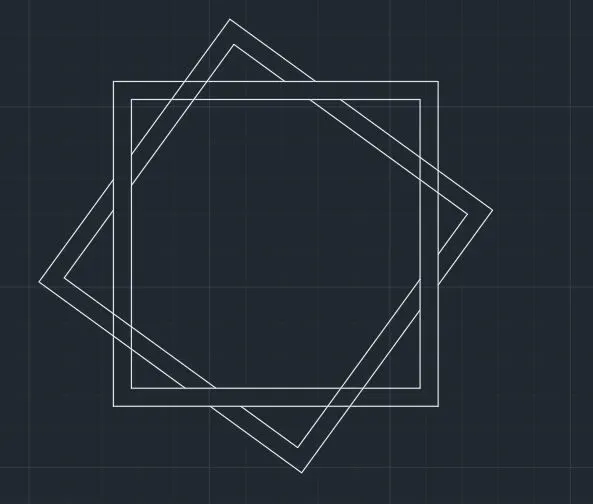
Results:- The given figure is drawn.
10. Aim:- To Draw given figure.
Procedure:-
Command: L
LINE
Specify first point:
Specify next point or [Undo]: 9'
Specify next point or [eXit/Undo]: 20'-4"
Specify next point or [Close/eXit/Undo]: 9'
Specify next point or [Close/eXit/Undo]: 3'
Specify next point or [Close/eXit/Undo]: 4'-6"
Specify next point or [Close/eXit/Undo]: 4'-6"
Specify next point or [Close/eXit/Undo]: 1'-2"
Specify next point or [Close/eXit/Undo]:
Specify next point or [Close/eXit/Undo]:
Specify next point or [Close/eXit/Undo]:
Specify next point or [Close/eXit/Undo]:
Specify next point or [Close/eXit/Undo]:
Specify next point or [Close/eXit/Undo]: *Cancel*
Command: L
LINE
Specify first point:
Specify next point or [Undo]: 2'-8"
Specify next point or [eXit/Undo]:
Specify next point or [Close/eXit/Undo]: *Cancel*
Command: L
LINE
Specify first point:
Specify next point or [Undo]:
Specify next point or [eXit/Undo]: *Cancel*
Command:
Command: _.erase 1 found
Command: Specify opposite corner or [Fence/WPolygon/CPolygon]:
Command: M
MOVE 2 found
Specify base point or [Displacement] <Displacement>:
Specify second point or <use first point as displacement>:
Automatic save to C:\Users\Mohin Khan G A\AppData\Local\Temp\Drawing1_1_1684_4f001a3f.sv$ ...
Command:
Command: L
LINE
Specify first point:
Specify next point or [Undo]: 3'-7"
Specify next point or [eXit/Undo]:
Specify next point or [Close/eXit/Undo]: *Cancel*
Command: l
LINE
Specify first point:
Specify next point or [Undo]:
Specify next point or [eXit/Undo]: *Cancel*
Command:
Command: _.erase 1 found
Command: Specify opposite corner or [Fence/WPolygon/CPolygon]:
Command: M
MOVE 2 found
Specify base point or [Displacement] <Displacement>:
Specify second point or <use first point as displacement>:
Command: TR
TRIM
Current settings: Projection=UCS, Edge=None
Select cutting edges ...
Select objects or <select all>:
Select object to trim or shift-select to extend or
[Fence/Crossing/Project/Edge/eRase]:
Select object to trim or shift-select to extend or
[Fence/Crossing/Project/Edge/eRase/Undo]:
Select object to trim or shift-select to extend or
[Fence/Crossing/Project/Edge/eRase/Undo]: Specify opposite corner: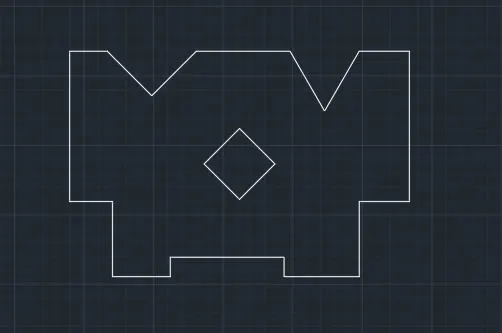
Results:- The given figure is drawn.