Creating a Residence Layout, Seating plan, Toilet and Utility room plan using AutoCad
1.
Aim:- To draw plan of resident house plan
Procedure:-
Select objects: 1 found
Select objects:
Specify base point or [Displacement] :
Specify second point or : *Cancel*
Command: *Cancel*
Command:
Command:
Command: _lengthen
Select an object to measure or [DElta/Percent/Total/DYnamic] :
Current length: 11'-6.00"
Select an object to measure or [DElta/Percent/Total/DYnamic] :
Current length: 11'-6.00"
Select an object to measure or [DElta/Percent/Total/DYnamic] :
Current length: 11'-6.00"
Select an object to measure or [DElta/Percent/Total/DYnamic] :
Current length: 11'-6.00"
Select an object to measure or [DElta/Percent/Total/DYnamic] :
Specify total length or [Angle] <0'-1.00">: 6'04"
Select an object to change or [Undo]:
Select an object to change or [Undo]: _u
Command has been completely undone.
Select an object to change or [Undo]: *Cancel*
Command:
Command:
Command: _lengthen
Select an object to measure or [DElta/Percent/Total/DYnamic] :
Current length: 11'-6.00"
Select an object to measure or [DElta/Percent/Total/DYnamic] :
Current length: 11'-6.00"
Select an object to measure or [DElta/Percent/Total/DYnamic] : DE
Enter delta length or [Angle] <0'-0.00">: Specify second point: 6'-4"
Select an object to change or [Undo]:
Select an object to change or [Undo]: *Cancel*
Command:
Command:
Command:
Command: _explode 1 found
1 was not able to be exploded.
Select objects: 1 found, 0 total
1 was not able to be exploded.
Select objects: *Cancel*
None found.
Command:
Command:
Command: _trim
Current settings: Projection=UCS, Edge=None
Select cutting edges ...
Select objects or
Select object to trim or shift-select to extend or
[Fence/Crossing/Project/Edge/eRase]:
Select object to trim or shift-select to extend or
[Fence/Crossing/Project/Edge/eRase/Undo]:
Select object to trim or shift-select to extend or
[Fence/Crossing/Project/Edge/eRase/Undo]:
Select object to trim or shift-select to extend or
[Fence/Crossing/Project/Edge/eRase/Undo]:
Select object to trim or shift-select to extend or
[Fence/Crossing/Project/Edge/eRase/Undo]:
Select object to trim or shift-select to extend or
[Fence/Crossing/Project/Edge/eRase/Undo]:
Select object to trim or shift-select to extend or
[Fence/Crossing/Project/Edge/eRase/Undo]:
Select object to trim or shift-select to extend or
[Fence/Crossing/Project/Edge/eRase/Undo]: *Cancel*
Command: Specify opposite corner or [Fence/WPolygon/CPolygon]:
Automatic save to C:\Users\Mohin Khan G A\AppData\Local\Temp\Drawing1_1_17858_e0583553.sv$ ...
Command:
Command: _.erase 1 found
Command:
Automatic save to C:\Users\Mohin Khan G A\AppData\Local\Temp\Drawing1_1_17858_e0583553.sv$ ...
Command:
Command:
Command:
Command: _offset
Current settings: Erase source=No Layer=Source OFFSETGAPTYPE=0
Specify offset distance or [Through/Erase/Layer] <0'-9.00">: 0'-4.5"
Select object to offset or [Exit/Undo] :
Specify point on side to offset or [Exit/Multiple/Undo] :
Select object to offset or [Exit/Undo] : *Cancel*
Command:
Command: _trim
Current settings: Projection=UCS, Edge=None
Select cutting edges ...
Select objects or
Select object to trim or shift-select to extend or
[Fence/Crossing/Project/Edge/eRase]:
Select object to trim or shift-select to extend or
[Fence/Crossing/Project/Edge/eRase/Undo]: *Cancel*
Command:
Command: _offset
Current settings: Erase source=No Layer=Source OFFSETGAPTYPE=0
Specify offset distance or [Through/Erase/Layer] <0'-4.50">: 8'-3"
Select object to offset or [Exit/Undo] :
Specify point on side to offset or [Exit/Multiple/Undo] :
Select object to offset or [Exit/Undo] : *Cancel*
Command:
Command: _offset
Current settings: Erase source=No Layer=Source OFFSETGAPTYPE=0
Specify offset distance or [Through/Erase/Layer] <8'-3.00">: *Cancel*
Command:
Command: _offset
Current settings: Erase source=No Layer=Source OFFSETGAPTYPE=0
Specify offset distance or [Through/Erase/Layer] <8'-3.00">: 8'-1.5"
Select object to offset or [Exit/Undo] : *Cancel*
Command:
Command: _offset
Current settings: Erase source=No Layer=Source OFFSETGAPTYPE=0
Specify offset distance or [Through/Erase/Layer] <8'-1.50">: *Cancel*
Command:
Command:
Command:
Command: _explode 1 found
1 was not able to be exploded.
Select objects: *Cancel*
None found.
Command:
Command: _offset
Current settings: Erase source=No Layer=Source OFFSETGAPTYPE=0
Specify offset distance or [Through/Erase/Layer] <8'-1.50">:
Select object to offset or [Exit/Undo] :
Specify point on side to offset or [Exit/Multiple/Undo] :
Select object to offset or [Exit/Undo] : *Cancel*
Command:
Command: _trim
Current settings: Projection=UCS, Edge=None
Select cutting edges ...
Select objects or
Select object to trim or shift-select to extend or
[Fence/Crossing/Project/Edge/eRase]:
Select object to trim or shift-select to extend or
[Fence/Crossing/Project/Edge/eRase/Undo]:
Select object to trim or shift-select to extend or
[Fence/Crossing/Project/Edge/eRase/Undo]:
Select object to trim or shift-select to extend or
[Fence/Crossing/Project/Edge/eRase/Undo]: *Cancel*
Command:
Command: _offset
Current settings: Erase source=No Layer=Source OFFSETGAPTYPE=0
Specify offset distance or [Through/Erase/Layer] <8'-1.50">: 0'-4.50"
Select object to offset or [Exit/Undo] :
Specify point on side to offset or [Exit/Multiple/Undo] :
Select object to offset or [Exit/Undo] : *Cancel*
Command:
Command:
** STRETCH **
Specify stretch point or [Base point/Copy/Undo/eXit]:
Command: *Cancel*
Command:
Command:
Command: _trim
Current settings: Projection=UCS, Edge=None
Select cutting edges ...
Select objects or
Select object to trim or shift-select to extend or
[Fence/Crossing/Project/Edge/eRase]:
Select object to trim or shift-select to extend or
[Fence/Crossing/Project/Edge/eRase/Undo]: *Cancel*
Command:
Command:
Command: _offset
Current settings: Erase source=No Layer=Source OFFSETGAPTYPE=0
Specify offset distance or [Through/Erase/Layer] <0'-4.50">:
Select object to offset or [Exit/Undo] :
Specify point on side to offset or [Exit/Multiple/Undo] :
Select object to offset or [Exit/Undo] :
Specify point on side to offset or [Exit/Multiple/Undo] :
Select object to offset or [Exit/Undo] : *Cancel*
Command:
Command:
** STRETCH **
Specify stretch point or [Base point/Copy/Undo/eXit]:
Command: *Cancel*
Command:
Command:
Command: _trim
Current settings: Projection=UCS, Edge=None
Select cutting edges ...
Select objects or
Select object to trim or shift-select to extend or
[Fence/Crossing/Project/Edge/eRase]:
Select object to trim or shift-select to extend or
[Fence/Crossing/Project/Edge/eRase/Undo]:
Select object to trim or shift-select to extend or
[Fence/Crossing/Project/Edge/eRase/Undo]:
Select object to trim or shift-select to extend or
[Fence/Crossing/Project/Edge/eRase/Undo]:
Select object to trim or shift-select to extend or
[Fence/Crossing/Project/Edge/eRase/Undo]:
Select object to trim or shift-select to extend or
[Fence/Crossing/Project/Edge/eRase/Undo]:
Select object to trim or shift-select to extend or
[Fence/Crossing/Project/Edge/eRase/Undo]:
Select object to trim or shift-select to extend or
[Fence/Crossing/Project/Edge/eRase/Undo]: *Cancel*
Command: Specify opposite corner or [Fence/WPolygon/CPolygon]:
Command: Specify opposite corner or [Fence/WPolygon/CPolygon]: *Cancel*
Command: _.erase 2 found
Command:
Automatic save to C:\Users\Mohin Khan G A\AppData\Local\Temp\Drawing1_1_17858_e0583553.sv$ ...
Command:
Command:
Command:
Command: _line
Specify first point:
Specify next point or [Undo]:
Specify next point or [eXit/Undo]: *Cancel*
Command:
Command:
Command: _trim
Current settings: Projection=UCS, Edge=None
Select cutting edges ...
Select objects or
Select object to trim or shift-select to extend or
[Fence/Crossing/Project/Edge/eRase]:
Select object to trim or shift-select to extend or
[Fence/Crossing/Project/Edge/eRase/Undo]: *Cancel*
Command:
Command:
Command: _offset
Current settings: Erase source=No Layer=Source OFFSETGAPTYPE=0
Specify offset distance or [Through/Erase/Layer] <0'-4.50">: 3'
Select object to offset or [Exit/Undo] :
Specify point on side to offset or [Exit/Multiple/Undo] :
Select object to offset or [Exit/Undo] : *Cancel*
Command:
Command: _line
Specify first point:
Specify next point or [Undo]:
Specify next point or [eXit/Undo]: *Cancel*
Command:
Command:
Command: _offset
Current settings: Erase source=No Layer=Source OFFSETGAPTYPE=0
Specify offset distance or [Through/Erase/Layer] <3'-0.00">: 1'
Select object to offset or [Exit/Undo] :
Specify point on side to offset or [Exit/Multiple/Undo] :
Select object to offset or [Exit/Undo] :
Specify point on side to offset or [Exit/Multiple/Undo] :
Select object to offset or [Exit/Undo] :
Specify point on side to offset or [Exit/Multiple/Undo] :
Select object to offset or [Exit/Undo] :
Specify point on side to offset or [Exit/Multiple/Undo] :
Select object to offset or [Exit/Undo] :
Specify point on side to offset or [Exit/Multiple/Undo] :
Select object to offset or [Exit/Undo] :
Specify point on side to offset or [Exit/Multiple/Undo] :
Select object to offset or [Exit/Undo] :
Specify point on side to offset or [Exit/Multiple/Undo] :
Select object to offset or [Exit/Undo] :
Specify point on side to offset or [Exit/Multiple/Undo] :
Select object to offset or [Exit/Undo] :
Specify point on side to offset or [Exit/Multiple/Undo] :
Select object to offset or [Exit/Undo] : *Cancel*
Command:
Command: _line
Specify first point:
Specify next point or [Undo]:
Specify next point or [eXit/Undo]: *Cancel*
Command:
Command:
Command: _line
Specify first point:
Specify next point or [Undo]:
Specify next point or [eXit/Undo]: *Cancel*
Command:
Command: _.erase 1 found
Command:
Command: Specify opposite corner or [Fence/WPolygon/CPolygon]: *Cancel*
Command:
** STRETCH **
Specify stretch point or [Base point/Copy/Undo/eXit]:
Command: *Cancel*
Command: *Cancel*
Command:
Command:
** STRETCH **
Specify stretch point or [Base point/Copy/Undo/eXit]:
Command: *Cancel*
Command:
Command:
Command: _offset
Current settings: Erase source=No Layer=Source OFFSETGAPTYPE=0
Specify offset distance or [Through/Erase/Layer] <1'-0.00">: 1'
Select object to offset or [Exit/Undo] :
Specify point on side to offset or [Exit/Multiple/Undo] :
Select object to offset or [Exit/Undo] :
Specify point on side to offset or [Exit/Multiple/Undo] :
Select object to offset or [Exit/Undo] : *Cancel*
Command:
Command:
Command: _trim
Current settings: Projection=UCS, Edge=None
Select cutting edges ...
Select objects or
Select object to trim or shift-select to extend or
[Fence/Crossing/Project/Edge/eRase]:
Select object to trim or shift-select to extend or
[Fence/Crossing/Project/Edge/eRase/Undo]:
Select object to trim or shift-select to extend or
[Fence/Crossing/Project/Edge/eRase/Undo]: *Cancel*
Command:
Command:
Command:
Command: _group Select objects or [Name/Description]: *Cancel*
Command:
** STRETCH **
Specify stretch point or [Base point/Copy/Undo/eXit]:
Command:
Command:
Command: _trim
Current settings: Projection=UCS, Edge=None
Select cutting edges ... 2 found
Select object to trim or shift-select to extend or
[Fence/Crossing/Project/Edge/eRase]:
Command:
Command:
Command: _trim
Current settings: Projection=UCS, Edge=None
Select cutting edges ...
Select objects or
Select object to trim or shift-select to extend or
[Fence/Crossing/Project/Edge/eRase]:
Select object to trim or shift-select to extend or
[Fence/Crossing/Project/Edge/eRase/Undo]:
Select object to trim or shift-select to extend or
[Fence/Crossing/Project/Edge/eRase/Undo]: *Cancel*
Command:
Command:
Command:
Command: Specify opposite corner or [Fence/WPolygon/CPolygon]: *Cancel*
Command: Specify opposite corner or [Fence/WPolygon/CPolygon]: *Cancel*
Command:
Command: *Cancel*
Command:
Command:
Command: _line
Specify first point:
Specify next point or [Undo]: 2'-6"
Specify next point or [eXit/Undo]: 2'-6"
Specify next point or [Close/eXit/Undo]: *Cancel*
Command:
Command: _arc
Specify start point of arc or [Center]: _c
Specify center point of arc:
Specify start point of arc: *Cancel*
Command:
Command:
Command: _arc
Specify start point of arc or [Center]: _c
Specify center point of arc:
Specify start point of arc:
Specify end point of arc (hold Ctrl to switch direction) or [Angle/chord Length]:
Command: Specify opposite corner or [Fence/WPolygon/CPolygon]:
Command:
Command:
Command: _rotate
Current positive angle in UCS: ANGDIR=counterclockwise ANGBASE=0
3 found
Specify base point:
Specify rotation angle or [Copy/Reference] <90>:
Command: Specify opposite corner or [Fence/WPolygon/CPolygon]:
Command:
Command:
Command: _move 3 found
Specify base point or [Displacement] :
Specify second point or :
Command:
Command:
Command: _trim
Current settings: Projection=UCS, Edge=None
Select cutting edges ...
Select objects or
Select object to trim or shift-select to extend or
[Fence/Crossing/Project/Edge/eRase]:
Select object to trim or shift-select to extend or
[Fence/Crossing/Project/Edge/eRase/Undo]:
Does not intersect with the cutting edge.
Select object to trim or shift-select to extend or
[Fence/Crossing/Project/Edge/eRase/Undo]: *Cancel*
Command:
Command: _.erase 1 found
Command:
Command:
Command: _trim
Current settings: Projection=UCS, Edge=None
Select cutting edges ...
Select objects or
Select object to trim or shift-select to extend or
[Fence/Crossing/Project/Edge/eRase]:
Select object to trim or shift-select to extend or
[Fence/Crossing/Project/Edge/eRase/Undo]: *Cancel*
Command:
Command:
Command:
Command:
Command: _copy 2 found
Current settings: Copy mode = Multiple
Specify base point or [Displacement/mOde] :
Specify second point or [Array] :
Specify second point or [Array/Exit/Undo] : *Cancel*
Command:
Command:
Command:
Command:
Command: _rotate
Current positive angle in UCS: ANGDIR=counterclockwise ANGBASE=0
2 found
Specify base point:
Specify rotation angle or [Copy/Reference] <270>:
Command:
Command:
Command:
Command:
Command: _mirror 2 found
Specify first point of mirror line:
Specify second point of mirror line:
Erase source objects? [Yes/No] : *Cancel*
Command:
Command:
Command: _mirror
Select objects: 1 found
Select objects: 1 found, 2 total
Select objects:
Specify first point of mirror line:
Specify second point of mirror line:
Erase source objects? [Yes/No] : Y
Command:
Command:
Command:
Command:
Command: _move 2 found
Specify base point or [Displacement] :
Specify second point or :
Command:
Command:
Command:
Command:
Command: _move 2 found
Specify base point or [Displacement] :
Specify second point or :
Command:
Command:
Command: _trim
Current settings: Projection=UCS, Edge=None
Select cutting edges ...
Select objects or
Select object to trim or shift-select to extend or
[Fence/Crossing/Project/Edge/eRase]:
Select object to trim or shift-select to extend or
[Fence/Crossing/Project/Edge/eRase/Undo]:
Select object to trim or shift-select to extend or
[Fence/Crossing/Project/Edge/eRase/Undo]: *Cancel*
Command:
Command:
Command:
Command:
Command:
Command: *Cancel*
Command:
Command:
Command: _line
Specify first point:
Specify next point or [Undo]: 3'-3"
Specify next point or [eXit/Undo]: 3'-3"
Specify next point or [Close/eXit/Undo]: *Cancel*
Command:
Command: _arc
Specify start point of arc or [Center]: _c
Specify center point of arc:
Specify start point of arc:
Specify end point of arc (hold Ctrl to switch direction) or [Angle/chord Length]:
Command:
Command:
Command: _trim
Current settings: Projection=UCS, Edge=None
Select cutting edges ...
Select objects or
Select object to trim or shift-select to extend or
[Fence/Crossing/Project/Edge/eRase]:
Select object to trim or shift-select to extend or
[Fence/Crossing/Project/Edge/eRase/Undo]: _u
Command has been completely undone.
Select object to trim or shift-select to extend or
[Fence/Crossing/Project/Edge/eRase]: *Cancel*
Command: Specify opposite corner or [Fence/WPolygon/CPolygon]:
Command: Specify opposite corner or [Fence/WPolygon/CPolygon]: *Cancel*
Command: Specify opposite corner or [Fence/WPolygon/CPolygon]:
Command:
Command:
Command: _move 3 found
Specify base point or [Displacement] :
Specify second point or :
Command:
Command:
Automatic save to C:\Users\Mohin Khan G A\AppData\Local\Temp\Drawing1_1_17858_e0583553.sv$ ...
Command:
Command: _.erase 1 found
Command:
Command: *Cancel*
Command:
Command:
Command: _trim
Current settings: Projection=UCS, Edge=None
Select cutting edges ...
Select objects or
Select object to trim or shift-select to extend or
[Fence/Crossing/Project/Edge/eRase]:
Select object to trim or shift-select to extend or
[Fence/Crossing/Project/Edge/eRase/Undo]:
Select object to trim or shift-select to extend or
[Fence/Crossing/Project/Edge/eRase/Undo]: *Cancel*
Command: Specify opposite corner or [Fence/WPolygon/CPolygon]:
Command: *Cancel*
Command:
Command:
Command: *Cancel*
Command:
Command:
Command: _line
Specify first point: *Cancel*
Command:
Command:
Command: _offset
Current settings: Erase source=No Layer=Source OFFSETGAPTYPE=0
Specify offset distance or [Through/Erase/Layer] <0'-4.50">: 2'
Select object to offset or [Exit/Undo] :
Specify point on side to offset or [Exit/Multiple/Undo] :
Select object to offset or [Exit/Undo] :
Specify point on side to offset or [Exit/Multiple/Undo] :
Select object to offset or [Exit/Undo] : *Cancel*
Command:
Command: _line
Specify first point:
Specify next point or [Undo]: *Cancel*
Command:
Command:
Command: _line
Specify first point:
Specify next point or [Undo]:
Specify next point or [eXit/Undo]: *Cancel*
Command:
Command:
Command: _line
Specify first point:
Specify next point or [Undo]:
Specify next point or [eXit/Undo]: *Cancel*
Command:
Command:
** STRETCH **
Specify stretch point or [Base point/Copy/Undo/eXit]:
Command: *Cancel*
Command:
Command:
Command:
Command:
Command: *Cancel*
Command:
Command: Specify opposite corner or [Fence/WPolygon/CPolygon]: *Cancel*
Command:
Command: Specify opposite corner or [Fence/WPolygon/CPolygon]:
Command:
Command: *Cancel*
Command:
Command:
Command:
Command: _offset
Current settings: Erase source=No Layer=Source OFFSETGAPTYPE=0
Specify offset distance or [Through/Erase/Layer] <2'-0.00">: 0'-.5"
Specify point on side to offset or [Exit/Multiple/Undo] :
Select object to offset or [Exit/Undo] : *Cancel*
Command: Specify opposite corner or [Fence/WPolygon/CPolygon]:
Command: Specify opposite corner or [Fence/WPolygon/CPolygon]:
Command:
Command: *Cancel*
Command:
Command:
Command: _line
Specify first point:
Specify next point or [Undo]: 6'
Specify next point or [eXit/Undo]: *Cancel*
Command:
Command:
Command: _line
Specify first point:
Specify next point or [Undo]:
Specify next point or [eXit/Undo]: *Cancel*
Command:
Command: _.erase 1 found
Command: L
LINE
Specify first point:
Specify next point or [Undo]: 0'-4.5"
Specify next point or [eXit/Undo]: *Cancel*
Command:
Command:
** STRETCH **
Specify stretch point or [Base point/Copy/Undo/eXit]:0'-4.5"
Command: *Cancel*
Command:
Command:
Command:
Command: _copy 1 found
Current settings: Copy mode = Multiple
Specify base point or [Displacement/mOde] :
Specify second point or [Array] :
Specify second point or [Array/Exit/Undo] : *Cancel*
Command: Specify opposite corner or [Fence/WPolygon/CPolygon]:
Command:
Command:
Command: _move 3 found
Specify base point or [Displacement] :
Specify second point or : *Cancel*
Command:
Command:
Command: _move
Select objects: Specify opposite corner: 3 found
Select objects:
Specify base point or [Displacement] :
Specify second point or :
Command: *Cancel*
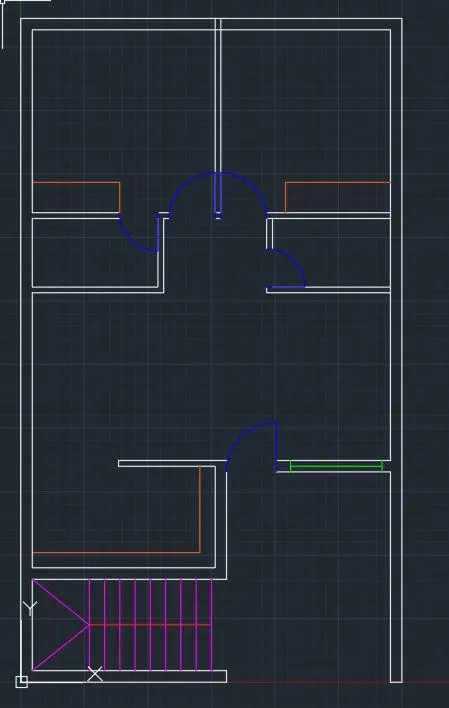
Result:- The given residencial house plan is done.
2. Aim:- To sketch the seating plan for an outdoor canopy.
Procedure:-
Command: UNITS
Command: _circle
Specify center point for circle or [3P/2P/Ttr (tan tan radius)]:
Specify radius of circle or [Diameter] <452.00>: 452
Command:
Command:
Command: _circle
Specify center point for circle or [3P/2P/Ttr (tan tan radius)]:
Specify radius of circle or [Diameter] <452.00>: 1398
Command:
Command:
Command: _line
Specify first point:
Specify next point or [Undo]: 300
Specify next point or [eXit/Undo]: 150
Specify next point or [Close/eXit/Undo]: *Cancel*
Command:
Command: _circle
Specify center point for circle or [3P/2P/Ttr (tan tan radius)]:
Specify radius of circle or [Diameter] <1398.00>:
Command: _u CIRCLE GROUP
Command:
Command:
Command: _line
Specify first point:
Specify next point or [Undo]:
Specify next point or [eXit/Undo]: *Cancel*
Command:
Command:
Command: _arc
Specify start point of arc or [Center]:
Specify second point of arc or [Center/End]: _e
Specify end point of arc:
Specify center point of arc (hold Ctrl to switch direction) or [Angle/Direction/Radius]: _d
Specify tangent direction for the start point of arc (hold Ctrl to switch direction):
Command:
Command:
Command: _offset
Current settings: Erase source=No Layer=Source OFFSETGAPTYPE=0
Specify offset distance or [Through/Erase/Layer] <0.50>:
Select object to offset or [Exit/Undo] :
Specify point on side to offset or [Exit/Multiple/Undo] : *Cancel*
Command:
Command:
Command: _offset
Current settings: Erase source=No Layer=Source OFFSETGAPTYPE=0
Specify offset distance or [Through/Erase/Layer] <0.50>: 20
Select object to offset or [Exit/Undo] :
Specify point on side to offset or [Exit/Multiple/Undo] :
Select object to offset or [Exit/Undo] : *Cancel*
Command:
Command: _offset
Current settings: Erase source=No Layer=Source OFFSETGAPTYPE=0
Specify offset distance or [Through/Erase/Layer] <20.00>: 40
Select object to offset or [Exit/Undo] :
Specify point on side to offset or [Exit/Multiple/Undo] :
Select object to offset or [Exit/Undo] : *Cancel*
Command:
Command: _line
Specify first point:
Specify next point or [Undo]:
Specify next point or [eXit/Undo]: *Cancel*
Command:
Command:
Command: _line
Specify first point:
Specify next point or [Undo]:
Specify next point or [eXit/Undo]: *Cancel*
Command:
Command:
Command: _rectang
Specify first corner point or [Chamfer/Elevation/Fillet/Thickness/Width]:
Specify other corner point or [Area/Dimensions/Rotation]:
Command: Specify opposite corner or [Fence/WPolygon/CPolygon]:
Command:
Command:
Command: _mirror 1 found
Specify first point of mirror line:
Specify second point of mirror line:
Erase source objects? [Yes/No] : N
Command:
Command:
Command: _fillet
Current settings: Mode = TRIM, Radius = 0.00
Select first object or [Undo/Polyline/Radius/Trim/Multiple]:
Select second object or shift-select to apply corner or [Radius]:
Command:
Command:
Command: _fillet
Current settings: Mode = TRIM, Radius = 0.00
Select first object or [Undo/Polyline/Radius/Trim/Multiple]: *Cancel*
Command:
Command: _fillet
Current settings: Mode = TRIM, Radius = 0.00
Select first object or [Undo/Polyline/Radius/Trim/Multiple]: *Cancel*
Command:
Command: _fillet
Current settings: Mode = TRIM, Radius = 0.00
Select first object or [Undo/Polyline/Radius/Trim/Multiple]: *Cancel*
Command:
Command: _fillet
Current settings: Mode = TRIM, Radius = 0.00
Select first object or [Undo/Polyline/Radius/Trim/Multiple]:
Select first object or [Undo/Polyline/Radius/Trim/Multiple]:
Select second object or shift-select to apply corner or [Radius]:
Command: _mirror
Crossing Lasso Press Spacebar to cycle options5 found
Select objects: Specify opposite corner: 12 found (5 duplicate), 12 total
Select objects:
Specify first point of mirror line:
Specify second point of mirror line:
Erase source objects? [Yes/No] : N
Command: Specify opposite corner or [Fence/WPolygon/CPolygon]:
Command:
Command:
Command: _copy 12 found
Current settings: Copy mode = Multiple
Specify base point or [Displacement/mOde] :
Specify second point or [Array] :
Specify second point or [Array/Exit/Undo] : *Cancel*
Command:
Command: _rotate
Current positive angle in UCS: ANGDIR=counterclockwise ANGBASE=0
Select objects: Specify opposite corner: 12 found
Select objects:
Specify base point:
Specify rotation angle or [Copy/Reference] <270>:
Command: Specify opposite corner or [Fence/WPolygon/CPolygon]:
Command:
Command:
Command: _mirror 12 found
Specify first point of mirror line:
Specify second point of mirror line:
Erase source objects? [Yes/No] : N
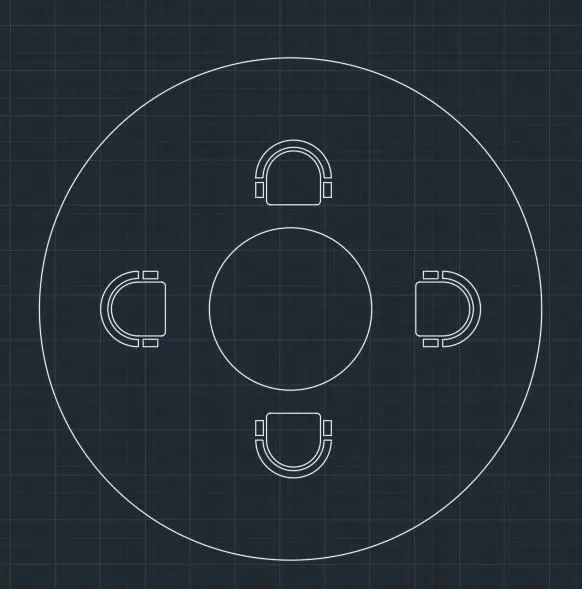
Result:- The given the seating plan for an outdoor canopy is drawn.
3. Aim:- To Draw the given part of plan.
Procedure:- Command: UNITS
Command: Regenerating model.
Command:
Command: _rectang
Specify first corner point or [Chamfer/Elevation/Fillet/Thickness/Width]: *Cancel*
Command:
Command: _rectang
Specify first corner point or [Chamfer/Elevation/Fillet/Thickness/Width]:
Specify other corner point or [Area/Dimensions/Rotation]: d
Specify length for rectangles <10.00>: 2350
Specify width for rectangles <10.00>: 4400
Specify other corner point or [Area/Dimensions/Rotation]:
Command: _explode 1 found
Command:
Command:
Command: _offset
Current settings: Erase source=No Layer=Source OFFSETGAPTYPE=0
Specify offset distance or [Through/Erase/Layer] <Through>: 300
Select object to offset or [Exit/Undo] <Exit>:
Specify point on side to offset or [Exit/Multiple/Undo] <Exit>:
Select object to offset or [Exit/Undo] <Exit>:
Specify point on side to offset or [Exit/Multiple/Undo] <Exit>:
Select object to offset or [Exit/Undo] <Exit>: *Cancel*
Command:
Command: _offset
Current settings: Erase source=No Layer=Source OFFSETGAPTYPE=0
Specify offset distance or [Through/Erase/Layer] <300.00>: 150
Select object to offset or [Exit/Undo] <Exit>:
Specify point on side to offset or [Exit/Multiple/Undo] <Exit>:
Select object to offset or [Exit/Undo] <Exit>:
Select object to offset or [Exit/Undo] <Exit>:
Select object to offset or [Exit/Undo] <Exit>:
Specify point on side to offset or [Exit/Multiple/Undo] <Exit>:
Select object to offset or [Exit/Undo] <Exit>: *Cancel*
Command:
Command: _offset
Current settings: Erase source=No Layer=Source OFFSETGAPTYPE=0
Specify offset distance or [Through/Erase/Layer] <150.00>: 2100
Select object to offset or [Exit/Undo] <Exit>:
Select object to offset or [Exit/Undo] <Exit>:
Select object to offset or [Exit/Undo] <Exit>:
Specify point on side to offset or [Exit/Multiple/Undo] <Exit>:
Select object to offset or [Exit/Undo] <Exit>: *Cancel*
Command:
Command: _offset
Current settings: Erase source=No Layer=Source OFFSETGAPTYPE=0
Specify offset distance or [Through/Erase/Layer] <2100.00>: 1500
Select object to offset or [Exit/Undo] <Exit>:
Specify point on side to offset or [Exit/Multiple/Undo] <Exit>:
Select object to offset or [Exit/Undo] <Exit>: _u
Select object to offset or [Exit/Undo] <Exit>: *Cancel*
Command:
Command: _offset
Current settings: Erase source=No Layer=Source OFFSETGAPTYPE=0
Specify offset distance or [Through/Erase/Layer] <1500.00>: 150
Select object to offset or [Exit/Undo] <Exit>:
Specify point on side to offset or [Exit/Multiple/Undo] <Exit>:Command: _trim
Current settings: Projection=UCS, Edge=None
Select cutting edges ...
Select objects or <select all>:
Select object to trim or shift-select to extend or
[Fence/Crossing/Project/Edge/eRase]:
Select object to trim or shift-select to extend or
[Fence/Crossing/Project/Edge/eRase/Undo]:
Select object to trim or shift-select to extend or
[Fence/Crossing/Project/Edge/eRase/Undo]:
Select object to trim or shift-select to extend or
[Fence/Crossing/Project/Edge/eRase/Undo]:
Select object to trim or shift-select to extend or
[Fence/Crossing/Project/Edge/eRase/Undo]:
Select object to trim or shift-select to extend or
[Fence/Crossing/Project/Edge/eRase/Undo]:
Select object to trim or shift-select to extend or
[Fence/Crossing/Project/Edge/eRase/Undo]:
Select object to trim or shift-select to extend or
[Fence/Crossing/Project/Edge/eRase/Undo]:
Select object to trim or shift-select to extend or
[Fence/Crossing/Project/Edge/eRase/Undo]:
Select object to trim or shift-select to extend or
[Fence/Crossing/Project/Edge/eRase/Undo]:
Select object to trim or shift-select to extend or
[Fence/Crossing/Project/Edge/eRase/Undo]:
Select object to trim or shift-select to extend or
[Fence/Crossing/Project/Edge/eRase/Undo]:
Select object to trim or shift-select to extend or
[Fence/Crossing/Project/Edge/eRase/Undo]:
Select object to trim or shift-select to extend or
[Fence/Crossing/Project/Edge/eRase/Undo]: Specify opposite corner:
Select object to trim or shift-select to extend or
[Fence/Crossing/Project/Edge/eRase/Undo]: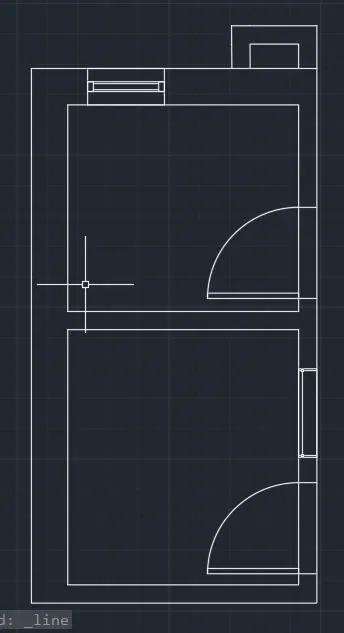
Result:- The given section is drawn.