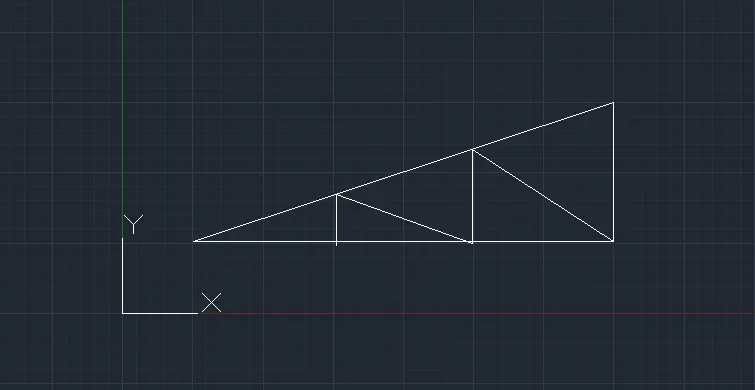
Creation of geometries by Coordinate system methods using AutoCad
Q1 ;
Aim :
To create the geometries using all the coordinates system methods.
To create the Line tool to create the geometries and use circle tool when required.
Procedure :
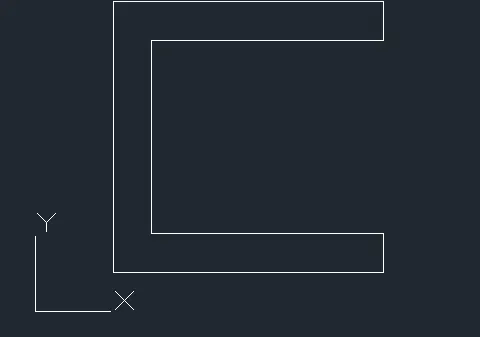
Relative rectangular co-ordinate:
Select line tool from the ribbon tab, the command prompt shows “specify the first point’.
In the command prompt, entre the first point as (2,1)
Then the command asks to enter the next point.
Specify the next point has (@7,0)
Specify the next point has (@0,1)
Specify the next point has (@-6,0)
Specify the next point has (@0,5)
Specify the next point has (@6,0)
Specify the next point has (@0,1)
Specify the next point has (@-7,0)
Specify the next point as (2,1), else click on the “close” from the command prompt.
Q2:
Aim :
To create the geometries using all the coordinates system methods.
To create the Line tool to create the geometries and use circle tool when required.
Procedure :
Relative rectangular co-ordinate:
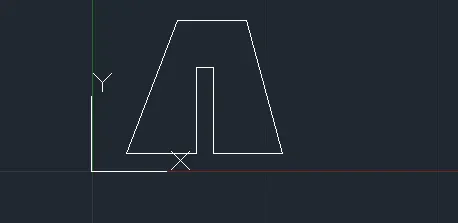
Select line tool from the ribbon tab, the command prompt shows “specify the first point’.
In the command prompt, entre the first point as (2,1)
Then the command asks to enter the next point.
Specify the next point has (@4,0)
Specify the next point has (@0,5)
Specify the next point has (@1,0)
Specify the next point has (@0,-5)
Specify the next point has (@-4,0)
Specify the next point has (@8<105)
Specify the next point has (@-4,0)
Specify the next point has (@-8>105)
Specify the next point as (2,1), else click on the “close” from the command prompt.
Q3:
Aim :
To create the geometries using all the coordinates system methods.
To create the Line tool to create the geometries and use circle tool when required.
Procedure :
Relative rectangular co-ordinate:
Select line tool from the ribbon tab, the command prompt shows “specify the first point’.
In the command prompt, entre the first point as (2,1)
Then the command asks to enter the next point.
Specify the next point has (@1,0)
Specify the next point has (@0,5)
Specify the next point has (@2,-2)
Specify the next point has (@2,2)
Specify the next point has (@-0,-5)
Specify the next point has (@1,0)
Specify the next point has (@0,8)
Specify the next point has (@-1,0)
Specify the next point has (@-2,-3)
Specify the next point has (@2,3)
Specify the next point has (@-1,0)
Specify the next point has (@8,0)
Specify the next point as (2,1), else click on the “close” from the command prompt.

Q4:
Aim :
To create the geometries using all the coordinates system methods.
To create the Line tool to create the geometries and use circle tool when required.
Procedure :
Relative rectangular co-ordinate:
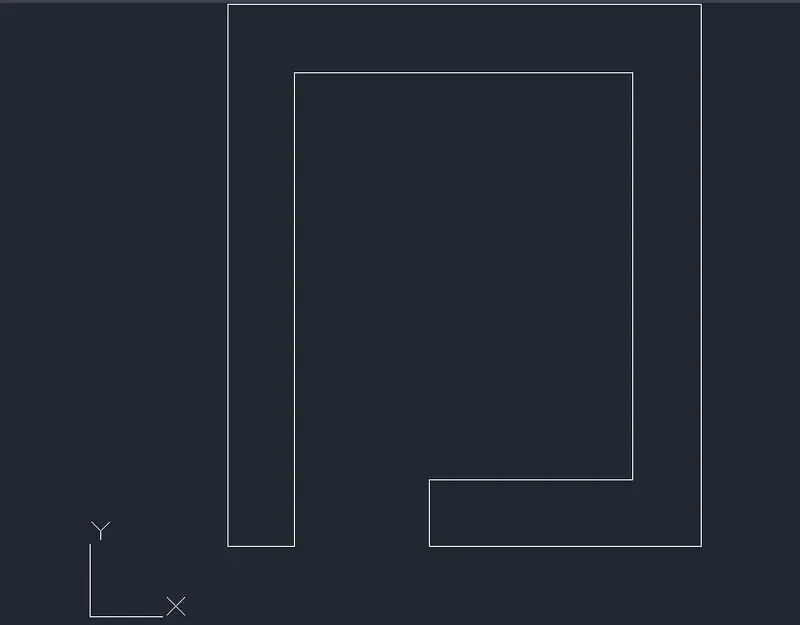
Select line tool from the ribbon tab, the command prompt shows “specify the first point’.
In the command prompt, entre the first point as (2,1)
Then the command asks to enter the next point.
Specify the next point has (@2,1)
Specify the next point has (@0,9)
Specify the next point has (@8,0)
Specify the next point has (@0,-9)
Specify the next point has (@-5,0)
Specify the next point has (@0,1)
Specify the next point has (@4,0)
Specify the next point has (@0,7)
Specify the next point has (@-6,0)
Specify the next point has (@0,-8)
Specify the next point as (2,1), else click on the “close” from the command prompt.
Q5:
Aim :
To create the geometries using all the coordinates system methods.
To create the Line tool to create the geometries and use circle tool when required.
Procedure:
Relative rectangle co-ordinate:
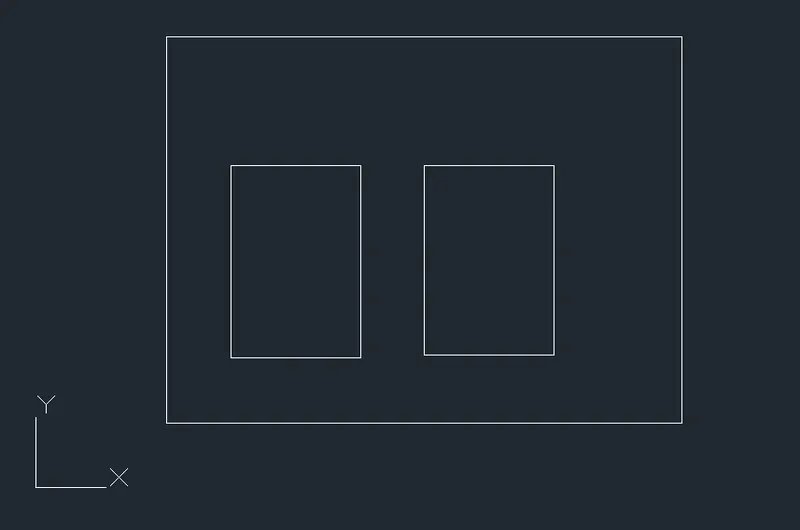
Select rectangle tool from the ribbon tab, the command prompt shows “specify the first point’.
In the command prompt, entre the first point as (2,1)
Specify a rectangle box with length 9units and breath 7units breath
Select rectangle tool and create in the box of
2units of length & 3units of breath.
Q6:
Aim :
To create the geometries using all the coordinates system methods.
To create the Line tool to create the geometries and use circle tool when required.
Procedure :
Relative rectangular co-ordinate:
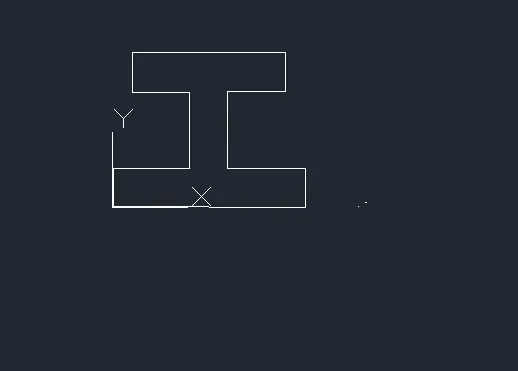
Select line tool from the ribbon tab, the command prompt shows “specify the first point’.
In the command prompt, entre the first point as (0,0)
Then the command asks to enter the next point.
Specify the next point has (@0,0)
Specify the next point has (@10,0)
Specify the next point has (@0,3)
Specify the next point has (@-5,0)
Specify the next point has (@0,5)
Specify the next point has (@4,0)
Specify the next point has (@0,3)
Specify the next point has (@-9,0)
Specify the next point has (@0,-3)
Specify the next point has (@4,0)
Specify the next point has (@0,-5)
Specify the next point has (@-5,0)
Specify the next point has (@0,-3)
Else click on the “close” from the command prompt
Q7:
Aim :
To create the geometries using all the coordinates system methods.
To create the Line tool to create the geometries and use circle tool when required.
Procedure :
Relative rectangular co-ordinate:
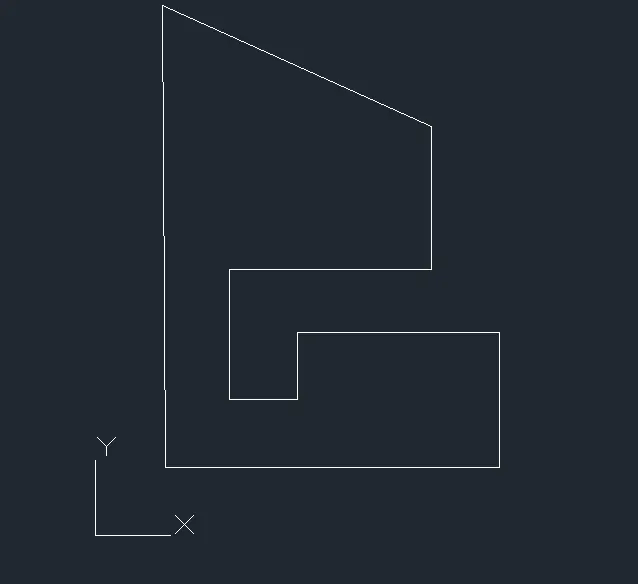
Select line tool from the ribbon tab, the command prompt shows “specify the first point’.
In the command prompt, entre the first point as (1,1)
Then the command asks to enter the next point.
Specify the next point has (@1,1)
Specify the next point has (@5,0)
Specify the next point has (@-3,0)
Specify the next point has (@0,1)
Specify the next point has (@0,-1)
Specify the next point has (@-1,0)
Specify the next point has (@0,2)
Specify the next point has (@4,0)
Specify the next point has (@0,2)
Specify the next point has (@-4>275)
Specify the next point has (@0,-8)
Specify the next point has (@0,-3)
Specify the next point has (1,1) else click on the “close” from the command prompt.
Q8:
Aim :
To create the geometries using all the coordinates system methods.
To create the Line tool to create the geometries and use circle tool when required.
Procedure :
Relative rectangular co-ordinate:
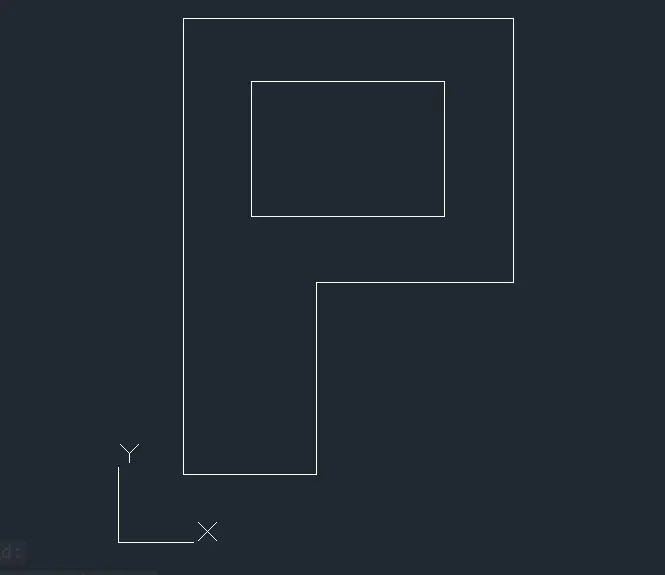
Select line tool from the ribbon tab, the command prompt shows “specify the first point’.
In the command prompt, entre the first point as (1,1)
Then the command asks to enter the next point.
Specify the next point has (@1,1)
Specify the next point has (@2,0)
Specify the next point has (@0,3)
Specify the next point has (@3,0)
Specify the next point has (@0,4)
Specify the next point has (@-6,0)
Specify the next point has (@0,-8)
Specify the next point has (1,1) else click on the “close” from the command prompt.
Select a rectangular tool from the ribbon and create a box of 2units of length and 3units of breath.
Q9:
Aim :
To create the geometries using all the coordinates system methods.
To create the Line tool to create the geometries and use circle tool when required.
Procedure :
Relative rectangular co-ordinate:
Select line tool from the ribbon tab, the command prompt shows “specify the first point’.
In the command prompt, entre the first point as (0,0)
Then the command asks to enter the next point.
Specify the next point has (@0,0)
Specify the next point has (@10,0)
Specify the next point has (@0,1)
Specify the next point has (@-2,0)
Specify the next point has (@0,4)
Specify the next point has (@2,0)
Specify the next point has (@-5,3)
Specify the next point has (@5,-3)
Specify the next point has (@2,0)
Specify the next point has (0,-5)
Specify the next point has (-2,0)
Specify the next point has (0,0) else click on the “close” from the command prompt.

Q10:
Aim :
To create the geometries using all the coordinates system methods.
To create the Line tool to create the geometries and use circle tool when required.
Procedure :
Relative rectangular co-ordinate:
Select line tool from the ribbon tab, the command prompt shows “specify the first point’.
In the command prompt, entre the first point as (1,1)
Then the command asks to enter the next point.
Specify the next point has (@1,1)
Specify the next point has (@-4,4)
Specify the next point has (@4,4)
Specify the next point has (@0,4)
Now type esc and exit the line command.
Again entre the line command and specify the first point has (@2,5)
Specify the next point has (@2,5)
Specify the next point has (@0,1)
Specify the next point has (@3,1)
Specify the next point has (@3,-1)
Exit the line command
Again entre the line command
Specify the line has (@0,4)
Specify the line has (@7,0)
Close the line command entering esc.
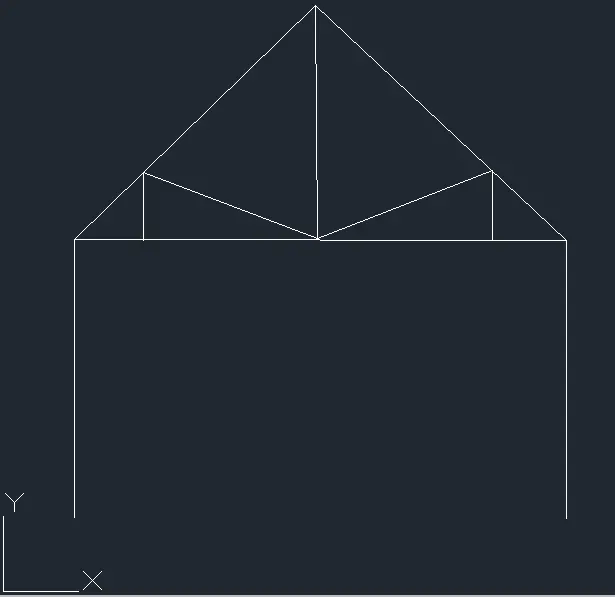
Specify the first point cursive and then for distance for 3.6 draw a line for upward direction.
Q11:
Aim :
To create the geometries using all the coordinates system methods.
To create the Line tool to create the geometries and use circle tool when required.
Procedure :
Relative rectangular co-ordinate:
Select line tool from the ribbon tab, the command prompt shows “specify the first point’.
In the command prompt, entre the first point as (1,1)
Then the command asks to enter the next point.
Specify the next point has (@1,1)
Specify the next point has (@6,0)
Specify the next point has (@0,2)
Specify the next point has (@-6,3)
Now type esc and exit the line command.
Again entre the line command and specify the first point has (@3,0)
Specify the next point has (@3,0)
Specify the next point has (@0,1)
Specify the next point has (@2,-1)
Specify the next point has (@5,1)
Specify the next point has (@2,-2)
Exit the line command.