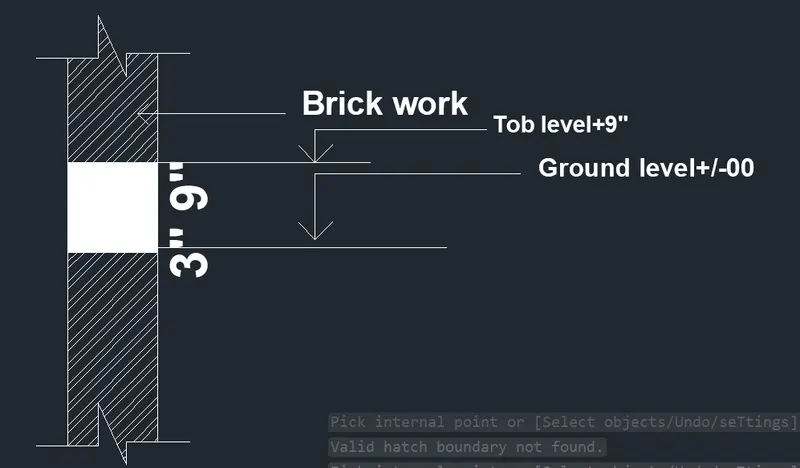
Creation of Column Schedule and Drawing Template using AutoCad
Q1:
Aim:
To create the geometries using all the coordinates system methods.
To create the Line tool to create the geometries and use circle tool when required
Procedure:
Select the line tool from the ribbon tab or enter the line command and draw the
box has shown in the diagram.
Trim the extra lines and exit the trim command
Enter the text command and specify the first point.
Type all the text has given in the diagram.
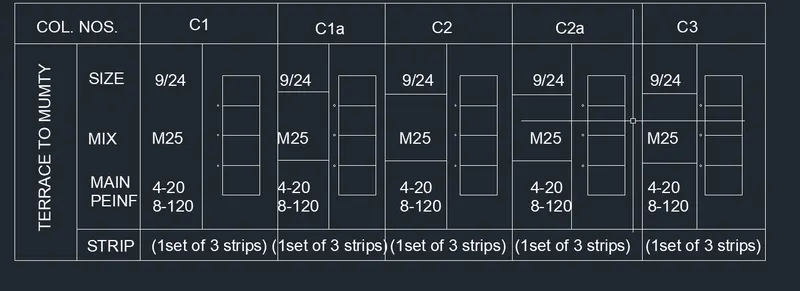
Q2:
Aim:
To create the geometries using all the coordinates system methods.
To create the Line tool to create the geometries and use circle tool when required
Procedure:
Select the line tool from the ribbon tab or enter the line command and draw the
box has shown in the diagram.
Trim the extra lines and exit the trim command
Enter the text command and specify the first point.
Type all the text has given in the diagram.
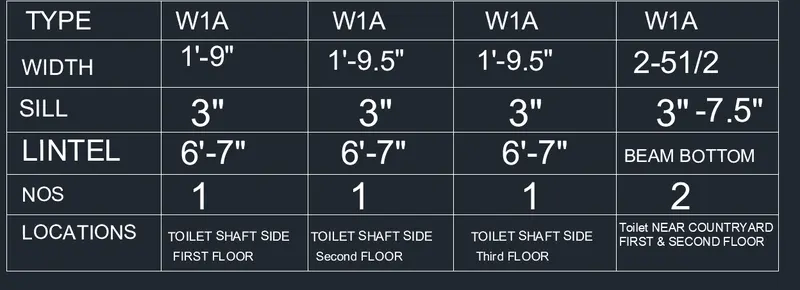
Q3:
Aim:
To create the geometries using all the coordinates system methods.
To create the Line tool to create the geometries and use circle tool when required
Procedure:
Select the line tool from the ribbon tab or enter the line command and draw the
box has shown in the diagram.
Trim the extra lines and exit the trim command
Enter the text command and specify the first point.
Type all the text has given in the diagram.

Q4:
Aim:
To create the geometries using all the coordinates system methods.
To create the Line tool to create the geometries and use circle tool when required
Procedure:
Select the line tool from the ribbon tab or enter the line command and draw the
box has shown in the diagram.
Trim the extra lines and exit the trim command
Enter the text command and specify the first point.
Type all the text has given in the diagram.
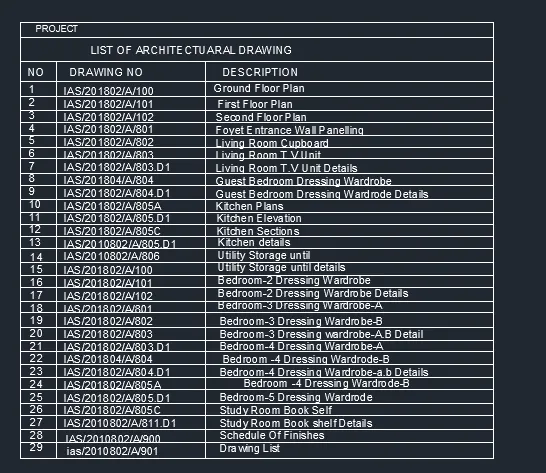
Q5:
Aim:
To create the geometries using all the coordinates system methods.
To create the Line tool to create the geometries and use circle tool when required
Procedure:
Select the line tool from the ribbon tab or enter the line command and draw the
box has shown in the diagram.
Trim the extra lines and exit the trim command
Enter the text command and specify the first point.
Type all the text has given in the diagram.