Creation of geometries by Coordinate system methods using AutoCad
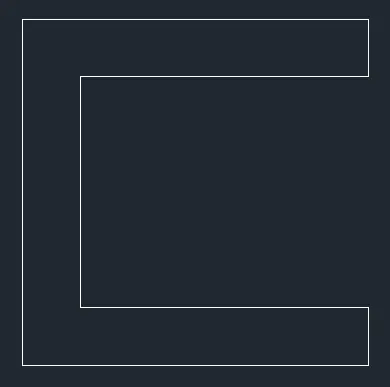
Create the geometries from P1 to P2 using all the coordinates system methods. You need to use the Line tool to create the geometries. Where required you need to use the circle tool.
P1 :
- Absolute Coordinate Method :
- Use Line command then enter the coordinates as per the figure given.
- Enter Point 1 = (2,1)
- Enter Point 2 = (8,1)
- Enter Point 3 = (8,2)
- Enter Point 4 = (3,2)
- Enter Point 5 = (3,6)
- Enter Point 6 = (8,6)
- Enter Point 7 = (8,7)
- Enter Point 8 = (2,7)
- Now just type c for close in command line or or again enter point 1 coordinate (2,1) & press esc.
- Relative Rectangular oordinate Method :
- Use Line command then enter the coordinates as per the figure given.
- Enter Point 1 = (2,1)
- Enter Point 2 = (@6,0)
- Enter Point 3 = (@0,1)
- Enter Point 4 = (@-5,0)
- Enter Point 5 = (@0,4)
- Enter Point 6 = (@5,0)
- Enter Point 7 = (@0,1)
- Enter Point 8 = (@-6,0)
- Now just type c for close in command line or or again enter point 1 coordinate (@0,-6) & press esc
- Relative Polar Coordinate Method :
- Use Line command then enter the coordinates as per the figure given.
- Enter Point 1 = (2,1)
- Enter Point 2 = (@6<0)
- Enter Point 3 = (@1<90)
- Enter Point 4 = (@5<180)
- Enter Point 5 = (@4<90)
- Enter Point 6 = (@5<0)
- Enter Point 7 = (@1<90)
- Enter Point 8 = (@6<180)
- Now just type c for close in command line or or again enter point 1 coordinate (@6<270) & press esc
- Direct Distance Entry Method :
- Use Line command then enter the coordinates as per the figure given.
- Enter Point 1 = (2,1)
- Move Mouse in Right hand Direction and Enter Length = 6
- Move Mouse in Upward Diretion and Enter Length = 1
- Move Mouse in Left hand Direction and Enter Length = 5
- Move Mouse in Upward Diretion and Enter Length = 4
- Move Mouse in Right hand Direction and Enter Length = 5
- Move Mouse in Upward Diretion and Enter Length = 1
- Move Mouse in Left hand Direction and Enter Length = 6
- Now just type c for close in command line or or Move Mouse in Downward direction and enter length = 6 & press esc
Figure Attached Below :
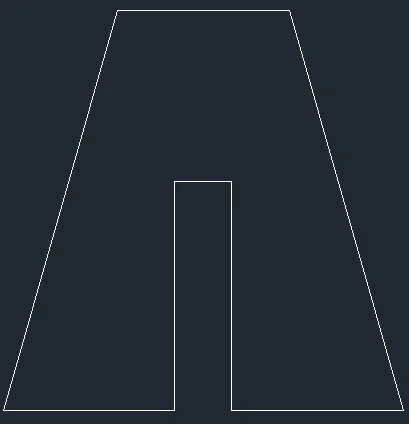
P2 :
- Absolute Coordinate Method :
- Use Line command then enter the coordinates as per the figure given.
- Enter Point 1 = (2,1)
- Enter Point 2 = (5,1)
- Enter Point 3 = (5,5)
- Enter Point 4 = (6,5)
- Enter Point 5 = (6,1)
- Enter Point 6 = (9,1)
- Enter Point 7 = (7,8)
- Enter Point 8 = (4,8)
- Now just type c for close in command line or or again enter point 1 coordinate (2,1) & press esc.
- Relative Rectangular oordinate Method :
- Use Line command then enter the coordinates as per the figure given.
- Enter Point 1 = (2,1)
- Enter Point 2 = (@3,0)
- Enter Point 3 = (@0,4)
- Enter Point 4 = (@1,0)
- Enter Point 5 = (@0,-4)
- Enter Point 6 = (@3,0)
- Enter Point 7 = (@-2,7)
- Enter Point 8 = (@-3,0)
- Now just type c for close in command line or enter point coordinate (@-2,-7) & press esc
- Relative Polar Coordinate Method :
- Use Line command then enter the coordinates as per the figure given.
- Enter Point 1 = (2,1)
- Enter Point 2 = (@3<0)
- Enter Point 3 = (@4<90)
- Enter Point 4 = (@1<0)
- Enter Point 5 = (@4<270)
- Enter Point 6 = (@3<0)
- Enter Point 7 = (@-2,7) {Since, no angle value is given}
- Enter Point 8 = (@3<180)
- Now just type c for close in command line or enter point coordinate (@-2,-7) {Since, no angle value is given} & press esc
- Direct Distance Entry Method :
- Use Line command then enter the coordinates as per the figure given.
- Enter Point 1 = (2,1)
- Move Mouse in Right hand Direction and Enter Length = 3
- Move Mouse in Upward Diretion and Enter Length = 4
- Move Mouse in Right hand Direction and Enter Length = 1
- Move Mouse in Downward Diretion and Enter Length = 4
- Move Mouse in Right hand Direction and Enter Length = 3
- Enter Point 7 = (@-2,7) {Since, no angle value is given}
- Move Mouse in Left hand Direction and Enter Length = 3
- Now just type c for close in command line or again enter point 1 coordinate (2,1) & press esc.
Figure Attached Below :
P3 :
Relative Polar Coordinate Method :
- Use Line command then enter the coordinates as per the figure given.
- Enter Point 1 = (2,1)
- Enter Point 2 = (@1<0)
- Enter Point 3 = (@2<90)
- Enter Point 4 = (@3<0)
- Enter Point 5 = (@1<90)
- Enter Point 6 = (@3<180)
- Enter Point 7 = (@3<90)
- Enter Point 8 = (@5<0)
- Enter Point 9 = (@1<90)
- Enter Point 10 = (@6<180)
- Now just type c for close in command line or again enter point 1 coordinate (@7<270) & press esc.
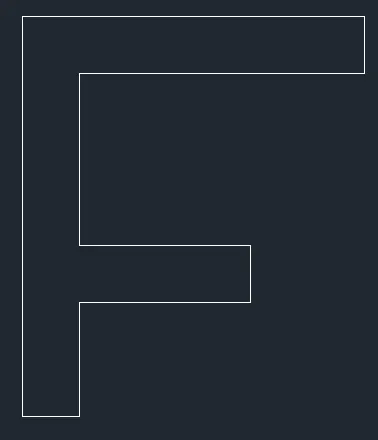
P4 :
Relative Rectangular oordinate Method :
- Use Line command then enter the coordinates as per the figure given.
- Enter Point 1 = (2,1)
- Enter Point 2 = (@1,0)
- Enter Point 3 = (@0,4)
- Enter Point 4 = (@2,-2)
- Enter Point 5 = (@2,2)
- Enter Point 6 = (@0,-4)
- Enter Point 7 = (@1,0)
- Enter Point 8 = (@0,7)
- Enter Point 9 = (@-1,0)
- Enter point 10 = (@-2,-3)
- Enter Point 11 = (@-2,3)
- Enter point 12 = (@-1,0)
- Now just type c for close in command line or enter point coordinate (@0,-7) & press esc.

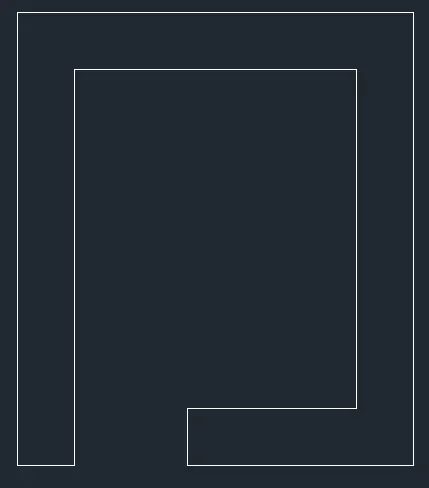
P5 :
Relative Rectangular oordinate Method :
- Use Line command then enter the coordinates as per the figure given.
- Enter Point 1 = (2,1)
- Enter Point 2 = (@1,0)
- Enter Point 3 = (@0,7)
- Enter Point 4 = (@5,0)
- Enter Point 5 = (@0,-6)
- Enter Point 6 = (@-3,0)
- Enter Point 7 = (@0,-1)
- Enter Point 8 = (@4,0)
- Enter Point 9 = (@0,8)
- Enter point 10 = (@-7,0)
- Now just type c for close in command line or enter point coordinate (@0,-8) & press esc.
P6 :
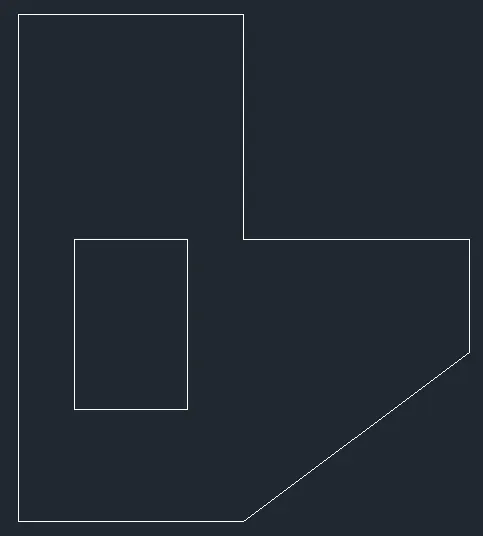
Relative Rectangular oordinate Method :
- Use Line command then enter the coordinates as per the figure given.
- Enter Point 1 = (2,1)
- Enter Point 2 = (@4,0)
- Enter Point 3 = (@4,3)
- Enter Point 4 = (@0,2)
- Enter Point 5 = (@-4,0)
- Enter Point 6 = (@0,4)
- Enter Point 7 = (@-4,0)
- Now just type c for close in command line or enter point coordinate (@0,-9) & press esc.
- Use Line command then enter the coordinates as per the figure given.
- Enter Point 1 = (3,3)
- Enter Point 2 = (@2,0)
- Enter Point 3 = (@0,3)
- Enter Point 4 = (@-2,0)
- Now just type c for close in command line or enter point coordinate (@0,-3) & press esc.
P7 :
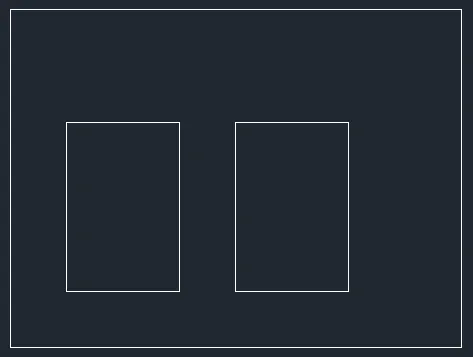
Relative Rectangular oordinate Method :
- Use Line command then enter the coordinates as per the figure given.
- Enter Point 1 = (2,1)
- Enter Point 2 = (@8,0)
- Enter Point 3 = (@0,6)
- Enter Point 4 = (@-8,0)
- Now just type c for close in command line or enter point coordinate (@0,-6) & press esc.
- Use Line command then enter the coordinates as per the figure given.
- Enter Point 1 = (3,2)
- Enter Point 2 = (@2,0)
- Enter Point 3 = (@0,3)
- Enter Point 4 = (@-2,0)
- Now just type c for close in command line or enter point coordinate (@0,-3) & press esc.
- Use Line command then enter the coordinates as per the figure given.
- Enter Point 1 = (6,2)
- Enter Point 2 = (@2,0)
- Enter Point 3 = (@0,3)
- Enter Point 4 = (@-2,0)
- Now just type c for close in command line or enter point coordinate (@0,-3) & press esc.
P8 :
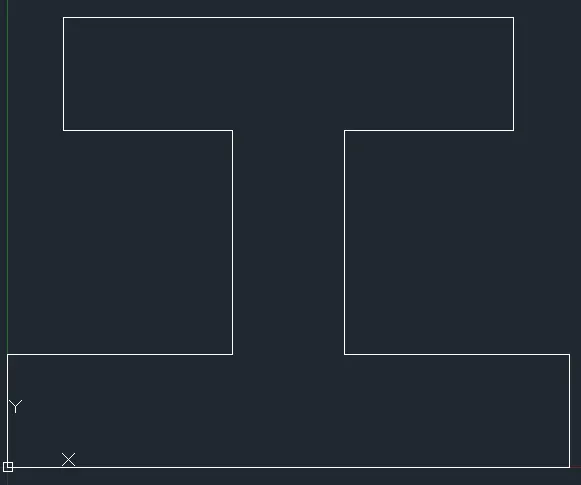
Relative Polar Coordinate Method :
- Use Line command then enter the coordinates as per the figure given.
- Enter Point 1 = (0,0)
- Enter Point 2 = (@10<0)
- Enter Point 3 = (@2<90)
- Enter Point 4 = (@4<180)
- Enter Point 5 = (@4<90)
- Enter Point 6 = (@3<0)
- Enter Point 7 = (@2<90)
- Enter Point 8 = (@8<180)
- Enter Point 9 = (@2<270)
- Enter Point 10 = (@3<0)
- Enter Point 9 = (@4<270)
- Enter Point 10 = (@4<180)
- Now just type c for close in command line or again enter point 1 coordinate (@2<270) & press esc.
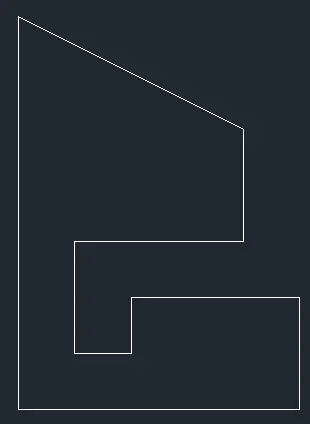
P9 :
Relative Rectangular oordinate Method :
- Use Line command then enter the coordinates as per the figure given.
- Enter Point 1 = (1,1)
- Enter Point 2 = (@5,0)
- Enter Point 3 = (@0,2)
- Enter Point 4 = (@-3,0)
- Enter Point 5 = (@0,-1)
- Enter Point 6 = (@-1,0)
- Enter Point 7 = (@0,2)
- Enter Point 8 = (@3,0)
- Enter Point 9 = (@0,2)
- Enter point 10 = (@-4,2)
- Now just type c for close in command line or enter point coordinate (@0,-7) & press esc.
P10 :
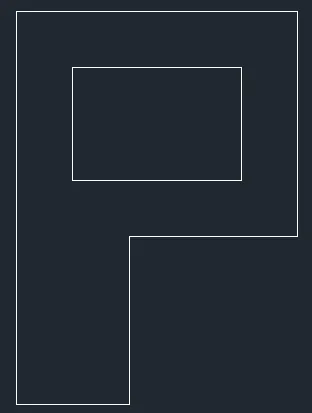
Relative Rectangular oordinate Method :
- Use Line command then enter the coordinates as per the figure given.
- Enter Point 1 = (1,1)
- Enter Point 2 = (@2,0)
- Enter Point 3 = (@0,3)
- Enter Point 4 = (@3,0)
- Enter Point 5 = (@0,4)
- Enter Point 6 = (@-5,0)
- Now just type c for close in command line or enter point coordinate (@0,-7) & press esc.
- Use Line command then enter the coordinates as per the figure given.
- Enter Point 1 = (2,5)
- Enter Point 2 = (@3,0)
- Enter Point 3 = (@0,2)
- Enter Point 4 = (@-3,0)
- Now just type c for close in command line or enter point coordinate (@0,-2) & press esc.
Civil Related Problems
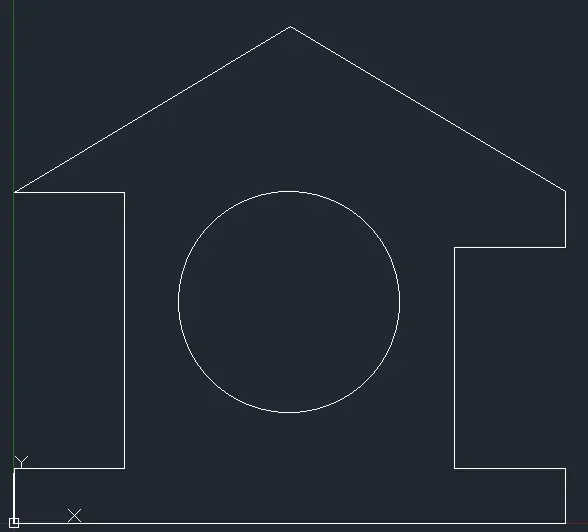
Draw the profile and the trusses using any coordinate system methods. The dimensions are there for references.
Profile - Wood
Relative Polar Coordinate Method :
- Use Line command then enter the coordinates as per the figure given.
- Enter Point 1 = (0,0)
- Enter Point 2 = (@10<0)
- Enter Point 3 = (@1<90)
- Enter Point 4 = (@2<180)
- Enter Point 5 = (@4<90)
- Enter Point 6 = (@2<0)
- Enter Point 7 = (@1<90)
- Enter Point 8 = (@5.831<149.036)
- Enter Point 9 = (@5.831<210.964)
- Enter Point 10 = (@2<0)
- Enter Point 9 = (@5<270)
- Enter Point 10 = (@2<180)
- Now just type c for close in command line or again enter point 1 coordinate (@1<270) & press esc.
- Use CIRCLE command then enter the coordinates as per the figure given.
- Enter Point 1 = (5,4)
- Enter Radius = 2.
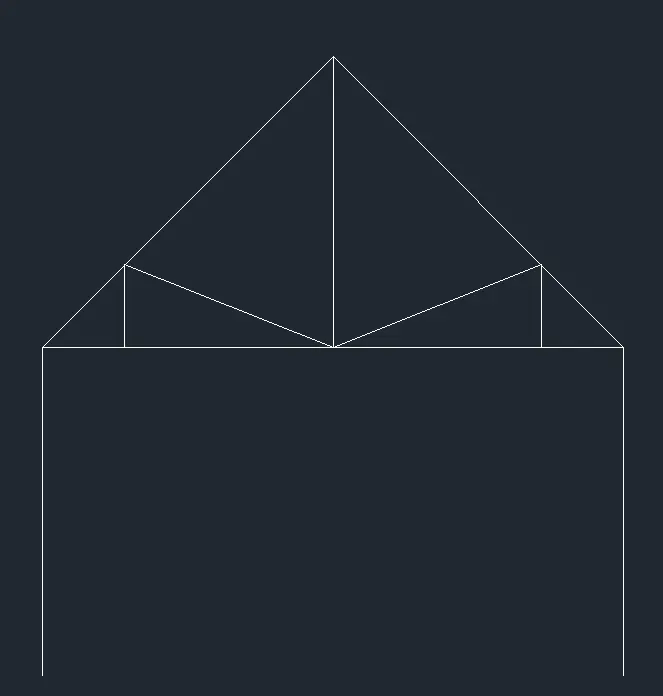
Queen Post Truss :
Use Line command then enter the coordinates as per the figure given.
- Enter Point 1 = (1,1)
- Enter Point 2 = (@7.072<0)
- Enter Point 3 = (@4<270) & press esc
- Use Line command
- Enter Point 4 = (1,5)
- Enter Point 5 = (@5<45)
- Enter Point 6 = (@3<315) & Press esc
- Use Line command
- Enter Point 7 = (2,5)
- Enter Point 8 = (@1<90)
- Enter Point 9 = (@2.536,-1)
- Enter Point 10 = (@2.536,1)
- Enter Point 9 = (@1<270) & press esc
- Use Line command
- Enter Point 10 = (4.536,5)
- Enter Point 11 = (@3.536<90)
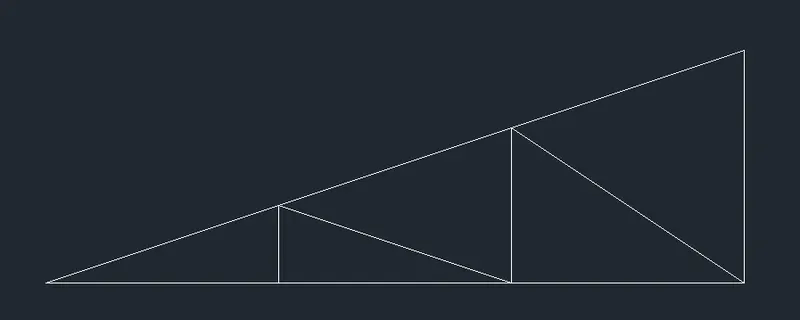
Mono Pitch :
Use Line command then enter the coordinates as per the figure given.
- Enter Point 1 = (1,1)
- Enter Point 2 = (@6,2)
- Now just type c for close in command line or again enter point 1 coordinate (@6<180) & press esc.
- Use Line command
- Enter Point 3 = (3,1)
- Enter Point 4 = (@0.667<90)
- Enter Point 5 = (@2,-0.667)
- Enter Point 6 = (@1.333<90)
- Enter Point 7 = (@2,-1.333)
- press esc.