Creation of geometries by Coordinate system methods using AutoCad
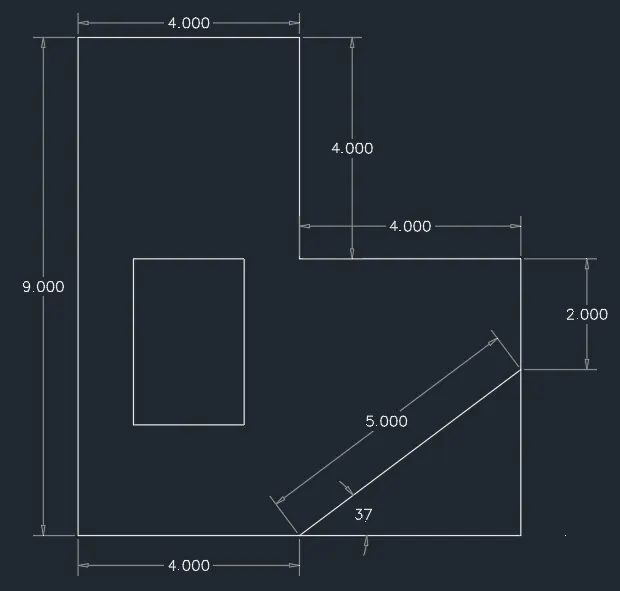
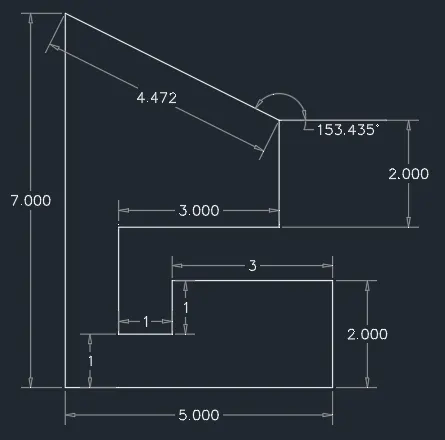
PROJECT AIM:- Create the geometries from P1 to P10 using all the coordinates system methods. Also, I have accomplished the project for drawing the profile and the trusses using any coordinate system methods, I have used the Line tool to create the geometries. Where required you need to use the circle tool. I have used the Imperial Template and the Decimal Units to draft the features. Dimensions are there for references.
INTRODUCTION:-
AutoCad has three coordinate systems for drawing sketches. These are the following systems to draw sketches:-
- Absolute coordinate system:- By using cartesian coordinate system where all the coordinates are with respect to the origin(0,0). Syntax- (5,2)
- Relative rectangular coordinate system:- It is a coordinate system where all the coordinates are with respect to the the previous coordinate. Syntax- (@4,3)
- Polar coordinate system:- In this system you can include coordinates whose length and angle is are specified with respect to origin. Syntax- (@3<45)
PROCEDURE:-
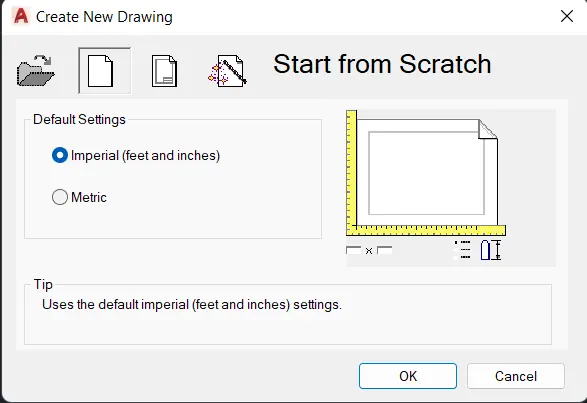
STEP-1:- Select Imperial system and decimal units.
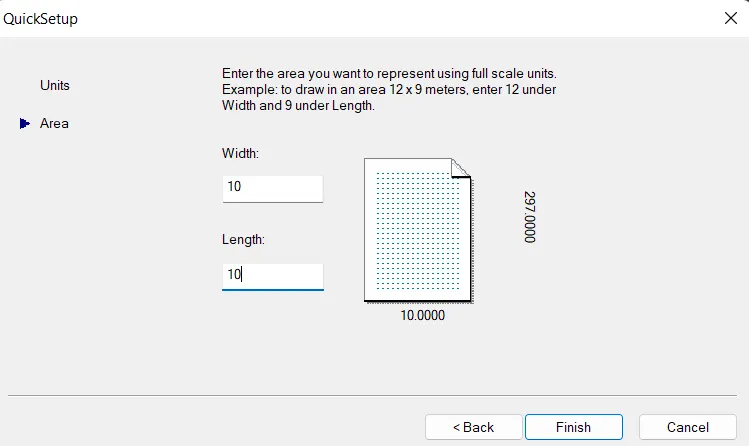
STEP-2:- Use the line command and enter the coordinates as per given data.
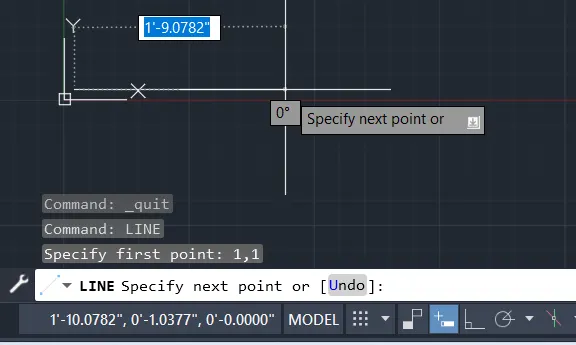
STEP-3:- Then draw that particular drawing according to given sketches as follow.
For P1 Sketch:-
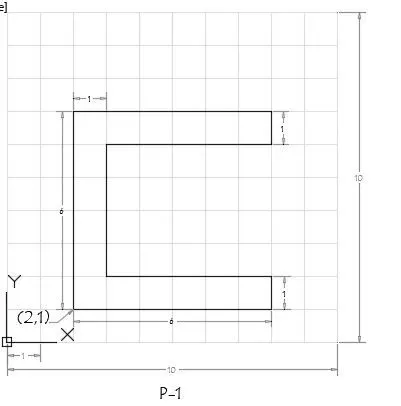
Absolute coordinate system:-
STEPS:-
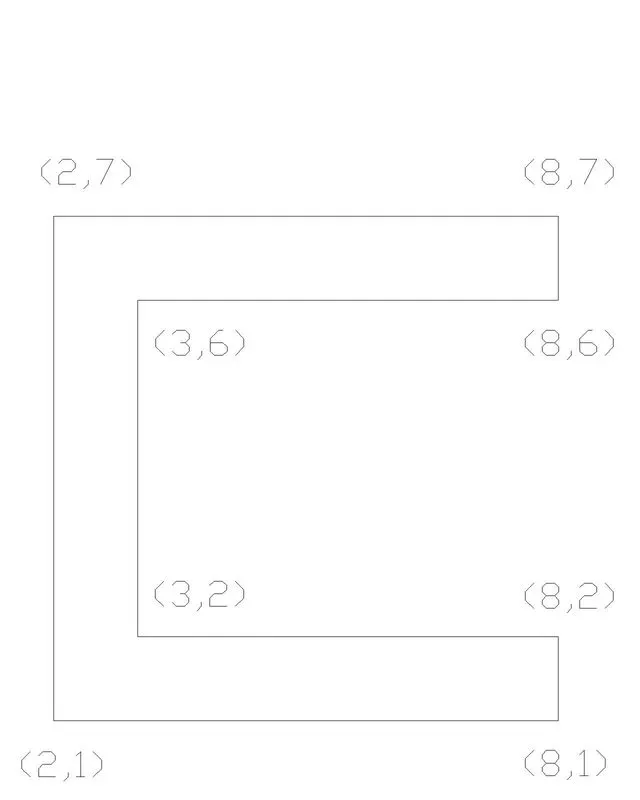
- Type the command "L" for line and give the coordinates for starting point 1. (2,1).
- Type the next coordinate of point 2 (8,1) in the command box.
- Type the next coordinate of point 3 (8,2) in the command box.
- Type the next coordinate of point 4 (3,2) in the command box.
- Type the next coordinate of point 5 (3,6) in the command box.
- Type the next coordinate of point 6 (8,6) in the command box.
- Type the next coordinate of point 7 (8,7) in the command box.
- Type the next coordinate of point 8 (2,7) in the command box.
- Enter or click on the command close.
RESULT:-
Relative rectangular coordinate system:-
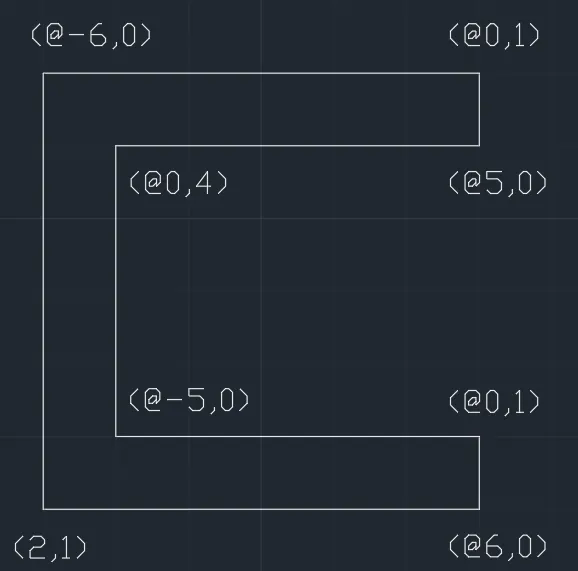
- Type the command "L" for line and give the coordinates for starting point 1. (2,1).
- Type the next coordinate of point 2 (@6,0) in the command box.
- Type the next coordinate of point 3 (@0,1) in the command box.
- Type the next coordinate of point 4 (@-5,0) in the command box.
- Type the next coordinate of point 5 (@0,4) in the command box.
- Type the next coordinate of point 6 (@5,0) in the command box.
- Type the next coordinate of point 7 (@0,1) in the command box.
- Type the next coordinate of point 8 (@-6,0) in the command box.
- Enter or click on the command close.
RESULT:-
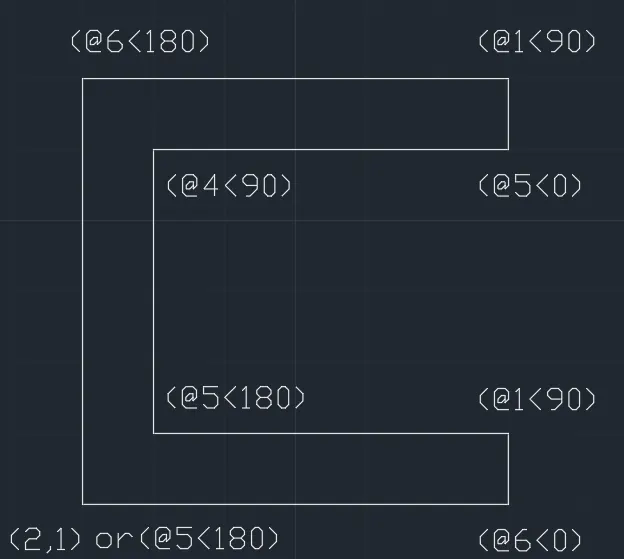
Polar coordinate system:-
- Type the command "L" for line and give the coordinates for starting point 1. (2,1).
- Type the next coordinate of point 2 (@6<0) in the command box.
- Type the next coordinate of point 3 (@1<90) in the command box.
- Type the next coordinate of point 4 (@5<180) in the command box.
- Type the next coordinate of point 5 (@4<90) in the command box.
- Type the next coordinate of point 6 (@5<0) in the command box.
- Type the next coordinate of point 7 (@1<90) in the command box.
- Type the next coordinate of point 8 (@6<180) in the command box.
- Enter or click on the command close or (@6<270).
RESULT:-
For P2 Sketch:-
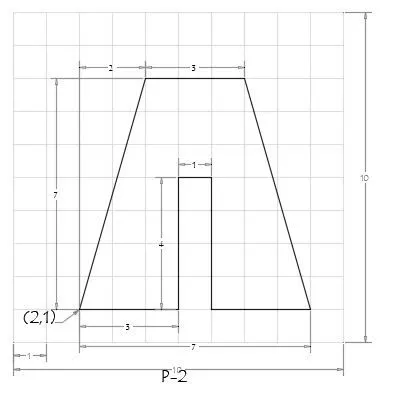
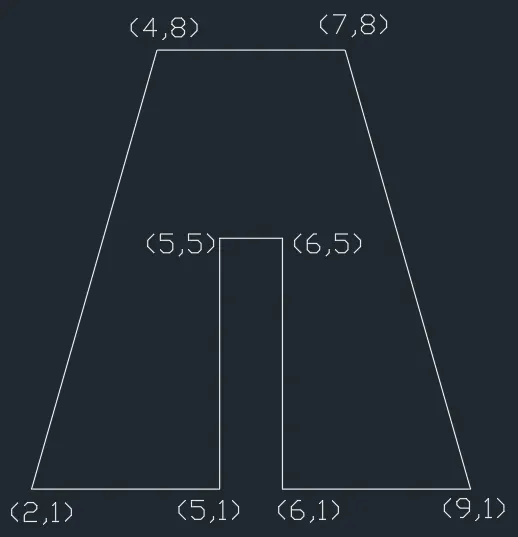
Absolute coordinate system:-
STEPS:-
- Type the command "L" for line and give the coordinates for starting point 1. (2,1).
- Type the next coordinate of point 2 (5,1) in the command box.
- Type the next coordinate of point 3 (5,5) in the command box.
- Type the next coordinate of point 4 (6,5) in the command box.
- Type the next coordinate of point 5 (6,1) in the command box.
- Type the next coordinate of point 6 (9,1) in the command box.
- Type the next coordinate of point 7 (7,8) in the command box.
- Type the next coordinate of point 8 (4,8) in the command box.
- Enter or click on the command close.
RESULT:-
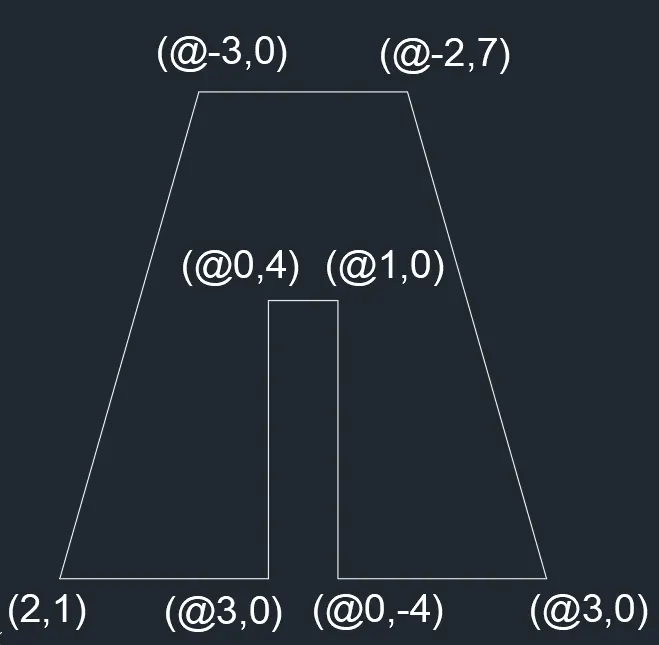
Relative rectangular coordinate system:-
- Type the command "L" for line and give the coordinates for starting point 1. (2,1).
- Type the next coordinate of point 2 (@3,0) in the command box.
- Type the next coordinate of point 3 (@0,4) in the command box.
- Type the next coordinate of point 4 (@1,0) in the command box.
- Type the next coordinate of point 5 (@0,-4) in the command box.
- Type the next coordinate of point 6 (@3,0) in the command box.
- Type the next coordinate of point 7 (@-2,7) in the command box.
- Type the next coordinate of point 8 (@-3,0) in the command box.
- Enter or click on the command close.
RESULT:-
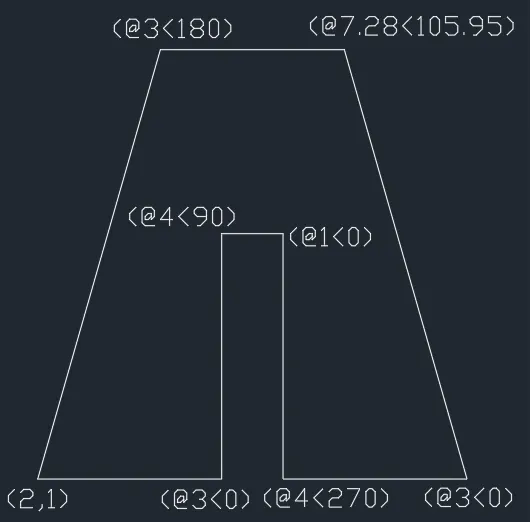
Polar coordinate system:-
- Type the command "L" for line and give the coordinates for starting point 1. (2,1).
- Type the next coordinate of point 2 (@3<0) in the command box.
- Type the next coordinate of point 3 (@4<90) in the command box.
- Type the next coordinate of point 4 (@1<0) in the command box.
- Type the next coordinate of point 5 (@4<270) in the command box.
- Type the next coordinate of point 6 (@3<0) in the command box.
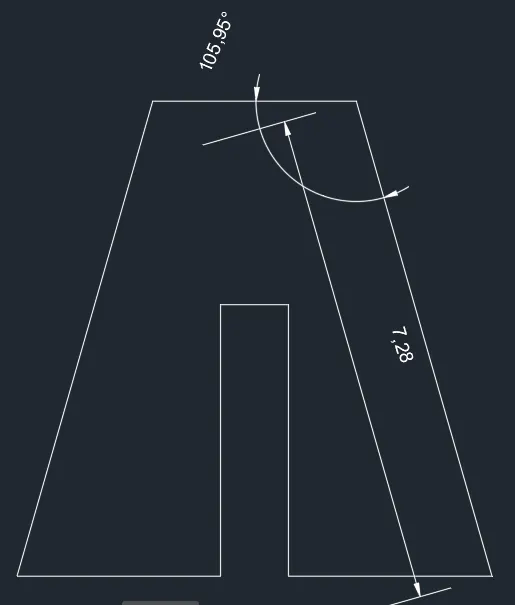
- Type the next coordinate of point 7 (@7.28<105.95) in the command box.
- Type the next coordinate of point 8 (@3<180) in the command box.
- Enter or click on the command close.
RESULT:-
For P3 Sketch:-
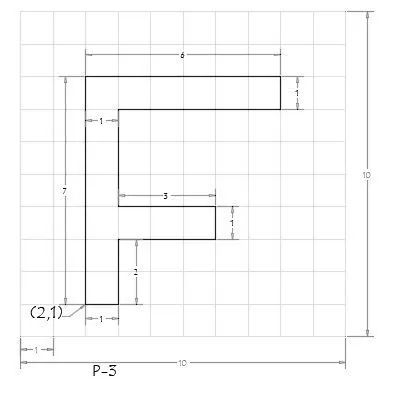
Absolute coordinate system:-
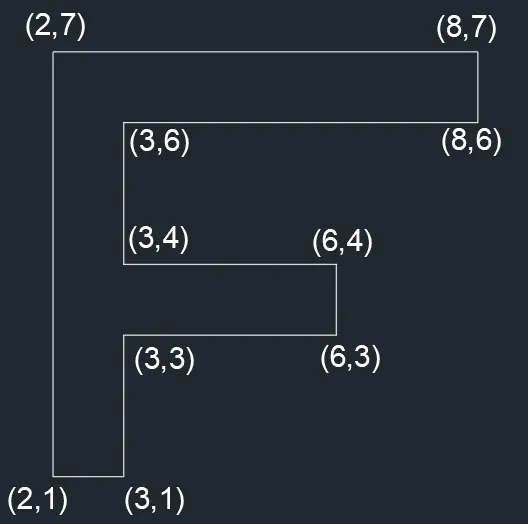
STEPS:-
- Type the command "L" for line and give the coordinates for starting point 1. (2,1).
- Type the next coordinate of point 2 (3,1) in the command box.
- Type the next coordinate of point 3 (3,3) in the command box.
- Type the next coordinate of point 4 (6,3) in the command box.
- Type the next coordinate of point 5 (6,4) in the command box.
- Type the next coordinate of point 6 (3,4) in the command box.
- Type the next coordinate of point 7 (3,6) in the command box.
- Type the next coordinate of point 9 (8,6) in the command box.
- Type the next coordinate of point 10 (8,7) in the command box.
- Type the next coordinate of point 11 (2,7) in the command box.
- Enter or click on the command close.
RESULT:-
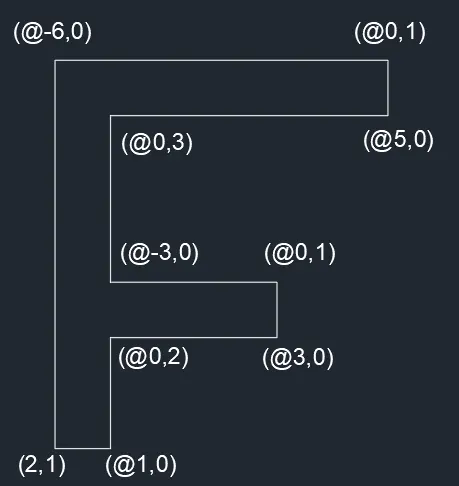
Relative rectangular coordinate system:-
- Type the command "L" for line and give the coordinates for starting point 1. (2,1).
- Type the next coordinate of point 2 (@1,0) in the command box.
- Type the next coordinate of point 3 (@0,2) in the command box.
- Type the next coordinate of point 4 (@3,0) in the command box.
- Type the next coordinate of point 5 (@0,1) in the command box.
- Type the next coordinate of point 6 (@-3,0) in the command box.
- Type the next coordinate of point 7 (@0,3) in the command box.
- Type the next coordinate of point 7 (@5,0) in the command box.
- Type the next coordinate of point 7 (@0,1) in the command box.
- Type the next coordinate of point 7 (@-6,0) in the command box.
- Enter or click on the command close.
RESULT:-
Polar coordinate system:-
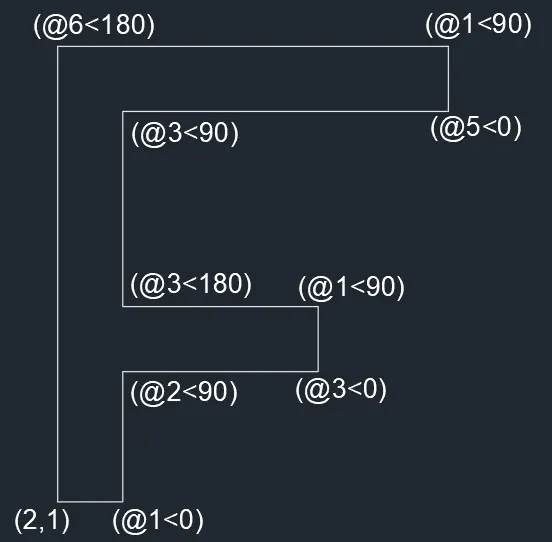
- Type the command "L" for line and give the coordinates for starting point 1. (2,1).
- Type the next coordinate of point 2 (@1<0) in the command box.
- Type the next coordinate of point 3 (@2<90) in the command box.
- Type the next coordinate of point 4 (@3<0) in the command box.
- Type the next coordinate of point 5 (@1<90) in the command box.
- Type the next coordinate of point 6 (@3<180) in the command box.
- Type the next coordinate of point 7 (@3<90) in the command box.
- Type the next coordinate of point 8 (@5<0) in the command box.
- Type the next coordinate of point 9 (@1<90) in the command box.
- Type the next coordinate of point 10 (@6<180) in the command box.
- Enter or click on the command close.
RESULT:-
For P4 Sketch:-
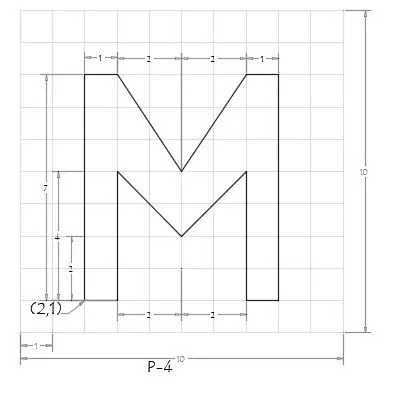
Absolute coordinate system:-
STEPS:-
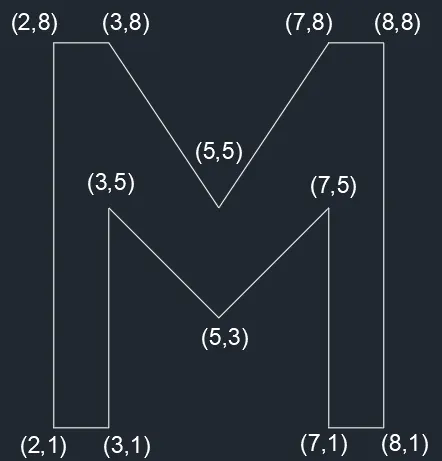
- Type the command "L" for line and give the coordinates for starting point 1. (2,1).
- Type the next coordinate of point 2 (3,1) in the command box.
- Type the next coordinate of point 4 (3,5) in the command box.
- Type the next coordinate of point 5 (5,3) in the command box.
- Type the next coordinate of point 6 (7,5) in the command box.
- Type the next coordinate of point 7 (7,1) in the command box.
- Type the next coordinate of point 8 (8,1) in the command box.
- Type the next coordinate of point 9 (8,8) in the command box.
- Type the next coordinate of point 10 (7,8) in the command box.
- Type the next coordinate of point 10 (5,5) in the command box.
- Type the next coordinate of point 11 (3,8) in the command box.
- Type the next coordinate of point 12 (2,8) in the command box.
- Enter or click on the command close.
RESULT:-
Relative rectangular coordinate system:-
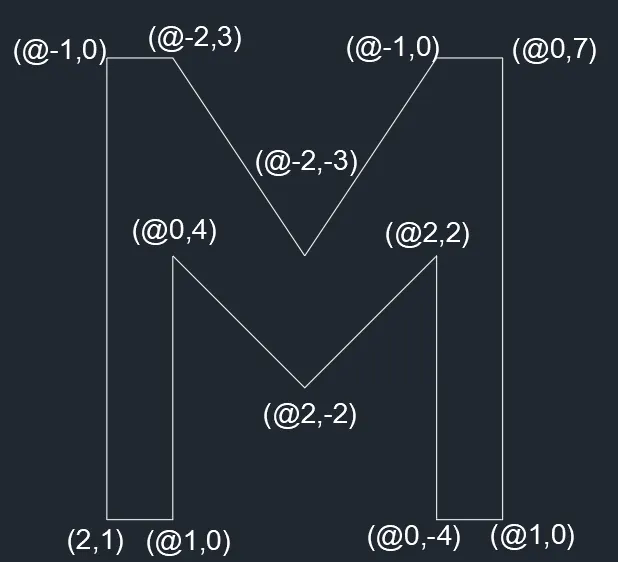
- Type the command "L" for line and give the coordinates for starting point 1. (2,1).
- Type the next coordinate of point 2 (@1,0) in the command box.
- Type the next coordinate of point 3 (@0,4) in the command box.
- Type the next coordinate of point 4 (@2,-2) in the command box.
- Type the next coordinate of point 5 (@2,2) in the command box.
- Type the next coordinate of point 6 (@0,-4) in the command box.
- Type the next coordinate of point 7 (@1,0) in the command box.
- Type the next coordinate of point 8 (@0,7) in the command box.
- Type the next coordinate of point 9 (@-1,0) in the command box.
- Type the next coordinate of point 10 (@-2,-3) in the command box.
- Type the next coordinate of point 11 (@-2,3) in the command box.
- Type the next coordinate of point 12 (@-1,0) in the command box.
- Enter or click on the command close.
RESULT:-
Polar coordinate system:-
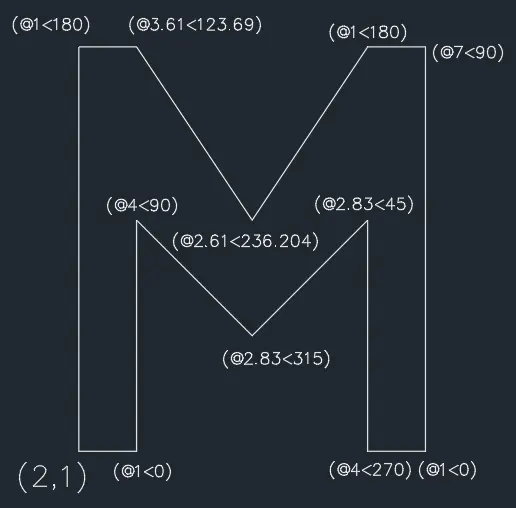
- Type the command "L" for line and give the coordinates for starting point 1. (2,1).
- Type the next coordinate of point 2 (@1<0) in the command box.
- Type the next coordinate of point 3 (@4<90) in the command box.
- Type the next coordinate of point 4 (@2.83<315) in the command box.
- Type the next coordinate of point 5 (@2.83<45) in the command box.
- Type the next coordinate of point 6 (@4<270) in the command box.
- Type the next coordinate of point 7 (@7<90) in the command box.
- Type the next coordinate of point 8 (@1<180) in the command box.
- Type the next coordinate of point 9 (@2.61<236.204) in the command box.
- Type the next coordinate of point 10 (@3.61<123.69) in the command box.
- Type the next coordinate of point 10 (@1<180) in the command box.
- Enter or click on the command close.
RESULT:-
For P5 Sketch:-
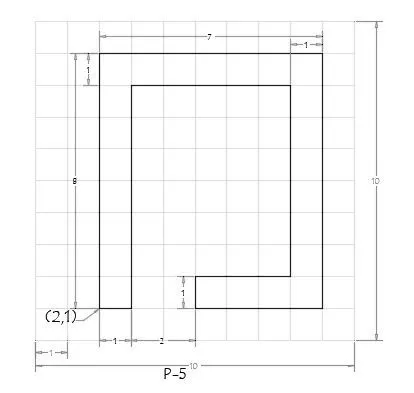
Absolute coordinate system:-
STEPS:-
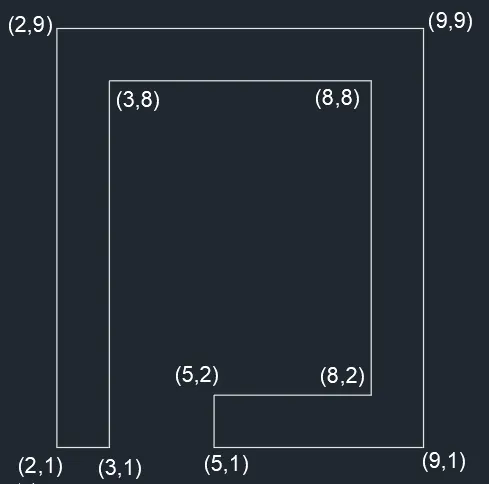
- Type the command "L" for line and give the coordinates for starting point 1. (2,1).
- Type the next coordinate of point 2 (3,1) in the command box.
- Type the next coordinate of point 3 (3,8) in the command box.
- Type the next coordinate of point 4 (8,8) in the command box.
- Type the next coordinate of point 5 (8,2) in the command box.
- Type the next coordinate of point 6 (5,2) in the command box.
- Type the next coordinate of point 7 (5,1) in the command box.
- Type the next coordinate of point 8 (9,1) in the command box.
- Type the next coordinate of point 9 (9,9) in the command box.
- Type the next coordinate of point 10 (2,9) in the command box.
- Enter or click on the command close.
RESULT:-
Relative rectangular coordinate system:-
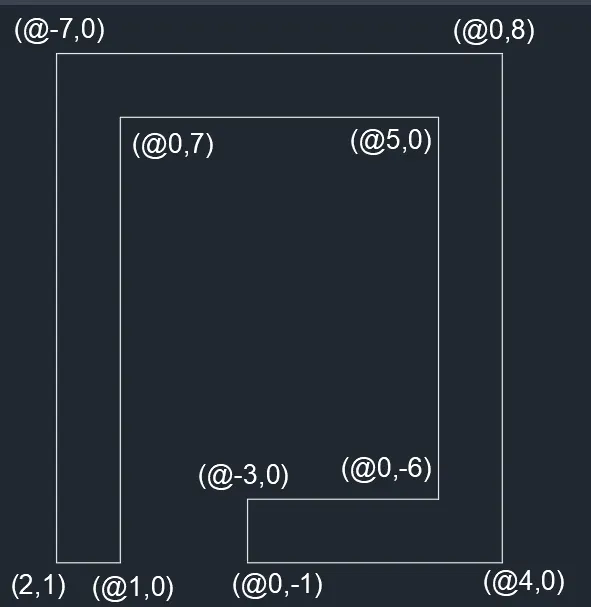
- Type the command "L" for line and give the coordinates for starting point 1. (2,1).
- Type the next coordinate of point 2 (@1,0) in the command box.
- Type the next coordinate of point 3 (@0,7) in the command box.
- Type the next coordinate of point 4 (@5,0) in the command box.
- Type the next coordinate of point 5 (@0,-6) in the command box.
- Type the next coordinate of point 6 (@-3,0) in the command box.
- Type the next coordinate of point 7 (@0,-1) in the command box.
- Type the next coordinate of point 8 (@4,0) in the command box.
- Type the next coordinate of point 9 (@0,8) in the command box.
- Type the next coordinate of point 10 (@-7,0) in the command box.
- Enter or click on the command close.
RESULT:-
Polar coordinate system:-
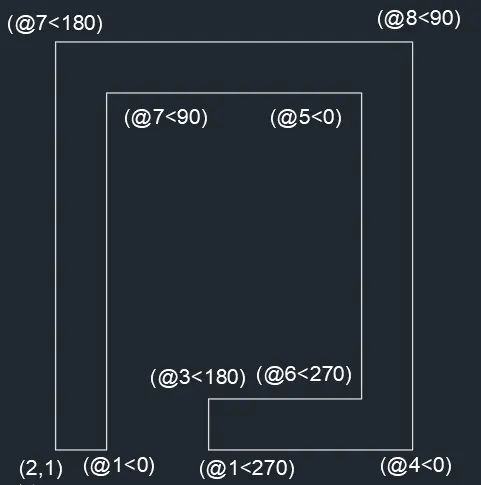
- Type the command "L" for line and give the coordinates for starting point 1. (2,1).
- Type the next coordinate of point 2 (@1<0) in the command box.
- Type the next coordinate of point 3 (@7<90) in the command box.
- Type the next coordinate of point 4 (@5<0) in the command box.
- Type the next coordinate of point 5 (@6<270) in the command box.
- Type the next coordinate of point 6 (@3<180) in the command box.
- Type the next coordinate of point 7 (@1<270) in the command box.
- Type the next coordinate of point 8 (@4<0) in the command box.
- Type the next coordinate of point 9 (@8<90) in the command box.
- Type the next coordinate of point 10 (@7<180) in the command box.
- Enter or click on the command close.
RESULT:-
For P6 Sketch:-
Absolute coordinate system:-
STEPS:-
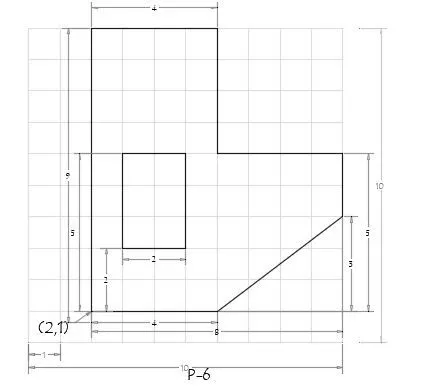
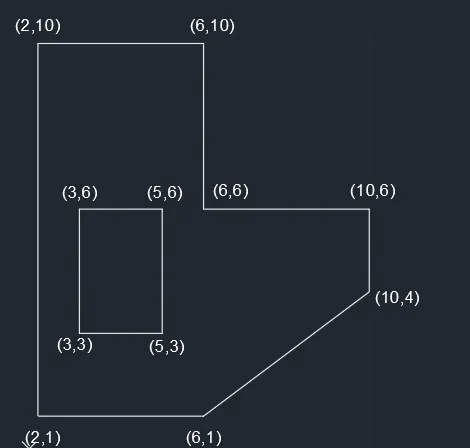
- Type the command "L" for line and give the coordinates for starting point 1. (2,1).
- Type the next coordinate of point 2 (6,1) in the command box.
- Type the next coordinate of point 3 (10,4) in the command box.
- Type the next coordinate of point 4 (10,6) in the command box.
- Type the next coordinate of point 5 (6,6) in the command box.
- Type the next coordinate of point 6 (6,10) in the command box.
- Type the next coordinate of point 7 (2,10) in the command box.
- Enter or click on the command close.
- Type the command "L" for line and give the coordinates for starting point 1. (3,3).
- Type the next coordinate of point for rectangle (5,3) in the command box.
- Type the next coordinate of point for rectangle (5,6) in the command box.
- Type the next coordinate of point for rectangle (3,6) in the command box.
- Enter or click on the command close.
RESULT:-
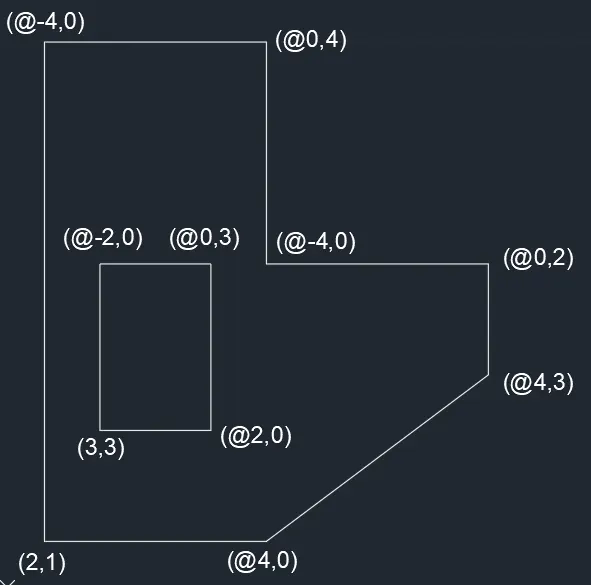
Relative rectangular coordinate system:-
- Type the command "L" for line and give the coordinates for starting point 1. (2,1).
- Type the next coordinate of point 2 (@4,0) in the command box.
- Type the next coordinate of point 3 (@4,3) in the command box.
- Type the next coordinate of point 4 (@0,2) in the command box.
- Type the next coordinate of point 5 (@-4,0) in the command box.
- Type the next coordinate of point 6 (@0,4) in the command box.
- Type the next coordinate of point 7 (@-4,0) in the command box.
- Enter or click on the command close.
- Type the command "L" for line and give the coordinates for starting point 1. (3,3).
- Type the next coordinate of point for rectangle (@2,0) in the command box.
- Type the next coordinate of point for rectangle (@0,3) in the command box.
- Type the next coordinate of point for rectangle (@-2,0) in the command box.
- Enter or click on the command close.
RESULT:-
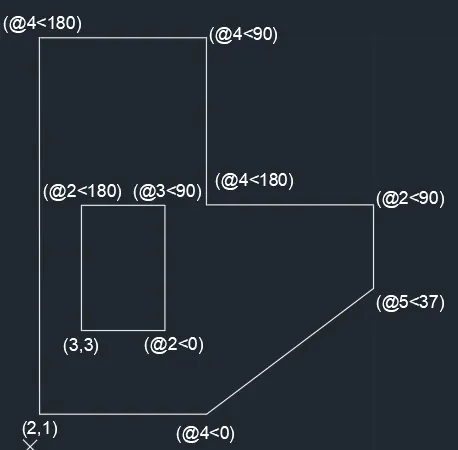
Polar coordinate system:-
- Type the command "L" for line and give the coordinates for starting point 1. (2,1).
- Type the next coordinate of point 2 (@4<0) in the command box.
- Type the next coordinate of point 3 (@5<37) in the command box.
- Type the next coordinate of point 4 (@2<90) in the command box.
- Type the next coordinate of point 5 (@4<180) in the command box.
- Type the next coordinate of point 6 (@4<90) in the command box.
- Type the next coordinate of point 7 (@4<180) in the command box.
- Enter or click on the command close.
- Type the command "L" for line and give the coordinates for starting point 1. (3,3).
- Type the next coordinate of point 2 (@2<0) in the command box.
- Type the next coordinate of point 3 (@3<90) in the command box.
- Type the next coordinate of point 3 (@2<180) in the command box.
- Enter or click on the command close.
RESULT:-
For P7 Sketch:-
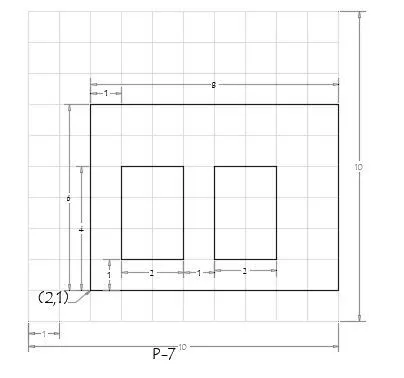
Absolute coordinate system:-
STEPS:-
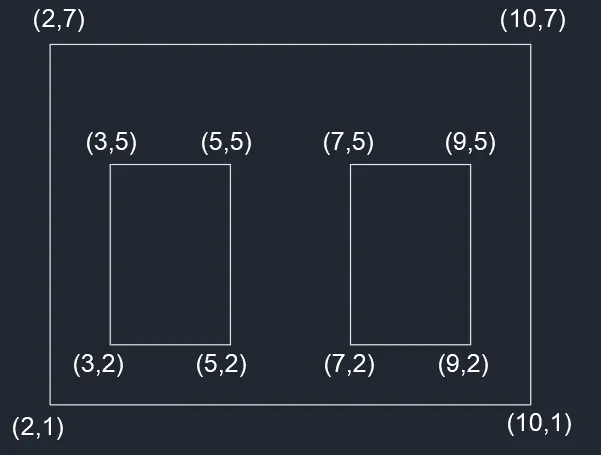
- Type the command "L" for line and give the coordinates for starting point 1. (2,1).
- Type the next coordinate of point (10,1) in the command box.
- Type the next coordinate of point (10,7) in the command box.
- Type the next coordinate of point (2,7) in the command box.
- Enter or click on the command close.
- Type the command "L" for line and give the coordinates for starting point 1. (3,2).
- Type the next coordinate of point (5,2) in the command box.
- Type the next coordinate of point (5,5) in the command box.
- Type the next coordinate of point (3,5) in the command box.
- Enter or click on the command close.
- Type the command "L" for line and give the coordinates for starting point 1. (7,2).
- Type the next coordinate of point for (9,2) in the command box.
- Type the next coordinate of point for (9,5) in the command box.
- Type the next coordinate of point for (7,5) in the command box.
- Enter or click on the command close.
RESULT:-
Relative rectangular coordinate system:-
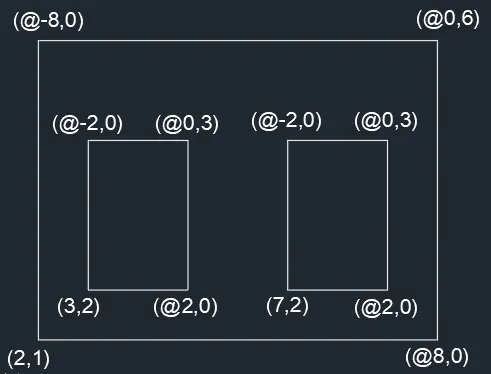
- Type the command "L" for line and give the coordinates for starting point 1. (2,1).
- Type the next coordinate of point (@8,0) in the command box.
- Type the next coordinate of point (@0,6) in the command box.
- Type the next coordinate of point (@-8,0) in the command box.
- Enter or click on the command close.
- Type the command "L" for line and give the coordinates for starting point 1. (3,2).
- Type the next coordinate of point for rectangle (@2,0) in the command box.
- Type the next coordinate of point for rectangle (@0,3) in the command box.
- Type the next coordinate of point for rectangle (@-2,0) in the command box.
- Enter or click on the command close.
- Type the command "L" for line and give the coordinates for starting point 1. (7,2).
- Type the next coordinate of point for rectangle (@2,0) in the command box.
- Type the next coordinate of point for rectangle (@0,3) in the command box.
- Type the next coordinate of point for rectangle (@-2,0) in the command box.
- Enter or click on the command close.
RESULT:-
Polar coordinate system:-
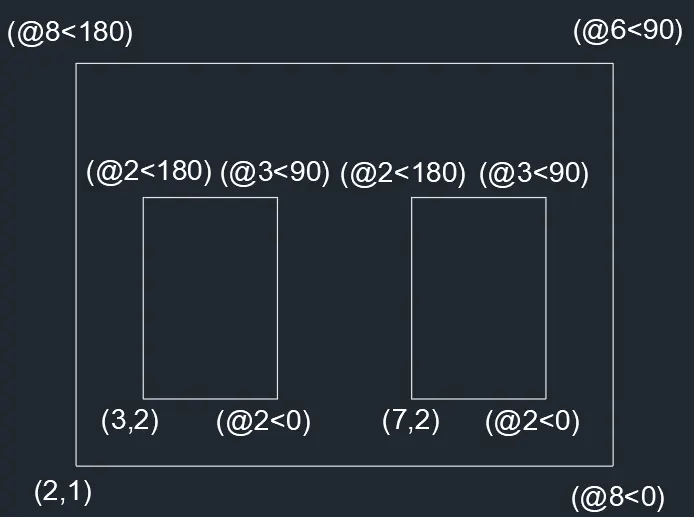
- Type the command "L" for line and give the coordinates for starting point 1. (2,1).
- Type the next coordinate of point 2 (@8<0) in the command box.
- Type the next coordinate of point 3 (@6<90) in the command box.
- Type the next coordinate of point 4 (@8<180) in the command box.
- Enter or click on the command close.
- Type the command "L" for line and give the coordinates for starting point 1. (3,2).
- Type the next coordinate of point 2 (@2<0) in the command box.
- Type the next coordinate of point 3 (@3<90) in the command box.
- Type the next coordinate of point 3 (@2<180) in the command box.
- Enter or click on the command close.
- Type the command "L" for line and give the coordinates for starting point 1. (7,2).
- Type the next coordinate of point 2 (@2<0) in the command box.
- Type the next coordinate of point 3 (@3<90) in the command box.
- Type the next coordinate of point 3 (@2<180) in the command box.
- Enter or click on the command close.
RESULT:-
For P8 Sketch:-
Absolute coordinate system:-
STEPS:-
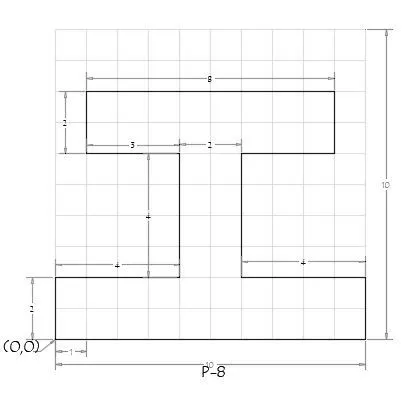
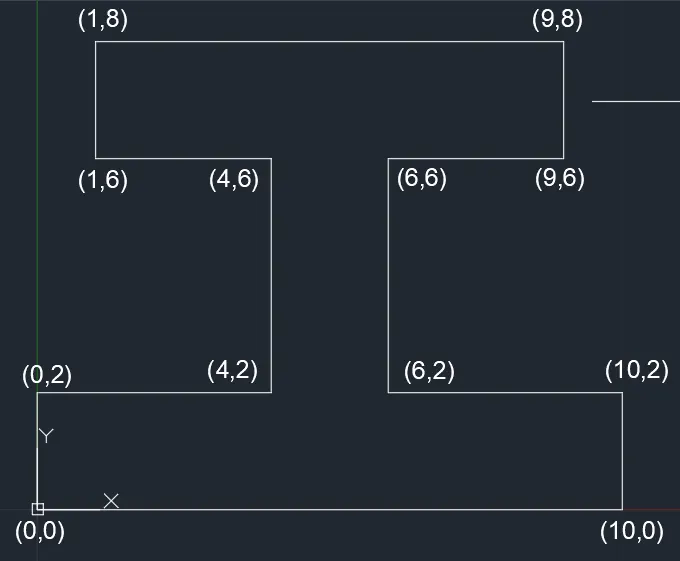
- Type the command "L" for line and give the coordinates for starting point 1. (0,0).
- Type the next coordinate of point 2 (10,0) in the command box.
- Type the next coordinate of point 3 (10,2) in the command box.
- Type the next coordinate of point 4 (6,2) in the command box.
- Type the next coordinate of point 5 (6,6) in the command box.
- Type the next coordinate of point 6 (9,6) in the command box.
- Type the next coordinate of point 7 (9,8) in the command box.
- Type the next coordinate of point 7 (1,8) in the command box.
- Type the next coordinate of point 7 (1,6) in the command box.
- Type the next coordinate of point 7 (4,6) in the command box.
- Type the next coordinate of point 7 (4,2) in the command box.
- Type the next coordinate of point 7 (0,2) in the command box.
- Enter or click on the command close.
RESULT:-
Relative rectangular coordinate system:-
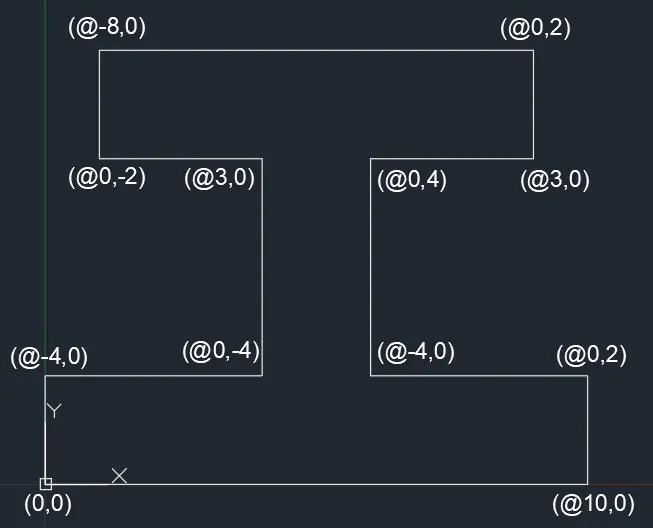
- Type the command "L" for line and give the coordinates for starting point 1. (0,0).
- Type the next coordinate of point (@10,0) in the command box.
- Type the next coordinate of point (@0,2) in the command box.
- Type the next coordinate of point (@-4,0) in the command box.
- Type the next coordinate of point (@0,4) in the command box.
- Type the next coordinate of point (@3,0) in the command box.
- Type the next coordinate of point (@0,2) in the command box.
- Type the next coordinate of point (@-8,0) in the command box.
- Type the next coordinate of point (@0,-2) in the command box.
- Type the next coordinate of point (@3,0) in the command box.
- Type the next coordinate of point (@0,-4) in the command box.
- Type the next coordinate of point (@-4,0) in the command box.
- Enter or click on the command close.
RESULT:-
Polar coordinate system:-
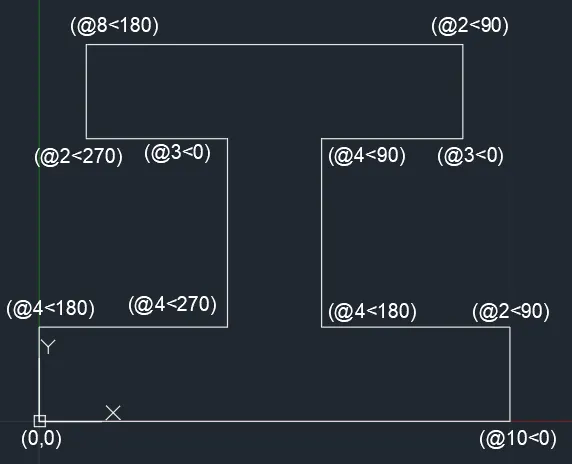
- Type the command "L" for line and give the coordinates for starting point 1. (2,1).
- Type the next coordinate of point 2 (@10<0) in the command box.
- Type the next coordinate of point 3 (@2<90) in the command box.
- Type the next coordinate of point 4 (@4<180) in the command box.
- Type the next coordinate of point 5 (@4<90) in the command box.
- Type the next coordinate of point 6 (@3<0) in the command box.
- Type the next coordinate of point 7 (@2<90) in the command box.
- Type the next coordinate of point 8 (@8<180) in the command box.
- Type the next coordinate of point 9 (@2<270) in the command box.
- Type the next coordinate of point 10 (@3<0) in the command box.
- Type the next coordinate of point 11 (@4<270) in the command box.
- Type the next coordinate of point 12 (@4<180) in the command box.
- Enter or click on the command close.
RESULT:-
For P9 Sketch:-
Absolute coordinate system:-
STEPS:-
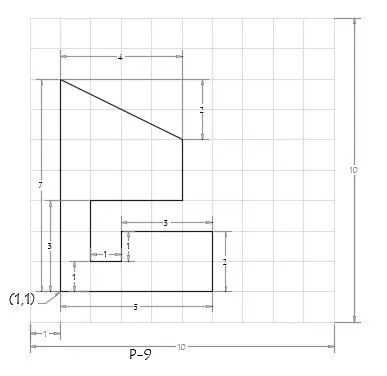
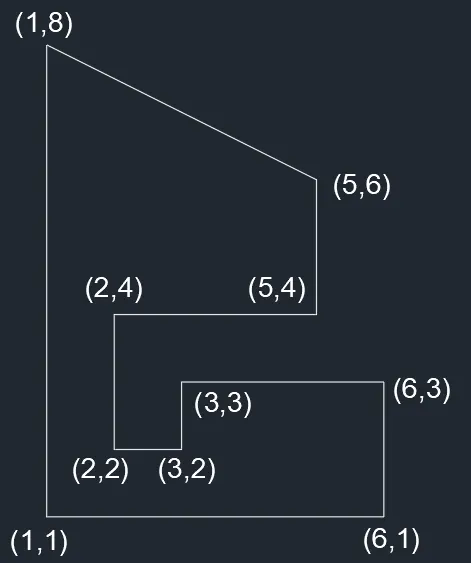
- Type the command "L" for line and give the coordinates for starting point 1. (1,1).
- Type the next coordinate of point 2 (6,1) in the command box.
- Type the next coordinate of point 3 (6,3) in the command box.
- Type the next coordinate of point 4 (3,3) in the command box.
- Type the next coordinate of point 5 (3,2) in the command box.
- Type the next coordinate of point 6 (2,2) in the command box.
- Type the next coordinate of point 7 (2,4) in the command box.
- Type the next coordinate of point 7 (5,4) in the command box.
- Type the next coordinate of point 7 (5,6) in the command box.
- Type the next coordinate of point 7 (1,8) in the command box.
- Enter or click on the command close.
RESULT:-
Relative rectangular coordinate system:-
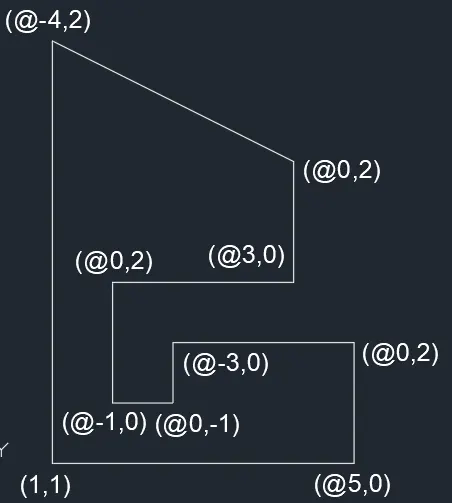
- Type the command "L" for line and give the coordinates for starting point 1. (1,1).
- Type the next coordinate of point (@5,0) in the command box.
- Type the next coordinate of point (@0,2) in the command box.
- Type the next coordinate of point (@-3,0) in the command box.
- Type the next coordinate of point (@0,-1) in the command box.
- Type the next coordinate of point (@-1,0) in the command box.
- Type the next coordinate of point (@0,2) in the command box.
- Type the next coordinate of point (@3,0) in the command box.
- Type the next coordinate of point (@0,2) in the command box.
- Type the next coordinate of point (@-4,2) in the command box.
- Enter or click on the command close.
RESULT:-
Polar coordinate system:-
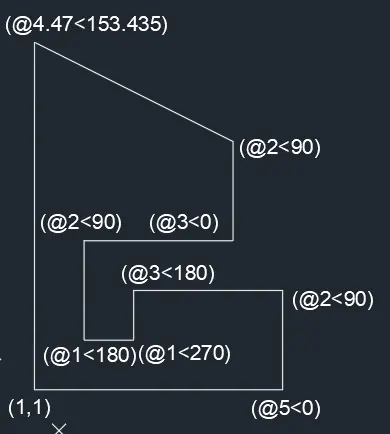
- Type the command "L" for line and give the coordinates for starting point 1. (1,1).
- Type the next coordinate of point 2 (@5<0) in the command box.
- Type the next coordinate of point 3 (@2<90) in the command box.
- Type the next coordinate of point 4 (@3<180) in the command box.
- Type the next coordinate of point 4 (@1<270) in the command box.
- Type the next coordinate of point 4 (@1<180) in the command box.
- Type the next coordinate of point 4 (@2<90) in the command box.
- Type the next coordinate of point 4 (@3<0) in the command box.
- Type the next coordinate of point 4 (@2<90) in the command box.
- Type the next coordinate of point 4 (@4.47<153.435) in the command box.
- Enter or click or 7<270 on the command close.
RESULT:-
For P10 Sketch:-
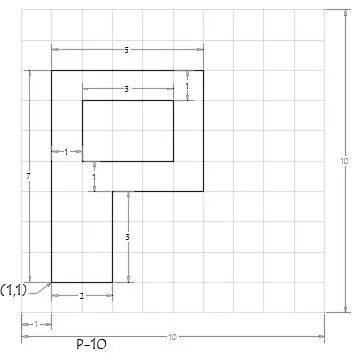
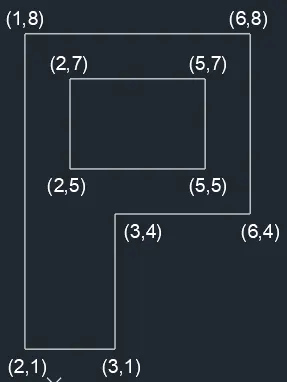
Absolute coordinate system:-
STEPS:-
- Type the command "L" for line and give the coordinates for starting point 1. (1,1).
- Type the next coordinate of point 2 (3,1) in the command box.
- Type the next coordinate of point 3 (3,4) in the command box.
- Type the next coordinate of point 4 (6,4) in the command box.
- Type the next coordinate of point 5 (6,8) in the command box.
- Type the next coordinate of point 6 (1,8) in the command box.
- Enter or click on the command close.
- Type the command "L" for line and give the coordinates for starting point 1. (2,5).
- Type the next coordinate of point 7 (5,5) in the command box.
- Type the next coordinate of point 7 (5,7) in the command box.
- Type the next coordinate of point 7 (2,7) in the command box.
- Enter or click on the command close.
RESULT:-
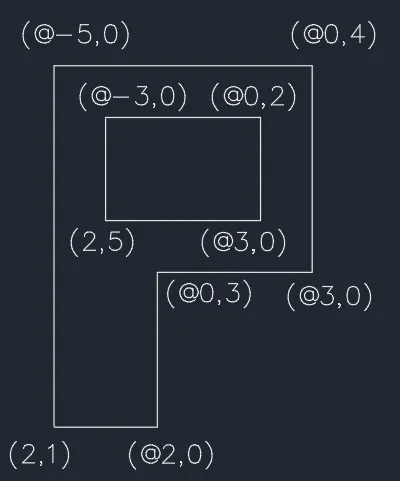
Relative rectangular coordinate system:-
- Type the command "L" for line and give the coordinates for starting point 1. (1,1).
- Type the next coordinate of point (@2,0) in the command box.
- Type the next coordinate of point (@0,3) in the command box.
- Type the next coordinate of point (@3,0) in the command box.
- Type the next coordinate of point (@0,4) in the command box.
- Type the next coordinate of point (@-5,0) in the command box.
- Enter or click on the command close.
- Type the command "L" for line and give the coordinates for starting point 1. (2,5).
- Type the next coordinate of point (@3,0) in the command box.
- Type the next coordinate of point (@0,2) in the command box.
- Type the next coordinate of point (@-3,0) in the command box.
- Enter or click on the command close.
RESULT:-
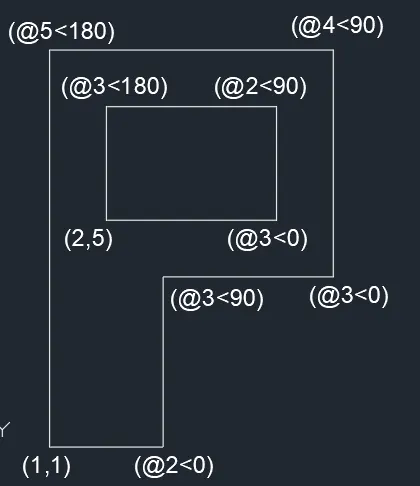
Polar coordinate system:-
- Type the command "L" for line and give the coordinates for starting point 1. (1,1).
- Type the next coordinate of point 2 (@2<0) in the command box.
- Type the next coordinate of point 3 (@3<90) in the command box.
- Type the next coordinate of point 4 (@3<0) in the command box.
- Type the next coordinate of point 4 (@4<90) in the command box.
- Type the next coordinate of point 4 (@5<180) in the command box.
- Type the command "L" for line and give the coordinates for starting point 1. (1,1).
- Type the next coordinate of point 4 (@3<0) in the command box.
- Type the next coordinate of point 4 (@2<90) in the command box.
- Type the next coordinate of point 4 (@3<180) in the command box.
- Enter or click on the command close.
RESULT:-
Civil Related Problems
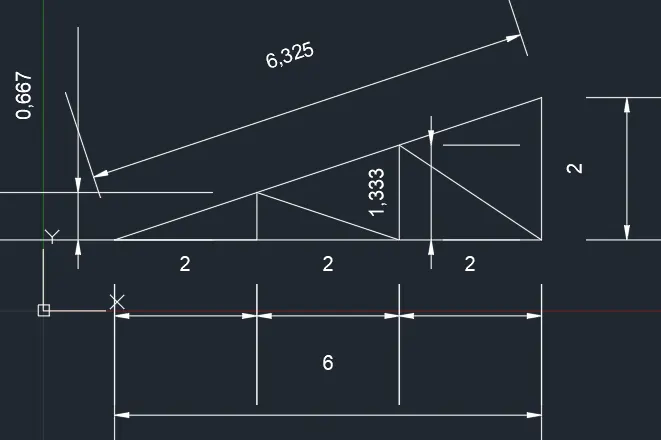
Draw the profile and the trusses using any coordinate system methods. The dimensions are there for references:-
Problem Profile:-
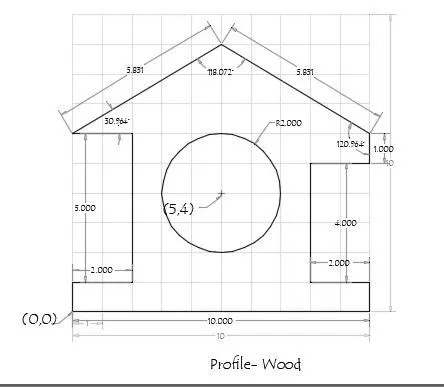
Absolute coordinate system:-
STEPS:-
- Type the command "L" for line and give the coordinates for starting point 1. (0,0).
- Type the next coordinate of point 2 (10,1) in the command box.
- Type the next coordinate of point 3 (8,1) in the command box.
- Type the next coordinate of point 4 (8,5) in the command box.
- Type the next coordinate of point 5 (10,5) in the command box.
- Type the next coordinate of point 6 (10,6) in the command box.
- Type the next coordinate of point 7 (5,9) in the command box.
- Type the next coordinate of point 7 (2,6) in the command box.
- Type the next coordinate of point 7 (2,1) in the command box.
- Type the next coordinate of point 7 (0,1) in the command box.
- Enter or click on the command close.
- Type the command "circle" and give the coordinate (5,4) and provide a radius 2.
RESULT:-
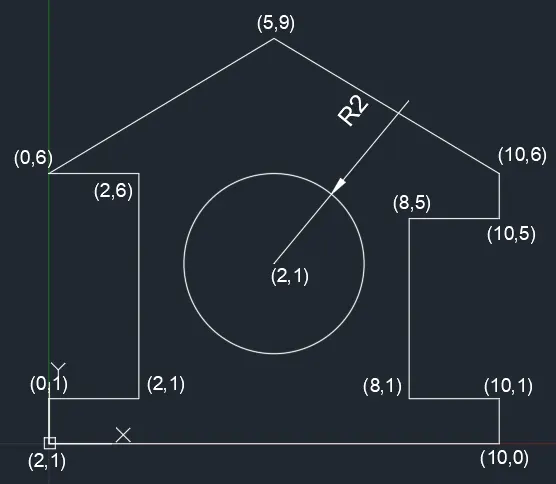
Problem Profile:-
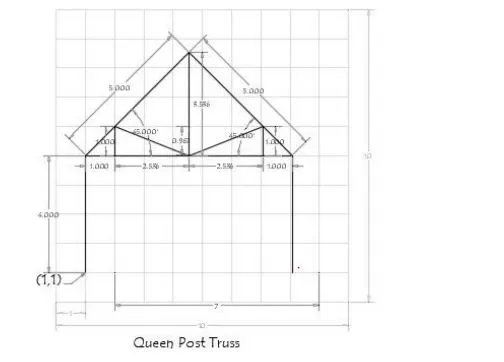
Absolute coordinate system:-
STEPS:-
- Type the command "L" for line and give the coordinates for starting point 1. (1,1).
- Type the next coordinate of point 2 (1,5) in the command box.
- Type the next coordinate of point 3 (8.072,5) in the command box.
- Type the next coordinate of point 4 (8.072,1) in the command box.
- Press the key "escape" for closing.
- Type the command "L" for line and give the coordinates for starting point 1. (1,5).
- Type the next coordinate of point 6 (4.536,8.536) in the command box.
- Type the next coordinate of point 7 (8.072,5) in the command box.
- Type the next coordinate of point 7 (7.072,5) in the command box.
- Type the next coordinate of point 7 (7.072,6) in the command box.
- Type the next coordinate of point 7 (4.536,5) in the command box.
- Type the next coordinate of point 7 (2,6) in the command box.
- Type the next coordinate of point 7 (2,5) in the command box.
- Type the next coordinate of point 7 (4.536,5) in the command box.
- Type the next coordinate of point 7 (4.5,8.536) in the command box.
- Press the key "escape" for closing.
RESULT:-
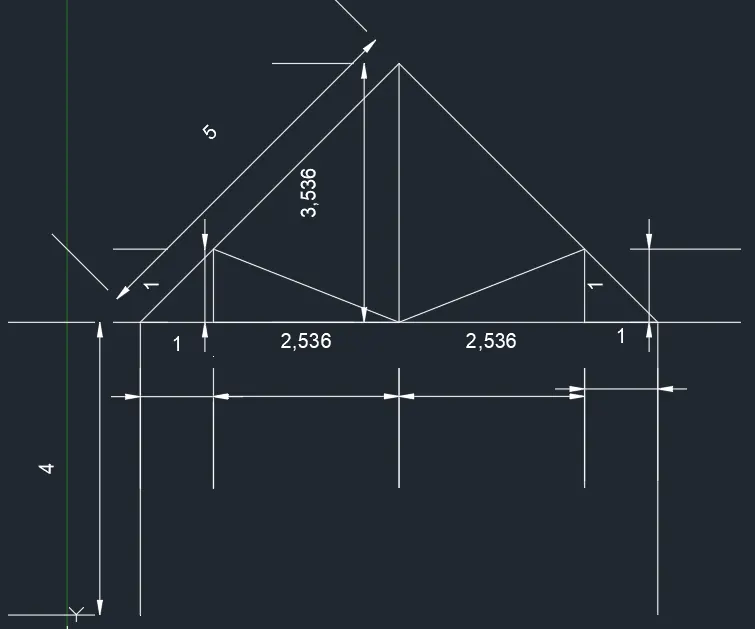
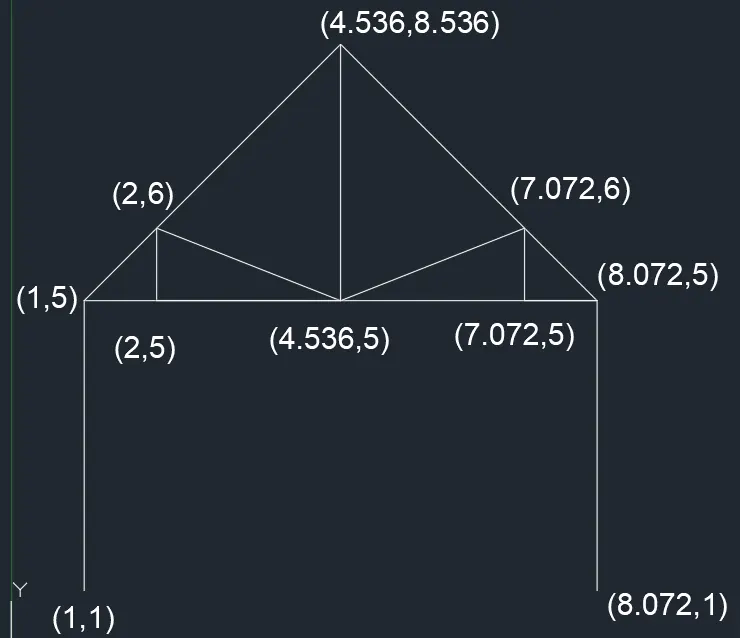
Problem Profile:-
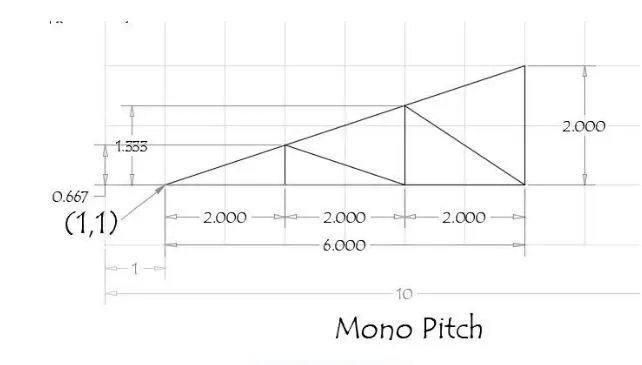
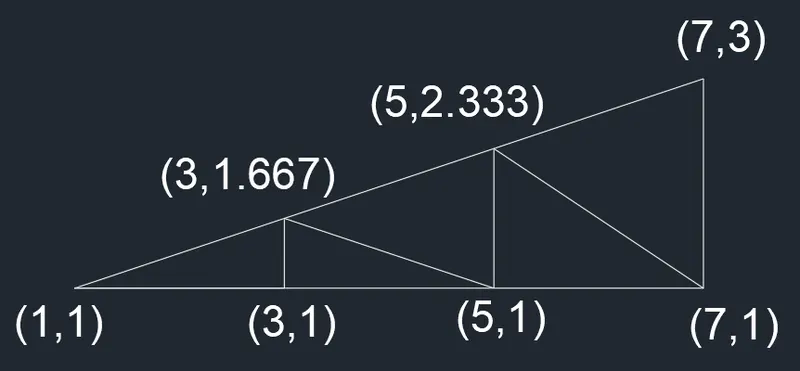
Absolute coordinate system:-
STEPS:-
- Type the command "L" for line and give the coordinates for starting point 1. (1,1).
- Type the next coordinate of point 2 (7,1) in the command box.
- Type the next coordinate of point 3 (7,3) in the command box.
- Type the next coordinate of point 4 (1,1) in the command box.
- Type the next coordinate of point 6 (3,1) in the command box.
- Type the next coordinate of point 7 (3,1.667) in the command box.
- Type the next coordinate of point 7 (5,1) in the command box.
- Type the next coordinate of point 7 (5,2.333) in the command box.
- Type the next coordinate of point 7 (7,1) in the command box.
- Enter or click on the command close.
RESULT:-