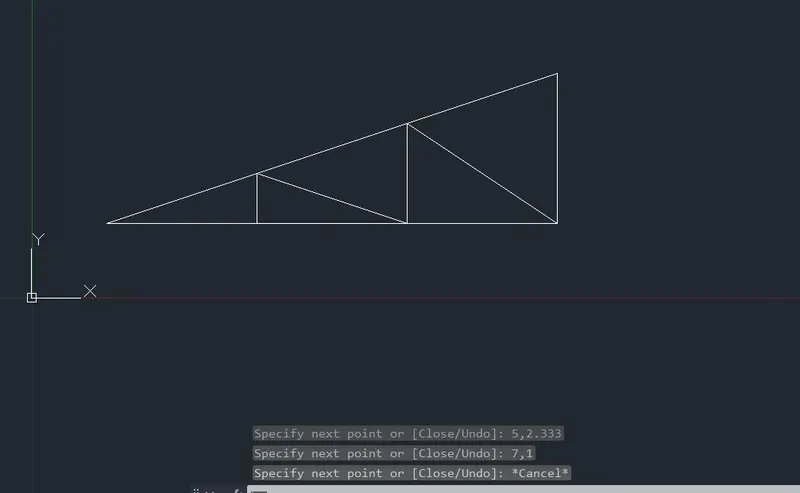
Creation of geometries by Coordinate system methods using AutoCad
AIM:
To create the given geometrices and trusses in autocad, using the different coordinate system method and the line and circle drawing tools.
Geometrics p-1 and p-2 are drawn using all coordinate systems, and each of the remaining geometrics are drawn using any one of the coordinate systems.
INTRODUCTION:
COORDINATE SYSTEM: Arrangement of reference lines or curves used to identify the location of points in space. In two dimensions, the most common system in the cartesian system.
TYPES OF COORDINATE SYSTEM ARE:
- ABSOLUTE COORDINATE SYSTEM: Absolute coordinate system refers to a cartesian system that uses x- axis , y - axis and sometimes a z - axis to establish a point some distance from a common origin.
- RELATIVE COORDINATE SYSTEM: Relative coordinates are locations defined by their distance from a reference point. An example of a relative coordinate is the distance from your computer monitor to your printer.
- RELATIVE RECTANGULAR COORDINATE SYSTEM: It is a coordinate system that specifies each point by a pair of numerical coordinates in the x - axis and y - axis. In this system the points succeeding the first point are typed in as @ x,y in the command line.
- RELATIVE POLAR COORDINATE SYSTEM: This system specifies the distance and angle of a particular point with respect to its previous point. In the relative polar coordinate system, points are established by typing @ distance < angle enter in the command line.
PROBLEM 1: DRAFTING THE GEOMETRY GIVEN IN P1:
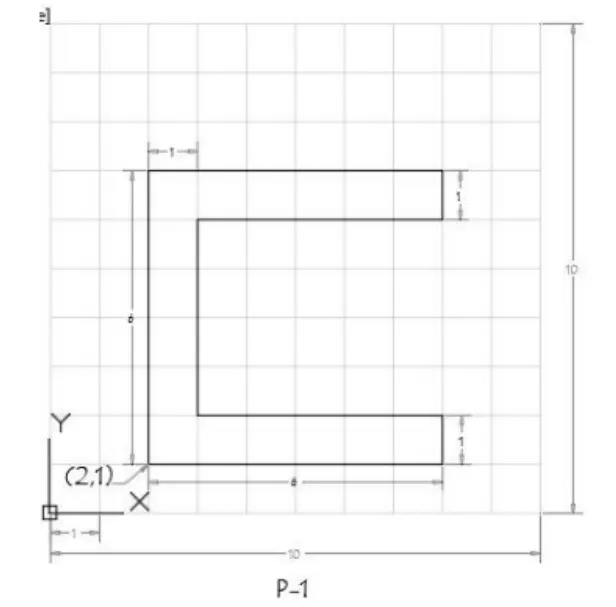
A) ABSOLUTE COORDINATE SYSTEM: In this system, distance is measured from origin.
PROCEDURE:
Step 1: Type the command L for line and give the coordinates for point 1 (2,1).
Step 2: Type the next coordinate of point 2 (2,7) in the command box.
Step 3: Type the next coordinate of point 3 ( 8,7) in the command box.
Step 4: Type the next coordinate of point 4 ( 8,6) in the command box.
Step 5 : Type the next coordinate of point 5 ( 3,6) in the command box.
Step 6 : Type the next coordinate of point 6 ( 3,2) in the command box.
Step 7 : Type the next coordinate of point 7 ( 8,2) in the command box.
Step 8 : Type the next coordinate of point 8 ( 8,1) in the command box.
Step 9 : Enter the or click on the command close.
RESULT:
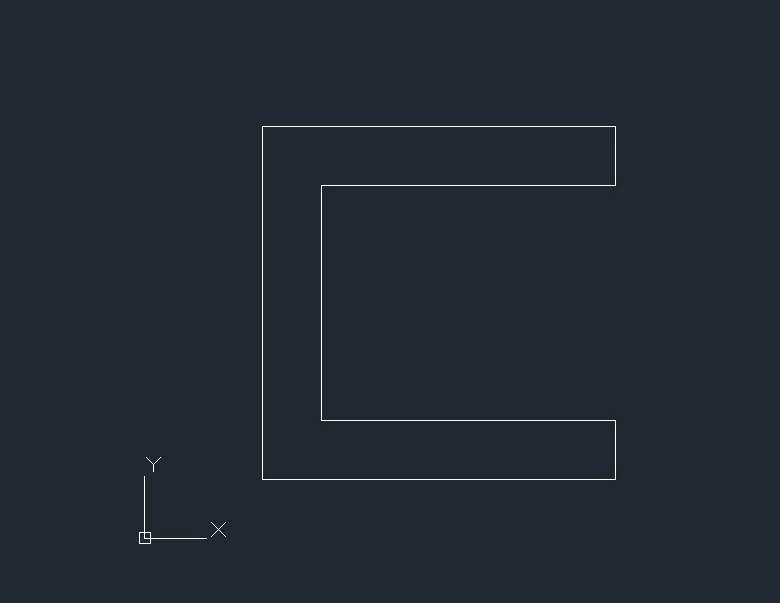
B) RELATIVE RECTANGULAR COORDINATE SYSTEM: In this system, coordinates are measured from the previous point.
PROCEDURE:
Step 1: Type the command L for line and give the coordinate for point 1 (2,1).
Step 2 : Type the next coordinate of point 2 @0,6 in the command box.
Step 3 : Type the next coordinate of point 3 @6,0 in the command box.
Step 4: Type the next coordinate of point 4 @0,-1 in the command box.
Step 5: Type the next coordinate of point 5 @ -5,0 in the command box.
Step 6 : Type the next coordinate of point 6 @ 0,-4 in the command box.
Step 7 : Type the next coordinate of point 7 @ 5,0 in the command box.
Step 8 : Type the next coordinate of point 8 @ 0,-1 in the command box.
Step 9 Enter or click on the command close.
RESULT:
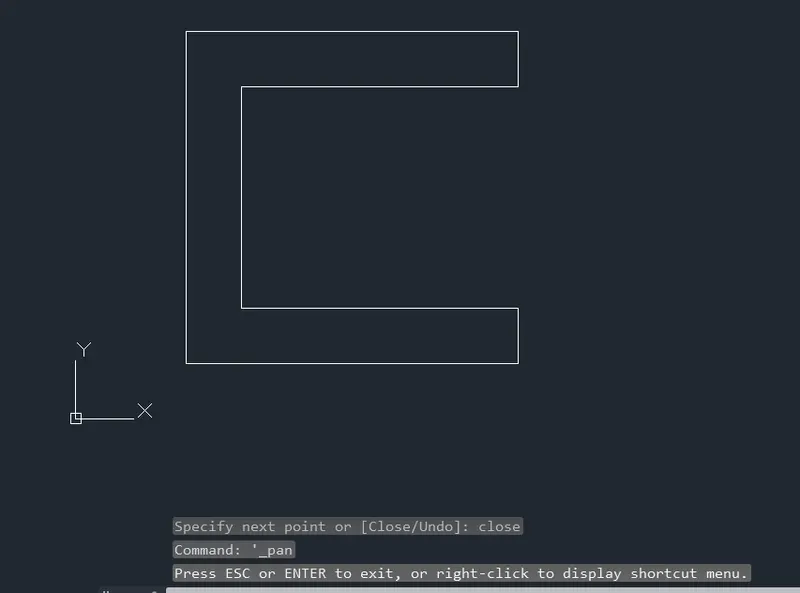
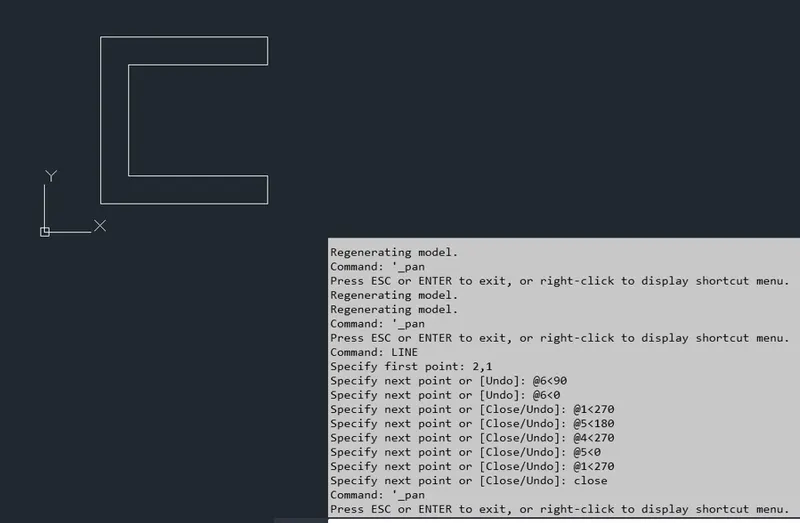
C) POLAR COORDINATE SYSTEM: In polar coordinate system, the coordinate and the angle with respect to x - axis is given.
PROCEDURE:
Step 1: Type the command L for line and give the coordinate for point 1 (2,1).
Step 2 : Type the next coordinate of point 2 @6<90 in the command box.
Step 3 : Type the next coordinate of point 3 @6<0 in the command box.
Step 4: Type the next coordinate of point 4 @1<270 in the command box.
Step 5: Type the next coordinate of point 5 @ 5<180 in the command box.
Step 6 : Type the next coordinate of point 6 @ 4<270 in the command box.
Step 7 : Type the next coordinate of point 7 @ 5<0 in the command box.
Step 8 : Type the next coordinate of point 8 @ 1<270 in the command box.
Step 9 : Enter or click on the command close.
RESULT:
-----------------------------------------------------------------------------------------------------------------------------
PROBLEM 2 : DRAFTING THE GEOMETRY GIVEN IN P2:
a) ABSOLUTE COORDINATE SYSTEM: In this system, distance is measured from origin.
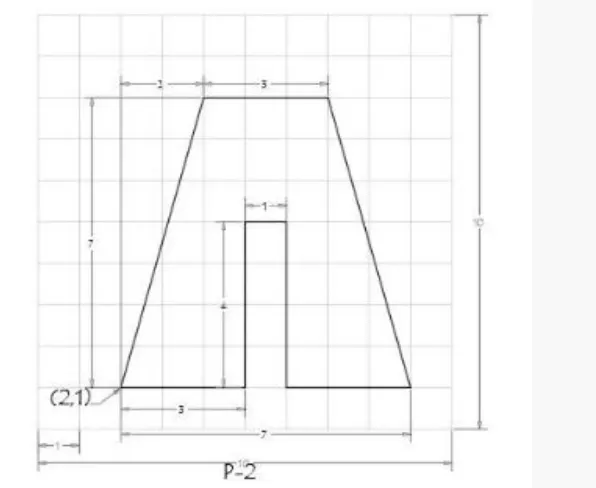
PROCEDURE:
Step 1: Type the command L for line and give the coordinates for point 1 (2,1).
Step 2: Type the next coordinate of point 2 (4,8) in the command box.
Step 3: Type the next coordinate of point 3 ( 7,8) in the command box.
Step 4: Type the next coordinate of point 4 ( 9,1) in the command box.
Step 5 : Type the next coordinate of point 5 ( 6,1) in the command box.
Step 6 : Type the next coordinate of point 6 ( 6,5) in the command box.
Step 7 : Type the next coordinate of point 7 ( 5,5) in the command box.
Step 8 : Type the next coordinate of point 8 ( 5,1) in the command box.
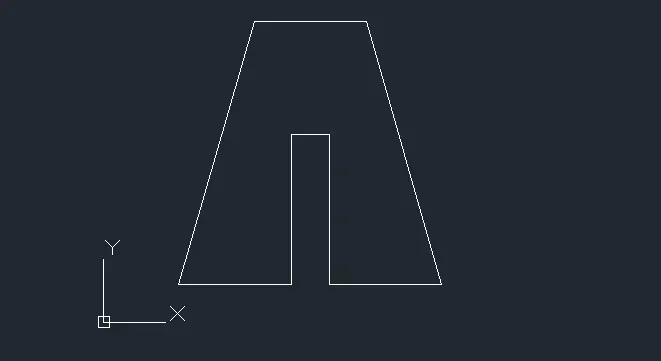
Step 9 : Enter the or click on the command close.
RESULT:
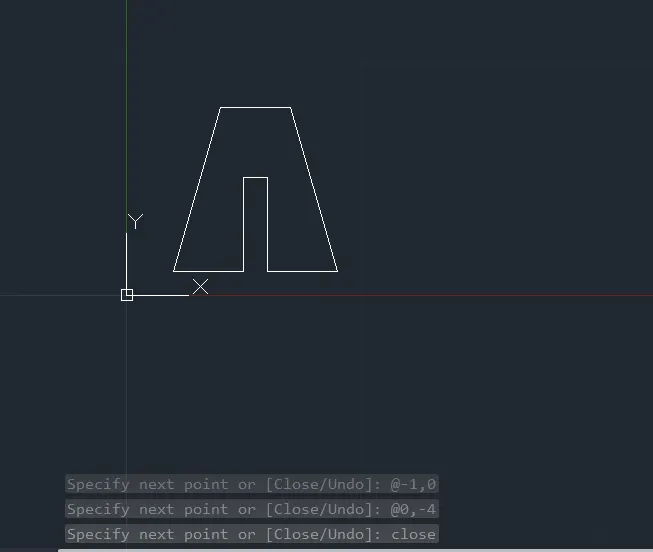
B) RELATIVE RECTANGULAR COORDINATE SYSTEM: In this system, coordinates are measured from the previous point.
PROCEDURE:
Step 1: Type the command L for line and give the coordinate for point 1 (2,1).
Step 2 : Type the next coordinate of point 2 @2,7 in the command box.
Step 3 : Type the next coordinate of point 3 @3,0 in the command box.
Step 4: Type the next coordinate of point 4 @2,-7 in the command box.
Step 5: Type the next coordinate of point 5 @ -3,0 in the command box.
Step 6 : Type the next coordinate of point 6 @ 0,4 in the command box.
Step 7 : Type the next coordinate of point 7 @ -1,0 in the command box.
Step 8 : Type the next coordinate of point 8 @ 0,-4 in the command box.
Step 9 Enter or click on the command close.
RESULT:
-----------------------------------------------------------------------------------------------------------------------------
PROBLEM 3 : DRAFTING THE GEOMETRY GIVEN IN P4:
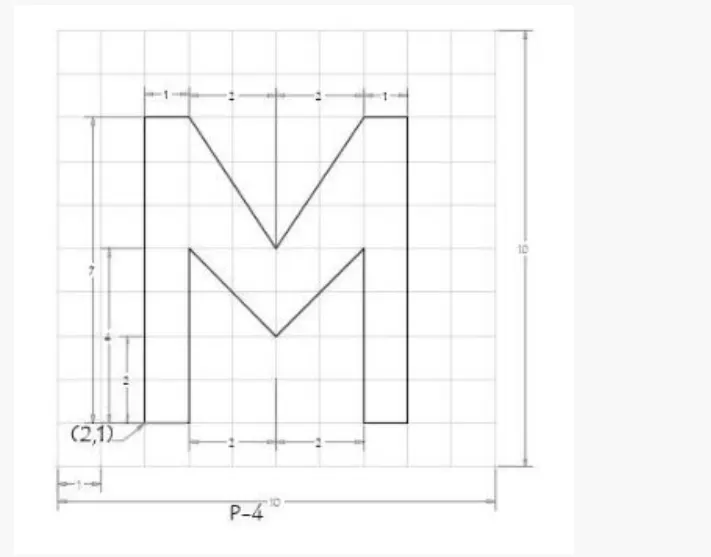
a) ABSOLUTE COORDINATE SYSTEM: In this system, distance is measured from origin.
PROCEDURE:
Step 1: Type the command L for line and give the coordinates for point 1 (2,1).
Step 2: Type the next coordinate of point 2 (2,8) in the command box.
Step 3: Type the next coordinate of point 3 ( 3,8) in the command box.
Step 4: Type the next coordinate of point 4 ( 5,5) in the command box.
Step 5 : Type the next coordinate of point 5 ( 7,8) in the command box.
Step 6 : Type the next coordinate of point 6 ( 8,8) in the command box.
Step 7 : Type the next coordinate of point 7 ( 8,1) in the command box.
Step 8 : Type the next coordinate of point 8 ( 7,1) in the command box.
Step 9 : Type the next coordinate of point 9 (7,5) in the command box.
Step 10 : Type the next coordinate of point 10 (5,3 ) in the command box.
Step 11: Type the next coordinate of point 11 ( 3,5 ) in the command box.
Step 12: Type the next coordinate of point 12 ( 3,1) in the command box.
Step 13 : Enter or click on the command close.
RESULT:
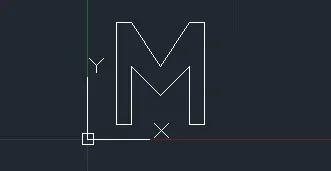
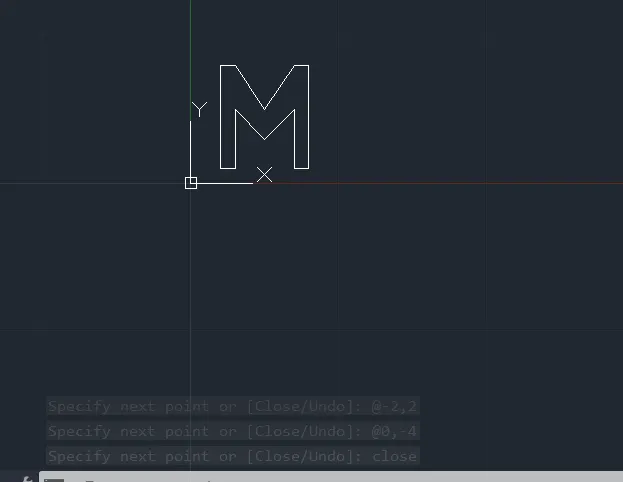
B) RELATIVE RECTANGULAR COORDINATE SYSTEM: In this system, coordinates are measured from the previous point.
PROCEDURE:
Step 1: Type the command L for line and give the coordinates for point 1 (2,1).
Step 2: Type the next coordinate of point 2 @0,7 in the command box.
Step 3: Type the next coordinate of point 3 @1,0 in the command box.
Step 4: Type the next coordinate of point 4 @2,-3 in the command box.
Step 5 : Type the next coordinate of point 5 @2,3 in the command box.
Step 6 : Type the next coordinate of point 6 @1,0 in the command box.
Step 7 : Type the next coordinate of point 7 @0,-7 in the command box.
Step 8 : Type the next coordinate of point 8 @-1,0 in the command box.
Step 9 : Type the next coordinate of point 9 @0,4 in the command box.
Step 10 : Type the next coordinate of point 10 @-2,-2 in the command box.
Step 11: Type the next coordinate of point 11 @-2,2 in the command box.
Step 12: Type the next coordinate of point 12 @0,-4 in the command box.
Step 13 : Enter or click on the command close.
RESULT:
-----------------------------------------------------------------------------------------------------------------------------
PROBLEM 4 : DRAFTING THE GEOMETRY GIVEN IN P-5:
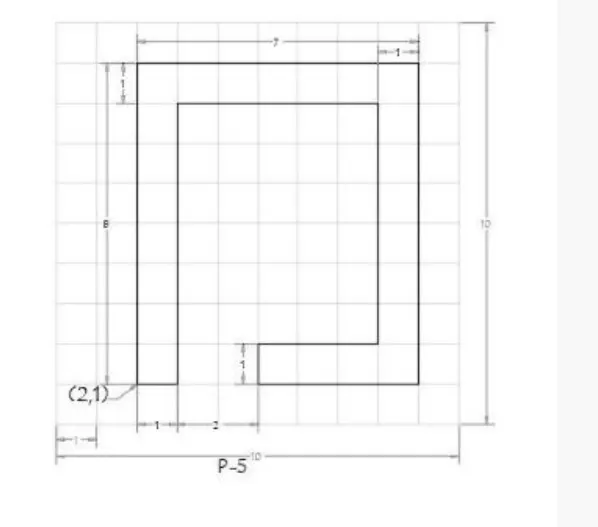
a) ABSOLUTE COORDINATE SYSTEM: In this system, distance is measured from origin.
PROCEDURE:
Step 1: Type the command L for line and give the coordinates for point 1 (2,1).
Step 2: Type the next coordinate of point 2 (2,9) in the command box.
Step 3: Type the next coordinate of point 3 ( 9,9) in the command box.
Step 4: Type the next coordinate of point 4 ( 9,1) in the command box.
Step 5 : Type the next coordinate of point 5 ( 5,1) in the command box.
Step 6 : Type the next coordinate of point 6 ( 5,,2) in the command box.
Step 7 : Type the next coordinate of point 7 ( 8,2) in the command box.
Step 8 : Type the next coordinate of point 8 ( 8,8) in the command box.
Step 9 : Type the next coordinate of point 9 (3,8) in the command box.
Step 10 : Type the next coordinate of point 10 (3,1 ) in the command box.
Step 11 : Enter or click on the command close.
RESULT:
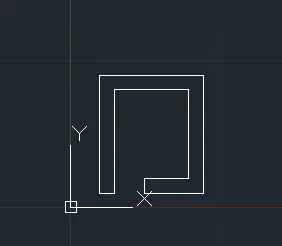
B) RELATIVE RECTANGULAR COORDINATE SYSTEM: In this system, coordinates are measured from the previous point.
PROCEDURE:
Step 1: Type the command L for line and give the coordinates for point 1 (2,1).
Step 2: Type the next coordinate of point 2 @0,8 in the command box.
Step 3: Type the next coordinate of point 3 @7,0 in the command box.
Step 4: Type the next coordinate of point 4 @0,-8 in the command box.
Step 5 : Type the next coordinate of point 5 @-4,0 in the command box.
Step 6 : Type the next coordinate of point 6 @0,1 in the command box.
Step 7 : Type the next coordinate of point 7 @3,0 in the command box.
Step 8 : Type the next coordinate of point 8 @0,6 in the command box.
Step 9 : Type the next coordinate of point 9 @-5,0 in the command box.
Step 10 : Type the next coordinate of point 10 @0,-7 in the command box.
Step 11 : Enter or click on the command close.
RESULT:
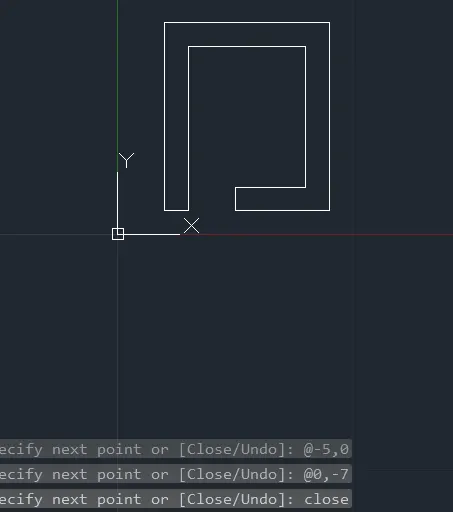
-----------------------------------------------------------------------------------------------------------------------------
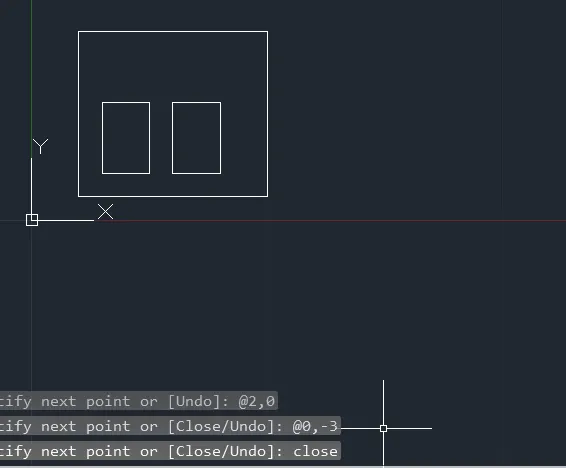
PROBLEM 5 : DRAFTING THE GEOMETRY GIVEN IN P-7:
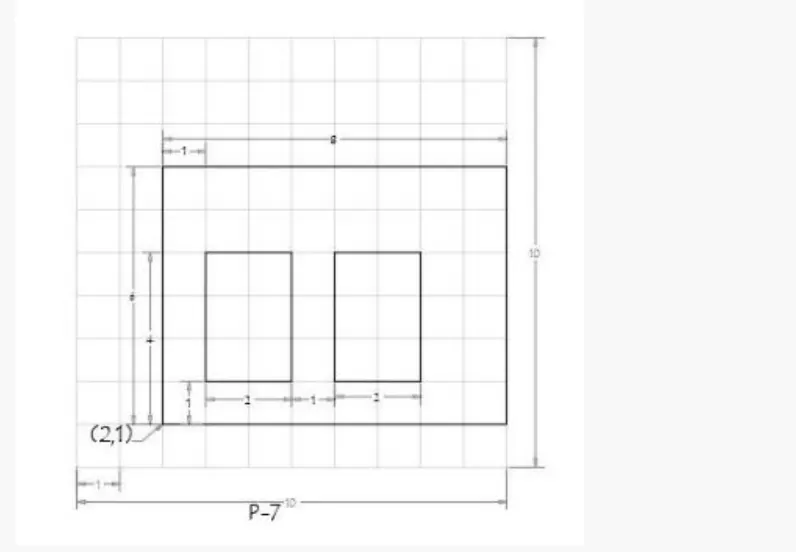
a) ABSOLUTE COORDINATE SYSTEM: In this system, distance is measured from origin.
PROCEDURE:
Step 1: Type the command L for line and give the coordinates for point 1 (2,1).
Step 2: Type the next coordinate of point 2 (2,7) in the command box.
Step 3: Type the next coordinate of point 3 ( 10,7) in the command box.
Step 4: Type the next coordinate of point 4 ( 10,1) in the command box.
Step 5 : Enter or click on the command close.
Step 6 : Type the command L for line and give the coordinates for point 5 (3,2).
Step 7 : Type the next coordinate of point 6 ( 3,5,) in the command box.
Step 8 : Type the next coordinate of point 7 ( 5,5) in the command box.
Step 9 : Type the next coordinate of point 8 (5,2) in the command box.
Step 10 : Enter or click on the command close.
Step 11: Type the command L for line and give the coordinates for point 9 (6,2).
Step 12: Type the next coordinate of point 10 (6,5) in the command box.
Step 13: Type the next coordinate of point 11 ( 8,5) in the command box.
Step 14 : Type the next coordinate of point 12 ( 8,2) in the command box.
Step 15: Enter or click on the command close.
RESULT:
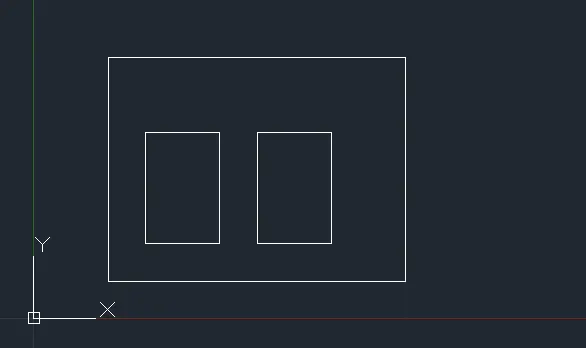
B) RELATIVE RECTANGULAR COORDINATE SYSTEM: In this system, coordinates are measured from the previous point.
PROCEDURE:
Step 1: Type the command L for line and give the coordinates for point 1 (2,1).
Step 2: Type the next coordinate of point 2 @0,7 in the command box.
Step 3: Type the next coordinate of point 3 @8,0 in the command box.
Step 4: Type the next coordinate of point 4 @0,-7 in the command box.
Step 5 : Enter or click on the command close.
Step 6 : Type the command L for line and give the coordinates for point 5 (3,2).
Step 7 : Type the next coordinate of point 6 @0,3 in the command box.
Step 8 : Type the next coordinate of point 7 @2,0 in the command box.
Step 9 : Type the next coordinate of point 8 @0,-3 in the command box.
Step 10 : Enter or click on the command close.
Step 11: Type the command L for line and give the coordinates for point 9 ( 6,2).
Step 12: Type the next coordinate of point 10 @( 0,3) in the command box.
Step 13: Type the next coordinate of point 11@ ( 2,0) in the command box.
Step 14: Type the next coordinate of point 12 @ (0,-3) in the command box.
Step 15: Enter or click on the command close.
RESULT:
-----------------------------------------------------------------------------------------------------------------------------
PROBLEM 6: DRAFTING THE GEOMETRY GIVEN IN P-8:
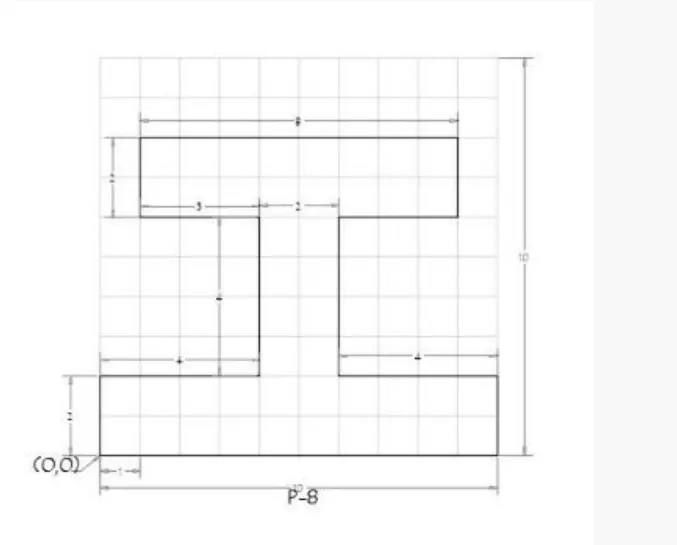
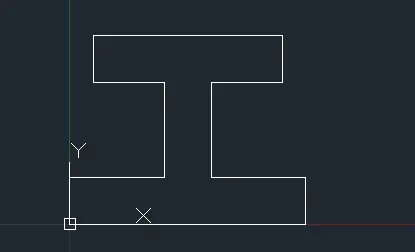
a) ABSOLUTE COORDINATE SYSTEM: In this system, distance is measured from origin.
PROCEDURE:
Step 1: Type the command L for line and give the coordinates for point 1 (0,0).
Step 2: Type the next coordinate of point 2 (0,2) in the command box.
Step 3: Type the next coordinate of point 3 ( 4,2) in the command box.
Step 4: Type the next coordinate of point 4 ( 4,6) in the command box.
Step 5 : Type the next coordinate of point 5 ( 1,6) in the command box.
Step 6 : Type the next coordinate of point 6 ( 1,8) in the command box.
Step 7 : Type the next coordinate of point 7 ( 9,8) in the command box.
Step 8 : Type the next coordinate of point 8 ( 9,6) in the command box.
Step 9 : Type the next coordinate of point 9 (6,6) in the command box.
Step 10 :Type the next coordinate of point 10 (6,2 ) in the command box.
Step 11: Type the next coordinate of point 11 (10,2) in the command box.
Step 12: Type the next coordinate of point 12 (10,0) in the command box.
Step 13: Enter or click on the command close.
RESULT:
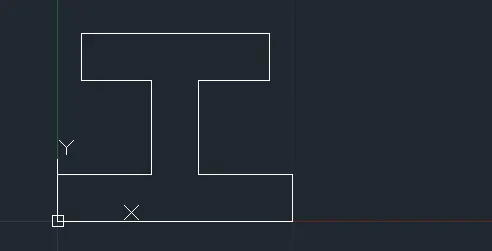
B) RELATIVE RECTANGULAR COORDINATE SYSTEM: In this system, coordinates are measured from the previous point.
PROCEDURE:
Step 1: Type the command L for line and give the coordinates for point 1 (0,0).
Step 2: Type the next coordinate of point 2 @0,2in the command box.
Step 3: Type the next coordinate of point 3 @4,0 in the command box.
Step 4: Type the next coordinate of point 4 @0,4 in the command box.
Step 5 : Type the next coordinate of point 5 @-3,0 in the command box.
Step 6 : Type the next coordinate of point 6 @0,2 in the command box.
Step 7 : Type the next coordinate of point 7 @8,0 in the command box.
Step 8 : Type the next coordinate of point 8 @0,-2 in the command box.
Step 9 : Type the next coordinate of point 9 @-3,0 in the command box.
Step 10 :Type the next coordinate of point 10 @0,-4 in the command box.
Step 11: Type the next coordinate of point 11 @4,0 in the command box.
Step 12: Type the next coordinate of point 12 @0,-2 in the command box.
Step 13: Enter or click on the command close.
RESULT:
-----------------------------------------------------------------------------------------------------------------------------
PROBLEM 7: DRAFTING THE GEOMETRY GIVEN IN P- 9:
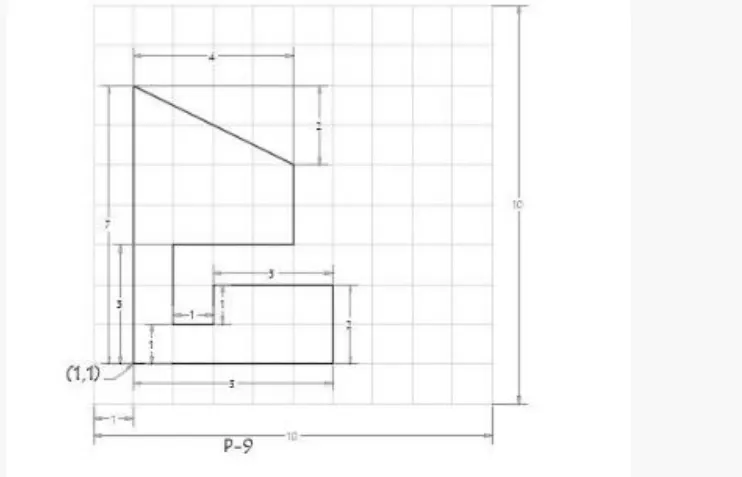
a) ABSOLUTE COORDINATE SYSTEM: In this system, distance is measured from origin.
PROCEDURE:
Step 1: Type the command L for line and give the coordinates for point 1 (1,1).
Step 2: Type the next coordinate of point 2 (1,8) in the command box.
Step 3: Type the next coordinate of point 3 ( 5,6) in the command box.
Step 4: Type the next coordinate of point 4 ( 5,4) in the command box.
Step 5 : Type the next coordinate of point 5 ( 2,4) in the command box.
Step 6 : Type the next coordinate of point 6 ( 2,2) in the command box.
Step 7 : Type the next coordinate of point 7 ( 3,2) in the command box.
Step 8 : Type the next coordinate of point 8 ( 3,3) in the command box.
Step 9 : Type the next coordinate of point 9 (6,3) in the command box.
Step 10 :Type the next coordinate of point 10 (6,1) in the command box.
Step 11: Enter or click on the command close.
RESULT:
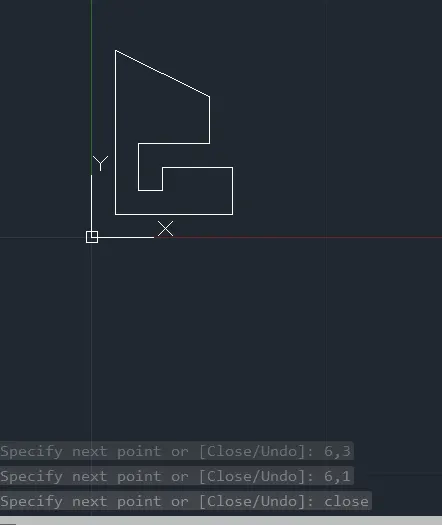
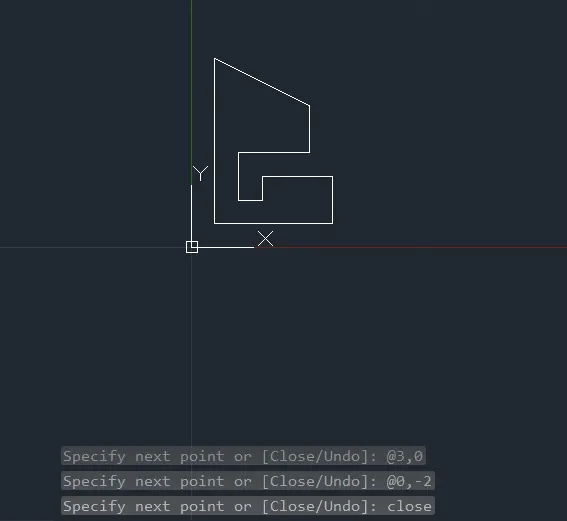
B) RELATIVE RECTANGULAR COORDINATE SYSTEM: In this system, coordinates are measured from the previous point.
PROCEDURE:
Step 1: Type the command L for line and give the coordinates for point 1 (1,1).
Step 2: Type the next coordinate of point 2 @0,7in the command box.
Step 3: Type the next coordinate of point 3 @4,-2 in the command box.
Step 4: Type the next coordinate of point 4 @0,-2 in the command box.
Step 5 : Type the next coordinate of point 5 @-3,0 in the command box.
Step 6 : Type the next coordinate of point 6 @0,-2 in the command box.
Step 7 : Type the next coordinate of point 7 @1,0 in the command box.
Step 8 : Type the next coordinate of point 8 @0, i1n the command box.
Step 9 : Type the next coordinate of point 9 @3,0 in the command box.
Step 10 :Type the next coordinate of point 10 @0,-2 in the command box.
Step 11: Enter or click on the command close.
RESULT:
-----------------------------------------------------------------------------------------------------------------------------
PROBLEM 8: DRAFTING GEOMETRY GIVEN IN P-10:
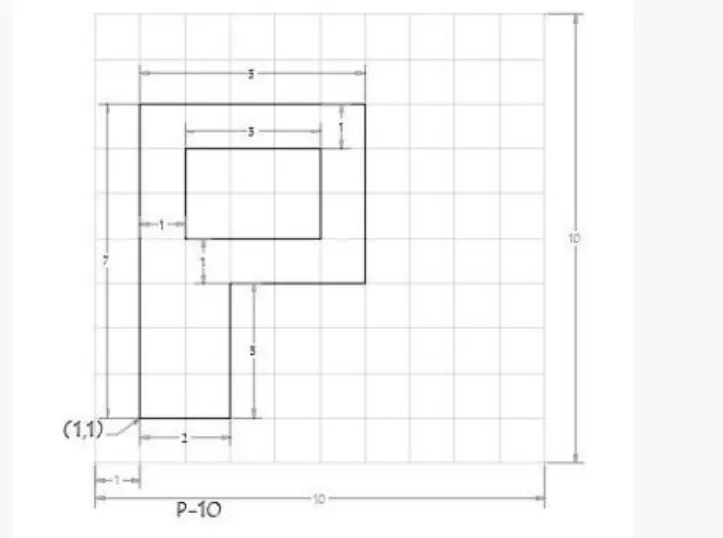
a) ABSOLUTE COORDINATE SYSTEM: In this system, distance is measured from origin.
PROCEDURE:
Step 1: Type the command L for line and give the coordinates for point 1 (1,1).
Step 2: Type the next coordinate of point 2 (1,8) in the command box.
Step 3: Type the next coordinate of point 3 ( 6,8) in the command box.
Step 4: Type the next coordinate of point 4 ( 6,4) in the command box.
Step 5 : Type the next coordinate of point 5 ( 3,4) in the command box.
Step 6 : Type the next coordinate of point 6 ( 3,1) in the command box.
Step 7: Enter or click on the command close.
Step 8: Type the command L forline and give the coordinates for point 7 (2,5).
Step 9: Type the next coordinate of point 8 ( 2,7) in the command box.
Step 10: Type the nex coordinate of point 9 ( 5,7) in the command box.
Step 11: Type the next coordinate of point 10 ( 5,5) in the command box.
Step 12: Enter or click on the command close.
RESULT:
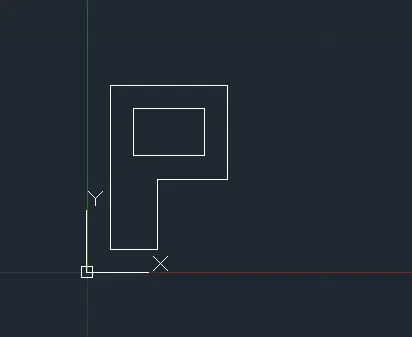
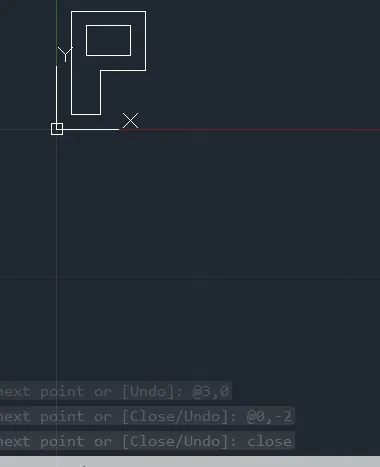
B) RELATIVE RECTANGULAR COORDINATE SYSTEM: In this system, coordinates are measured from the previous point.
PROCEDURE:
Step 1: Type the command L for line and give the coordinates for point 1 (1,1).
Step 2: Type the next coordinate of point 2 @0,7in the command box.
Step 3: Type the next coordinate of point 3 @5,0 in the command box.
Step 4: Type the next coordinate of point 4 @0,-4 in the command box.
Step 5 : Type the next coordinate of point 5 @-3,0 in the command box.
Step 6 : Type the next coordinate of point 6 @0,-3 in the command box.
Step 7: Enter or click on the command close.
Step 8 : Type the command L for line and give the coordinates for point 7 (2,5).
Step 9 : Type the next coordinate of point 8 @ 0,2 in the command box.
Step 10 : Type the next coordinate of point 9 @ 3,0 in the command box.
Step 11 : Type the next coordinate of point 10 @ 0,-2 in the command box.
Step 12: Enter or click on the command box.
RESULT:
-----------------------------------------------------------------------------------------------------------------------------
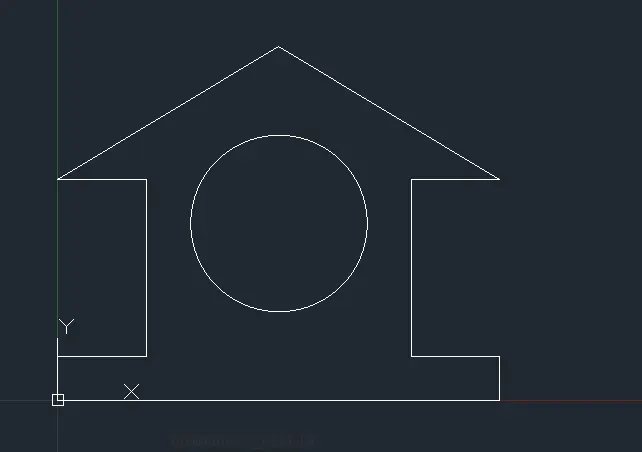
PROBLEM 9: DRAFTING THE WOOD PROFILE GIVEN IN P-11
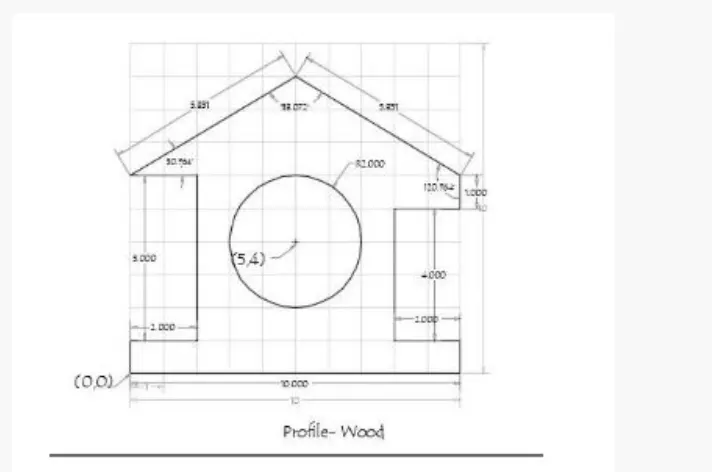
USING DIRECT DISTANCE ENTRY METHOD:
PROCEDURE:
Step 1: Type the command L for line and give the coordinates for point 1 (0,0).
Step 2: Enter the length point 2 as 10 in the command line toward +ve x axis.
Step 3: Enter the length point 3 as 1 in the command line toward +ve y axis.
Step 4: Enter the length point 4 as 2 in the command line toward - ve x axis.
Step 5 : Enter the length point 5 as 4 in the command line toward +ve y axis.
Step 6: Enter the length point 6 as 2 in the command line toward +ve x axis.
Step 7 : Enter the length point 7 as 5.831 in the command line at an angle of <149.036 from the +ve x axis.
Step 8: Enter the length point 8 as 5.831 in the command line at an angle of <210.964 from the +ve x axis.
Step 9: Enter the length point 9 as 2 in the command line toward +ve x axis.
Step 10 : Enter the length point 10 as 5 in the command line toward -ve y axis.
Step 11: Enter the length point 11 as 2 in the command line toward -ve x axis.
Step 12: Click close on the command line.
Step13: Select the circle too by entering circle command.
Step 14 : Specify the center point 5,4.
Step 15: Specify radius of circle 2.
RESULT:
-----------------------------------------------------------------------------------------------------------------------------
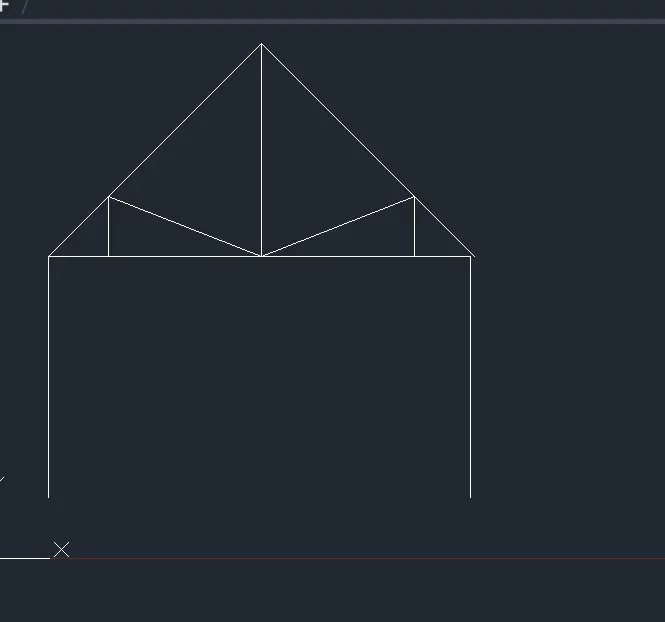
PROBLEM 10: DRAFTING THE QUEEN POST TRUSS GIVEN IN P-12:
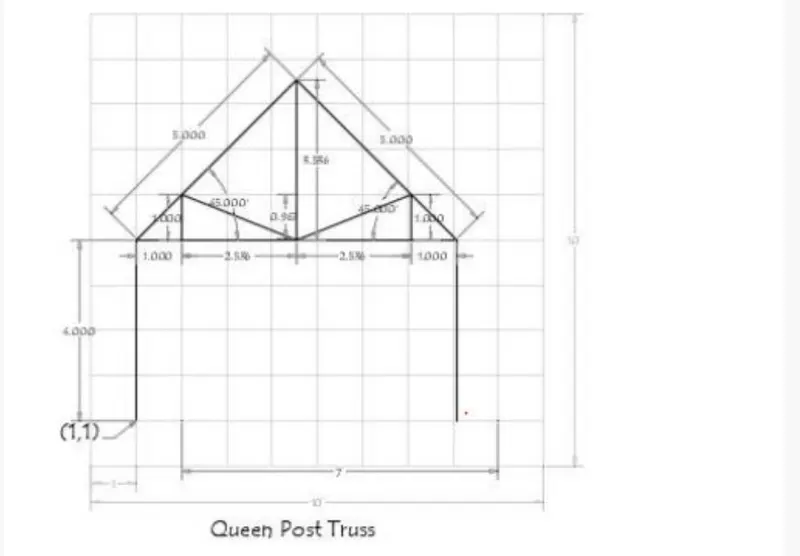
a) ABSOLUTE COORDINATE SYSTEM: In this system, distance is measured from origin.
PROCEDURE:
Step 1: Type the command L for line and give the coordinates for point 1 (1,1).
Step 2: Type the next coordinate of point 2 (1,5) in the command box.
Step 3: Type the next coordinate of point 3 ( 8,5) in the command box.
Step 4: Type the next coordinate of point 4 ( 8,1) in the command box.
Step 5: Press Esc to cancel the line command.
Step 6 : Type the command L for line and give the coordinate for point 5 ( 1,5) in the command box.
Step 7 : Type the next point 5 length @5<45 in the command box.
Step 8: Type the next point 6 length @5<315 in the command box.
Step 9: Type the next coordinate of point 7 (3,5) in the command box.
Step 10: Type the next coordinate of point 8 (2,6) in the command box.
Step 11: Type the next coordinate of point 9 (4.536,5) in the command box.
Step 12: Type the next coordinate of point 10 (7.072,6) in the command box.
Step 13: Type the next coordinate of point 11 ( 7.072,5) in the command box.
Step 14: Press Esc to cancel the command.
RESULT:
-----------------------------------------------------------------------------------------------------------------------------
PROBLEM: 11 DRAFTING THE QUEEN POST TRUSS GIVEN IN P-13:
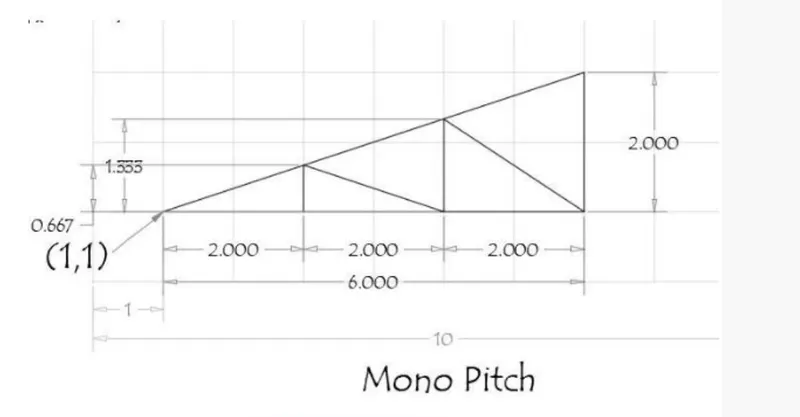
a) ABSOLUTE COORDINATE SYSTEM: In this system, distance is measured from origin.
PROCEDURE:
Step 1: Type the command L for line and give the coordinates for point 1 (1,1).
Step 2: Type the next coordinate of point 2 (7,1) in the command box.
Step 3: Type the next coordinate of point 3 ( 7,3) in the command box.
Step 4: Enter or click on the command close.
Step 5: Type the command L for line and give the coordinates for point 4 (3,1).
Step 6: Type the next coordinate of point 5 ( 3,1.667) in the command box.
Step 7: Type the nex coordinate of point 6( 5,1) in the command box.
Step 8: Type the next coordinate of point 7 ( 5,2.333) in the command box.
Step 9: Type the next coordinate of point 8 (7,1) in the command box.
Step 10: Enter or click on the command close.
RESULT: